Dataverse: Moving Datasets: Provide way in the UI for a user to do this
Have discussed this in the past but did not do if for 4.0. If a user uploads their dataset into the wrong dataverse, could we have a way in the UI for them to change this.
Additionally, I'd like to track how many RT tickets we have about this now that 4.0 is out and see if it is happening as frequently as it was in 3.6 to determine how necessary this is now.
 eaquigley
All 52 comments
This needs to be designed during 4.0.2 to be developed during 4.0.3.
eaquigley
on 12 May 2015
Things to think about:
- When a user moves a dataset into a dataverse, if that dataverse doesn't have the metadata domains the dataset uses, the user needs to be told to go to the dataverse and enable the metadata domains needed for the dataset.
- Can we do this for them somehow? Tell them the dataverse doesn't have the needed metadata domains, needs (insert metadata domains), would you like to add them? If not, dataset cannot be moved.
eaquigley
on 12 May 2015
We used to have a "move dataverse" command but it was problematic and #283 is still open. The challenges listed in the Google doc mentioned in that issue still apply: Implications of moving dataverses and datasets.
It sounds like in production we've moved a few things manually. I'd be interested in knowing what the steps have been.
 pdurbin
on 13 May 2015
pdurbin
on 13 May 2015
See also the "How to move dv's, ds" doc at https://docs.google.com/document/d/1A2v_ylLIRLIV6UpkDAJNNiFQt7q3SrAtAvQmg4nHBoY/edit?usp=sharing mentioned at https://groups.google.com/d/msg/dataverse-community/polE7z9_-NE/3xwAxgIHGgAJ
Here are the related issued:
- Moving Dataverses + Datasets: Provide way in the UI for a user to do this - https://github.com/IQSS/dataverse/issues/2073
- Move Dataset: Allow super user to move a dataset to another dataverse, one at a time. - https://github.com/IQSS/dataverse/issues/2226
- Move Dataverse: Allow super user to move a dataverse and reindex it and all child objects. - https://github.com/IQSS/dataverse/issues/2278
pdurbin
on 26 Jan 2017
We at DANS felt the urge to have a GUI to do the moving of datasets and therefore we have developed a separate web application that must be deployed on the same Glassfish as Dataverse.
Our Github repo: https://github.com/DANS-KNAW/dataverse-datasetmover
It uses the 'move' API introduced in version 4.8.6.
It would however be much better if this functionality was available in the Dataverse GUI.
For the initial implementation I would restrict it to superuser only.
My proposal is to add a 'Move Dataset' option in the 'Edit' dropdown list at the bottom just above 'Deaccession Dataset'. The associated 'move' dialog would allow for the selection of the target verse. At the bottom, similar to the deaccession, action buttons for 'Move' and 'Cancel'.
This is useful fo single move actions, for 'batch' movements we might want a 'Reorganize' block on the Dashboard. But that would be another issue.
If there is no objection we at DANS could plan to spend some time and work towards a PR.
 PaulBoon
on 12 Mar 2019
PaulBoon
on 12 Mar 2019
@PaulBoon no objection from me but I dragged this issue to code review at https://waffle.io/IQSS/dataverse to bring it up at standup in about an hour to get more opinions. I like your idea to focus on "single move" operations first rather than trying to support batch operations as well.
pdurbin
on 12 Mar 2019
Hi @PaulBoon - we got a chance to catch up about this during our design meeting earlier today. Thanks as always for the willingness to contribute useful code to the project!
We're doing some other work in the areas of adding dataverses, adding datasets, linking data, and moving dataverses/datasets, and we'd like to approach this as a design project in the next few months, taking into account a few different workflows. For this reason, I'm hesitant to accept PRs for end users moving datasets right now, and would prefer to work with you as the design team does some research and testing about how to work on moving along with related activities.
In the meantime, a PR that adds some admin dashboard functionality would be an extremely welcome and helpful addition. @mheppler or another member of the design team can provide some guidance here if you're interested in working on this.
Let me know what you think about a dashboard option in the short term. Thanks again!
 djbrooke
on 13 Mar 2019
djbrooke
on 13 Mar 2019
The dashboard option is OK, but I would focus on moving a single dataset as being the minimal requirement for this functionality. I will soon have a look at the code to see how it can be implemented.
PaulBoon
on 14 Mar 2019
@PaulBoon great! Please check your inbox for an invitation to https://github.com/orgs/IQSS/teams/dataverse-readonly/members so we can assign this issue to you.
pdurbin
on 14 Mar 2019
Hi Philip,
Sorry for the delay, I just joined.
Also I have now a local branch with an initial working dashboard ‘card’ for moving a dataset to another verse.
But I need some guidance from someone with JSF knowledge, mine is sub-minimal.
Best wishes,
Paul
From: Philip Durbin notifications@github.com
Reply-To: IQSS/dataverse reply@reply.github.com
Date: Thursday, 14 March 2019 at 16:15
To: IQSS/dataverse dataverse@noreply.github.com
Cc: Paul Boon paul.boon@dans.knaw.nl, Mention mention@noreply.github.com
Subject: Re: [IQSS/dataverse] Moving Dataverses + Datasets: Provide way in the UI for a user to do this (#2073)
@PaulBoonhttps://github.com/PaulBoon great! Please check your inbox for an invitation to https://github.com/orgs/IQSS/teams/dataverse-readonly/members so we can assign this issue to you.
—
You are receiving this because you were mentioned.
Reply to this email directly, view it on GitHubhttps://github.com/IQSS/dataverse/issues/2073#issuecomment-472912031, or mute the threadhttps://github.com/notifications/unsubscribe-auth/ACDSv8x1MWxqhzLlxtiDTcxVsaNB6Qnqks5vWmd7gaJpZM4EHCAi.
PaulBoon
on 18 Mar 2019
@PaulBoon thanks! I assigned this issue to you. You are welcome to ask your JSF questions here in this issue, http://chat.dataverse.org , https://groups.google.com/forum/#!forum/dataverse-dev , etc. I'm not the best with JSF but we'll get your question answered somehow. 😄
pdurbin
on 18 Mar 2019
Hi @PaulBoon, please put a screen shot here in the issue when you have a chance. Thanks!
 TaniaSchlatter
on 19 Mar 2019
TaniaSchlatter
on 19 Mar 2019
@TaniaSchlatter it looks like @PaulBoon just put some screenshots in pull request #5668
Here they are:
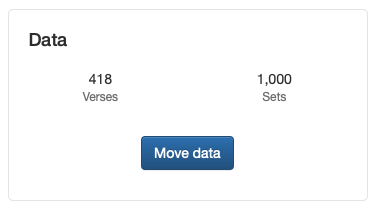
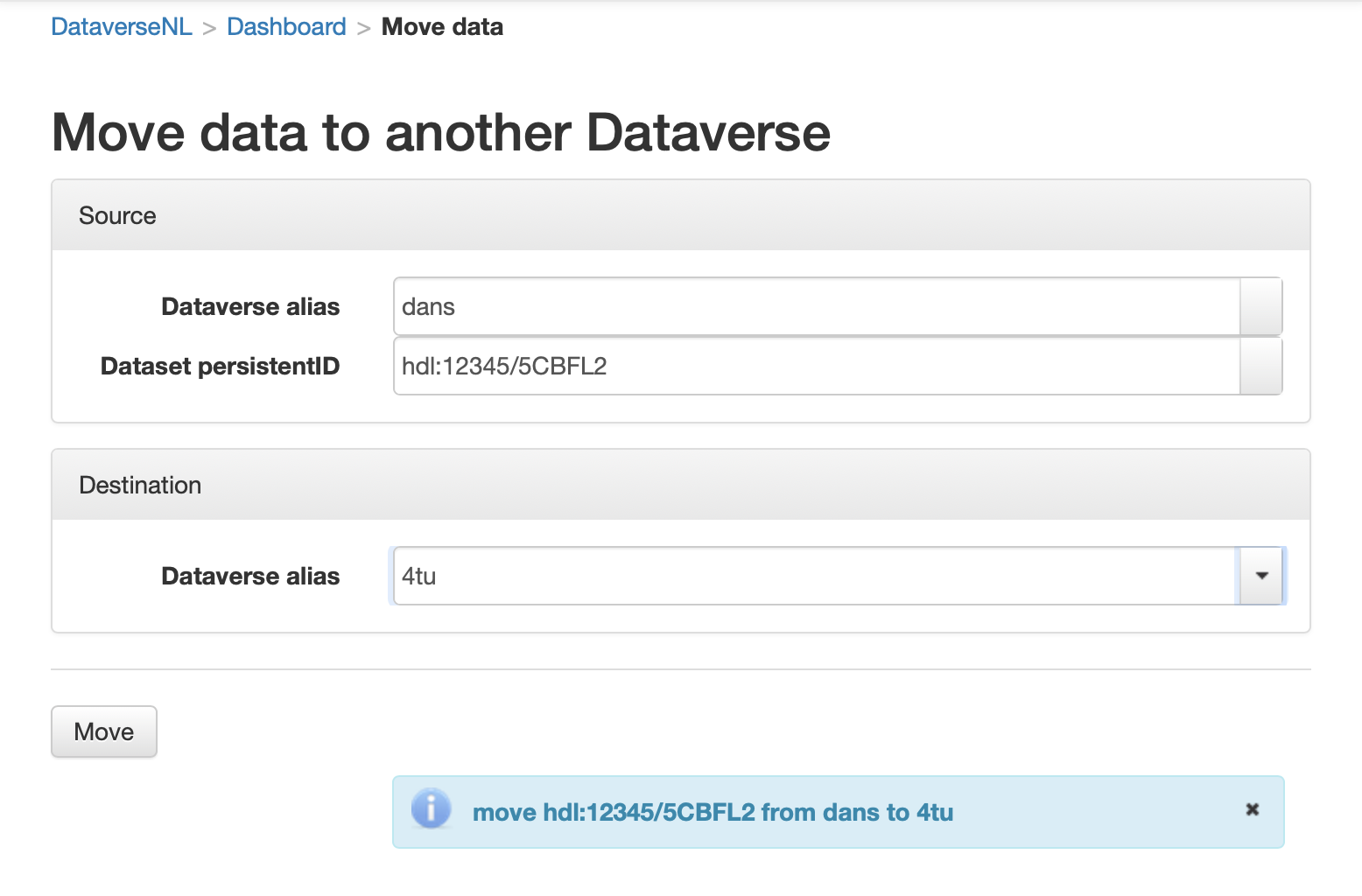
pdurbin
on 19 Mar 2019
@PaulBoon thanks for the pull request! I used the following command to spin up your branch this morning on EC2 and did a demo at our design meeting:
ec2-create-instance.sh -b 2073-add-move-to-dashboard -r https://github.com/PaulBoon/dataverse.git
pdurbin
on 20 Mar 2019
@PaulBoon I have committed a new branch 2073-dashboard-move-data-updates and submitted as a PR to your original branch.
The new PR contains some UI revisions based on discussions with the design team. Those changes included simplify the form (see mocked up screenshot below).
The preferred input for this form is the p:autoComplete that allows the superuser to copy and paste a dataset persistent ID into the input, which then provides a dropdown menu to select the dataset, which can include additional metadata, including the dataset title and current host dataverse. This same autoComplete component should also be used to select the new host dataverse.
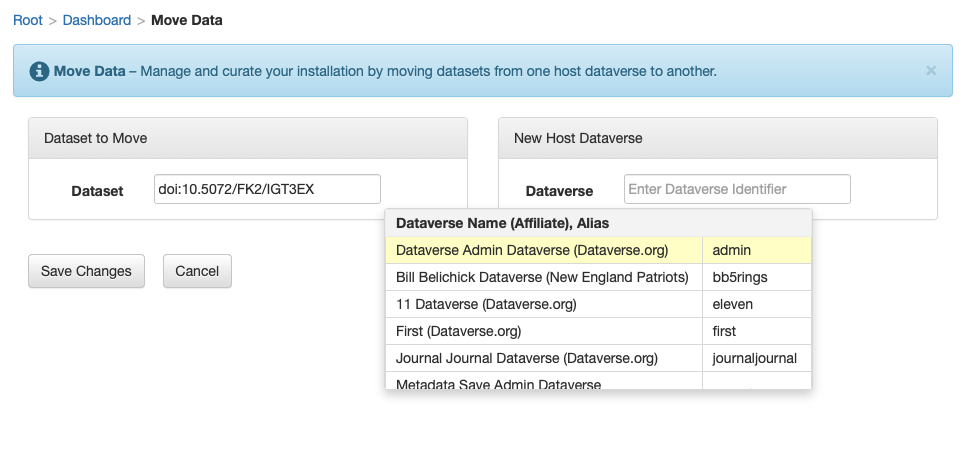
Other suggestions and feedback are outlined below. Please let myself or @scolapasta know if you have any questions.
UPDATES
- Added help info text to msg block
- Changed layout col-sm-6
- Changed panel headings, moved text to bundle
- Added Dataverse Identifier placeholder to bundle
- Added Dataset Persistent ID placeholder to bundle
- Changed confirmation dialog header and body text
- (Still more to-do's below)
TO-DO's
- Confirmation dialog style and bundle txt (see Deaccession Dataset confirmation dialog in dataset pg)
- Bootstrap glyphicon-warning-sign and text-warning style class
- Add dynamic dataset title and PID, plus new host dataverse name to msg
- Swap p:selectOneMenu for p:autoComplete component (see "Local Dataverse" input in Create Harvesting Client dialog form)
- Wire up new Cancel btn
- Remove disable rendering from Save Changes btn
- Remove p:messages component from bottom of page and associated msg's in backing bean
- select source and destination in order to move
- move doi:10.5072/FK2/2CP03O from bb5rings to eleven
- Success msg added to msg block on Move Data pg
- The dataset "{DATASET TITLE}" ({DATASET PID}) has been successfully moved to {DATAVERSE NAME}.
- Validation msg added to msg block on Move Data pg, as well as inline to form components
- (Changes to input components require new error handling)
- Documentation added to Admin Guide > Dashboard
 mheppler
on 26 Mar 2019
mheppler
on 26 Mar 2019
Thanks @mheppler for the PR, I just merged it and will have a closer look when I start working on those todo's.
PaulBoon
on 27 Mar 2019
I do have some questions about the mockup.
- What is the 'Cancel' button supposed to do; leave the page and go the the dashboard or simply clearing/resetting the input? I don't see much use for it either way.
- The 'Save Changes' is also less explicit than 'Move Dataset', also I don't think that these buttons are found in the other 'cards', so it is not helping much for the GUI consistency I think.
Just some thoughts, not a strong opinion.
PaulBoon
on 27 Mar 2019
@PaulBoon to answer your questions...
- Having a cancel btn on form pages is consistent with the rest of the app, as you guessed, clear the form and return the user back to the previous pg (dashboard)
- The save changes btn is also consistent with the rest of the app, the user already clicked a "Move Data" btn on the dashboard, so it is redundant
Our Style Guide isn't as robust as needed to cover questions like these, and it's something we have hope to added soon.
mheppler
on 27 Mar 2019
@PaulBoon thanks for the recent commits on the connected PR! Let us know when it's ready for us to review.
djbrooke
on 1 Apr 2019
@PaulBoon hi! Are you blocked at all? Need any help getting this issue out of dev and into code review?
pdurbin
on 5 Apr 2019
Hi @pdurbin, Before trying to use the autocomplete instead of the select I want to have the validation working. Right now I am stuck with the validation messages. The problem is that I need to validate before showing the confirmation dialog, not showing it if the form is invalid. The not-showing part seems to work when invalid, but I don't get the validation message on screen. I think I need client side validation working correctly.
Any help appreciated.
PaulBoon
on 5 Apr 2019
@PaulBoon thanks for the update! To be honest, I was telling @kcondon yesterday that I would have been fine with giving your initial implementation to him to QA but I appreciate all the extra work you're putting in. I dragged this over to code review so we can talk about scope, etc during standup in 45 minutes. I'm been saying that I suspect this will be a wildly popular supersuser feature once it ships. I'm still very impressed that you created an entire application on the side just to provide a GUI. It speaks to how much of a need there is to keep datasets organized by moving them from one dataverse to another.
pdurbin
on 5 Apr 2019
I used ec2-create-instance.sh -b 2073-add-move-to-dashboard -r https://github.com/PaulBoon/dataverse.git -g main.yml to spin up the branch at http://ec2-3-81-98-96.compute-1.amazonaws.com:8080 in case anyone wants to click around after standup.
pdurbin
on 5 Apr 2019
Hey @PaulBoon - we'd want to implement this with the autocomplete instead of dropdowns, so we'll be happy to help you get there. What's the best method to help you with the validation messages? A call next week?
djbrooke
on 5 Apr 2019
@PaulBoon if IRC is easier, that's an option as well: http://chat.dataverse.org . Please just let us know and thanks for working so hard on this!
pdurbin
on 8 Apr 2019
I made some progress with the validation, so I will try to do the autocomplete instead of dropdowns and see how far I get when copying from the 'create harvesting client' dialog.
PaulBoon
on 8 Apr 2019
@PaulBoon ok. When it stops being fun, please let us know! 😄
pdurbin
on 8 Apr 2019
Thanks @PaulBoon for the additional changes and the todo list in the PR. We'll take a look ASAP and provide feedback and/or make the changes ourselves (if it's OK with you).
djbrooke
on 12 Apr 2019
Hi @djbrooke, It would be great if we can get it in the next release (4.13?), so what ever is needed to get it in is OK with me.
PaulBoon
on 15 Apr 2019
OK @PaulBoon, no problem. We're slim on developers this week due to vacations, so it may not be until next week. If you want to work on it in the meantime, great.
djbrooke
on 15 Apr 2019
I just ran the code on my laptop as of dac47c4 and it seems like it's working fine. Here are some screenshots:
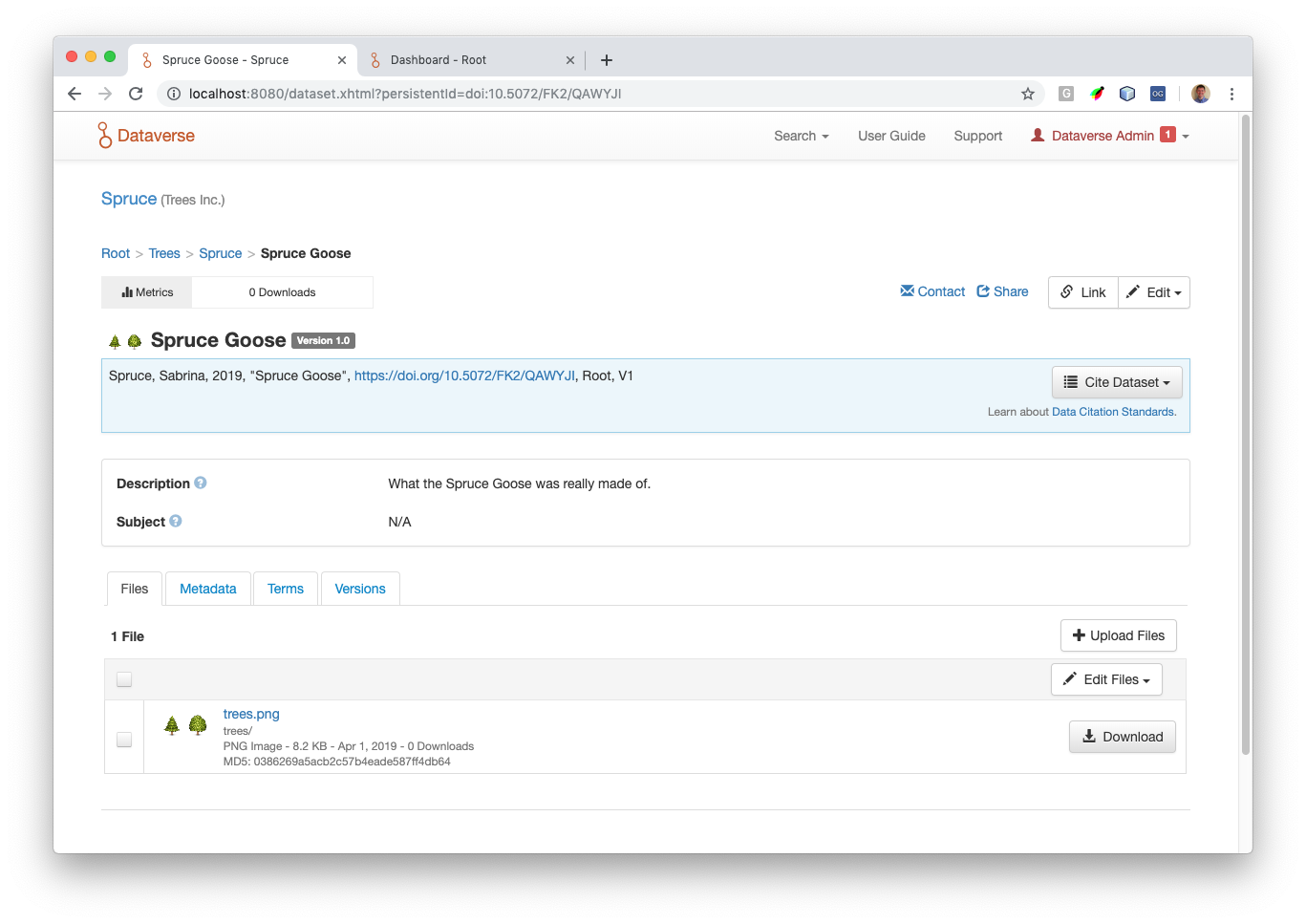
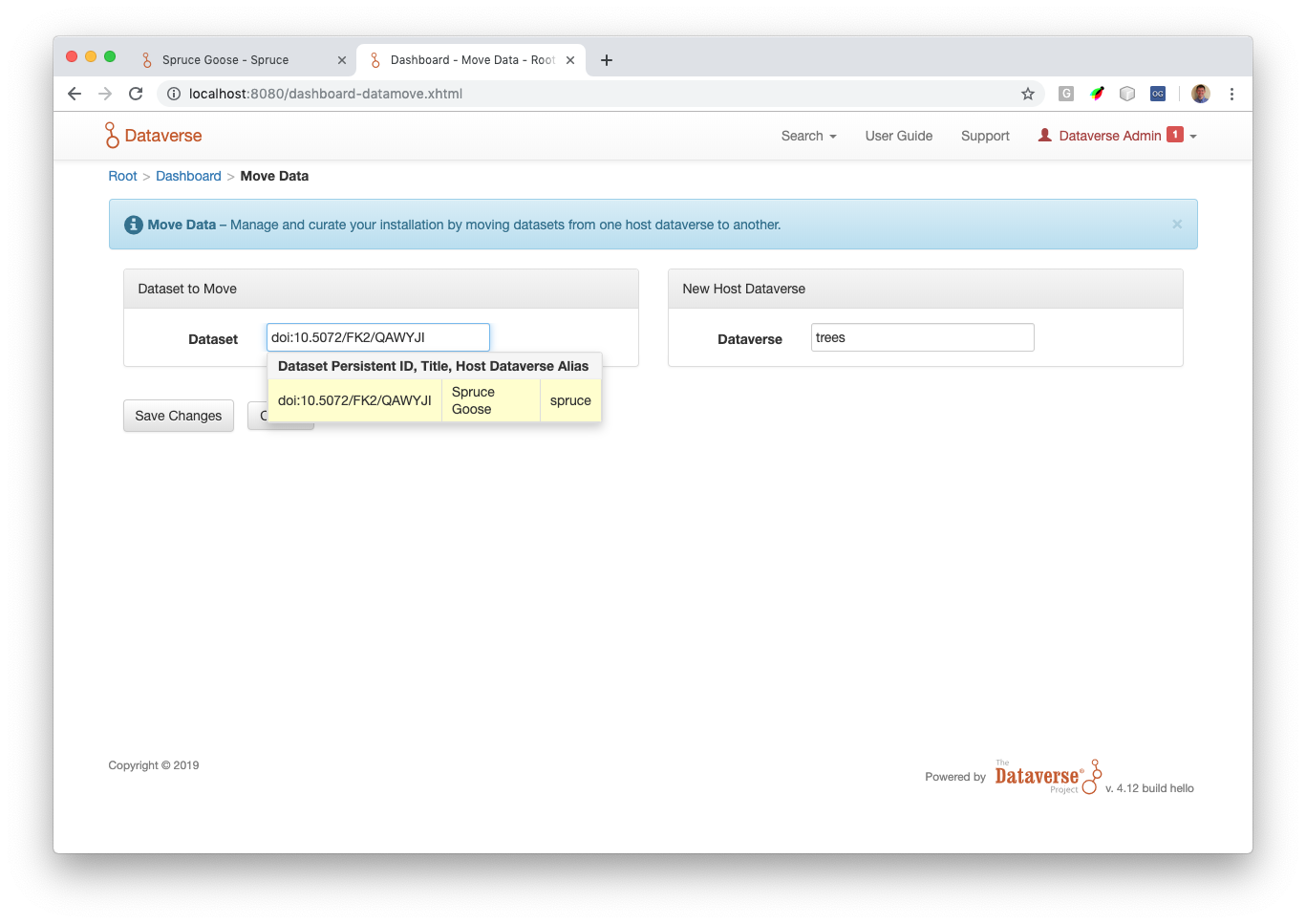
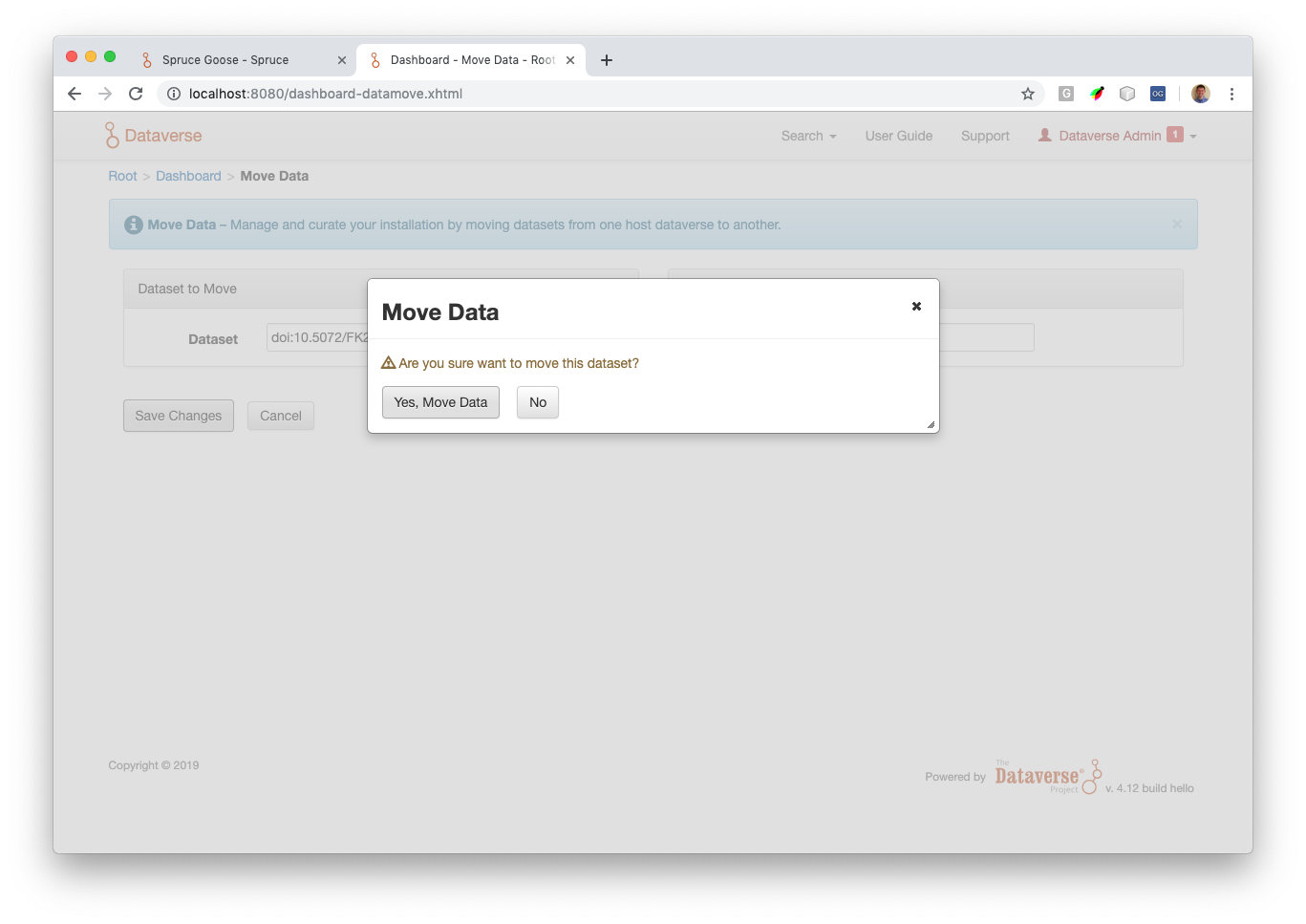
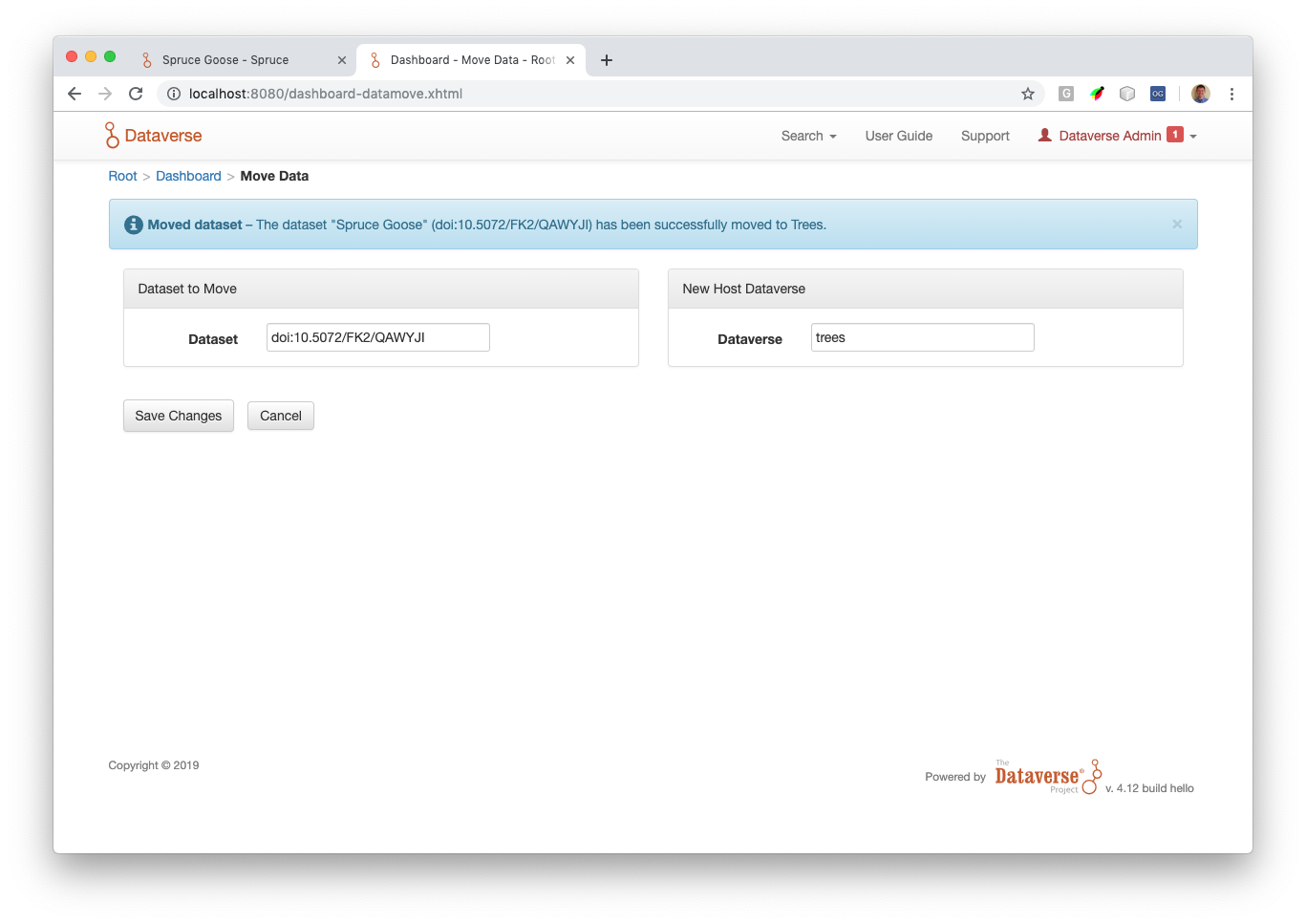
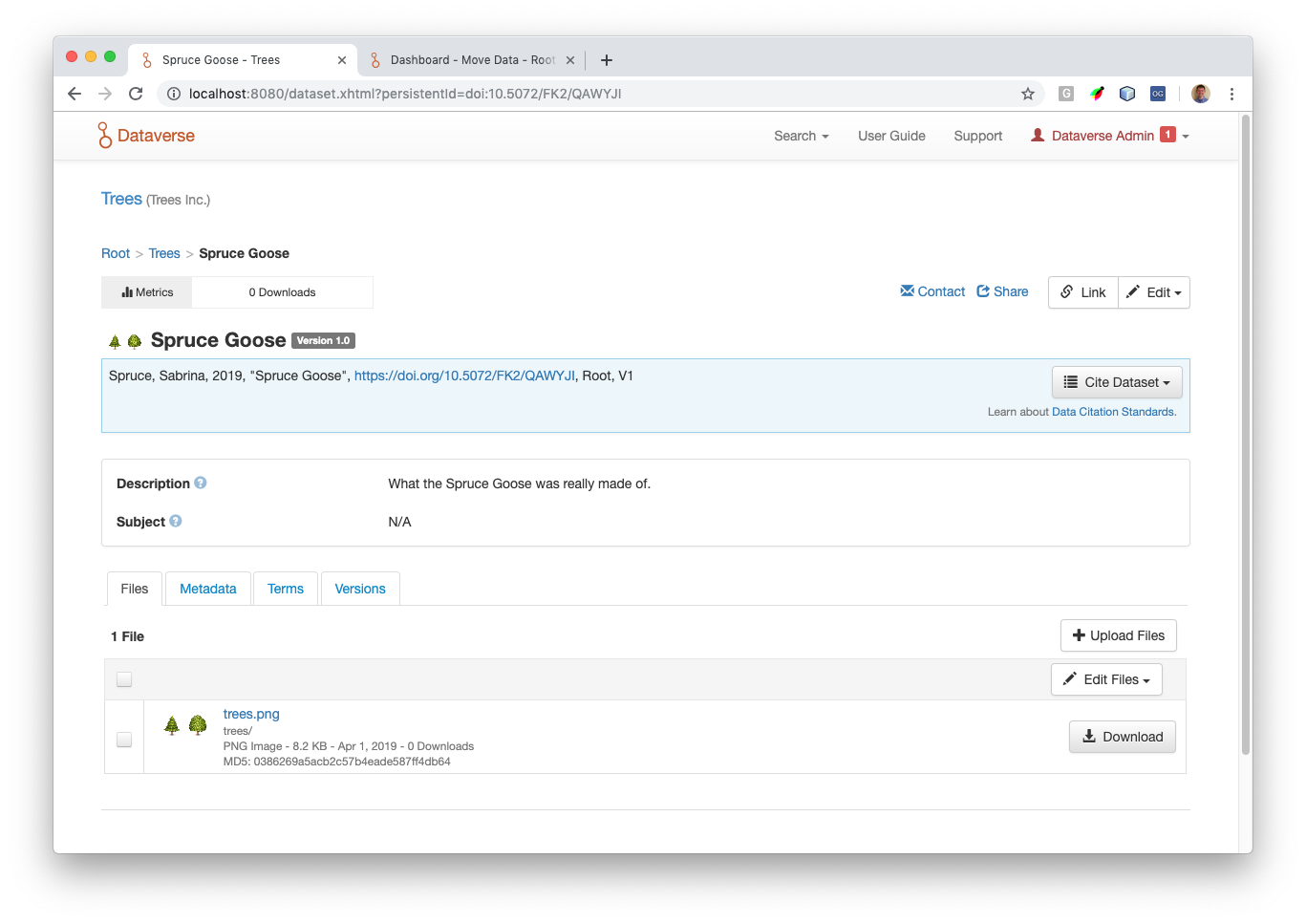
I'm going to merge the latest from develop (to pick up the 4.13 release) and move this issue to code review.
pdurbin
on 22 Apr 2019
@PaulBoon I tried to push to your fork but I got this:
murphy:dataverse pdurbin$ git push PaulBoon 2073-add-move-to-dashboard
ERROR: Permission to PaulBoon/dataverse.git denied to pdurbin.
fatal: Could not read from remote repository.

Please make sure you have the correct access rights
and the repository exists.
murphy:dataverse pdurbin$
So I created this pull request instead: https://github.com/PaulBoon/dataverse/pull/2
Can you please merge it? Also, I think there's a box you can check if you'd like (people with push access to the dataverse repo under IQSS) to be able to push to your fork. No pressure. 😄 It looks like this newish feature of GitHub is documented at https://help.github.com/en/articles/allowing-changes-to-a-pull-request-branch-created-from-a-fork
pdurbin
on 22 Apr 2019
@PaulBoon I just made a second pull request to add some docs: https://github.com/PaulBoon/dataverse/pull/3
pdurbin
on 22 Apr 2019
@PaulBoon thanks for merging those pull requests. Moving to QA.
pdurbin
on 23 Apr 2019
Issues found, to be reviewed @TaniaSchlatter :
- Specific failure messages are not presented in the UI but are in the API. For instance, attempting to move a published dataset to an unpublished dv is not allowed and fails correctly but no additional info is provided. It is provided in the server log and the API does return the same info: {"status":"ERROR","message":"Published Dataset may not be moved to unpublished Dataverse. You may publish kc042319 target Dataverse and re-try the move."} Do we care whether the UI failures provide additional info?
- When a dataset is successfully moved, the success message is written to the blue info box so that an inattentive user (me), does not notice that anything happened. It had been suggested we use the green success banner instead.
- The autocomplete appears to timeout after a while so the page stops working. You need to navigate away and back. Server log says: javax.faces.application.ViewExpiredException: viewId:/dashboard-datamove.xhtml - View /dashboar
d-datamove.xhtml could not be restored. Not sure whether we care about this since workaround is simple and it took a while (15mins?)to fail. - When a guestbook or link conflict occurs, there is no option to force a move as in the API. Do we want to provide this or a note to use the API which does? Error does not indicate there is a conflict, only that it cannot be moved.
 kcondon
on 24 Apr 2019
kcondon
on 24 Apr 2019
Regarding the issues found in QA:
we will address #2 as a bug – success message should be displayed as a success message (green) and not status (blue). Errors are displaying correctly in the red error message style.
we will either display the error messages that are in the API and provide context, or add a few lines of messaging to the page, stating conditions for moving (to help prevent errors). Text to state something like:
"In order to move a dataset:
- the dataverse can not have a guestbook, or be linked to other dataverses
- the dataverse must be published if the dataset is published"
TaniaSchlatter
on 24 Apr 2019
Regarding the above - let's show the info in the error message instead of in informational text.
djbrooke
on 25 Apr 2019
@mheppler I still can't push to Paul's fork so I just created a branch called 2073-dataset-move-ui if you want to join the party. Like you said in Slack, he'll still get credits for his commits if we end up merging the new branch. The only commit I pushed so far is 33492c2 because I realized we don't document very well the "force" option @kcondon mentioned at standup.
pdurbin
on 25 Apr 2019
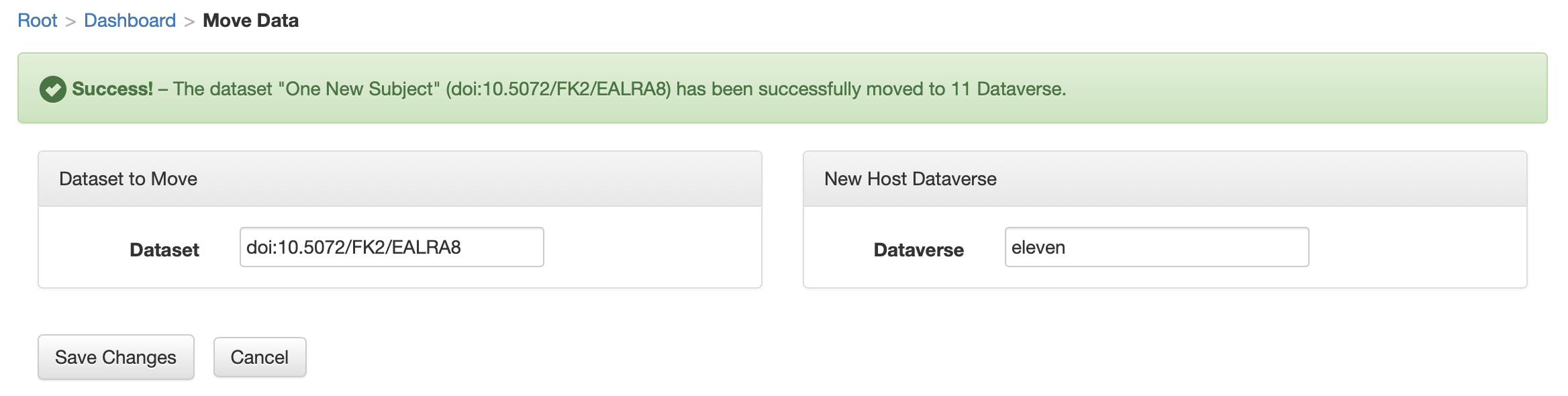
Fixed success msg style format that was reported in QA (see attached). Also noticed two other issues to resolve.
- autoComplete on permissions pg can find user "Brady" with _"rad"_ but move data pg can't find "doi:10.5072/FK2/EALRA8" with _"EALRA8"_ or "eleven" with _"ven"_
- clear form on success (see attached)
mheppler
on 26 Apr 2019
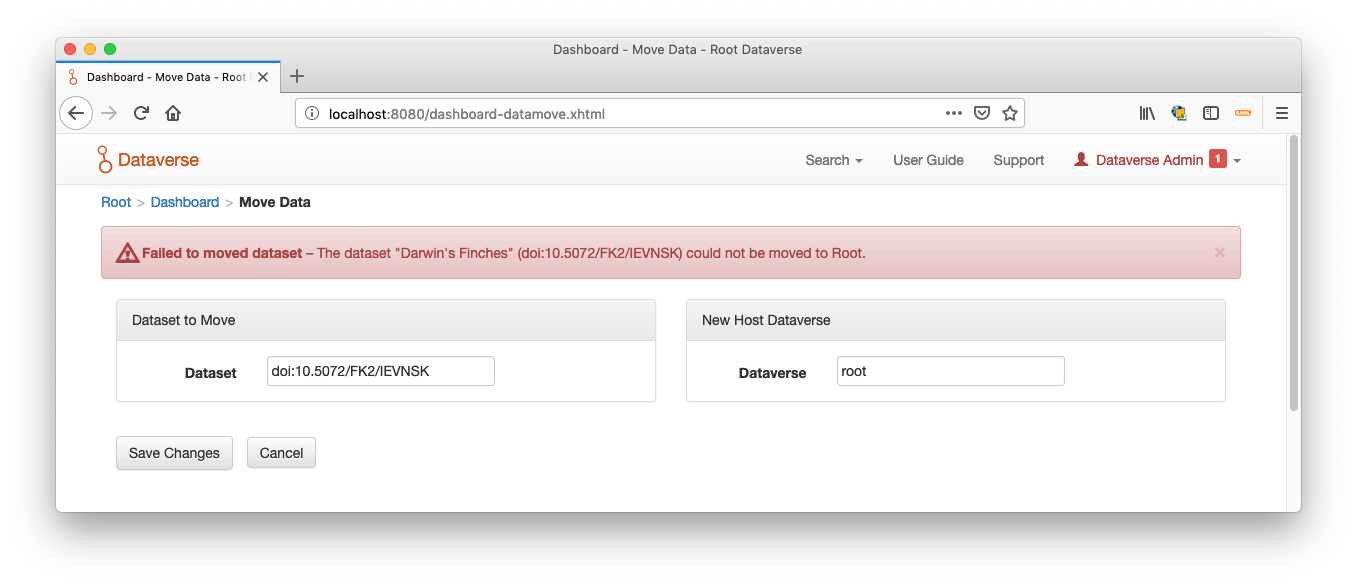
I see what we mean about how we want to improve the message for when the dataset has a guestbook. Here's a screenshot:
pdurbin
on 26 Apr 2019
In 6aa88aee0 I started bubbling up the error message like this example about a guestbook:
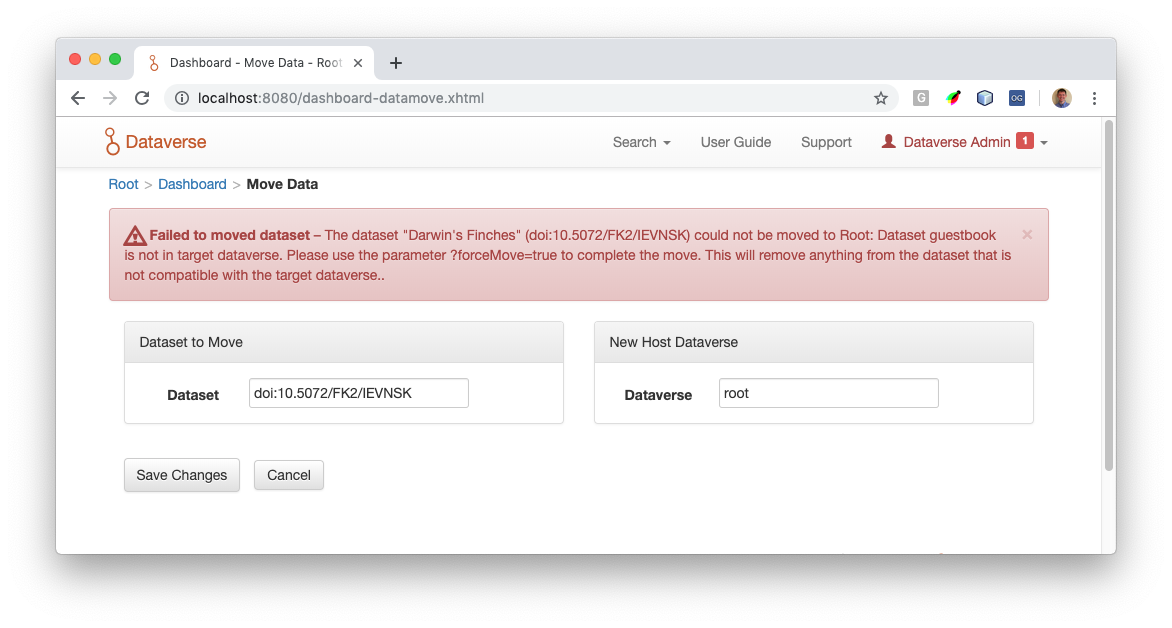
pdurbin
on 29 Apr 2019
Here's the other error having to do with linking:
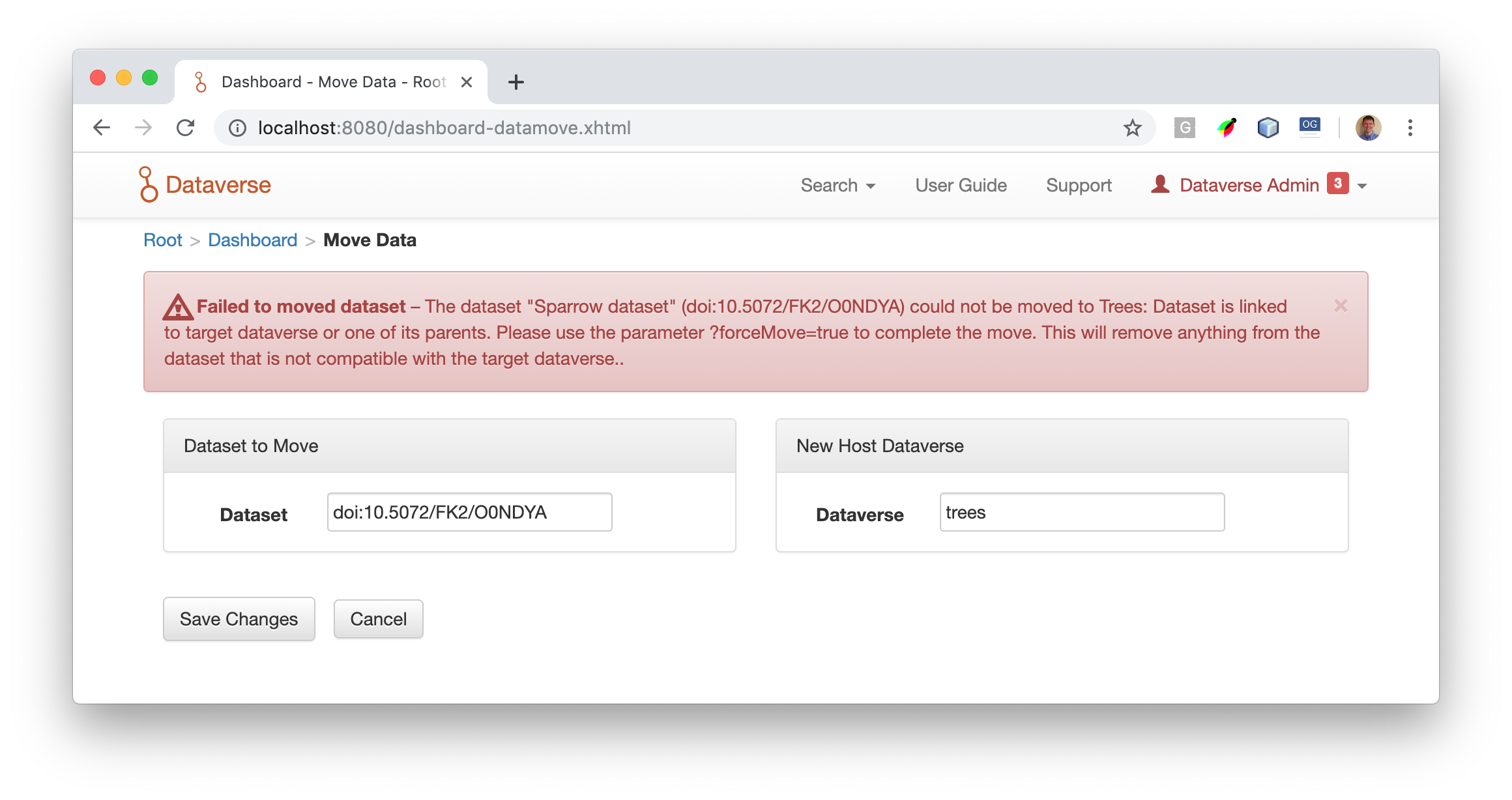
pdurbin
on 29 Apr 2019
At design standup this morning we decided that we'll be cleaning up the error messages and directing UI users to the API if a "force" is required. The first step for me was to assert at least one of the current API errors in c9646ae (I targeted the linking error because I don't think you can do much with guestbooks from the API) and next I'll change them. Also, we noticed that the commands have English strings. I'll move these to the bundle.
pdurbin
on 29 Apr 2019
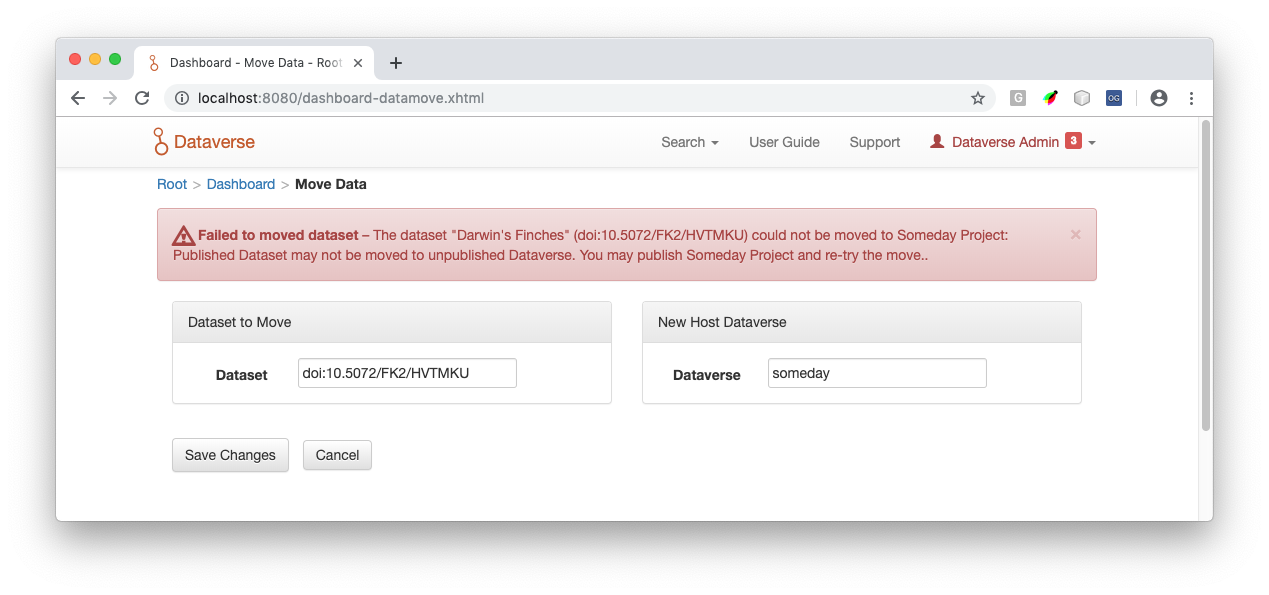
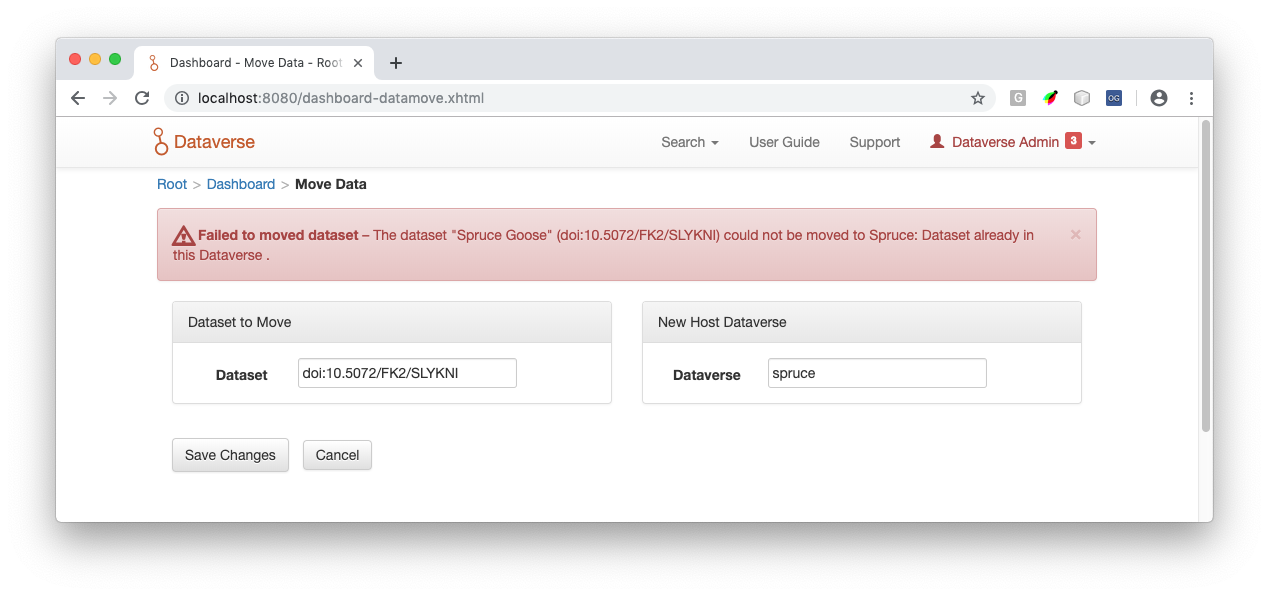
In 00f3a24 I moved English strings from MoveDatasetCommand into Bundle.properties. Now that I've looked at this code a little more I understand how to exercise the errors. Here are two more:
Attempt to move published dataset to an unpublished dataverse:
Attempt to move a dataset to the dataverse it's already in:
Now that I have screenshots for all the existing messaging, I'll work on on improving the messaging. 😄
pdurbin
on 30 Apr 2019
After standup I showed my re-write of the guestbook error above but it wasn't received very favorably (which is totally fine) so I re-wrote it again. As of 5ff1dcc67 here's how it looks:
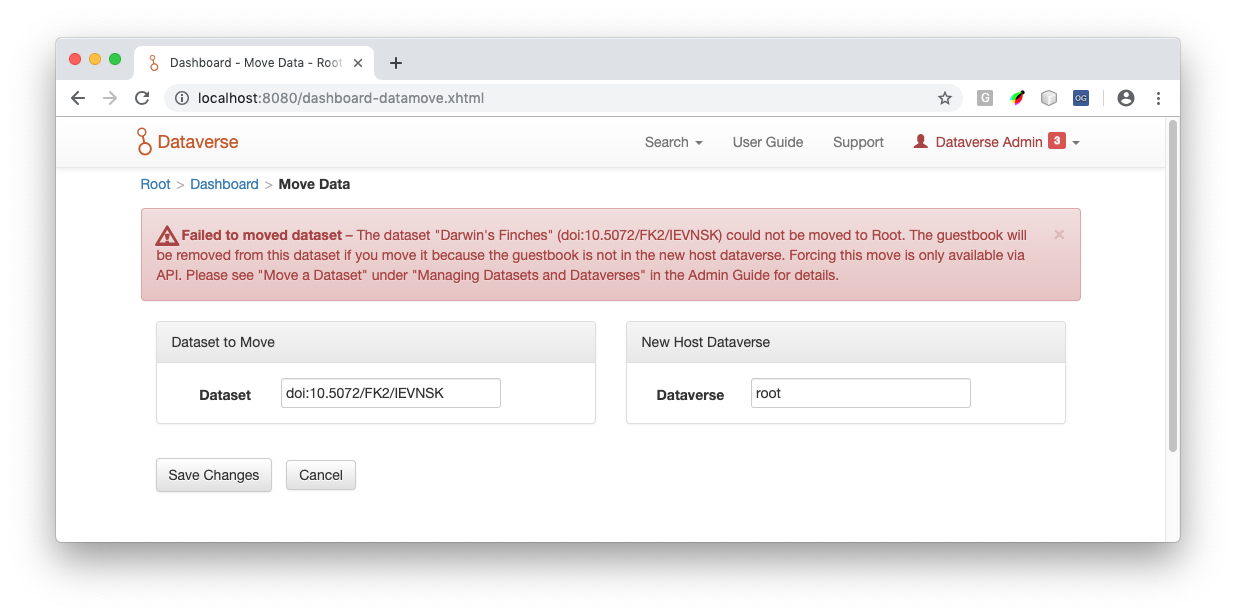
There's a fair amount of messaging in this pull request but I'm including the screenshot above so people get a sense of how the messages are constructed (while typing this up I realized I missed moving some English to the bundle and corrected it in 714caee). The message above, for example, is the concatenation of four (4) bundle entries:
dashboard.card.datamove.message.failure.summary + dashboard.card.datamove.message.failure.details + dashboard.card.datamove.dataset.command.error.unforced.datasetGuestbookNotInTargetDataverse + dashboard.card.datamove.dataset.command.error.unforced.suggestForce
@dlmurphy volunteered to review and/or change the following messages:
#dashboard-datamove.xhtml
dashboard.card.datamove=Data
dashboard.card.datamove.header=Dashboard - Move Data
dashboard.card.datamove.manage=Move Data
dashboard.card.datamove.message=Manage and curate your installation by moving datasets from one host dataverse to another.
dashboard.card.datamove.selectdataset.header=Dataset to Move
dashboard.card.datamove.newdataverse.header=New Host Dataverse
dashboard.card.datamove.dataset.label=Dataset
dashboard.card.datamove.dataverse.label=Dataverse
dashboard.card.datamove.confim.dialog=Are you sure want to move this dataset?
dashboard.card.datamove.confim.yes=Yes, Move Data
dashboard.card.datamove.message.success=The dataset "{0}" ({1}) has been successfully moved to {2}.
dashboard.card.datamove.message.failure.summary=Failed to moved dataset
dashboard.card.datamove.message.failure.details=The dataset "{0}" ({1}) could not be moved to {2}. {3}{4}
dashboard.card.datamove.dataverse.placeholder=Enter Dataverse Identifier...
dashboard.card.datamove.dataverse.menu.header=Dataverse Name (Affiliate), Identifier
dashboard.card.datamove.dataverse.menu.invalidMsg=No matches found
dashboard.card.datamove.dataset.placeholder=Enter Dataset Persistent ID, doi:...
dashboard.card.datamove.dataset.menu.header=Dataset Persistent ID, Title, Host Dataverse Identifier
dashboard.card.datamove.dataset.menu.invalidMsg=No matches found
dashboard.card.datamove.dataset.command.error.targetDataverseUnpublishedDatasetPublished=A published dataset may not be moved to an unpublished dataverse. You can retry the move after publishing {0}.
dashboard.card.datamove.dataset.command.error.targetDataverseSameAsOriginalDataverse=This dataset is already in this dataverse.
dashboard.card.datamove.dataset.command.error.unforced.datasetGuestbookNotInTargetDataverse=The guestbook will be removed from this dataset if you move it because the guestbook is not in the new host dataverse.
dashboard.card.datamove.dataset.command.error.unforced.linkedToTargetDataverseOrOneOfItsParents=This dataset is linked to the new host dataverse or one of its parents. This move will remove all links to this dataset.
dashboard.card.datamove.dataset.command.error.unforced.suggestForce=Forcing this move is only available via API. Please see "Move a Dataset" under "Managing Datasets and Dataverses" in the Admin Guide for details.
dashboard.card.datamove.dataset.command.error.indexingProblem=Dataset could not be moved. Indexing failed.
If any changes are made, please let me know so I can adjust the tests in MoveIT.java.
pdurbin
on 1 May 2019
The last sentence should follow our usual guides reference format, which includes a link, something like...
For more information about moving datasets, see our <a href="{0}/{1}/admin/dataverses-datasets.html#move-a-dataset" title="Move a Dataset - Dataverse Admin Guide" target="_blank">Admin Guide</a>.
Note: that example requires the inclusion of systemConfig.guidesBaseUrl and systemConfig.guidesVersion config settings passed as parameters to build the full URL to the guides.
mheppler
on 1 May 2019
Just discussed the guide links with @mheppler and @pdurbin. We're interested in putting the link to the relevant Admin Guide section in both the error message (as in Mike's previous comment) _and_ in the blue status message you see for this feature before you do anything.
 dlmurphy
on 2 May 2019
dlmurphy
on 2 May 2019
Also per discussion with @dlmurphy and @mheppler and I want to test the worst case scenario of both links and a guestbook being in play at the same time. We want to make sure the error message can display both at the same time.
pdurbin
on 2 May 2019
Made some minor edits to the error messaging. Reviewed docs while I was in there and they look good. Passing on to @pdurbin to take care of some of the java stuff we noticed.
dlmurphy
on 2 May 2019
As of b39709f06 I'm linking to the guides from the error like this:

pdurbin
on 3 May 2019
@pdurbin one small suggested, add the word "currently" to "is [currently] only available"
 scolapasta
on 3 May 2019
scolapasta
on 3 May 2019
Ok, I'm moving this to code review because I think I'm done.
In 10f85cd fixed a spelling error @dlmurphy caught.
In 1b2c205 I added "currently" for @scolapasta
In 9ca7383 I added a link to the guides from the blue info box as requested from @mheppler and @dlmurphy which looks like this:

pdurbin
on 3 May 2019
Related issues
 acoppock
·
44Comments
acoppock
·
44Comments
 astrofrog
·
62Comments
astrofrog
·
62Comments
 omaralsoudanii
·
73Comments
omaralsoudanii
·
73Comments
 jggautier
·
80Comments
jggautier
·
80Comments
 sparrowjack63
·
43Comments
sparrowjack63
·
43Comments