Dataverse: Unable to break the link between a dataset and a subdataverse
Version: 4.20
Hello everybody,
We have a small problem with the Move Dataset and the Link Dataset functionalities.
What we're trying to do is to delete a subdataverse, but we cannot because a dataset is linked to it. So I've tried to break the link by moving the dataset out of the subdataverse into the Dataverse root with the curl command documented here, but Dataverse claims that the dataset is already in the root, even though it shows up in the subdataverse and the link icon appears in the GUI :
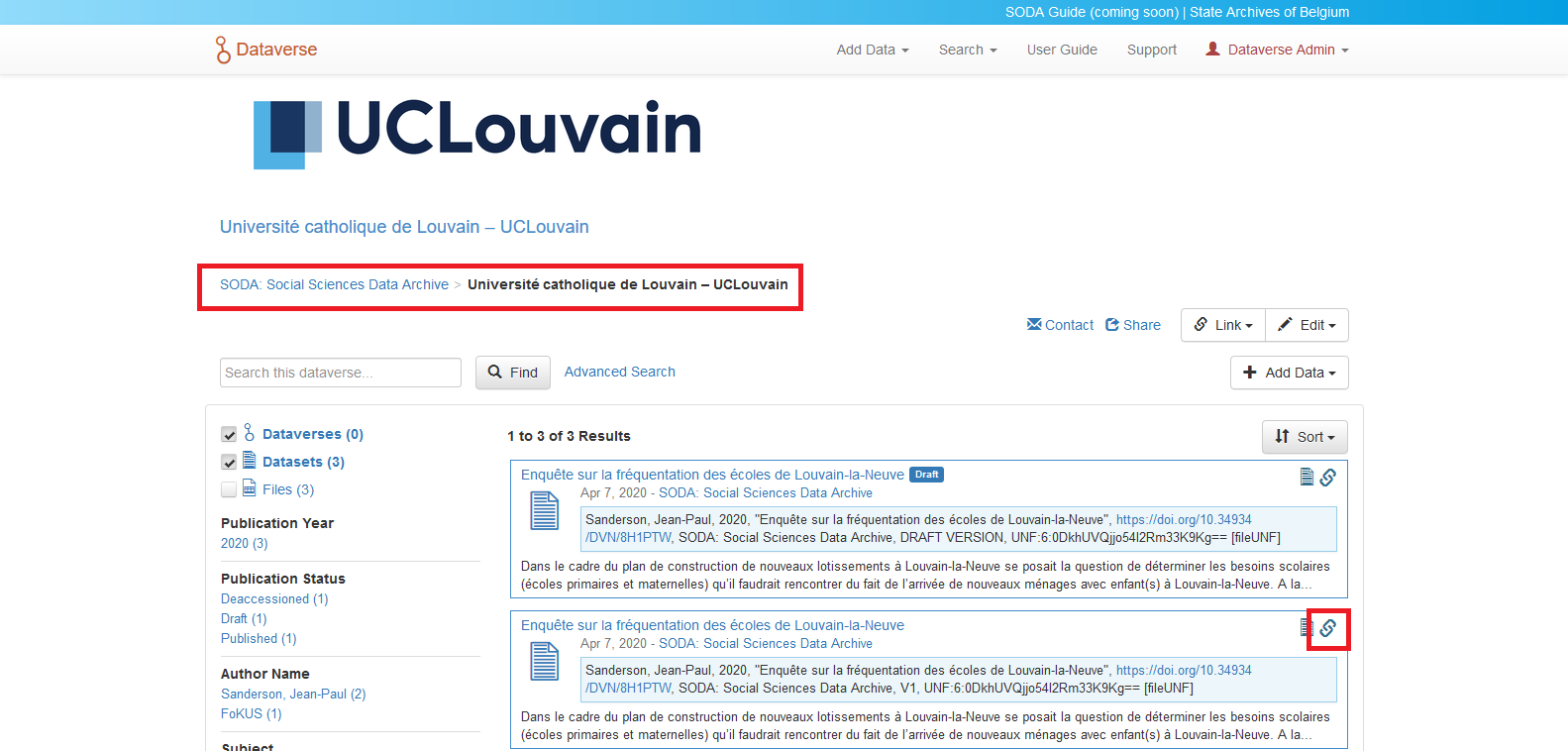
As you can see here, when I first try to move it into the root, Dataverse tells me that the dataset is already there. I then try to move it into the subdataverse then out of it to sever the link, but then a look at the GUI shows that the dataset is still considered linked to the subdataverse:
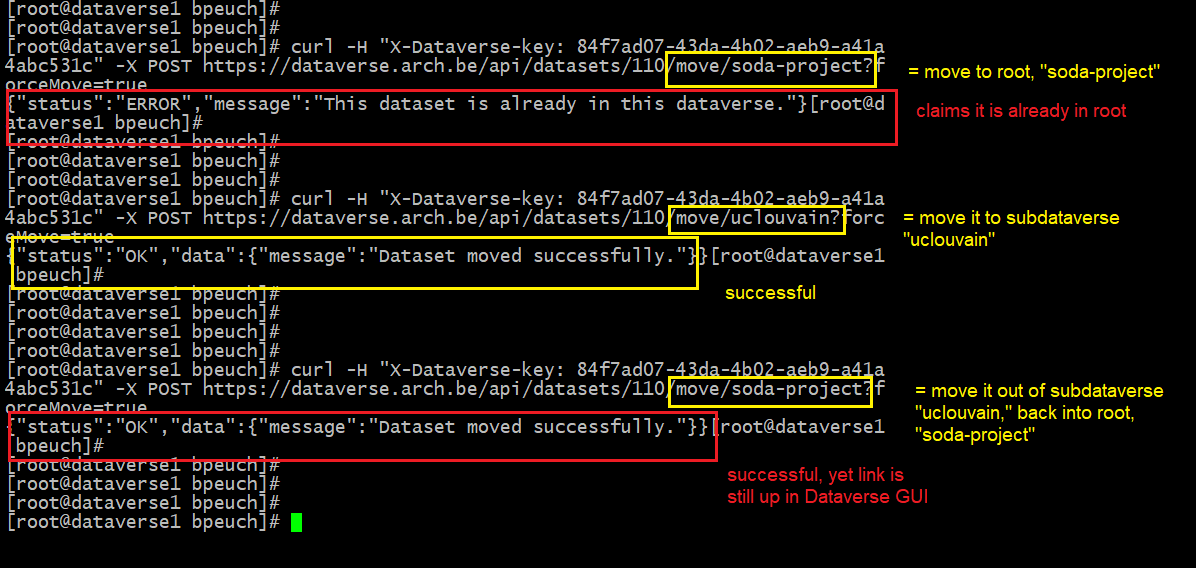
Does anyone know how to break the link in such a case?
 BPeuch
All 6 comments
@BPeuch I hope that API key in the picture is not the one of your Dataverse admin user...
 poikilotherm
on 28 Jul 2020
poikilotherm
on 28 Jul 2020
Not anymore, @poikilotherm. Thanks for pointing this out, and thank you too, @djbrooke. I'll make sure to redact this information next time I post screenshots.
BPeuch
on 28 Jul 2020
@BPeuch It sounds like the dataset is in the root and linked to the subdataverse, so moving won't help.
There is API for this, though from a quick search, I could not find it in the guides.
From the code (it is in the datasets API):
@DELETE
@Path("{datasetId}/deleteLink/{linkedDataverseId}")
 scolapasta
on 28 Jul 2020
scolapasta
on 28 Jul 2020
Thanks a lot, @scolapasta! I successfully deleted the link.
I don't know why but I was certain it said somewhere in the guides that you have to move a dataset to break its link to a subdataverse. Turns out the curl command is documented here.
I learned two valuable lessons today. Thanks again to all those who reached out.
BPeuch
on 28 Jul 2020
@BPeuch Ah, great! I thought it was somewhere in the guides.
When Moving a Dataset, we do need to check links (from the guide:
If the moved dataset has a guestbook or a dataverse link that is not compatible with the destination dataverse, you will be informed and given the option to force the move (with forceMove=true as a query parameter) and remove the guestbook or link (or both)) so that might be what you were thinking.
scolapasta
on 28 Jul 2020
Yes indeed, @scolapasta, that is the bit I had in mind. Thanks. Now we know there is a dedicated feature and, well, if I had looked around some more I would have likely found it. :)
BPeuch
on 29 Jul 2020
Related issues
 bsilverstein
·
3Comments
bsilverstein
·
3Comments
 matthew-a-dunlap
·
4Comments
matthew-a-dunlap
·
4Comments
 rmo-cdsp
·
3Comments
rmo-cdsp
·
3Comments
 jggautier
·
3Comments
poikilotherm
·
4Comments
jggautier
·
3Comments
poikilotherm
·
4Comments
Most helpful comment
Not anymore, @poikilotherm. Thanks for pointing this out, and thank you too, @djbrooke. I'll make sure to redact this information next time I post screenshots.