Dataverse: Rendering of the "Add Data" button in the header should be based on permissions of generic authenticated user in Root
Version: 4.19
Hello everybody,
A small comment about the new "Add Data" button, who's now part of the toolbar (see #5718).
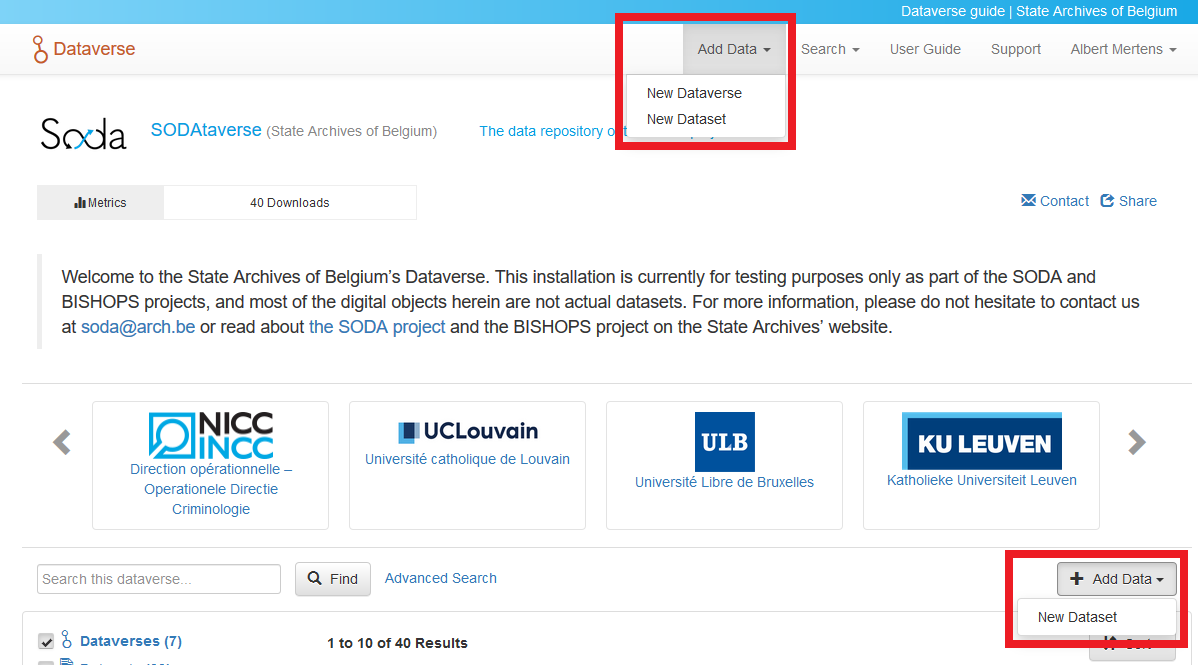
When a Dataverse administrator decided that a user, or all users, may only add datasets, as shown here…

… then the users in question only have the "Add Dataset" option when they click on the original "Add Data" button, the one located above the list of datasets and sub-Dataverses. However, the option to "Add Dataverse" still appears in the new "Add Data" button, as you can see here:
 BPeuch
All 17 comments
Thanks for bringing this up, @BPeuch. After a brief discussion with @mheppler, next steps are to take a close look at the render logic behind the buttons.
 TaniaSchlatter
on 12 Mar 2020
TaniaSchlatter
on 12 Mar 2020
The buttons allow the user to create Datasets (or Dataverses) in different Dataverses. The ones in the header create at the root dataverse, while in page create at the Dataverse you are in.
(though in both cases you can change what the host is, once the create page is loaded, to any dataverse where you have appropriate permissions)
Maybe the in page button should say "Add data to this dataverse"?
Also, I checked the code and there is no render logic for the ones in the header at all. So if permissions for the root dataverse are changed to not allow anyone to deposit on root, the button still shows is there. Clicking it sends you to an Not Authorized page.
 scolapasta
on 16 Mar 2020
scolapasta
on 16 Mar 2020
Sorry to create noise, but isn't this related / part of #6708 ?
 poikilotherm
on 16 Mar 2020
poikilotherm
on 16 Mar 2020
You're right @poikilotherm. I should have linked the issues for clarity's sake, especially since this is a young feature. Thank you for mentioning it.
BPeuch
on 17 Mar 2020
There is a proposed solution discussed in #6772 and repeated here:
Make the behavior of the Add Data button in the nav bar the same as the Add Data button on the Root Dataverse page.
There are 5 user states that relate to the Add Data button in the header:
User can not add to Root – no "Add Data" button in header.
User can add dataverses but not datasets to Root – "Add Data" button in header with only "Add Dataverse" option.
User can add datasets but not dataverses to Root (this issue) – "Add Data" button in header with only "Add Datasets" option.
User can add Dataverses and Datasets to Root (Harvard) – "Add Data" button in header with both options – what we have now.
User is a Guest – not logged in – consider showing the "Add Data" dialog, that prompts users to Sign Up or Log In.
There are cases when users can not add to Root, but can add to specific dataverses below root if they have permission. In these cases, the "Add Data" button appears on those dataverses for users who are logged in. This would continue to be the case, and there is no implication for the "Add Data" in the nav bar – it would not show, as in #1 above. Pinging @scolapasta to verify.
TaniaSchlatter
on 1 Apr 2020
In @TaniaSchlatter listed user states above, UVa has the 1st one.
Then what about the "Add Data" button on My Data. That too assumes adding dataverses and datasets in root Dataverse.
 shlake
on 7 Apr 2020
shlake
on 7 Apr 2020
I must say I'm really happy with how the button now behaves in the latest version. I think this is a great way of stimulating user engagement:

BPeuch
on 9 Apr 2020
@shlake There would not be an "Add Data" button on the My Data page. There would be an "Add Data" button on Dataverses that the logged in user has permissions to add to. I think this is current functionality, and it would not change. Pinging @scolapasta.
TaniaSchlatter
on 15 Apr 2020
Right. Confirming that the idea is to get the logic of the Add Data button in the header in line with the logic of the Add Data button on the Root Dataverse (since the Add Data button Add Buttons go to the Create Dataverse / Dataset under the Root).
I thought the one open question was #5, whether we wanted the popup, or to just send you to the login page* (which offers a sign up link). What we agreed on is that there did not seem to be a valid reason for an inconsistent behavior here.
(*) from a technical perspective the link would just always go to the create page, which would then redirect a non logged in user to login.
The difference I see with the two options:
Without the popup, we would only show the options that any authenticated user has. Once a user logs in, they may have direct access to add other objects.
A concrete example: Authenticated users have access to add datasets at the root, while my account has direct access to also add datasets. So before logging in, I would see the Add button, click on it, and only see Add Dataset. If I were logged in, I would see both Add Dataverse and Add Dataset. (I think this is the reason we chose the popup before - we knew we could show the button because we knew there would always be something the user could add (based on the authenticated users permission), but we waited until they logged in to show which things, so the button wouldn't show different options once clicked, if logged in or not.
scolapasta
on 15 Apr 2020
@scolapasta Please don't assume that authenticated users have access to add datasets at the root - UVa does not allow datasets at the root.
shlake
on 15 Apr 2020
That was not meant as an assumption; just an example. We are definitely keeping the "no permission for authenticated users at root" use case in mind.
See # 1 from Tania's comment:
https://github.com/IQSS/dataverse/issues/6741#issuecomment-607434758
scolapasta
on 15 Apr 2020
- This is a display logic change. The goal is to bring the behavior of the "Add Data" button on the header into alignment with the display logic for the button on the page _when/if the installation allows logged in users to create a Dataverse and/or create a dataset_.
- If an installation does not allow users who are logged in to create a dataverse or dataset, no Add Data button appears in the header, no matter who the user is/what permissions they have.
- When the user is not logged in, in cases where the installation allows for depositing in the root, users should get the login page when they click on "Add Data" in the header. This is what happens on Harvard Dataverse now. This will mean that the behavior of the various Add Data buttons is not 100% consistent, which is the case now. The Harvard Dataverse Home page and the Add Data in the nav bar will load the log in page, and the button on the Dataverse page will continue to load the popup.
 djbrooke
on 15 Apr 2020
djbrooke
on 15 Apr 2020
@djbrooke I have modified the logic so that the Add Data in the header will only show the user's permissions on Root in the header or "Any Authenticated User" if not logged in. So now we need an answer to the question above. If you're not logged in do you go directly to the login page if you try to add a ds or dv, or should you get the "Hey login or create an account!" popup that you get in the page (non-header) Add Data button?
 sekmiller
on 24 Apr 2020
sekmiller
on 24 Apr 2020
@sekmiller thx for tagging me. I vote for keeping it consistent with the other add data button, so let's show the popup.
djbrooke
on 24 Apr 2020
Got it! thanks.
sekmiller
on 24 Apr 2020
Based on the discussions during the Design meeting yesterday, I have modified the rendering of the Add Data button in the header. In the header it will be rendered based on the permissions of a generic authenticated user, regardless of whether the user is logged in and that logged in user's permissions on Root. So even if I am a logged in super user, if the a generic authenticated user has no add permissions in Root I won't have an add data button in the header. The rendering of the Add Data button in the body of the dataverse page remains unchanged - that is it is based on the permissions a generic user if no one is logged in or the logged in user. (and based on the permissions in the dataverse currently being viewed.) I am going to change the title of the ticket accordingly.
sekmiller
on 28 Apr 2020
If an installation does not allow users to add to Root, but does allow users to be granted access to add to Dataverses or datasets, it is possible that having the "Add Data" button show even when users are not logged in would help facilitate depositing data. In this case, it would probably be better to show the log in popup rather than the log in page. This would need more discussion with relevant installations.
TaniaSchlatter
on 25 Jun 2020
Related issues
 pdurbin
·
45Comments
pdurbin
·
45Comments
 pameyer
·
55Comments
pameyer
·
55Comments
 omaralsoudanii
·
73Comments
pdurbin
·
86Comments
omaralsoudanii
·
73Comments
pdurbin
·
86Comments
 aculich
·
57Comments
aculich
·
57Comments
Most helpful comment
Based on the discussions during the Design meeting yesterday, I have modified the rendering of the Add Data button in the header. In the header it will be rendered based on the permissions of a generic authenticated user, regardless of whether the user is logged in and that logged in user's permissions on Root. So even if I am a logged in super user, if the a generic authenticated user has no add permissions in Root I won't have an add data button in the header. The rendering of the Add Data button in the body of the dataverse page remains unchanged - that is it is based on the permissions a generic user if no one is logged in or the logged in user. (and based on the permissions in the dataverse currently being viewed.) I am going to change the title of the ticket accordingly.