Dataverse: Edit Files - Dropdown (delete/restrict/unrestrict) menu hidden in new dataset form
The Edit menu in the file table on the new dataset page appears to be being cut-off/not shown except for a few pixels. Visible on demo.dataverse.org. I've tracked it down to an overflow:hidden style being applied to the table as part of the .ui-datatable-scrollable-header class being applied, but I'm not sure what a good fix would be. The existing dataset page, which has a paginated table rather than a scrollable one, doesn't have the issue.
 qqmyers
All 7 comments
Sounds like a duplicate of #3835
Here's a screenshot I just took from the demo server:
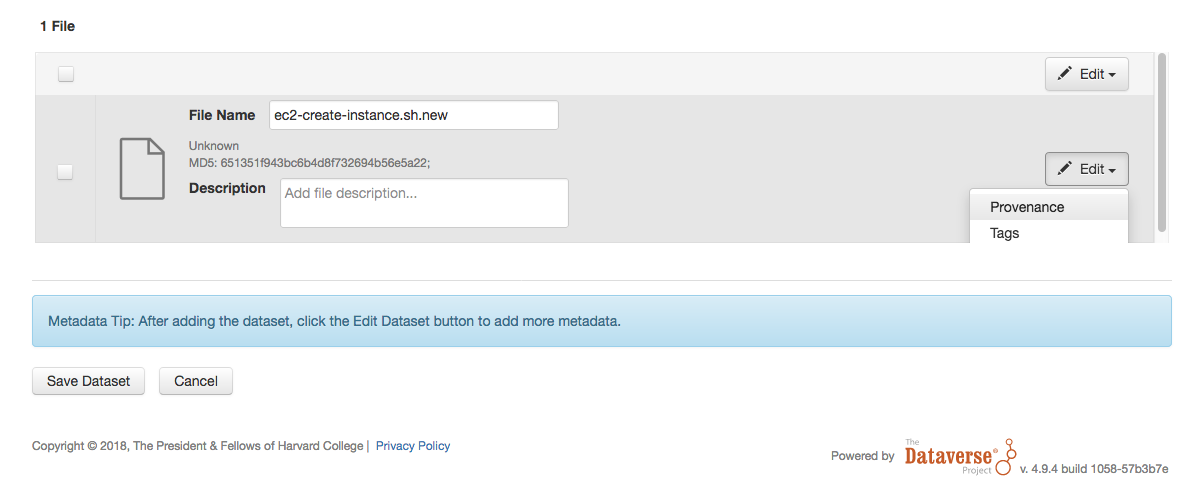
Or are you seeing something else, @qqmyers ? A screenshot might help.
 pdurbin
on 12 Oct 2018
pdurbin
on 12 Oct 2018
@qqmyers I had noticed this in a recent development branch and will look into it in more detail. This seems to be an oversight on my part, or possibly a result of bad merge.
 mheppler
on 12 Oct 2018
mheppler
on 12 Oct 2018
@pdurbin - possibly the same bug, but different symptom. I see the cutoff in the Edit menu in the header - almost completely hidden in this snip.

qqmyers
on 12 Oct 2018
@qqmyers I have not seen that issue. I have not been able to replicate it on demo either.
The style class ui-datatable-scrollable-header you referenced was removed from the stylesheet as part of the #4656 issue which swapped out the scrolling feature of the file table with a paginator. That was released in 4.9.2.
I would guess you are seeing a cahced version of the stylesheet possibly, but use the version number in the link URL's to avoid this.
<link type="text/css" rel="stylesheet" href="/javax.faces.resource/css/structure.css.xhtml?version=4.9.4">
That said, I will continue to investigate on my end. If find any more details in your installation or in demo, please add them here.
mheppler
on 12 Oct 2018
@mheppler - Hmmm. I only see it on demo when I have enough files (I tried 4 and then 47 but guessing it's above the 25 per page limit). It is in the new dataset page only, which I think is using editFilesFragment.xhtml rather than filesFragment from #4656. The stylesheet being referenced shows as
https://demo.dataverse.org/javax.faces.resource/components.css.xhtml?ln=primefaces&v=6.2 in my browse...
qqmyers
on 12 Oct 2018
Ahhhh, sorry I missed that it was on the New Dataset pg form, @qqmyers. I was able to replicate this locally with 33 files and will investigate further.

mheppler
on 12 Oct 2018
Removed the scroll functionality from the Edit Files dataTable, which was left behind after the changes to the dataset version of the dataTable in #4656. This was causing the Edit File dropdown menu in the table header to display behind table rows, because the CSS which would correct this was removed.
You would need 27 or more files in the dataTable to see this issue when editing/uploading files or creating a new dataset, which both use the editFilesFragment. Removing the scroll feature will now clearly display all files in the table on the page. If you upload 100's of files, you will have to scroll the entire page through all of them to get to the Save Changes and Cancel buttons displayed below the dataTable.
Another solution could be to return the CSS that overwrites the CSS from PrimeFaces which is the cause of the disappearing dropdown menu.
mheppler
on 12 Oct 2018
Related issues
 shlake
·
4Comments
shlake
·
4Comments
 Fernand0S
·
4Comments
Fernand0S
·
4Comments
 rmo-cdsp
·
3Comments
rmo-cdsp
·
3Comments
 atrisovic
·
3Comments
atrisovic
·
3Comments
 lmaylein
·
3Comments
lmaylein
·
3Comments