Dataverse: File Upload - Scalable upload options, AKA "dual-mode"
As a repository operator, I'd like to be able to support Dataverse native HTTP (browser and API) uploads and DCM uploads in the same installation. Similarly, I'd like to be able to support Dataverse native HTTP, S3 redirect (, swift?) download methods alongside RSAL downloads in the same installation.
 pameyer
All 55 comments
This includes:
- make the Upload Files pg scalable for any combination of HTTP, dropbox, rsync+ssh, or any other config options we develop down the road
- the file upload workflow for rsync only will need to change, to use the Upload Files pg and not just the Upload Files popup, to be more consistent across the various config options
- for this initial phase of delivering "dual-mode", you will only be able to upload one way or another, HTTP/Dropbox or rsync+ssh, but not both
- download methods will depend on which upload method was used
- dataset lock will continue to be applied when the rsync script is downloaded, which displays the lock warning msg on the Upload Files pg -- you will not be able to return to the Upload Files pg once you leave it, because the dataset lock feature currently disables the Upload Files button

 mheppler
on 30 May 2018
mheppler
on 30 May 2018
Initial commit for UI prototype added to branch 4610-upload-dual-mode. Changes include:
- New accordion panel UI for various upload method options
- Placeholder panel headers, help text, etc
- Fixed trailing hyphen issue in help msg block outlined in #4608
- New "Done" button added to editdatafiles.xhtml when the page is empty/no file/nothing to save
Tasks to tackle in the next phase of development:
- Proper render logic for dropbox and rsync panels
- Final help text for panels, added to bundle
- Investigate bug for new "Done" button on editdatafiles.xhtml when you delete uploaded files from the table
- Investigate use of element id's in commandButtons on Lines 296-297 of editFilesFragment.xhtml, does not seem scalable, and not sure if I added all the new UI id's to all the buttons that need them (see delete bug above?)
- Write help/error/success msg text for all the various render conditions related to what upload options are available and when (note: you can not upload via rsync if you have already uploaded files via http, and vice versa) -
mheppler
on 31 May 2018
This probably needs it's own issue, but the documentation for how to set up Dropbox for file upload is severely lacking. It took me far too long to find these required steps in the Dropbox documentation. We should link to that page from our guides to make it easier to set up. Currently, we provide no instructions.
mheppler
on 31 May 2018
3db4486 was so far develop that I couldn't even run the code so I merged the lastest in fb4e4f3. Heads up to @dlmurphy that I went with the version of @mheppler 's branch, which will undo fe59aef so you two should get on the same page about that tooltip.
 pdurbin
on 25 Jun 2018
pdurbin
on 25 Jun 2018
@pdurbin, I just talked with @mheppler and we're good with that merge. That tooltip will likely be further edited in the near future as part of the 5.0 redesign process anyway.
 dlmurphy
on 25 Jun 2018
dlmurphy
on 25 Jun 2018
I took a quick look at pull request #4862 and noticed that there are merge conflicts in the bundle.
pdurbin
on 17 Jul 2018
@sekmiller fixed the merge conflict in b5f81e3 and I offered to help with weaving this new feature into the guides somehow. He's going to take a look at the render logic for installations that haven't been configured with Dropbox or DCM. Right now it's all visible, including some placeholder text that @dlmurphy or others might want to weigh in on:

Question for @pameyer (and others): Is it ok if it's not possible to turn off "native" or "traditional" file upload? I believe you have it turned off it your fork but it's not possible in the pull request as of this writing. I checked with @sekmiller
pdurbin
on 17 Jul 2018
Yes, it does make sense to retain the ability for different upload methods to be configurable (at minimum at the installation level, possibly at the dataverse level).
pameyer
on 17 Jul 2018
@pameyer ok, thanks. @sekmiller we can't just put !settingsWrapper.rsyncUpload back in to disable "Upload with HTTP via your browser". (Also, I just noticed that we need to move that English out of editFilesFragment.xhtml and into the bundle.) I guess we need a setting or something to disable "Upload with HTTP via your browser". @pameyer in your mind when "Upload with HTTP via your browser" is disabled does that mean that APIs that use HTTP are disabled as well? Or would that be a different setting?
pdurbin
on 18 Jul 2018
I think it's better to be consistent with APIs and HTTP UI (aka - if HTTP browser uploads are disabled, HTTP upload APIs should also be disabled).
pameyer
on 18 Jul 2018
@sekmiller and I spoke with @djbrooke @pameyer @landreev and @oscardssmith this morning. In 3ba0036 I adjusted the FileUploadMethods enum to rename "NATIVE" to "native/http" in preparation for making it possible to disable http upload for both GUI and API. @sekmiller and I believe it will be better to have "native/http" explicitly set as a database setting out of the box rather than having implicit logic in the code. So we'll be updating setup scripts to add it. I also added a TODO to add "native/dropbox" if we feel like it helps makes the code and user experience for sysadmins better. Some discussion about if it would be better to move the Dropbox key from a JVM option to a database setting. (I'd probably leave it alone but I don't have a strong opinion about this.)
pdurbin
on 18 Jul 2018
Pull request #4862 is looking good, I think, so I moved it to QA. Heads up to @mheppler and @dlmurphy that in 4a7fcf5 I removed some help text that I didn't find very helpful. If someone can suggest better text, please advise and it can be put back in.
pdurbin
on 19 Jul 2018
Issues so far:
- [x] It says dual mode but drop box was added as a 3rd option. Is that legit and it implies people want to remove drop box and potentially run in drop box only mode (may not work well). Per Danny, yes, Dropbox should be a full-fledged member and work on its own. Update: was demoted to resolve dropbox only bugs. RESOLVED
- [x] File upload apis (sword, native, replace) are disabled during rsync-only mode but also during mixed mode, system-wide. Native API returns: status":"ERROR","message":":UploadMethods contains dcm/rsync+ssh. Please use rsync file upload. Should maybe depend on whether rsync has been uploaded to dataset in mixed mode rather than system-wide. RESOLVED
- [x] Changing upload mode config may result in unanticipated behavior. Going from one->dual should be ok as one is subset of dual but going from dual->one might be an issue, particularly if dropping https. Am told behavior should be that https downloads should continue working but may not make additional uploads and current rsync support does not allow changes so that would be consistent. FUNCTIONS AS DESIGNED
- [x] Default setting at install time and via update script is native/http but in v4.9.1, dropbox functionality is included in native mode so it is enabled, whether configured or not. So, should it not also be part of the setup-all.sh setting and the update script? Per Danny, OK. FUNCTIONS AS DESIGNED
- [ ] What should the help text that Phil removed say? Check with Mike/Derek. Update: needs review with Mike against original mockups and Mike's to do list. UNDER REVIEW
- [x] Rsync mode not working, lock not enabled. RESOLVED
- [x] Dropbox only mode does not upload files. Now not allowed as only mode. NA
- [x] Dropbox panel is not expanded by default when it is the only mode, so it looks like it is not enabled/does nothing. NA
- [x] File landing page shows download button and download api url when rsync file if :DownloadMethods not configured. RESOLVED
- [x] Uploading a file via http on dataset create clears dataset metadata on upload complete, works with drop box. RESOLVED
- [x] Click add dataset adds about 30 log lines of the same text, deprecated API:
[2018-07-23T18:17:18.972-0400] [glassfish 4.1] [INFO] [] [org.primefaces.component.fragment.FragmentRenderer] [tid: _ThreadID=52 _ThreadName=jk-connector(3)] [timeMillis: 1532384238972] [levelValue: 800] [[
autoUpdate attribute is deprecated and will be removed in a future version, use p:autoUpdate component instead.]] RESOLVED - [ ] Creating a dataset when rsync enabled but without choosing an upload method and dcm unavailable/down results in exception in UI and partial creation of dataset. Server log indicates error retrieving rsync script. FIX WORKS BUT NEEDS REVIEW, LOGGING TWEAK
- [ ] Usability issue, once you upload a file using http with dual mode enabled, upload files view shows a red triangle and message under Rsync: You can not upload additional files to this dataset. This is a bit confusing -is it saying I cannot upload any files? That's not accurate. Since I've uploaded using HTTP, I cannot use Rsync to upload files to this dataset.
 kcondon
on 20 Jul 2018
kcondon
on 20 Jul 2018
Rsync is now working, refer to checklist above for issues.
Native and Dropbox work in basic UI testing. Could not get Rsync to work by following dcm_mock instructions. Actually noticed a server log error: Caused by: java.io.IOException: Dataset doi:10.5072/FK2/7L67Q5 is not locked for DCM upload
batch-jobs log says,
SEVERE: Dataset {0} is not locked for DCM upload. Exiting
Server log error:
[2018-07-20T18:35:19.966-0400] [glassfish 4.1] [SEVERE] [] [job-73] [tid: _ThreadID=342 _ThreadName=concurrent/__defaultManagedExecuto
rService-managedThreadFactory-Thread-2] [timeMillis: 1532126119966] [levelValue: 1000] [[
Dataset doi:10.5072/FK2/VFIW5V is not locked for DCM upload. Exiting]]
[2018-07-20T18:35:19.966-0400] [glassfish 4.1] [WARNING] [] [com.ibm.jbatch.container.impl.JobThreadRootControllerImpl] [tid: _ThreadI
D=342 _ThreadName=concurrent/__defaultManagedExecutorService-managedThreadFactory-Thread-2] [timeMillis: 1532126119966] [levelValue: 9
00] [[
Caught throwable in main execution loop with Throwable message: java.io.IOException: Dataset doi:10.5072/FK2/VFIW5V is not locked fo
r DCM upload, and stack trace: com.ibm.jbatch.container.exception.BatchContainerRuntimeException: java.io.IOException: Dataset doi:10.
5072/FK2/VFIW5V is not locked for DCM upload
at com.ibm.jbatch.container.artifact.proxy.JobListenerProxy.beforeJob(JobListenerProxy.java:45)
at com.ibm.jbatch.container.impl.JobThreadRootControllerImpl.jobListenersBeforeJob(JobThreadRootControllerImpl.java:303)
at com.ibm.jbatch.container.impl.JobThreadRootControllerImpl.originateExecutionOnThread(JobThreadRootControllerImpl.java:103)
at com.ibm.jbatch.container.util.BatchWorkUnit.run(BatchWorkUnit.java:80)
at java.util.concurrent.Executors$RunnableAdapter.call(Executors.java:511)
at java.util.concurrent.FutureTask.run(FutureTask.java:266)
at org.glassfish.enterprise.concurrent.internal.ManagedFutureTask.run(ManagedFutureTask.java:141)
at java.util.concurrent.ThreadPoolExecutor.runWorker(ThreadPoolExecutor.java:1149)
at java.util.concurrent.ThreadPoolExecutor$Worker.run(ThreadPoolExecutor.java:624)
at java.lang.Thread.run(Thread.java:748)
at org.glassfish.enterprise.concurrent.ManagedThreadFactoryImpl$ManagedThread.run(ManagedThreadFactoryImpl.java:250)
Caused by: java.io.IOException: Dataset doi:10.5072/FK2/VFIW5V is not locked for DCM upload
at edu.harvard.iq.dataverse.batch.jobs.importer.filesystem.FileRecordJobListener.beforeJob(FileRecordJobListener.java:177)
at com.ibm.jbatch.container.artifact.proxy.JobListenerProxy.beforeJob(JobListenerProxy.java:43)
... 10 more
]]
[2018-07-20T18:35:19.966-0400] [glassfish 4.1] [SEVERE] [] [job-73] [tid: _ThreadID=342 _ThreadName=concurrent/__defaultManagedExecutorService-managedThreadFactory-Thread-2] [timeMillis: 1532126119966] [levelValue: 1000] [[
Job Failed. See Log for more information.]]
Need to test API enable/disable, mixed mode, rsync only mode. Need to follow up on above questions.
kcondon
on 21 Jul 2018
Some notes from conversation about Add New Dataset page with Phil, Kevin, and Tania:
Make rsync window collapsible like the other two.
Properly indent the messaging in the rsync window
Replace the text in the rsync window with:
rsync allows you to run a script that transfers your files into or out of Dataverse via SSH. It is useful for extremely large files (>1GB), or packages containing a large number of files. Once you have saved this dataset, you can upload your data using rsync via the "Upload Files" button on the dataset page.
dlmurphy
on 25 Jul 2018
Sketch that hints at render logic for dropbox and rsync panels:

 TaniaSchlatter
on 25 Jul 2018
TaniaSchlatter
on 25 Jul 2018
Replace the text in the rsync window
Fixed in 7452e66
Properly indent the messaging in the rsync window
Fixed in a867f5b
collapsible
My understanding is that there is still work to be done in this area. @djbrooke will do housekeeping on the issue.
pdurbin
on 25 Jul 2018
Will discuss with @mheppler and other interested parties when he's back next week.
 djbrooke
on 25 Jul 2018
djbrooke
on 25 Jul 2018
Thanks @sekmiller and @mheppler for working together to generate a checklist of remaining items here. I'll be happy to help with questions of scope, etc.
djbrooke
on 30 Jul 2018
Talked to @sekmiller. Outline of cleanup:
- [x] change info msg for HTTP+browser to "Select or drag and drop files from your desktop, directly into the upload widget.", instead of redundant "For more information about supported file formats, please refer to the User Guide."
- [x] ...as a result, added conditionally rendered "For more information about supported file formats, please refer to the User Guide." info msg above upload widget for create dataset workflow
- [x] removed duplicate render logic for dropbox key
- [x] changed info msg for Dropbox to "Select files from Dropbox with their Chooser upload widget.", instead of "Files can also be uploaded directly from Dropbox."
- [x] fix the header link toggle for the rsync panel
- [x] removed "Warning message about how this option is not available because..", relying on only "You can not upload additional files to this dataset.", which Kevin described in his comment as a "usability issue".
- [ ] improve "You can not upload additional files to this dataset." warning msg for rsync when files exist in dataset (this could be because you already uploaded an rsync file, or you just used HTTP on the Upload Files pg)
- [x] changed create dataset info msg for rsync to "Upload files using rsync via SSH, which is more reliable and secure for large file transfers. The script will be available on the Upload Files page once you save this dataset.", cutting the previous version nearly in half.
- [x] added "Upload files using rsync via SSH, which is more reliable and secure for large file transfers." sentence to the existing rsync info msg
- [x] remove render logic hiding Edit > Upload (Files) option for
DatasetPage.workingVersion.hasPackageFile - [x] remove create dataset rsync warning msg from dataset.xhtml, which is now in editFilesFragment.xhtml
- [x] remove old "Upload Files" btn for rsync only from filesFragment.xhtml
- [x] remove old
DatasetPage.workingVersion.hasPackageFilerender logic that disables Upload Files btn in filesFragment.xhtml - [x] remove old
rsyncUpload_popupfrom dataset.xhtml - [x] if rsync only panel displayed, default open view
- [x] "Rsync script not available" error msg incorrectly displayed when package file has been uploaded, changed to "You can not upload additional files to this dataset." (See to-do above about fixing that "additional files" msg)
mheppler
on 30 Jul 2018
At standup this morning I volunteered to deploy the code to the dev1 server in various configurations:
- native + dropbox only
- rsync only
- both
As of ec8aa56, native + dropbox only has been deployed: https://dev1.dataverse.org
pdurbin
on 6 Aug 2018
Latest and greatest to-do checklist based on review of the new feature summary doc with @pameyer and @pdurbin and @dlmurphy.
- [x] Need to improve
isHasRsyncScript()render logic to deliver more informative msg than just "Rsync script not available!" Should add "I'm broken" and "I'm busy" logic, with appropriate msg text for each (i.e. "contact Support", or "try again later"). Done in 23f3beb. - [x] If any file exists, fix render logic which incorrectly displays "Rsync script not available!" error msg, to instead display new dynamic version of the "You can not upload additional files to this dataset." warning msg, which should also explain "_why can't I upload more files?_". Done in 23f3beb.
- [x] When dataset lock warning msg is displayed, add text link to "Download Script" just like the download btn in the rsync upload instructions in case someone needs to access that script again, as well as text link to user guide in case someone needs to learn more about rsync uploads which is the cause of the lock. Done in 7550dea.
- [x] When HTTP file is added, fix render logic which incorrectly displays "The script will be available..." info msg, to instead display "You can not upload additional files to this dataset." warning msg, which should also explain "_why can't I upload more files?_". Done in 23f3beb.
- [x] When HTTP file exists, fix render logic which incorrectly displays "Rsync script not available!" error msg, to instead display "You can not upload additional files to this dataset." warning msg, which should also explain "_why can't I upload more files?_". Done in 23f3beb.
Still to consider, which might ultimately get added to the to-do list:
- Do we want disable and add warning msgs to Upload Files pg if user accesses pg manually view browser history while dataset is locked/upload disabled?
- File size upload limit info msg (HTTP vs rsync, might need dynamic msg for dual mode)
- File type info msg (is rsync properly supported with this msg)
mheppler
on 8 Aug 2018
Document with in-app messaging for this feature: https://docs.google.com/document/d/14mkaH_YW1jP-xlFMtLuW-xDuAx_3g3FbIuVJ_0YhLAE/edit
My new revisions to the messaging are highlighted in green.
Next step for me is to work on the documentation.
dlmurphy
on 10 Aug 2018
I just committed the bulk of the Dual Mode documentation, but on Monday morning I want to briefly check around the rest of the guides and make sure other sections about rsync are still accurate.
dlmurphy
on 11 Aug 2018
I'm ready for code review as of cf041d5 so I dragged this issue over in https://waffle.io/IQSS/dataverse
pdurbin
on 13 Aug 2018
Hold up, I have one more doc commit to make, then I'm ready too.
dlmurphy
on 13 Aug 2018
OK, docs are done too now, ready for code review.
dlmurphy
on 13 Aug 2018
@matthew-a-dunlap I addressed your code review feedback in 65407cd . Please check it out and let me know if there's anything else.
pdurbin
on 14 Aug 2018
- [x] Found an issue in dual mode: guestbook is missing from dataverse edit menu when rsync is defined in :DownloadMethods. :DownloadMethods is used both for rsync only and dual mode as it renders rsync urls. This check no longer seems correct in dual mode where we want gb for http download and that is defined in :UploadMethods. When both are defined, I assume we do want to show gb but would like to discuss.
kcondon
on 17 Aug 2018
Discussed briefly with @sekmiller and @kcondon and here is what I have as the outstanding issues:
- [ ] update branch with develop to get all the goodness of DCM S3 in there
- [ ] dataverse pg needs {settingsWrapper.rsyncDownload} render logic for metrics block and guestbook link in Edit dropdown changed to something that supports dual mode
- [ ] confirm with @pameyer that he signs off on everything
Happy to discuss in more detail if needed to get this to done.
mheppler
on 21 Aug 2018
- [x] Too many because's in this message:
file.rsyncUpload.httpUploadDisabledDueToRsyncFileExisting=HTTP upload is disabled for this dataset because because you have already uploaded files via rsync. If you would like to switch to HTTP upload, please contact {0}.
kcondon
on 21 Aug 2018
rsync upload, unpublished
Message should use email address rather than the name of the root dataverse per DMurphy:
- [x] You cannot upload additional files to this dataset. A dataset can only hold one data package. If you need to replace the data package in this dataset, please contact Support at [support email].
kcondon
on 22 Aug 2018
- [x] This message is missing:
“Multiple file upload/download methods are available for this dataset. Once you upload a file using one of these methods, your choice will be locked in for this dataset.”
kcondon
on 22 Aug 2018
- [x] This message is missing for already published with http files, altered after review to remove "switch statement".
rsync upload is disabled because this dataset has already been published with files uploaded via HTTP.
kcondon
on 22 Aug 2018
rsync upload, published
- [x] This message needs to be altered for the published case to remove the sentence "If you would like to switch...":
HTTP upload is disabled for this dataset because because you have already uploaded files via rsync. If you would like to switch to HTTP upload, please contact Support at [support email].
kcondon
on 22 Aug 2018
rsync upload, published
- [x] Once published, delete should not be available for rsync. Subsequent drafts should also not have file delete. Delete should be hidden after publish for rsync. Have confirmed delete package file works for unpublished so ok to show then.
Restrict/Unrestrict should not be available for rsync files since they're downloaded outside of Dataverse (and are are public). They should always be hidden.
kcondon
on 22 Aug 2018
On c7c6b7e
DCM only mode:
- [ ] delete unpublished package file, click upload again, error message is "The Data Capture Module failed to generate the rsync script. Please contact Root Support." Implies system failure, rather than expected behavior. Implementation complexity for changing messaging may be more than its worth.
- [x] renaming a package file in UI works. Won't change anything other than display, may not be worth disabling. Any thoughts on this being high-complexity or low-complexity?
- [ ]
ui-datatable-tablewrappermight be too short; clicking the "edit files" menu results in the appearance of a scrollbar. Seen with single package file present in dataset, may apply to other cases with single file. - (split into separate issue)
api/info/metrics/downloads/toMonthendpoint returns0; but won't have any useful information (and in dual-mode, this info will be incomplete). - fixes for shoulder/identifier from were split out from
https://github.com/IQSS/dataverse/pull/4946; so DCM checksum success API in Dataverse is non-functional. Not something that needs to be fixed in this branch; just noting it.
Dual mode:
- [x] create dataset in UI; upload native file,
/dataCaptureModule/rsyncAPI endpoint still produces valid transfer script. scanner still picks it up, results in mixed dataset (endpoint would be expected to return an error if there's a native file).

- [x] create dataset in UI with no files; publish; click "add files"; download transfer script; upload native/http file; click "save changes"; error message "the files could not be updated". glassfish logs show that the save is being rejected (correctly) due to dataset log. May be worth providing more informative messaging (aka - "you picked DCM uploads, don't do native").
- (split into separate issue) in dual mode, it looks like the metrics block on the dataset page is hidden/disabled for datasets with only native files (possible I'm missing this due to unfamiliarity with metrics blocks). Metrics blocks are still displayed for the root Dataverse.
Initial thinking is that it makes sense to defer metrics-related issues to a separate issue (which intersects with multiple storage locations).
pameyer
on 22 Aug 2018
rsync upload, unpublished
Messages needs to be updated to use support email addresses:
[x] http section should have support email rather than Harvard Dataverse Support: HTTP upload is disabled for this dataset because you have already uploaded files via rsync. If you would like to switch to HTTP upload, please contact Harvard Dataverse Support.
[x] rsync section should also have support email rather than null:
You cannot upload additional files to this dataset. A dataset can only hold one data package. If you need to replace the data package in this dataset, please contact null.
kcondon
on 28 Aug 2018
adb73a4000f42a8ffca8e8dbb24754a31e14cd00 ; in DCM only mode
- [x] Suggestion for slight wording change "Upload files using rsync via SSH. This method is recommended for large file transfers. The rsync upload script will be available on the Upload Files page once you save this dataset." -> "Upload files using rsync via SSH. This method is recommended for large file transfers. The upload script will be available on the Upload Files page once you save this dataset."
- [x] "Redownload DCM Script" button might need better wording, and visually should be on the other left so the inactive "upload files" button doesn't move. Also seems that counter-intuitive that the "redownload DCM script" button sends the user the same page as the "upload files" button would have.
[x] If we need a "redownload DCM script button", it shouldn't be visible once there's a package in the dataset.

[x] was able to reproduce the
ui-datatable-tablewrapperbehavior:


[ ] selecting a file causes the file table to move down due to appearance of "1 file is currently selected..." Possible UX problem with things jumping up and down.
pameyer
on 31 Aug 2018
As @pameyer suggested above, the button added for "Redownload DCM Script" when the dataset is locked for upload, needs some attention. This issue was moved back into develop in order to solve this. The button currently links to the File Upload pg which is the same page the disabled "Upload Files" btn links to.
In an attempt to deliver something closer to what was initially suggested, I have managed to get this Frankenstein looking button and message block solution mocked up. (It is only mocked up because when you click on the button you don't get the script, but instead the page refreshes and the dataset lock warning msg is no longer displayer.)

Will be working to get something similar to this solution, or a text link -- if possible, but there were concerns about the onclick nature of this link, as opposed to a URL you can navigate to.
mheppler
on 5 Sep 2018
After reviewing options with the team, it was determined the easiest solution would be to make the "Download DCM Script" button on the dataset pg actually download script, instead of link to the Upload Files pg. (What made it even easier was that the DatasetPage.java bean already had the DatasetPage.downloadRsyncScript() code in it!)

mheppler
on 5 Sep 2018
Moving back to QA with the blessing of @pameyer. Will address his last "jumping up and down" UX issue in another issue or later in this QA cycle.
mheppler
on 5 Sep 2018
On 92ec40559e37dfd3c795f15b0732ff4165de460a
big-data mode:
- slightly odd that there's an option to edit file permissions (dataset page -> edit button -> permissions -> file) that doesn't do anything; may not be worth fixing.
dual-mode:
- "jumping up and down" is there for normal files too; haven't checked develop to see if it's an issue outside dual-mode.
- [x] still possible to create a mixed dataset (in an empty dataset, navigate to upload files page, download script via API, upload file via browser, save dataset, run upload script and DCM scanner). Low probability path, but it results in a dataset in a state is shouldn't be possible for it to be in.

pameyer
on 18 Sep 2018
A little more investigation on the mixed dataset; native upload APIs are blocked when a DCM upload lock is present, but not blocked when there's already a package file in the dataset.
pameyer
on 19 Sep 2018
checked in fixes for both of @pameyer 's notes above. moving back to QA assigning back to Pete.
 sekmiller
on 20 Sep 2018
sekmiller
on 20 Sep 2018
@sekmiller Thanks; fixes look good.
It looks like I've run out of ways to break this; the closest I came was inconsistent UI state:
one way native upload can be inactive

the other way native upload can be inactive

There were suggestions from the UI review yesterday (https://docs.google.com/document/d/1Cshqx10BnYKy8HWEPFgI7Dho8ObXSN8zo48mP3t9Egk); @djbrooke are we considering those (chevron icons; red error -> yellow warning; link in "please contact support") in-scope for this issue, or splitting them off?
pameyer
on 20 Sep 2018
Thanks @pameyer - we should do those suggestions as part of this issue.
@dlmurphy can you put together a checklist from the notes doc and add it here?
djbrooke
on 21 Sep 2018
Checklist from UX Review:
[X] Add text to end of rsync upload script: "ALL TRANSFERS COMPLETE. Dataverse is now verifying the checksum and your upload should appear in the UI in ~5 minutes." @pameyer, feel free to rephrase this, the main thing is just to set expectations for when the file will appear in the UI.
[x] Upload method panel header need chevron icons to indicate open/closed state, similar to this metadata block, for example:

[x] As soon as one http file is uploaded, the rsync upload window should change its message to the warning message. You shouldn’t need to click save first.
[x] rsync upload warning message when http files are added -- message should be yellow warning style, not red error style.
[x] In message when DCM fails to generate script - “Please contact support” should link to the support modal.
[x] When you delete a file uploaded with HTTP, you end up with an empty upload pg:

dlmurphy
on 21 Sep 2018
Added chevron icons to upload method headers. Fixed warning msg styling. Added new render logic for missing msgs when HTTP file is added. de33aec8f88981ffcea0f7f0286326dea99165eb

mheppler
on 24 Sep 2018
Had to remove !empty EditDatafilesPage.fileMetadatas render logic from the dataTable to get the "There are no selected files to display." empty table msg on the Edit Files pg to display again. Unfortunately that also return the "Files you upload will appear here." empty table msg on the Create Dataset and Upload Files pgs.


mheppler
on 24 Sep 2018
on 7e45bbfd9
@mheppler do you think the oddness with "files will appear" widgets is confusing enough to get sorted?
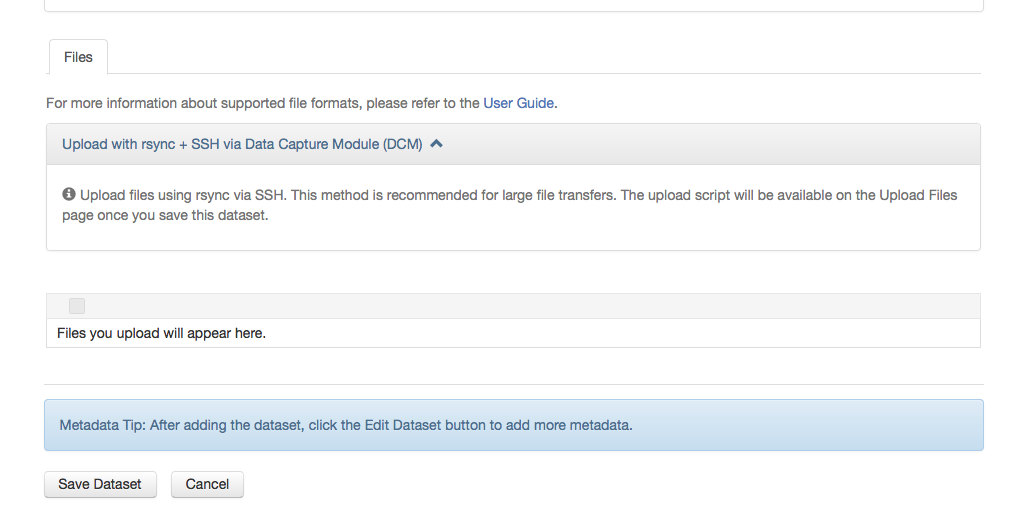
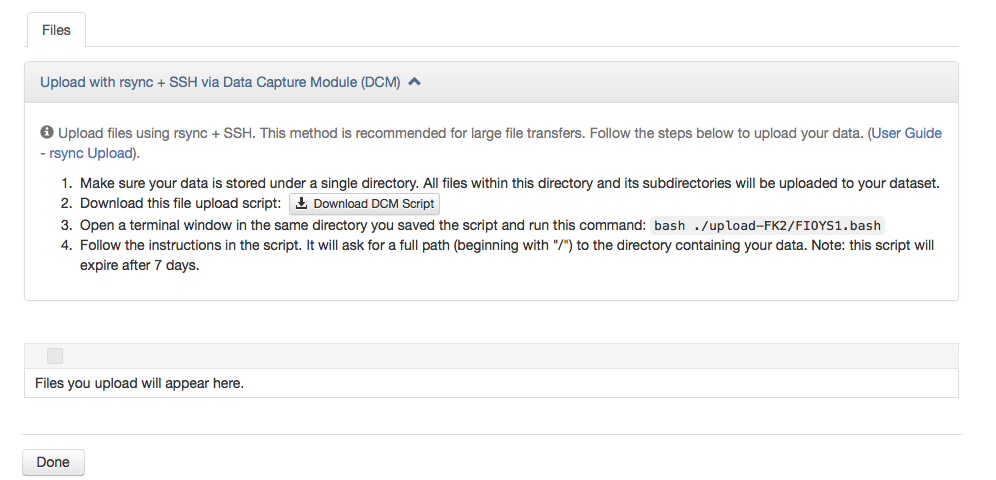
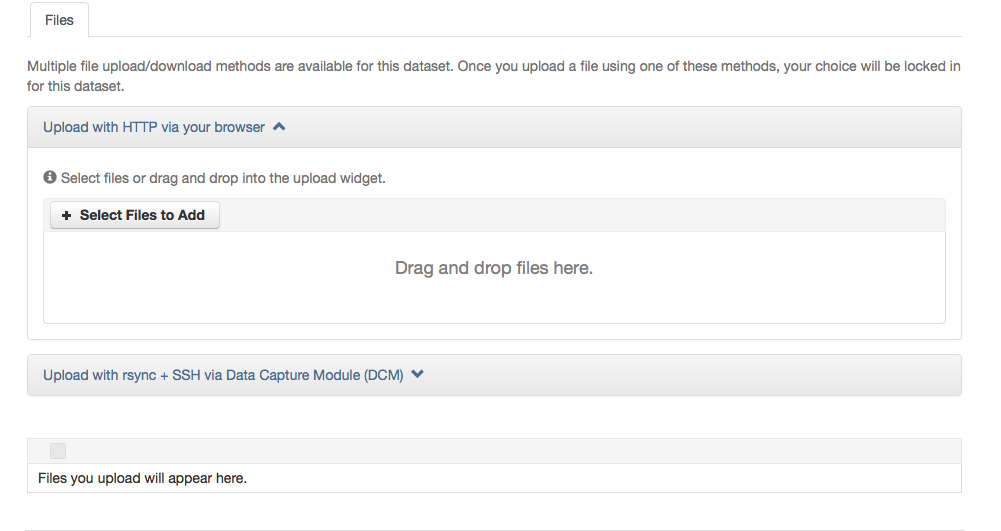
dual mode:
- [x] dataset w\ package file; "http upload disabled" is red, should be orange (unless I'm misinterpreting/misremembering from UX review)
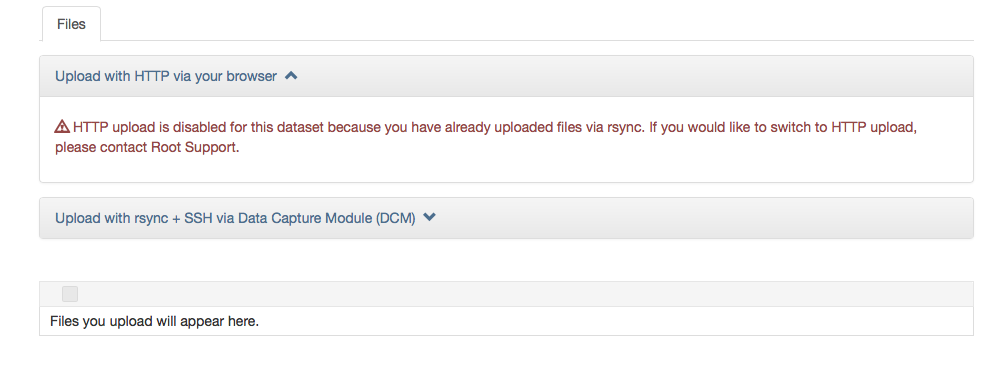
- probably not dual-mode specific; but "upload package file; delete package file; add/edit files page" shows red "DCM couldn't generate script" error. This is not an error (DCM won't provide a script for a dataset where the files have already been validated), but the logic required to distinguish this from an actual error may mean it's better handled elsewhere.
both modes:
- [x] new version release of DCM (for new text), and bump version on dataverse side.
pameyer
on 25 Sep 2018
@pameyer -- I was at a loss with that one. Initially, there was render logic that would hide that table, but it also resulted in an empty Edit Files pg when you delete a file. I can take another look at the render logic and see if there is another workaround for both workflows.
Didn't realize this at first, but it appears that the delete functionality is broken on the Edit Files pg. You click "Save Changes" and instead of going to the dataset pg with a success msg, the Edit Files pg refreshes, with an empty table and a "Done" button.
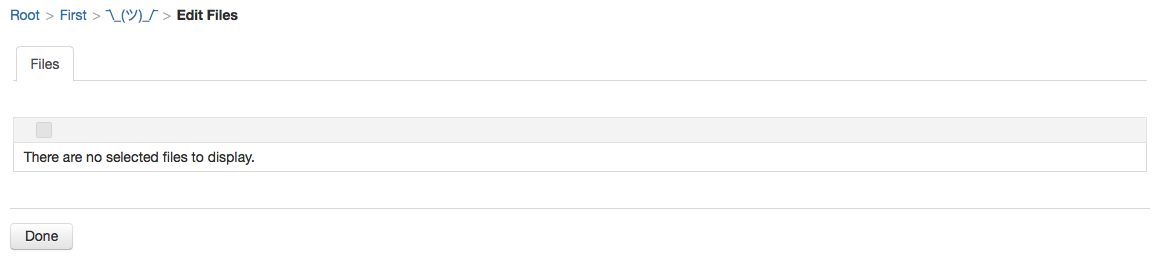
Also, reviewed Pete's "upload package file; delete package file; add/edit files page" workflow and error msg and since this is something that exists for rsync-only as well, we aren't going to hold up dual-mode to improve this error handling related to script generation vs DCM won't allow another script to be generated because you violated it's rules about deleting packages.
Lastly, there appears to be some strangeness with the file replace workflow as well. Working to diagnosis it, but it looks like maybe the file.addreplace.error.replace.new_file_has_different_content_type confirmation popup is being flashed on the page.
mheppler
on 25 Sep 2018
Discussed remaining to-do issues with @sekmiller so we can swarm and get this to done!
- [x] Improve render logic to display empty files table with "There are no selected files to display" msg on Edit Files pg after you delete a file, but NOT display empty files table with "Files you upload will appear here" msg that is inaccurate for rsync uploads
- [x] Edit Files pg, when you delete a file, Save Change btn is broken
- [x] Update Replace File pg with new "Replace File" pg title, and hide rsync upload widget because you can not replace dataverse package files (note: must check if Replace option appears in Edit btn dropdown on file pg for package files...)
- [x] The
fileTypeDifferentPopuppopup for Replace File that displays "The original file (...) and replacement file (...) are different file types." warning msg just blinks on the page and disappears, which appears to be the result of@formbeing added to the hiddenAllUploadsFinishedcommandButton on editFilesFragment.xhtml in commit 8dffc46bbdc9e8782efcdb82c8c974411ca39385 - [x] Remove duplicate
/resources/js/dropins.jslink, as well as duplicateopenDropboxChooser()function from dataset.xhtml, both are also included in editFilesFragment.xhtml - [x] Change red error msg styling to orange warning msg styling for "HTTP upload is disabled for this dataset because..." msgs in the HTTP upload panel
mheppler
on 26 Sep 2018
Wanted to add some additional information about the 827072f12a832c51d188080063625b70ac9f0719 commit above -- "Improved render logic for filesTable on editFilesFragment to only show with empty msg if a file was deleted in the Edit File view".
Once upon a time, the editFilesFragment was made to be an include that could be used on more than one page (7c7e1e0259d426680e9279de997197652932aca6). I believe there may have been some render logic related to authentication in the filesTable dataTable that was a remnant and was no longer needed.
#{(datasetPage or (dataverseSession.user.authenticated and permissionsWrapper.canIssueUpdateDatasetCommand(EditDatafilesPage.dataset)))}
The rsync upload workflow does not require this dataTable to be displayed with the emptyMessage "Files you upload will appear here." The changes to dual-mode brought that msg back into rsync-only and is also not required in dual mode. So new render logic was added to the table, removing the unnecessary authentication render logic as well as the logic to always display it on the dataset pg.
#{!empty EditDatafilesPage.fileMetadatas or !EditDatafilesPage.showFileUploadFragment()}
This new render logic only displays the dataTable when it is empty in the Edit Files workflow after you have deleted every file(s) displayed in the table, which then displays the proper "There are no selected files to display" as the emptyMessage.
Edit Files:

Create Dataset:

mheppler
on 27 Sep 2018
With my latest check in you can delete a file in the Edit Metadata workflow. IF the list of files is empty the buttons will not revert to "Done" because you must press "Save Changes" complete the delete. Or "Cancel" if you change your mind. Again.
sekmiller
on 5 Oct 2018
Related issues
 sparrowjack63
·
43Comments
sparrowjack63
·
43Comments
 bmckinney
·
75Comments
bmckinney
·
75Comments
 eaquigley
·
44Comments
eaquigley
·
44Comments
 scolapasta
·
49Comments
pdurbin
·
45Comments
scolapasta
·
49Comments
pdurbin
·
45Comments