Dataverse: Attempts uploading large (up to 4g) files via web. Will test command line workarounds.
We've uploaded files (Mp4's and zip's) of various sizes (1g, 1.5g, 2g, 2.5g, 4g, 4.5g), on three servers of varying specs, with some unexpected results. I will provide the specs and the results from those tests in a followup. We planning to test the same servers with the same files using the recommenced command line workarounds and will report those results.
 laulandn
All 22 comments
@laulandn thanks, yes the two command line workarounds (ways to upload files without using the GUI) are in the API Guide:
- SWORD: http://guides.dataverse.org/en/4.8.5/api/sword.html#add-files-to-a-dataset-with-a-zip-file
- native: http://guides.dataverse.org/en/4.8.5/api/native-api.html#datasets (Look for "A more detailed “add” example using curl". Examples in #4255 might be helpful as well.)
 pdurbin
on 26 Jan 2018
pdurbin
on 26 Jan 2018
These were all "Upload Dataset Files" web uploads using Chrome on Linux.
System specs (all Amazon AWS)
- prod: "m4.xlarge", 16g ram, 2.5g cpu x 4, / =20g, /ebs=100g
- train: "t2.xlarge", 16g ram, 2.5g cpu x 4, / =20g, /ebs=40g
- dev: "m3.medium", 4g ram, 2.5g cpu x 1, / =8g, /ebs=100g
The "m4.xlarge" style notes are Amazon, and can denote cost and bandwidth(?) among other things.
NOTE: We didn't plan the specs as much as had them grow organically.
File sizes tested:
1g, 1.5g, 2g, 2.5g, 3.5g, 4.5g, 6g
mp4's and zips of the same (relative) sizes.
Dataverse upload size limits were set to 5g.
We are using apache, and I didn't modify any timeouts, etc.
Results (size limit, all under succeeded):
- prod: froze at 4.5g
- training: froze at 2.5g
- dev: froze at 1g
(I left the frozen ones in that state for 4+ hours)
It looks like there might be an Amazon effect, because the results tracked the Amazon "sizes".
I will test FireFox and Mac/Windows and report if there are any significant differences.
laulandn
on 29 Jan 2018
I've done a bunch more testing using many different client setups. I'm going to skip to the conclusions.
These are the things that affected maximum successful file upload size (largest attempted was 4g):
- Operating system and browser don't seem to have a major impact...as long as the machine can run its own OS that is. I had a small machine that struggles with Win10 but did fine with Linux.
- The size (cpu/memory) of both the client and server had large impacts but not as much as expected.
- The #1 impact is network bandwidth. Going from wired to wifi caused successful file size uploads to drop anywhere from 1/2 to 1/8 or worse on the same client.
- Using zip files vs raw files did not seem to have as much effect as expected. With the caveat that the zips I used only had 2-10 files in them, although the files, and final sizes, were the same as the raw files I used (i.e. up to 4g in size).
- I did not test tabular data files, files used were mostly very large MP4's and zips.
In all cases "success" is defined as the progress bar completing, ability to save changes to the dataset, and to publish it. (and/or subsequently delete/destroy both the files and/or datasets)
When the upload "failed", the progress bar would complete filling to the right, but then stop there and no other feedback was given. Waiting up to 24 hours showed no changes. Stopping, reloading and trying again gave same results.
Let me know if you need any more rigorous testing and/or info.
And thanks again for continuing to improve such as awesome product!
laulandn
on 13 Feb 2018
One more comment: I haven't done any further testing of the workarounds since by definition they should "just work". All of the above tests were done from the Dataverse web ui using the same three servers I mentioned earlier.
laulandn
on 13 Feb 2018
@CCMumma gave us an update on this issue during today's community call. In the notes at https://groups.google.com/d/msg/dataverse-community/ZRwlwLUsy50/xR91ZGmvAgAJ I indicated that TDL has 4 GB upload working fairly reliably on wired connections and that they don't recommend wireless for uploads over 2 GB. We agreed that we'd keep this issue open to continue to think about supporting large file upload in the UI.
pdurbin
on 27 Feb 2018
Sounds good. I think 4gb wired 2gb wifi is reasonable for now.
laulandn
on 28 Feb 2018
During Tuesday's community call @amberleahey mentioned that they'd like to support 10 GB uploads. Here's what I wrote in the notes at https://groups.google.com/d/msg/dataverse-community/EmBtB_wDBAo/FdxYkEu6AQAJ
"(Amber) In addition to linking to large files that are externally hosted, we're also thinking about trying to scale the system to support what we're calling "medium" sized files, moving them to object storage. We're evaluating S3 and Swift. We want to be able to bypass uploading files to a temporary folder. We think this might be a bottleneck. Looking for a 10 GB range. We also want to look into the rsync Data Capture Module (DCM) but also talk to the community about something browser based."
@qqmyers mentioned that the Command-line DVUploader would also benefit from this idea of not using a temp file. Docs on the uploader can be found at http://guides.dataverse.org/en/4.11/user/dataset-management.html#command-line-dvuploader
pdurbin
on 28 Feb 2019
Since PRs #4522 and #5466 which made network and proxy timeout errors visible, and thus allowed admins to set timeouts high enough to handle larger files, I'm not aware of testing on the limits of file size beyond a few GB (successful at ~4GB at TDL). (Note that #5466, which is in v4.11, fixed this functionality after it broke in some version after last spring, so testing on v4.11 would be best).
If Amber or others have done testing at 10GB+, I'd be interested in hearing the results, and any info on whether the limits are just the amount of time it takes over http given the user's bandwidth (hard to fix without switching to gridftp/Globus), some slowdown in glassfish/disk, or with the post-processing time (e.g. for zip files where Dataverse unpacks the contents after upload prior to users seeing files appear). Or if there really is some size at which something breaks.
 qqmyers
on 28 Feb 2019
qqmyers
on 28 Feb 2019
So we are still investigating potential bottlenecks to try and isolate these upload and download file issues for larger than 2GB files.
One thing I've been doing is testing medium file upload in other similar systems, potentially (minus the processing which happens in Dataverse, another thing to evaluate scaling). Here are my results from uploading a 9.7GB zip to Zenodo:

This took about 4.5 hours, the user experience wasn't that great (if you navigate away from the upload form, its unclear whether or not the upload is progressing), but it did work! I'm going to test on another browser based cloud storage utility we have here called SWIFT browser.
 amberleahey
on 1 Mar 2019
amberleahey
on 1 Mar 2019
4.5 hours is a long time but cool that the Zenodo upload worked. Given the number of hours, anything that supports restarting the upload, such as rsync, would be a better solution. At least for downloads you can add the --continue flag to wget and many browsers are able to pick up where they left off. Uploads are trickier. In practice, we have been know to tell users to give us a hard drive with the data. I described this replace-the-file hack at https://groups.google.com/d/msg/dataverse-community/DDIGmmRe8oE/xMLMjOuxBgAJ
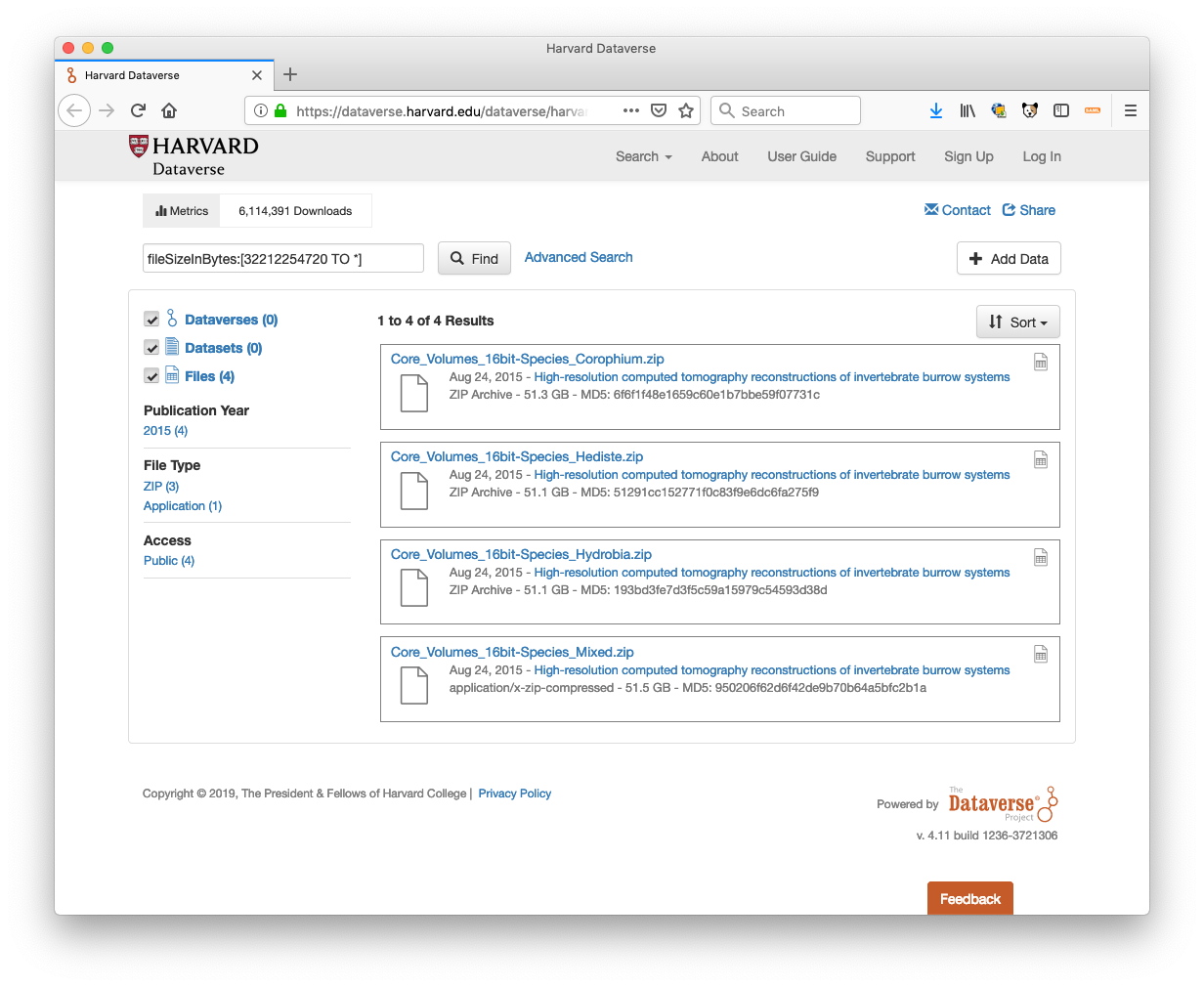
By using fileSizeInBytes:[32212254720 TO *] as a search query on Harvard Dataverse, you can see that this hack has allowed us to give files in the system that are upward of 50 GB:
pdurbin
on 1 Mar 2019
Hi @pdurbin yes we've tried that route for uploading larger files via backend replacing and it does work but isn't really a sustainable solution for these medium to large file sizes. We'd like to find a solution that is browser based that end users can initiate. I totally agree 4.5 hours is very long! We can do better than that.
Testing some of the direct to cloud upload options including AWS browser and multipart APIs and SWIFT it looks like we can upload files that are 10GB in size (single file) in around 5 minutes. Bypassing Dataverse completely through some kind of direct upload/ linking tool embedded in the dataset 'add files' form might be a nice solution.
Is there already an issue created for direct upload/ linking to cloud storage (or external storage) yet? I'm thinking we might want to scope how this could talk to Dataverse and how generic it would need to be.
amberleahey
on 11 Mar 2019
@amberleahey hi! I think you should go ahead and create a new issue. As you mentioned on the call the other day ( https://groups.google.com/d/msg/dataverse-community/EmBtB_wDBAo/FdxYkEu6AQAJ ), you're looking for a simpler solution than TRSA (#5213), even though it's somewhat related. I can't remember if you've commented on the new "Command-line DVUploader" yet but it's something you might want to try, even though it isn't browser based: http://guides.dataverse.org/en/4.11/user/dataset-management.html#command-line-dvuploader
pdurbin
on 11 Mar 2019
I think our needs are similar to TRSA although they might be interacting at a more granular level (in terms of indexing metadata at the file and variable level) but really would benefit from an API that read/wrote from direct storage or external storage and passed a file link for upload and download in DV.
We will also take a look at the command line DVUploader, thanks for the reminder! Will get started on another issue in the meantime for tracking direct to storage upload/links to files.
amberleahey
on 11 Mar 2019
Hi @amberleahey - are you planning to make it easier to transfer data in and out of the storage drivers configured for Dataverse, bypassing the application server, or are you looking for a non-TRSA way to index the metadata from a file at an external storage source into Dataverse (or both)?
 djbrooke
on 13 Mar 2019
djbrooke
on 13 Mar 2019
@djbrooke I think both. but not more than file link (temp Url similar to DV-s3 configuration for downloads), checksum, and file size. I think we can get these from the storage and send to DV for indexing.
amberleahey
on 14 Mar 2019
Just so I'm understanding....
- It would be (for example) @amberleahey 's job to get the large file on S3 somehow, in the same bucket Dataverse is using.
- Dataverse's job to take the path to the uploaded file as input and then rename the file to Dataverse convention (e.g. 16977e9770b-f416fa6309a1) and become "aware" of the file by adding it to the database and Solr. (This would be API-only the start rather than in the GUI.) At the end, it would look like a normally uploaded file.
Do I have this roughly right? The main ideas here are:
- Bypass Glassfish on upload.
- Put the file in the same S3 bucket so it's "close" to other files Dataverse is handling.
Come to think of it, there's no reason why this feature should be tied to S3. We could apply the same thinking to files on the file system or Swift. In fact, once upon a time, before the "package" idea was invented, we had (unmerged) code that would crawl a file system and add files, making Dataverse aware of them. In fact, that code might be merged but subsequently changed before a release. At the time I was saying that we could try to support the use case "here's a hard drive with a big file on it... can you somehow get it into Dataverse?" 😄
pdurbin
on 14 Mar 2019
Seconding @amberleahey's facet of this request: Here's another use case (part of a local study I'm working with, that might reasonably be stored on a dataverse) with individual zip files close to 10GB:
https://zenodo.org/record/3236625#.XQm3UYhKibg
In addition to being able to store on Dataverse, I'd like to be able to speed the access of others to the dataset: e.g. pinning it to my own IPFS cluster or seeding a torrent of the file. (If either of those were standard ways to find/download it)
 metasj
on 19 Jun 2019
metasj
on 19 Jun 2019
I wonder if #5954 is related here.
 poikilotherm
on 19 Jun 2019
poikilotherm
on 19 Jun 2019
https://docs.aws.amazon.com/AmazonS3/latest/dev/PresignedUrlUploadObject.html might be useful somewhere in this...
qqmyers
on 22 Jun 2019
"By the way we are very happy to share that we are able to upload files with 20GB size via http and also through DVuploader tool. We had to set higher timeout value for glassfish and apache and it worked." -- @Venki18 from https://researchdata.ntu.edu.sg at https://help.hmdc.harvard.edu/Ticket/Display.html?id=282331#txn-6192485
pdurbin
on 24 Oct 2019
FWIW - #6490 implements the presigned upload URL approach I mentioned above. That PR supports direct upload to S3 via the web interface and API/DVUploader.
qqmyers
on 10 Jan 2020
I'm going to close this, as the DVUploader, #6490, Rsync, and other options exist or are in process of being built.
djbrooke
on 23 Jan 2020
Related issues
 BPeuch
·
4Comments
BPeuch
·
4Comments
 Fernand0S
·
4Comments
Fernand0S
·
4Comments
 bsilverstein
·
3Comments
amberleahey
·
3Comments
BPeuch
·
3Comments
bsilverstein
·
3Comments
amberleahey
·
3Comments
BPeuch
·
3Comments