Dataverse: "Submitted for Review" message appearing on published versions of datasets can confuse dataset contributors and curators/admins
After this workflow...
- The depositor creates a dataset and submits it for review
- the dataset is published by a curator
- the depositor edits the dataset and submits a second version of the dataset for review
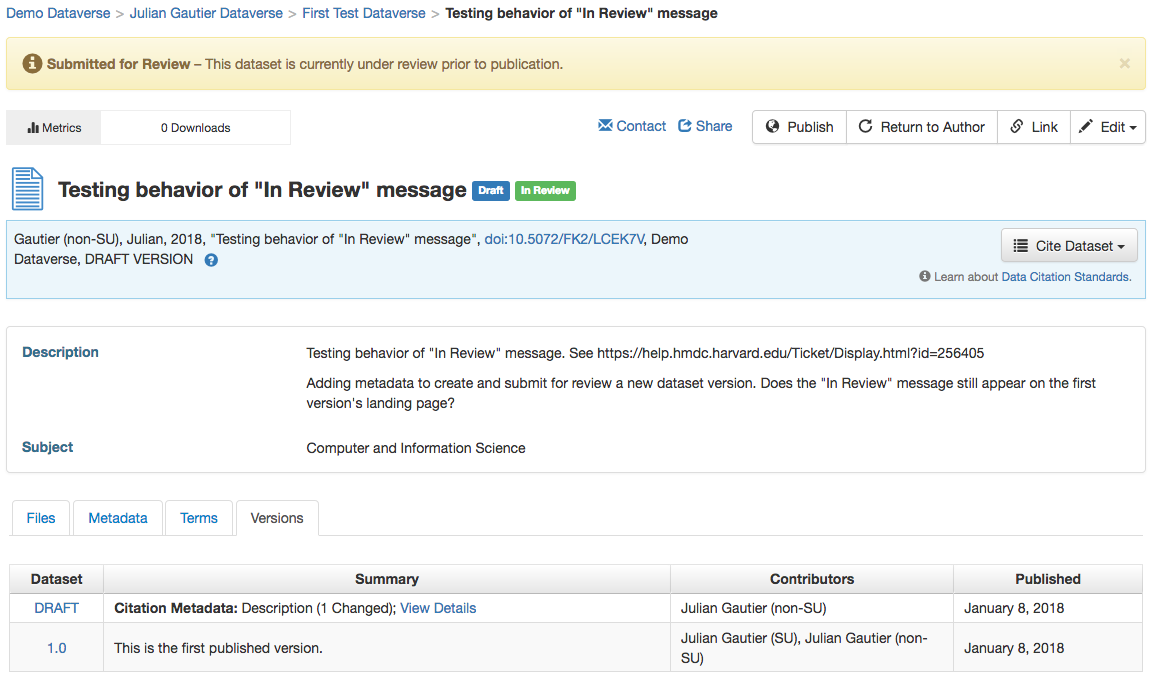
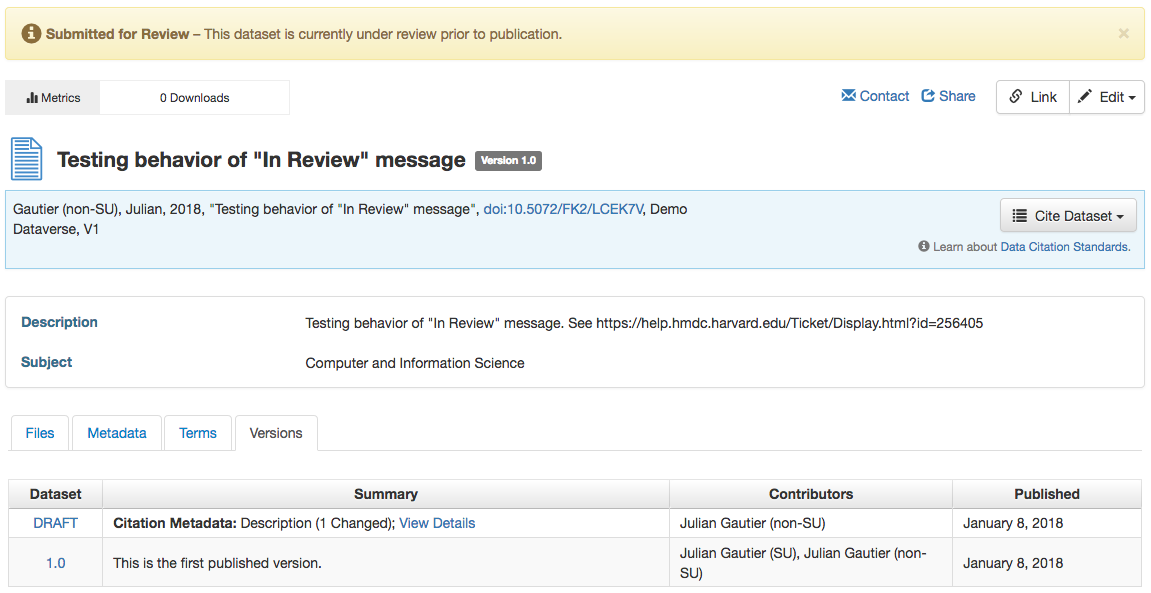
... the yellow "Submitted for Review" message exists on all versions of the dataset, although only the draft version is actually submitted for review. The first version is already published/publicly accessible.
The message appearing on pages of published dataset versions can be confusing to the researcher who's deposited the dataset because it looks like the dataset has never been published.
It can also be confusing to the curator who lands on an already published version of the dataset, but sees the "Submitted for Review" message, and doesn't know how to publish or return the dataset. (Doesn't know to click on the draft version link in the versions tab.)
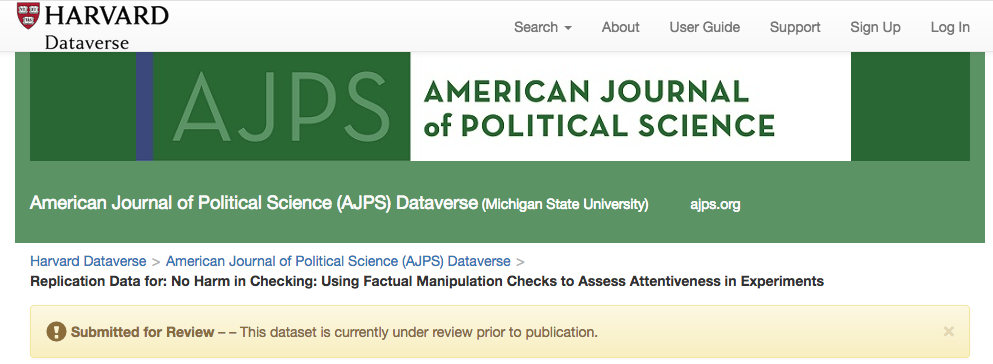
This message is also displayed to users who have no access to the dataset, including guest users not logged in.
Message on draft version page of dataset:
Message on first published version of dataset:
This is seen on Harvard Dataverse and demo.dataverse running 4.8.4.
 jggautier
All 11 comments
Thanks @jggautier. This was noticed during load testing for the move to AWS.
 djbrooke
on 23 Feb 2018
djbrooke
on 23 Feb 2018
This message is also displayed to user without any access related to the dataset, as well as guest users not logged in.
 mheppler
on 23 Feb 2018
mheppler
on 23 Feb 2018
I assume that this used to work fine but a regression slipped in. @jggautier and @mheppler seem to be talking about version 4.8.4, which is what's in production as of this writing.
 pdurbin
on 26 Feb 2018
pdurbin
on 26 Feb 2018
@djbrooke, @mheppler, @sbarbosadataverse, @dlmurphy and @TaniaSchlatter discussed this briefly and agreed that everyone (anyone logged out or logged in with permissions on the dataset) should see the message only on the draft version of the dataset. Already published dataset versions should not have this message.
This issue was prompted by a support ticket from a dataverse curator who landed on an earlier, already published version of a dataset, saw the "Submitted for Review" message, and didn't know how to publish or return the dataset. He didn't know to click on the draft version link in the versions tab. I think our proposal to remove the message from all versions of the dataset that this curator sees would not help him realize that he needs to navigate to the draft version of the dataset in order to publish or return to it to the author. But we agreed that this scenario happens very rarely - we have no evidence that curators often land on older versions of datasets whose drafts they need to publish or return to the author - so it doesn't need to be considered at this point.
jggautier
on 10 Jul 2018
@matthew-a-dunlap and I just discussed this regression. In my case I wasn't logged in but I can see the "Submitted for Review" message:
pdurbin
on 13 Nov 2018
We should only show on drafts.
djbrooke
on 28 Nov 2018
To solve the issue with "Submitted for Review" alert msg's being displayed to guests/or users without permsions, I added canUpdateDataset() render logic to the lock msg section of the DatasetPage.java bean.
        if (dataset.isLocked() && canUpdateDataset()) {
            ...
        }
In that if statement, there are dataset lock warning msg's for multiple workflows, including, DatasetLock.Reason.Workflow, DatasetLock.Reason.InReview, DatasetLock.Reason.DcmUpload, and DatasetLock.Reason.pidRegister. Those locks msg are included on more than just the draft version of a dataset, because there are "Edit" and "Upload Files" btn's on all versions that are disabled while the dataset is lock.
Because of these other workflows, I added render logic that determines if you have permission to see these buttons, and not the render logic that only shows the msg while viewing a draft version of a dataset.
I have discussed with @jggautier and @dlmurphy we determined that if we improved the msg text, it should reduce confusion regarding the draft version vs older published versions.

Also included in this fix are improvements to the writing format and style of the other lock msg's. Those changes included are:



mheppler
on 3 Dec 2018
Suggestions for revisions to the above messages, based on input from @scolapasta and @mheppler:
Dataset Locked -- This dataset is locked until publication.
File Upload in Progress -- This dataset is locked while its data files are being transferred and verified.
Publish in Progress -- This dataset is locked while its file persistent identifiers are being registered or updated.
 dlmurphy
on 4 Dec 2018
dlmurphy
on 4 Dec 2018
The submit for review banner issue is fixed but the in review tag is broken when viewed from the dataverse page:

I should say I think the in review banner is fixed but not 100% sure of logic:
do not display to any user without edit perms and then to those with edit perms, still show it on published version but indicate it is the draft version that is under review but still lock dataset unless you are have publish perms.
 kcondon
on 13 Dec 2018
kcondon
on 13 Dec 2018
@kcondon I will stop by to review the screenshot above with you, ~but I believe this is a result of an old javascript cache in your browser. I have pulled this branch and tested again locally and all looks kosher here~.
Comment above retracted. What I was looking at was the My Data pg. I am now seeing this problem on the dataverse pg of my localhost. Will report backing on findings...
Submitted for Review warning alert render logic:
- Only display to any users with edit permissions
- Display it on all dataset versions (with msg text to indicate it is the draft version that is under review)
- Lock dataset (edit, upload, etc) for all users except those with publish permissions
mheppler
on 18 Dec 2018
@kcondon We found the cause of the weird banner on the home page, so I think this is ready for QA. Also, re-merged with the latest from Dev.
 sekmiller
on 18 Dec 2018
sekmiller
on 18 Dec 2018
Related issues
djbrooke
·
4Comments
djbrooke
·
3Comments
jggautier
·
4Comments
 bsilverstein
·
3Comments
bsilverstein
·
3Comments
 amberleahey
·
3Comments
amberleahey
·
3Comments