Dataverse: Multiple formats under "Download All" dropdown
Since many repositories include code that expects data files to be in a particular format, it's frustrating that dataverse defaults to downloading data files as .tab.
IMHO, the default should be the original file format, with options for all the others.
 acoppock
All 44 comments
I do see your point. The rational behind this behavior has been to take the user's data, that may have been in some proprietary format - like SPSS or Stata - and change it to tab-delimited, for archival purposes, since it's a format that's guaranteed to be readable without any special software... And then it makes sense that this format becomes the default. Admittedly, it probably makes less sense with files that were originally CSV (now that we support converting CSV files into tabular data...). If nothing else, CSV is just as good of an "archival format" as tab-delimited...
So, once again, I do see your point. Still, this is very, very ancient legacy and it would honestly be difficult for us to just change this behavior, without upsetting or at least confusing many existing users. But we should still be able to make it less frustrating for users like you.
First of all, we already have an issue that's very close to the head of the dev. queue that will add an option for the user to opt out of converting a file to tabular data in the first place. Kind of a nuclear option, really - because then you would not be able to do things that require tabular metadata. So, not sure if that will help with your use case.
And then we can make it configurable for individual files. As in, keep the default behavior as it is now - tab. is the default download format; but make it possible to specify, per file, which format should be the default.
Also, it sounds like you were talking about downloading files programmatically, via API calls. I'm assuming you were able to work around this, using our API methods. Should be relatively easy, to first look up a file and determine if it's tabular or not, and if it is, ask for the original, instead of the default file. Still some extra stuff to do, of course - but doable.
To summarize, we are open to suggestions, and we should be able to make the download API better suited to your needs - via extra options/features, etc. But just changing the default behavior for every existing tabular file may not be an option, for legacy reasons.
Cheers.
 landreev
on 17 Jul 2017
landreev
on 17 Jul 2017
Ah I see!
Purpose 1: archiving. .rdata is likely not a great archive format, so I see the need to convert here. I think the right approach is to convert all data.frames in an .rdata file to tabular, not just the first one. Leaves open the question of what to do with r objects that are not data.frames.
Purpose 2: downloading. I’ve been using the website, not downloading programatically. The main point of friction for me is when I use the check box to select all files in an archive. That’s when it would be especially useful to have the default be the original file format. And I think this point is not r-specific — it’s been frustrating when the replication .do files call for the .dta versions of things but I only have the .tab!
But since changing these defaults appears to be hard for legacy reasons, perhaps the moment to fix things is to have a drop-down on the “download” button associated with the multi-file download that says, “download all files as original.”
I also like users being able to set the default download type per-file. I would use such a feature.
Thanks very much for your response,
Alex
On Jul 17, 2017, at 6:10 AM, landreev notifications@github.com wrote:
I do see your point. The rational behind this behavior has been to take the user's data, that may have been in some proprietary format - like SPSS or Stata - and change it to tab-delimited, for archival purposes, since it's a format that's guaranteed to be readable without any special software... And then it makes sense that this format becomes the default. Admittedly, it probably makes less sense with files that were originally CSV (now that we support converting CSV files into tabular data...). If nothing else, CSV is just as good of an "archival format" as tab-delimited...
So, once again, I do see your point. Still, this is very, very ancient legacy and it would honestly be difficult for us to just change this behavior, without upsetting or at least confusing many existing users. But we should still be able to make it less frustrating for users like you.
First of all, we already have an issue that's very close to the head of the dev. queue that will add an option for the user to opt out of converting a file to tabular data in the first place. Kind of a nuclear option, really - because then you would not be able to do things that require tabular metadata. So, not sure if that will help with your use case.
And then we can make it configurable for individual files. As in, keep the default behavior as it is now - tab. is the default download format; but make it possible to specify, per file, which format should be the default.
Also, it sounds like you were talking about downloading files programmatically, via API calls. I'm assuming you were able to work around this, using our API methods. Should be relatively easy, to first look up a file and determine if it's tabular or not, and if it is, ask for the original, instead of the default file. Still some extra stuff to do, of course - but doable.
To summarize, we are open to suggestions, and we should be able to make the download API better suited to your needs - via extra options/features, etc. But just changing the default behavior for every existing tabular file may not be an option, for legacy reasons.
Cheers.
—
You are receiving this because you authored the thread.
Reply to this email directly, view it on GitHub https://github.com/IQSS/dataverse/issues/4000#issuecomment-315665081, or mute the thread https://github.com/notifications/unsubscribe-auth/AIvwQQjXDapmAx0aDXr71ZCsAOdwRpIuks5sOt7GgaJpZM4OWxWd.
acoppock
on 17 Jul 2017
Hello! Is there any chance of letting users have a choice within the "download all" menu between download all in tabular format and downloading all in original formats? That would seem to address your concern about legacy users. You could then possibly run some analytics, and if it turns out that 98% of users prefer to download in .tab vs original format, we will all know definitively that this was a fringe issue; if it turns out the other way, we will know that there was demand for original file formats.
If this won't be possible, could there be some documentation on repositories for which data files have been converted? I ask because recently some colleagues were trying to download files from dataverse to replicate a study and were unable to do so, and had no idea even what the source of the problem was or how to address it based on the repository they had navigated to. Perhaps a pop-up menu when you select "download all" explaining the issue?
 setgree
on 16 Nov 2017
setgree
on 16 Nov 2017
Regarding the last request:
This would be very easy to achieve on the API side (i.e. to make that API method that zips up multiple file bundles accept an extra "format=original" option; that would make it use the originals for the files that were converted to tabular data...)
On the dataset page, can we add an extra checkbox ("use originals"?) next to that download-multiple-files-button? (I mean, of course we can add a checkbox - but can we do it without making the whole thing more, rather than less confusing?)
landreev
on 16 Nov 2017
This checkbox would make my life a lot easier, thank you!
setgree
on 16 Nov 2017
Also, we have a github issue already opened for giving the dataset owner an easy way to "un-ingest" a tabular data file; i.e. to convert it back to the original. Let's implement it finally. It should be easy. And for a researcher whose needs are primarily archival (like providing replication data to the research community), who don't need/care about running online data exploration/analysis on the site, this by itself would solve an issue like this one.
landreev
on 16 Nov 2017
Also, we have a github issue already opened for giving the dataset owner an easy way to "un-ingest" a tabular data file; i.e. to convert it back to the original. Let's implement it finally. It should be easy
Yep. Good old #3766.
 pdurbin
on 17 Nov 2017
pdurbin
on 17 Nov 2017
What's the actual action item here?
 oscardssmith
on 6 Jul 2018
oscardssmith
on 6 Jul 2018
@oscardssmith good question. You could bring this up during backlog grooming to get a "definition of done".
pdurbin
on 9 Jul 2018
No worries, I'll bring it to backlog grooming once it's a priority and there is some consensus on an approach.
 djbrooke
on 9 Jul 2018
djbrooke
on 9 Jul 2018
We just discussed this issue in our weekly design meeting.
For this issue, our goal is to allow users to easily “download all” files in a dataset in their original format using our UI.
On the dataset page's "Download all" button, we want to add two dropdown options:
Archival (open) format
Original format
But we're open to suggestion, leave your comments if you have any thoughts on this solution.
 dlmurphy
on 11 Jul 2018
dlmurphy
on 11 Jul 2018
Do we want to have logic to only give these options in the case where you have ingested files? Also to consider, currently we only ingest tabular files, but we have discussed the idea of other types of ingest, e.g. ingest zip files as a dataverse "package". Nt sure if this affects the design for this at this stage or if it's a bridge we should cross later.
 scolapasta
on 11 Jul 2018
scolapasta
on 11 Jul 2018
Yes, we only want to offer these options in cases where the distinction matters, i.e. when the dataset has at least one ingested file.
dlmurphy
on 11 Jul 2018
That's what I assumed. Just wanted to make sure it got tracked in the issue. Thanks!
scolapasta
on 11 Jul 2018
One quick thought is that @mheppler and I seem to agree that we shouldn't hack on the code until after we've refactored it for #4656.
pdurbin
on 11 Jul 2018
Is #4464 a duplicate of this ticket?
pdurbin
on 13 Jul 2018
assigning to @dlmurphy to talk about this at next estimation session
djbrooke
on 6 Aug 2018
Notes from sprint planning:
- The option to download original files will only show up when there's at least one file that has been ingested
- We should add some text (guides and manifest file) that the original format refers to the files themselves and not the hierarchy
djbrooke
on 8 Aug 2018
My understanding of this story is to: Create a dropdown for the download multiple files button when any of the selected files have multiple formats. Have the first option in the dropdown be the original format.
 matthew-a-dunlap
on 13 Aug 2018
matthew-a-dunlap
on 13 Aug 2018
I've been looking over our DataAccess API and am trying to understand how that should match up with this new functionality. In DataAccess, we have the option to download multiple files in a bundle or "All Formats" for one file. Do we want to add new API functionality to support bundle downloads in the original format? Or am I missing some way to do this with our current functionality.
Answer: Sounds like we need to extend the current API functionality.
matthew-a-dunlap
on 13 Aug 2018
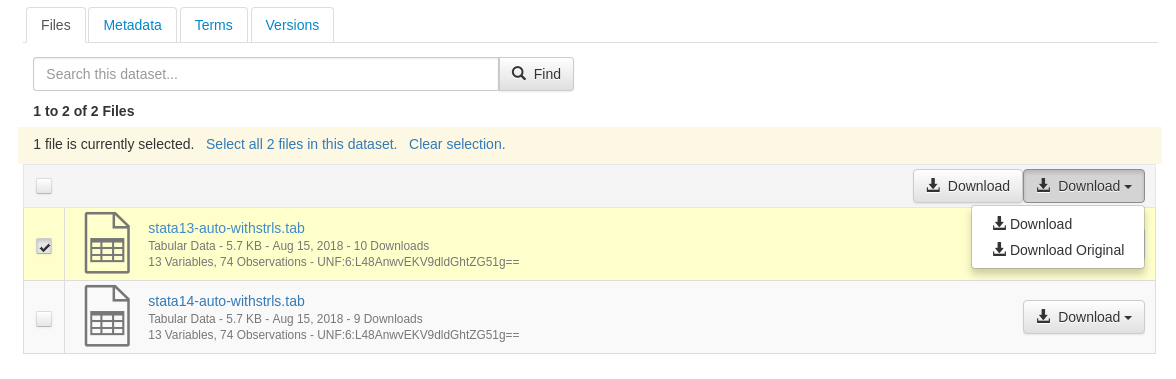
I have a working flow for downloading multiple files in their original format, both for API and UI.
Still to do:
- [ ] More IT tests
- [ ] Cleanup
- [ ] Documentation
- [x] Download all render logic
- [ ] Description of UI changes
matthew-a-dunlap
on 16 Aug 2018
I will never stop accidentally closing the issue thinking that I'm deleting my entered comment text
matthew-a-dunlap
on 16 Aug 2018
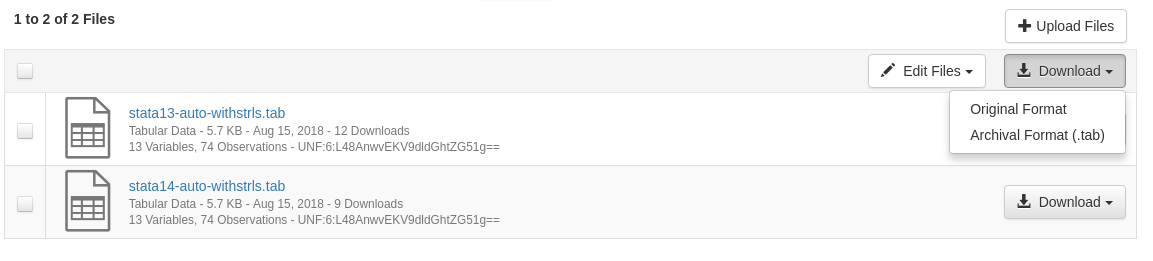
Below is the current state of the download dropdown when a dataset has tabular files. If it does not, the download multiple remains a button, the same as before.
matthew-a-dunlap
on 16 Aug 2018
So sadly this story is not wrapped up at this point. I had not realized all the popups in play with guestbook and restricted. There are a few bugs I am aware of with the new "Original Format" code as well as one bug that existed from beforehand
- [x] Downloading multiple files (one .dta and one .json) with "original format" as a non-logged in user.
- Returned zip only contains the dta. Doing "Archival format" returns both files.
- Doing the same download when logged in returns both files
- [x] Downloading multiple files (one restricted .dta, one unrestricted .dta, one .json) as non-logged in user with guestbook required
- downloading "original format" returns .tab instead of .dta. This is because
FileDownloadServiceBean.writeGuestbookAndStartDownloadalways callscallDownloadServlet()with the boolean parameter for original as false. This needs to be passed correctly.
- downloading "original format" returns .tab instead of .dta. This is because
- [x] After breaking checks out of writer, we are no longer getting the correct size for original files. See Access.java line 530
- [ ] Preexisting: Download multiple files as non-logged in user with guestbook. The first time downloading multiple files creates the zip. The second time only one file is downloaded.
- Restricted does not matter
- Refreshing the page allows the first download to be zip again
For all these bugs I tested them with a non-logged in user, but quite possibly still happens with logged in user without permissions. I am checking them off as they are fixed
matthew-a-dunlap
on 17 Aug 2018
I will be online tomorrow morning to work on this more
matthew-a-dunlap
on 17 Aug 2018
I have made the decision to return a 207 status code (multi-status) when not all the files requested can be returned. This is in part to support the upcoming work in #4576, as now the UI can tell when the API result was incomplete without having to look inside the zip's manifest.
We originally looked at 206 (partial result) but that code is actually to be used when a user specifically requests a partial result.
When that work is taken on, the API should be updated to return more info alongside the 207 code for better API support. This code may need to be built upon more, for as of right now the zip is created before the UI can be informed of the size.
matthew-a-dunlap
on 17 Aug 2018
So here is an overview of what was changed:
- Download Original is an option for download in both UI and API
- The
/api/access/datafilesnow accepts an argument of?format=originalto trigger original downloads.
- This required a refactor, and it was fairly substantial as I also added the 207 status code for when not all requested files are provided.
- There are some possible performance impacts for
/api/access/datafiles, as getting info out of the nested inner methods in the function required doing some actions twice. - I wrote an AccessIT test suite to help with this development. It is not as deep as I would have preferred for
/api/access/datafilesas the tests do not confirm contents, instead they just compare zip sizes.
- The Dataset Page now has a dropdown for downloading multiple selected files, only when a dataset has tabular data with an original format
- The UI previously called
/api/access/datafilesand continues to do so. - To wire this flow, minor changes were made around guestbook, as the selected option needed to pass through.
- I also had to make a very minor change to the file page to provide an argument to not download original through guestbook
- The UI previously called
- There are notes above on some bugs created from this work that I fixed
Note one thing I did not have time to change was a UI bug I found that was pre-existing:
- Download multiple files as non-logged in user with guestbook. The first time downloading multiple files creates the zip. The second time only one file is downloaded.
- Restricted does not matter
- Refreshing the page allows the first download to be zip again
I had hoped to add persistentId to /api/access/datafiles but ran out of time.
matthew-a-dunlap
on 18 Aug 2018
Hey, I reviewed and approved the changes in the branch.
However, it looks like there are 2 merge conflicts between the branch and develop, on DatasetPage.java and FileDownloadServiceBean.java.
I'm going to move it back into dev. briefly for this to be resolved.
landreev
on 22 Aug 2018
@kcondon
Sorry for the delay with this.
BTW, I re-tested the dev. brunch - using the batch download with only one checkbox clicked IS working correctly, with or without guestbooks.
Putting this into QA now.
landreev
on 23 Aug 2018
OK, back into dev it goes.
(Since Matthew's code was written before Jim's changes were merged in, the case where a user clicks on the batch download button, while only one file box is checked isn't covered by his changes - the user gets the single file unzipped, but the "download original" selection isn't honored)
Will fix shortly.
landreev
on 23 Aug 2018
@kcondon I fixed the issue above (the one I showed you earlier).
Found another bug; it's in the dev. branch, meaning, it's an existing issue. But it's right in the code I had to work on now, so wanted to discuss the possibility of fixing it as part of this issue. Let's talk tomorrow.
landreev
on 24 Aug 2018
(meant to drag this into QA, since it's ready; but I'll show you the "pre-existing condition" I mentioned earlier and/or mention it in standup)
landreev
on 24 Aug 2018
This is the unrelated bug that was found in the process of working on this:
We are not supposed to count downloads by datasets owners/admins/otherwise authorized personnel from draft versions.
But the following condition exists:
If you go to a draft, of a PUBLISHED dataset (i.e., at least one other, published version of the dataset exists), and try to download some files that also occur in a published version:
downloading these files one by one - does not increment the download count. (correct behavior).
Downloading the same files, but via the batch download button + checkboxes - download counts DO get incremented.
landreev
on 24 Aug 2018
Since there is a lot of poking around at the Download Selected Files btn functionality (AKA Download-All), I would like to reference this issue to see if the recent pagination or work in this issue has magical resolved this bug.
File Download: Changing the list of selected files for a multipage file list results in bad download all behavior. #3711
If not, maybe there is something that we've learned here that can be added to that issue in order to add more detail about what is going.
 mheppler
on 24 Aug 2018
mheppler
on 24 Aug 2018
Issues found so far:
- [x] 1. When working with an unpublished dataset, download archive format downloads original file, whether as part of multiple download or single file. This works when published or draft of a published dataset, regardless of whether the file is published.
- [x] 2. When register files lock is in place, download selected select list is grayed out but individual downloads work.
- [x] 3. When download an unrestricted tabular file in original format, see a large stack trace in server.log:
A system exception occurred during an invocation on EJB FileDownloadServiceBean, method: public void edu.harvard.iq.dataverse.FileDownloadServiceBean.writeGuestbookAndStartBatchDownload(edu.harvard.iq.dataverse.GuestbookResponse)]] - [x] 4. Might want download popup to be reviewed by design when some of the files are restricted and you do not have access. This is ok, preexisted this build.
- [x] 5. Downloading a combination of restricted for which you don't have access and another file sometimes results in wrong file download. dataset Test Download Original 3, first 2 files.
 kcondon
on 29 Aug 2018
kcondon
on 29 Aug 2018
The stack trace from writing a GuestbookResponse (item 3.) is likely something I introduced; as I rewrote all the parts involved pretty heavily (when making Matthew's and Jim's changes work with each other; and when fixing the unrelated download count bug mentioned above).
landreev
on 29 Aug 2018
@kcondon just to confirm, in 3. above, this is a "batch" download, with just one file checkbox checked, correct?
landreev
on 29 Aug 2018
@kcondon back into QA - please retest.
landreev
on 30 Aug 2018
(number 2. on the list is a pre-existing condition; and there may be some reason why it was done that way. Everything else should be working properly now)
landreev
on 30 Aug 2018
FYI: the batch downloads should stay enabled while the dataset is locked now.
Still kinda confused as to why we apparently had invested all that effort into disabling downloads in locked datasets in the first place... Was there some good reason for that nobody remembers now??
landreev
on 30 Aug 2018
Found one last bug:
-When downloading multiple files via api as guest, issue with unpublished/published files
kcondon
on 30 Aug 2018
@matthew-a-dunlap
Copy-and-pasting from/expanding on the slack discussion on making the full permission check pass before generating any zipped output, in order to produce the 207 return code, for posterity:
For the purposes of 4000, I feel like we probably should revert back to checking the permissions as we generate the zipped stream. We may still end up using the current implementation when working on #4576; but let's think about it then. The 207 code may beuseful to have, for the API users (even though, it looks like it was never specifically requested in #4576 - it was something we offered along the way); but the UI users will
a) have no benefit from it; and
b) will be penalized by having to wait before the zipped output starts streaming. In the past, it was a serious enough problem that it was causing timeouts for some users (datasets with tons of small files?) - so that we ended up rewriting that API methods, specifically to use the streaming approach instead. Also, we have switched to a more expensive way of checking permissions - we are no longer cutting corners there, so it'll be even worse.
Also, c) for the UI users, we are already checking the permissions on the UI side (and are warning the users there, via a popup, that we are dropping some files that they cannot download); and, per #4576, we'll be doing the same for the files that have to be dropped because of the size limit. Meaning, when this API receives a call that's a redirect from the UI, it will only contain the file ids that the user is in fact allowed to download. We do of course want to double check that it is indeed the case; but no need doing it in a separate first pass, before generating any output.
So we may want the API to do both things. I.e., handle it the way you have it implemented now, by default: - run the full check, if any files have to be dropped - generate 207, only then generate output. But, also support some kind of a "start streaming asap" flag, to be used when we redirect the user to that API from the UI. But, again, we should probably address that when we work on #4576.
landreev
on 4 Sep 2018
This may not need another round of review but I am dragging it back in incase someone wants to put eyes on it.
matthew-a-dunlap
on 7 Sep 2018
I just want to express my excitement and enthusiasm for this ticket. Thanks for all the hard work! We're just moving our datasets to Dataverse and it probably would have been a dealbreaker if this wasn't in progress!
 makmanalp
on 10 Sep 2018
makmanalp
on 10 Sep 2018
Related issues
 BPeuch
·
3Comments
BPeuch
·
3Comments
 jggautier
·
4Comments
djbrooke
·
4Comments
jggautier
·
4Comments
djbrooke
·
4Comments
 raprasad
·
5Comments
raprasad
·
5Comments
 poikilotherm
·
3Comments
poikilotherm
·
3Comments
Most helpful comment
Ah I see!
Purpose 1: archiving. .rdata is likely not a great archive format, so I see the need to convert here. I think the right approach is to convert all data.frames in an .rdata file to tabular, not just the first one. Leaves open the question of what to do with r objects that are not data.frames.
Purpose 2: downloading. I’ve been using the website, not downloading programatically. The main point of friction for me is when I use the check box to select all files in an archive. That’s when it would be especially useful to have the default be the original file format. And I think this point is not r-specific — it’s been frustrating when the replication .do files call for the .dta versions of things but I only have the .tab!
But since changing these defaults appears to be hard for legacy reasons, perhaps the moment to fix things is to have a drop-down on the “download” button associated with the multi-file download that says, “download all files as original.”
I also like users being able to set the default download type per-file. I would use such a feature.
Thanks very much for your response,
Alex