Dataverse: File Upload w/ Rsync UI/Workflow changes
Users should be able to upload files via rsync. When rsync is available, users will not be able to upload via http methods.
The technical underpinnings for rsync are present, but we need to decide on what the UI/UX should be for rsync uploads.
 djbrooke
All 37 comments
During the 2016-09-08 SBGrid Sprint Planning meeting ( https://docs.google.com/document/d/1wWSdKUOGA1L7UqFsgF3aOs8_9uyjnVpsPAxk7FObOOI/edit ) this issue was given an effort level of "5".
The code that @bmckinney demo'ed lives at https://github.com/bmckinney/dataverse-canonical/tree/dcm-beta and it works (deployed to https://dv.sbgrid.org currently) but would probably benefit from @scolapasta and @mheppler taking a look so I'm going to assign this issue to them and me and Bill to figure out what happens next to this code.
 pdurbin
on 13 Sep 2016
pdurbin
on 13 Sep 2016
@bmckinney @djbrooke and I discussed this and I believe that what should happen next is for a branch to be pushed to the main IQSS repo so that @mheppler can easily switch to it and make UI improvements.
pdurbin
on 15 Sep 2016
There is a plan for design/usability in Trello: https://trello.com/c/Nbte37k1/9-sbgrid-rsync-file-uploads-4-8. In terms of timing, is it accurate to say that this is planned to be presented at June's Dataverse Community Meeting as production-ready code or at least a prototype?
 TaniaSchlatter
on 7 Apr 2017
TaniaSchlatter
on 7 Apr 2017
That's correct!
djbrooke
on 7 Apr 2017
We did a pre-test of the mockups with @pameyer and several issues came up:
(Linked mockups: https://projects.invisionapp.com/share/F3C9JRA8Z#/screens/240095406_Rsync_Create_Dataset_1)
For uploads, just using "rsync" is either too much information or too little. For downloads, it's probably the best word to use.
Pete expected to be able to copy the location of the rsync script (rather than download it to his laptop) so he could "wget" & paste the file into a terminal window that is open (via SSH) to the remote server where his data is stored and run it there.
The mockups led the data owner (Pete) to assume that the files he transferred were not encrypted during transfer.
Additional issues with the mockups:
- change the word "ingest" to "upload" – ingest is only for tabular data.
TaniaSchlatter
on 30 Jun 2017
UI IMPACT
As defined in the following mockup document.
Create Dataset
- [x] Render logic to hide upload file widgets
- [x] Help msg explaining, "_You must create your dataset before you can upload..._" and link to User Guide
Dataset (view/no files)
- [ ] ~Render logic to hide Metrics block~ (moved to #3998)
- [x] "Upload Files" button links to popup instead of Upload Files pg (no files uploaded)
- [x] Render logic to hide search block for dataset with 0 or 1 Files
- [x] Render logic to hide Edit Files button for dataset with 0 Files
Dataset (upload in progress, dependencies: #3942, #3561, #DCM-TBD)
- [x] In progress message: "DCM File Upload - this dataset is locked until the data files have been transferred and verified." (added to the bundle) (L.A.)
- [x] Upload Files" button ~disabled (allow edit metadata?)~ stays enabled - so that the user could download the script again; if they lost the first script; and/or to bump up the expiration date. (L.A.)
- [ ] ~Dataverse Package info displayed... (??? like we do with ingrest... ??? out of scope)~ (this can't be done, because, unlike tabular ingest, where the file already exists - as a non-ingested file - the package file has not been uploaded/created yet. - L.A.)
- [ ] ~File row inline blue/info msg block "_Upload in progress..._" displayed (just display empty table)~ (same reason as above - L.A.)
Upload Files (popup)
- [x] Help msg, "_Follow these steps to upload your data. To learn more about the upload process and how to prepare your data, please refer to the User Guide (link: {0}/{1}/user/dataset-management.html#file-handling-and-uploading)._"
- [x] Instructions with text link to download rsync upload script, bash command, full path beginning with "/", key expiration date, etc... ???. Done in a16a650.
- [ ] Clicking download bumps experation date (dependencies #DCM-TBD)
- [x] Clicking download locks dataset (dependencies #DCM-TBD)
- [x] Validation warning msg, "_Rsync script not available!_"
- [x] Change default
codestyling from Bootstrap from red to something less "WARNING" - [x] "Close" button
Dataset (view/has file/success-upload)
- [ ] ~Success msg explaining, "_The file has been transferred._" (text added to bundle in #3942)~ (the package datafile appearing on the page, and the dataset becoming unlocked again is serving as the success message - L.A.)
- [x] Disable "Upload Files" feature after successful file upload, warning msg "_hey, you can't upload any more files!_"
- [x] Validation warning msg explaining, "_You can not upload additional files without deleting the existing files first._"
- [x] Replace link to upload instructions popup with warning msg
- [x] Render logic to hide search block for dataset with 0 or 1 Files
- [ ] ~Render logic to hide Guestbook (??? any other related to-do items... ???)~ (moved to #3998)
Dataset (file table)
- [x] "Dataverse Package" friendly file mime type (MimeTypeDisplay.properties)
- [x] "Dataverse Package" file type icon (fontcustom.css; cube...???)
- [ ] ~Display no download count, download/map/explore/request access buttons~ (moved to #3998)
- [ ] ~Display "Local Access" path, "Download Access" rsync commands for various locations (with location name country in parentheses), "Verify Data" command~ (moved to #3998)
File
- [ ] ~Render logic to hide Metrics block~ (moved to #3998)
- [x] "Dataverse Package" friendly file mime type (MimeTypeDisplay.properties)
- [x] "Dataverse Package" file type icon (fontcustom.css; cube...???)
- [ ] ~Display no download count, download/map/explore/request access buttons~ (moved to #3998)
- [ ] ~New "Data Access" tab, displayed first, with help msg and labels/values to display "Local Access" path, "Download Access" rsync commands for various locations (with location name country in parentheses), "Verify Data" command~ (moved to #3998)
Notifications
- [x] "...datatset successfully uploaded and verified"
User Guide
- [x] Rsync Upload > File Handling + Uploading > Dataset + File Management
- [x] Remove support email from Linked Dataverses + Linked Datasets > Dataverse Management (reported in #4081, also found in rsync docs so closed that issue and fixed all references found in this branch)
Developer Guide
- [x] FontCustom > Tools
 mheppler
on 10 Jul 2017
mheppler
on 10 Jul 2017
Various "upload in progress" indicators have a dependency on both DCM changes (https://github.com/sbgrid/data-capture-module/issues/21), and supporting Dataverse <-> DCM API changes (#3942).
 pameyer
on 12 Jul 2017
pameyer
on 12 Jul 2017
In standup this morning I mentioned a few recommendations for this issue, but it turns out most of them actually apply more to #3998. But there's still one that's relevant here.
On the Upload Files popup (over the Dataset page):
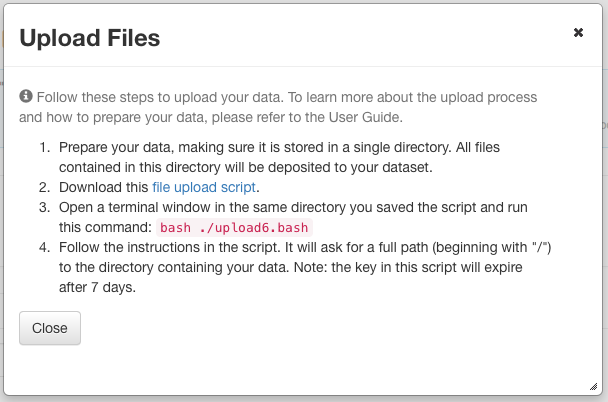
The red text on pink background ("bash ./upload6.bash") should instead be highlighted black text, as seen in this file page mockup:

This is because users report that when they see the red text, they think an error has occurred. I'll be making the same recommendation for the download pages in #3998.
 dlmurphy
on 1 Aug 2017
dlmurphy
on 1 Aug 2017
Reviewed the UI IMPACT outlined above and moved a few more of the items to the File Download w/ Rsync UI/Workflow changes #3998 issue.
mheppler
on 2 Aug 2017
I'm looking into the checklist items under the "Dataset (upload in progress)".
 landreev
on 15 Aug 2017
landreev
on 15 Aug 2017
@landreev sounds good. I'm looking at stuff under "Upload Files (popup)".
pdurbin
on 16 Aug 2017
The dataset is now getting locked when the user downloads the rsync script.
The locked page shows the "dcm upload in progress" (the message is in the bundle), until the package is uploaded.
I was having all sorts of issues with actually displaying the image and getting the page properly refreshed... so let's review this quickly.
landreev
on 22 Aug 2017
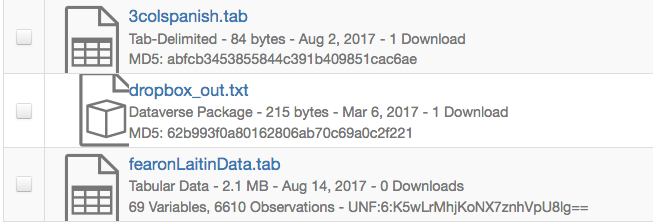
@mheppler I added code that properly identifies a package file as class "package". So the page is now showing the new custom icon; but it appears to be a little off center or something? - please see below:
landreev
on 22 Aug 2017
First pass notes:
- user scripts for interacting with previous APIs continued to work with no changes.
- is messaging about "supported file formats" on the bottom of the create page configurable (or in a bundle)?
- link to download transfer script looks like a link, but doesn't fully act like a link (aka - no copy/paste into wget; which from previous discussions is probably more effort than is justified to fix). Could we add text mentioning that this link won't work through copy/paste?
- Popup / download link continues to work when dataset is locked for transfer, so does API for script download.
- One suggestion for the "File Upload" notification text: "File Upload - this dataset is locked until the data files have been transferred and verified." (context being that the upload doesn't start until the user starts the transfer script).
- disabling uploads after successful transfer doesn't appear to work (upload files box still there / visually enabled).
- subject of success emails is "your file import job has completed"
- loading a dataset page triggers a warning "Problem getting rsync script: null". Proximal cause appears to be DCM not returning JSON when the HTTP status isn't 200 (which is fixable on the DCM side - https://github.com/sbgrid/data-capture-module/issues/22); root cause probably DV hitting
sr.pyunnecessarily. - loading dataset page also triggers Ejb exception, possibly, possibly not to previous.
- "delete file" drop down doesn't work "Error deleting physical file object while deleting DataFile 11 from the database". Fix deletion, or remove the drop down option? Possibly better to fix deletion; deleting the dataset shows same exception in logs (and reports success without deleting the dataset).
- incrementing expiration time on requests to DCM
sr.pyhttps://github.com/sbgrid/data-capture-module/issues/16 appears to be working as expected.
pameyer
on 24 Aug 2017
- "Problem getting rsync script: null". Not resolved after switching the DCM to return empty JSON list for non-200 cases. Further investigation showed that it was occurring when DV was requesting a transfer script for a dataset that had already been verified. Short version - this exception is unlikely to be hiding significant problems.
pameyer
on 24 Aug 2017
Continuing notes:
- "success message" gets sent when there's a failure of the package file rename (aka - user gets notification about success, but no files appear on dataset page). This failure mode is due to system mis-configuration rather than user action, but could still confuse users.
- "failure message" doesn't show up on the dataset page (aka - page user will potentially be reloading / letting refresh until their files show up). notification and email do go out; may be more effort than justified to change.
- failure message -> rerun script -> success message path works.
pameyer
on 24 Aug 2017
Can we decide who's going to work on addressing this stuff?
I stepped in last week to work on the dataset locks and status messages on the page. Do I own the rest of this ticket now? A lot of the things currently being discussed, I don't know much about at all. I'm sure I can figure it all out. But is there somebody else on the team who was involved in implementing these things earlier, for whom they make more sense already?
This thing is still sitting in code review (prematurely, it sounds like?); if I should just pull this back into the dev. column and work on it, let me know.
Some quick questions/ideas:
"Supported file formats" - what page is that? But yes, everything should be configurable. If something needs to be changed/hidden, when rsync is configured as the upload mode, I'm sure it can be done.
I didn't like the current lock message either; I can just go ahead and put the message you suggested into the bundle, unless anyone objects.
"Popup / download link continues to work when dataset is locked for transfer" - that I haven't been able to reproduce... Once the dataset is locked, the "download" button should be shaded and disabled... Is it some edge case, of having another browser window open, that still has the button enabled?? Yes, we can add an additional code check to the backing bean.
As for email notifications, are there any implemented currently? Or is this something that needs to be added?
Download link not copy-and-pasteable... Can we just replace the link with a button? Unless it's easy to add the target value to the link, to make it possibly to copy it... @mheppler ?
As for adding text explaining that it's not possible... I don't know, there is a lot going on in that popup already - not sure it's worth it. I would probably address it in one of the 2 ways above.
Disabling further uploads after a successful DCM upload - has somebody already worked on this? Or is this something new that needs to be added?
landreev
on 25 Aug 2017
In retrospect, I should've taken notes somewhere else and condensed them rather than using the comments on the github issue for that.
"supported file formats" is in the files panel of dataset.xhtml in create mode; but it does look likely that its in a bundle already.
"Popup / download link continues to work when dataset is locked for transfer" - I think this is a feature rather than a bug (aka - user downloads script, forgets where, they can download it again even though the dataset is locked for transfer).
Email notifications have been implemented; but we deferred some wording/UX stuff until now.
Download link / copy-paste: I think either of those suggestions would work.
pameyer
on 25 Aug 2017
Oh, this part:
"Popup / download link continues to work when dataset is locked for transfer" - I think this is a feature rather than a bug (aka - user downloads script, forgets where, they can download it again even though the dataset is locked for transfer).
I thought we were going to handle this by having the expiration date on the lock - ?
landreev
on 25 Aug 2017
Reworking previous few comments from good/bad/ugly mix into a checklist
TODO:
- [x] fixing deletion (delete on package files or datasets containing them fail); @landreev mentioned he'd work on that
- [x] rename failure / notification (success notification sent from batch import even when import has failed due to failure to rename package file); @sekmiller mentioned he'd work on that
- [x] link to download transfer script looks like a link, but doesn't fully act like a link (no copy/paste); swap with button (in preference to adding text)
- [x] "File Upload" Notification text change; @dlmurphy / @landreev mentioned taking a look
- [x] disabling uploads after successful transfer doesn't work (upload files box still there / visually enabled). @pameyer and @pdurbin decided to fix this with d217c64.
- [x] subject line for success emails is "your file import job has completed"; should be "your dataset $dataset_PID has been successfully uploaded and verified".
- [x] "failure message" (from DCM) doesn't show up on the dataset page (aka - page user will potentially be reloading / letting refresh until their files show up). notification and email do go out; may be more effort than justified to change. Should be testable by manual curl calls to
/api/datasets/:persistentId/dataCaptureModule/checksumValidationw\out DCM. @pdurbin talked to @pameyer about this after standup on 2017-08-29 and we decided we won't fix this. When the good news comes from the DCM, the yellow "in progress" notification disappears and the package is shown below, after the page refreshes. - [x] when dataset is locked, don't shift the "upload files" button to disabled UI state. Fixed in 4eae2e6.
good:
- DCM related APIs keep working
- user can download script when the dataset is locked (aka - when the user forgets where they put the script, or accidentally deleted it, they can re-download).
- failure message -> rerun script -> success message path works.
ugly (aka - not worth fixing currently):
- Ejb exceptions on dataset landing page
- "supported file formats"; @pameyer needs to track down how to customize the bundle these for deployment.
pameyer
on 28 Aug 2017
https://github.com/IQSS/dataverse/issues/4111 may be related to the delete issue.
pameyer
on 28 Aug 2017
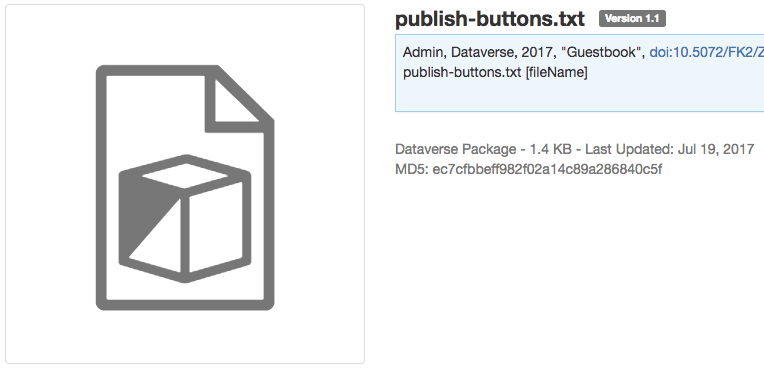
@pameyer not sure if warrented another to-do checklist item, so I didn't add it, but I'll be fixing the icons for Dataverse Package file types in Chrome.
mheppler
on 29 Aug 2017
@sekmiller the createPackageDataFile method in FileRecordWriter.java seems to be the one related to "when import has failed due to failure to rename package file".
pdurbin
on 29 Aug 2017
I realize I didn't reference my commit yesterday, to automatically link it to this issue. But I did check some code that should have fixed the delete issue above. Will mark it on the checklist.
And thanks @pameyer for the checklist - it helps a lot.
landreev
on 29 Aug 2017
Chrome is 👍

mheppler
on 29 Aug 2017
Another run-through:
TODO:
- [x] Minor text change to Upload Files popup; "Note: the key in this script will expire after 7 days." -> "Note: this script will expire after 7 days." (the transfer account expires, not the key).
- [x] ~No obvious way for a user to determine which datasets are locked (and/or which datasets don't yet have files).~ There's a workable way of doing this.
Good:
- DCM APIs still work
- delete works
- upload popup after upload/verify
- validation failure -> notify -> rerun -> validation success path still works
- rename failure fails cleanly enough (endpoint returns html w\ DV 500 page; no success message to user).
- wasn't able to break anything else
Ugly:
- didn't notice the "no obvious way to tell which datasets you haven't uploaded yet" sooner.
- deleting a package file from a draft dataset leaves an empty directory structure behind.
- success message is "the selected files have been updated"; could see this being confusing to end users.
- clicking on the dataset link the the "success message" ignores port in url scheme for the link (aka - dev environment on
localhost:8088haslocalhostin link target). Only link I've noticed with this behavior; very low probability of impacting users in production; does not need to be fixed in this issue.
pameyer
on 1 Sep 2017
From #3561:
- [x] Returning dataset to author sends two notifications and emails to author.
- [x] Two info messages are listed at top of a dataset submitted for review, 1 green success, submitted for review, 1 brownish yellow saying dataset is now in review.
- [x] When submitted dataset is in the process of being published, in review tag disappears but on the author's view, submit for review button is still visible and is once again enabled to be clicked, though it does say publish in progress at top of dataset. (this was fixed still in #3561)
djbrooke
on 7 Sep 2017
Re: two message blocks upon submitting a dataset for review, the green-success msg should only display after the user first clicks the submit btn, then the yellow-warning msg should only display when the user returns to the dataset, as an indicator the dataset is still in review.
mheppler
on 7 Sep 2017
@pameyer @michbarsinai - I have added the 4th lock reason, specifically for a dcm upload in progress. I decided it would be cleaner/easier to work with this way.
landreev
on 7 Sep 2017
@mheppler - yes, that's why the "two messages" issue was entered here. (we decided it was easier to address it after the merge). I'm working on it.
landreev
on 7 Sep 2017
Did a quick test pre QA:
- Minor doc issue, under File Upload Script, step 2, refers to a link but now a button.
- If download the transfer script from the popup and click "x" to close the popup rather than the close button, does not lock the dataset until page refresh.
 kcondon
on 8 Sep 2017
kcondon
on 8 Sep 2017
Regarding @kcondon's last notes:
- minor doc change - fixed;
- yes, the page refresh and the success message are tied specifically to the "close" button in the popup; I need to either tie the same function to the onClose() for the popup; or disable the "x" close checkbox? - Will figure it out tomorrow.
landreev
on 8 Sep 2017
Fixed the issue 2. that @kcondon reported lat night (closing the popup via the "x" box), by adding an ajax event="close" listener.
The branch should be ready for merging into the rsync download branch.
landreev
on 8 Sep 2017
Two restAssured errors uncovered after merge of #3561 into develop:
- [x] Email addresses should not be directly explosed
- Looks like a regression of a bug fixed in https://github.com/IQSS/dataverse/issues/3443
- https://build.hmdc.harvard.edu:8443/job/phoenix.dataverse.org-apitest-develop/edu.harvard.iq$dataverse/134/testReport/junit/edu.harvard.iq.dataverse.api/DatasetsIT/testExcludeEmail/
- Line 417 in DatasetsIT.java (I think)
- [x] dataFile.contentType is null/blank
- https://build.hmdc.harvard.edu:8443/job/phoenix.dataverse.org-apitest-develop/edu.harvard.iq$dataverse/134/testReport/junit/edu.harvard.iq.dataverse.api/FilesIT/test_006_ReplaceFileGoodTabular/
- Line 463 in FilesIT.java (I think)
 matthew-a-dunlap
on 8 Sep 2017
matthew-a-dunlap
on 8 Sep 2017
I'll take a look at the failing REST Assured tests.
pdurbin
on 8 Sep 2017
In ce0e97c I re-fixed #3443 about excluding email addresses from metadata export (they were being exposed), marked a method as deprecated to hopefully prevent regressions like this in the future, and added a "Privacy Considerations" section to the Installation Guide. I gave @matthew-a-dunlap a brain dump about the fix.
pdurbin
on 11 Sep 2017
In 840c7a2 @matthew-a-dunlap and I fixed a bug in native file add that appears in develop as of 9d319bd where if you upload a .dat file you get a 500 error rather than a proper JSON response. The 500 was resulting from a null user attempting to create a lock:
Caused by: java.lang.IllegalArgumentException: Cannot lock a dataset for a null user
    at edu.harvard.iq.dataverse.DatasetLock.<init>(DatasetLock.java:117)
    at edu.harvard.iq.dataverse.DatasetLock.<init>(DatasetLock.java:104)
    at edu.harvard.iq.dataverse.DatasetServiceBean.addDatasetLock(DatasetServiceBean.java:540)
I also tested adding the same file via the GUI but was unable to reproduce the bug. I can only assume this means that the GUI and the API are taking separate execution paths, which is unfortunate. Anyway, should be fixed.
pdurbin
on 12 Sep 2017
Related issues
 eaquigley
·
44Comments
pdurbin
·
86Comments
eaquigley
·
44Comments
pdurbin
·
86Comments
 borsna
·
60Comments
borsna
·
60Comments
 scolapasta
·
49Comments
scolapasta
·
49Comments
 omaralsoudanii
·
73Comments
omaralsoudanii
·
73Comments
Most helpful comment
Reworking previous few comments from good/bad/ugly mix into a checklist
TODO:
/api/datasets/:persistentId/dataCaptureModule/checksumValidationw\out DCM. @pdurbin talked to @pameyer about this after standup on 2017-08-29 and we decided we won't fix this. When the good news comes from the DCM, the yellow "in progress" notification disappears and the package is shown below, after the page refreshes.good:
ugly (aka - not worth fixing currently):