Dataverse: Notifications: page slow to load and results in time-out when many undeleted notifications
internal server error when trying to load notification page for sonia in production, likely due to trying to load a large number of notifications/need "Delete all" function
This is unusable for me at this time.
related to #2891
 sbarbosadataverse
All 14 comments
This is probably due to the way notifications are rendered:
- get all notifications for the current user
- process every notification, i.e. do lookups for dataverse, dataset, datafile or user that the notification is about and print it
A user notification should be processed once, at the time that it is generated. If possible, notifications should be generated and processed asynchronously.
 bencomp
on 27 Jan 2016
bencomp
on 27 Jan 2016
I have the same issue on production under my own account.....
 raprasad
on 20 Sep 2016
raprasad
on 20 Sep 2016
Another possibility may be referrals to dataverse objects that no longer exist. (I thought that was fixed but maybe not for some older notifications.)
A "live" list of notifications with potentially broken objects may be found here*:
https://services.dataverse.harvard.edu/miniverse/qc/broken-notifications
- The code behind this list may need some vetting with someone more familiar with the notifications model
raprasad
on 22 Jun 2017
Another dataverse admin on Harvard Dataverse reported problems seeing this error - Internal Server Error - An unexpected error was encountered, no more information is available - when trying to view his notifications in the application. https://github.com/IQSS/dataverse/issues/2892
He's not sure how recent the problem is, but maybe it would be helpful to use his account to test the ideas in this github issue about why this is happening? (In the meantime, the admin can see the notifications from his email).
 jggautier
on 10 Jan 2018
jggautier
on 10 Jan 2018
 pdurbin
on 10 Jan 2018
pdurbin
on 10 Jan 2018
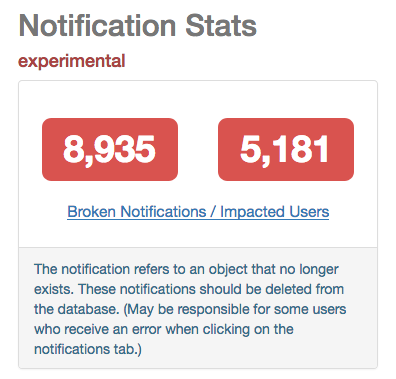
May be helpful: https://services.dataverse.harvard.edu/miniverse/qc/dashboard
- Scroll down to Notification Stats section.
- drill down for 1st section: https://services.dataverse.harvard.edu/miniverse/qc/broken-notifications
- you may be able to drill down on this as an admin user (don't remember)
- drill down for 1st section: https://services.dataverse.harvard.edu/miniverse/qc/broken-notifications
For a known user (maybe user in ticket with consent) or with a copy of the database:
delete user's notifications no longer pointing to a valid object
delete user's older notifications that are unread (maybe some db schema changes have them pointing elsewhere)
- see if problem persists
In theory, neither of the above should matter but if it's not obvious, it's worth experimenting (with a db copy). With schema changes over a couple of years, it could be something simple that slipped through
raprasad
on 10 Jan 2018
@raprasad thanks. Very interesting. Here's a screenshot:
pdurbin
on 10 Jan 2018
- I had the same (unresolved) error for my DV production account. gut feeling is that it's early messages before code put in place to deal with pointers to non-existent objects. (of course if it's a new user having these issues, then that's wrong)
raprasad
on 10 Jan 2018
In theory it should not be related to pointers to deleted objects as we handled that from the beginning of 4.0. Of course, it's always possible that there's a bug there, but this has worked before.
 scolapasta
on 10 Jan 2018
scolapasta
on 10 Jan 2018
Feel free to use my production account to troubleshoot. Currently the notifications page is broken. e.g. you can steadily delete notifications until it works--and see if it's a certain type of notification that's blocked, something else with the account, etc, etc. (slack for any needed info)
raprasad
on 10 Jan 2018
Our users also experience this issue in 4.15.1
Can the notification feature be optimized for better performance?
 lwo
on 19 Nov 2019
lwo
on 19 Nov 2019
@lwo clearly, something needs to be done. Thanks for speaking up. The release notes for 4.16 ( https://github.com/IQSS/dataverse/releases/tag/v4.16 ) advise that older notifications should be deleted: "In making the fix for #5687 we discovered that notifications created prior to 2018 may have been invalidated. With this release we advise that these older notifications are deleted from the database."
That's not really a fix, of course, but I wanted to put it on your radar since you're at 4.15.1.
Are you interested in working on this issue?
Also, are you aware that I set up a new system to try to help understand the priorities of the installations of Dataverse around the world? I'd like to invite you to create a board for IISH at https://github.com/orgs/IQSS/projects
For more background on this idea, please see the "boards for prioritizing issues (for each installation of Dataverse)" thread at https://groups.google.com/d/msg/dataverse-community/z8ugn2KzNSc/zt7COeRYBQAJ
pdurbin
on 19 Nov 2019
+1 for a "delete all" function. Currently when I updated a data set with 40 files, I have to manually clear 40 notifications through a not-very-responsive UI :(.
 mankoff
on 10 Nov 2020
mankoff
on 10 Nov 2020
I'm also stuck with this issue - it could also be reduced by allowing customisation of notification preferences.
e.g.:
| What | Email | App |
| ------ | ------ | ---- |
| Dataset Ingest Successful | [] | [] |
| Dataset Ingest Fail | [:x:] | [] |
| Dataset Publication Successful | [] | [] |
| Dataset Publication Failure | [:x:] | [] |
| Dataset Deletion | [:x:] | [] |
My outlook rule filters hundreds of emails a week straight into the bin, my notifications tab became unresponsive a long time ago and manually deleting each one was painful even during testing let alone after a month of production running!
 joeHickson
on 1 Dec 2020
joeHickson
on 1 Dec 2020
Related issues
 BPeuch
·
3Comments
BPeuch
·
3Comments
 poikilotherm
·
4Comments
raprasad
·
5Comments
poikilotherm
·
3Comments
poikilotherm
·
4Comments
raprasad
·
5Comments
poikilotherm
·
3Comments
 bsilverstein
·
4Comments
bsilverstein
·
4Comments
Most helpful comment
Our users also experience this issue in 4.15.1
Can the notification feature be optimized for better performance?