Dataverse: Dataset Tabular File Ingest - Displaying both "success" and "ingest in process" message is confusing/wrong
There should maybe be no "success" message until the files completes ingest
 sbarbosadataverse
All 11 comments
@oscardssmith have you noticed this while working on #3767?
 pdurbin
on 25 Jun 2017
pdurbin
on 25 Jun 2017
Closed the issue Tabular File Ingest: No message indicating page will refresh on its own, or if user needs to manually refresh #1798 as a duplicate of this issue.
Recently saw this issue in my localhost develop branch, build d317d23d1bc31ca2d8cc3a0f2c32ab6ad2431112, and agree that is confusing and should be clearer in the UI what the process will be for the end user.

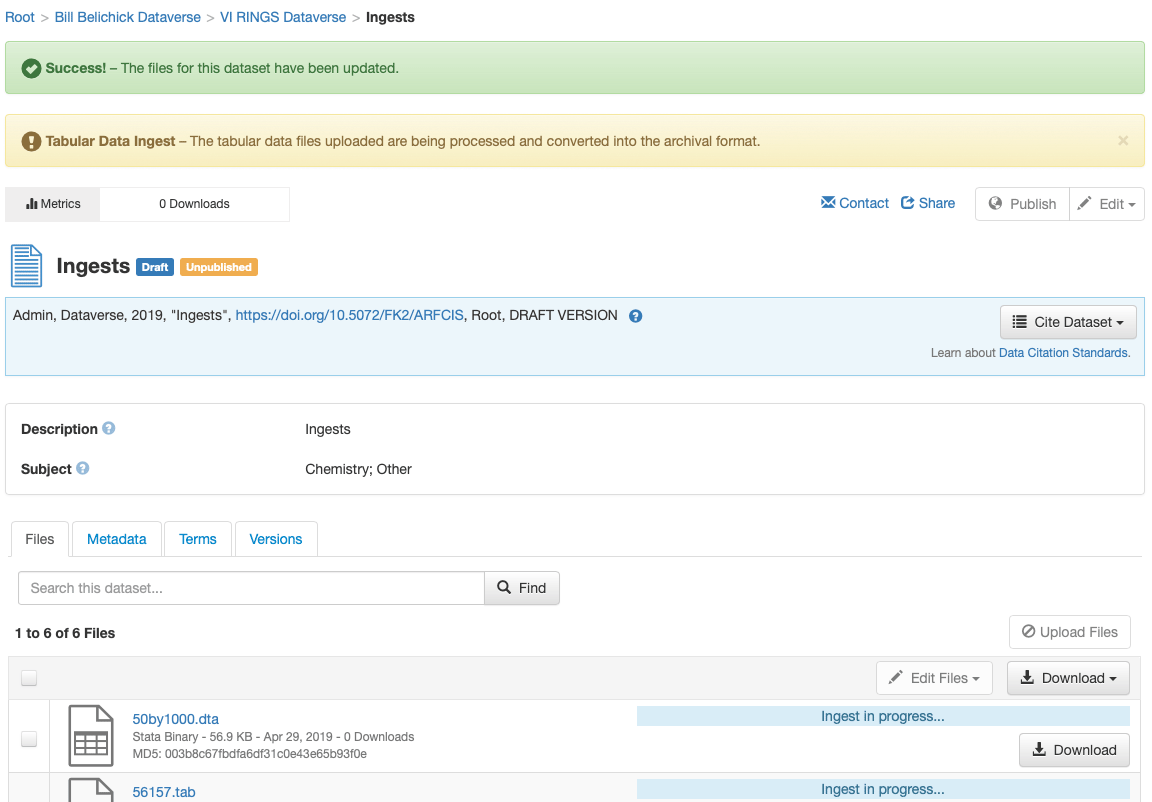
The "Ingest in progess..." message will automatically be removed from the page, but the disabled state for the Publish, Edit and Upload buttons remains. In addition to the buttons, there is other functionality on the page that is broken when the page doesn't refresh properly, including the Explore button being added to the file table row, as well as the "Upload Completed with Errors" hover popover linked to the warning icon not working, as reported in issue #3491.
Recently, we have developed "workflows" for publish, that use the warning message block to inform the user about the dataset lock status. We should apply similar messaging to the file ingest workflow, explaining why those buttons are disable and for how long. We should also fix the page refresh to properly update _everything_ on the page.
 mheppler
on 2 Apr 2018
mheppler
on 2 Apr 2018
- Improve messaging on the page (top of page and on ingesting files, possible lock messaging). The files are there and available for download, but the ingest process is not yet complete. Expectations setting is important.
- Verify that the auto-page refresh is working as expected (work with @sbarbosadataverse on this one).
 djbrooke
on 10 Apr 2019
djbrooke
on 10 Apr 2019
Issues #3491 and #3794 are also page-refresh related, and might be able to be addressed with this issue.
 TaniaSchlatter
on 22 Apr 2019
TaniaSchlatter
on 22 Apr 2019
At sprint planning the other week I mentioned this tweet about waiting for ingest to complete: https://twitter.com/b_schaffner/status/1108158686265044993

The animated version is even better:

But the good news is that ingest succeeded! Then he tweeted this: https://twitter.com/b_schaffner/status/1108173691224031234

pdurbin
on 25 Apr 2019
Confirmed... no action needed...
- In my localhost I was able to see the "Ingest in progess..." msg and disabled buttons all refresh as expected, issue #1798 reported this required manual refresh of the page, but I didn't have to, that issue was closed as a dup already, nothing we need to do here...
- Was also able to confirm that the Explore btn displayed properly when the "Upload Completed with Errors" warning icon displayed, I think this means we can close #3491...
- I have not seen the UI issues reported in #3794 in a long time and I suggest we close that issue as well...
Ingest in progress... to-do list...
- Utilize dataset lock workflow to display warning msg (see screenshot) with new msg text
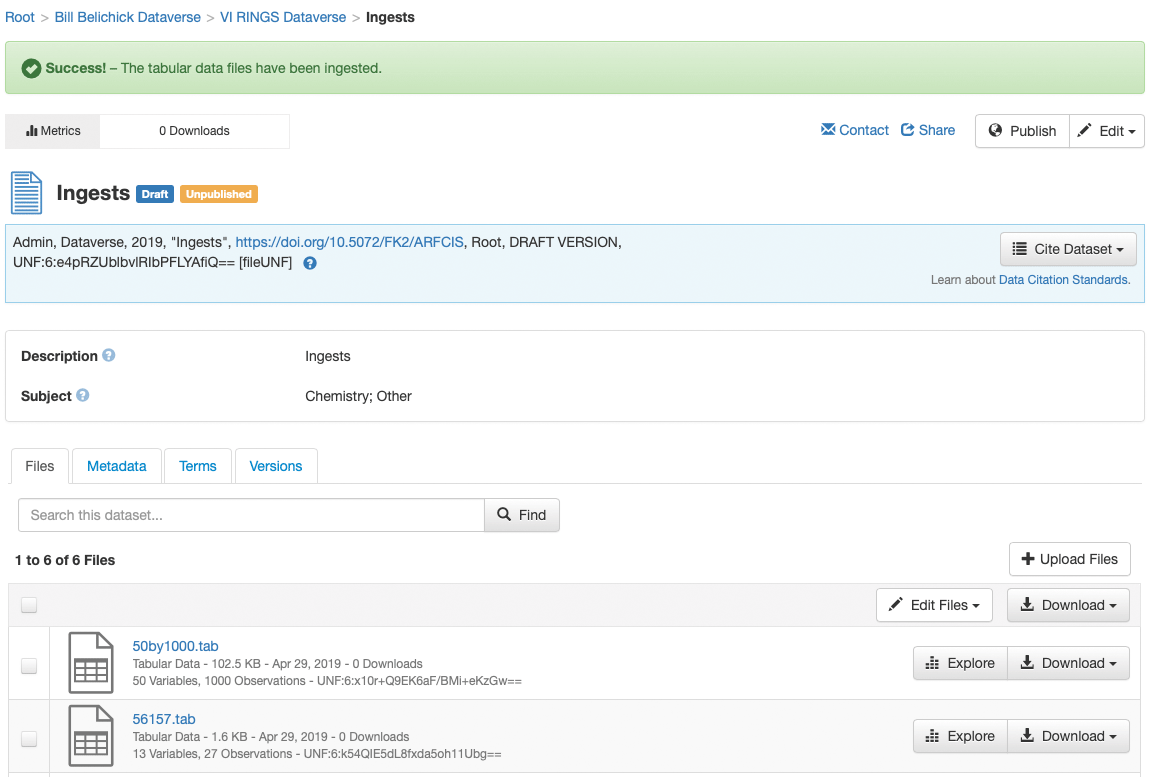
- Create new ingest success msg text and display that when ingest completes (see screenshot)
- Fix the "Upload Completed with Errors" popover to display when you hover over the warning icon after you have selected that file and the table refreshes, breaking the jquery binding to trigger popover
[DATASET LOCKED, INGEST IN PROGESS...]
[DATASET INGEST SUCCESS...]
mheppler
on 29 Apr 2019
@mheppler @sekmiller Issues found, testing with Chrome:
-The explore button still needs a manual refresh to appear, at least when a configure button is also configured. Happens with 50by1000 .dta and collier-1740.csv but not some very small .csv files. #3491 is not only about upload with errors but displaying explore on ingest.
-Getting weird upload failures for some larger files, eg. feaironlaitin.dta
Upload unsuccessful (400: Bad Request). (2MB): other failures say network error for 3MB zip files. Would someone try there against dataverse-internal?
Retested on dvn-build, works. This appears to be a server issue.
-Sometimes the configure/explore buttons appear immediately, while ingest is in progress. Noticed during multiple upload/delete/upload.
 kcondon
on 7 May 2019
kcondon
on 7 May 2019
Coordinated with @kcondon to try and replicate some of the issues he saw. Here is what I confirmed locally in the 2709-ingest-warning-messaging branch.
- fearonLaitainData.dta uploaded and ingested with no trouble, expect when the page refreshed when ingest completed, there was no success msg or Explore btn displayed -- the Explore btn appears if you manually refresh
- 50by1000.dta had a completely different successful ingest... the Explore btn appears while "ingest in progress..." and "Dataset Lock" warning msg are displayed... the page never refreshes, no blue spinner checking on the ingest status... and you have manually refresh the page to remove the "ingest in progress..." msg and unlock the edit + upload btns... again, no success msg
Screenshot of the empty Dataset Lock warning msg, as well as Explore btn displaying before ingest completes.

mheppler
on 7 May 2019
The fix I put in to display the explore button when ingest completes wipes out the success message (you see it for a moment and then it goes away.) This is because the explore button is rendered based on the fileDownloadhelper which is injected into the DatasetPage bean. In order to refresh the "helper" you have to reload the whole page. I'll see if there's a tricky way to repost the success message after reloading the page.
 sekmiller
on 7 May 2019
sekmiller
on 7 May 2019
I fixed the ingest success message so that it will appear after the page reloads any explore buttons.
I haven't seen an empty locked message. Are there any tricky steps needed to recreate?
sekmiller
on 7 May 2019
@sekmiller -- that could be due to a local dev setup error on my part, by not copying over the new bundle in this branch over to my local properties files directory that I configured for internationalization.
mheppler
on 7 May 2019
Related issues
djbrooke
·
3Comments
 bsilverstein
·
3Comments
bsilverstein
·
3Comments
 matthew-a-dunlap
·
4Comments
matthew-a-dunlap
·
4Comments
 amberleahey
·
3Comments
amberleahey
·
3Comments
 lmaylein
·
3Comments
lmaylein
·
3Comments
Most helpful comment
Closed the issue Tabular File Ingest: No message indicating page will refresh on its own, or if user needs to manually refresh #1798 as a duplicate of this issue.
Recently saw this issue in my localhost
developbranch, build d317d23d1bc31ca2d8cc3a0f2c32ab6ad2431112, and agree that is confusing and should be clearer in the UI what the process will be for the end user.The "Ingest in progess..." message will automatically be removed from the page, but the disabled state for the Publish, Edit and Upload buttons remains. In addition to the buttons, there is other functionality on the page that is broken when the page doesn't refresh properly, including the Explore button being added to the file table row, as well as the "Upload Completed with Errors" hover popover linked to the warning icon not working, as reported in issue #3491.
Recently, we have developed "workflows" for publish, that use the warning message block to inform the user about the dataset lock status. We should apply similar messaging to the file ingest workflow, explaining why those buttons are disable and for how long. We should also fix the page refresh to properly update _everything_ on the page.