Dataframes.jl: Documentation enhancement
1. Add introductory section on what a DataFrame is.
DataFrame Introduction
A DataFrame is a table that can contain data of various types side-by-side. It is a two-dimensional data structure with three main components: rows, columns, and the data:
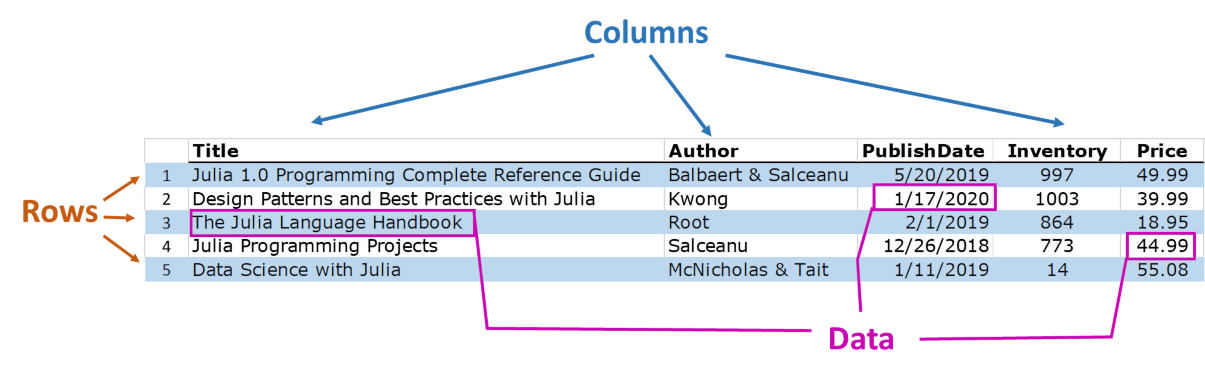
In contrast to a matrix which can only be referenced by row and column indices, the columns of DataFrames have _names_ or _labels_ attached to them. The columns in a DataFrame can be referenced by name (and also by integer indexes). In the example above, the names of the columns are Title, Author, PublishDate, Inventory, and Price.
Each column can, and usually does, have a different data type. In the example table above, you see the datatypes of strings, dates, integers, and real numbers.
DataFrames are a powerful and useful way to organize, store, analyze, and report data. The Julia DataFrames package has many functions for creating DataFrames, subsetting and reshaping DataFrames, joining two DataFrames together, and more.
2. After "Examining the Data" and before "Taking A Subset", add a new subsection, "Referencing Single Cells"
Referencing Single Cells
Now that your DataFrame is created, you can reference single cells by row number and column name. You can use the DataFrame.name notation, or the :name notation to refer to columns.
julia> mydiet = DataFrame(Food = ["Apple","Bagel","Cookie","Egg"], Calories=[72, 289, 59, 102])
julia> mydiet.Food
4-element Array{String,1}:
 "Apple"
 "Bagel"
 "Cookie"
 "Egg"

julia> mydiet[:,:Food]
4-element Array{String,1}:
 "Apple"
 "Bagel"
 "Cookie"
 "Egg"
To reference a single cell, you can use the row number and the column name as in DataFrame[row,:name] or using the dot notation, DataFrame.name[row]
julia> mydiet[1,:Food]
"Apple"
julia> mydiet.Food[1]
"Apple"
An advantage of the DataFrame[row,:name] syntax is that ":name" can be replaced by a variable that holds the name of the column.
julia> cname=Symbol("Calories")
:Calories
julia> mydiet[1,cname]
72
You can also reference individual cells by numeric indexes
julia> mydiet[2,1]
"Bagel"
If you want to reference multiple columns for a row, you can use the DataFrame[row,[:name1,:name2,...]] syntax
julia> mydiet[1:2,[:Food,:Calories]]
2×2 DataFrame
│ Row │ Food   │ Calories │
│     │ String │ Int64    │
├─────┼────────┼──────────┤
│ 1   │ Apple  │ 72       │
│ 2   │ Bagel  │ 289      │
These are a simplest methods to access the data in the table. The next section discusses powerful indexing methods to let you subset the DataFrame, or select subsets based on the values of the data in the DataFrame.
3. In section "Importing and Exporting Data (I/O)", add a warning on a "gotcha" related to using CSV.jl to read the data in.
In fact, replace the information after "using CSV" with the following:
You can read a .csv file containing your dataset at file pathname _fpath_ using (Windows example):
fpath = "C:\\Users\\biff\\Documents\\myData\\mydataset.csv"
df = CSV.read(fpath,copycols=true;dateformat="mm/dd/yyyy")
Note that if you don't include _copycols=true_, then your DataFrame will be built with immutable, read-only, CSV.Column vectors. If you only want a read-only table, set _copycols=false_. However, you likely want to mutate data in your DataFrame, so be sure to include _copycols=true_. See the CSV.jl documentation for other input options, such as _dateformat_, which will help get your data read in correctly.
To write your DataFrame to .csv file, use the CSV.write function:
julia> mydiet = DataFrame(Food = ["Apple","Bagel","Cookie","Egg"], Calories=[72, 289, 59, 102])
julia> fname = "C:\Users\biff\Documents\myData\mydiet.csv"
julia> CSV.write(fname,mydiet,writeheader=true,quotestrings=true)
In the above, writeheader=true will write the column names at the top of the file and quotestrings=true will put quotes around string data. See the See the CSV.jl documentation for other output options which will help you get your DataFrame written to a file correctly.
 blackeneth
All 5 comments
Thank you for the suggestion. I think it is worthwhile to make a PR out of this - would you care to do this? Probably then @nalimilan would be best to review it (he is much better than me in the language-related stuff).
One small note that I think it would be better to take a screenshot of a DataFrame output from DataFrames.jl in Julia (so that the users will see here what they will later get when working with the package).
 bkamins
on 29 Apr 2020
bkamins
on 29 Apr 2020
Agreed that PRs are best, but discussion in https://discourse.julialang.org/t/non-friendly-documentation/38109/87 is partly about harvesting contributions from users for whom making a PR might be intimidating. The main effort in writing good documentation is the presentation and writing, so we should consider mechanisms to capture that effort.
 timholy
on 29 Apr 2020
timholy
on 29 Apr 2020
A PR can be opened from the GitHub UI, so I don't think it's that scary. And it's also rewarding to be attributed one's work in the commit history.
@blackeneth Feel free to ask for help if you don't find how to do it.
 nalimilan
on 29 Apr 2020
nalimilan
on 29 Apr 2020
Ok, I created the pull request.
I can work on the documentation so more in the near future.
blackeneth
on 30 Apr 2020
Thank you. This is excellent.
Especially it is great that you are willing to work on enhancing it further. Here, one information is that https://github.com/JuliaData/DataFrames.jl/pull/2214 will change a whole of the documentation related to select, combine, by, groupby and map, so probably it is best if you skip these parts before that #2214 is merged (hopefully we ca do it in a few days, depending on the availability of the reviewers), as otherwise there will be merge conflicts.
bkamins
on 30 Apr 2020
Related issues
 rofinn
·
3Comments
rofinn
·
3Comments
 cossio
·
5Comments
bkamins
·
7Comments
cossio
·
5Comments
bkamins
·
7Comments
 jangorecki
·
7Comments
jangorecki
·
7Comments
 mattBrzezinski
·
5Comments
mattBrzezinski
·
5Comments
Most helpful comment
Thank you for the suggestion. I think it is worthwhile to make a PR out of this - would you care to do this? Probably then @nalimilan would be best to review it (he is much better than me in the language-related stuff).
One small note that I think it would be better to take a screenshot of a
DataFrameoutput from DataFrames.jl in Julia (so that the users will see here what they will later get when working with the package).