Datadog-agent: Datadog agent is unable to start when i use `systemctl restart datadog-agent.service`
Hi,
After enabling "logs_enabled: true: in /etc/datadog-agent/datadog.yaml , and adding below attached parameter, i tried to restart datadog -agent on centos 7. but its not coming up. it fails with below error.
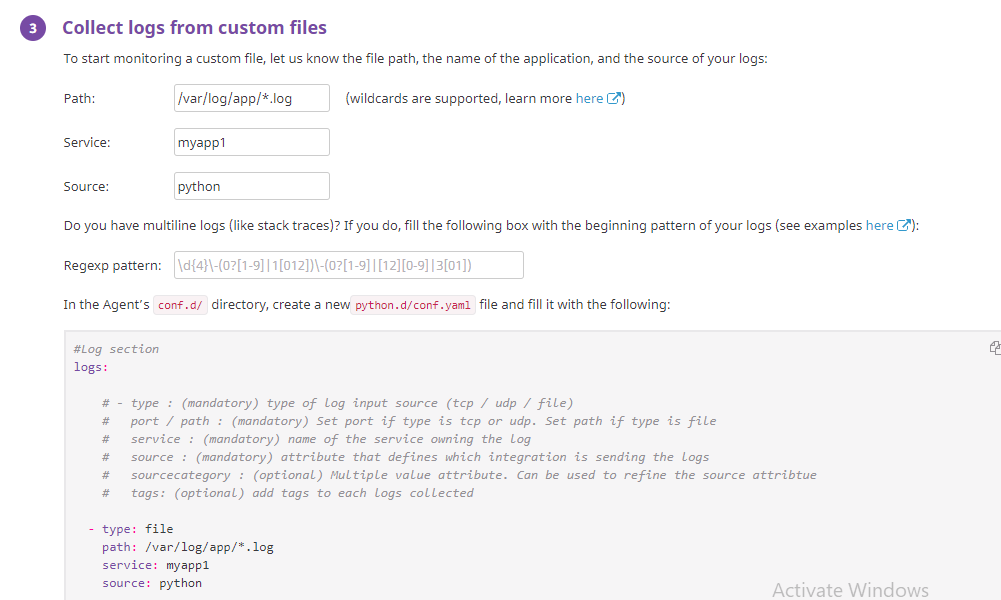
[root@centos-s-1vcpu-1gb-ams3-01 python.d]# systemctl enable datadog-agent.service
[root@centos-s-1vcpu-1gb-ams3-01 python.d]# systemctl start datadog-agent.service
[root@centos-s-1vcpu-1gb-ams3-01 python.d]# systemctl status datadog-agent.service
● datadog-agent.service - "Datadog Agent"
Loaded: loaded (/usr/lib/systemd/system/datadog-agent.service; enabled; vendor preset: disabled)
Active: failed (Result: start-limit) since Thu 2019-05-30 20:06:51 UTC; 4s ago
Process: 6989 ExecStart=/opt/datadog-agent/bin/agent/agent run -p /opt/datadog-agent/run/agent.pid (code=exited, status=255)
Main PID: 6989 (code=exited, status=255)
May 30 20:06:51 centos-s-1vcpu-1gb-ams3-01 systemd[1]: datadog-agent.service: main process exited, code=exited, status=255/n/a
May 30 20:06:51 centos-s-1vcpu-1gb-ams3-01 systemd[1]: Unit datadog-agent.service entered failed state.
May 30 20:06:51 centos-s-1vcpu-1gb-ams3-01 systemd[1]: datadog-agent.service failed.
May 30 20:06:51 centos-s-1vcpu-1gb-ams3-01 systemd[1]: datadog-agent.service holdoff time over, scheduling restart.
May 30 20:06:51 centos-s-1vcpu-1gb-ams3-01 systemd[1]: Stopped "Datadog Agent".
May 30 20:06:51 centos-s-1vcpu-1gb-ams3-01 systemd[1]: start request repeated too quickly for datadog-agent.service
May 30 20:06:51 centos-s-1vcpu-1gb-ams3-01 systemd[1]: Failed to start "Datadog Agent".
May 30 20:06:51 centos-s-1vcpu-1gb-ams3-01 systemd[1]: Unit datadog-agent.service entered failed state.
May 30 20:06:51 centos-s-1vcpu-1gb-ams3-01 systemd[1]: datadog-agent.service failed.
note: i am using datadog-agent-6.11.2-1.x86_64 version
 sandhyamohanty29
All 10 comments
Hey @sandhyamohanty29
I recommend reaching out to [email protected] so they can look into it a bit more closely. That way, you'll be able to share your logs and configuration files that you wouldn't necessarily want to post publicly.
Typically, support will request sending a flare, but if you're not able to do so because the agent is encountering an issue that prevents it from running, the team will help identify which configuration files and agent logs will be useful for troubleshooting. Thanks!
 le-he-hoo
on 4 Jun 2019
le-he-hoo
on 4 Jun 2019
hitting the same issue. @le-he-hoo is this something being worked on ?
 sangmeshcp
on 11 Jun 2019
sangmeshcp
on 11 Jun 2019
having he same issue
 shivamsinha15
on 30 Oct 2019
shivamsinha15
on 30 Oct 2019
In my case, the issue was that I forgot to delete blank space before
logs_enabled: true
Basically, yaml file was not parsed due to error and the line can't start with a blank space.
 vladan-me
on 7 Mar 2020
vladan-me
on 7 Mar 2020
removing of blank space helped. go figure
 pgmabv99
on 23 Sep 2020
pgmabv99
on 23 Sep 2020
I have the same issue on HAProxy servers. I havehaproxy.yaml.examplein/etc/datadog-agent/confd.d/ which I copied to haproxy.yaml.
Do I need to create haproxy.din conf.d then copy haproxy.yaml to conf.d/haproxy.d/?
Where can I find this line logs_enabled: true ?
 piamaria
on 29 Jan 2021
piamaria
on 29 Jan 2021
In my case, the issue was that I forgot to delete blank space before
logs_enabled: true
Basically, yaml file was not parsed due to error and the line can't start with a blank space.
@vladan-me Just a note here that there is a PR open for improvements around YAML parsing issues planned for 7.27+ so this should be easier to pinpoint in the future by checking the logs.
 sgnn7
on 1 Feb 2021
sgnn7
on 1 Feb 2021
Why don't you just use JSON?
yaml is so picky... it causes a lot of unnecessary headaches.
 kmiklas
on 2 Feb 2021
kmiklas
on 2 Feb 2021
Why don't you just use JSON?
yaml is so picky... it causes a lot of unnecessary headaches.
json? how? by converting yaml to json?
piamaria
on 3 Feb 2021
In my case, the issue was that I forgot to delete blank space before
logs_enabled: true
Basically, yaml file was not parsed due to error and the line can't start with a blank space.@vladan-me Just a note here that there is a PR open for improvements around YAML parsing issues planned for 7.27+ so this should be easier to pinpoint in the future by checking the logs.
As I picked this one from another person, I think he didn't install dd agent properly
piamaria
on 3 Feb 2021
Related issues
 omb
·
3Comments
omb
·
3Comments
 joshuabaird
·
3Comments
joshuabaird
·
3Comments
 ralmsdeveloper
·
4Comments
ralmsdeveloper
·
4Comments
 SleepyBrett
·
3Comments
SleepyBrett
·
3Comments
 dignajar
·
3Comments
dignajar
·
3Comments
Most helpful comment
In my case, the issue was that I forgot to delete blank space before
logs_enabled: trueBasically, yaml file was not parsed due to error and the line can't start with a blank space.