Dask: Dask's distributed scheduler is not installing in google's colab
I use Google Colab for practising pandas, numpy concepts.
So I tried the same thing for dask also. I tried to install dask in google colab by following the steps mentioned in Dask install
*What happened:*
When I tried to install dask in colab it installed successfully without any errors.Refer dask_install.png for reference
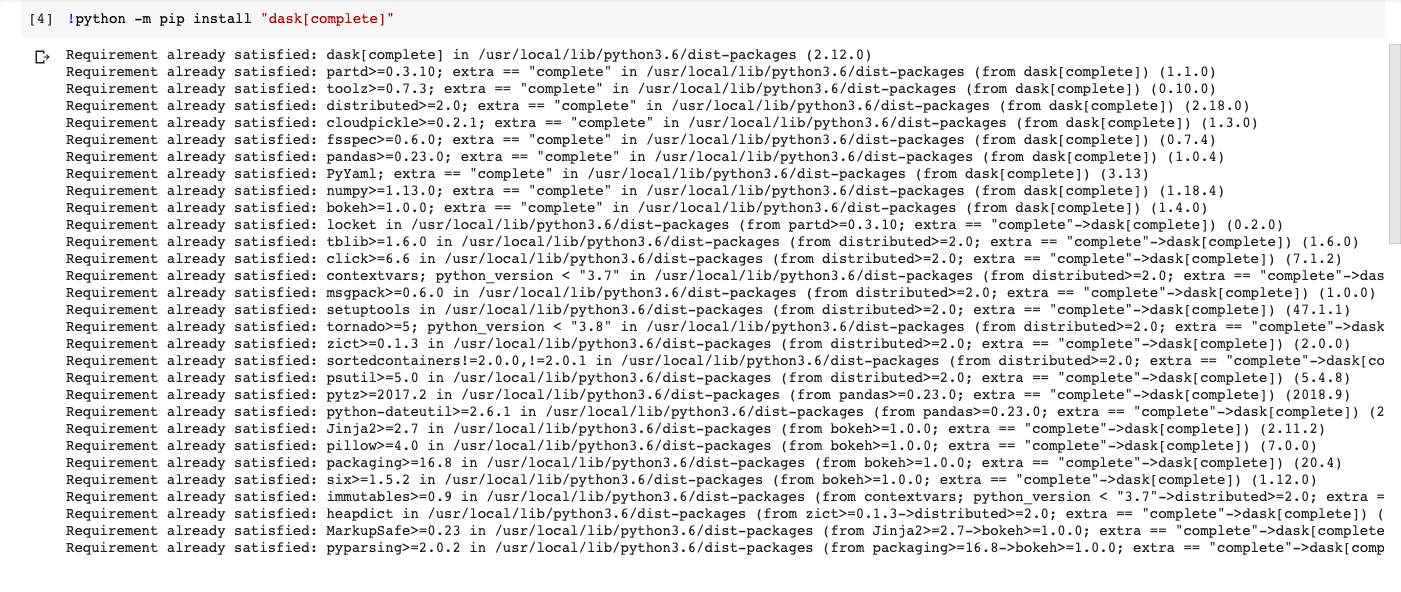
Also I have upgraded dask[distributed] by "!python -m pip install "dask[distributed]" --upgrade"
This also installed succesfully without any errors.
But when I tried the following code
from dask.distributed import Client, progress
client = Client(processes=False, threads_per_worker=4,
                n_workers=1, memory_limit='2GB')
client
the following traceback occured
ImportError Traceback (most recent call last)
/usr/local/lib/python3.6/dist-packages/dask/distributed.py in
2 try:
----> 3 from distributed import *
4 except ImportError:
5 frames
ImportError: cannot import name 'future_set_exc_info'
During handling of the above exception, another exception occurred:
ImportError Traceback (most recent call last)
/usr/local/lib/python3.6/dist-packages/dask/distributed.py in
9 ' python -m pip install "dask[distributed]" --upgrade # or python -m pip install'
10 )
---> 11 raise ImportError(msg)
ImportError: Dask's distributed scheduler is not installed.
Please either conda or pip install dask distributed:
conda install dask distributed # either conda install
python -m pip install "dask[distributed]" --upgrade # or python -m pip install
Also looked some of the solutions mentioned in stackoverflow and previous issues
solution
But this issue didnt resolve.
What you expected to happen:
But when I tried to install the above inmy laptop it worked fine without any error. But it is failing to install in google's colab environment
Environment:
- Dask version: 2.18.0
- Python version: 3.6.9
- Install method (conda, pip, source): pip
 SowmyaLR
All 3 comments
Alright this is not a dask issue but an IPython magic issue followed by a google colab issue, both are finicky.
First:
! magic is strange as it will start a new shell will run the command and discard the shell.
As with most remote environments, they are NOT running system python, but some type of virtual environment.
So your command installs dask in system python (if the virtual env does not update the PATH for system python), which is might not be reachable from your colab notebook.
If you change it to the %pip magic:
%pip install "dask[complete]" it should work in most virtual environments, this is however not the directly the case on the current google colab, as it uses an old tornado.
So now you will have to also install that (preferably BEFORE "dask[complete]"),
%pip install -U tornado
as you will see in the logs, this will pop up:
WARNING: Upgrading ipython, ipykernel, tornado, prompt-toolkit or pyzmq can
cause your runtime to repeatedly crash or behave in unexpected ways and is not
recommended. If your runtime won't connect or execute code, you can reset it
with "Factory reset runtime" from the "Runtime" menu.
WARNING: tornado > 4.5.0 is incompatible with ipykernel < 5.0
WARNING: The following packages were previously imported in this runtime:
  [tornado]
Run "pip install -U ipykernel" before restarting to avoid repeated crashes.
DO NOT actually run that pip command as it will break the colab (I did mention it was finicky, right?), forcing you to do a factory reset of the kernel via: Runtime->Factory Reset Runtime
If you try to start your client it will raise an error:
I have seen both your error and
RuntimeError: There is no current event loop in thread 'IO loop'. pop up.
Now there is a way around this:
go to Runtime->Restart Runtime and rerun everything.
If you get allocated the same compute node (worked 9/10 times for me), it should restart and work (I did mention it was finicky, right?)
No guaranty on the stability of your jupyter notebook in this way...
 sroet
on 9 Jun 2020
sroet
on 9 Jun 2020
Thanks @sroet.
Closing this, since I don't think there's anything Dask can do to make this process smoother.
 TomAugspurger
on 9 Jun 2020
TomAugspurger
on 9 Jun 2020
@sroet Thanks a lot for this resolution. I have been looking for various solves, this eventually was affecting Auto-Sklearn as well, after this I am able to run it smoothly.
 Rohit-IISc
on 11 Nov 2020
Rohit-IISc
on 11 Nov 2020
Related issues
 chinmaychandak
·
4Comments
chinmaychandak
·
4Comments
 j-bennet
·
3Comments
j-bennet
·
3Comments
 jameslamb
·
4Comments
jameslamb
·
4Comments
 syagev
·
5Comments
syagev
·
5Comments
 asmith26
·
3Comments
asmith26
·
3Comments
Most helpful comment
Alright this is not a
daskissue but an IPython magic issue followed by a google colab issue, both are finicky.First:
!magic is strange as it will start a new shell will run the command and discard the shell.As with most remote environments, they are NOT running system python, but some type of virtual environment.
So your command installs dask in system python (if the virtual env does not update the PATH for system python), which is might not be reachable from your colab notebook.
If you change it to the
%pipmagic:%pip install "dask[complete]"it should work in most virtual environments, this is however not the directly the case on the current google colab, as it uses an old tornado.So now you will have to also install that (preferably BEFORE "dask[complete]"),
%pip install -U tornadoas you will see in the logs, this will pop up:
DO NOT actually run that pip command as it will break the colab (I did mention it was finicky, right?), forcing you to do a factory reset of the kernel via:
Runtime->Factory Reset RuntimeIf you try to start your client it will raise an error:
I have seen both your error and
RuntimeError: There is no current event loop in thread 'IO loop'.pop up.Now there is a way around this:
go to
Runtime->Restart Runtimeand rerun everything.If you get allocated the same compute node (worked 9/10 times for me), it should restart and work (I did mention it was finicky, right?)
No guaranty on the stability of your jupyter notebook in this way...
view link to an working example