Dask: Create architecture diagram for the distributed system
Currently our best architecture diagrams are the following:

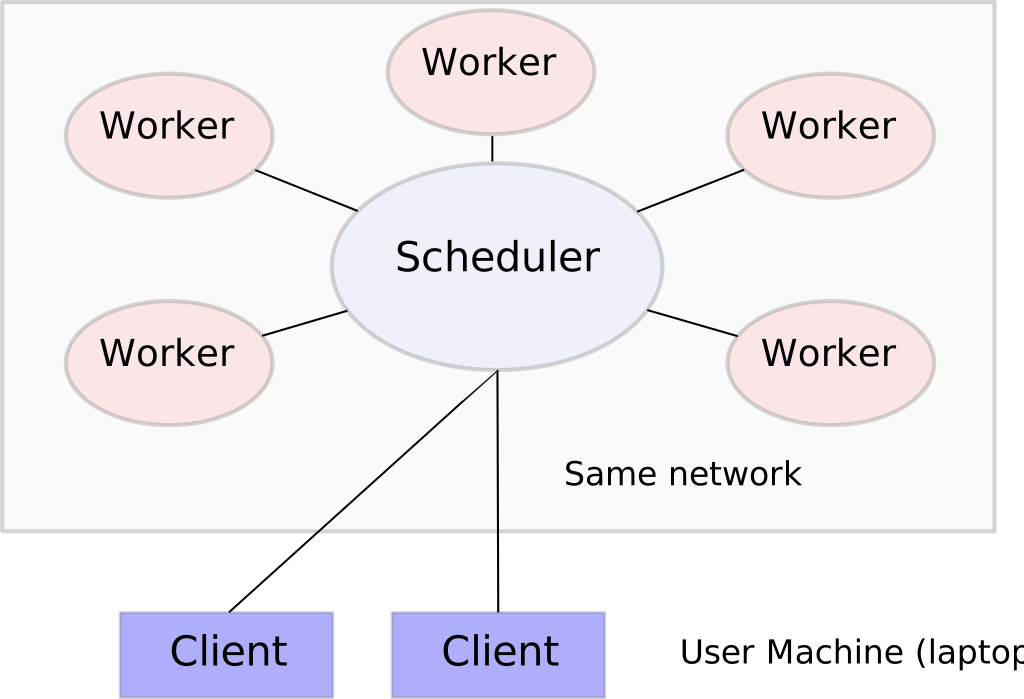
It would be nice to refresh these diagrams so that they can be more easily used
in documentation and presentations. In particular it would be useful to make
clear the following points:
Dask networks are composed of three pieces
- A centralized scheduler, which manages workers
- Many workers, which do the computation, hold onto results, and
communicate results to each other. - One or multiple clients, from which users interact from Jupyter
notebooks or scripts and submit work to the scheduler for execution on
the workers
Dask can be deployed on many different cluster technologies including
- Hadoop/Spark clusters running YARN
- HPC clusters running job managers like SLURM, SGE, PBS, LSF, or others
common in academic and scientific labs - Kubernetes clusters, either on the cloud or on premises
I feel that these base technologies are typically represented as the bottom layer of a set of blocks
The user, in their Jupyter notebook uses normal Python code that looks like
Pandas, Scikit-Learn, or other common PyData libraries.Dask then breaks up these big data computations into many smaller
computations that actually use the Pandas, Scikit-Learn, and other
libraries, submits them to the scheduler, and runs them on the workers,
giving the user the experience of big data with familiar libraries.Dask can also extend far beyond traditional MapReduce/Spark style
comptutations, and can execute much more complex algorithms, such as are
often needed in modern problems today extending beyond typical database
queries.
This is a complex story that we'll need to tell both in static images, but also
possibly in animations, slide transitions, or even short videos.
I'm writing this issue mostly to point people with some design experience. Anyone would be welcome to help out here.
 mrocklin
All 3 comments
Hi,
I agree with what you present here. One of the great tool that could be used for this is PlantUML. It is not as flexible as manually designed schema, but it has the advantages of quickly providing textual descriptions that are easily extensible.
 jjerphan
on 25 Feb 2019
jjerphan
on 25 Feb 2019
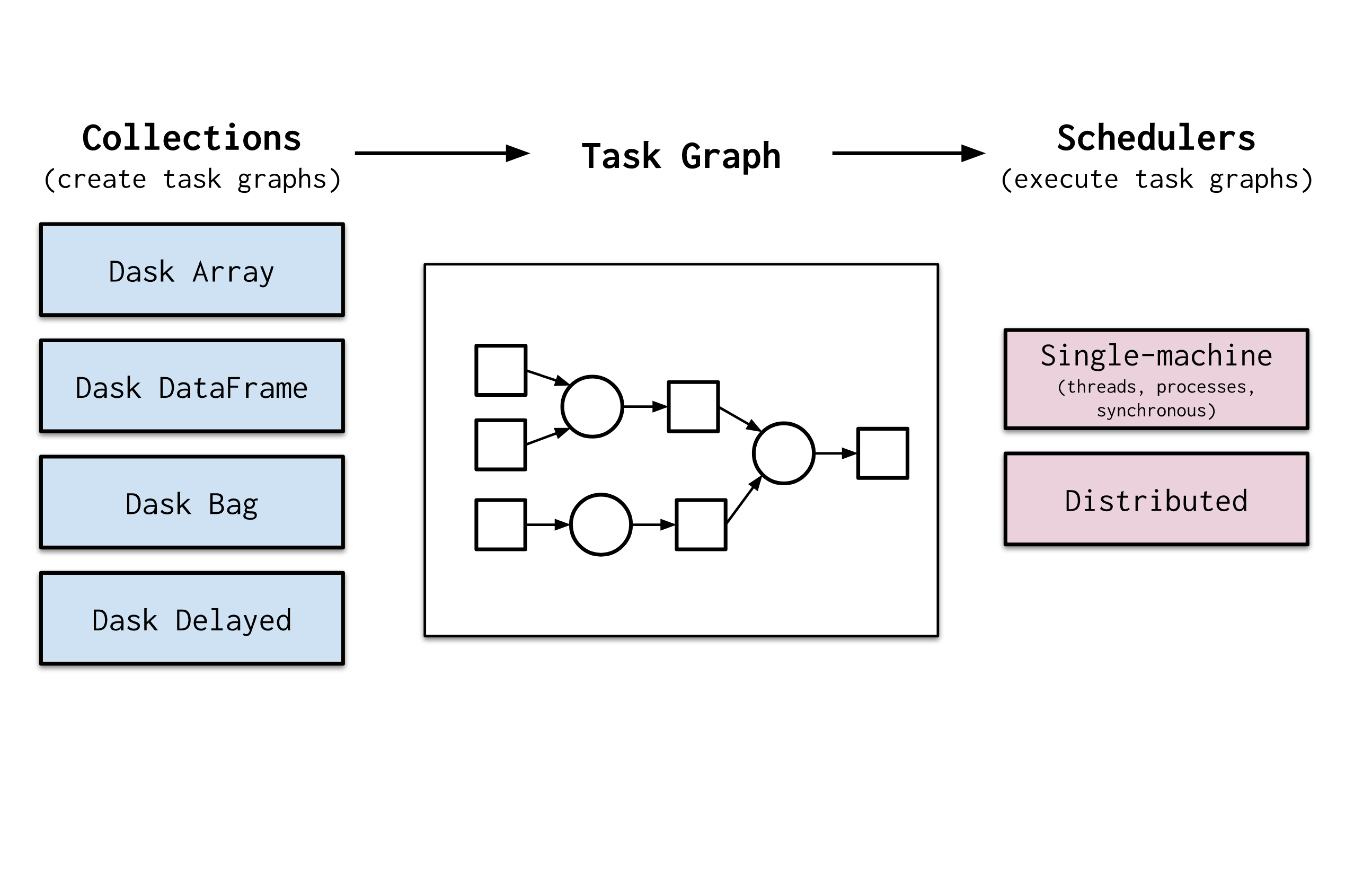
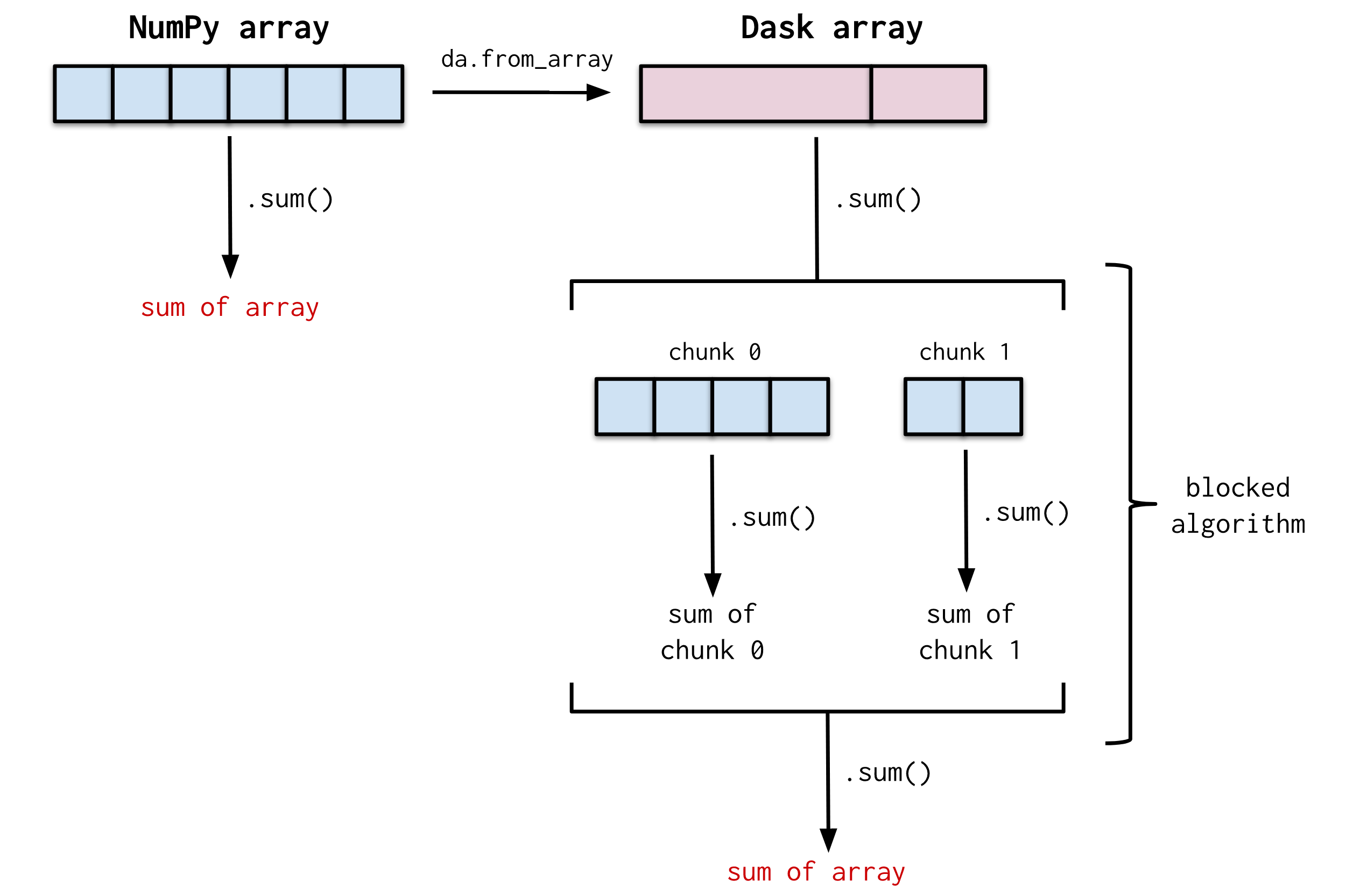
I was experimenting with Google Drawings to make diagrams for a recent talk. I found it to be relatively straightforward to use and had fun making a few figures (shown below). Thought I'd share some of them here. (Btw, the style of these diagrams is heavily inspired by a recent post from @alimanfoo in the zarr gitter channel)
Overview diagram (effectively the same as the current overview diagram):
Blocked algorithm:
Distributed scheduler diagram:

 jrbourbeau
on 1 Aug 2019
jrbourbeau
on 1 Aug 2019
@jrbourbeau just want to say I LOVE these diagrams. I just stumbled onto them from search, looking for some things for a conference talk I'm preparing. I'm planning to use these (with image credit given, of course).
I think they explain the core concepts better than the ones in the documentation today, such as the existing collections-task_graph-schedulers one at https://docs.dask.org/en/latest/scheduling.html#scheduling
 jameslamb
on 21 Sep 2020
jameslamb
on 21 Sep 2020
Related issues
 syagev
·
5Comments
syagev
·
5Comments
 michcio1234
·
3Comments
michcio1234
·
3Comments
 curiouscod3
·
5Comments
curiouscod3
·
5Comments
 abast
·
5Comments
abast
·
5Comments
 julioasotodv
·
4Comments
julioasotodv
·
4Comments
Most helpful comment
I was experimenting with Google Drawings to make diagrams for a recent talk. I found it to be relatively straightforward to use and had fun making a few figures (shown below). Thought I'd share some of them here. (Btw, the style of these diagrams is heavily inspired by a recent post from @alimanfoo in the zarr gitter channel)
Overview diagram (effectively the same as the current overview diagram):
Blocked algorithm:
Distributed scheduler diagram: