Dashboard: Refreshing in Firefox causes the session to be logged out
Environment
Installation method: https://raw.githubusercontent.com/kubernetes/dashboard/v2.0.0/aio/deploy/recommended.yaml
Kubernetes version: 1.16.7
Dashboard version: 2.0.0
Operating system: Windows 10
Node.js version ('node --version' output): 12.13.1
Go version ('go version' output): 1.14
I am seeing inconsistent results while trying to refresh my dashboard via the browser. I am getting logged out when I am refreshing the dashboard (browser refresh) in Firefox (76.0.1) but I don't get logged out in Edge and Chrome
Steps to reproduce
Login with a token and refresh the dashboard (F5 refresh) in Firefox, Chrome and Edge
Observed result
You are logged out in Firefox but not in Chrome and Edge
Expected result
Either refreshing gets logged out in all browser or it doesn't
Comments
I have even tried to start Firefox in safe mode and the issue persists so its not an issue with my extensions.
 SayakMukhopadhyay
All 14 comments
I see the same issue. It is especially annoying when you want to open multiple tabs, which became basically impossible because once you re-login in a new tab, the session in the other one gets invalidated. So you can only have one active tab.
 TobiasWenzel
on 18 May 2020
TobiasWenzel
on 18 May 2020
Can't reproduce on Firefox 76.0.1. The session is stored in a cookie. If you are getting "logged out" without any information then it probably means that something clears the token during refresh, but it is definitely not Dashboard itself. Check your cookies in developer tools. There should be jweToken cookie stored after you log in.
 floreks
on 19 May 2020
floreks
on 19 May 2020
I have checked and I can confirm that the cookie is still present. When I login for the first time, the cookie gets set and gets sent on every request. When I refresh, the cookie is not removed and is still sent on every request but the dashboard starts showing the login page. I don't even see any Location header in any of the responses which might indicate a redirect.
Needless to say, I have tried this on Private mode and on safe mode.
SayakMukhopadhyay
on 19 May 2020
@SayakMukhopadhyay check and show me the response from api/v1/login/status call. Based on that we decide whether to redirect to login view or stay on a current view.
floreks
on 19 May 2020
On refreshing after logging in, I am getting 3 hits to the status endpoint and each of them has this as a response
{
 "tokenPresent": false,
 "headerPresent": false,
 "httpsMode": true,
 "impersonationPresent": false,
 "impersonatedUser": ""
}
I have checked the request headers and they do have the jwe token

SayakMukhopadhyay
on 19 May 2020
Your jweToken is corrupted. It is much much longer than that and contains much more information. That's why the response from API is tokenPresent: false. It can't decode it and confirm that it is valid.
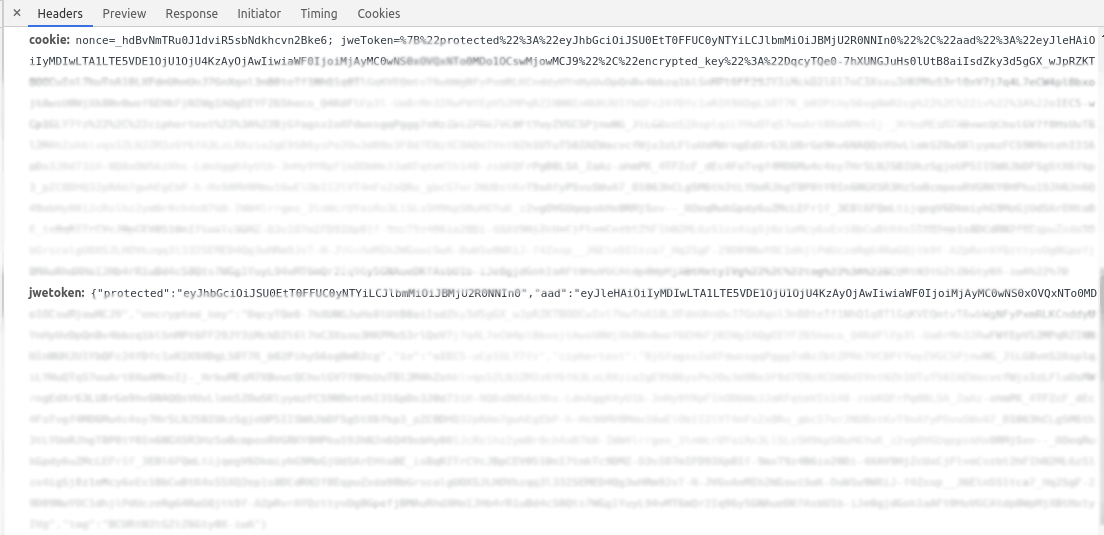
Seems like your browser somehow corrupts the cookie during refresh. I really couldn't reproduce that on my FF.
floreks
on 19 May 2020
I think the ellipses are just a contraction. The raw headers looks like this
Host: 127.0.0.1:8001
User-Agent: Mozilla/5.0 (Windows NT 10.0; Win64; x64; rv:76.0) Gecko/20100101 Firefox/76.0
Accept: application/json, text/plain, */*
Accept-Language: en-US,en;q=0.5
Accept-Encoding: gzip, deflate
DNT: 1
Connection: keep-alive
Referer: http://127.0.0.1:8001/api/v1/namespaces/kubernetes-dashboard/services/https:kubernetes-dashboard:/proxy/
Cookie: jweToken=%7B%22protected%22%3A%22eyJhbGciOiJSU<843 characters in redacted by me>; isNotIncognito=true;
Cache-Control: max-age=0
I don't see a jwetoken header in there. API does not use cookie header to get the token, but explicit header.
floreks
on 19 May 2020
Oh, yes, I can see that everytime I refresh, the jweToken is no more in the header. Any idea what could be the cause of this?
SayakMukhopadhyay
on 20 May 2020
Did you try using localhost instead of 127.0.0.1?
floreks
on 20 May 2020
Yep, same issue. Unfortunately I don't even have a spare system that I could test on.
SayakMukhopadhyay
on 20 May 2020
I'll also test it on Win 10 and the latest FF 76 later today. I don't see however how Dashboard itself could not be passing this header. Interceptor logic is very simple. It gets the jwetoken cookie and adds it to every API request if present.
floreks
on 20 May 2020
I have tested a couple more scenarios today.
When accessing Dashboard over HTTPS and any domain localhost, rpi3 (my custom local domain) or 127.0.0.1 everything works as intended. Cookie is stored and passed over to the API.
I've had then the idea that something might be wrong with saving a cookie when using HTTP protocol in Firefox. This seems to be exactly the case.
This is how we are saving the cookie for secure and non-secure domains.
Expected (how the browser should save it)
| Domain | HttpOnly | Secure | SameSite |
|-----------|----------|--------|----------|
| localhost | false | false | Strict |
Chrome

Firefox

This feels like Firefox has changed its logic lately and allows saving cookies with Secure=true and SameSite=Strict for a non-https website. Possibly, the first cookie set already saves the cookie and then part destined for localhost does not override the cookie properly. Due to Secure=true flag then Dashboard can't properly retrieve the token after refreshing in order to stay logged in.. I'll take a closer look at this tomorrow and try to explicitly detect domain/protocol before trying to save the cookie.
floreks
on 20 May 2020
@floreks I have tested this and it works on Firefox on Windows 10 and Ubuntu 18.04. But I had to clear my cookies for localhost/127.0.0.1 else I was getting the old behaviour.
P.S. v2.0.0 was having the same issue on a brand new setup of Firefox in Ubuntu 18.04 and with v2.0.1 the issue is not happening there anymore.
Thanks a ton for the quick fix!!
SayakMukhopadhyay
on 22 May 2020
Related issues
 dorsegal
·
31Comments
dorsegal
·
31Comments
 beardstack
·
29Comments
beardstack
·
29Comments
 bryk
·
55Comments
bryk
·
55Comments
 saikatgithub
·
34Comments
saikatgithub
·
34Comments
 sigrlami
·
33Comments
sigrlami
·
33Comments
Most helpful comment
I have tested a couple more scenarios today.
When accessing Dashboard over
HTTPSand any domainlocalhost,rpi3 (my custom local domain)or127.0.0.1everything works as intended. Cookie is stored and passed over to the API.I've had then the idea that something might be wrong with saving a cookie when using
HTTPprotocol in Firefox. This seems to be exactly the case.This is how we are saving the cookie for secure and non-secure domains.
https://github.com/kubernetes/dashboard/blob/153efdf4e082ae003f79fbbcd1cca50aca7dd3b5/src/app/frontend/common/services/global/authentication.ts#L63-L86
Expected (how the browser should save it)
| Domain | HttpOnly | Secure | SameSite |
|-----------|----------|--------|----------|
| localhost | false | false | Strict |
Chrome
Firefox
This feels like Firefox has changed its logic lately and allows saving cookies with
Secure=trueandSameSite=Strictfor a non-https website. Possibly, the first cookie set already saves the cookie and then part destined forlocalhostdoes not override the cookie properly. Due toSecure=trueflag then Dashboard can't properly retrieve the token after refreshing in order to stay logged in.. I'll take a closer look at this tomorrow and try to explicitly detect domain/protocol before trying to save the cookie.