Dashboard: Dashboard login does not authorize with valid config file
Environment
I have installed dashboard to my cluster using below URL.
kubectl apply -f https://raw.githubusercontent.com/kubernetes/dashboard/master/src/deploy/recommended/kubernetes-dashboard.yaml
Now I am trying to login using my config file, but it is not allowing me to login and throws error as un-authrorized, attached screen shot with developer tool response.
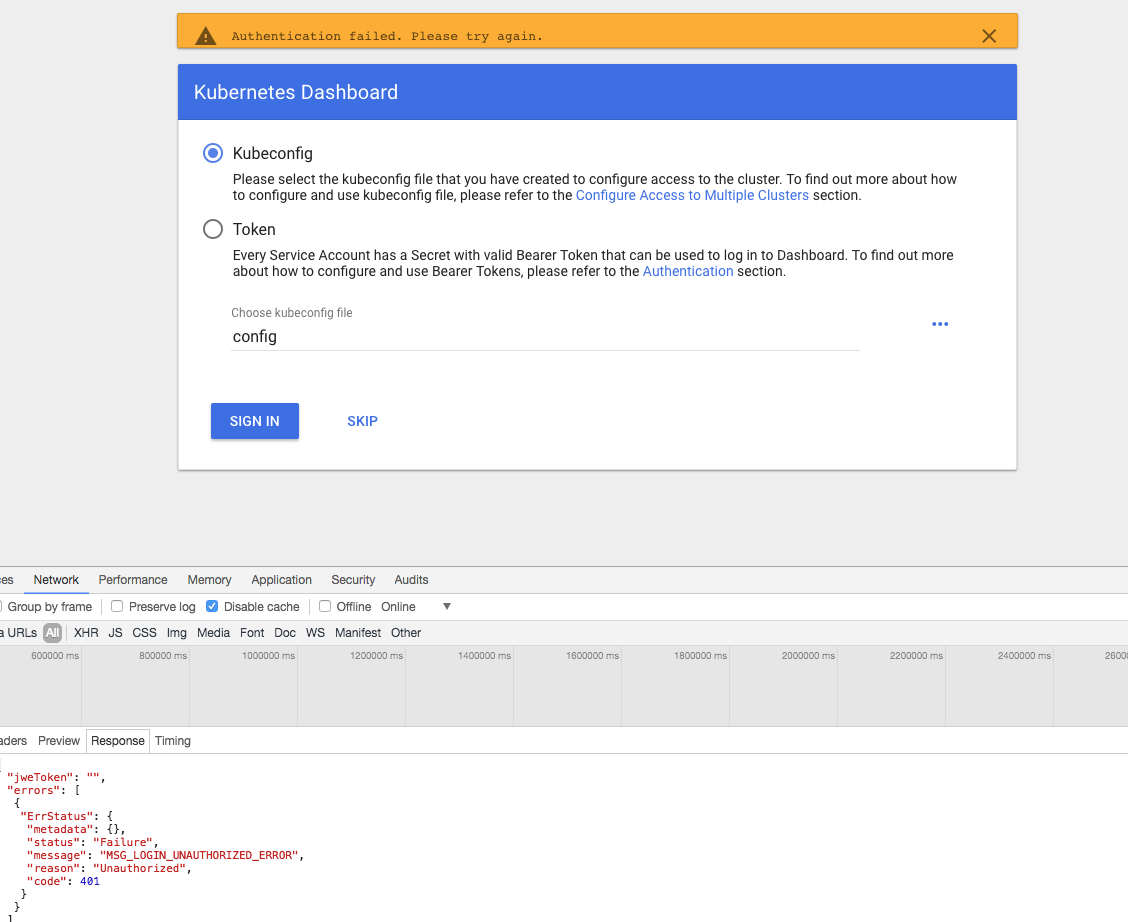
My config file
apiVersion: v1
clusters:
- cluster:
    certificate-authority-data: {{certdata}}
    server: https://api.{mycluster_name}
  name: {mycluster_name}
contexts:
- context:
    cluster: {mycluster_name}
    user: {mycluster_name}
  name: {mycluster_name}
current-context: {mycluster_name}
kind: Config
preferences: {}
users:
- name: {mycluster_name}
  user:
    as-user-extra: {}
    client-certificate-data: {{certdata}}
    password: GlFP7KHi8KokfqFE3NNbsSnzUQil3f2F
    username: admin
- name: {mycluster_name}-basic-auth
  user:
    as-user-extra: {}
    password: GlFP7KHi8KokfqFE3NNbsSnzUQil3f2F
    username: admin
Dashboard version: 1.8 (latest version)
Kubernetes version:  1.8.8
Operating system: Mac
Steps to reproduce
Install latest dashboard and try login with valid config file
Observed result
Throws un-authorzied access error
Expected result
Login should works
Comments
Please let me know for any additional details.
 ssubramanian123
All 6 comments
Here is the log from from kubernetes dashboard pod
2018/03/02 21:35:05 [2018-03-02T21:35:05Z] Incoming HTTP/2.0 GET /api/v1/csrftoken/login request from 100.117.190.64:49734: {}
2018/03/02 21:35:05 [2018-03-02T21:35:05Z] Outcoming response to 100.117.190.64:49734 with 200 status code
2018/03/02 21:35:05 [2018-03-02T21:35:05Z] Incoming HTTP/2.0 POST /api/v1/login request from 100.117.190.64:49734: {
  "kubeConfig": "apiVersion: v1\nclusters:\n- cluster:\n    certificate-authority-data: {cert}\n    server: https://api.{myclustername}\n  name: {myclustername}\ncontexts:\n- context:\n    cluster: {myclustername}\n    user: {myclustername}\n  name: {myclustername}\ncurrent-context: {myclustername}\nkind: Config\npreferences: {}\nusers:\n- name: {myclustername}\n  user:\n    as-user-extra: {}\n    client-certificate-data: {cert}\n    client-key-data: {cert}\n    password: GlFP7KHi8KokfqFE3NNbsSnzUQil3f2F\n    username: admin\n- name: {myclustername}-basic-auth\n  user:\n    as-user-extra: {}\n    password: GlFP7KHi8KokfqFE3NNbsSnzUQil3f2F\n    username: admin\n",
  "password": "",
  "token": "",
  "username": ""
}
2018/03/02 21:35:05 Non-critical error occurred during resource retrieval: the server has asked for the client to provide credentials
2018/03/02 21:35:05 [2018-03-02T21:35:05Z] Outcoming response to 100.117.190.64:49734 with 200 status code
2018/03/02 21:35:22 Metric client health check failed: the server could not find the requested resource (get services heapster). Retrying in 30 seconds
Your current context is set to user using client-certificate-data: {{certdata}} as part of user configuration. We are not supporting any kind of certificate-based authentication. Possibly it is not working because of that.
Another option is that this user has no access to server version endpoint. This is what we are using to check if used credentials are correct as there is no direct mechanism exposed by apiserver to make sure that user has logged in.
 floreks
on 3 Mar 2018
floreks
on 3 Mar 2018
@floreks Thanks for your reply. I didnt get your reply completely.
Using this client-certificate-date, I am able to run any admin kubectl command. It works fine. This config is generated out of KOPs. I am completely able to manage the cluster using this config through kubectl.
Also I didnt get server version endpoint, what is that meant by and how to activate this?
Can you please help me with the steps to fix this config to work with dashboard?
Thanks in advance.
ssubramanian123
on 5 Mar 2018
What I mean is that using client-certificate-data in kubeconfig file is not supported by Dashboard. If basic authentication is enabled in the cluster (username/password) then it is supported as long as you pass --authentication-mode basic argument to the Dashboard container. You'd need to modify Dashboard yaml used for deployment. This argument is described more deeply in here: https://github.com/kubernetes/dashboard/wiki/Dashboard-arguments
floreks
on 5 Mar 2018
@floreks our cluster is RBAC enabled clusters. So we have authorization mode as RBAC.
As per dashboard arguments the cluster should be enabled with '--authorization-mode=ABAC' and '--basic-auth-file' flags set. So I am not sure how my cluster supports this feature.
Can you please help with the details.
ssubramanian123
on 6 Mar 2018
In this case kubeconfig file you have shown is not valid from Dashboard perspective. Only token and basic auth are supported.
floreks
on 6 Mar 2018
Related issues
 Fohlen
·
4Comments
Fohlen
·
4Comments
 andrei-dascalu
·
3Comments
andrei-dascalu
·
3Comments
 maciaszczykm
·
3Comments
maciaszczykm
·
4Comments
maciaszczykm
·
3Comments
maciaszczykm
·
4Comments
 mhobotpplnet
·
3Comments
mhobotpplnet
·
3Comments
Most helpful comment
@floreks our cluster is RBAC enabled clusters. So we have authorization mode as RBAC.
As per dashboard arguments the cluster should be enabled with '--authorization-mode=ABAC' and '--basic-auth-file' flags set. So I am not sure how my cluster supports this feature.
Can you please help with the details.