Dashboard: Unable to access dashboard via kubectl proxy
Environment
Dashboard version: v1.8.2
Kubernetes version:v1.9.2
Operating system:Ubuntu 16.04.2 LTS
Node.js version:nodejs/xenial-updates 4.2.6~dfsg-1ubuntu4.1 amd64
Go version:go version go1.6.2 linux/amd64
Steps to reproduce
kuberadm --kubernetes-version=v1.9.2 --pod-network-cidr=192.168.0.0/16
The cluster init successfully,and then three other nodes join the cluster.
kubectl apply -f https://docs.projectcalico.org/v2.6/getting- started/kubernetes/installation/hosted/kubeadm/1.6/calico.yaml
I choose calico as pod network.
wget https://rawgit.com/kubernetes/dadashboard/master/src/deploy/kubernetes-dashboard.yaml
vim kubernetes-dashboard.yaml edit "image" to my local docker image:gcr.io/google_containers/kubernetes-dashboard-amd64:v1.8.2
kubectl create -f kubernetes-dashboard.yaml
kubectl get pods --all-namespaces
NAMESPACE NAME READY STATUS RESTARTS AGE
kube-system calico-etcd-pt998 1/1 Running 0 1h
kube-system calico-kube-controllers-d669cc78f-zfjh7 1/1 Running 0 1h
kube-system calico-node-fg5nn 2/2 Running 0 1h
kube-system calico-node-gnc5d 2/2 Running 0 1h
kube-system calico-node-gp4gh 0/2 ContainerCreating 0 1h
kube-system calico-node-sd2g7 2/2 Running 0 1h
kube-system etcd-k8s-node1 1/1 Running 0 1h
kube-system kube-apiserver-k8s-node1 1/1 Running 0 1h
kube-system kube-controller-manager-k8s-node1 1/1 Running 0 1h
kube-system kube-dns-6f4fd4bdf-gj6v9 3/3 Running 0 1h
kube-system kube-proxy-fvdmh 0/1 ContainerCreating 0 1h
kube-system kube-proxy-hcmh6 1/1 Running 0 1h
kube-system kube-proxy-lwd5p 1/1 Running 0 1h
kube-system kube-proxy-pbnnq 1/1 Running 0 1h
kube-system kube-scheduler-k8s-node1 1/1 Running 0 1h
kube-system kubernetes-dashboard-5d8f8dc87f-rgwqk 1/1 Running 0 44m
kubectl describe pod kubernetes-dashboard-5d8f8dc87f-rgwqk --namespace=kube-system
Events:
Type Reason Age From Message
---- ------ ---- ---- -------
Normal Scheduled 58m default-scheduler Successfully assigned kubernetes-dashboard-5d8f8dc87f-rgwqk to k8s-node3
Normal SuccessfulMountVolume 58m kubelet, k8s-node3 MountVolume.SetUp succeeded for volume "tmp-volume"
Normal SuccessfulMountVolume 58m kubelet, k8s-node3 MountVolume.SetUp succeeded for volume "kubernetes-dashboard-certs"
Normal SuccessfulMountVolume 58m kubelet, k8s-node3 MountVolume.SetUp succeeded for volume "kubernetes-dashboard-token-xs2hl"
Normal Pulled 58m kubelet, k8s-node3 Container image "gcr.io/google_containers/kubernetes-dashboard-amd64:v1.8.2" already present on machine
Normal Created 58m kubelet, k8s-node3 Created container
Normal Started 58m kubelet, k8s-node3 Started container
kubectl get deployments --all-namespaces
NAMESPACE NAME DESIRED CURRENT UP-TO-DATE AVAILABLE AGE
kube-system calico-kube-controllers 1 1 1 1 1h
kube-system kube-dns 1 1 1 1 1h
kube-system kubernetes-dashboard 1 1 1 1 45m
kubectl describe deployment kubernetes-dashboard --namespace=kube-system
Name: kubernetes-dashboard
Namespace: kube-system
CreationTimestamp: Tue, 06 Feb 2018 15:25:28 +0800
Labels: k8s-app=kubernetes-dashboard
Annotations: deployment.kubernetes.io/revision=1
Selector: k8s-app=kubernetes-dashboard
Replicas: 1 desired | 1 updated | 1 total | 1 available | 0 unavailable
StrategyType: RollingUpdate
MinReadySeconds: 0
RollingUpdateStrategy: 25% max unavailable, 25% max surge
Pod Template:
Labels: k8s-app=kubernetes-dashboard
Service Account: kubernetes-dashboard
Containers:
kubernetes-dashboard:
Image: gcr.io/google_containers/kubernetes-dashboard-amd64:v1.8.2
Port: 8443/TCP
Args:
--auto-generate-certificates
Liveness: http-get https://:8443/ delay=30s timeout=30s period=10s #success=1 #failure=3
Environment:
Mounts:
/certs from kubernetes-dashboard-certs (rw)
/tmp from tmp-volume (rw)
Volumes:
kubernetes-dashboard-certs:
Type: Secret (a volume populated by a Secret)
SecretName: kubernetes-dashboard-certs
Optional: false
tmp-volume:
Type: EmptyDir (a temporary directory that shares a pod's lifetime)
Medium:
Conditions:
Type Status Reason
---- ------ ------
Available True MinimumReplicasAvailable
Progressing True NewReplicaSetAvailable
OldReplicaSets:
NewReplicaSet: kubernetes-dashboard-5d8f8dc87f (1/1 replicas created)
Events:
Type Reason Age From Message
---- ------ ---- ---- -------
Normal ScalingReplicaSet 59m deployment-controller Scaled up replica set kubernetes-dashboard-5d8f8dc87f to 1
kubectl get services --all-namespaces
NAMESPACE NAME TYPE CLUSTER-IP EXTERNAL-IP PORT(S) AGE
default kubernetes ClusterIP 10.96.0.1
kube-system calico-etcd ClusterIP 10.96.232.136
kube-system kube-dns ClusterIP 10.96.0.10
kube-system kubernetes-dashboard ClusterIP 10.104.167.155
kubectl describe service kubernetes-dashboard --namespace=kube-system
Name: kubernetes-dashboard
Namespace: kube-system
Labels: k8s-app=kubernetes-dashboard
Annotations:
Selector: k8s-app=kubernetes-dashboard
Type: ClusterIP
IP: 10.104.167.155
Port:
TargetPort: 8443/TCP
Endpoints: 172.18.0.2:8443
Session Affinity: None
Events:
It seems that dashboard is already running in the cluster.
Then I run kubectl proxy
kubectl proxy --address='0.0.0.0' --port=8002 --accept-hosts='.*'
Open my browser type "MasterIP:8002/ui" It returns:
Error: 'dial tcp 172.18.0.2:8443: getsockopt: connection refused'
Trying to reach: 'https://172.18.0.2:8443/'
By the way,I control master-node machine from my laptop via ssh.
kubectl get nodes
k8s-node1 Ready master 1h v1.9.2
k8s-node2 Ready
k8s-node3 Ready
k8s-node4 Ready
k8s-node1 is master node.
Observed result
Error: 'dial tcp 172.18.0.2:8443: getsockopt: connection refused'
Trying to reach: 'https://172.18.0.2:8443/'
Expected result
Access dashboard and start to manage k8s cluster
Comments
 PhoenixAD
All 8 comments
/uiendpoint is deprecated and probably won't work anymore.- See my comment in: https://github.com/kubernetes/dashboard/issues/2800#issuecomment-363334624
- Read the NOTE in
kubectl proxysection regarding usingkubectl proxy --address='0.0.0.0' --port=8002 --accept-hosts='.*'. https://github.com/kubernetes/dashboard/wiki/Accessing-Dashboard---1.7.X-and-above#kubectl-proxy
Closing as this is not a Dashboard issue and has been already discussed many times in closed issues.
 floreks
on 6 Feb 2018
floreks
on 6 Feb 2018
I have the same issue, I Tested With Flannel it works, with calico 3.1 is not working .... I can't Proxy service with calico ....
 jfpucheu
on 19 Apr 2018
jfpucheu
on 19 Apr 2018
I have same issue with flannel, it doesn't work.
 skamayker
on 25 Apr 2018
skamayker
on 25 Apr 2018
Same issue with calico 3.2... but, I am trying to access via kubectl proxy as default and thus trying to access http://localhost:8001/api/v1/namespaces/kube-system/services/https:kubernetes-dashboard:/proxy/
but, am getting Error: 'dial tcp 192.168.2.3:8443: connect: connection refused'
Trying to reach: 'https://192.168.2.3:8443/'
NB, I have admin.conf running locally and am able to access the cluster via kubectl with no issue.
Also, of note is that this had been working when I first got the cluster up. However, I was having networking issues, and had to apply this in order to get CoreDNS to work Coredns service do not work,but endpoint is ok the other SVCs are normal only except dns, so I am wondering if this maybe broke the proxy service?
 GregSilverman
on 15 Dec 2018
GregSilverman
on 15 Dec 2018
We've been having this issue as well. Our repro steps:
Terraform azure resources (3 masters, 3 etcd, 4 nodes)
use ansible to apply RHEL CIS hardening https://github.com/MindPointGroup/RHEL7-CIS
Deploy using kubespray https://github.com/kubernetes-sigs/kubespray
The interesting thing to note is that once you run kubespray with the reset.yaml and redeploy all is well. Currently I'm inspecting iptable differences to see whats up.
 warrenackerman
on 27 Dec 2018
warrenackerman
on 27 Dec 2018
@warrenackerman, I ended up upgrading all nodes to 1.13.1 and did not apply the patch previously needed by CoreDNS. Now, everything appears to be functioning, including the problem we had that required the patch and the dashboard.
GregSilverman
on 27 Dec 2018
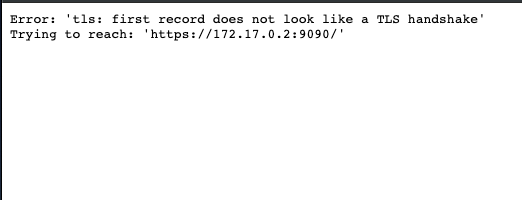
someone can help me, i'm running dashboard with command:kubectl proxy --address="192.168.0.105" -p 8001 --accept-hosts='^*$'
 Nurlan199206
on 8 May 2019
Nurlan199206
on 8 May 2019
Environment
Dashboard version: v1.8.2
Kubernetes version:v1.9.2
Operating system:Ubuntu 16.04.2 LTS
Node.js version:nodejs/xenial-updates 4.2.6~dfsg-1ubuntu4.1 amd64
Go version:go version go1.6.2 linux/amd64
Steps to reproduce
kuberadm --kubernetes-version=v1.9.2 --pod-network-cidr=192.168.0.0/16
The cluster init successfully,and then three other nodes join the cluster.
kubectl apply -f https://docs.projectcalico.org/v2.6/getting- started/kubernetes/installation/hosted/kubeadm/1.6/calico.yaml
I choose calico as pod network.
wget https://rawgit.com/kubernetes/dadashboard/master/src/deploy/kubernetes-dashboard.yaml
vim kubernetes-dashboard.yaml edit "image" to my local docker image:gcr.io/google_containers/kubernetes-dashboard-amd64:v1.8.2
kubectl create -f kubernetes-dashboard.yaml
kubectl get pods --all-namespaces
NAMESPACE NAME READY STATUS RESTARTS AGE
kube-system calico-etcd-pt998 1/1 Running 0 1h
kube-system calico-kube-controllers-d669cc78f-zfjh7 1/1 Running 0 1h
kube-system calico-node-fg5nn 2/2 Running 0 1h
kube-system calico-node-gnc5d 2/2 Running 0 1h
kube-system calico-node-gp4gh 0/2 ContainerCreating 0 1h
kube-system calico-node-sd2g7 2/2 Running 0 1h
kube-system etcd-k8s-node1 1/1 Running 0 1h
kube-system kube-apiserver-k8s-node1 1/1 Running 0 1h
kube-system kube-controller-manager-k8s-node1 1/1 Running 0 1h
kube-system kube-dns-6f4fd4bdf-gj6v9 3/3 Running 0 1h
kube-system kube-proxy-fvdmh 0/1 ContainerCreating 0 1h
kube-system kube-proxy-hcmh6 1/1 Running 0 1h
kube-system kube-proxy-lwd5p 1/1 Running 0 1h
kube-system kube-proxy-pbnnq 1/1 Running 0 1h
kube-system kube-scheduler-k8s-node1 1/1 Running 0 1h
kube-system kubernetes-dashboard-5d8f8dc87f-rgwqk 1/1 Running 0 44m
kubectl describe pod kubernetes-dashboard-5d8f8dc87f-rgwqk --namespace=kube-system
Events:
Type Reason Age From MessageNormal Scheduled 58m default-scheduler Successfully assigned kubernetes-dashboard-5d8f8dc87f-rgwqk to k8s-node3
Normal SuccessfulMountVolume 58m kubelet, k8s-node3 MountVolume.SetUp succeeded for volume "tmp-volume"
Normal SuccessfulMountVolume 58m kubelet, k8s-node3 MountVolume.SetUp succeeded for volume "kubernetes-dashboard-certs"
Normal SuccessfulMountVolume 58m kubelet, k8s-node3 MountVolume.SetUp succeeded for volume "kubernetes-dashboard-token-xs2hl"
Normal Pulled 58m kubelet, k8s-node3 Container image "gcr.io/google_containers/kubernetes-dashboard-amd64:v1.8.2" already present on machine
Normal Created 58m kubelet, k8s-node3 Created container
Normal Started 58m kubelet, k8s-node3 Started container
kubectl get deployments --all-namespaces
NAMESPACE NAME DESIRED CURRENT UP-TO-DATE AVAILABLE AGE
kube-system calico-kube-controllers 1 1 1 1 1h
kube-system kube-dns 1 1 1 1 1h
kube-system kubernetes-dashboard 1 1 1 1 45m
kubectl describe deployment kubernetes-dashboard --namespace=kube-system
Name: kubernetes-dashboard
Namespace: kube-system
CreationTimestamp: Tue, 06 Feb 2018 15:25:28 +0800
Labels: k8s-app=kubernetes-dashboard
Annotations: deployment.kubernetes.io/revision=1
Selector: k8s-app=kubernetes-dashboard
Replicas: 1 desired | 1 updated | 1 total | 1 available | 0 unavailable
StrategyType: RollingUpdate
MinReadySeconds: 0
RollingUpdateStrategy: 25% max unavailable, 25% max surge
Pod Template:
Labels: k8s-app=kubernetes-dashboard
Service Account: kubernetes-dashboard
Containers:
kubernetes-dashboard:
Image: gcr.io/google_containers/kubernetes-dashboard-amd64:v1.8.2
Port: 8443/TCP
Args:
--auto-generate-certificates
Liveness: http-get https://:8443/ delay=30s timeout=30s period=10s #success=1 #failure=3
Environment:
Mounts:
/certs from kubernetes-dashboard-certs (rw)
/tmp from tmp-volume (rw)
Volumes:
kubernetes-dashboard-certs:
Type: Secret (a volume populated by a Secret)
SecretName: kubernetes-dashboard-certs
Optional: false
tmp-volume:
Type: EmptyDir (a temporary directory that shares a pod's lifetime)
Medium:
Conditions:
Type Status ReasonAvailable True MinimumReplicasAvailable
Progressing True NewReplicaSetAvailable
OldReplicaSets:
NewReplicaSet: kubernetes-dashboard-5d8f8dc87f (1/1 replicas created)
Events:
Type Reason Age From MessageNormal ScalingReplicaSet 59m deployment-controller Scaled up replica set kubernetes-dashboard-5d8f8dc87f to 1
kubectl get services --all-namespaces
NAMESPACE NAME TYPE CLUSTER-IP EXTERNAL-IP PORT(S) AGE
default kubernetes ClusterIP 10.96.0.1 443/TCP 1h
kube-system calico-etcd ClusterIP 10.96.232.136 6666/TCP 1h
kube-system kube-dns ClusterIP 10.96.0.10 53/UDP,53/TCP 1h
kube-system kubernetes-dashboard ClusterIP 10.104.167.155 443/TCP 47m
kubectl describe service kubernetes-dashboard --namespace=kube-system
Name: kubernetes-dashboard
Namespace: kube-system
Labels: k8s-app=kubernetes-dashboard
Annotations:
Selector: k8s-app=kubernetes-dashboard
Type: ClusterIP
IP: 10.104.167.155
Port: 443/TCP
TargetPort: 8443/TCP
Endpoints: 172.18.0.2:8443
Session Affinity: None
Events:It seems that dashboard is already running in the cluster.
Then I run kubectl proxy
kubectl proxy --address='0.0.0.0' --port=8002 --accept-hosts='.*'
Open my browser type "MasterIP:8002/ui" It returns:
Error: 'dial tcp 172.18.0.2:8443: getsockopt: connection refused'
Trying to reach: 'https://172.18.0.2:8443/'By the way,I control master-node machine from my laptop via ssh.
kubectl get nodes
k8s-node1 Ready master 1h v1.9.2
k8s-node2 Ready 1h v1.9.2
k8s-node3 Ready 1h v1.9.2
k8s-node4 Ready 1h v1.9.2
k8s-node1 is master node.Observed result
Error: 'dial tcp 172.18.0.2:8443: getsockopt: connection refused'
Trying to reach: 'https://172.18.0.2:8443/'Expected result
Access dashboard and start to manage k8s cluster
Comments
solution Worked for me : kubectl proxy --address='0.0.0.0' --port=80'2 --accept-hosts='.*
 kittunotes
on 7 Jul 2019
kittunotes
on 7 Jul 2019
Related issues
 eloyekunle
·
3Comments
eloyekunle
·
3Comments
 lukmanulhakimd
·
4Comments
lukmanulhakimd
·
4Comments
 mhobotpplnet
·
3Comments
mhobotpplnet
·
3Comments
 minminmsn
·
4Comments
minminmsn
·
4Comments
 kairen
·
4Comments
kairen
·
4Comments
Most helpful comment
/uiendpoint is deprecated and probably won't work anymore.kubectl proxysection regarding usingkubectl proxy --address='0.0.0.0' --port=8002 --accept-hosts='.*'. https://github.com/kubernetes/dashboard/wiki/Accessing-Dashboard---1.7.X-and-above#kubectl-proxyClosing as this is not a Dashboard issue and has been already discussed many times in closed issues.