Dashboard: Change namespace dialog actions reversed
Environment
Dashboard version: master
Kubernetes version: 1.8.0
Operating system: Linux Mint
Node.js version: v6.11.2
Go version: 1.9.2
Steps to reproduce
- Open resource in namespace that is not in a different namespace
- Select a namespace from the select menu on the left
- Click "Yes" in the dialog asking you if you want to change your namespace.
Observed result
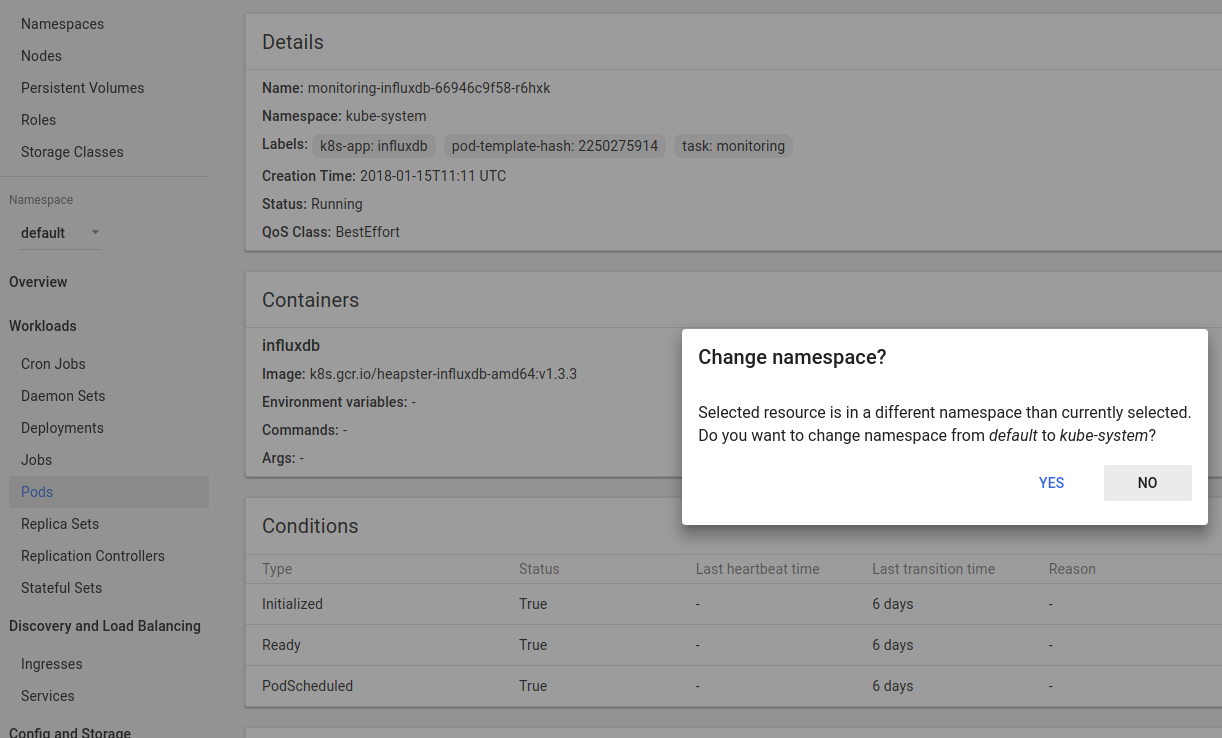
Clicking "Yes" leaves the user on the page. Clicking "No" switches the user to the different namespace.
The text "Do you want to change the namespace from x to y" has the namespace order reversed.
Expected result
Clicking "No" leaves the user on the page. Clicking "Yes" switches the user to the different namespace.
The text "Do you want to change the namespace from x to y" has the namespace order correctly.
Comments
 dzoeteman
All 17 comments
It is actually correct. The check is fired after changing namespace, not before. If you check namespace on the navbar and in URL then you can see that it was changed and you could see view reload animation during the change.
- You are on a resource page that is in
kube-systemnamespace. - Change namespace to
default. Namespace is changed. - Check is fired and dialog is shown saying that currently selected resource is in a different namespace than currently selected (
default). - You can either stay on this resource page and change namespace back to
kube-systemor keep namespace unchanged and get redirected tooverviewpage.

 floreks
on 22 Jan 2018
floreks
on 22 Jan 2018
@floreks I understand it makes sense from a technical POV, but I don't see how that is useful from a user's POV.
It would seem logical to me that if I change the namespace in the select box, that I want to change the namespace. When I then get a dialog asking me "Change namespace?" I expect that to be a confirmation asking if I'm sure to change the namespace to the namespace I selected. I was quite confused when I first saw this dialog, pressed "Yes" and nothing happened.
Please see my PR #2785 so you can see what I changed in the behaviour, it might explain the issue a little better.
dzoeteman
on 22 Jan 2018
You have changed the logic, but it is not true. The most important indicator is that state actually reloads when you change namespace. You can see that. While being on a new namespace you get message.
Selected resource is in a different namespace than currently selected. This part itself indicates for the second time that your namespace has changed already. Then you are asked if you want to stay on this new namespace that you have switched to or you want to return to previous namespace and stay on this detail page.
floreks
on 22 Jan 2018
@floreks I understand that is how it works at the moment, yes. And I see how it could be useful in some circumstances (like when you arrive in the application from a URL with a pod resource that's in a different namespace than selected in the URL).
But let me explain a user flow. If I am on a pod detail page, and I want to go to the overview page of a different namespace, I would expect changing the namespace in the select box would take me there. Instead, it just changes the namespace in the state, and with that reloads to basically an "invalid" state. Then I am asked if I want to switch back to the namespace of the resource.
I would expect rather, that I am either just immediately taken to the overview page of the namespace I selected, or that I am asked a confirmation for changing the namespace to the namespace I selected.
If you are really set on this behaviour though, would you agree it would at least be good to change the title/text of the dialog box to something like "Return to resource namespace?"?
dzoeteman
on 22 Jan 2018
I am on a pod detail page, and I want to go to the overview page of a different namespace, I would expect changing the namespace in the select box would take me there.
It can not work this way as to be consistent it would have to work the same for every other page, i.e. when you would be on a pod list page and you would change namespace then you would be redirected to overview which is not expected. Namespace selector always worked in the same way. It is independent of the state you are currently on. It's role is only to change current namespace to a different one. Other parts of the application can then jump in and say "hey, something is not right, this resource is in a different namespace than you have selected".
If you are really set on this behaviour though, would you agree it would at least be good to change the title/text of the dialog box to something like "Return to resource namespace?"?
It can not be done this way also as there are more use cases where this dialog appears. When you are on node detail page then you can see all pods that belong to a node and they can belong to different namespaces. Chosing a pod from a different namespace will redirect you to detail page of this pod and it will trigger this namespace info dialog also.
Also using direct link with wrong namespace can trigger this check. In those cases message Return to resource namespace does not make much sense. It has to be generic enough, because it can be triggered by different actions.
floreks
on 22 Jan 2018
@floreks I understand the uses cases. In any way, my PR may be a worse experience with these use cases, so I'll close my PR.
I would rather suggest that maybe this dialog is too generic, if it covers all these use cases. In my mind at least, it doesn't make much sense for the user flow I described, but it does make sense for the user flows you described.
I don't have a solution that would work for all these use cases, so I'll leave it at that for now. Maybe the dialog/state change is too generic, but at the same time, I'm not sure how I would specify the use case I described and make it work in a non-hacky way in Angular (something like checking if the user himself changed the select box and the user is on a resource detail page?). But I do think it doesn't make sense from the user flow I described.
dzoeteman
on 22 Jan 2018
I understand your flow also. When I was working on it, it also came to my mind that this particular use case might not be as simple as I'd want however, if we consider all use cases where this dialog is triggered then it has to be generic enough and done this way. Also I didn't want to just redirect user to some page without any notification as it could be confusing. User should know what is going on at all times.
We might reconsider this while rewriting app to angular 5. Maybe there will be some easier way to detect this.
floreks
on 22 Jan 2018
This current behavior is kind of terrible in my opinion. I have never selected a different namespace and then asked myself whether I really wanted to go to resources for the new namespace or not. It feels like I have to solve a puzzle every time I select a namespace, figuring out whether to click yes or no just to continue to the requested namespace :) When I get it wrong, it's even more confusing, as the namespace didn't actually change to what I asked for. I would love it if changing namespaces always went to the overview page for the requested namespace, if it can't be smarter than that.
Think about it like an IDE. If you asked an IDE to open a new project, would it leave a file open for the old project, then instantly ask you if you wanted to switch back to the old project, or would it go to an overview page for the project that you just asked for it to open?
 EmpireJones
on 13 Mar 2018
EmpireJones
on 13 Mar 2018
@EmpireJones @dzoeteman
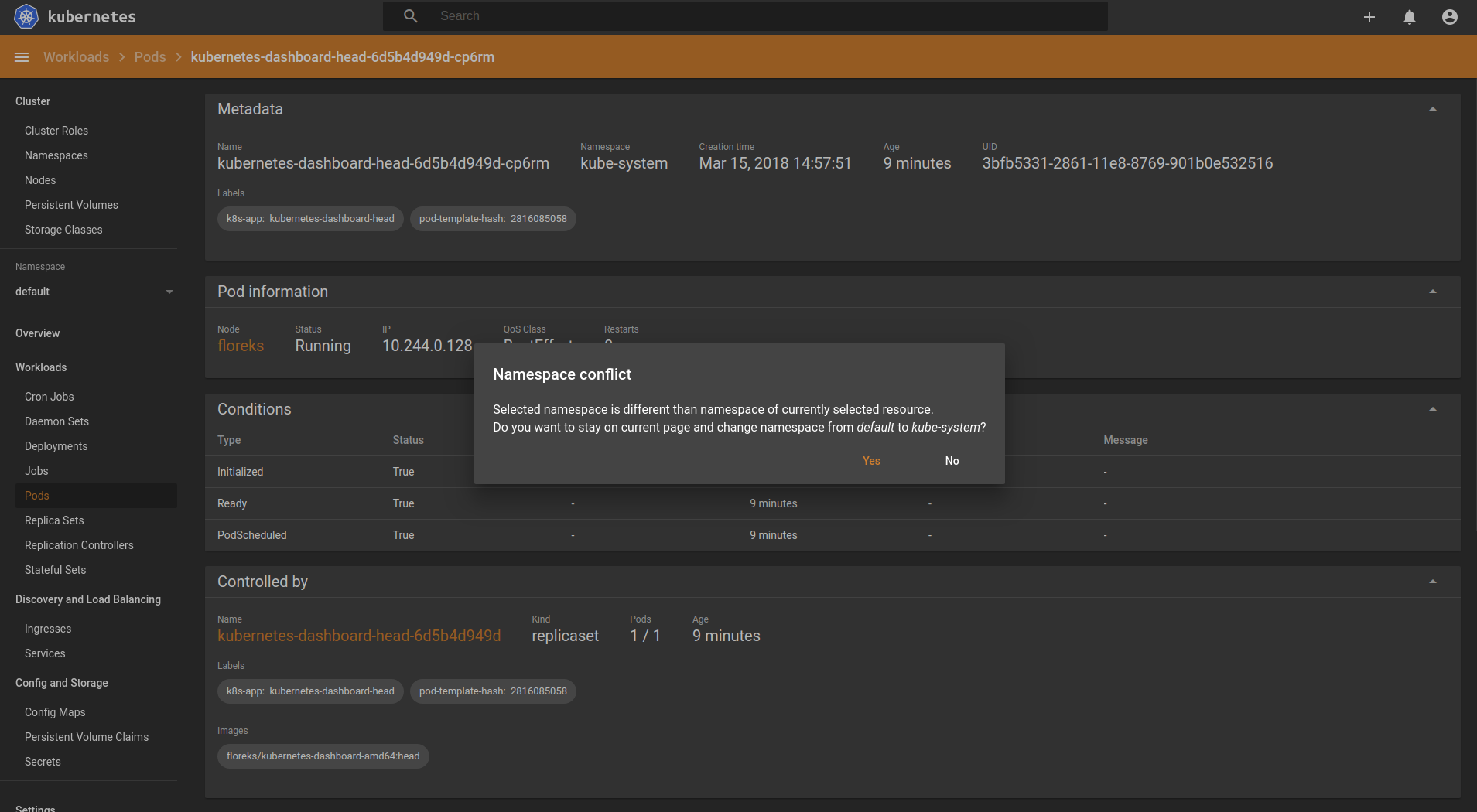
We have addressed this during angular migration and message has been changed to be more precise so you do not have to think what is going to happen after clicking Yes or No.
floreks
on 15 Mar 2018
The popup in the screenshot doesn't seem like much of an improvement. I'll probably just try to get use to always pressing no when something pops up, or pressing the overview button first. I see no need for a confirmation popup. Anything that pops up required mental capacity, in my opinion.
EmpireJones
on 16 Mar 2018
In Kubernetes there are resources that are namespaced and there are resources that are non-namespaced such as i.e. Nodes. On a Node view you can see a pod list that shows all pods on a node and they can be from a different namespaces. Namespace selector works with part of the application that shows namespaced resources. In a case where you select resource from a different namespace than namespace that is is currently an application-wide selected namespace, you will have a conflict.
It's like you would try to do kubectl get -n kube-system pod grafana and grafana is in a default namespace. On our side it works, but there is a conflict because -n switch is set to kube-system.
We have to show some information and inform user that there is such conflict. Right now it clearly says Do you want to stay on a current page... Yes/No. It is rather simple question, isn't it?
floreks
on 16 Mar 2018
I think a part of the problem here is that the "namespace" drop down in the only element on the left-side nav that operates as a filter on the current resource view. Example: If I'm viewing a ReplicaSet, clicking Pods does not just show me the pods that are a part of that Set, it shows me all of the pods in the namespace.
I would opt for having the namespace drop down always return me to the overview page for that namespace, and adding an additional namespace filter dropdown somewhere else on the page when viewing resources with child resources in multiple namespaces.
 jmcnevin
on 16 Mar 2018
jmcnevin
on 16 Mar 2018
I think a part of the problem here is that the "namespace" drop down in the only element on the left-side nav that operates as a filter on the current resource view. Example: If I'm viewing a ReplicaSet, clicking Pods does not just show me the pods that are a part of that Set, it shows me all of the pods in the namespace.
Yes and this behavior is correct as navbar clearly separates resources that are namespaced and non-namespaced. Everything below ns selector is a namespaced resource thus clicking on entry in the navbar always points you to the list of resources filtered by whatever namespace is selected or All namespaces.
On the other hand when you are on replica set detail view you can see a list of pods that only belong to this replica set.
Consider such use case:
- User selects
testnamespace to work with. - User does some operations.
- User goes to node detail view and wants to go to some pod detail view but this pod is in a different namespace than
test. - User is on a pod detail view that is in ns
devbut he clearly selectedtestas the namespace to work with. - We can either: inform user that there is a conflict (1), redirect him to some arbitrary chosen view without informing why (2) or change his current active namespace to ns
dev(3).
Also you should remember that resource names are unique IN a namespace but not ACROSS namespaces. There is a possibility to have 2 pods with same names in 2 different namespaces. This makes option 3 dangerous as user might not be aware that his current active namespace has changed.
Option 2 on the other hand is not really an option as user should always be redirected to the view he has chosen if there is no error and his session has not expired. Redirecting to overview without any message why would be confusing.
That is why we have decided to go with option 1 and inform user that something unexpected have happend and he has to decide what to do next.
We could be more strict and go with kubectl behavior and if you have selected test ns and then try to go to pod detail view that is located in different namespace you will be redirected to error state with information that Resource not found.. This is what kubectl does when you do kubectl -n test get pod x and x is in a ns dev in example. I don't think however that most users would want that.
floreks
on 16 Mar 2018
In the case of option 3, wouldn't a big red banner stating "You've switched namespaces!" suffice?
I would wager that the most common usage of this drop down is browse between namespaces to get a general overview of the system, and would just prefer to do that as quickly as possible without having to grok this popup every time it appears.
jmcnevin
on 16 Mar 2018
In the case of option 3, wouldn't a big red banner stating "You've switched namespaces!" suffice?
I am not sure if I like the idea of taking the decision part out of user hands. It's like I am browsing through UI and then all of sudden I am being informed "hey we have changed your namespace, enjoy!" but why if I don't want that and I want to decide what to do?
I would wager that the most common usage of this drop down is browse between namespaces to get a general overview of the system, and would just prefer to do that as quickly as possible without having to grok this popup every time it appears.
We have to think of all use cases as equal here as we do not have any data that could prove you are right. I could say that I think it is quite common to use and work with multiple namespaces at a time, i.e. staging, development, production. User then can quite often change namespace and want to work with resources from single namespace only.
Also I do not think that this dialog will appear very often. There are only 3 scenarios I can think of right now that can cause it to appear:
- User is on a detail page of non-namespaced resource and he clicks on a related namespaced resource that is in a different namespace (excluding
All namespacesoption). - User provides you a link (
/api/v1/<resource>/<resourceNamespace>/<name>?namespace=<appNamespace>) whereresourceNamespaceis different thanappNamespace. Most probably he would have to construct it manually. - User is already on a detail page of some resource that is in a namespace
xand then he manually changes namespace toy, however in this situation we could redirect him to parent list view of current resource type.
This leaves us with pretty much first scenario that might or might not be common. I have seen it maybe a few times while using Dashboard, besides when I was testing different scenarios to trigger it.
floreks
on 16 Mar 2018
The third scenario you've mentioned is how I run into this popup most often, and I'd be happy with the solution you've proposed (redirect) for that.
jmcnevin
on 16 Mar 2018
As a quick fix I have changed this behavior on our angular migration branch for the third scenario. If user is on a details view and he uses namespace selector to change namespace, he will be redirected to overview state of this namespace. Other 2 scenarios are left as is and dialog will still appear.
floreks
on 19 Mar 2018
Related issues
 pavankjadda
·
3Comments
pavankjadda
·
3Comments
 donspaulding
·
5Comments
donspaulding
·
5Comments
 andrei-dascalu
·
3Comments
andrei-dascalu
·
3Comments
 kairen
·
4Comments
kairen
·
4Comments
 shu-mutou
·
3Comments
shu-mutou
·
3Comments
Most helpful comment
As a quick fix I have changed this behavior on our angular migration branch for the third scenario. If user is on a details view and he uses namespace selector to change namespace, he will be redirected to overview state of this namespace. Other 2 scenarios are left as is and dialog will still appear.