Dashboard: no kind Role is registered
Hi guys,
I have set up cluster with kops.
When I try to run dashboard for some reason i get 3 weard errors: no kind "Role", Rolebinding and Deployment in registered version. I am running version 1.8.4 of kubernetes apparently.
kubectl apply -f https://raw.githubusercontent.com/kubernetes/dashboard/master/src/deploy/recommended/kubernetes-dashboard.yaml
secret "kubernetes-dashboard-certs" configured
serviceaccount "kubernetes-dashboard" configured
service "kubernetes-dashboard" configured
unable to decode "https://raw.githubusercontent.com/kubernetes/dashboard/master/src/deploy/recommended/kubernetes-dashboard.yaml": no kind "Role" is registered for version "rbac.authorization.k8s.io/v1"
unable to decode "https://raw.githubusercontent.com/kubernetes/dashboard/master/src/deploy/recommended/kubernetes-dashboard.yaml": no kind "RoleBinding" is registered for version "rbac.authorization.k8s.io/v1"
unable to decode "https://raw.githubusercontent.com/kubernetes/dashboard/master/src/deploy/recommended/kubernetes-dashboard.yaml": no kind "Deployment" is registered for version "apps/v1beta2"
I am not sure how to resolve it. As I run the latest and greatest version I would expect it to support everything. I would appreciate your hints.
Regards,
Ivan
 vanomashey
All 10 comments
Hi! no kind "Role" is registered for version "rbac.authorization.k8s.io/v1" says that your cluster doesn't recognize such a resource. I think your cluster version is too low to have it. Please try with newer version or check in your cluster if API "rbac.authorization.k8s.io/v1" is available. Use kubectl version and check with kubernetes.io page.
 maciaszczykm
on 9 Jan 2018
maciaszczykm
on 9 Jan 2018
Exactly. I have checked it twice. I have the latest version of kops and kubernetes version is 1.8.4.
Is there any way this might be happening?
vanomashey
on 9 Jan 2018
kubectl version
Client Version: version.Info{Major:"1", Minor:"5", GitVersion:"v1.5.7", GitCommit:"8eb75a5810cba92ccad845ca360cf924f2385881", GitTreeState:"clean", BuildDate:"2017-04-27T10:00:30Z", GoVersion:"go1.7.5", Compiler:"gc", Platform:"linux/amd64"}
Server Version: version.Info{Major:"1", Minor:"8", GitVersion:"v1.8.4", GitCommit:"9befc2b8928a9426501d3bf62f72849d5cbcd5a3", GitTreeState:"clean", BuildDate:"2017-11-20T05:17:43Z", GoVersion:"go1.8.3", Compiler:"gc", Platform:"linux/amd64"}
This proves that version on the server is 1.8.4
Very confusing. Cannot understand why it does not accept API calls then.
vanomashey
on 9 Jan 2018
I think that guys from kops have only enabled certain resource api versions.
Are you sure that RBAC is enabled in your cluster?
In K8S 1.8 Deployment appears in 2 versions v1beta1 and v1beta2.
https://v1-8.docs.kubernetes.io/docs/api-reference/v1.8/#deployment-v1beta2-apps
As for the Roles I see that versions v1, v1beta1, v1alpha1 are supported in this K8S version.
https://v1-8.docs.kubernetes.io/docs/api-reference/v1.8/#role-v1-rbac
There is some api endpoint that allows you to check enabled apis. I'll check which one.
 floreks
on 10 Jan 2018
floreks
on 10 Jan 2018
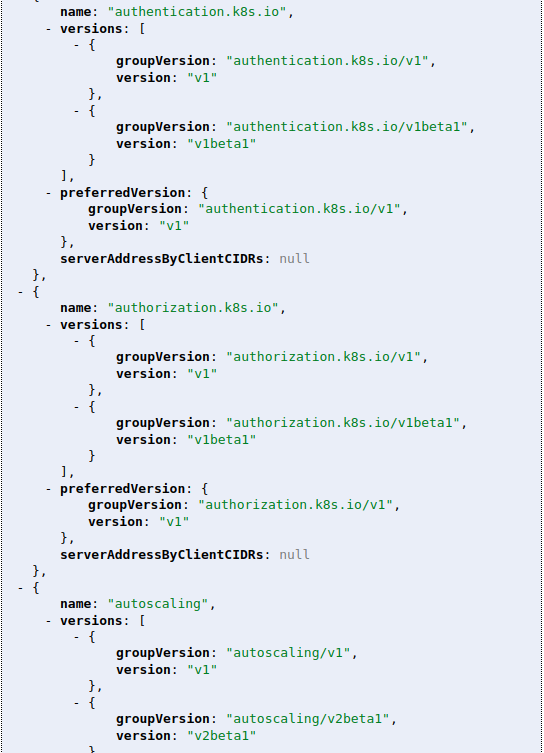
You can check <apiserver_ip>:<apiserver_port>/apis endpoint. If you use kubectl proxy then check http://localhost:8001/apis. It should list enabled apis and their versions. You can use that information to adjust deploy yaml.
In example
floreks
on 11 Jan 2018
Hi Sebastian,
Apparently you are right. For some reason I have very short list of enabled apis.
Why is the list of APIs are so short by default? Why "deployments" which is very important api is disabled? and how can I enable it?
This is the contents of apis endpoint:
{
kind: "APIGroupList",
apiVersion: "v1",
groups: [
{
name: "apiregistration.k8s.io",
versions: [
{
groupVersion: "apiregistration.k8s.io/v1beta1",
version: "v1beta1"
}
],
preferredVersion: {
groupVersion: "apiregistration.k8s.io/v1beta1",
version: "v1beta1"
},
serverAddressByClientCIDRs: null
},
{
name: "extensions",
versions: [
{
groupVersion: "extensions/v1beta1",
version: "v1beta1"
}
],
preferredVersion: {
groupVersion: "extensions/v1beta1",
version: "v1beta1"
},
serverAddressByClientCIDRs: null
},
{
name: "apps",
versions: [
{
groupVersion: "apps/v1beta1",
version: "v1beta1"
},
{
groupVersion: "apps/v1beta2",
version: "v1beta2"
}
],
preferredVersion: {
groupVersion: "apps/v1beta1",
version: "v1beta1"
},
serverAddressByClientCIDRs: null
},
{
name: "authentication.k8s.io",
versions: [
{
groupVersion: "authentication.k8s.io/v1",
version: "v1"
},
{
groupVersion: "authentication.k8s.io/v1beta1",
version: "v1beta1"
}
],
preferredVersion: {
groupVersion: "authentication.k8s.io/v1",
version: "v1"
},
serverAddressByClientCIDRs: null
},
{
name: "authorization.k8s.io",
versions: [
{
groupVersion: "authorization.k8s.io/v1",
version: "v1"
},
{
groupVersion: "authorization.k8s.io/v1beta1",
version: "v1beta1"
}
],
preferredVersion: {
groupVersion: "authorization.k8s.io/v1",
version: "v1"
},
serverAddressByClientCIDRs: null
},
{
name: "autoscaling",
versions: [
{
groupVersion: "autoscaling/v1",
version: "v1"
},
{
groupVersion: "autoscaling/v2beta1",
version: "v2beta1"
}
],
preferredVersion: {
groupVersion: "autoscaling/v1",
version: "v1"
},
serverAddressByClientCIDRs: null
},
{
name: "batch",
versions: [
{
groupVersion: "batch/v1",
version: "v1"
},
{
groupVersion: "batch/v1beta1",
version: "v1beta1"
}
],
preferredVersion: {
groupVersion: "batch/v1",
version: "v1"
},
serverAddressByClientCIDRs: null
},
{
name: "certificates.k8s.io",
versions: [
{
groupVersion: "certificates.k8s.io/v1beta1",
version: "v1beta1"
}
],
preferredVersion: {
groupVersion: "certificates.k8s.io/v1beta1",
version: "v1beta1"
},
serverAddressByClientCIDRs: null
},
{
name: "networking.k8s.io",
versions: [
{
groupVersion: "networking.k8s.io/v1",
version: "v1"
}
],
preferredVersion: {
groupVersion: "networking.k8s.io/v1",
version: "v1"
},
serverAddressByClientCIDRs: null
},
{
name: "policy",
versions: [
{
groupVersion: "policy/v1beta1",
version: "v1beta1"
}
],
preferredVersion: {
groupVersion: "policy/v1beta1",
version: "v1beta1"
},
serverAddressByClientCIDRs: null
},
{
name: "rbac.authorization.k8s.io",
versions: [
{
groupVersion: "rbac.authorization.k8s.io/v1",
version: "v1"
},
{
groupVersion: "rbac.authorization.k8s.io/v1beta1",
version: "v1beta1"
}
],
preferredVersion: {
groupVersion: "rbac.authorization.k8s.io/v1",
version: "v1"
},
serverAddressByClientCIDRs: null
},
{
name: "storage.k8s.io",
versions: [
{
groupVersion: "storage.k8s.io/v1",
version: "v1"
},
{
groupVersion: "storage.k8s.io/v1beta1",
version: "v1beta1"
}
],
preferredVersion: {
groupVersion: "storage.k8s.io/v1",
version: "v1"
},
serverAddressByClientCIDRs: null
},
{
name: "apiextensions.k8s.io",
versions: [
{
groupVersion: "apiextensions.k8s.io/v1beta1",
version: "v1beta1"
}
],
preferredVersion: {
groupVersion: "apiextensions.k8s.io/v1beta1",
version: "v1beta1"
},
serverAddressByClientCIDRs: null
}
]
}
Have you managed to enable the APIs?
 MohammedFadin
on 14 Jan 2018
MohammedFadin
on 14 Jan 2018
I'm closing this as this is cluster config issue not Dashboard itself. I have provided link to documentation explaining how to enable/disable apis.
https://kubernetes.io/docs/reference/api-overview/#api-groups
floreks
on 14 Jan 2018
Thank you guys for help!
vanomashey
on 14 Jan 2018
@floreks The referenced link does not resolve. Perhaps one of the following would help.
 medined
on 10 Nov 2018
medined
on 10 Nov 2018
Related issues
 bryk
·
55Comments
bryk
·
55Comments
 cnwalker
·
32Comments
cnwalker
·
32Comments
 Masber
·
44Comments
Masber
·
44Comments
 Rahul91
·
71Comments
Rahul91
·
71Comments
 saschagrunert
·
30Comments
saschagrunert
·
30Comments
Most helpful comment
Hi!
no kind "Role" is registered for version "rbac.authorization.k8s.io/v1"says that your cluster doesn't recognize such a resource. I think your cluster version is too low to have it. Please try with newer version or check in your cluster if API"rbac.authorization.k8s.io/v1"is available. Usekubectl versionand check with kubernetes.io page.