Dashboard: oversized record received
Environment
Setting up Kubernetes on a Raspberry Pi cluster, using this guide https://gist.github.com/alexellis/fdbc90de7691a1b9edb545c17da2d975
{
  "major": "1",
  "minor": "8",
  "gitVersion": "v1.8.5",
  "gitCommit": "cce11c6a185279d037023e02ac5249e14daa22bf",
  "gitTreeState": "clean",
  "buildDate": "2017-12-07T16:05:18Z",
  "goVersion": "go1.8.3",
  "compiler": "gc",
  "platform": "linux/arm"
}
I initially setup the recommended version, using the steps described at https://github.com/kubernetes/dashboard/wiki/Installation (but using the ARM version). Then I decided that, since this was running on an isolated local cluster, I'd use the alternativeversion and make the auth part a bit simpler
So I removed the deployment of the recommended version , ran the command listed under the "Update" section here https://github.com/kubernetes/dashboard/wiki/Installation#update .. once that was done I re-ran kubectl apply -f <path to the alternative arm deployment on github>
Everything came back up, except that I cannot access the web UI on localhost:8001/ui
Steps to reproduce
Browse http://localhost:8001/ui
Observed result
Error: 'tls: oversized record received with length 20527'
Trying to reach: 'https://10.44.0.1:9090/'
Expected result
Should gain access to the web UI
Comments
This happens both if I set up an SSH tunnel (SSH -L ...) to my Raspberry Pi that runs the master, or if I copy over my /etc/kubernetes/admin.conf to my laptop, set KUBECONFIG to point to it, and run kubectl proxy
 thecodejunkie
All 12 comments
http://localhost:8001/ui is deprecated and will not work. Use the link provided in README to access Dashboard.
In case apiserver is exposed on localhost:8001:
http://localhost:8001/api/v1/namespaces/kube-system/services/https:kubernetes-dashboard:/proxy/
 floreks
on 12 Dec 2017
floreks
on 12 Dec 2017
@floreks browsing /ui is automatically forwarded to http://localhost:8001/api/v1/namespaces/kube-system/services/https:kubernetes-dashboard:/proxy/ and it is the latter that is generating the error

thecodejunkie
on 12 Dec 2017
Not quite sure where it gets 10.44.0.1:9090 from
kubectl get svc --namespace=kube-system

NAME                   TYPE        CLUSTER-IP      EXTERNAL-IP   PORT(S)         AGE
kube-dns               ClusterIP   10.96.0.10      <none>        53/UDP,53/TCP   1d
kubernetes-dashboard   ClusterIP   10.104.182.79   <none>        80/TCP          5h
But please bare with me, I'm really new to the Kubernetes stuff 😄
thecodejunkie
on 12 Dec 2017
Oh my. I think I just noticed the problem. Since I am running the alternative version, which serves stuff over HTTP I needed to change
http://localhost:8001/api/v1/namespaces/kube-system/services/https:kubernetes-dashboard:/proxy/
to
http://localhost:8001/api/v1/namespaces/kube-system/services/http:kubernetes-dashboard:/proxy/
I did not notice the https part in the URL itself.
Once I did that I got this far
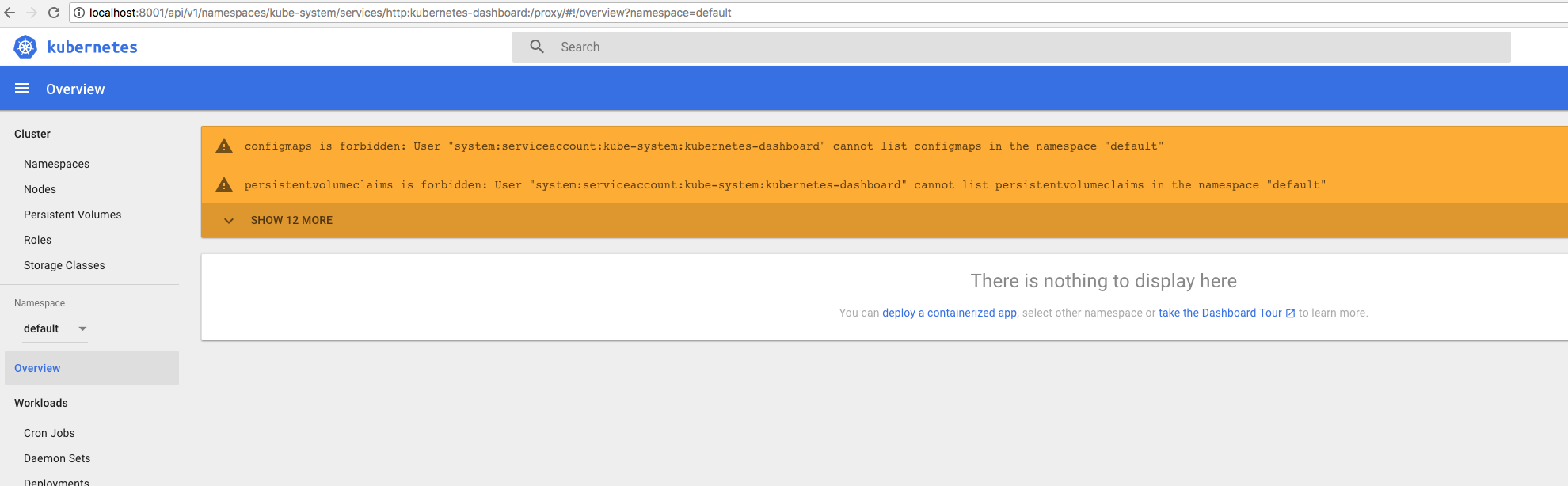
I get these errors no matter the namespace (I tried default and kube-system). This this because I'm not passing an Authorization Header ?
If that's the case then maybe I'm better of going with the recommended installation and try to figure out how to create a kubeconfig.yaml file with a username & password?
Appreciate your advice @floreks
thecodejunkie
on 12 Dec 2017
@floreks browsing /ui is automatically forwarded to http://localhost:8001/api/v1/namespaces/kube-system/services/https:kubernetes-dashboard:/proxy/
Good. I didn't know our cherry pick was already merged and new k8s 1.8.X released. Still, /ui redirect is in deprecation period starting from K8S 1.8 release and will be removed in K8S 1.10.
With alternative setup you either need to configure Auth header like described in our wiki or follow this guide to grant full admin privileges directly to Dashboard Service Account.
floreks
on 12 Dec 2017
@floreks Will do, thanks! Does the Official release and Development release (in your link) map to recommended and alternative installations of the dashboard?
thecodejunkie
on 12 Dec 2017
Recommended and alternative are different ways of deploying Dashboard. Recommended one uses HTTPS and has login screen enabled by default. Alternative one exposes Dashboard over HTTP only and does not have login functionality enabled by default. It can be maybe used in home setup where your cluster is not exposed to outside world and if you just do not care about such functionality and only want to access cluster resources.
Official/development releases map xxx.yaml and xxx-head-.yaml files used to deploy Dashboard. Head releases are updated automatically after every master build, so they can be unstable.
floreks
on 12 Dec 2017
@floreks thank you for an excellent response. I grabbed a service-account-token using kubectl -n kube-system get secret and kubectl -n kube-system describe secret endpoint-controller-token-s4mm5 (I just randomly picked one of the service account tokens)
Attached it to my requests, using a browser plugin, as an Authorization header

Am I misunderstanding the docs? Hmm
thecodejunkie
on 12 Dec 2017
You understand it correctly, however there is an issue with the apiserver proxy here.
Check Important section.
https://github.com/kubernetes/dashboard/wiki/Access-control#authorization-header
floreks
on 12 Dec 2017
Unfortunately in this case you'd need to access Dashboard directly, i.e. using NodePort method: https://github.com/kubernetes/dashboard/wiki/Accessing-Dashboard---1.7.X-and-above#nodeport
This way header will actually reach Dashboard.
floreks
on 12 Dec 2017
@floreks ah.. that issue seems to be dropped? I will read up on the NodePort method. Also since this is a completely isolated cluster, running on a bunch of Raspberries, I will probably end up granting admin privileges eventually. But as a learning exercise I'd like to be able to get this to work first 😄
I'll close this now as it's way beyond the original reported issue. Hopefully it can provide some help to others that stumble across the same problem(s)
Thanks!
thecodejunkie
on 12 Dec 2017
Seems that it has been dropped unfortunately. In case you need some more information we are available on kubernetes slack 'sig-ui' channel. It's a better place to discuss configuration issues.
floreks
on 12 Dec 2017
Related issues
 minminmsn
·
4Comments
minminmsn
·
4Comments
 mxey
·
3Comments
mxey
·
3Comments
 donspaulding
·
5Comments
donspaulding
·
5Comments
 pavankjadda
·
3Comments
pavankjadda
·
3Comments
 lukmanulhakimd
·
4Comments
lukmanulhakimd
·
4Comments
Most helpful comment
Oh my. I think I just noticed the problem. Since I am running the
alternativeversion, which serves stuff over HTTP I needed to changehttp://localhost:8001/api/v1/namespaces/kube-system/services/https:kubernetes-dashboard:/proxy/
to
http://localhost:8001/api/v1/namespaces/kube-system/services/http:kubernetes-dashboard:/proxy/
I did not notice the
httpspart in the URL itself.Once I did that I got this far
I get these errors no matter the namespace (I tried
defaultandkube-system). This this because I'm not passing an Authorization Header ?If that's the case then maybe I'm better of going with the
recommendedinstallation and try to figure out how to create akubeconfig.yamlfile with a username & password?Appreciate your advice @floreks