Dashboard: Deployment in version "v1beta1" cannot be handled as a Deployment: [pos 620]: json: expect char '"' but got char '1'
Issue details
Edited Deployment config in kubernetes/dashboard UI to include NEO4J_HEAP_MEMORY environment variable for neo4j but received an error when updated the deployment
Environment
Dashboard version: gcr.io/google_containers/kubernetes-dashboard-amd64:v1.5.1
Kubernetes Client Version: version.Info{Major:"1", Minor:"5", GitVersion:"v1.5.1", GitCommit:"82450d03cb057bab0950214ef122b67c83fb11df", GitTreeState:"clean", BuildDate:"2016-12-14T00:57:05Z", GoVersion:"go1.7.4", Compiler:"gc", Platform:"linux/amd64"}
Kubernetes Server Version: version.Info{Major:"1", Minor:"5", GitVersion:"v1.5.1", GitCommit:"82450d03cb057bab0950214ef122b67c83fb11df", GitTreeState:"clean", BuildDate:"2016-12-14T00:52:01Z", GoVersion:"go1.7.4", Compiler:"gc", Platform:"linux/amd64"}
Operating system: Linux k8s-master01 4.8.0-22-generic #24-Ubuntu SMP Sat Oct 8 09:15:00 UTC 2016 x86_64 x86_64 x86_64 GNU/Linux
Node.js version:
Go version: 1.7.4
Steps to reproduce
- Create new Deployment with out environment variable
- Edit the deployment and add the new environment variable
- Update deployment
Observed result
Error:

I got the structure and where to add the NEO4J_HEAP_MEMORY from here:

And updated it to the existing Deployment:

Expected result
ReplicaSet and Pods updated with new config
 naisanza
All 14 comments
Hey @naisanza can you paste the manifest you are using?
 guiocavalcanti
on 2 Feb 2017
guiocavalcanti
on 2 Feb 2017
@guiocavalcanti I don't have a manifest as I am using purely the UI for kubernetes/dashboard with all default settings
I'm using the docker image at https://hub.docker.com/_/neo4j/
naisanza
on 2 Feb 2017
@naisanza I think this is a wrong error message. The actual problem is occuring because somewhere you have a key with a numeric value. Try to search the manifest for the char 1 and surround it with double quotes.
guiocavalcanti
on 2 Feb 2017
@guiocavalcanti I noticed that I took the settings from the (working) Replica Set config and applied it to the (old) Deployment config
I don't know how much that matters, but I'll recreate the test and will create the new key-values in the (old) Replica Set config
naisanza
on 9 Feb 2017
@guiocavalcanti If I put the integer in quotes "1500" it works, but it's shown in Environmental variables incorrectly:

It looks like this if the Environmental variables is added from using the +CREATE button:

Is there a difference between 1500 and "1500", is one being taken as an integer and the other is taken as a string? Does it matter to kubernetes?
naisanza
on 12 Feb 2017
@naisanza
It actually looks like kubernetes issue not dashboard. I've tried that on dashboard 1.5.1 with kubernetes 1.5.2(you are using 1.5.1) and it worked fine. I've updated deployment with env variable test/test and it was correctly propagated to pod.


 floreks
on 22 Feb 2017
floreks
on 22 Feb 2017
@floreks try it with an integer value
Using an integer without quotation marks will get an error when adding environment variables after creating the deployment from the UI, but using quotation marks will be reflected in the deployment configuration.
I'm trying to find out if that has any impact when the docker image reads that value that includes quotations versus no quotations
naisanza
on 22 Feb 2017
Any progress?
 zouyee
on 17 Apr 2017
zouyee
on 17 Apr 2017
After investigating this a bit more I have to say that it works as expected. Kubernetes accepts env variables only as strings.
type EnvVar struct {
    // Required: This must be a C_IDENTIFIER.
    Name string
    // Optional: no more than one of the following may be specified.
    // Optional: Defaults to ""; variable references $(VAR_NAME) are expanded
    // using the previous defined environment variables in the container and
    // any service environment variables.  If a variable cannot be resolved,
    // the reference in the input string will be unchanged.  The $(VAR_NAME)
    // syntax can be escaped with a double $$, ie: $$(VAR_NAME).  Escaped
    // references will never be expanded, regardless of whether the variable
    // exists or not.
    // +optional
    Value string
    // Optional: Specifies a source the value of this var should come from.
    // +optional
    ValueFrom *EnvVarSource
}
As editor has to allow integer values also and we can not do any validity check if added object, field, etc. is compliant with kubernetes api then such errors may happen.
floreks
on 27 Jun 2017
You can always try to put integer into quotation marks, so it will be recognized as a string.
 maciaszczykm
on 27 Jun 2017
maciaszczykm
on 27 Jun 2017
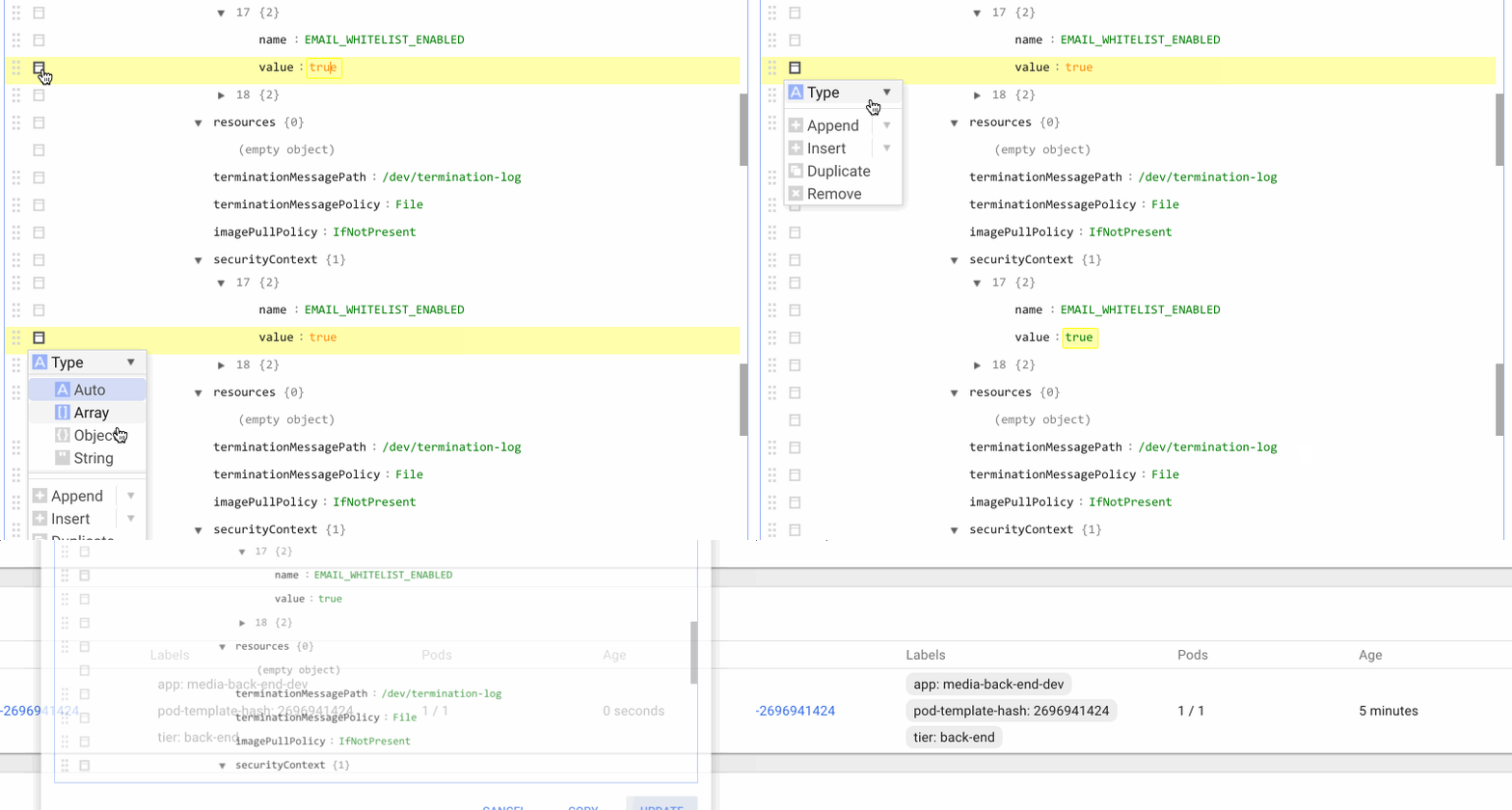
When specifying env variables using the UI after the initial deployment, I was experiencing this same issue when trying to specify settings that were Integers or Booleans. Surrounding it in quotes didn't work properly for me.
I was able to get past this by changing the "type" of the value to a string using the following:
 kobelb
on 28 Nov 2017
kobelb
on 28 Nov 2017
Edit mode was changed to text mode in 1.7. This should not be a problem anymore.
floreks
on 28 Nov 2017
In my case , justin because I configured a wrong yaml file with a missing -:

Below is the difference of a - exist or not, the JSON format at left is more intuitive:


 ykfq
on 19 Mar 2018
ykfq
on 19 Mar 2018
Please try to pass the environment variable's value within the double quotes, especially when you are passing some numeric value, In my case, I was passing the environment variables in the deployment file without the double quotes. I was getting the same error, but when I changed it worked for me. It might help you as well.
Thanks,
 kamalguptadevops
on 3 Jun 2019
kamalguptadevops
on 3 Jun 2019
Related issues
 mxey
·
3Comments
mxey
·
3Comments
 kasunsjc
·
3Comments
maciaszczykm
·
4Comments
kasunsjc
·
3Comments
maciaszczykm
·
4Comments
 shu-mutou
·
3Comments
shu-mutou
·
3Comments
 puja108
·
5Comments
puja108
·
5Comments
Most helpful comment
@naisanza I think this is a wrong error message. The actual problem is occuring because somewhere you have a key with a numeric value. Try to search the manifest for the char
1and surround it with double quotes.