Dash: Dash in Jupyter - more seamless jupyter notebook integration
This answer in forum provides this function to do this using iframe:
from IPython import display
def show_app(app,  # type: dash.Dash
             port=9999,
             width=700,
             height=350,
             offline=True,
             style=True,
             **dash_flask_kwargs):
    """
    Run the application inside a Jupyter notebook and show an iframe with it
    :param app:
    :param port:
    :param width:
    :param height:
    :param offline:
    :return:
    """
    url = 'http://localhost:%d' % port
    iframe = '<iframe src="{url}" width={width} height={height}></iframe>'.format(url=url,
                                                                                  width=width,
                                                                                  height=height)
    display.display_html(iframe, raw=True)
    if offline:
        app.css.config.serve_locally = True
        app.scripts.config.serve_locally = True
    if style:
        external_css = ["https://fonts.googleapis.com/css?family=Raleway:400,300,600",
                        "https://maxcdn.bootstrapcdn.com/font-awesome/4.7.0/css/font-awesome.min.css",
                        "http://getbootstrap.com/dist/css/bootstrap.min.css", ]

        for css in external_css:
            app.css.append_css({"external_url": css})

        external_js = ["https://code.jquery.com/jquery-3.2.1.min.js",
                       "https://cdn.rawgit.com/plotly/dash-app-stylesheets/a3401de132a6d0b652ba11548736b1d1e80aa10d/dash-goldman-sachs-report-js.js",
                       "http://getbootstrap.com/dist/js/bootstrap.min.js"]

        for js in external_js:
            app.scripts.append_script({"external_url": js})

    return app.run_server(debug=False,  # needs to be false in Jupyter
                          port=port,
                          **dash_flask_kwargs)
This question on Stack Overflow provides further evidence of interest in this feature. So, I'm posting this here both as feature request and as a reference. Feel free to close this issue if you are already aware of this.
 lincolnfrias
All 19 comments
Is there any way to do this in purely offline mode (behind a corporate firewall)?
 yumyumz
on 15 Sep 2018
yumyumz
on 15 Sep 2018
Is there any way to do this in purely offline mode (behind a corporate firewall)?
That should already work. The exception might be the CSS and JS assets (which are, by default, loaded from a CDN) but you can toggle those here: https://dash.plot.ly/external-resources
 chriddyp
on 17 Sep 2018
chriddyp
on 17 Sep 2018
For reference, @GibbsConsulting has a project here: https://github.com/GibbsConsulting/jupyter-plotly-dash/
chriddyp
on 29 Oct 2018
We're experimenting with a lightweight JupyterLab extension that:
- renders the Dash app in a JupyterLab tab as an iframe.
- runs the app in a separate process/thread to prevent the
run_servercall from blocking the kernel. It detects when the app has changed and then restarts the dash app.
One of the nice things about developing in Jupyter is that the data pre-processing steps are sort of "cached" in the initial cells. So, you can preserve a single cell for your app.layout and iterate pretty quickly.
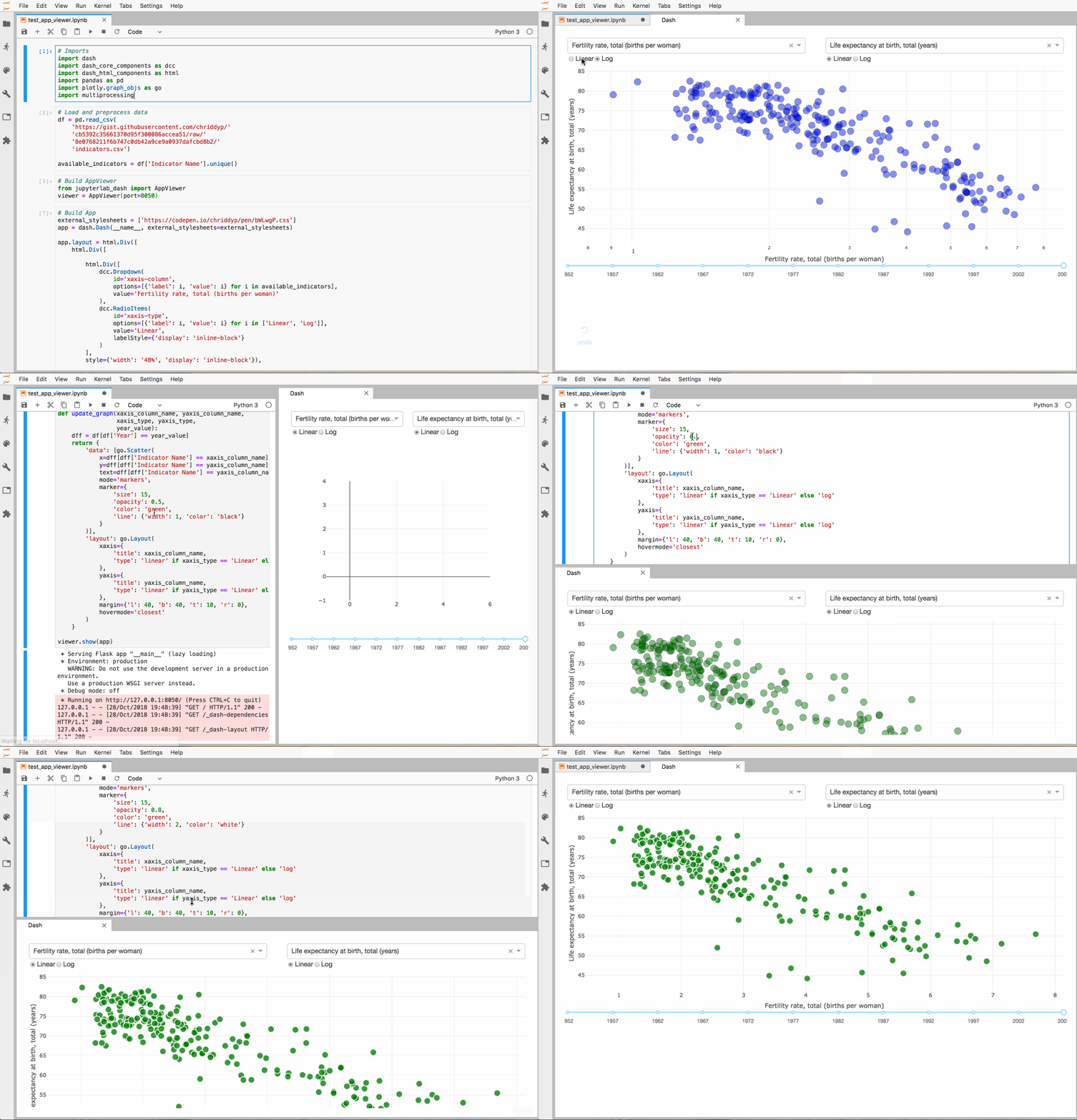
We'll keep this thread updated with our progress
chriddyp
on 29 Oct 2018
Any way to make it work with hub?
 erolosty
on 12 Nov 2018
erolosty
on 12 Nov 2018
@chriddyp - Thanks for the mention. We've just pushed a new, albeit still prerelease, version.
 GibbsConsulting
on 12 Nov 2018
GibbsConsulting
on 12 Nov 2018
@chriddyp
We'll keep this thread updated with our progress
Is there a beta version we could try out?
 TiemenSch
on 21 Nov 2018
TiemenSch
on 21 Nov 2018
We have open sourced this extension in this repo: https://github.com/plotly/jupyterlab-dash 🎉
chriddyp
on 6 Dec 2018
Awesome! Thanks.
 AlexCaranha
on 11 Dec 2018
AlexCaranha
on 11 Dec 2018
Cool!
 xiaolulu2017
on 13 Dec 2018
xiaolulu2017
on 13 Dec 2018
Hi,
I'm very interested in using dash in my jupyter lab.
The installation is just running fine:

However when it comes to import the package in jupyter it says module not found

Do you have any clue to solve this issue ?
( This is my first post, I tried my best)
Sincerly,
Charles.
 therondcharles
on 17 Dec 2018
therondcharles
on 17 Dec 2018
@therondcharles You also need to install the python package in "jupyterlab_dash" together with linking it into your jupyterlab. I believe the "Installation" part in https://github.com/plotly/jupyterlab-dash should include a "pip install ./jupyterlab-dash"
 davhin
on 19 Dec 2018
davhin
on 19 Dec 2018
I would like to use dash widgets as more than a view/visualize component in a notebook. (Use the richer interactivity for control flows etc)
I was wondering how do I share/access dash widget state from another cell/part of a notebook.
I realise the problem isn't different from regular dash app and state sharing, and I'm aware of prescribed ways. But in a notebook setting, it doesn't feel natural. Just wondering if there is a better/easier way to achieve it.
Just noticed https://github.com/plotly/jupyterlab-dash/issues/5
Thanks for the good work. 👍
 shyam334
on 20 Dec 2018
shyam334
on 20 Dec 2018
@davhin Thanks for your input, however I am still not able to make the app work, I run into:
AttributeError: Can't pickle local object 'AppViewer.show.
@therondcharles Have you managed to use it?
Thank you all
 Alexboiboi
on 17 Jan 2019
Alexboiboi
on 17 Jan 2019
Hi,
@Alexboiboi Sorry for the delay, last month was pretty intense...
I did not manage to use the actual version and I am waiting for an official release on jupyter lab extension repo.
However I used as work-around the following ressource:
https://github.com/GibbsConsulting/jupyter-plotly-dash/
It works fine in the different projects I have been using it
Here is one them (you will be especially interested in cells 1 for the installation and 7 for using it) :
https://github.com/therondcharles/Geoloc/blob/master/TP_IOT_final.ipynb
Sincerely, Charles
therondcharles
on 6 Feb 2019
Thanks @chriddyp the jupyter-plotly-dash is a great extension however, is there a easy way to debug while using it,as it is easy to make a typing mistake otherwise and spend hours to spot it - https://github.com/plotly/jupyterlab-dash/issues/31
Currently if I make a mistake in say the callback function, I simply get a 500 error without any further debugging info
 somghosh
on 22 Jul 2019
somghosh
on 22 Jul 2019
@therondcharles
Any plans for Windows support?
 miriam-rabacal
on 25 Feb 2020
miriam-rabacal
on 25 Feb 2020
@therondcharles
hey, it is outdated but I just had the same problem and it had to do with node.js version, I had to upgrade node and install the extension:
jupyter labextension install jupyterlab-dash
 olyanico
on 25 Mar 2020
olyanico
on 25 Mar 2020
On May 20 this year we formally released official support for Dash & Jupyter :tada:
chriddyp
on 28 Aug 2020
Related issues
 r-chris
·
3Comments
r-chris
·
3Comments
 KyleKing
·
4Comments
KyleKing
·
4Comments
 Jerry-Ma
·
3Comments
Jerry-Ma
·
3Comments
 jwhendy
·
3Comments
jwhendy
·
3Comments
 germayneng
·
4Comments
germayneng
·
4Comments
Most helpful comment
We're experimenting with a lightweight JupyterLab extension that:
run_servercall from blocking the kernel. It detects when the app has changed and then restarts the dash app.One of the nice things about developing in Jupyter is that the data pre-processing steps are sort of "cached" in the initial cells. So, you can preserve a single cell for your
app.layoutand iterate pretty quickly.We'll keep this thread updated with our progress