I have no problems with running dash with shipped flask server (except occasional bugs where I have to restart server since it hangs for some reason).
Therefore I replaced default flask development server with gunicorn, a production wsgi web server.
My app is more or less:
...
app = dash.Dash()
server = app.server
...
if __name__ == '__main__':
    app.run_server(debug=False, host="0.0.0.0")
and I run gunicorn in typical way:
gunicorn -w -b 0.0.0.0:8050 module_name.server
However upon contacting this URL; I get only statically rendered component, that is only initial states. Every interactivity is dead and site is unfunctional for me. I see no error reported in gunicorn.
 nmiculinic
All 14 comments
to echo the sentiment of this issue - it would be really helpful if there were a tutorial for running dash in production.
 rawwerks
on 15 Jul 2017
rawwerks
on 15 Jul 2017
Hi,
I've come across the same problem. Tried deploying my Dash app to Heroku using the tutorial available here. As @rawwerks experiences, I only get static components: for example.
 richard-muir
on 17 Jul 2017
richard-muir
on 17 Jul 2017
For me Tornado works, and I gave up on gunicorn. Nevertheless I'd like to know why and how to fix it.
nmiculinic
on 17 Jul 2017
Can it have todo with http/https issues? I get a similar effect when trying to dash in an https only environment... I guess it tries to update the interactive components with jsons via http and that fails. Any idea how to fix that?
@nmiculinic do you have an example on how to use dash+tornado.
 fdroessler
on 19 Jul 2017
fdroessler
on 19 Jul 2017
The issue that you're seeing is likely do to not setting the server's secret_key. secret_key is required for CSRF protection. CSRF protection isn't needed for all apps, but it's included by default. Learn more about CSRF protection here: https://www.owasp.org/index.php/Cross-Site_Request_Forgery_(CSRF)_Prevention_Cheat_Sheet
To add a secret key, do something like:
import os
server.secret_key = os.environ.get('SECRET_KEY', 'default-value-used-in-development')
and export the SECRET_KEY as an environmental variable in your production system. Flask recommends generating a secret key with:
>>> import os
>>> os.urandom(24)
'\xfd{H\xe5<\x95\xf9\xe3\x96.5\xd1\x01O<!\xd5\xa2\xa0\x9fR"\xa1\xa8'
(See http://flask.pocoo.org/docs/0.12/quickstart/#sessions).
 chriddyp
on 21 Jul 2017
chriddyp
on 21 Jul 2017
I have written a deployment guide for Dash here: https://plot.ly/dash/deployment. It includes an example with Heroku and Gunicorn. I hope that it helps!
chriddyp
on 21 Jul 2017
I'm closing this for now but feel free to reopen if the issue remains :)
chriddyp
on 21 Jul 2017
I'm experiencing a similar problem and didn't manage to solve it. I have a Dash app running in a Docker container. I'm using gunicorn also, this is my command in the Dockerfile:
CMD gunicorn -w 10 -b 0.0.0.0:8050 -t 100000 --max-requests 20 app:server
When I run the container locally everything works fine, I'm able to click tabs in my app and the content is displayed properly. However, when I deploy the app in a cloud-hosted VM (AWS ec2 instance) with exactly the same container, I can only display the base url, no reaction when I click the tabs. If I modify the URL manually (adding the trailing part like "/tab_name"), I get 500 error. I can see in the app logs inside the container that the POST requests are reaching it properly.
I've added the secret key below app = dash.Dash(..), but it didn't help (maybe I should add something more?):
app.server.secret_key = 'SOME_KEY_STRING'
Any idea on what's going on and how to fix it?
 arudzinska
on 26 Jul 2018
arudzinska
on 26 Jul 2018
If you open up the Developer tools in your browser (hit F12 key) and switch to the networking tab, then try clicking on the non-responsive links, what do you see? If you see any errors, posting a screenshot of them could help.
This issue might be relevant #289
 ned2
on 2 Aug 2018
ned2
on 2 Aug 2018
Thanks for your answer, ned2 and sorry for taking time to come back. I've managed to resolve the issue by moving from a standalone EC2 instance to AWS Elastic Beanstalk web app managed platform - the difference here is that Beanstalk automatically deploys nginx and load balancing in front of the instance(s) hosting the app. Apparently, using nginx must have helped. I also stopped using gunicorn. Hope this will help some folks in the future!
arudzinska
on 13 Aug 2018
Hi everyone, I also had this problem when using nginx and gunicorn for deployment. Running locally 'python app.py' worked fine, but deploying with gunicorn only gave the static first page.
But using ned2's suggestion from Aug 2 gave an interesting error message: "413 Request Entity Too Large" from nginx. Modifying the nginx.config according to this worked for me. Hope this helps someone down the road.
 jbechtel
on 1 Oct 2018
jbechtel
on 1 Oct 2018
I also encountered a problem similar to @jbechtel.
My dash website has only a single page, but there are some callback fucntions on the page that are used to interact with the chart. Look at the picture below:
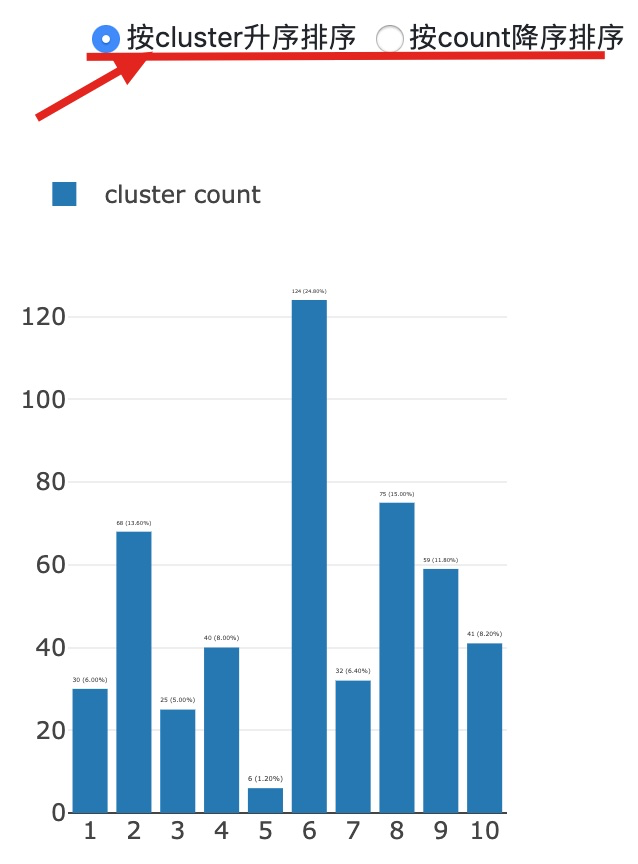
The problem I encountered was that when I started the project with gunicorn, my interaction with the chart was good or bad. (ie clicking the toggle radio button chart does not respond). But when I started .py directly with python3, there was no problem.
I went to the network tab of the chrome browser inspect and found the request http://127.0.0.1:8000/_dash-update-component, sometimes 200, and sometimes 500, which is why it caused my front-end operation to be unresponsive.
But I finally solved this problem. I found that just put
gunicorn -w 4 app:server Become gunicorn app:server Just start the project success.
However, why?
 xjnotxj
on 1 Aug 2019
xjnotxj
on 1 Aug 2019
@xjnotxj my first reaction, not being able to see your code, is that you've created a global variable that, when you're using multiple workers, is only available in one of those workers. So when a later request goes to a different worker it throws an error. See https://dash.plot.ly/sharing-data-between-callbacks
Note this kind of error would also likely cause problems for multiple users viewing the app even if it's run with a single worker.
 alexcjohnson
on 1 Aug 2019
alexcjohnson
on 1 Aug 2019
@nmiculinic I understand this is from a while ago now, but I was wondering how you went about deploying a dash app with tornado?
 Jobbalob
on 17 Jan 2020
Jobbalob
on 17 Jan 2020
Related issues
 mheydasch
·
3Comments
mheydasch
·
3Comments
 KyleKing
·
4Comments
KyleKing
·
4Comments
 germayneng
·
4Comments
germayneng
·
4Comments
 lochbrunner
·
3Comments
alexcjohnson
·
3Comments
lochbrunner
·
3Comments
alexcjohnson
·
3Comments