Dash-to-panel: Gnome 40 support
This is probablt still early to start working on, but gnome 40 support would be nice. Currently the extension cannot be started on gnome 40 and it gives an error No JS module 'viewSelector' found in search path.
 Chrysostomus
All 91 comments
Same issue in another task bar:
https://extensions.gnome.org/extension/4000/babar
 fthx
on 5 Feb 2021
fthx
on 5 Feb 2021
Exited!
 iMonZ
on 17 Feb 2021
iMonZ
on 17 Feb 2021
New issue on Gnome 40 (Fedora 34 Beta):
Gtk.BuilderError: /home/username/.local/share/gnome-shell/extensions/[email protected]/Settings.ui:26:39 Invalid property: GtkFrame.shadow_type

Stack trace:
  _init@/home/username/.local/share/gnome-shell/extensions/[email protected]/prefs.js:168:23
  wrapper@resource:///org/gnome/gjs/modules/script/_legacy.js:83:27
  _Base.prototype._construct@resource:///org/gnome/gjs/modules/script/_legacy.js:19:10
  newClass@resource:///org/gnome/gjs/modules/script/_legacy.js:115:21
  buildPrefsWidget@/home/username/.local/share/gnome-shell/extensions/[email protected]/prefs.js:2192:20
  _init@resource:///org/gnome/Shell/Extensions/js/extensionsService.js:209:40
  OpenExtensionPrefsAsync/<@resource:///org/gnome/Shell/Extensions/js/extensionsService.js:122:28
  asyncCallback@resource:///org/gnome/gjs/modules/core/overrides/Gio.js:115:22
  run@resource:///org/gnome/Shell/Extensions/js/dbusService.js:177:20
  main@resource:///org/gnome/Shell/Extensions/js/main.js:19:13
  run@resource:///org/gnome/gjs/modules/script/package.js:206:19
  start@resource:///org/gnome/gjs/modules/script/package.js:190:8
  @/usr/share/gnome-shell/org.gnome.Shell.Extensions:1:17
 CRCinAU
on 26 Feb 2021
CRCinAU
on 26 Feb 2021
Further, it doesn't like the <padding> element, or the margin_* keys,
CRCinAU
on 26 Feb 2021
@charlesg99 / @jderose9 - Any news on the status of this for Gnome 40?
Fedora 34 Beta is already shipping Gnome 40 Beta - so you'll likely have a lot of reports soon of this extension failing...
CRCinAU
on 6 Mar 2021
I'd like to help with this, but struggling to find a good workflow for debugging GNOME extensions. Simply being able to set a breakpoint in an IDE would be nice.
 azcn2503
on 8 Mar 2021
azcn2503
on 8 Mar 2021
@azcn2503 not sure about debugging, but in order to test between file edits I'm using
dbus-run-session -- env MUTTER_DEBUG_DUMMY_MODE_SPECS=1280x720 MUTTER_DEBUG_DUMMY_MONITOR_SCALES=1 gnome-shell --nested --wayland
Reference: https://www.youtube.com/watch?v=YjMgtUSYg4w&t=1890s
 frandieguez
on 9 Mar 2021
frandieguez
on 9 Mar 2021
Just Perfection have just published an extension upgrade video, https://www.youtube.com/watch?v=ziRg2-M7NKU
really useful
frandieguez
on 15 Mar 2021
I hope we see support for Gnome Shell 40 soon as i can't miss this extension anymore. Absolutely love it!
Fedora 34 beta should come out next Tuesday by the way.
This maybe interesting reading material as well:
https://blogs.gnome.org/shell-dev/2021/03/20/extensions-rebooted-porting-your-existing-extensions-to-gnome-40/
 freddyw
on 20 Mar 2021
freddyw
on 20 Mar 2021
I hope we see support for Gnome Shell 40 soon as i can't miss this extension anymore. Absolutely love it!
Yeah - I've seen my productivity plummet while testing Fedora 34 at the moment because this extension (and a lot of others) just don't work in F34 / G40 as yet... I guess that's the fun part of testing...
CRCinAU
on 21 Mar 2021
There was plenty discussion beforehand, it's in the os-mockups repo of gnome. They are much more receptive to ideas than they get credit for.
Chrysostomus
on 24 Mar 2021
Every time I open an app, any of my screens at random will have the window appear.
@Turbine1991: That's not by design. It sounds much more like a bug. You should file an issue with some details @ https://gitlab.gnome.org/GNOME/mutter/-/issues/new?issue%5Bassignee_id%5D=&issue%5Bmilestone_id%5D=
 garrett
on 24 Mar 2021
garrett
on 24 Mar 2021
According to Migration Guid ui.viewSelector has been renamed to ui.searchController in GNOME Shell 40. It controls the search entry behavior.
 aeldemery
on 26 Mar 2021
aeldemery
on 26 Mar 2021
I also recommend to take a look at https://www.youtube.com/watch?v=ziRg2-M7NKU and https://www.youtube.com/watch?v=U-XcvME0e2E good info for porting extensions to gnome 40
 jatin-cbs
on 29 Mar 2021
jatin-cbs
on 29 Mar 2021
@Turbine1991 yeah, a ton of changes impacting almost every object. This gjs.guide helped a lot but it's very tedious work, pick an incompatibility, research, test, dig, test,
https://gjs.guide/extensions/upgrading/gnome-shell-40.html
Part of the problem is that the gtk4 docs are still a work in progress, and figuring out the DTD for the .ui is more an act of discovery than research.
 blackjackshellac
on 1 Apr 2021
blackjackshellac
on 1 Apr 2021
Can we pin this issue to get better response. And also close the duplicate #1297
jatin-cbs
on 2 Apr 2021
I tried to update to gnome 40, here is my branch.
It's the first time I'm working on a GS extension, and I'm pretty stuck right now.
But at least the panel is showing again, and most of the Settings.ui errors are fixed (some things are removed, because they seem to be no longer part of Gtk4).
Don't know if this is of use for anyone, but feel free to try it and give feedback.
 philippun1
on 3 Apr 2021
philippun1
on 3 Apr 2021
I tried to update to gnome 40, here is my branch.
It's the first time I'm working on a GS extension, and I'm pretty stuck right now.
But at least the panel is showing again, and most of the Settings.ui errors are fixed (some things are removed, because they seem to be no longer part of Gtk4).
Don't know if this is of use for anyone, but feel free to try it and give feedback.
This is incredibly useful, I'd suggest making a draft pull request on this repo to try to get help/feedback.
 dylanmtaylor
on 6 Apr 2021
dylanmtaylor
on 6 Apr 2021
I tried to update to gnome 40, here is my branch.
For anyone who doesn't know how to use this branch, paste this into terminal (as a user):
git clone -b "update-to-gnome40" https://github.com/philippun1/dash-to-panel.git dash-to-panel && \
cd dash-to-panel && \
make && \
make install
And then restart gnome.
 Turbine1991
on 7 Apr 2021
Turbine1991
on 7 Apr 2021
This is incredibly useful, I'd suggest making a draft pull request on this repo to try to get help/feedback.
Thank you. I suppose I will soon make a pull request.
For anyone interested, I did some more progress:
- panel now works properly and no longer malfunctions after suspend/resume
- settings dialog now works (at least most of it). It looks a bit weird though, because packing is no longer supported with gnome 40 and all grids are now shown in one single line...
- _newUpdateWorkspacesViews does not work right now, so it is disabled and the standard workspace / app grid behaviour is currently active
philippun1
on 7 Apr 2021
Replace packing left-attach,top-attach inside each <child> with something like
```
blackjackshellac
on 7 Apr 2021
Replace packing left-attach,top-attach inside each
<child>with something like<layout> <property name="row">x</property> <property name="column">y></property> </layout>
Do you know how the syntax for this is exactly? There seems to be no documentation. I tried several variations, but none worked so far.
Anyhow, here is my draft pull request.
philippun1
on 7 Apr 2021
Great effort by philippun1. If I were just using 1 monitor it would be totally usable (on Fedora 34 Beta). But when using a multi-monitor setup I cannot navigate the mouse to another monitor, it alywas stays on the laptops internal screen. No errors or clues what's going on unfortunately. Wayland or X11 does not seem to make any difference.
freddyw
on 7 Apr 2021
Replace packing left-attach,top-attach inside each
<child>with something like<layout> <property name="row">x</property> <property name="column">y></property> </layout>Do you know how the syntax for this is exactly? There seems to be no documentation. I tried several variations, but none worked so far.
I found some discussion about it on discourse.gnome.org, can't remember where. I suggested that the porting document include this information. GtkGrid can use this approach, not GtkBox (there's no equivalent to packing/position, you have to shuffle the objects inside the box manually to order them). I've left the <packing> tags commented out in this sample code snippet for reference,
                        <object class="GtkGrid" id="scale_grid">
                          <property name="visible">True</property>
                          <property name="can-focus">True</property>
                          <child>
                            <object class="GtkLabel">
                              <property name="visible">True</property>
                              <property name="can-focus">False</property>
                              <property name="halign">start</property>
                              <property name="margin-top">5</property>
                              <property name="margin-start">5</property>
                              <property name="label" translatable="yes" context="label-hour">Hours</property>
                              <layout>
                                <property name="row">0</property>
                                <property name="column">1</property>
                              </layout>
                            </object>
                            <!--<packing>
                              <property name="left-attach">1</property>
                              <property name="top-attach">0</property>
                            </packing>-->
                          </child>
                          <child>
                            <object class="GtkLabel">
                              <property name="visible">True</property>
                              <property name="can-focus">False</property>
                              <property name="margin-top">5</property>
                              <property name="margin-start">5</property>
                              <property name="halign">start</property>
                              <property name="label" translatable="yes" context="label-minutes">Minutes        </property>
                              <layout>
                                <property name="row">1</property>
                                <property name="column">1</property>
                              </layout>
                            </object>
                            <!--<packing>
                              <property name="left-attach">1</property>
                              <property name="top-attach">1</property>
                            </packing>-->
                          </child>
                          ...
Here's the settings.ui that I'm working with.
blackjackshellac
on 7 Apr 2021
I suspect this is what drives the child layout, also seems to be layout properties for column-span and row-span
blackjackshellac
on 7 Apr 2021
I tried to update to gnome 40, here is my branch.
For anyone who doesn't know how to use this branch, paste this into terminal (as a user):
git clone -b "update-to-gnome40" https://github.com/philippun1/dash-to-panel.git dash-to-panel && \
cd dash-to-panel && \
make && \
make install
And then restart gnome.
now
I tried this today, and the panel works again! thank you!
Issue
But there is a problem with the button "show applications" on the left of the panel, application icons did not appear when I pressed it, nothing responsed.
evn
archlinux latest with gnome40.
 colben
on 8 Apr 2021
colben
on 8 Apr 2021
@blackjackshellac That worked, thank you.
@colben Trying to fix the show apps button as next step.
@freddyw I tested multi monitor and did some fixes, it works for my test cases now: Laptop with external display (HDMI or VGA) and Manjaro Gnome testing on wayland. On X I have some graphics glitches on external display.
philippun1
on 8 Apr 2021
In anybody has the panel being stuck as a simple black bar: reset this extension's settings using dconf.
Some are broken and will make the panel stuck in an unrecoverable way
 abarisain
on 8 Apr 2021
abarisain
on 8 Apr 2021
@freddyw I tested multi monitor and did some fixes, it works for my test cases now: Laptop with external display (HDMI or VGA) and Manjaro Gnome testing on wayland. On X I have some graphics glitches on external display.
@philippun1 , how can I test your fixes, have you already commited them to github?
freddyw
on 8 Apr 2021
@freddyw Yes, I already pushed it into my branch.
The showAppsIcon button woks now with a workaround.
philippun1
on 8 Apr 2021
@freddyw Yes, I already pushed it into my branch.
The showAppsIcon button woks now with a workaround.
thanks,I would try a moment later …
colben
on 9 Apr 2021
@philippun1 moving the panel to the left is still broken, that said thanks for getting it working to this point!
 jjgalvez
on 9 Apr 2021
jjgalvez
on 9 Apr 2021
@freddyw Yes, I already pushed it into my branch.
The showAppsIcon button woks now with a workaround.
Did some more testing and digging and turns out that when i change the primary monitor to one of the external screens (i am using the internal laptop display and 2 external monitors) it seems to be working for now. I removed the extension first, cleared anything in dconf and reinstalled. When switching back to the internal display as primary, the monitor is stuck on that display. Anyways, i am happy with how it works at the moment, so thanks again for all your efforts @philippun1 .
freddyw
on 9 Apr 2021
the branch the @philippun1 created works nice for me on Arch. thank you for your great effort.
 mohamedation
on 9 Apr 2021
mohamedation
on 9 Apr 2021
the branch the @philippun1 created works nice for me on Arch. thank you for your great effort.
Same here. Thx for the effort @philippun1
 cyn1c
on 9 Apr 2021
cyn1c
on 9 Apr 2021
I tried to update to gnome 40, here is my branch.
It's the first time I'm working on a GS extension, and I'm pretty stuck right now.
But at least the panel is showing again, and most of the Settings.ui errors are fixed (some things are removed, because they seem to be no longer part of Gtk4).
Don't know if this is of use for anyone, but feel free to try it and give feedback.
Thx for the effort @philippun1 my only problem is that whenever i use the workspaces overview for some reason the color of the panel and changes and remains changed even when i'm in the desktop , i have to manually disable/enable panel opcaity to get it working again ,after some testing i noticed that it does that only in particular themes for some reason like matcha gtk
yeah it's not the fault of the theme it does it in every theme in matcha just seems way darker
 KonstantMan
on 9 Apr 2021
KonstantMan
on 9 Apr 2021
@philippun1
Tried today again. Applications icon works, app-grid comes up nicely. But, there's a strange problem when using MS Edge or Opera ( both Chromium based) as the browser, and when the panel is intelligently hidden; it simply won't come out of hiding, shivers a bit. It works quite well with Firefox. Fedora 34 Gnome 40
 chdslv
on 9 Apr 2021
chdslv
on 9 Apr 2021
@philippun1: I'm using Dash to Panel with Gnome 3.38 and I'm happy that you try to port Dash to Panel to Gnome 40. Thanks for your work and your effort. Also, Thanks to people who try to help you ;-)
 Tuxman2
on 11 Apr 2021
Tuxman2
on 11 Apr 2021
@philippun1 getting error - No JS module '_overview' found in search path
any fix to this?
 aspieln3r
on 11 Apr 2021
aspieln3r
on 11 Apr 2021
@chdslv I cannot reproduce the intellihide issue with edge on Manjaro, maybe it's Fedora specific? Please try again with the latest commits and maybe reset the dconf settings.
@aspieln3r When do you get this error message?
philippun1
on 11 Apr 2021
@philippun1
Tried with the latest commits just now, but the problem persists. If you have time, try on Fedora 34 live. Just giving you a feedback.
chdslv
on 11 Apr 2021
@philippun1 I'm on archlinux with latest updates. Installed dash to panel and after I restarted shell, there was no panel or top bar and in the extensions app, there is a red exclamation on dash to panel and this message.
aspieln3r
on 12 Apr 2021
@philippun1 In your fork version, "override panel theme background color" doesn't work!!!!! The color always becomes black from the override color.
 work-chausat
on 12 Apr 2021
work-chausat
on 12 Apr 2021
@philippun1 I'm on archlinux with latest updates. Installed dash to panel and after I restarted shell, there was no panel or top bar and in the extensions app, there is a red exclamation on dash to panel and this message.
Works for me. I had dash-to-panel already before, so I just did an update via modified AUR PKGBUILD ( https://github.com/home-sweet-gnome/dash-to-panel/issues/1302#issuecomment-817174433 ).
How did you install the forked version? Did you uninstall the previous one to avoid having two versions at the same time (either in your $HOME or /usr/.. path)?
 archont00
on 12 Apr 2021
archont00
on 12 Apr 2021
@philippun1 In your fork version, "override panel theme background color" doesn't work!!!!! The color always becomes black from the override color.
Yeah i have kind of the same issue but with override theme background opacity
KonstantMan
on 12 Apr 2021
@archont00 I created a softlink in .local/share/gnome-shell/extensions to the branch directly. But you can just call make install. And you should uninstall the dash-to-panel package.
@KonstantMan @work-chausat I'm aware of this issue, the background is set correctly in both scenarios, but I'm not yet sure why it is shown incorrectly.
philippun1
on 12 Apr 2021
Hi everybody and thanks to those who developed the nice extension. Is there any plan to merge @philippun1 's branch into the original git? I want to know if I should revert the changes to the PKGBUILD at some point or not
 lo-zed
on 12 Apr 2021
lo-zed
on 12 Apr 2021
@archont00 I first removed old dash to panel and installed new one by cloning forked repo.
Edit: it works now but the panel is invisible when I enable 'just perfection' extension.
aspieln3r
on 13 Apr 2021
Just installed the fork'ed version on Fedora 34 upgrade from Fedora 33. Seems to work well after a logout - even the opacity and dynamic opacity settings. Nice work @philippun1 !
CRCinAU
on 13 Apr 2021
Works great for me on fedora 34!
Two small things:
- sometimes, it seems the opacity is ignored, causing a dark panel, and then turning "override gradient" on and off causes the opacity to return. I think this is related to what other people have reported.
- when closing the activities overview, the animation makes a little jump upward on the last frame, about the width of the removed top bar. I think the animation assumes the top bar is there, and then when the animation is complete everything jumps up. Hopefully this is something that can be fixed in this ext.
Thanks for all the work!
 theol0403
on 13 Apr 2021
theol0403
on 13 Apr 2021
I tried to update to gnome 40, here is my branch.
For anyone who doesn't know how to use this branch, paste this into terminal (as a user):
git clone -b "update-to-gnome40" https://github.com/philippun1/dash-to-panel.git dash-to-panel && \
cd dash-to-panel && \
make && \
make install
And then restart gnome.
Hi, I install this way on Archlinux and Gnome 40 and it works but there's one issue: app grid icon don't work.
regards,
Przemek
 PrzemekSkw
on 13 Apr 2021
PrzemekSkw
on 13 Apr 2021
@archont00 I created a softlink in .local/share/gnome-shell/extensions to the branch directly. But you can just call make install. And you should uninstall the dash-to-panel package.
@KonstantMan @work-chausat I'm aware of this issue, the background is set correctly in both scenarios, but I'm not yet sure why it is shown incorrectly.
Yes, i removed .local/share/gnome-shell/extensions/[email protected], and make install. "override panel theme background color" really doesn't work!!!!! the background is set correctly in both scenarios, but it will changes when you click menu list, the color always changes to black from the override color which is set correctly before.
@philippun1 when i enabled "Keep original gnome-shell top panel", the problem is disappeared, but when i disabled it, the problem comes back again!!
work-chausat
on 14 Apr 2021
Also another recent problem i noticed is that some notifications don't respect the panel and they cover it
KonstantMan
on 16 Apr 2021
I found the issue tvat GNOME still thinks there is a dash, so the virtual desktops are too small and there is wasted space in the app picker
 sergioad
on 25 Apr 2021
sergioad
on 25 Apr 2021
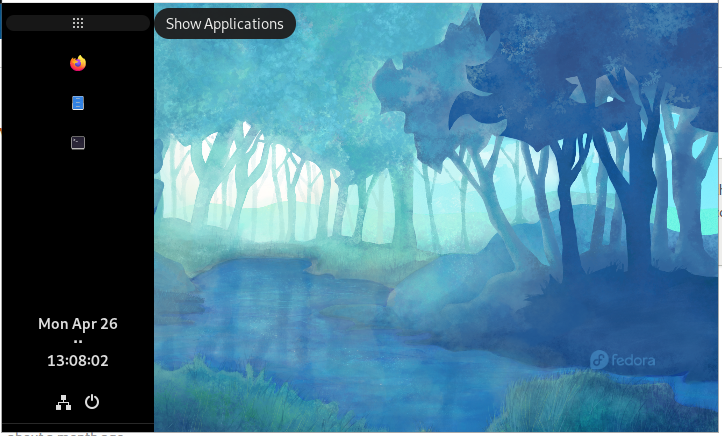
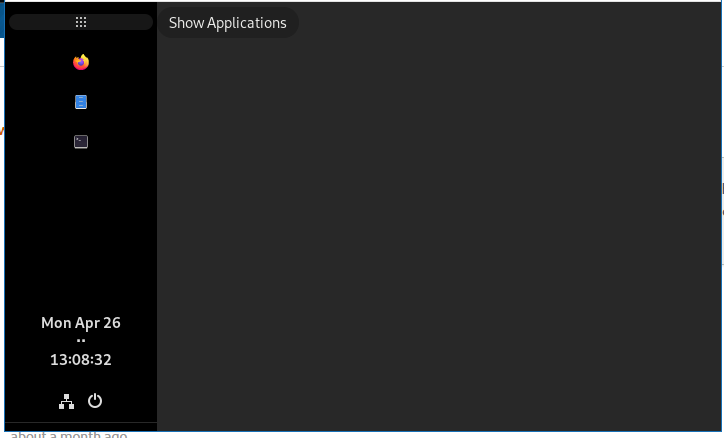
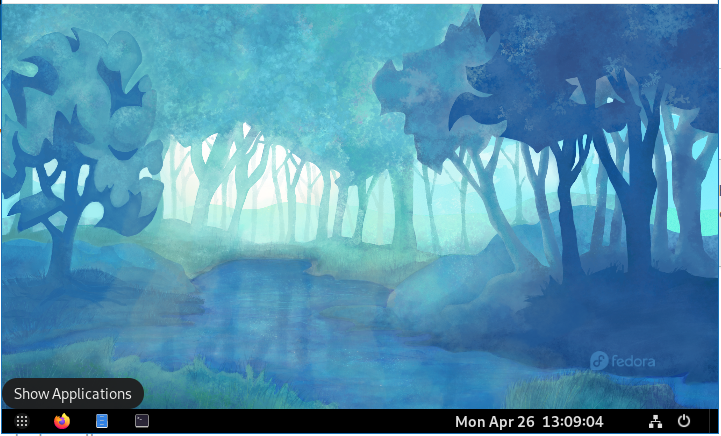
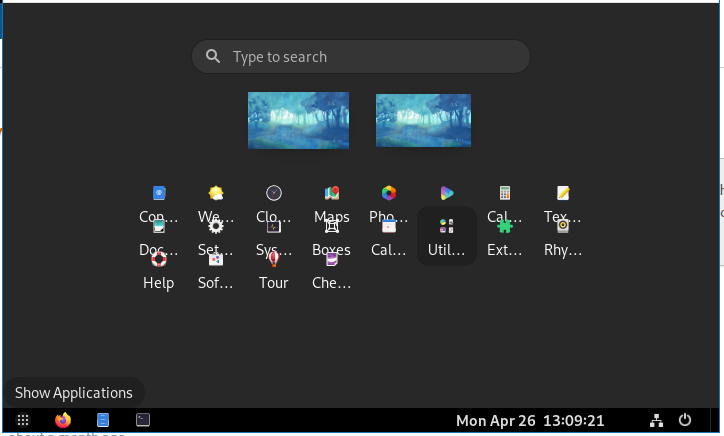
Using @philippun1's version (at b163ac5), I have an issue where when I click the Activities button (or Applications button), the menu is just blank. This only happens when my taskbar is on the left or right; it doesn't happen when it's on the top or bottom.
On the left, before clicking:
On the left, after clicking:
On the bottom, before clicking:
On the bottom, after clicking:
 alexandre-leblanc
on 26 Apr 2021
alexandre-leblanc
on 26 Apr 2021
Using @philippun1's version (at b163ac5), I have an issue where when I click the Activities button (or Applications button), the menu is just blank. This only happens when my taskbar is on the left or right; it doesn't happen when it's on the top or bottom.
If you use a override color for taskbar, after the button was clicked, the backgroud of taskbar changed to black, "override panel theme background color" doesn't work!!!!!
work-chausat
on 27 Apr 2021
One issue that still remains for me is the bottom padding on the overview screen "thinks" the dash is still there and too big. Similarly, there's unnecessary padding at the top for the top bar.
See the screenshot: https://imgur.com/SWSWvsi
 kaimast
on 3 May 2021
kaimast
on 3 May 2021
I agree with you on that
On Mon, May 3, 2021, 13:20 Kai Mast @.*> wrote:
One issue that still remains for me is the bottom padding on the overview
screen "thinks" the dash is still there and too big. Similarly, there's
unnecessary padding at the top for the top bar.See the screenshot: https://imgur.com/SWSWvsi
—
You are receiving this because you commented.
Reply to this email directly, view it on GitHub
https://github.com/home-sweet-gnome/dash-to-panel/issues/1265#issuecomment-831440982,
or unsubscribe
https://github.com/notifications/unsubscribe-auth/ABJAJKMGS34C7VD3FU77WFLTL3SNNANCNFSM4WG4IBNA
.
sergioad
on 4 May 2021
@kaimast Out of curiosity, how did you get the "background" of the overview to be different from the default grey?
 j-james
on 4 May 2021
j-james
on 4 May 2021
@kaimast Out of curiosity, how did you get the "background" of the overview to be different from the default grey?
It's this extension: https://extensions.gnome.org/extension/3193/blur-my-shell/
Edit: Put the wrong link in here at first.
kaimast
on 4 May 2021
latest error:
Gtk.BuilderError: Settings.ui:23:47 Invalid property: GtkBox.margin_left
It looks like this might be an update to the extension from the original author? Replacing it with the current fork git checkout works fine.
CRCinAU
on 4 May 2021
@CRCinAU Sounds like the auto-updater pulled the 3.38 version. You will need to install from the fork again.
@philippun1 I will need to release at least one more 3.38 update. Might want to disable the auto-update or point it at your repo.
 jderose9
on 4 May 2021
jderose9
on 4 May 2021
Sounds like the auto-updater pulled the 3.38 version. You will need to install from the fork again.
This was just done automatically by the gnome-extensions-app - I'm not sure how that works....
CRCinAU
on 4 May 2021
Edit: as @freddyw pointed out, just manually install it from this branch:
I was afraid the build process would be too complicated, but nope:
- download zip from this link: (code - download zip)
- extract it
- open the extracted folder in a terminal
- type "make install" in terminal
- logout and log back in
- profit
My original whining: Please make it work for Gnome 40, I can't live without dash-to-panel.
 adam993
on 6 May 2021
adam993
on 6 May 2021
Please make it work for Gnome 40, I can't live without dash-to-panel
It's better to downgrade your system (GNOME), or don't upgrade it until necessary extensions work. And it's a little off-topic (useless messages) for this issue.
 AlexWayfer
on 6 May 2021
AlexWayfer
on 6 May 2021
@adam993, please read back the entire thread, you don't have to live without: https://github.com/home-sweet-gnome/dash-to-panel/issues/1265#issuecomment-812887431
freddyw
on 6 May 2021
Please make it work for Gnome 40, I can't live without dash-to-panel
It's better to downgrade your system (GNOME), or don't upgrade it until necessary extensions work. And it's a little off-topic (useless messages) for this issue.
I'm new to Linux and I didn't know that things would break by upgrading (Fedora 33 to 34). Once they broke I thought that the lesser evil would be to just wait for dash to panel support.
As for my message being useless, I thought I would do good by showing developers how many people needed the fix. Maybe not the best place to post it, sorry if that's the case
adam993
on 6 May 2021
So the other part, once you install the fork, the new gnome-extensions-app will automatically update it again to the latest published version on login - which means your next login will have the broken version from the gnome repo again.
CRCinAU
on 6 May 2021
So the other part, once you install the fork, the new
gnome-extensions-appwill automatically update it again to the latest published version on login - which means your next login will have the broken version from the gnome repo again.
The autoupdates without a way to disable them are really anoying: There's a workaround, which hopefully helps you:
1) pull the fork
2) in the Makefile & metadata.json: replace the UUID with something different (but the same in both, or it won't install); I also replaced the installname, but didn't test if all of this was necessary.
 dnwerner
on 6 May 2021
dnwerner
on 6 May 2021
The autoupdates without a way to disable them are really anoying: There's a workaround, which hopefully helps you:
1. pull the fork

2. in the Makefile & metadata.json: replace the UUID with something different (but the same in both, or it won't install); I also replaced the installname, but didn't test if all of this was necessary.
That works perfectly - thanks! I didn't have to change the name, only the uuid...
CRCinAU
on 6 May 2021
If you are on GNOME 40 and the gnome-shell updater is pulling the latest dash-to-panel release (which does not list 40 in the compatible versions), it sounds like a bug that needs to be reported upstream. The extension metadata is part of their spec and extensions.gnome.org respects the versions listed for compatibility - I would expect the auto-updater to do the same. Looking at the code it does seem that it sends the current shell version so it sounds like their API isn't checking the version numbers correctly.
https://gitlab.gnome.org/GNOME/gnome-shell/-/blob/master/js/ui/extensionDownloader.js
This is sort of an aside from the fact that forcefully installing extension updates without any way to disable it seems a little scary and disappointing.
jderose9
on 6 May 2021
Did you already report it & can share a link to the issue?
Here is an issue on the forced auto-updating (maybe giving it some upvotes will bring it to more attention, bc. the prospect of not being able to control if updates are installed also sounds like a security vulnerability to me)
https://gitlab.gnome.org/GNOME/gnome-shell/-/issues/2514
dnwerner
on 6 May 2021
@jderose9 This is not a bug. The extension was installed prior to the Gnome update that broke it. The system expects that extension is going to be updated to support the new Gnome version. This worked for me for several extensions that stopped working with the Gnome upgrade and added the support for Gnome 40 lately.
The only bug here apart from the fact that there is no actual release of dash-to-panel for Gnome 40 is that the fork doesn't use the extensions website and utilizes the same UUID as the original project. This is not the intended usage of things.
 lig
on 6 May 2021
lig
on 6 May 2021
@jderose9 This is not a bug. The extension was installed prior to the Gnome update that broke it. The system expects that extension is going to be updated to support the new Gnome version. This worked for me for several extensions that stopped working with the Gnome upgrade and added the support for Gnome 40 lately.
The only bug here apart from the fact that there is no actual release of
dash-to-panelfor Gnome 40 is that the fork doesn't use the extensions website and utilizes the sameUUIDas the original project. This is not the intended usage of things.
Good point, but I'd still argue on behalf of robustness - in any situation it would be a good sanity check to validate if the manifest of the to-be-installed update shows compatibility. (Btw, I'm unsure: Does upgrading at the moment verify that the new upgrade doesn't raise the minimum supported version above the current local shell version?)
dnwerner
on 6 May 2021
@dnwerner after any update the extension is forced to be disabled if it is still incompatible with the current version. Actually, I'd rather agree that there is a minimal need in updating an extension in such a case.
lig
on 6 May 2021
As a work around to the gnome-extensions auto-updater, this is what I did.
$ VERSION=9999 make install
Just have to remember to undo it when dash-to-panel is ready for prime time :)
blackjackshellac
on 6 May 2021
@lig I disagree. The extension metadata asks for each supported GS version to be listed explicitly, not a minimum compatible version number
jderose9
on 6 May 2021
I really like the fact that we are so many who want a working dash to panel extension.
And i hope that eventually it will be officially released with gnome 40 support.
But for now there's probably one thing remaining to solve, the fact that after the overview, panel doesn't retain its original opacity a trick i have found is to use really transparent shell themes like bigsur, Has anyone come up with a better idea?
KonstantMan
on 6 May 2021
As a work around to the gnome-extensions auto-updater, this is what I did.
$ VERSION=9999 make installJust have to remember to undo it when dash-to-panel is ready for prime time :)
Alternatively use VERSION=42 (the currently available version) and when an update is pushed your extension will be automatically updated.
The only downside is if an update is pushed that isn't GNOME 40 compatible you'll have to reinstall (with the new version number).
 PHLAK
on 7 May 2021
PHLAK
on 7 May 2021
Imho, this should be merged as soon as possible and we can then open issues for more narrow problems. There are just too many changes for one pull request.
kaimast
on 7 May 2021
Ok, this has been merged. Many thanks to @philippun1!!
jderose9
on 8 May 2021
@jderose9 I made two more pull requests fixing a merging error (#1328) and updating the GtkScale format-value callbacks (#1329).
philippun1
on 10 May 2021
Thanks a lot @philippun1 and @jderose9 . Installed latest Git build https://github.com/home-sweet-gnome/dash-to-panel/commit/3fb7bdb83b69478341ec1568b31ef6829d004715 on Arch Linux via gnome-shell-extension-dash-to-panel-git AUR package and working fine so far. Finally Dash to Panel is back and GNOME usable again, really nice and appreciated.
 kq01526
on 11 May 2021
kq01526
on 11 May 2021
I've just installed the extension from source, and am happy to report that it largely works. The only thing I noticed upon quick inspection was that setting the background color/gradient doesn't function. While I don't use that functionality myself, I would imagine others do.
 jhpratt
on 13 May 2021
jhpratt
on 13 May 2021
I think that ideally we would have the following issues resolved before releasing the GNOME 3.40 release to extensions.gnome.org. If anyone is able to contribute time to looking into any of these it would be a big help:
1326 - Probably the most critical
1338
1327 - Not really important but probably solved with 1338.
1333 - if the workaround PR is "good enough" then maybe this is solved
There are a few features not working such as the custom panel color, gradient and anything else set with inline CSS but they are less used features with workaround (such as setting in your theme) so I think we can just remove those for the initial release.
jderose9
on 14 May 2021
@jderose9, @philippun1
Gnome 40. Arch Linux. Trying this branch.
When using with MS Edge for Linux and Opera, D2P doesn't come out of auto-hide, it just blinks. Auto-hide works well with Firefox, but not with any Chromium based browsers.
chdslv
on 15 May 2021
@chdslv That branch has been merged this repo. Try reinstalling your installation from this repos mater branch.
PHLAK
on 16 May 2021
@chdslv That branch has been merged this repo. Try reinstalling your installation from this repos
materbranch.
The problem is still there after installing the "master." You can check by installing a chromium based browser.
chdslv
on 16 May 2021
Is there a release planned as well?
 mbevc1
on 8 Jun 2021
mbevc1
on 8 Jun 2021
@jderose9 since people file a bazillion duplicates of this ticket and it's the question on everyone's lips, maybe something you could do is to use GitHub's feature to "pin" this ticket to the top for the time being (and for people to simply subscribe to this ticket) so that you get less spammage ;)
 nekohayo
on 9 Jun 2021
nekohayo
on 9 Jun 2021
@nekohayo Nice idea :)
jderose9
on 9 Jun 2021
Related issues
 ktamp
·
5Comments
ktamp
·
5Comments
 Pointedstick
·
6Comments
Pointedstick
·
6Comments
 RomanShumikhin
·
3Comments
RomanShumikhin
·
3Comments
 ghost
·
5Comments
ghost
·
5Comments
 Steps65
·
5Comments
Steps65
·
5Comments
Most helpful comment
I tried to update to gnome 40, here is my branch.
It's the first time I'm working on a GS extension, and I'm pretty stuck right now.
But at least the panel is showing again, and most of the Settings.ui errors are fixed (some things are removed, because they seem to be no longer part of Gtk4).
Don't know if this is of use for anyone, but feel free to try it and give feedback.