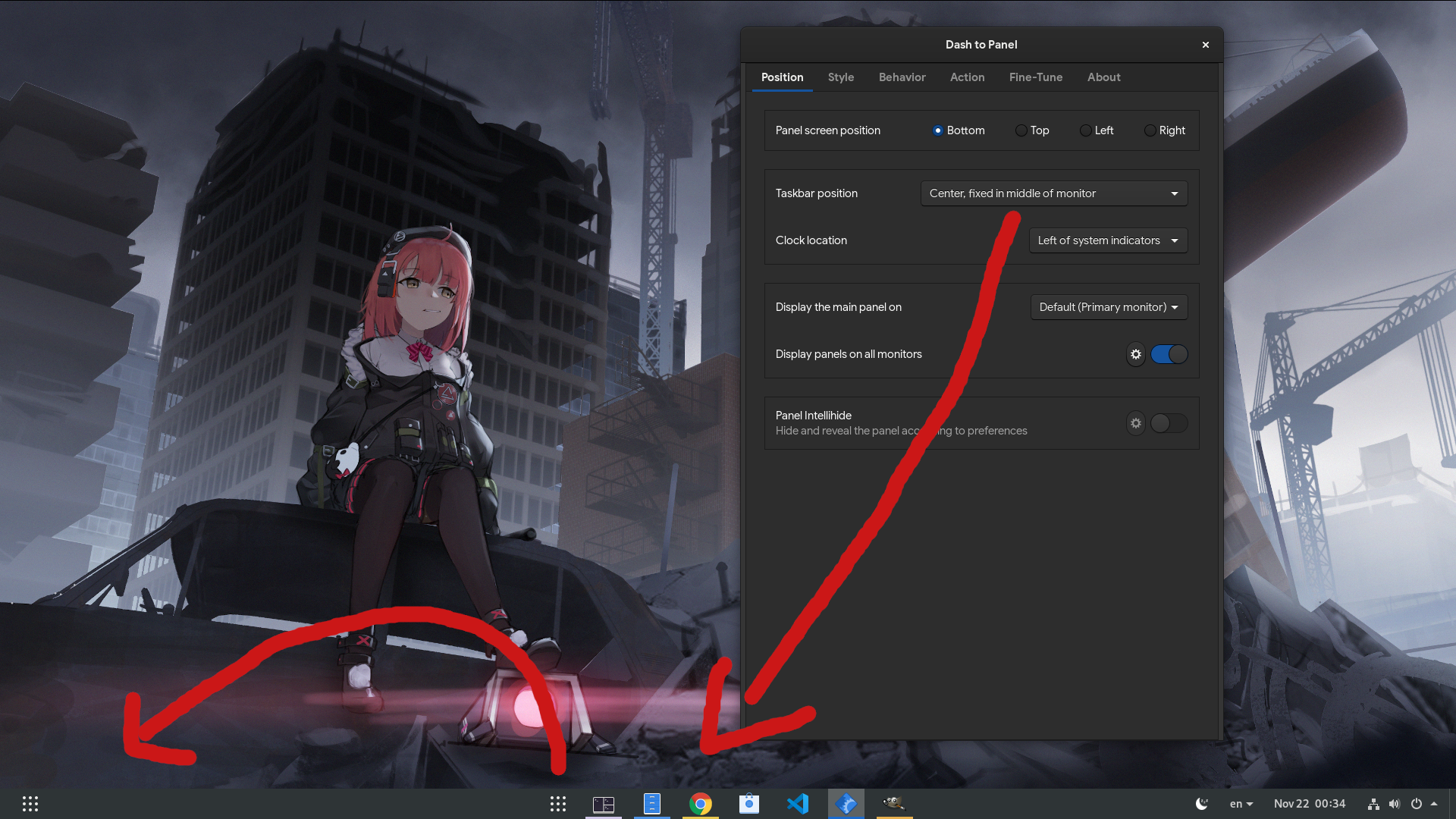
Dash-to-panel: when setting panel in center, 9-dots button could align left?
such an option would be nice, and perhaps should be default, because it makes more sense to have the favorites separated from the 9-dots, plus the left space doesnt look "deserted"
 alex285
All 10 comments
Hey Alex! Thanks for the suggestion! I agree it would be nice, but it already was proposed in #150. I'd like to think of a way that would solve all of the positioning feature requests we currently have, while making it easy to work with. Nothing so far :)
 charlesg99
on 24 Nov 2019
charlesg99
on 24 Nov 2019
Hey! I've started working on the positioning of the taskbar elements and I think I have a solution that will allow a very fine-grained configuration. The only problem that I foresee is the loss of some of the current user settings (only the taskbar and clock positions). Upon updating, users would need to re-position the panel elements. I personally don't think it is a big roadblock, but I'd like to have some input about this. I might be a bit late as I'm almost done with it though :) Here is what I have so far for the settings:
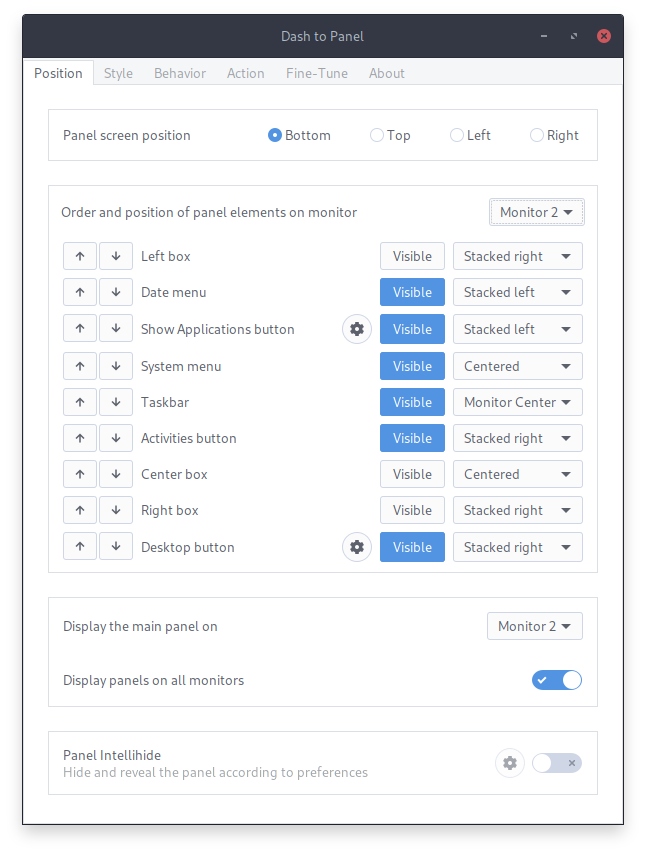
This will allow a configuration per monitor and I've removed the clock and the system menu from the panel boxes to allow their individual placements.
@jderose9 Any thoughts?
Thanks!
charlesg99
on 11 May 2020
@charlesg99 Dude, you are amazing! :1st_place_medal: Overall looks great to me, and nice idea to fit the gears buttons in too.
Do you think there would be any roadblock to mapping the user's old old settings to a set of new settings so they don't lose them?
Personally I think it would be helpful if there was a way to maintain one configuration across monitors - that might be more common than having different configurations per monitor. (A checkbox might be best, or alternately a "Copy to all monitors" button)
I'm confused about how the Left/center/right box are ordered along with the other items which are essentially their contents. Is it that the items below the "box" are within that box?
 jderose9
on 15 May 2020
jderose9
on 15 May 2020
Glad you like it! Yeah I thought about doing a small "migration" of the current settings to the new ones and ended up keeping it for last (if it isn't too complicated :) Worst case scenario the user has to reposition the panel elements once after the update (the default positions will remain the same).
I agree with the monitors sync, I'll add a checkbox for it! As for the boxes, I've removed the activities button, clock and the system menu from their parent and placed them directly in the panel, so they can now be positioned independently. Thanks!
charlesg99
on 15 May 2020
Alright, the new positioning options are on the feature-panel-positions branch! Please try it out, seems stable for me so far! Thanks!
charlesg99
on 17 May 2020
@charlesg99 "for Canada!!" https://youtu.be/Y_KapA4j3FU?t=28 :))
alex285
on 18 May 2020
I hope @charlesg99 is filthy rich. And if he's not, he should be.
@charlesg99 just FYI.... You are a Rockstar. Thank you, thank you, thank you!
How can I give you money?
 hotroof
on 18 May 2020
hotroof
on 18 May 2020
Thanks for the kind words! Glad it's useful!
charlesg99
on 19 May 2020
Loving it, great!
Wouldn't it make sense for the favorites to be separated from the taskbar? To be honest I misunderstood this issue and thought that's what the branch was about.
The idea is that the favorites being favs, you often end up with the task bar icon AND the favorite next to each other and can be confusing, if they were to move away it wouldn't be as much.
 Simon-L
on 23 May 2020
Simon-L
on 23 May 2020
The feature-panel-positions branch was merged, please install the latest master and let us know if you find issues with the new functionalities. Thanks!
charlesg99
on 3 Jul 2020
Related issues
 bmccorm2
·
5Comments
bmccorm2
·
5Comments
 ghost
·
5Comments
ghost
·
5Comments
 Rawleenc
·
6Comments
Rawleenc
·
6Comments
 ningacoding
·
6Comments
alex285
·
6Comments
ningacoding
·
6Comments
alex285
·
6Comments
Most helpful comment
Hey! I've started working on the positioning of the taskbar elements and I think I have a solution that will allow a very fine-grained configuration. The only problem that I foresee is the loss of some of the current user settings (only the taskbar and clock positions). Upon updating, users would need to re-position the panel elements. I personally don't think it is a big roadblock, but I'd like to have some input about this. I might be a bit late as I'm almost done with it though :) Here is what I have so far for the settings:
This will allow a configuration per monitor and I've removed the clock and the system menu from the panel boxes to allow their individual placements.
@jderose9 Any thoughts?
Thanks!