Dart-code: Error text in debug console is low contrast with some themes
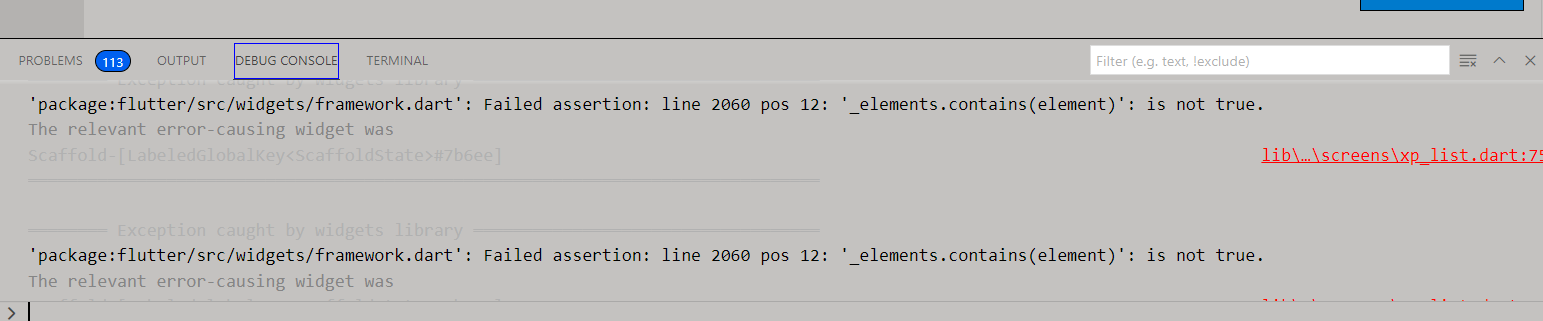
How can i change the color of the gray text i tried in settings.json the following: does not wok for that piece of text Screenshots Versions (please complete the following information): Dart extension version: v3.22.0 Dart/Flutter SDK version: 2.0.6
The relevant error-causing widget was
Scaffold-[LabeledGlobalKey
"debugConsole.infoForeground": 000000,
"debugConsole.errorForeground": 000000,
"debugConsole.warningForeground": ffee00"
Version: 1.56.0 (user setup)
Commit: cfa2e218100323074ac1948c885448fdf4de2a7f
Date: 2021-05-04T22:09:06.405Z
Electron: 12.0.4
Chrome: 89.0.4389.114
Node.js: 14.16.0
V8: 8.9.255.24-electron.0
OS: Windows_NT x64 10.0.19042
 iulian0512
All 5 comments
@iulian0512 can you confirm which VS Code theme you're using (or if custom, can you provide the JSON/colour values)?
Thanks!
 DanTup
on 10 May 2021
DanTup
on 10 May 2021
@DanTup here is my complete theme
vscodeGrayIulian.jsonc.txt
iulian0512
on 11 May 2021
Thanks! It looks like themes can set some of the ansi colours:
"terminal.ansiBlack": "#000000",
"terminal.ansiBlue": "#0000c0",
"terminal.ansiBrightGrey": "#ff0000",
"terminal.ansiBrightBlack": "#505050",
"terminal.ansiBrightBlue": "#2080f0",
"terminal.ansiBrightCyan": "#80f0f0",
"terminal.ansiBrightGreen": "#80f080",
"terminal.ansiBrightMagenta": "#f060f0",
"terminal.ansiBrightRed": "#f04040",
"terminal.ansiBrightWhite": "#ffffff",
"terminal.ansiBrightYellow": "#f0f060",
"terminal.ansiCyan": "#00b0b0",
"terminal.ansiGreen": "#008000",
"terminal.ansiMagenta": "#b000b0",
"terminal.ansiRed": "#c00000",
"terminal.ansiWhite": "#ffffe0",
"terminal.ansiYellow": "#808000",
We're currently using some grayscale values to try and dim text here, but those colours are not customisable and don't look great outside of fairly-dark or fairly-light backgrounds.
I'll see if I can find some alternatives in the customisable set, otherwise we might need to make this toggleable.
DanTup
on 17 May 2021
I've removed the. use of custom grey colours, and now write text as stderr where we want it red, and stdout otherwise. The only ansi code used is to fade the colour of stack frames that aren't part of your own code (which seems to work well for all themes).
Here's how it looks in Dark Theme:

Light theme:
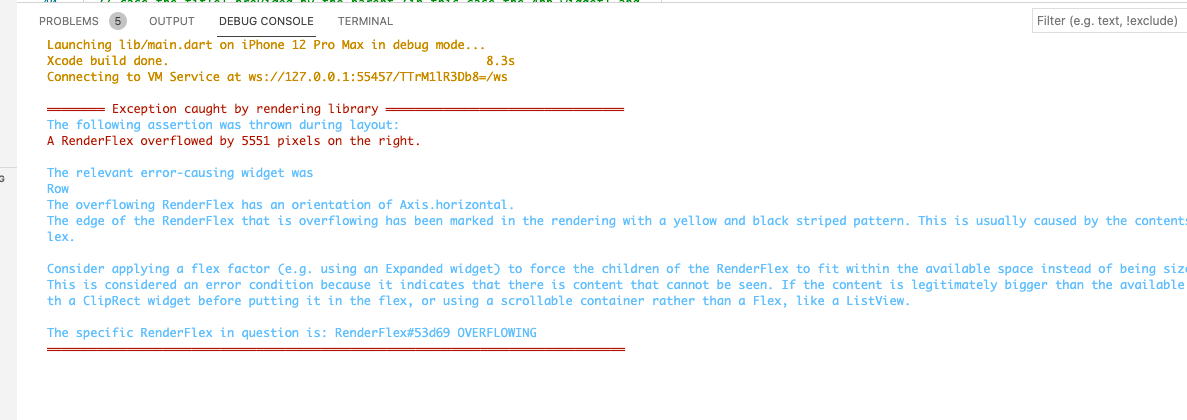
Custom theme above (although I updated "debugConsole.errorForeground": "#990000" because it was originaly set to black and the error messages were less clear).

This should work better for all themes now, and be more customisable since it doesn't use codes that aren't themable in VS Code.
DanTup
on 18 May 2021
it looks wonderful thanks.
iulian0512
on 18 May 2021
Related issues
 FeimiSzy
·
4Comments
DanTup
·
4Comments
FeimiSzy
·
4Comments
DanTup
·
4Comments
 rgb1380
·
3Comments
rgb1380
·
3Comments
 agmcleod
·
3Comments
agmcleod
·
3Comments
 kinex
·
3Comments
kinex
·
3Comments
Most helpful comment
I've removed the. use of custom grey colours, and now write text as
stderrwhere we want it red, andstdoutotherwise. The only ansi code used is to fade the colour of stack frames that aren't part of your own code (which seems to work well for all themes).Here's how it looks in Dark Theme:
Light theme:
Custom theme above (although I updated
"debugConsole.errorForeground": "#990000"because it was originaly set to black and the error messages were less clear).This should work better for all themes now, and be more customisable since it doesn't use codes that aren't themable in VS Code.