Dart-code: Unable to interact with build-error dialog using the mouse on Linux PopOS 20.10 GUI
Issue Type: Bug
I'm using Linux PopOS 20.10.
Amd Ryzen 5 3500U. 16 gigs of Ram and SSD 120 gigas.
I ran the following code:
File: Car.dart
class Car {

   String name = 'car';

}
File: main.dart
import 'Car.dart';

class App {

   void main () {

     Car car = new Car ();

   }

}

App app = new App ();

app.main ();
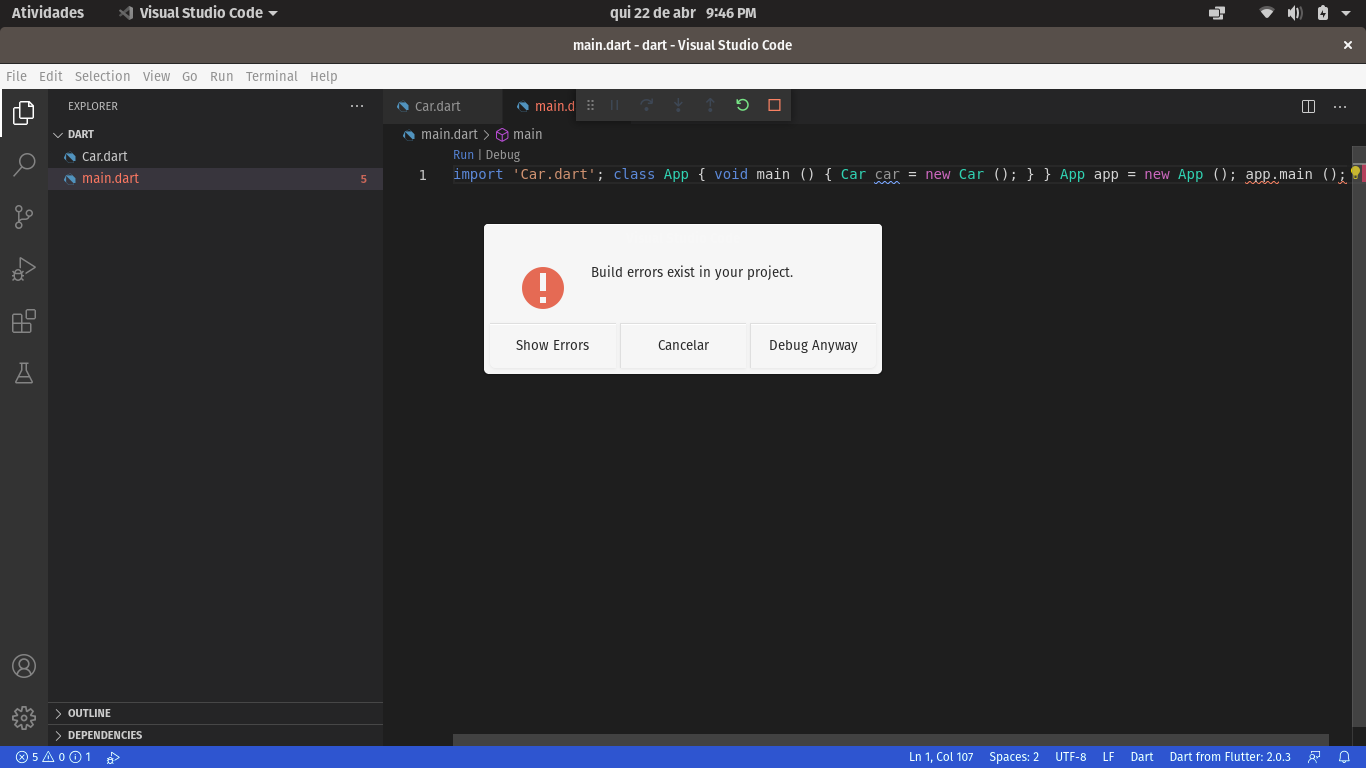
It then issues an error message and crashes the entire graphical interface. To get back to work I have to kill all user processes.
Extension version: 3.21.1
VS Code version: Code 1.55.2 (3c4e3df9e89829dce27b7b5c24508306b151f30d, 2021-04-13T09:37:02.931Z)
OS version: Linux x64 5.11.0-7612-generic
System Info
|Item|Value|
|---|---|
|CPUs|AMD Ryzen 5 3500U with Radeon Vega Mobile Gfx (8 x 1400)|
|GPU Status|2d_canvas: enabled
gpu_compositing: enabled
multiple_raster_threads: enabled_on
oop_rasterization: disabled_off
opengl: enabled_on
protected_video_decode: unavailable_off
rasterization: disabled_software
skia_renderer: enabled_on
video_decode: disabled_software
vulkan: disabled_off
webgl: enabled
webgl2: enabled|
|Load (avg)|1, 1, 1|
|Memory (System)|13.66GB (7.46GB free)|
|Process Argv|--no-sandbox --unity-launch --crash-reporter-id c22a40c4-6e3b-429f-b572-5a83f4d43433|
|Screen Reader|no|
|VM|0%|
|DESKTOP_SESSION|pop|
|XDG_CURRENT_DESKTOP|Unity|
|XDG_SESSION_DESKTOP|pop|
|XDG_SESSION_TYPE|x11|
A/B Experiments
vsliv368:30146709
vsreu685:30147344
python383cf:30185419
pythonvspyt678:30270856
pythonvspyt602:30291499
vspor879:30202332
vspor708:30202333
vspor363:30204092
vstry914:30276682
pythonvsdeb440:30248342
pythonvsded773:30248341
pythonvspyt875:30259475
pythonvsnew554cf:30291488
pythontb:30283811
vspre833:30267464
pythonptprofiler:30281270
vshan820:30276952
vscorecescf:30290706
pythondataviewer:30285071
vscus158cf:30286554
 alvarengacarlos
All 8 comments
It then issues an error message and crashes the entire graphical interface
Can you post the error message?
How are you running the app? Does the same occur if you run dart /path.to/main.dart from the terminal?
 DanTup
on 22 Apr 2021
DanTup
on 22 Apr 2021
When I run from the command line it doesn't crash.
Incredible as it may seem, I just ran the code and it didn't crash. But that does not mean that the problem cannot reappear
alvarengacarlos
on 23 Apr 2021
@alvarengacarlos the code in your screenshot does not appear to be valid. You can't call methods from the top level (you have app.main();). You need to wrap them in a top level main() method:
void main() {
  App app = new App();
  app.main();
}
@alvarengacarlos the code in your screenshot does not appear to be valid. You can't call methods from the top level (you have
app.main();). You need to wrap them in a top levelmain()method:void main() { App app = new App(); app.main(); }
Yes. I know that the code does not run. But would this justify the crash of the graphical interface? But thank you
alvarengacarlos
on 26 Apr 2021
@alvarengacarlos no, it should not - sorry I was looking at the screenshot above which says "Build errors exist in your project" which is normal for this error.
Can you reliably reproduce this? If so, could you try using Start -> Run Without Debugging to see whether that makes a difference (eg. does it only crash in debug mode)?
DanTup
on 26 Apr 2021
I'm the one who asks for parrots. I have just discovered that it is not blocking the graphical interface as a whole. It is just locking the mouse functions. When I click on run it displays the error message and locks the mouse, that is, I can't click on anything anymore. However with the keys on the keyboard I can navigate through the options on the error screen. Also during the bug I can navigate between the programs that are open on the computer, however I can't use the mouse until the error screen in VScode is closed. To close I use the keys on the keyboard. But I thank you for your attention and I apologize again for the mistake.

alvarengacarlos
on 27 Apr 2021
I'm the one who asks for parrots. I have just discovered that it is not blocking the graphical interface as a whole. It is just locking the mouse functions. When I click on run it displays the error message and locks the mouse, that is, I can't click on anything anymore. However with the keys on the keyboard I can navigate through the options on the error screen. Also during the bug I can navigate between the programs that are open on the computer, however I can't use the mouse until the error screen in VScode is closed. To close I use the keys on the keyboard. But I thank you for your attention and I apologize again for the mistake.
I don't know if it could stop being a bug. But it is much less "harmful" than I thought and warned you. Again, I'm sorry for the mistake.
alvarengacarlos
on 27 Apr 2021
@alvarengacarlos no worries, thanks for the clarification! If I understand correctly, when this dialog appears, your cannot interact with it using the mouse, only the keyboard?
This dialog is drawn by VS Code, so I suspect the issue is upstream in either VS Code or Electron. I think you can probably reproduce the same if you tried to launch a TypeScript project that also had compile errors.
It sounds a little bit similar to https://github.com/microsoft/vscode/issues/62704, though that was fixed a long time ago. I would recommend filing a new issue at https://github.com/microsoft/vscode/issues/new/choose and post the link back here, and will keep an eye on it to see if I can help.
Thanks!
DanTup
on 28 Apr 2021
Related issues
 mayorbyrne
·
5Comments
DanTup
·
4Comments
mayorbyrne
·
5Comments
DanTup
·
4Comments
 lukepighetti
·
4Comments
lukepighetti
·
4Comments
 Matt-Gleich
·
4Comments
Matt-Gleich
·
4Comments
 kinex
·
3Comments
kinex
·
3Comments
Most helpful comment
@alvarengacarlos no, it should not - sorry I was looking at the screenshot above which says "Build errors exist in your project" which is normal for this error.
Can you reliably reproduce this? If so, could you try using Start -> Run Without Debugging to see whether that makes a difference (eg. does it only crash in debug mode)?