Dart-code: Error waiting for a debug connection: The log reader stopped unexpectedly.
App runs from Terminal running flutter run in release or debug mode.
App runs directly from Intellij IDE.
App does not run launching from vscode.
flutter doctor
Doctor summary (to see all details, run flutter doctor -v):
[✓] Flutter (Channel dev, 1.26.0-1.0.pre, on Linux, locale pt_PT.UTF-8)
[✓] Android toolchain - develop for Android devices (Android SDK version 30.0.2)
[✓] Chrome - develop for the web
[✓] Linux toolchain - develop for Linux desktop
[✓] Android Studio
[✓] IntelliJ IDEA Community Edition (version 2020.3)
[✓] Connected device (2 available)
• No issues found!
vscode
Version: 1.52.1
Commit: ea3859d4ba2f3e577a159bc91e3074c5d85c0523
Date: 2020-12-16T16:32:10.090Z
Electron: 9.3.5
Chrome: 83.0.4103.122
Node.js: 12.14.1
V8: 8.3.110.13-electron.0
OS: Linux x64 5.8.0-34-generic snap
vscode flutter extensions
Flutter
Version: 3.18.1
Dart
Version: 3.18.1
Steps to Reproduce
Using Ubuntu 20.04.1 LTS
- Install Flutter SDK
- Change channel to dev
- flutter config --enable-linux-desktop
- Create a project
- Open project on vscode
- Launch the project using
Linuxas default device
Expected results: The Flutter app to show up
Actual results:
Launching lib/main.dart on Linux in debug mode...
lib/main.dart:1
Error waiting for a debug connection: The log reader stopped unexpectedly.
Error launching application on Linux.
Exited (sigterm)
DEBUG CONSOLE
Launching lib/main.dart on Linux in debug mode...
lib/main.dart:1
Error waiting for a debug connection: The log reader stopped unexpectedly.
Error launching application on Linux.
Exited (sigterm)
 e200
e200
All 26 comments
Could you try capturing debugging logs while reproducing this?
- Run the Dart: Capture Debugging Logs command
- Reproduce the issue
- Click Cancel on the logging notification to stop logging and open the log
- Remove anything sensitive from the log
- Attach the log here (or in a gist)
Thanks!
 DanTup
on 11 Jan 2021
DanTup
on 11 Jan 2021
Hi @DanTup!
You can see the log here: https://gist.github.com/e200/75cf9c7c0dde2561726a918a608d20bb
e200
on 11 Jan 2021
Thanks! Could you try running flutter run using the exact arguments VS Code is using from the terminal (both VS Code's built-in terminal, and an external terminal) to see whether the same occurs there?
The full command VS Code is running is:
flutter run --machine --target lib/main.dart -d linux --dart-define=flutter.inspector.structuredErrors=true --start-paused --web-server-debug-protocol ws --web-server-debug-backend-protocol ws --web-allow-expose-url -v
Thanks!
DanTup
on 11 Jan 2021
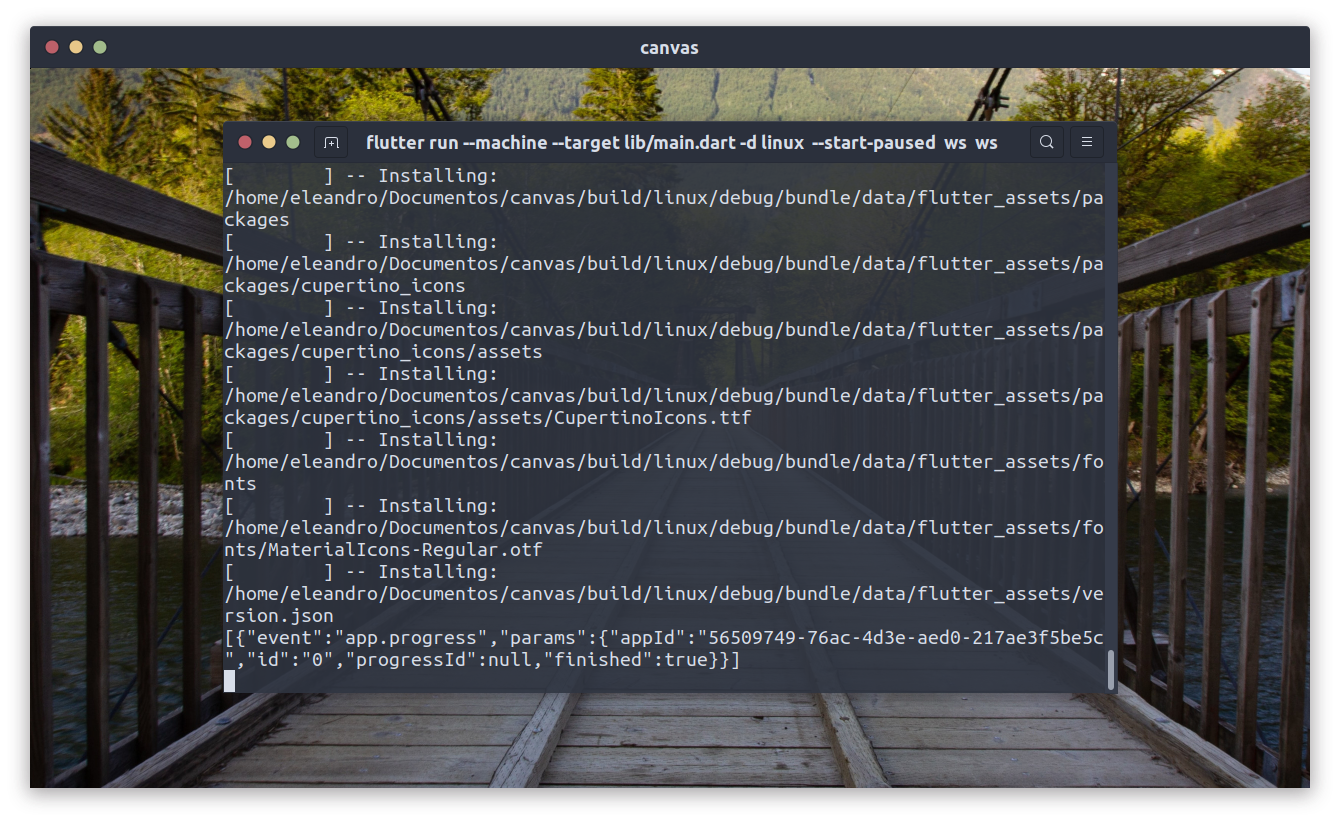
This is the app running after run: flutter run --machine --target lib/main.dart -d linux --dart-define=flutter.inspector.structuredErrors=true --start-paused --web-server-debug-protocol ws --web-server-debug-backend-protocol ws --web-allow-expose-url -v
The logs of this execution can be found here:
https://gist.github.com/e200/4498a21ae4bfa510b7989d2ca6390d98
The app is running with a strange behavior, it is showing the content behind the window, in this case, is the Desktop Wallpaper and the terminal running the app. Another strange behavior is that the content showed in the window its not transparent, it is actually a screenshot of the content behind the window, if I move the window, the content remains the same as you can see in this short video:
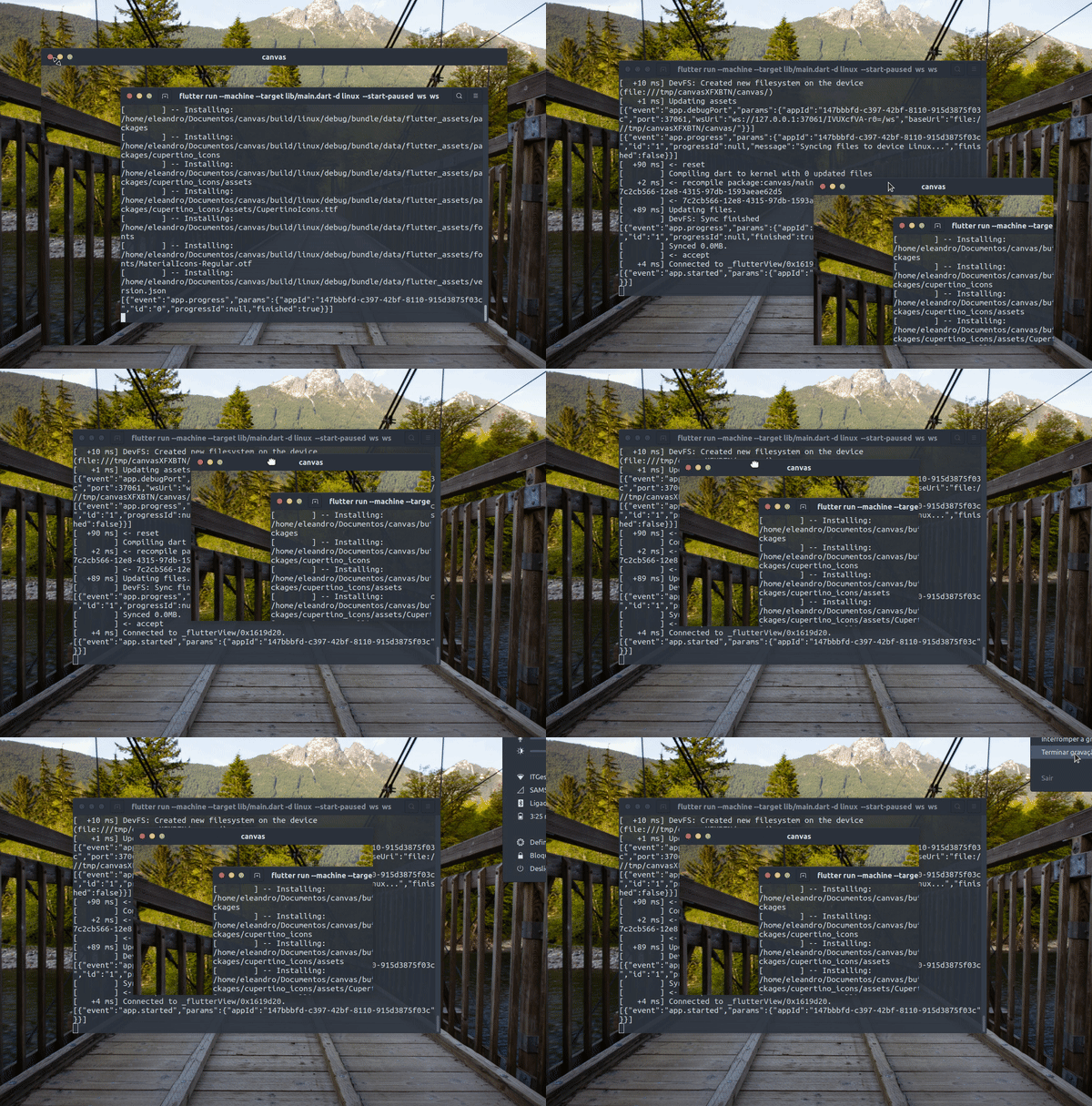
Be aware that everything is happening on a fresh created project.
e200
on 11 Jan 2021
That last video is a different bug that should be raised with Flutter (it's not something that can be fixed here in the VS Code extension code).
The log suggests it's getting further than you did from VS Code though. Can you try the same command from the VS Code embedded terminal to see whether it works there or not?
VS Code isn't doing much more than running that command, so maybe there's something different in the environment. Whether it occurs from the built-in terminal might help track down what.
DanTup
on 11 Jan 2021
Works well if I run flutter run from the vscode terminal, but not if I run the command with those arguments.
This gist contains the logs from the vscode builtin terminal running: flutter run --machine --target lib/main.dart -d linux --dart-define=flutter.inspector.structuredErrors=true --start-paused --web-server-debug-protocol ws --web-server-debug-backend-protocol ws --web-allow-expose-url -v
https://gist.github.com/e200/4fbef4761bb75581225789a0e1062cf3
e200
on 11 Jan 2021
My guess is that it's the --start-paused flag causing the issue. I presume if you just run flutter run --start-paused from the built-in terminal you see the same?
If so, can you try running printenv in the built-in terminal and the external terminal, and see if there are any differences that might affect things? I don't think the issue is related to the VS Code extension as it's not involved at all when you run from the built-in terminal, although I'm also not sure what else would be different between the built-in terminal and an external terminal.
DanTup
on 11 Jan 2021
@DanTup yes. I got the same result.
Running printenv on both terminals show very different results, but I couldn't find anything that may cause this issue, maybe because I don't have enough knowledge to take a closer look.
But we get the same result from both terminals. May this means that the problem isn't with the vscode extension itself?
Also, some days ago when I first installed Flutter and enabled Linux Desktop everything was right, it just started last week.
e200
on 11 Jan 2021
In https://github.com/flutter/flutter/issues/73611, @ruicraveiro mentioned having this Wayland(?) but not with X11. Do you know if this may apply here? I'm not very familiar with Linux (and had never heard of Wayland) unfortunately.
Given this occurs from the built-in terminal though, I'm not sure there's anything that can be fixed here (in the VS Code extension repo) - as the terminal is entirely handled by VS Code. Whether it's a VS Code bug/limitation or something else, I'm really not sure.
DanTup
on 11 Jan 2021
@DanTup Wayland and x11 are like GUI managers for Linux, and they handle GUIs differently, that may be another issue.
Well, this is confusing. Surprisingly the same app runs on IntelliJ IDE.
e200
on 11 Jan 2021
Are you using Wayland too? I saw there were some unresolved issues about Wayland in VS Code, though I don't know if they're related:
DanTup
on 11 Jan 2021
No, these issues are not related :(
I'm using x11.
e200
on 11 Jan 2021
Understood.
Unfortunately I don't have any more ideas. This doesn't seem related to anything the VS Code extension is doing, as it repros from the built-in terminal (which is entirely VS Code's and not touched by the extension). It may be worth re-opening the issue in the Flutter repo to see if anyone more familiar with the Linux work is able to provide some pointers for better understanding what's happening or getting more useful diagnostic information.
Out of interest - are you using Snap to install Flutter? I did find https://github.com/flutter/flutter/issues/72985 which has this comment from 7 days ago that might be worth trying? https://github.com/flutter/flutter/issues/72985#issuecomment-754120742
DanTup
on 11 Jan 2021
Understood.
Unfortunately I don't have any more ideas. This doesn't seem related to anything the VS Code extension is doing, as it repros from the built-in terminal (which is entirely VS Code's and not touched by the extension). It may be worth re-opening the issue in the Flutter repo to see if anyone more familiar with the Linux work is able to provide some pointers for better understanding what's happening or getting more useful diagnostic information.
Out of interest - are you using Snap to install Flutter? I did find flutter/flutter#72985 which has this comment from 7 days ago that might be worth trying? flutter/flutter#72985 (comment)
Hi again @DanTup.
I was using a manually installed Flutter SDK first when everything happened, then I tried using snap and I’m using fvm right now facing the same problem in all of the 3 options.
I’ll do as you suggest and reopen the Flutter issue.
I really appreciate your support.
e200
on 11 Jan 2021
No worries, I hope you can get to the bottom of it. I've added a comment to the Flutter issue summarising what we found here. It may not be a Flutter issue, but perhaps someone there can give some pointers on what might trigger Flutter to end up where it prints that error.
I'll close this as there's nothing to do here, and leave you to re-open the Flutter issue. Thanks!
DanTup
on 11 Jan 2021
@DanTup I'm not sure if the previous conclusions in this issue were correct. I've tried running from within my vscode terminal using the command args listed in the previous comments and the app runs fine. Its only when I try to run it with the codelens debug link or F5 that I get the error mesg about logger reader stopped.
The previous comments about it being related to Wayland maybe something as I'm am using Wayland on this machine too.
 maks
on 18 Jan 2021
maks
on 18 Jan 2021
Its only when I try to run it with the codelens debug link or F5 that I get the error mesg about logger reader stopped.
When you tried from the terminal, did you use the full command the same as VS Code is running (eg. see https://github.com/Dart-Code/Dart-Code/issues/3056#issuecomment-757954326)? If so, I suspect it may be related to something in the environment, though I'm not very familiar (with Linux or Wayland). The extension here is really just calling flutter run --machine (with a few args to support things like debugging) so I can't think of many things that would be different. Perhaps VS Code or the VS Code extension host are changing/adding environment variables.
Some things worth trying:
- Running with the
runlink (without debugging) to see if that changes anything (if it doesn't occur there, it indicates something in either the debugging flags, or the connection of a debugger) - Spawning
flutter runfrom a Dart script in your bin folder to see if that repros (if so, that might give an easy way to examine things like environment variables - in the Dart script - to see if they're different to when you're running in a terminal).
DanTup
on 18 Jan 2021
@DanTup sorry to take a while to reply.
Yes I ran using full command line per the earlier comment from e200 that you linked to and the app runs fine, try it via the codelens debug or run link or F5 (or Ctrl-f5) and always the same error. I'm now on Dartcode v3.19.1 and its still occuring.
Is there a way I can see any more details of the error I'm getting from Darcode than whats printed in the Debug Console pane?
maks
on 1 Feb 2021
Oh sorry @DanTup I only just noticed your instructions at the top of this issue on how to grab debug logs.
So I got the logs and seems mine are happening in similiar spot as well:
[15:12:00] [FlutterRun] [Info] [Dart ] <== [ +403 ms] [2/5] Building CXX object CMakeFiles/flutter_isolates.dir/flutter/generated_plugin_registrant.cc.o
[15:12:00] [FlutterRun] [Info] [Dart ] <== [  +30 ms] [3/5] Building CXX object CMakeFiles/flutter_isolates.dir/my_application.cc.o
[15:12:00] [FlutterRun] [Info] [Dart ] <== [ +204 ms] [4/5] Linking CXX executable intermediates_do_not_run/flutter_isolates
[15:12:00] [FlutterRun] [Info] [Dart ] <== [        ] [4/5] Install the project...
[15:12:00] [FlutterRun] [Info] [Dart ] <== [  +12 ms] -- Install configuration: "Debug"
[15:12:00] [FlutterRun] [Info] [Dart ] <== [  +33 ms] -- Installing: /home/maks/work/flutter_isolates/build/linux/debug/bundle/flutter_isolates
[15:12:00] [FlutterRun] [Info] [Dart ] <== [        ] -- Set runtime path of "/home/maks/work/flutter_isolates/build/linux/debug/bundle/flutter_isolates" to "$ORIGIN/lib"
[15:12:00] [FlutterRun] [Info] [Dart ] <== [        ] -- Installing: /home/maks/work/flutter_isolates/build/linux/debug/bundle/data/icudtl.dat
[15:12:00] [FlutterRun] [Info] [Dart ] <== [   +1 ms] -- Installing: /home/maks/work/flutter_isolates/build/linux/debug/bundle/lib/libflutter_linux_gtk.so
[15:12:01] [FlutterRun] [Info] [Dart ] <== [ +109 ms] -- Installing: /home/maks/work/flutter_isolates/build/linux/debug/bundle/data/flutter_assets
[15:12:01] [FlutterRun] [Info] [Dart ] <== [        ] -- Installing: /home/maks/work/flutter_isolates/build/linux/debug/bundle/data/flutter_assets/kernel_blob.bin
[15:12:01] [FlutterRun] [Info] [Dart ] <== [  +34 ms] -- Installing: /home/maks/work/flutter_isolates/build/linux/debug/bundle/data/flutter_assets/version.json
[15:12:01] [FlutterRun] [Info] [Dart ] <== [   +1 ms] -- Installing: /home/maks/work/flutter_isolates/build/linux/debug/bundle/data/flutter_assets/FontManifest.json
[15:12:01] [FlutterRun] [Info] [Dart ] <== [        ] -- Installing: /home/maks/work/flutter_isolates/build/linux/debug/bundle/data/flutter_assets/fonts
[15:12:01] [FlutterRun] [Info] [Dart ] <== [        ] -- Installing: /home/maks/work/flutter_isolates/build/linux/debug/bundle/data/flutter_assets/fonts/MaterialIcons-Regular.otf
[15:12:01] [FlutterRun] [Info] [Dart ] <== [        ] -- Installing: /home/maks/work/flutter_isolates/build/linux/debug/bundle/data/flutter_assets/AssetManifest.json
[15:12:01] [FlutterRun] [Info] [Dart ] <== [        ] -- Installing: /home/maks/work/flutter_isolates/build/linux/debug/bundle/data/flutter_assets/NOTICES
[15:12:01] [FlutterRun] [Info] [Dart ] <== [{"event":"app.progress","params":{"appId":"4f073f97-3bac-4251-acf7-e0e446c09969","id":"0","progressId":null,"finished":true}}]
[15:12:02] [FlutterRun] [Error] [Dart ] [+1176 ms] Error waiting for a debug connection: The log reader stopped unexpectedly.
[15:12:02] [FlutterRun] [Error] [Dart ] [   +1 ms] Error launching application on Linux.
[15:12:04] [FlutterRun] [Info] [Dart ] <== [{"event":"app.stop","params":{"appId":"4f073f97-3bac-4251-acf7-e0e446c09969"}}]
[15:12:04] [FlutterRun] [Info] [Dart ] Process terminated! null, SIGTERM
[15:12:04] [VmService] [Info] [Dart ] Process exited (sigterm)
[15:12:04] [VmService] [Info] [Dart ] Disconnect requested!
And running in VSCode terminal pane the exact same cmd as is in the log starts the app fine. I've not been able to reproduce the error when running in a norma terminal either.
maks
on 1 Feb 2021
@maks I would add a note on https://github.com/flutter/flutter/issues/73611 with any extra info you can provide. There's not much going on the in the VS Code extension here (it's just spawning Flutter) so it may be helpful to get some clarification from Flutter about exactly what "The log reader stopped unexpectedly" means on Linux (I wasn't able to figure that out from the code).
DanTup
on 1 Feb 2021
@DanTup I figured out that this problem occurs when I switch from bash to zsh.
Is there any way to configure vscode to use bash on launch the app in Debug Mode?
This may solve the issue.
e200
on 3 Feb 2021
oh!! thanks @e200 ! wow I never thought about the shell ! That could be it for me too as even though I'm using bash I'm currently using Manjaro linux distro which installs zsh as the default shell.
maks
on 3 Feb 2021
@maks you're welcome! Now we just need to find a way to tell vscode to use bash instead of zsh.
e200
on 3 Feb 2021
@e200 actually I think I spoke too soon. I've now even completely removed zsh from my system but I'm still seeing the log reader stopped error when trying to run/debug from vscode.
maks
on 3 Feb 2021
@maks yes, you're right because the same is happening to me after completely remove zsh and oh-my-zsh, but I'm pretty sure they are the cause since I have a fresh Ubuntu install and it worked fine, then I installed zsh and oh-my-zsh and switched the default shell to zsh and it happened.
e200
on 3 Feb 2021
Now we just need to find a way to tell vscode to use bash instead of zsh.
The shell used in VS Code's terminal shouldn't change anything here - it's not used for spawning the Flutter process in the VS Code debugger. We spawn the process using child_process.spawn(), and we do pass shell: true which according to the docs "Default: '/bin/sh' on Unix, process.env.ComSpec on Windows.".
It's probably worth making notes about anything you discover on the Flutter issue so they're in one place/an open issue (although it sounds like the shell might not be related after all).
DanTup
on 4 Feb 2021
Related issues
 mccadi
·
3Comments
DanTup
·
4Comments
mccadi
·
3Comments
DanTup
·
4Comments
 ifredom
·
3Comments
DanTup
·
3Comments
e200
·
3Comments
ifredom
·
3Comments
DanTup
·
3Comments
e200
·
3Comments
Most helpful comment
@maks I would add a note on https://github.com/flutter/flutter/issues/73611 with any extra info you can provide. There's not much going on the in the VS Code extension here (it's just spawning Flutter) so it may be helpful to get some clarification from Flutter about exactly what "The log reader stopped unexpectedly" means on Linux (I wasn't able to figure that out from the code).