Dart-code: Dart codeActions not working with keybindings in vscode
Describe the bug
I have created my own vscode keybindings using the refactoring options given by dart documentation like
https://dartcode.org/docs/refactorings-and-code-fixes/
bud suddenly out of nowhere all of my keybindings stopped working and I always get the same message
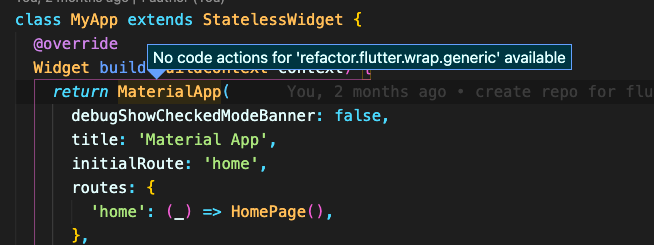
This is my keybindings code

To Reproduce
Just create keybinding and try to use it
Expected behavior
when using any of my defined keybindings like "cmd+w cmd+w" I get the message given before "no code actions for"
but the rare thing is that when I try to apply it form the quick actions part with "cmd + ."
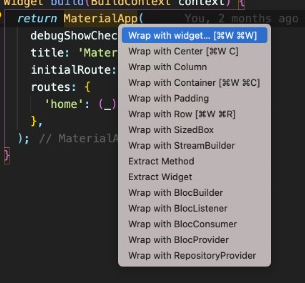
it works ok
Versions (please complete the following information):
- VS Code version: 1.52.1
- Dart extension version: 3.18.0
- Dart/Flutter SDK version: 2.10.4 / 1.22.5
 elianmortega
All 7 comments
maybe this is related: the whole refactor menu is gone in the context menu.
Or am i missing something?

(same versions as elian)
 sstadtl
on 28 Dec 2020
sstadtl
on 28 Dec 2020
I've checked other issues on a problem similar they talk about the context in vs code but im a little lost there I dont understand what are they referring to.
*Demo video of problem *
As you can see in the following screen recording when I press right click I do get the normal menu options,
when I press "cmd+." I do get the quick-actions and if I select them everything works well, but when I try to use the keybindings I have assigned for those quick actions a get the message "No action for ...."
elianmortega
on 28 Dec 2020
I think there are two issues here:
- You need to provide a full segment of the ID, eg.
refactor.convertnot justrefactor.con - If you're using LSP, there was a bug that was preventing Refactors from showing up in the UI correctly (https://github.com/Dart-Code/Dart-Code/issues/2885). This has been fixed in the latest Flutter master, but the fix is not in Flutter stable channel.
Using LSP on Flutter master, and updating the keybind to filter to refactor.convert works for me:

Let me know if this doesn't seem to solve the issue. Thanks!
 DanTup
on 30 Dec 2020
DanTup
on 30 Dec 2020
Thanks for the help,
For the first point it was my bad I was doing some testing and take the screenshot in the wrong time but the actual file look like this:
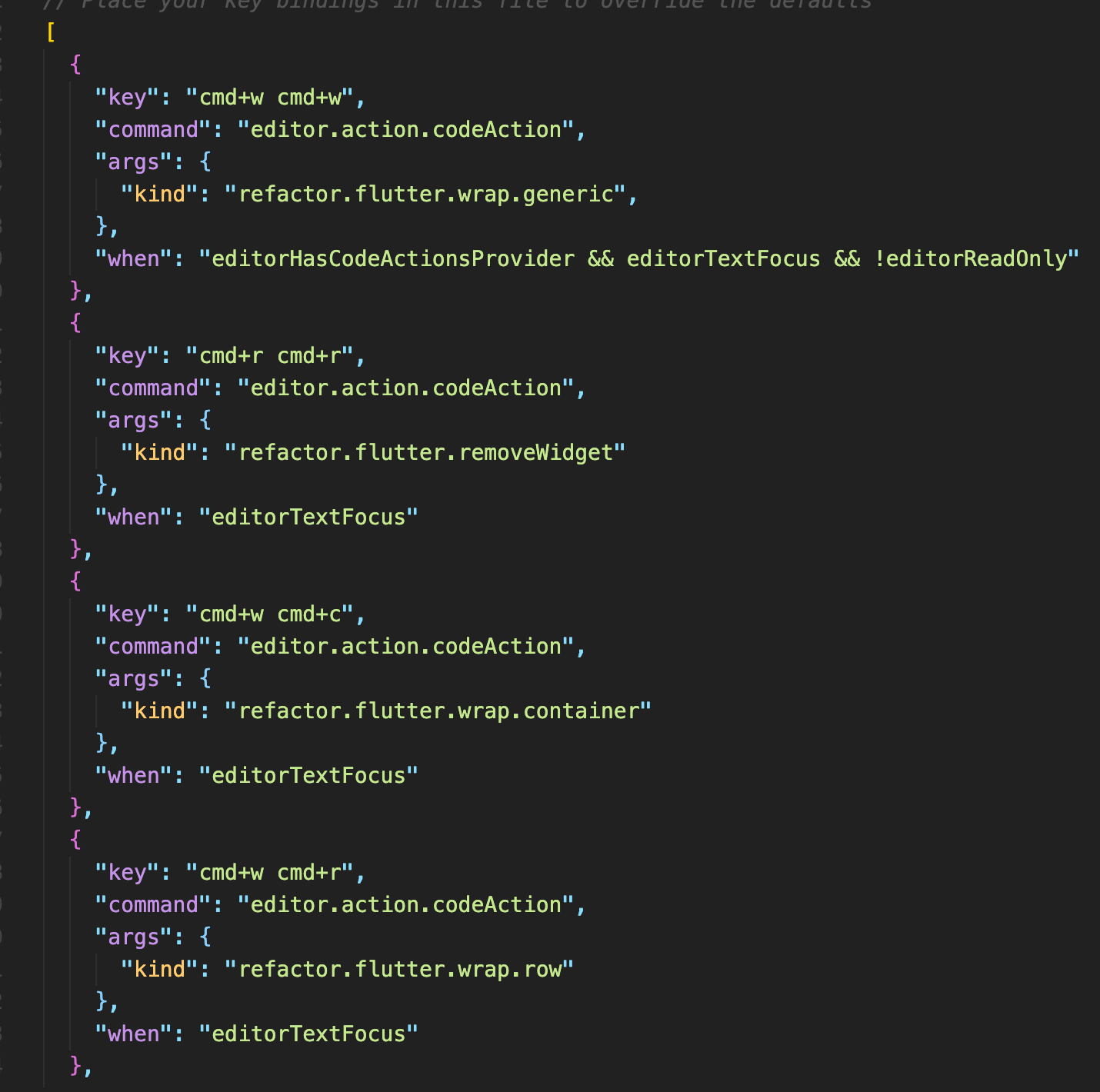
I do have the full segment of the ID.
But I still got the problem, an interesting thing happened yesterday I was installing FVM to manage different flutter version and for a moment everything worked ok so I don't know what the problem might be. Im going to add the code of my vscode settings:
Key Bindings
// Place your key bindings in this file to override the defaults
[
  {
    "key": "cmd+w cmd+w",
    "command": "editor.action.codeAction",
    "args": {
      "kind": "refactor.flutter.wrap.generic",
    },
    "when": "editorHasCodeActionsProvider && editorTextFocus && !editorReadOnly"
  },
  {
    "key": "cmd+r cmd+r",
    "command": "editor.action.codeAction",
    "args": {
      "kind": "refactor.flutter.removeWidget"
    },
    "when": "editorTextFocus"
  },
  {
    "key": "cmd+w cmd+c",
    "command": "editor.action.codeAction",
    "args": {
      "kind": "refactor.flutter.wrap.container"
    },
    "when": "editorTextFocus"
  },
  {
    "key": "cmd+w cmd+r",
    "command": "editor.action.codeAction",
    "args": {
      "kind": "refactor.flutter.wrap.row"
    },
    "when": "editorTextFocus"
  },

  {
    "key": "cmd+w c",
    "command": "editor.action.codeAction",
    "args": {
      "kind": "refactor.flutter.wrap.center"
    }
  },
  // Toggle between terminal and editor
  {
    "key": "cmd+t",
    "command": "workbench.action.terminal.focus",
    "when": "editorTextFocus"
  },
  {
    "key": "cmd+t",
    "command": "workbench.action.focusActiveEditorGroup",
    "when": "terminalFocus"
  }
]
Vscode settings
{
    "[dart]": {
        "editor.formatOnSave": true,
        "editor.formatOnType": true,
        "editor.rulers": [
            80
        ],
        "editor.selectionHighlight": false,
        "editor.suggest.snippetsPreventQuickSuggestions": false,
        "editor.suggestSelection": "first",
        "editor.tabCompletion": "on",
        "editor.wordBasedSuggestions": false
    },
    "workbench.iconTheme": "material-icon-theme",
    "editor.fontSize": 14,
    "editor.defaultFormatter": "Dart-Code.dart-code",
    "yaml.schemas": {
        "file:///Users/elian-delaguayaba/.vscode/extensions/atlassian.atlascode-2.8.5/resources/schemas/pipelines-schema.json": "bitbucket-pipelines.yml"
    },
    "atlascode.bitbucket.enabled": true,
    "atlascode.jira.enabled": true,
    "atlascode.jira.jqlList": [
        {
            "id": "3c75b094-ec01-41f5-be47-c717a5e03ca0",
            "enabled": true,
            "name": "My delaguayaba Issues",
            "query": "assignee = currentUser() AND resolution = Unresolved ORDER BY lastViewed DESC",
            "siteId": "b8f9efc3-9d73-491c-91e2-737814446532",
            "monitor": true
        }
    ],
    "dart.flutterHotRestartOnSave": false,
    "dart.flutterGutterIcons": false,
    "dart.previewHotReloadOnSaveWatcher": true,
    "editor.formatOnSave": true,
    "debug.console.fontSize": 13,
    "gitlens.gitCommands.closeOnFocusOut": true,
    "window.zoomLevel": 0,
    "explorer.confirmDelete": false,
    "editor.hover.delay": 200,
    "workbench.view.alwaysShowHeaderActions": true,
    "workbench.colorTheme": "Material Theme Darker",
    "todo-tree.tree.showScanModeButton": false,
    "material-icon-theme.folders.theme": "specific",
    "gitlens.views.fileHistory.avatars": false,
    "explorer.confirmDragAndDrop": false,
    "markdown.preview.fontSize": 13.5,
    "editor.formatOnPaste": true,
    "editor.quickSuggestions": true,
    "dart.previewLsp": true,
    "workbench.sideBar.location": "right",
    "eslint.codeAction.showDocumentation": {
        "enable": true
    },
    "editor.hideCursorInOverviewRuler": true,
    "editor.tabCompletion": "on",
    "editor.acceptSuggestionOnEnter": "off",
    "explorer.compactFolders": false,
    "dart.flutterSdkPaths": [
        ".fvm/flutter_sdk"
    ],
    "terminal.integrated.fontSize": 12.5,
    "dart.flutterSdkPath": "/Users/elian-ortega/fvm/versions/stable",
}
Please let me know if any more information would be helpful to help me solve the issue.
elianmortega
on 30 Dec 2020
Based on those settings, it seems like you're using stable Flutter with the LSP Preview enabled:
    "dart.previewLsp": true,
    "dart.flutterSdkPath": "/Users/elian-ortega/fvm/versions/stable",
In which case I think you're seeing the issue described above:
If you're using LSP, there was a bug that was preventing Refactors from showing up in the UI correctly (#2885). This has been fixed in the latest Flutter master, but the fix is not in Flutter stable channel.
You'll need to either switch to Flutter master, or disable the LSP preview until the fix rolls out.
Please let me know if this doesn't solve the issue. Thanks!
DanTup
on 4 Jan 2021
@DanTup Thank you very much! I just changed the lsp option to false
"dart.previewLsp": false,
and now everything works fine! Thanks again!
elianmortega
on 4 Jan 2021
Glad to hear! FWIW LSP will become the default in the future, though that fix should be rolled out by the time that happens.
DanTup
on 4 Jan 2021
Related issues
 jascodes
·
4Comments
jascodes
·
4Comments
 atreeon
·
5Comments
atreeon
·
5Comments
 Matt-Gleich
·
4Comments
Matt-Gleich
·
4Comments
 partounian
·
4Comments
partounian
·
4Comments
 mayorbyrne
·
5Comments
mayorbyrne
·
5Comments
Most helpful comment
@DanTup Thank you very much! I just changed the lsp option to false
"dart.previewLsp": false,and now everything works fine! Thanks again!