Dart-code: How to stop formatter wrapping at 80 characters?
VSCode Version 1.33.1 (1.33.1)
Dart 3.02
Whenever code formatting is invoked, it wraps my dart code even though I checked all settings I could find
I don't think it's a general VSCode issue because the same code in an .m file does not get wrapped.
{
    "dart.flutterSdkPath": "/Applications/flutter",
    "workbench.colorTheme": "Visual Studio Light",
    "editor.formatOnSave": true,
    "editor.minimap.enabled": false,
    "editor.codeLens": false,
    "editor.folding": false,
    "editor.highlightActiveIndentGuide": false,
    "editor.insertSpaces": false,
    "editor.lightbulb.enabled": true,
    "editor.renderIndentGuides": false,
    "editor.overviewRulerBorder": true,
    "editor.hideCursorInOverviewRuler": true,
    "editor.wordWrapColumn": 999,
    "editor.formatOnType": true,
    "editor.wrappingIndent": "none",
    "[dart]": {
        "editor.rulers": [
            0
        ]
    },
}
      final existingEvents = (await deviceCalendar.retrieveEvents(calendar.id, RetrieveEventsParams())).data;
      final newEvents = list.where((x)=>existingEvents.firstWhere((y)=>y.title == x['text']) == null);
Becomes
      final existingEvents = (await deviceCalendar.retrieveEvents(
              calendar.id, RetrieveEventsParams()))
          .data;
      final newEvents = list.where((x) =>
          existingEvents.firstWhere((y) => y.title == x['text']) == null);
 duzenko
All 11 comments
You're right, this is a Dart setting. For formatting, we use the SDK-supplied dart_style library which wraps lines at 80 characters, but you can control this with the "dart.lineLength" setting.
Let me know if this doesn't work for you.
 DanTup
on 16 May 2019
DanTup
on 16 May 2019
@DanTup
- Is there any way to configure this per-project?
I.e. keep wrapping at 80 for flutter & flutter/plugins forks but wrap at 200 for everything else?
Specifically, in Android Studio. Where is this setting in Android Studio? I can't find it anywhere. The flutter fork wraps at 200 which will surely fail formatting test for my PR.
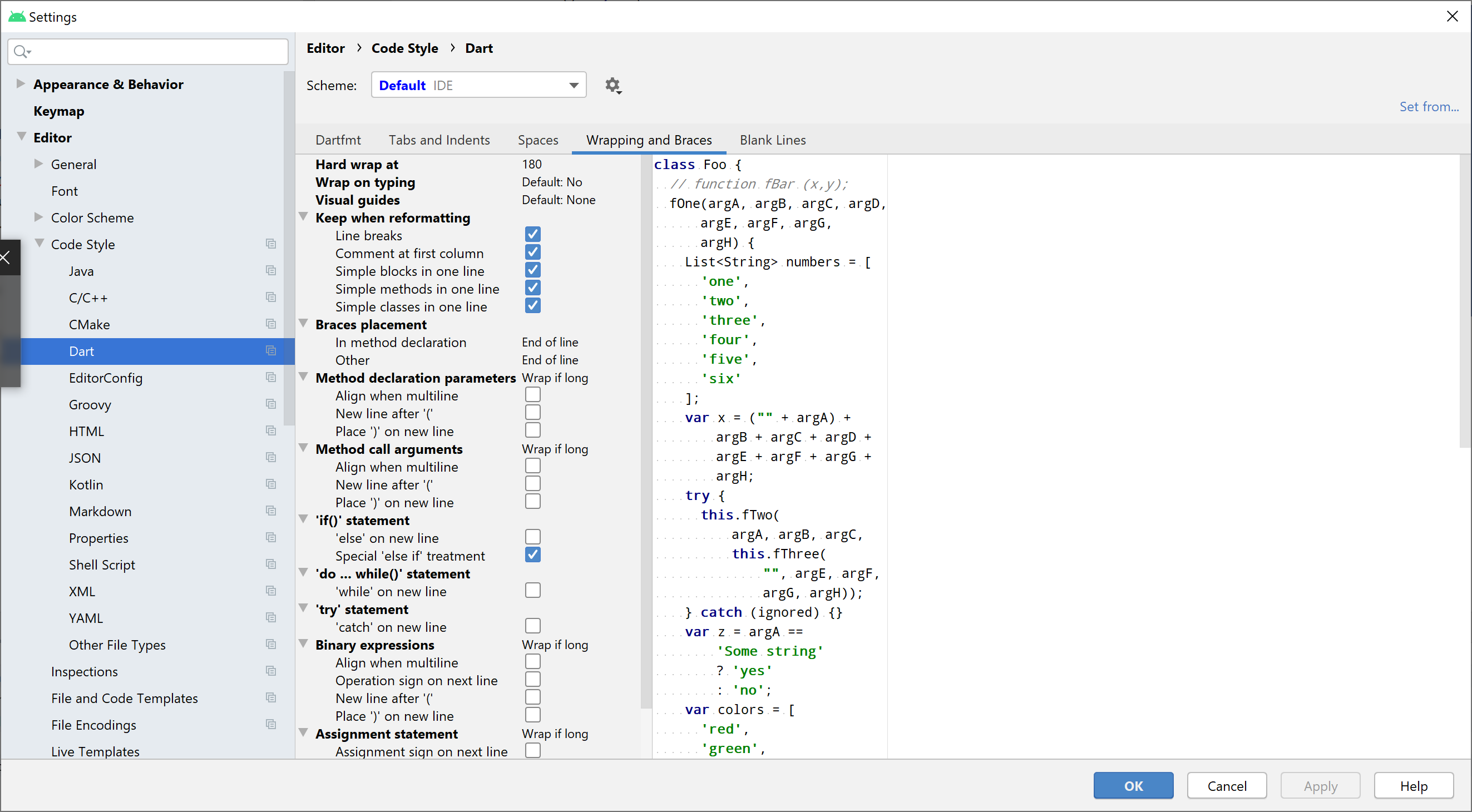
duzenko
on 4 Jun 2020
@duzenko It's possible in VS Code with "Workspace Settings" but I'm not familiar with config in Android Studio. Maybe @pq knows if this can be set per-project?
DanTup
on 4 Jun 2020
I don't believe this is configurable currently in IDEA.
@alexander-doroshko @jwren may know more?
 pq
on 4 Jun 2020
pq
on 4 Jun 2020
That's the only code style setting that survived but it's there.

 alexander-doroshko
on 4 Jun 2020
alexander-doroshko
on 4 Jun 2020
Ah! I was looking in the wrong place. Excellent. Thanks @alexander-doroshko!
pq
on 4 Jun 2020
Wish this setting could be shared with teammates.
We use editorconfig, however the line length defined in screenshot above overrides property in .editorconfig file.
Have tried such config:
[*]
max_line_length = 120
or
[*.dart]
max_line_length = 120
None is functional.
Is there anything to do to make editorconfig configuration take precedence over dart editor setting ?
Any alternative way to share this setting ?
Thanks ;)
 emri99
on 7 Dec 2020
emri99
on 7 Dec 2020
We use
editorconfig, however the line length defined in screenshot above overrides property in.editorconfigfile.
I don't think it's being overridden - the issue is likely that the Dart formatter does not support editorconfig and therefore what you're setting in your editorconfig is just not being read at all by the Dart formatter. There's a related issue at https://github.com/Dart-Code/Dart-Code/issues/914.
In the meantime, you should be able to set dart.lineLength and commit it to your .vscode/settings.json file if you want to share it in the repo.
DanTup
on 7 Dec 2020
I forgot to mention explicitely that we are using Android Studio ^^ thanks anyway ;)
emri99
on 7 Dec 2020
Oh, gotcha! I'm afraid I don't know much about AS so don't know how you would share settings there. Perhaps someone above may jump in if there's a way though!
DanTup
on 7 Dec 2020
@emri99 In IntelliJ IDEA and Android Studio, to share code style settings with teammates through Version Control System, you'll need to commit .idea/codeStyles/codeStyleConfig.xml and .idea/codeStyles/Project.xml files.
But first, make sure that you are using project-level code style settings (Scheme: Project in Settings/Preferences -> Editor -> Code Style):

Contents of these files will be like this:
<component name="ProjectCodeStyleConfiguration">
  <state>
    <option name="USE_PER_PROJECT_SETTINGS" value="true" />
  </state>
</component>
<component name="ProjectCodeStyleConfiguration">
  <code_scheme name="Project" version="173">
    <codeStyleSettings language="Dart">
      <option name="RIGHT_MARGIN" value="120" />
    </codeStyleSettings>
  </code_scheme>
</component>
Related issues
 rgb1380
·
3Comments
rgb1380
·
3Comments
 lukepighetti
·
4Comments
lukepighetti
·
4Comments
 rajeshjeshar
·
4Comments
rajeshjeshar
·
4Comments
 mayorbyrne
·
5Comments
mayorbyrne
·
5Comments
 shamrin
·
5Comments
shamrin
·
5Comments
Most helpful comment
You're right, this is a Dart setting. For formatting, we use the SDK-supplied dart_style library which wraps lines at 80 characters, but you can control this with the
"dart.lineLength"setting.Let me know if this doesn't work for you.