Dart-code: Device not showing up in VSCode, but detected in flutter
I am trying to debug my project with a real Android device (Mi Mix 2S running Android 9.0).
It works fine when running flutter run, but I cannot find the device in VSCode.
C:\Users\cheng>flutter doctor -v
[√] Flutter (Channel stable, v1.2.1, on Microsoft Windows [Version 10.0.18362.53], locale zh-CN)
    • Flutter version 1.2.1 at C:\Users\cheng\Documents\Software\flutter
    • Framework revision 8661d8aecd (9 weeks ago), 2019-02-14 19:19:53 -0800
    • Engine revision 3757390fa4
    • Dart version 2.1.2 (build 2.1.2-dev.0.0 0a7dcf17eb)

[√] Android toolchain - develop for Android devices (Android SDK version 28.0.3)
    • Android SDK at C:\Users\cheng\AppData\Local\Android\sdk
    • Android NDK location not configured (optional; useful for native profiling support)
    • Platform android-28, build-tools 28.0.3
    • Java binary at: C:\Users\cheng\Documents\Software\android-studio-preview\jre\bin\java
    • Java version OpenJDK Runtime Environment (build 1.8.0_152-release-1248-b01)
    • All Android licenses accepted.

[√] Android Studio (version 3.3)
    • Android Studio at C:\Users\cheng\Documents\Software\android-studio-preview
    • Flutter plugin version 32.0.1
    • Dart plugin version 182.5215
    • Java version OpenJDK Runtime Environment (build 1.8.0_152-release-1248-b01)

[√] VS Code (version 1.33.1)
    • VS Code at C:\Users\cheng\AppData\Local\Programs\Microsoft VS Code
    • Flutter extension version 2.25.1

[√] Connected device (1 available)
    • MIX 2S • 9723ff13 • android-arm64 • Android 9 (API 28)

• No issues found!
However,

 chengyuhui
All 40 comments
@chengyuhui Can you try running the Flutter: Run Flutter Doctor command from the VS Code command palette to see whether that shows the device? This may give different results to running it from the built-in terminal since it won't run any terminal startup scripts.
 DanTup
on 19 Apr 2019
DanTup
on 19 Apr 2019
The flutter doctor output shown in the given screenshot is triggered by Flutter: Run Flutter Doctor command. As is shown, the device shows up here (PS: I don't have any emulator on this computer).
chengyuhui
on 20 Apr 2019
Oh, sorry - I thought that was your terminal! Do you also see "No devices" in the status bar (bottom right)?
Can you check whether an errors are listed in the VS Code dev console (Help -> Toggle Developer Tools), and also use the dart.flutterDaemonLogFile setting to capture a daemon log file. After setting the setting, restart VS Code, then disconnect/reconnect your device, and then grab a copy of the logs, and we can see if there's anything obvious in there.
Thanks!
DanTup
on 20 Apr 2019
Daemon Log:
!! PLEASE REVIEW THIS LOG FOR SENSITIVE INFORMATION BEFORE SHARING !!

Dart Code extension: 2.25.1
Flutter extension: 2.25.1 (not activated)
VS Code: 1.33.1
Platform: win
Workspace type: Flutter
Multi-root?: false
Dart SDK:
    Loc: C:\Users\cheng\Documents\Software\flutter\bin\cache\dart-sdk
    Ver: 2.2.0-edge.0a7dcf17eb5f2450480527d6ad1e201fb47f1e36
Flutter SDK:
    Loc: C:\Users\cheng\Documents\Software\flutter
    Ver: 1.2.1
HTTP_PROXY: undefined
NO_PROXY: undefined

[下午3:50:22]: Spawning C:\Users\cheng\Documents\Software\flutter\bin\flutter.bat with args ["daemon"]
[下午3:50:22]: ..  in C:\Users\cheng\Documents\Software\flutter
[下午3:50:22]: PID: 20864
[下午3:50:22]: ==> [{"id":"1","method":"device.enable"}]
[下午3:50:30]: <== Starting device daemon...
[下午3:50:30]: <== [{"event":"daemon.connected","params":{"version":"0.4.2","pid":2312}}]
[下午3:51:00]: ==> [{"id":"2","method":"emulator.getEmulators"}]
[下午3:51:01]: <== [{"id":"2","result":[]}]
Nothing happens when the device is disconnected/reconnected, nothing related to flutter/dart in DevTools console.
I can't find "No devices" in my status bar, only Flutter version is there.
chengyuhui
on 20 Apr 2019
I can't find "No devices" in my status bar, only Flutter version is there.
Make sure you've got a .dart file open, and if it still doesn't appear, please attach a screenshot.
It seems like there may be a big in Flutter here though, but just to get some more info, can you do this:
- Run
flutter devicesand confirm your device show up - Run
flutter daemon -v - Once the daemon says it's connected, paste
[{"id":"1","method":"device.enable"}]into the terminal and press<enter>(you should see[{"id":"1"}]printed out) - Disconnect your device
- Wait 10 seconds
- Reconnected your device
Then paste the full output of all of that here.
Thanks!
DanTup
on 20 Apr 2019
It is really not here:

(Logs on the right are from a manual flutter run)
Output:
C:\Users\cheng>flutter devices
1 connected device:

MIX 2S • 9723ff13 • android-arm64 • Android 9 (API 28)

C:\Users\cheng>flutter daemon -v
[  +13 ms] executing: [C:\Users\cheng\Documents\Software\flutter\] git rev-parse --abbrev-ref --symbolic @{u}
[ +474 ms] Exit code 0 from: git rev-parse --abbrev-ref --symbolic @{u}
[   +2 ms] origin/stable
[        ] executing: [C:\Users\cheng\Documents\Software\flutter\] git rev-parse --abbrev-ref HEAD
[ +459 ms] Exit code 0 from: git rev-parse --abbrev-ref HEAD
[   +1 ms] stable
[        ] executing: [C:\Users\cheng\Documents\Software\flutter\] git ls-remote --get-url origin
[ +455 ms] Exit code 0 from: git ls-remote --get-url origin
[   +1 ms] https://github.com/flutter/flutter.git
[        ] executing: [C:\Users\cheng\Documents\Software\flutter\] git log -n 1 --pretty=format:%H
[ +463 ms] Exit code 0 from: git log -n 1 --pretty=format:%H
[   +1 ms] 8661d8aecd626f7f57ccbcb735553edc05a2e713
[        ] executing: [C:\Users\cheng\Documents\Software\flutter\] git log -n 1 --pretty=format:%ar
[ +462 ms] Exit code 0 from: git log -n 1 --pretty=format:%ar
[   +1 ms] 9 weeks ago
[        ] executing: [C:\Users\cheng\Documents\Software\flutter\] git describe --match v*.*.* --first-parent --long --tags
[ +462 ms] Exit code 0 from: git describe --match v*.*.* --first-parent --long --tags
[   +1 ms] v1.2.1-0-g8661d8aec
[ +549 ms] Starting device daemon...
[{"event":"daemon.connected","params":{"version":"0.4.2","pid":21800}}]
[{"id":"1","method":"device.enable"}]
[{"id":"1"}]
[{"event":"device.added","params":{"id":"9723ff13","name":"MIX 2S","platform":"android-arm64","emulator":false}}]
[{"event":"daemon.logMessage","params":{"level":"error","message":"Error retrieving device properties for ro.product.cpu.abi:"}}]
[{"event":"daemon.logMessage","params":{"level":"error","message":"error: device '9723ff13' not found\r\n"}}]
[{"event":"device.removed","params":{"id":"9723ff13","name":"MIX 2S","platform":"android-arm","emulator":false}}]
[{"event":"device.added","params":{"id":"9723ff13","name":"MIX 2S","platform":"android-arm64","emulator":false}}]
That's very strange - it should be added to the status bar when it detects a device. It's also strange that this new log shows the device connecting/disconnecting. Though it does have an error:
Error retrieving device properties for ro.product.cpu.abi:
Does this appear immediately when you connect the device, or only when you disconnected it?
Also, can you check the dev tools (Help -> Toggle Developer Tools) in VS Code to see if there are any warnings or errors?
DanTup
on 20 Apr 2019
Those errors only show up after the cable is unplugged, so I don't think they are related to this case.
Again, there is no Flutter-related logs in my DevTools console.
Actually I noticed a difference (don't know if it matters).
In the log output from the extension, [{"id":"1","method":"device.enable"}] comes before Starting device daemon..., but you asked me to sent that command after the daemon is connected, perhaps a timing issue?
chengyuhui
on 21 Apr 2019
In the log output from the extension, [{"id":"1","method":"device.enable"}] comes before Starting device daemon..., but you asked me to sent that command after the daemon is connected, perhaps a timing issue?
Hmm, I was going to say no, since this always happens (for many of our services), and the service doesn't read stdin until it's ready. For ex here's my log:
[15:18:55]: Spawning /Users/dantup/Dev/Google/flutter/bin/flutter with args ["daemon"]
[15:18:55]: ..  in /Users/dantup/Dev/Google/flutter
[15:18:55]: PID: 49701
[15:18:55]: ==> [{"id":"1","method":"device.enable"}]
[15:18:56]: <== Starting device daemon...
[15:18:56]: <== [{"event":"daemon.connected","params":{"version":"0.4.2","pid":49720}}]
[15:18:56]: <== [{"id":"1"}]
[15:18:56]: <== [{"event":"device.added","params":{"id":"1DD6786B-37D4-4355-AA15-B818A87A18B4","name":"iPhone XS Max","platform":"ios","emulator":true}}]
However, I just looked back at yours, and there's no response to request 1, so you could be right, it doesn't seem like it was processes.
What happens if you run this from the terminal:
flutter daemon <<< '[{"id":"1","method":"device.enable"}]'
This should do the same thing - send the request immediately, before the server is ready.
DanTup
on 22 Apr 2019
I used a similar way on Windows -- pasting in the command and hit enter when the script is running some git commands (trying to pipe the command resulted a strange behavior: the command exits after daemon started).
However, the device did not show up until I issued the same command again.
C:\Users\cheng>flutter daemon -v
[  +15 ms] executing: [C:\Users\cheng\Documents\Software\flutter\] git rev-parse --abbrev-ref --symbolic @{u}
[ +405 ms] Exit code 0 from: git rev-parse --abbrev-ref --symbolic @{u}
[   +3 ms] origin/stable
[        ] executing: [C:\Users\cheng\Documents\Software\flutter\] git rev-parse --abbrev-ref HEAD
[{"id":"1","method":"device.enable"}][ +425 ms] Exit code 0 from: git rev-parse --abbrev-ref HEAD
[   +4 ms] stable
[   +1 ms] executing: [C:\Users\cheng\Documents\Software\flutter\] git ls-remote --get-url origin

[ +482 ms] Exit code 0 from: git ls-remote --get-url origin
[   +1 ms] https://github.com/flutter/flutter.git
[        ] executing: [C:\Users\cheng\Documents\Software\flutter\] git log -n 1 --pretty=format:%H
[ +394 ms] Exit code 0 from: git log -n 1 --pretty=format:%H
[   +1 ms] 8661d8aecd626f7f57ccbcb735553edc05a2e713
[        ] executing: [C:\Users\cheng\Documents\Software\flutter\] git log -n 1 --pretty=format:%ar
[ +470 ms] Exit code 0 from: git log -n 1 --pretty=format:%ar
[   +3 ms] 10 weeks ago
[   +2 ms] executing: [C:\Users\cheng\Documents\Software\flutter\] git describe --match v*.*.* --first-parent --long
--tags
[ +896 ms] Exit code 0 from: git describe --match v*.*.* --first-parent --long --tags
[   +2 ms] v1.2.1-0-g8661d8aec
[ +575 ms] Starting device daemon...
[{"event":"daemon.connected","params":{"version":"0.4.2","pid":25400}}]
<======= It stops here, manually pasting below
[{"id":"1","method":"device.enable"}]
[{"id":"1"}]
[{"event":"device.added","params":{"id":"9723ff13","name":"MIX 2S","platform":"android-arm64","emulator":false}}]
Sorry, didn't realise you were on Windows :)
I'm going to try and make a beta of the next version very soon, so I'll see if I can tweak this to wait for connection, and then you can test with that. Thanks for the debugging!
DanTup
on 22 Apr 2019
Thanks, and please let me know when that version comes out.
chengyuhui
on 23 Apr 2019
@chengyuhui it's not totally ready yet (the release notes are a 404, for ex.) but you can grab the build here:
https://github.com/Dart-Code/Dart-Code/releases/tag/v2.26.0-beta.1
Info on installing preview releases is here:
https://dartcode.org/docs/installing-a-preview-release/
Let me know if this fixes your issue (or if you find any other problems in that version - you can open new issues for them). Thanks!
DanTup
on 23 Apr 2019
Thanks, now the device can be detected by vscode, but launching still fails (WebSocketException: Invalid WebSocket upgrade request). I will open a separate issue if needed.
chengyuhui
on 23 Apr 2019
@chengyuhui Great!
Yes, please open another issue for that. Be sure to include a log:
- Run the Dart: Capture Logs command from the VS Code command palette
- Tick the "Flutter Run" category
- Try to launch your app and wait for it to fail
- Click Stop Logging in the logging notification (which may have collapsed into the bell icon on the bottom right of the status bar)
Then include the log in the issue (or email it to [email protected] and including the GH issue number you opened). Thanks!
DanTup
on 23 Apr 2019
After some searching and playing around with proxy settings (I am in China so I have proxy enabled for some plugins to work), everything works perfectly now.
Anyway, thanks for your help!
chengyuhui
on 23 Apr 2019
Great! I suspected it might be proxy related and the log probably would've shown this. Glad you're all sorted - if you do hit any problems, do open issues and we'll take a look. Thanks!
DanTup
on 23 Apr 2019

I was facing the same issue so this is what I did...
I changed the location of Flutter SDK from C:\Program Files\flutter drive to any other drive like F:\Flutter were I was not asked for administrative permission to do task and then updated the PATH and then I quickly did flutter doctor check and it was all good and created new Flutter project from cmd and device was detected and I was able to launch emulator from the VScode directly and I was facing same issue in Android Studio this was the fix for both in my case hope it works for you.
 RaviPabari
on 10 Sep 2019
RaviPabari
on 10 Sep 2019
I had the same issue but on one project when the other projects were working fine somehow, So when I deleted the project and re-cloned it worked. ^_^
 osamagamal65
on 4 May 2020
osamagamal65
on 4 May 2020
I was facing the same issue so this is what I did...
I changed the location of Flutter SDK fromC:\Program Files\flutterdrive to any other drive likeF:\Flutterwere I was not asked for administrative permission to do task and then updated the PATH and then I quickly didflutter doctorcheck and it was all good and created new Flutter project from cmd and device was detected and I was able to launch emulator from the VScode directly and I was facing same issue in Android Studio this was the fix for both in my case hope it works for you.
I have the same problem but your solution doesnt seem to work for me @RaviPabari
when I try to run, it would just show this

and after clicking create android emulator I get this error
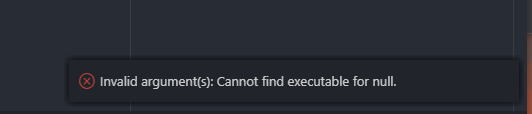
BTW I already have an android emulator running from android studio
 RaphaelWirawan
on 18 Jul 2020
RaphaelWirawan
on 18 Jul 2020
@RaphaelWirawan do the devices show up when you run flutter devices from the terminal?
If so, can you post the full output of running fluter doctor -v in the terminal, and then also from running the Flutter: Run Flutter Doctor command from the VS Code command palette?
Thanks!
DanTup
on 18 Jul 2020
This is still an issue for me for iOS devices. If I have VSCode running and plug in an iOS device, VSCode doesn't detect it unless I run the reload window command.
[✓] Flutter (Channel stable, v1.17.5, on Mac OS X 10.15.6 19G60d, locale en-AU)
    • Flutter version 1.17.5 at /Users/jamie/Library/flutter
    • Framework revision 8af6b2f038 (3 weeks ago), 2020-06-30 12:53:55 -0700
    • Engine revision ee76268252
    • Dart version 2.8.4


[✓] Android toolchain - develop for Android devices (Android SDK version 29.0.3)
    • Android SDK at /Users/jamie/Library/Android/sdk
    • Platform android-29, build-tools 29.0.3
    • Java binary at: /Applications/Android Studio.app/Contents/jre/jdk/Contents/Home/bin/java
    • Java version OpenJDK Runtime Environment (build 1.8.0_212-release-1586-b4-5784211)
    • All Android licenses accepted.

[✓] Xcode - develop for iOS and macOS (Xcode 11.4.1)
    • Xcode at /Applications/Xcode.app/Contents/Developer
    • Xcode 11.4.1, Build version 11E503a
    • CocoaPods version 1.9.1

[✓] Android Studio (version 3.6)
    • Android Studio at /Applications/Android Studio.app/Contents
    • Flutter plugin version 45.1.1
    • Dart plugin version 192.8052
    • Java version OpenJDK Runtime Environment (build 1.8.0_212-release-1586-b4-5784211)

[!] IntelliJ IDEA Ultimate Edition (version 2020.1.2)
    • IntelliJ at /Applications/IntelliJ IDEA.app
    ✗ Flutter plugin not installed; this adds Flutter specific functionality.
    ✗ Dart plugin not installed; this adds Dart specific functionality.
    • For information about installing plugins, see
      https://flutter.dev/intellij-setup/#installing-the-plugins

[✓] VS Code (version 1.47.2)
    • VS Code at /Applications/Visual Studio Code.app/Contents
    • Flutter extension version 3.12.2

[✓] Connected device (1 available)
    • iPhone-SE • {redacted} • ios • iOS 13.5
 jamie1192
on 21 Jul 2020
jamie1192
on 21 Jul 2020
@jamie1192 please can you capture a daemon log (https://dartcode.org/docs/logging/#flutter-daemon) when this happens and attach it to a new issue? Thanks!
DanTup
on 21 Jul 2020
Workaround:
I had this issue as well with an iOS device. By disabling and re-enabling the Flutter plugin in VS Code, the issue was gone.
 dumazy
on 22 Jul 2020
dumazy
on 22 Jul 2020
@DanTup when I run flutter doctor on terminal, it does shows as device connected.But when I try to run my flutter code I get the following message in my debug console
Unable to locate a development device; please run 'flutter doctor' for information about installing additional components.
Exited (1)
Note : I'm using VS code and Window 7
 Sidhi28
on 25 Jul 2020
Sidhi28
on 25 Jul 2020
@Sidhi28 please file a new issue, and include the full output of running flutter doctor -v in the terminal, and also running the Flutter: Run Flutter Doctor command from the VS Code command palette. Thanks!
DanTup
on 27 Jul 2020
Hi, I experience similar behavior - I see the Chrome device, however the flutter daemon stops during debug from VSCode. From console it works.
Flutter Doctor (from VSCode command palette)
[flutter] flutter doctor -v
[√] Flutter (Channel beta, 1.20.0-7.3.pre, on Microsoft Windows [Version 10.0.17134.1610], locale hu-HU)
    • Flutter version 1.20.0-7.3.pre at C:\flutter
    • Framework revision e606910f28 (2 days ago), 2020-07-28 16:06:37 -0700
    • Engine revision ac95267aef
    • Dart version 2.9.0 (build 2.9.0-21.10.beta)

[√] Android toolchain - develop for Android devices (Android SDK version 30.0.1)
    • Android SDK at C:\Users\dani\AppData\Local\Android\sdk
    • Platform android-30, build-tools 30.0.1
    • Java binary at: C:\Program Files\Android\Android Studio\jre\bin\java
    • Java version OpenJDK Runtime Environment (build 1.8.0_242-release-1644-b01)
    • All Android licenses accepted.

[√] Chrome - develop for the web
    • Chrome at C:\Program Files (x86)\Google\Chrome\Application\chrome.exe

[√] Android Studio (version 4.0)
    • Android Studio at C:\Program Files\Android\Android Studio
    • Flutter plugin version 47.1.2
    • Dart plugin version 193.7361
    • Java version OpenJDK Runtime Environment (build 1.8.0_242-release-1644-b01)

[√] VS Code, 64-bit edition (version 1.47.3)
    • VS Code at C:\Program Files\Microsoft VS Code
    • Flutter extension version 3.12.2

[√] Connected device (2 available)
    • Web Server (web) • web-server • web-javascript • Flutter Tools
    • Chrome (web)     • chrome     • web-javascript • Google Chrome 84.0.4147.105

• No issues found!
exit code 0
Flutter daemon logs when debug using Chrome device:
Dart Code extension: 3.12.2
Flutter extension: 3.12.2 (not activated)

App: Visual Studio Code
Version: 1.47.3
Platform: win

Workspace type: Flutter
Multi-root?: false

Dart SDK:
    Loc: C:\flutter\bin\cache\dart-sdk
    Ver: 2.9.0-21.10.beta
Flutter SDK:
    Loc: C:\flutter
    Ver: 1.20.0-7.3.pre

HTTP_PROXY: undefined
NO_PROXY: undefined

Thu Jul 30 2020 [18:15:48 GMT+0200] Log file started
[18:15:48] [FlutterDaemon] [Info] Spawning C:\flutter\bin\flutter.bat with args ["daemon"]
[18:15:48] [FlutterDaemon] [Info] ..  in C:\flutter
[18:15:48] [FlutterDaemon] [Info] ..  with {"toolEnv":{"FLUTTER_HOST":"VSCode","PUB_ENVIRONMENT":"vscode.dart-code"}}
[18:15:48] [FlutterDaemon] [Info]     PID: 9736
[18:15:48] [FlutterDaemon] [Info] ==> [{"id":"1","method":"emulator.getEmulators"}]
[18:15:51] [FlutterDaemon] [Info] <== [{"event":"daemon.connected","params":{"version":"0.5.3","pid":10492}}]
[18:15:51] [FlutterDaemon] [Info] ==> [{"id":"2","method":"device.enable"}]
[18:15:51] [FlutterDaemon] [Info] <== [{"event":"daemon.logMessage","params":{"level":"status","message":"Starting device daemon..."}}]
[18:15:51] [FlutterDaemon] [Info] <== [{"id":"2","result":[null,null,null,null]}]
[18:15:51] [FlutterDaemon] [Info] <== [{"id":"1","result":[]}]
[18:15:55] [FlutterDaemon] [Info] <== [{"event":"device.added","params":{"id":"web-server","name":"Web Server","platform":"web-javascript","emulator":false,"category":"web","platformType":"web","ephemeral":false,"emulatorId":null}}]
[18:15:55] [FlutterDaemon] [Info] <== [{"event":"device.added","params":{"id":"chrome","name":"Chrome","platform":"web-javascript","emulator":false,"category":"web","platformType":"web","ephemeral":false,"emulatorId":null}}]
[18:15:55] [FlutterDaemon] [Info] ==> [{"id":"3","method":"daemon.getSupportedPlatforms","params":{"projectRoot":"F:\\Projects\\mycorp\\my_project"}}]
[18:15:55] [FlutterDaemon] [Info] <== [{"id":"3","result":{"platforms":["ios","android","web"]}}]
[18:16:23] [FlutterDaemon] [Info] Process terminated! null, SIGTERM
Thu Jul 30 2020 [18:16:23 GMT+0200] Log file ended
Why does the daemon stop? Any help is appretiated. Thanks
 danielleiszen
on 30 Jul 2020
danielleiszen
on 30 Jul 2020
@danielleiszen please file a new issue, and a full log captured using Dart: Capture Logs (leaving everything ticked except Analyzer). The whole log isn't necessary, but at least the lines where the process terminates and a good chunk before that. Thanks!
DanTup
on 30 Jul 2020
It's only shows create android emulator after updating Xcode 12. It was like Start iOS Simulator option too.

 Safnaj
on 2 Oct 2020
Safnaj
on 2 Oct 2020
Workaround:
I had this issue as well with an iOS device. By disabling and re-enabling the Flutter plugin in VS Code, the issue was gone.
You saved my day!
 nightwolf-chen
on 7 Dec 2020
nightwolf-chen
on 7 Dec 2020
I had this issue as well with an iOS device. By disabling and re-enabling the Flutter plugin in VS Code, the issue was gone.
This is likely a coincidence and restarting VS Code would most likely have had the same effect. There's nothing stateful in the extension that should be affected by disabling/re-enabling, but reloading the window (which is required to disable extensions) would cause the device daemon to be destroyed and re-created (it normally lives for the whole session).
If anyone sees this issue frequently, please do file a new issue so we can try to get to the bottom of it. Thanks!
DanTup
on 8 Dec 2020
Workaround:
I had this issue as well with an iOS device. By disabling and re-enabling the Flutter plugin in VS Code, the issue was gone.You saved my day!
Did it worked for physical iOS Device or Simulator ??
I couldn't find it for iOS Simulator.
Safnaj
on 6 Jan 2021
As mentioned above, disabling/re-enabling the Flutter plugin is unlikely to have affected this, it's more likely that it was fixed by reloading VS Code (which restarts the device daemon).
If you're still seeing issues, please file a new issue with a detailed description of the issue and the full output of flutter doctor -v and we can try to track down what's wrong. Thanks!
DanTup
on 6 Jan 2021
My device is not detected today, it was detected before, checking developer option is on, but found usb debugging is off somehow, set it on and everything is okay
 klepon
on 16 Jan 2021
klepon
on 16 Jan 2021
Workaround:
I had this issue as well with an iOS device. By disabling and re-enabling the Flutter plugin in VS Code, the issue was gone.
This worked for me
 conradfeyt
on 21 Jan 2021
conradfeyt
on 21 Jan 2021
I had to run
sudo xcode-select --switch /Applications/Xcode.app/Contents/Developer
then
sudo xcodebuild -runFirstLaunch
 ConstantinN1
on 1 Mar 2021
ConstantinN1
on 1 Mar 2021
As mentioned above, disabling/re-enabling (or uninstalling/reinstalling) the Flutter plugin is unlikely to have affected this, it's more likely that it was fixed by reloading VS Code (which restarts the device daemon).
If anyone can reproduce this and restarted VS Code does _not_ fix it, I'd be interested in troubleshooting (I hang around in the Dart-Code discord server when I'm working -> https://discord.gg/xSTPEqm).
DanTup
on 7 Apr 2021
On your device go to developer option--> Revoke USB debugging and disconnect your device you will get a RSA fingerprint verification window click on accept .Done
 ViviVR7
on 21 Apr 2021
ViviVR7
on 21 Apr 2021
Happened when my pc shutdown instantly due to a power issue, then I turned on the pc, this error happend.
I tried the following steps
1) Disabled and Enabled Flutter plugin,
2) Disabled and Enabled Dart plugin
3) Restarted vscode
4) Restarted PC
Nothing worked,
And then I opened another flutter project folder from VSCODE>FILE>OPEN
It started showing up.
 rajeshjeshar
on 20 May 2021
rajeshjeshar
on 20 May 2021
@rajeshjeshar is it completely solved, or are you still having issues with your other project? If so, please file a new issue and we can troubleshoot there. Thanks!
DanTup
on 20 May 2021
Related issues
 mccadi
·
3Comments
mccadi
·
3Comments
 rgb1380
·
3Comments
DanTup
·
3Comments
rgb1380
·
3Comments
DanTup
·
3Comments
 awfin
·
3Comments
awfin
·
3Comments
 ifredom
·
3Comments
ifredom
·
3Comments
Most helpful comment
Workaround:
I had this issue as well with an iOS device. By disabling and re-enabling the Flutter plugin in VS Code, the issue was gone.