Dart-code: Cannot Hot Restart, i get this notification "There is already a debug configuration "Flutter" running"
I'm on macOS, After starting debugging using F5 i'm unable to initiate a Hot restart using the shortcut keys ctrl+F5 / ^ F5.. i get a notification at the bottom of Vscode "There is already a debug configuration "Flutter" running"

But using the Command palette, i'm able to initiate the hot restart
 rajeshzmoke
All 22 comments
Can you confirm which version of VS Code and Dart Code you're on?
Could you also open your keybindings (Preferences: Open Keyboard Shortcuts command from palette), type F5 into the search box and then post a screenshot?
It seems like for some reason when you're pressing Ctrl+F5 it's trying to run the Start Without Debugging command; however the default keybind for this only applies when !inDebugMode so this seems strange (I can't repro):

 DanTup
on 12 Jul 2018
DanTup
on 12 Jul 2018
Dart version 2.0.0-dev.63.0.flutter-4c9689c1d2 (fromflutter doctor)
Dart VM version: 1.24.3 (Wed Dec 13 23:26:59 2017) on "macos_x64" (dart --version)
Vscode Version 1.25.0 (1.25.0)
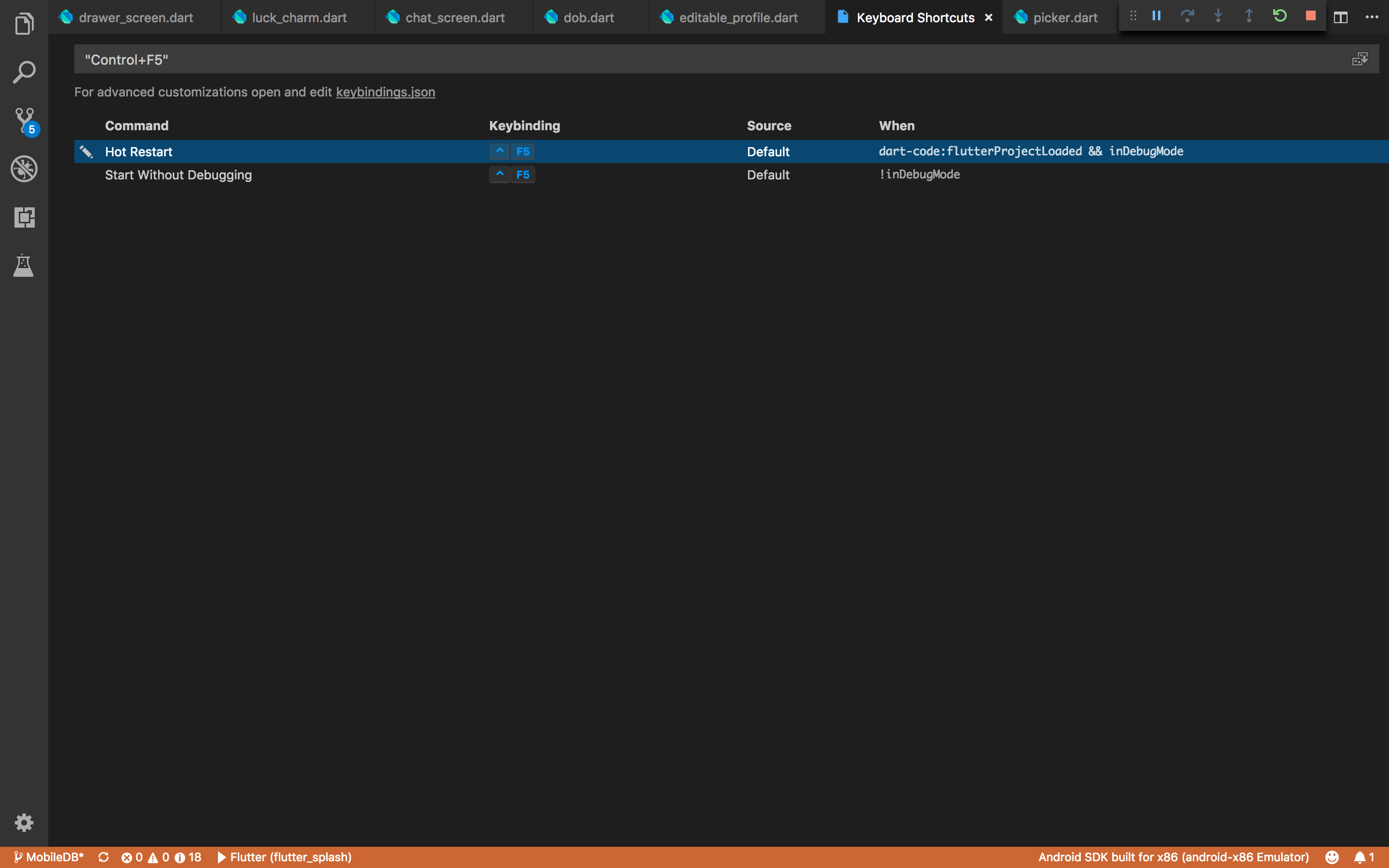
rajeshzmoke
on 12 Jul 2018
Very strange :/ This seems like it might be a VS Code bug, but I'm not sure how - if you weren't in a debug session then Hot Restart wouldn't appear in the palette. Can you click Help -> Toggle Dev Tools and see if there's a stack trace?
Do you know if you have anything else (eg. extensions) that might affect keybindings?
DanTup
on 12 Jul 2018
Help -> Toggle Dev Tools -> Console and saved the log, is this what you're asking?
-1531409538070.log
-1531409538071.log
i don't use any additional Keybinding extensions (i dont even change the default bindings), i use whatever is there by default
rajeshzmoke
on 12 Jul 2018
Hmmm, this is puzzling. I'll have to do some more digging.
Out of curiosity, do you have any other extensions installed at all (for ex., the VS Live Share one? That has to do some funky things to work and has broke a couple of things in the past).
DanTup
on 12 Jul 2018

This is all the extensions i have installed
rajeshzmoke
on 13 Jul 2018
I'm seeing this too, in similar circumstances.
A workaround is to select "Flutter: Hot Restart" from the Command Palette (command+shift+P).
Strange that this would work when the shortcut key fails.
 SteveAlexander
on 15 Jul 2018
SteveAlexander
on 15 Jul 2018
I'm not really sure what's going on here. I've opened https://github.com/Microsoft/vscode/issues/54378 in the VS Code repo to hopefully get some help. Please 👍/subscribe to that issue.
DanTup
on 16 Jul 2018
Are either of you able to test if this still occurs in the latest VS Code Insiders? There's a possible fix see here but since I can't repro in Stable I can't confirm if it helps.
DanTup
on 17 Jul 2018
I tried with the VSC insider
Version 1.26.0-insider (1.26.0-insider)
I don't get the error notification anymore but instead it just restarts without Debugging..still not able to Hot restart with shortcut keys...but works from command palette
rajeshzmoke
on 17 Jul 2018
Hmm strange. Just to confirm - just before you press this, you do see the floating Debug toolbar at the top was well as the Orange status bar, right?
DanTup
on 17 Jul 2018
yes
rajeshzmoke
on 17 Jul 2018
I just tried with Version 1.26.0-insider.
I see no change from what I reported with the release of VSC. I still get the error notification, and no hot restart on ctrl+F5. And I can still hot restart from the command palette.
SteveAlexander
on 17 Jul 2018
Another change has been made, if you update to latest insiders:
https://github.com/Microsoft/vscode/issues/54378#issuecomment-406538939
Could you also try disabling all other extensions (you can choose Disable for Workspace so that the only disable for that one folder) just to eliminate any possibility they're interfering.
DanTup
on 21 Jul 2018
Just tried the latest insiders. No change.
The only extensions I have enabled are Dart 2.16.0 and Flutter 2.16.0
The insiders version I got: 26e5a55cd8452477bfb7a472ea9475761600adf0
2018-07-20T05:05:22.026Z
SteveAlexander
on 21 Jul 2018
Doh, looks like the most recent changes were 5 changesets after that hash, so I guess it missed the last insiders build. There hasn't been a build since so I'd say try again later today or tomorrow.
DanTup
on 23 Jul 2018
Tried the latest again. Still no change.
Version: befea2253626b1918352df04477cae83eee618ac
2018-07-24T05:05:27.065Z
SteveAlexander
on 24 Jul 2018
Bah :(
I guess we need to try what's written here
- Does your hot restart command get triggered?
I presume the answer here is no (you don't see a message in the Debug Console saying we hot reloaded, even though the error appeared?)
- Does the Start Without Debugging get triggered (put a breakpoint here)
I'm sure the answer to this is yes, since that message is appearing, but it's worth putting a breakpoint there to verify (see below).
- If a wrong command is triggered we need to figure out why the contexts are not correct. For that put breakpoints here and check what is the last value that context is set to
Again, see below for adding breakpoints. This may get hit a few times, but if you make a note of the values, especially the last value that gets set after you start the debug session before you press Ctrl+F5.
* Setting a Breakpoint *
- Open VS Code
- Open dev tools (Help -> Toggle Developer Tools)
- Press
Cmd+Pfor the file picker (not sure what the key combo is on Windows?) - Enter the name of the
.tsfile(s) linked above - Add a breakpoint to the referenced line (note: line numbers may be slightly different if the code he linked to isn't the same version as VS Code, so just set it on the code that looks the same around that area)
It may be worth posting the results directly in https://github.com/Microsoft/vscode/issues/54378 to avoid delays in me picking it up and posting back over there.
DanTup
on 24 Jul 2018
Any improvements or fix on this?
rajeshzmoke
on 7 Aug 2018
Check the linked VS Code bug above. This seems like it may be a VS Code issue, but the attempted fixes haven't worked so far.
DanTup
on 8 Aug 2018
(EDIT) SOLUTION:
@DanTup @rajeshzmoke @SteveAlexander my solution and comments here.
 momoadeli
on 8 Aug 2018
momoadeli
on 8 Aug 2018
I believe this has been fixed in VS Code by https://github.com/Microsoft/vscode/issues/57255. If anyone is able to repro this and wants to try it in Insiders, please post back to confirm.
DanTup
on 3 Sep 2018
Related issues
 FeimiSzy
·
4Comments
FeimiSzy
·
4Comments
 lukepighetti
·
4Comments
lukepighetti
·
4Comments
 mayorbyrne
·
5Comments
mayorbyrne
·
5Comments
 Matt-Gleich
·
4Comments
DanTup
·
3Comments
Matt-Gleich
·
4Comments
DanTup
·
3Comments
Most helpful comment
I'm seeing this too, in similar circumstances.
A workaround is to select "Flutter: Hot Restart" from the Command Palette (command+shift+P).
Strange that this would work when the shortcut key fails.