Dart-code: Support a customisable formatter (custom indent settings, maybe .editorconfig?)
by my resolution I need to increase the tabsize from 2 to 4 spaces but it does not work
User settings:
"[dart]":{
        "editor.tabSize": 4,
        "editor.insertSpaces": true,
        "editor.detectIndentation": false,
    }
when formatting the document, always use 2 spaces.
 Arcrueid
All 122 comments
I'm afraid this is by design. The formatter that Dart Code uses is the official one (https://github.com/dart-lang/dart_style) and it does not support changing indenting; it always uses 2 spaces.
I'd love to have an alternative formatter, as I'm not a big fan of dart_style's opinions, but it's way down the list of priorities at this time.
I'm gonna keep this issue open and move to the backlog, as I think having a flexible formatter (such as based on editorconfig) is a reasonable request.
 DanTup
on 18 May 2018
DanTup
on 18 May 2018
For anyone OCD'd by this in VSCode and needs 4 or whatever spaces in the mean time, install the Macros extension, and map a key (or remap ctrl-S, whatever) to something like this:
"macros": {
    "saveAndFormatCode": [
        "cursorEnd",
        {
            "command": "type",
            "args": {
                "text": "  "
            }
        },
        "cursorLeftSelect",
        "cursorLeftSelect",
        "editor.action.selectHighlights",
        {
            "command": "type",
            "args": {
                "text": "    "
            }
        },
        "editor.action.trimTrailingWhitespace",
        "workbench.action.files.save",
    ]
}
 AshSimmonds
on 16 Jun 2018
AshSimmonds
on 16 Jun 2018
@AshSimmonds How does that work? I presume it's effectively replacing 2-spaces with a tab, but I don't understand how it's working - what is the cursorEnd bit doing?
Also; if you are just replacing two spaces with a tab, this might mess up when stuff is indented with 4 spaces (wrapped lines) (though that might not be a big deal).
DanTup
on 16 Jun 2018
Oh, I see - it's typing two spaces at the end, selecting them, then selecting all of the highlighted items (eg. the other double-spaces) and replacing them. Neat trick - though may have the issue mentioned above (and may mess with them insides strings, etc.)
@bwilkerson out of curiosity, does the plugin framework allow replacing the formatter in the server?
DanTup
on 16 Jun 2018
I don't know that it's a great solution, but it works for me, for now.
Basically yeah - it puts the cursor at the end of the line (because often I save just willy nilly) then plugs in two spaces, then selects them, then selects ALL two spaces throughout the file, then replaces them with four spaces, then removes them by trimming - hopefully leaving the user where they were. (often it leaves you in the same place but still multi-selected, boo hoo but whatever)
AshSimmonds
on 16 Jun 2018
Oh and yeah - this will obviously mess up anything with two+ spaces in a string or whatever in your code - not my problem basically, just make your own sanity checks if you do stuff like that for some reason.
All this does is replaces all double spaces with quadruple spaces, nothing more, nothing less.
AshSimmonds
on 16 Jun 2018
... does the plugin framework allow replacing the formatter in the server?
No. The plugin framework allows most operations to be extended, but not replaced. Replacement is hard. What if two plugins want to replace the same operation? Which one wins?
Extending is much easier. What if two plugins want to add navigation information? No problem, we just union all of the results.
However, not all operations are amenable to being extended. Formatting seems like one of those.
 bwilkerson
on 16 Jun 2018
bwilkerson
on 16 Jun 2018
Makes sense, thanks!
DanTup
on 16 Jun 2018
Seeing how opinionated the dart_style guys are about this, would it make sense to fork dart_style? make a more configurable version of it, and use that instead on dart-code? I don't really think that being able to chose between tabs/spaces and/or the tab size hurts the lang at all.
 pablote
on 9 Jul 2018
pablote
on 9 Jul 2018
Whether it's worthwhile depends on a few things:
- How much work is it to make a flexible/customisable version of
dart_style - How much work would it be to replace the built-in formatter (
dart_styleis included in the server, it's not just as simple as changing a dependency) - How will it effect code generated by the server (the user wouldn't want all quick-fixes etc. to provide space-indented code if they'd used tabs)
- What is the demand for this from users
Right now, I don't have a good answer for any of these.
It's something I'd personally like to see - I really dislike the 2-space indenting, and with an ultrawide monitor wrapping at 80 characters just makes me scroll up/down a lot three quarters of my screen is just the background of my editor - but the benefit needs to outweigh the cost and right now I don't know if it does. I am keeping an eye on the 👍's on this issue though, and so far there are only five and one of them is mine!
DanTup
on 10 Jul 2018
Ok, that makes sense. I've only recently got into Dart, because of Flutter, and I don't personally feel very confident to do these changes myself. I don't like the 2 spaces either, line widths of around 120 make more sense nowadays, and formatting doesn't seem to handle widget hierarchies great:

pablote
on 10 Jul 2018
@pablote That formatting looks really bad - I don't think it should do that. Could you paste that code into a new issue for me to look at? Also - did you increase the max length from 80? I found that makes things much worse (it tries to unwrap everything), though I would still expect the trailing commas to keep things on multiple lines.
DanTup
on 10 Jul 2018
I did, but reverting back to 80 causes the same issue. Creating a new issue thanks.
pablote
on 10 Jul 2018
Any idea if this is going to be worked on? I mean, it's not 1989. I have two big-arse monitors, and it's a little weird to have some Dart plugin developer tell me that all my Dart code needs to fit within the leftmost 1/6th of my editor space.
 tabinnorway
on 22 Sep 2018
tabinnorway
on 22 Sep 2018
it's a little weird to have some Dart plugin developer tell me
It's also a little weird for someone choosing to use a completely free open source plugin that I started in my spare time to suggest that I'm telling him how to write code 😕
As is stated in my comments above, I very much support this idea. I'm not a big fan of the default formatting either (I sometimes work on flutter_tools where I have to disable the formatter and format code manually). I have an Ultawide monitor and also think 80 character is silly (and although this is customisable, it causes other things to unwrap that I don't want).
The blocker for this is demand - see my comments in https://github.com/Dart-Code/Dart-Code/issues/914#issuecomment-403783077. If there is not enough demand then the analysis server is certainly not going to support it (and doing this without server support would not be efficient). The best thing you can for now do is put a 👍 on it and encourage others that want it to do the same. Supporting comments are welcome too, but please try to show a little respect for people that have put considerable spare time into delivering the free open source software you've chosen to use.
DanTup
on 22 Sep 2018
Cheers for all the ongoing effort Danny, super appreciated.
As I mentioned in one of the earlier posts in this thread a few months
back, it's easy enough to just make a macro that does the bog standard
format code and then does some stuff for your personal pecadillos like
doubles the spacing or whatever.
On 22 September 2018 at 18:26, Danny Tuppeny notifications@github.com
wrote:
it's a little weird to have some Dart plugin developer tell me
It's also a little weird for someone choosing to use a completely free
open source plugin that I started in my spare time to suggest that I'm
telling him how to write code 😕As is stated in my comments above, I very much support this idea. I'm not
a big fan of the default formatting either (I sometimes work on
flutter_tools where I have to disable the formatter and format code
manually). I have an Ultawide monitor and also think 80 character is
silly (and although this is customisable, it causes other things to unwrap
that I don't want).The blocker for this is demand - see my comments in #914 (comment)
https://github.com/Dart-Code/Dart-Code/issues/914#issuecomment-403783077.
If there is not enough demand then the analysis server is certainly not
going to support it (and doing this without server support would not be
efficient). The best thing you can for now do is put a 👍 on it and
encourage others that want it to do the same. Supporting comments are
welcome too, but please try to show a little respect for people that have
put considerable spare time into delivering the free open source software
you've chosen to use.—
You are receiving this because you were mentioned.
Reply to this email directly, view it on GitHub
https://github.com/Dart-Code/Dart-Code/issues/914#issuecomment-423728715,
or mute the thread
https://github.com/notifications/unsubscribe-auth/AInZOSCF0Y1_FwZNAqbmNkQGkYlA-eGMks5udftQgaJpZM4UEagF
.
AshSimmonds
on 22 Sep 2018
Re-indenting is a slightly simpler problem than changing the formatting entirely. Part of the problem I think many would like to see fixed though is the line-wrapping at 80 characters.
If fixing the indenting without changing wrapping etc. is valuable to many, then maybe there's value in doing something like your macro internally immediately after any format and on any new code inserted by code actions.
Put a 👍 on this comment if you think the indenting may be worthwhile on its own.
DanTup
on 22 Sep 2018
Huh, ok. I've never noticed the line-wrap issue, always thought that was an IDE determined thing. Maybe I'm dumb and thinking of something else?


AshSimmonds
on 22 Sep 2018
Sorry, I didn't mean the line-wrap in the editor, but rather where the formatter breaks lines of code. For example if you write:
if (thing)
  return;
The formatter will unwrap this onto one line:
if (thing) return;
Unless the condition is really long, then it'll leave it on the next line. Same goes for code like:
myThing
    .filter(a => x(a))
    .first;
It'll be unwrapped onto a single line depending on the lengths.
There are also other things people may want to control, like brace placement. This case somewhat lumps them all together, but it's possible people have different priorities, maybe indenting is the biggest issue and may be worth trying to solve without being flexible with all of the other things.
DanTup
on 22 Sep 2018
It's also a little weird for someone choosing to use a completely free open source plugin that I started in my spare time to suggest that I'm telling him how to write code
Sorry, bad on my part. Going for the thumbs up somewhere else :-)
tabinnorway
on 24 Sep 2018
@DanTup Over more than 53 years of programming, the last 40 of which were in a structured environment, I have come to appreciate coding guidelines. Where the dart folks and I disagree is formatting. I do not understand why dart formatting is so rigorous, trampling on the desires of the developers upon who dart depends for its success. I wish to propose a method whereby everyone can use their own styles. It is already imbedded in Visual Studio.
The concept is relatively simple. Provide a list of formatting options akin to the current Settings. The following is a partial list from Visual Studio 2008:
Line Numbers
WrappingPreserveSingleLine
FormatOnPaste
Add New Line On Enter After Fully Typed Word
WrappingKeepStatementsOnSingleLine
SpaceWithinOtherParentheses
Auto Formatting On Close Brace
OpenCloseBracesIndent
SpaceWithinMethodCallParentheses
SpaceAfterCast
SpacesIgnoreAroundVariableDeclaration
SpaceWithinExpressionParentheses
SpaceBetweenEmptyMethodDeclarationParentheses
PlaceSystemNamespaceFirst
SpaceWithinSquareBrackets
SpaceBetweenEmptySquareBrackets
SpaceBeforeOpenSquareBracket
SpacingAfterMethodDeclarationName
SpaceAfterMethodCallName
SpaceWithinCastParentheses
SpaceWithinMethodDeclarationParenthesis
SpaceBetweenEmptyMethodCallParentheses
Each programmer sets their own settings, reflecting their own preferences. During editing, reformatting modifies the source so that it meets the programmer's desires.
Here's the trick. Although the programmer writes the code using a favored style, the company, client, reader, etc. has a coding style of their own. Thus when a piece of code is being reviewed, it can be reformatted into the style most comfortable to each reader. When code is being delivered, the style imposed is that defined by the customer. And when code is returned to a programmer, that programmer can apply a different style.
The VS 2008 settings are at Tools->Options->Text Editor. The interface is intuitive and instructive.
 gggustafson
on 20 Nov 2018
gggustafson
on 20 Nov 2018
@gggustafson I think something like EditorConfig would be the best way to achieve something like this (which VS does support too).
See the comments above for why there's been no movement on this - it's somewhat complicated to implement and the demand for it is low (even though personally,I really support it - I think the existing formatter trades readability for consistency, and that isn't always the right choice). The best thing to do is add a 👍 and encourage anyone else that feels strongly about it to do the same. It'd be easier to justify spending effort on this if there's a good demand for it.
Thanks!
DanTup
on 21 Nov 2018
@DanTup I have no doubt that implementing a formatter of the kind that I suggest may be somewhat complicated. But as usual, I'd be glad to provide assistance if desired.
In so far as low demand, that may be caused by a number of factors: low use of dart and flutter in the wild, abysmal coding styles taught in "schools of higher learning", failure on the part of programmers to realize that they are not the only persons affected by their coding style.
When I was teaching the core computer science courses at Chapman University, I was amazed at the views my students had of programming. They couldn't care less whether or not their code was maintainable! It was only after the class was split into small three or four person groups, each group given unique-to-the-group requirements for a group project, coded the project, exchanged the code between groups, and then given changed requirements, that they began to understand how much coding style matters. Trading readability for consistency is immature! (It would also have resulted in a lower grade!)
Today, I am just "playing" with dart and flutter. I have not yet decided its utility. But I have time to work on a formatting project. Let me know if I may be of assistance.
gggustafson
on 21 Nov 2018
@DanTup
It is my dream to use tabs (not spaces) set for a width of 4 wile editing Dart files. Just for fun, I checked my max visible characters, and with VS Code in full-screen mode, using a 9 point font (yes, still quite readable), I have room for _475 characters visible charters per line_ .
If there is anything I can do to get involved in expanding the flexibility of the formatter, I am at your service.
It is my suspicion that the adoption of Dart would be positively affected if the formatter was more flexible and I want to help with this if possible.
@gggustafson Have you got any traction on this?
 seanvikoren
on 29 Nov 2018
seanvikoren
on 29 Nov 2018
@seanvikoren See @DanTup reply regarding EditorConfig, above. I am considering writing a dart formatter that more closely follows that of Visual Studio (VS). FYI the VS formatter honors TAB vs space.
As Dan asked, please add an up-vote and encourage anyone else that feels strongly about it to do the same.
gggustafson
on 1 Dec 2018
Indenting by a personal preference of some number of spaces or tabs is a detail programmers are definitely passionate about. Having it configurable would be very well appreciated by those not in the 2 spaces camp. Fingers crossed this can become configuration option.
 petermichaux
on 15 Jan 2019
petermichaux
on 15 Jan 2019
I consider this single aspect of Flutter / Dart to be the most likely thing
to stop adoption.
On thew other hand, fixing this is a pretty big effort.
Anyone want to take this on?
Cheers,
Sean Vikoren http://vikoren.com/
415-671-9645
On Tue, Jan 15, 2019 at 10:38 AM Peter Michaux notifications@github.com
wrote:
Indenting by a personal preference of some number of spaces or tabs is a
detail programmers are definitely passionate about. Having it configurable
would be very well appreciated by those not in the 2 spaces camp. Fingers
crossed this can become configuration option.—
You are receiving this because you were mentioned.
Reply to this email directly, view it on GitHub
https://github.com/Dart-Code/Dart-Code/issues/914#issuecomment-454502484,
or mute the thread
https://github.com/notifications/unsubscribe-auth/AAwAYN2Iiy5h13oD_eSSTNvDMKGzvQDhks5vDiAagaJpZM4UEagF
.
seanvikoren
on 15 Jan 2019
4 spaces please! 🙏
 tedhenry100
on 16 Jan 2019
tedhenry100
on 16 Jan 2019
I am currently developing a command-line formatter. I am using the options from Visual Studio for C#. I will post when it's available for testing.
gggustafson
on 17 Jan 2019
I juste don't understand why forcing people to use 2 spaces for indent. If I want to write all my code on one line, I should be able to do it. This is MY code.
This is totally crazy, I'm starting the learn the language and I already hate it when people does something like that. I value my freedom very much.
 Robouste
on 26 Feb 2019
Robouste
on 26 Feb 2019
@Robouste I understand the frustration, though you're not forced to use the formatter. The formatting done by the Dart extension is handled by dart_style, the same formatter you get when you run dartfmt. Unfortunately, it's not customisable.
In order to support formatting with different indenting (which, as I've said many times, I think is a very reasonable request) there needs to be a formatter that supports it. I don't believe the Dart team are working on such a formatter and I don't have time to do it myself, but if someone builds one I'm happy to provide pointers on integrating it with VS Code and making sure the Dart extension plays nicely with it.
DanTup
on 26 Feb 2019
@DanTup What do you mean by "you're not forced to use the formatter" ? How can I disable it ?
Robouste
on 26 Feb 2019
@Robouste The formatter should only run if you invoke it (either explicitly, or be enabling something like format-on-safe/format-on-type/etc.). If it seems to be running otherwise, that's definitely a bug - in which case open an issue with some notes and I can take a look.
DanTup
on 26 Feb 2019
It's not just an issue with the VSCode extension, I tried to use Android Studio and had the same result. It seems to be the language pattern and this is it.
 kleber-swf
on 7 Mar 2019
kleber-swf
on 7 Mar 2019
@kleber-swf That's correct - as discussed above, the formatting is done by the formatter that ships in the SDK - that's common to all of the official editors. The project is dart_style.
If someone is interested in building an alternative formatter, I'm happy to make sure it plays nicely with this one. I think the best way would be to build it as its own VS Code extension, and here we could:
- add a setting to disable our formatter (which your extension can declare in its manifest, so our formatter is automatically disabled when your extension is installed/uninstalled)
- add an API to allow you to call our formatter even when it's disabled from your extension
This would allow you to make your own formatter, or even just call ours and then do simple "fixing" of the indenting. I don't have time to do something myself, but I'm happy to provide pointers where I can if someone wants to have a go.
DanTup
on 7 Mar 2019
Ok, I just saw this topic: https://groups.google.com/a/dartlang.org/forum/#!topic/misc/VV4QMj5hIqw.
We realized that it's being an issue since 2016 and it's not fixed yet. No matter what the community says. I think this is kinda dictatorial and don't want to use a language/framework/technology that imposes its patterns above my team preferences.
We are starting a new project in our studio and we were seriously thinking in using Flutter/Dart on it, but since we can't do the simplest thing we are afraid to see this type of behavior in other parts of the framework.
We are not considering Flutter/Dart as an alternative anymore.
kleber-swf
on 7 Mar 2019
@kleber-swf I appreciate your frustration - as I've said many times above, I'd like this too - I use tabs for every language except Dart (the thread you linked was started by me).
Please understand that this repo is for the VS Code plugins, which do not do any language parsing or formatting - they simply call tools from your local SDK (including the same formatter you get if you run dartfmt). Any official formatter would need to be implemented in the SDK and not here (for several reasons).
The other option, is integrating an "unofficial" formatter. This wouldn't be a perfect solution because it would need to re-format code inserted by the language server, but it could be developed in isolation and easily tested/distributed without needing to come from the Dart team. It might also be a good way to show demand for such a formatter. Building such a formatter is not currently a priority for me either as I already have a lot to do, though I have offered assistance above if someone is interested in doing this.
I've also encouraged people to put 👍 's on this issue (and encourage others that would like it to do the same) to help show that there's demand for this. Currently it has only 50 which is a fairly small fraction of the installation count shown on the marketplace. Even as someone who really wants this, I find it hard to argue that the demand is significant - I think most people would rather time was spent on other things.
DanTup
on 7 Mar 2019
@DanTup I agree with you and I usually don't give up of things like this, but the attitude of not listening is so different that we are used to see on other communities like VSCode's for example. Of course I'm talking about _Dart_, not the plugin (which works great, btw). Sorry to release my frustration here.
Good luck for you guys 👍
kleber-swf
on 7 Mar 2019
May I interest why the issue is closed? Is it figured out?
As far as I see I still cannot change the tab size for Flutter projects.
Thanks.
 RomanN2
on 20 May 2019
RomanN2
on 20 May 2019
@RomanN2 this issue is not closed.
The current status of this is detailed in the comments above, most recently this comment from me. I've made sure that the formatter in this extension can be disabled so a formatter could easily be supplied by another VS Code extension if someone wanted to create one (and I'm happy to provide pointers if I can), but implementing a new formatter myself is not a priority.
DanTup
on 20 May 2019
@DanTup Thanks for explaining this. For some reason thought it's closed.
RomanN2
on 20 May 2019
@RomanN2 It's closed in dart_style.
We request indent option but @dart-lang member obliquely close issue by the line-length reason.
And they won't care what we want.
This is what they said when close that issue.
"I'm even hesitant to expose the line-length setting. It's mainly there for historical reasons and because it makes it easier to write small-scale tests. Real-world users should always leave it at the default 80."
 gluons
on 20 May 2019
gluons
on 20 May 2019
The benefits of having uniform code far outweighs our personal preference! This is one of the best things about dart: code is nearly always formatted the same, regardless of who wrote it. We will never reach a consensus of what formatting is best, whether tabs or spaces are better, whether using 2 or 4 "spaces" is better, etc... but the most important thing is to have rules about it!
I'm glad the dart team decided to write a document about these rules, and that the dart formatter simply enforces them.
Am I happy with all decisions made by the dart team? Of course not! But it's preference, and I don't care as long as it's uniform.
 enyo
on 20 May 2019
enyo
on 20 May 2019
I have started writing a dart formatter. It is written in dart.
How do I place it on GitHub so others can access it? Detailed instructions please.
gggustafson
on 20 May 2019
@gggustafson You can create a new repository at https://github.com/new and it should give you some instructions. However if you're not familiar with Git, it might be easier to install GitHub desktop (https://desktop.github.com/), login there, then drag your code folder onto it to create a repo, then commit and upload the code (it can create the repo for you during upload).
DanTup
on 20 May 2019
Detailed instructions please.
 mattreid1
on 21 May 2019
mattreid1
on 21 May 2019
I don't understand why we can't choose our own style. Why bake style in?
 epipheus
on 26 May 2019
epipheus
on 26 May 2019
@epipheus I'm not sure if you're asking about the VS Code plugin or dart_style, but the answers are repeated throughout this thread including my first response at the top :-)
The reason Dart Code has this formatting is because it uses the SDK-supplied formatter and that's how it works. Using anything else requires that something else exists.
The reason that dart_style works this way is detailed in its FAQ.
DanTup
on 26 May 2019
The issue has been reported here more than a year ago and they could not fix this stupidly "definitely not consuming so much time to implement" issue? What? Please, allow the formatter to respect the .editorconfig, or vscode global settings or user configuration to allow a different number of spaces for formatting.
- edit: sorry for bein so rude.
 dodancs
on 14 Jul 2019
dodancs
on 14 Jul 2019
@dodancs implementing this is not trivial and there's plenty of info on why in the discussions above. "Allowing the formatter to respect the settings" is not an accurate description of how this works - if it was a simple as changing "one number" it would certainly have been done (if not by me, but by someone submitting a PR).
Please keep your comments here civil and respectful. The decision about where to spend time is rarely "is there any value in this?" but rather where the (finite) developer hours are best spent for the biggest benefit to users. While many people would like better formatting, other features like Flutter UI Guides, support for Flutter for web/desktop, auto-import completions, etc. are usually much higher on most peoples wish lists.
As I've said above (many times) - I'd like to support this - but it hasn't been a high priority (adding 👍's to this issue a good way to help show how much demand there is). I have made sure the built-in formatter can be disabled so if someone wished to implement an alternative formatter as its own VS Code extension we would play nice. I even offered to provide guidance (in my free time) if someone had a formatter and didn't know how to build it into a VS Code extension.
DanTup
on 14 Jul 2019
@DanTup I am sorry. Is there any option to just change the number of spaces in indents manually so this could be semi-fixed? Or this is not possible?
dodancs
on 16 Jul 2019
@dodancs I'm afraid this is not possible with the current formatter (dart_style).
DanTup
on 16 Jul 2019
Me exploring flutter. Setup all the environment. Opening 'main.dart' and find out it cannot be 4 spaces. Good bye flutter.
 hadian90
on 13 Sep 2019
hadian90
on 13 Sep 2019
This is becoming a main reason for me dumping Dart - which is a shame, because I really like Dart.
But the idea that someone else decides how my INTERNAL and PRIVATE code looks like - it's appalling.
Sure, define strict rules for open source projects - I do not mind.
But please let me have my own branch styled the way I prefer.
Authors of dart_style even go as far as to define "beautiful". Sorry, dart_style authors, many of the things you do I find quite ugly. You seem to forgot that beauty is in the eye of the beholder.
You took the right to define that - for my own private projects - which is just crazy.
Goodbye Dart and Flutter. Because of code formatting terror. Crazy.
 mblataric
on 26 Sep 2019
mblataric
on 26 Sep 2019
FYI, in Android Studio you can configure the indent:
- Go to Settings > Editor > Code Style > Dart
- Dartfmt tab: uncheck "Use the dartfmt tool..."
- Tabs and Indents tab: configure the indent
 bhumkong
on 26 Sep 2019
bhumkong
on 26 Sep 2019
But please let me have my own branch styled the way I prefer.
To be clear, dartfmt is not _required_ by anything. It's enabled by default, and it's what is provided by the Dart team, but it doesn't place any limitations on you or your code. You are free to hand format (like the Flutter team chose to do in their SDK) or write your own formatter.
 natebosch
on 26 Sep 2019
natebosch
on 26 Sep 2019
But please let me have my own branch styled the way I prefer.
To be clear,
dartfmtis not _required_ by anything. It's enabled by default, and it's what is provided by the Dart team, but it doesn't place any limitations on you or your code. You are free to hand format (like the Flutter team chose to do in their SDK) or write your own formatter.
Right, except you are forced into 2 spaces indentation, even when you disable that damn thing.
And I don't want to disable it, formatters are good, they save time - when they work my way - but my way is not writing my own formatter - that's huge waste of time - it's configuring official one ...
I know, no point discussing this.
I just wanted to say that thing is so annoying I'll be going back to TypeScript just because of it.
@DanTup - your extension is great btw, I wish there would be someone as reasonable in dart_style team.
mblataric
on 26 Sep 2019
FYI, in Android Studio you can configure the indent:
- Go to Settings > Editor > Code Style > Dart
- Dartfmt tab: uncheck "Use the dartfmt tool..."
- Tabs and Indents tab: configure the indent
Sorry, should have mentioned I'm using Dart for web and Visual Studio Code where dart formatter completely ignores any indentation settings.
mblataric
on 27 Sep 2019
Right, except you are forced into 2 spaces indentation, even when you disable that damn thing.
The default is set as 2 spaces to match dartfmt. You can override this in your settings for the Dart language (the very first comment in this issue has the JSON to do that).
The formatter does not run automatically by default, but if you want to disable it (so the Format Document command disappears), you can use the dart.enableSdkFormatter setting.
DanTup
on 27 Sep 2019
Spent a good bit of time trying to work out why the auto-formatter was changing my code to 2 spaces instead of 4, glad I found this issue that explains why it won't work with 4 otherwise I was about to pull my hair out!
The default is set as 2 spaces to match
dartfmt. You can override this in your settings for the Dart language (the very first comment in this issue has the JSON to do that).
Will overriding that also fix the formatter? As I've tried setting the editor config to '4' in many a place yet the formatter still applies just 2 - or is this issue just a lost cause due to it using dartfmt?
 danives
on 27 Sep 2019
danives
on 27 Sep 2019
Will overriding that also fix the formatter? As I've tried setting the editor config to '4' in many a place yet the formatter still applies just 2 - or is this issue just a lost cause due to it using
dartfmt?
No, changing config won't impact the output you get from the formatter provided by the Dart team. dartfmt is an opinionated formatter.
See https://github.com/dart-lang/dart_style/wiki/FAQ#why-cant-i-configure-it
natebosch
on 28 Sep 2019
As someone who was really stoked to use Dart over React-Native, this is making me go back on my decision. Maybe I'm stupid, but I just can't work well with only 2 space formatting.
I'm really bummed over this.
 alrightsure
on 8 Nov 2019
alrightsure
on 8 Nov 2019
I hate to be forced to code with only single code formatter without configuration.
It's real monopoly. It forces everyone in the world to follow a group of people's favorite code style.
Not everyone like that style. Not every companies love that style.
IT"S BAD.
gluons
on 9 Nov 2019
Any way to switch off dartfmt for visual studio code then? Its a bit painful when other devs on a project use this program. And it completely messes up the formatting.
 skela
on 9 Nov 2019
skela
on 9 Nov 2019
Found it, stick "dart.enableSdkFormatter":false in .vscode/settings.json
skela
on 9 Nov 2019
I'm laughing because this is like religion in our world. Tab-people versus
space-people. Its pretty hilarious, yet, I get it. I want my code to look
the way I want it to look. Without building my own frickin' formatter
first.
On Sat, Nov 9, 2019 at 7:15 AM Alek Slater notifications@github.com wrote:
Found it, stick "dart.enableSdkFormatter":false in .vscode/settings.json
—
You are receiving this because you were mentioned.
Reply to this email directly, view it on GitHub
https://github.com/Dart-Code/Dart-Code/issues/914?email_source=notifications&email_token=AACVHX2PGSXHAIZJWJY2RLDQS2ZW3A5CNFSM4FARVAC2YY3PNVWWK3TUL52HS4DFVREXG43VMVBW63LNMVXHJKTDN5WW2ZLOORPWSZGOEDUF4XI#issuecomment-552099421,
or unsubscribe
https://github.com/notifications/unsubscribe-auth/AACVHX2DQGSO64TDYMNGWYLQS2ZW3ANCNFSM4FARVACQ
.
epipheus
on 1 Dec 2019
I remember prettier starting out embracing one style, now it supports, 'config file' as well as 'ignore commands'.
 a-eid
on 22 Dec 2019
a-eid
on 22 Dec 2019
The whole 2-space indent standard was started by the Ruby community, and Ruby syntax does look good with 2 spaces. And then like a year ago I noticed the Javascript community copied the 2-space standard. But 2-spaces simply looks bad and is totally wrong for any C-style language. Which is why the Go community has forced 4-space indent standard and wont let you compile unless you follow their formatting standard. But since Dart is used mostly in Flutter which has deeply nested brace structure in its code, the 2-space indent is so much worse for Dart than Javascript. With the prettier plugin for Javascript you can easily change indent space number whenever you like. This kind of configuration should be the available for dartfmt, a formatting standard shouldnt be forced for Dart like it in Go.
Another option I would like is to be able to set Allman brace style instead of K&R which most C++ formatters use. An even more long shot request I have is to have automatic colon insertion at end of lines which you can do with the prettier plugin with Javascript. I dont think this is possible with Dart since semicolons are required in Dart and the formatter cant run on incorrect code.
 maxirater
on 4 Feb 2020
maxirater
on 4 Feb 2020
The line of code responsible for this entire brouhaha?
https://github.com/dart-lang/dart_style/blob/master/lib/src/whitespace.dart#L10
petermichaux
on 18 Feb 2020
This issue is 2 years old and still nothing? Wow.
I despise anyone that enforces a style on my code. If I want to enforce a code formatting style on my project I can just use a linter, forcing people to write code the way you want is just stupid. Working on dart files is frustrating since I'm always fighting against the editor.
Please fix this, it doesn't sound that hard to do. If I had enough experience in dart I'd do it myself.
 ItsaMeTuni
on 17 Mar 2020
ItsaMeTuni
on 17 Mar 2020
@ItsaMeTuni no style is enforced - you can disable the formatter and manually format code (which is what the Flutter repository has been doing).
Please fix this, it doesn't sound that hard to do.
Unfortunately implementing this is not a trivial/quick fix as you suggest. The only current Dart formatter is dart_style which ships with the SDK and is opinionated by design - some disagree with this, but that's how it is has been designed and its code is not part of the VS Code extension and therefore can't just be modified here.
The best way to achieve this is to build an alternative formatter (perhaps by forking dart_style) and integrating it with VS Code. It would probably need to support running in a "server mode" so that it doesn't have an expensive startup each time a file needs formatting.
If someone wanted to do this (it can easily ship as its own VS Code extension) I have offered my assistance. It's not something I can currently prioritise doing myself as there are many other features that provide more value to users.
DanTup
on 17 Mar 2020
@ItsaMeTuni no style is enforced - you can disable the formatter and manually format code (which is what the Flutter repository has been doing).
Thanks for the reply! How do I disable it then? I have "dart.enableSdkFormatter": false on my VSCode settings and it doesn't do anything.
I'm still learning Dart so I don't feel I have the experience necessary to fork dart_style, modify it and then make a VS Code extension with it. After I feel I know enough about the language I might give it a try.
Also, sorry for being rude on my last comment. :)
ItsaMeTuni
on 17 Mar 2020
I have
"dart.enableSdkFormatter": falseon my VSCode settings and it doesn't do anything.
That should prevent the formatter from running. If you're still seeing it formatting, please open a new issue and we can troubleshoot there.
Also, sorry for being rude on my last comment. :)
No worries - I understand the frustration. I've always been (and remain for non-Dart) a tab user, and have been the person asking for this in the past!
DanTup
on 17 Mar 2020
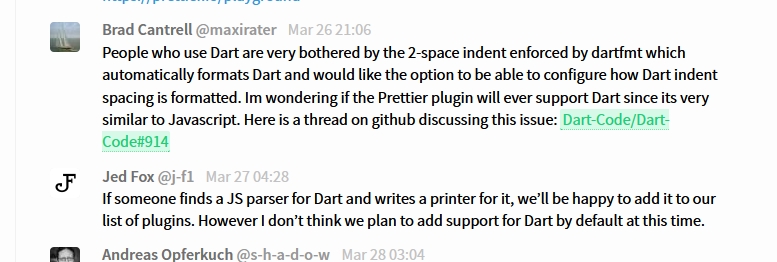
https://gitter.im/jlongster/prettier
I asked on the discussion board for the Prettier plugin (which is the most common Javascript formatting plugin on VS Code) if they could support Dart and this is the response I got:
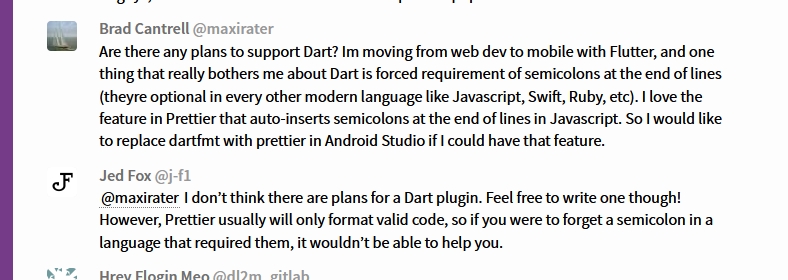
I also recently posted a question to them asking if they could support Dart for indent spacing configureability option:
maxirater
on 27 Mar 2020
Can't @munificent and his team do something to at least make it configurable? Or is it just the case of taking it on the chin and moving along until someone actually builds an extension for this?
 a7medpa
on 22 May 2020
a7medpa
on 22 May 2020
Hi, here is how you can change the tab identation size, choose tab or spaces and remove the 80 chars max length of line.
- go to '%your system user folder%/.vscode/extensions/'
This is where vscode saves the extensions. - open 'dart-code.dart-code-%version%/package.json'
- look for 'editor.tabSize', you will reach this point:
"editor.tabSize": 2,
"editor.insertSpaces": true,
"editor.detectIndentation": false,
"editor.suggest.insertMode": "replace"
replace to your preferences.
4.look for 'dart.lineLength', you will reach:
"dart.lineLength": {
"type": "integer",
"default": 80,
"description": "The maximum length of a line of code. This is used by the document formatter.",
"scope": "resource"
change the default value to your preferences.
Extra: the ruler should be gone and the 80-limit changed. If it didn't, you may have, as myself, accidentally enabled dart config globally. To disable that you have two options:
- On vscode, press f1 and type 'settings'. Select the "Preferences: Open Workspace Settings". On the settings page, select the "USER" tab right below the searchbar. On the searchbar, look for "rulers" option "Editor:rulers", click on 'edit in settings.json'.
- You can find the file in '%your user system folder%/AppData/Roaming/Code/User/settings.json'
On the file, remove the rulers both from "[dart]" AND from the root.
Of course, after all the editings, you have to restart vscode.
 rdnobrega
on 1 Jun 2020
rdnobrega
on 1 Jun 2020
here is how you can change the tab identation size,
open 'dart-code.dart-code-%version%/package.json'
You do not need to (and should not) do this. You can change all of those settings in your own user settings (using the code in the very top comment of this post) and use dart.enableSdkFormatter to disable the built-in formatter. Any changes you make to this file will be overwritten on every update.
If there is anything you are unable to do by modifying settings that you can do with the steps above, I would consider that a bug and be happy to fix it (if so, please open a new issue with a clear description of what doesn't work).
DanTup
on 1 Jun 2020
here is how you can change the tab identation size,
open 'dart-code.dart-code-%version%/package.json'You do not need to (and should not) do this. You can change all of those settings in your own user settings (using the code in the very top comment of this post) and use
dart.enableSdkFormatterto disable the built-in formatter. Any changes you make to this file will be overwritten on every update.If there is anything you are unable to do by modifying settings that you can do with the steps above, I would consider that a bug and be happy to fix it (if so, please open a new issue with a clear description of what doesn't work).
Hi Dan! The formatter is great and I would not wish to disable it. I would just like to adjust to my preferences of identation and linelength. Linelength can really be modified in the user settings but not identation..
I know it's a young project but flexibility in minor things generate a much better experience overall.
Don't get me wrong, I'm loving to use dart/flutter and I just want to see it improve.
rdnobrega
on 1 Jun 2020
Linelength can really be modified in the user settings but not identation..
Changing the indentation in the way you suggest should be no different to setting it in the same way as at the top of this thread. If you're seeing it behave differently with it set in each of those places, I consider that a bug (so please raise an issue) - the setting in package.json is simply a default setting, and you should be able to override it in your user settings without needing to modify the extensions code.
However, that indentation setting is ignored by the Dart formatter, so as soon as you format the document I expect it to revert to spaces. As much as I'd like to support indenting with tabs, it's not currently supported so turning off the formatter is the only way to prevent it changing things to spaces as you format.
DanTup
on 1 Jun 2020
How do we lose the authoritarian left curly bracket placement that must be on the same line as what precedes it, in favor of a liberated left bracket on its own line, basking in the very freedom its twin backwards sibling (right curly bracket) enjoys?
epipheus
on 1 Jun 2020
or freedom to line up equal signs of adjacent lines because it just feels better to me
epipheus
on 1 Jun 2020
Changing the indentation in the way you suggest should be no different to setting it in the same way as at the top of this thread. If you're seeing it behave differently with it set in each of those places, I consider that a bug (so please raise an issue) - the setting in
package.jsonis simply a default setting, and you should be able to override it in your user settings without needing to modify the extensions code.
Hi Dan, in my tests, when i overwrite the extension and restart vscode, vscode tells me the extension was modified and asks to reload it.
On the method sugested by the top comment of this topic, it is a macro that is activated by saving the document. What I believe I did is that the formatter itself is reloaded with the new configuration.
As a side note, I see great potential in the flutter:outline sidebar! It may should allow us to wrap widgets, insert other, and build the code so that we could add/change a property without looking around for it. I hope to I get the time in the future and help out with this feature or something like that.
rdnobrega
on 1 Jun 2020
To be clear, I'm referring to the very top comment which sets the options in the VS Code user settings in a [dart] section.
Also note that those indent settings are never sent to the Dart formatter so cannot be used for formatting. They're used only by VS Code itself.
So I believe that modifying the extension package.json doesn't do anything you can't do in user settings, but neither of them will allow you to influence the built-in formatters indentation. If either of these don't match what you're seeing, please file an issue so we can figure out why.
As a side note, I see great potential in the flutter:outline sidebar! It may should allow us to wrap widgets, insert other, and build the code so that we could add/change a property without looking around for it. I hope to I get the time in the future and help out with this feature or something like that.
It does already have some support for refactoring on the context menu, though due to how VS Code works you need to select (left-click) prior to right-clicking (this sucks, but VS Code doesn't want to support dynamic context menus so this is a bit of a hack). For other suggestions, please file issues here so they can be tracked. Thanks!
DanTup
on 1 Jun 2020
Well, happy 2nd birthday to this thread. In the mean time I now have a
neice who since this thread started has been born, grown teeth and learnt
to walk and swear. It's pretty funny though looking back (I posted a hack
in there somewhere to "fix" this), and I just hope folk can enjoy the
quirks of the game sometimes.
On Tue, 2 Jun 2020 at 04:09, Danny Tuppeny notifications@github.com wrote:
To be clear, I'm referring to the very top comment
https://github.com/Dart-Code/Dart-Code/issues/914#issue-324336138 which
sets the options in the VS Code user settings in a [dart] section.Also note that those indent settings are never sent to the Dart formatter
https://github.com/Dart-Code/Dart-Code/blob/bf85074bf973e2b85db1f13ac49ceae0129f81df/src/extension/providers/dart_formatting_edit_provider.ts#L78-L83
so cannot be used for formatting. They're used only by VS Code itself.So I believe that modifying the extension package.json doesn't do
anything you can't do in user settings, but neither of them will allow you
to influence the built-in formatters indentation. If either of these don't
match what you're seeing, please file an issue so we can figure out why.As a side note, I see great potential in the flutter:outline sidebar! It
may should allow us to wrap widgets, insert other, and build the code so
that we could add/change a property without looking around for it. I hope
to I get the time in the future and help out with this feature or something
like that.It does already have some support for refactoring on the context menu,
though due to how VS Code works you need to select (left-click) prior to
right-clicking (this sucks, but VS Code doesn't want to support dynamic
context menus so this is a bit of a hack). For other suggestions, please
file issues here so they can be tracked. Thanks!—
You are receiving this because you were mentioned.
Reply to this email directly, view it on GitHub
https://github.com/Dart-Code/Dart-Code/issues/914#issuecomment-637034510,
or unsubscribe
https://github.com/notifications/unsubscribe-auth/ACE5SOMDSOA4KYFLJN7RHNLRUPYRDANCNFSM4FARVACQ
.
AshSimmonds
on 1 Jun 2020
forcing formatting feels pretty asinine to be honest. can you just make it easy for us to pull this crap out completely or turn it on/off -- then we can close this.
epipheus
on 3 Jun 2020
forcing formatting feels pretty asinine to be honest. can you just make it easy for us to pull this crap out completely or turn it on/off
Nothing is forced - you can already turn this off using the dart.enableSdkFormatter which has been mentioned several times above.
This issue is not closed because it's still a reasonable request to support more flexible formatting, even if it's not something currently being worked on.
DanTup
on 3 Jun 2020
This thread is longer that the time I have on my hands. Is there a TL;DR as answer? I just want to be able to use 3 spaces instead of 2, is there any way to accomplish this?
 Lokdex
on 6 Jun 2020
Lokdex
on 6 Jun 2020
This thread is longer that the time I have on my hands. Is there a TL;DR as answer? I just want to be able to use 3 spaces instead of 2, is there any way to accomplish this?
No good way to date
a7medpa
on 7 Jun 2020
I just want to be able to use 3 spaces instead of 2, is there any way to accomplish this?
There's no way to have automatic formatting like this, but you can disable the formatter (dart.enableSdkFormatter) if you want to format yourself (or use another formatter - though I don't know that there are any).
DanTup
on 8 Jun 2020
This is enough for me to stop evaluating Dart and decide not to use it, also being very very happy I did not use it so far.
Once you think at least sometimes progress exists, you embark on monstrosities like these. I really hope people who took this decision will understand how wrong it is and I'll be ready to re-evaluate Dart, because I really think it deserves way more attention as a language. In the meantime I humbly invite those who took this decision to give a quick look at this, just the first 20 seconds:
https://youtu.be/HnmXxxXmaLA?t=2015
 ansorre
on 28 Jun 2020
ansorre
on 28 Jun 2020
Hi, quick question the dart.lineLength setting doesn't seem to have an effect on the dartfmt when using the dart.enableSdkFormatter. I'm happy with the dart_style (except the 80 column line length), and as the dartfmt does take a command line option -l to specify lineLength feels like it should work.
Has _anyone_ got this type of formatting change working?
edit: Using Android Studio, it has the option of lineLength whilst using the sdkFormatter.
 onyno
on 7 Aug 2020
onyno
on 7 Aug 2020
@onyno the dart.enableSdkFormatter is enabled by default, that's the only formatter we support. However, if you're using dart.previewLsp, the LSP server only got support for dart.lineLength recently, so unless you're on a recent build of Dart/Flutter, that might not work for you yet.
DanTup
on 7 Aug 2020
Thanks @DanTup, yes I'm on the beta channel for flutter, and have the dart.previewLsp enabled and have tried both code and code-insiders.
onyno
on 7 Aug 2020
I'm on the
betachannel for flutter, and have thedart.previewLspenabled
That's probably why - I'd expect Flutter's master channel to have this (and perhaps dev), but it might take a little longer to get to beta.
DanTup
on 7 Aug 2020
+1 to this thread and thanks for your efforts DanTup!
This is a big annoyance to me. If this is an issue with the dart_style project, has anyone submitted an issue at that project that I can go upvote over there? If not, maybe someone with good knowledge of both project could submit a well worded issue at the project explaining why this is a good idea.
In addition I have tried adding "dart.enableSdkFormatter":false and I do not see any different behaviour. My guide lines are still at two spaces, and when I hit return for a new line, it indents at two spaces.
 safield
on 2 Sep 2020
safield
on 2 Sep 2020
If this is an issue with the dart_style project, has anyone submitted an issue at that project that I can go upvote over there?
A few issues have been raised, but it's an explicit decision by dart_style not to be configurable. You can find many responses in the issue tracker why, here's one example.
Whilst I'd like a flexible formatter, I can't disagree with the points made. Creating and maintaining a flexible formatter is more work and the question is never "should we do this", it's always "should we spend time on this at the expense of that". For every day spent making the formatter flexible, a day would be taken away from something else. I'd like to use tabs and omit braces on one-line if statements without them unwrapping, but I'd much prefer to have things like extension methods and NNBD.
If people really want this and/or think it's not a lot of effort - dart_style is open source and can be forked. The first step to having flexible formatting inside VS Code is having a flexible formatter. I've made changes to the VS Code extension to allow easily disabling the SDK formatter in both DAS and LSP configurations so an alternative formatter could be used. I've also said that if someone builds an alternative formatter that works, I'm happy to provide pointers for wrapping it up in a VS Code extension so that it could be used alongside this extension. As much as I'd like it, I also can't justify spending time on it right now when there's so much else to do that has a bigger impact.
In addition I have tried adding "dart.enableSdkFormatter":false and I do not see any different behaviour. My guide lines are still at two spaces, and when I hit return for a new line, it indents at two spaces.
This setting only disables the formatter - it doesn't change VS Code's own behaviour based on the indent settings. If you want to use tabs, you'd need to both disable the formatter, and also configure VS Code to set the indent settings to tabs (that's what the JSON in the very top issue here does). Bear in mind though, that any code generated by the analysis server (things like quick-fixes) will still be space-indented, so it's not a prefect solution.
DanTup
on 9 Sep 2020
- Where can i post the below image to help you fix formatting?
- is there a way (annotation or otherwise) to disable formatting on a single class/method/variable (especially manual maps)?
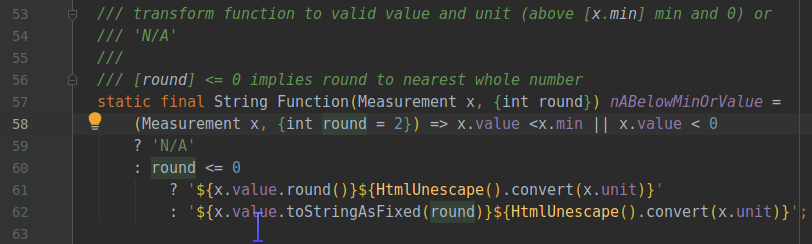
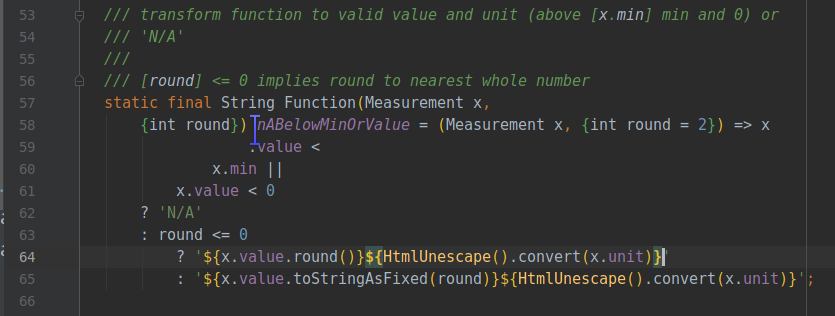
the code:
 /// transform function to valid value and unit (above [x.min] min and 0) or
  /// 'N/A'
  ///
  /// [round] <= 0 implies round to nearest whole number
  static final String Function(Measurement x,
      {int round}) nABelowMinOrValue = (Measurement x, {int round = 2}) => x
                  .value <
              x.min ||
          x.value < 0
      ? 'N/A'
      : round <= 0
          ? '${x.value.round()}${HtmlUnescape().convert(x.unit)}'
          : '${x.value.toStringAsFixed(round)}${HtmlUnescape().convert(x.unit)}';
- is there a way to change the spacing (2 instead of 4) introduced by conditional statements seen below?
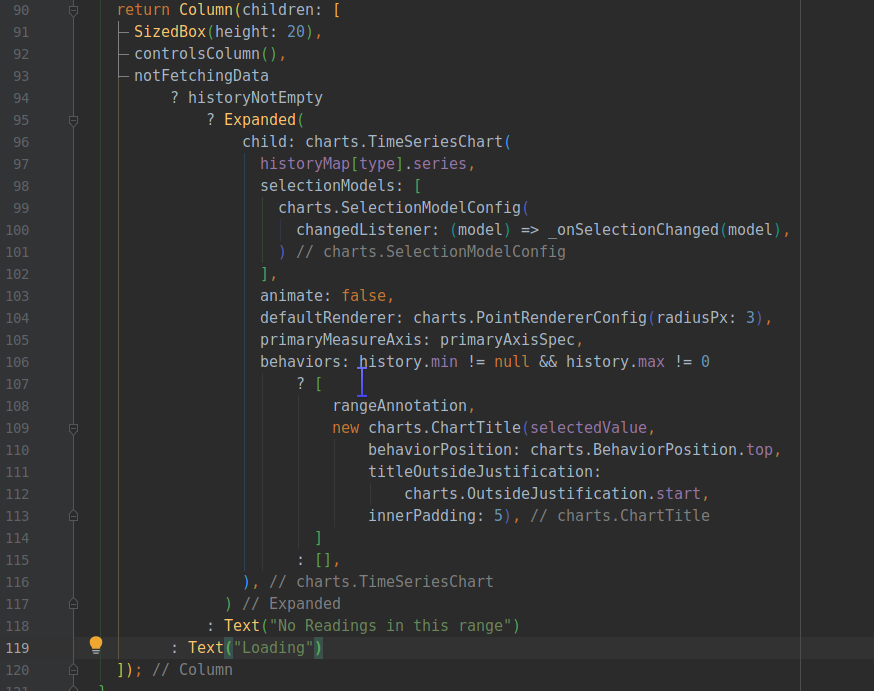
 MohammadAlHajj
on 14 Oct 2020
MohammadAlHajj
on 14 Oct 2020
Where can i post the below image to help you fix formatting?
If you want to raise an issue about the existing formatters formatting, https://github.com/dart-lang/dart_style is the correct place - that's the formatter that's being used here right now.
is there a way (annotation or otherwise) to disable formatting on a single class/method/variable (especially manual maps)?
I don't know of any official way, but putting end-of-line comments can cause the formatter to leave things alone. In many cases I think trailing commas may help format it as you'd like.
is there a way to change the spacing (2 instead of 4) introduced by conditional statements seen below?
I don't think so (though I think trailing commas may reduce some of the line-continuation indenting).
DanTup
on 14 Oct 2020
I'm afraid this is by design. The formatter that Dart Code uses is the official one (https://github.com/dart-lang/dart_style) and it does not support changing indenting; it always uses 2 spaces.
I'd love to have an alternative formatter, as I'm not a big fan of dart_style's opinions, but it's way down the list of priorities at this time.
I'm gonna keep this issue open and move to the backlog, as I think having a flexible formatter (such as based on editorconfig) is a reasonable request.
@DanTup
Greetings my dear, I would like that when I write some code block like (if, else, while,) etc ... when I place the brackets they are assigned to me with the Allman style like this:
if (true)
{
// hello world
}
Because no matter how hard I try the formatter automatically assigns me the standard format similar to JavaScript, like this:
if (true) {
// hello world
}
I would like to be able to select an option that allows me to use the Allman style or a similar one like the PSR-2 in the code.
 Junioreddn
on 22 Oct 2020
Junioreddn
on 22 Oct 2020
@Junioreddn this is not currently supported by the Dart extension - that's what this issue is about. Right now the only formatting option is using the SDK formatter (dart_style), turning of the formatter (using dart.enableSdkFormatter) or using an alternative VS Code extension for formatting (though I'm not aware of any that exist currently that support Dart).
DanTup
on 22 Oct 2020
@Junioreddn this is not currently supported by the Dart extension - that's what this issue is about. Right now the only formatting option is using the SDK formatter (dart_style), turning of the formatter (using
dart.enableSdkFormatter) or using an alternative VS Code extension for formatting (though I'm not aware of any that exist currently that support Dart).
@DanTup
It is exactly that, I spent all day yesterday editing and inquiring about the dart formatter to be able to put the Allman style in automatic, I even used this formatter:

It is from extension that I configured to have the Allman style but when I gave it to (Shift + Alt + F) it threw an error, so I had to put the default formatter of dart, but I still do not get used to this style
Junioreddn
on 22 Oct 2020
@DanTup
I really hope they add some option that allows you to configure that style in Dart, I wrote on twitter to Bob Nystrom, to know his opinion about it to see if they can suggest that idea to the developers of Dart style
Regards from Dominican Republic!! 😄
Junioreddn
on 22 Oct 2020
@DanTup https://github.com/Dart-Code/Dart-Code/issues/914#issuecomment-423728715 you said
The blocker for this is demand - see my comments in #914 (comment). If there is not enough demand then the analysis server is certainly not going to support it...
This is currently the #1 issue in the most upvoted list. Does that unblock it?
Also FYI it is the #3 most upvoted and #2 most commented issue in the dart_style repo.
cc: @munificent
 phanirithvij
on 2 Nov 2020
phanirithvij
on 2 Nov 2020
@phanirithvij my comment was that this is unlikely to happen if there's not clear demand, rather than it will be done if there is demand (apologies if this wasn't so clear). I think it's fair to say there is demand for this, but it's not a priority for me right now (there's a lot of other things to do and I have finite hours).
I have made some changes to make it easier to disable the SDK formatter in this extension, and I've offered pointers if someone wanted to build this (I think it would make sense in its own extension, even if I built it), though there have been no takers so far.
DanTup
on 3 Nov 2020
I just wanted to share my 2 cents and say that I also would like to have an option to change to tabs / 4 spaces.
 JaapWeijland
on 3 Dec 2020
JaapWeijland
on 3 Dec 2020
I just spent five minutes digging through the source code and discovered that they have an API available to create a new formatter. The formatter accepts arguments for page width and indents.
I know the fundamentals of building an extension, but have never used a language server, which I assume would be needed to build an extension that can actually run Dart code. Can someone point me towards resources that could get me off the ground for building a formatting extension so that we can all have a better time doing Advent of Code in Dart this year? 😂
 Tbhesswebber
on 6 Dec 2020
Tbhesswebber
on 6 Dec 2020
The formatter accepts arguments for page width and indents.
My understanding is that theindent field you're seeing there only sets leading indentation for every line, it does not control the character(s) used for indenting while formatting:
  /// The number of characters of indentation to prefix the output lines with.
  final int indent;
but have never used a language server, which I assume would be needed to build an extension that can actually run Dart code
The way I would go abouting build a separate formatting extension that used dart_style (or a fork of) would be to create a Dart command line app that ran in a "server mode" (similar to how the language server and Flutter tools work) that you can send JSON commands to over stdout to be formatted and returned JSON responses with the formatted code (or a set of edits). Compile that natively and ship it inside a VS Code extension that spawns the program at activation (and closes it at deactivation) and just translates VS Code's format requests over to it. That would avoid needing to have/locate any Dart SDK or worry about SDK versioning.
I expect the performance doing that would be fine, but some possible later improvements could then be to:
- Send the file contents to the server when a file is first opened/modified and then send the edits - that way the server already knows the contents of all open files and getting a formatted file wouldn't involve sending the whole file contents over
- Return just the minimal edits for the formatting rather than the entire formatted file (this is something the LSP server does, as replacing an entire file can result in breakpoints moving around for > 100k files in VS Code as it doesn't try to match old/new lines up)
DanTup
on 6 Dec 2020
So, I have had this issue recently, whilst upgrading to AndrioidStudio 4.2 beta from AndroidStudio 4.1. Back then, all my code looked healthy and natural (with 4-space wide tabs, of course), but right now it looks awful and unreadable. I simply cannot do my work anymore and I do not even want bother downgrading to previous version of AndroidStudio and trying to recover my settings. I have tried setting Default.xml file manually, but it does not do the trick.
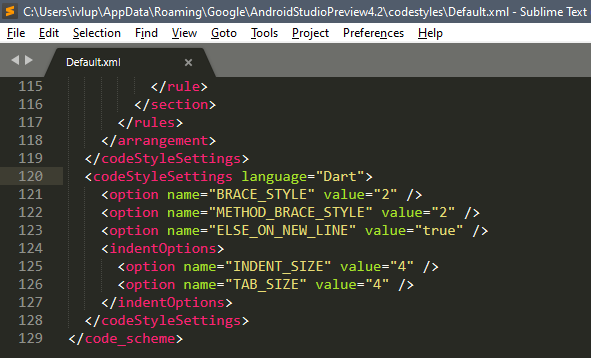
Also, I would like to add that I have certain eye condition (I wear glasses) and because of it, it is hard for me to recognize on which line the text is on and off. I cannot bear this awful design decision on dartfmt and if you have any ideas on solving this issue, I would like to hear them.
 ivatar39
on 7 Dec 2020
ivatar39
on 7 Dec 2020
@ivatar39 this repo/issue is for the VS Code extension, and is unrelated to Android Studio. There are discussions about dartfmt in Android Studio at https://github.com/flutter/flutter-intellij/issues/4617 and https://youtrack.jetbrains.com/issue/WEB-45838.
DanTup
on 7 Dec 2020
While I argue that every project should be consistent in terms of visual and code style, I also think that the idea that every program written in one language adopts the same style is deeply flawed.
From the official FAQ
1 and 2
- Consistency is paramount within the single project
- Different projects developed by different people don't need to look the same
- Anyone is much more likely to be a user of someone elses's code rather than a contributor.
Therefore there's little benefit in forcing one true style
3 and 4
- Sometimes breaking the rules greatly helps readability
- Beauty is subjective
Therefore removing all flexibility could actually produce code less readable and uglier for those who develop it in order to make it easier to read for someone who will never even know about the existence of that particular project
Also there are 2 other points not covered by the FAQ
- If people can avoid the formatter, and people very well can and do, this whole house of cards collapses onto itself, because the promise of uniformity is already broken
- Tabs help visually impaired people
https://dev.to/alexandersandberg/why-we-should-default-to-tabs-instead-of-spaces-for-an-accessible-first-environment-101f
 JackLilhammers
on 3 Feb 2021
JackLilhammers
on 3 Feb 2021
_"it's an explicit decision by dart_style not to be configurable"_
I hope this decision will be reviewed as it is not very developer-friendly. But in the meantime, perhaps it would be desirable to make the current situation more explicit from the beginning.
 GulliverMadrid
on 6 Mar 2021
GulliverMadrid
on 6 Mar 2021
"it's an explicit decision by dart_style not to be configurable"
I hope this decision will be reviewed as it is not very developer-friendly.
To be clear, the quote there is about the dart_style package. It's a Dart formatter designed to work in a specific way. It's not a _goal_ or an _explicit decision_ for the VS Code extension to not be configurable, but since it uses dart_style indirectly through the analysis server, it inherits that behaviour.
But in the meantime, perhaps it would be desirable to make the current situation more explicit from the beginning.
I've tried to be as explicit as possible about this. The very first reply at the top of this thread is me stating that this is a limitation of using dart_style and that although I'd like to support user preferences, it's definitely not a priority. I have left this issue open because I think it's a fair request (and I that there should be somewhere for people to put 👍 's so there is some visibility of demand) but it's not something I except to be tackled in the near future.
Let's try to avoid spamming everyone subscribed with the same complaints over and over. If you would like to see this issue, please add a 👍 . It's clear that many people would like this and that some find the idea that the formatter is not configurable ridiculous, but it's not particularly productive to keep repeating this - I'd prefer not to lock this issue since I've offered assistance if someone else wanted to create a VS Code formatter for this. Thanks!
DanTup
on 8 Mar 2021
@DanTup this is the most 👍ed issue in this repo. Did you set some 10000 goal to take a look at this?
phanirithvij
on 9 Mar 2021
@phanirithvij and others - I am neither a maintainer of, nor a contributor to, this extension, but there seems to be a major misunderstanding here. I don't mean to speak for @DanTup, but this was a pain point for me as well and, hopefully, my perspective helps to clarify the issue and how we can fix it.
Dart Code extends VS Code with support for the Dart programming language, and provides tools for effectively editing, refactoring, running, and reloading Flutter mobile apps, and AngularDart web apps.
_readme.md#introduction_
This is an extension to streamline the development and usage of Dart within VSCode. The aim isn't to provide new tooling for the Dart language as a whole, but to improve the development experience in Code to align with what you might see in Android Studio and other IDEs.
As Dan has said in their previous response, the pain point that we are all experiencing isn't one brought on by this extension, but by the tooling provided by the Dart team themselves. With enough :+1: on this issue, maybe we can add fuel to the fire for dart_style to become more accessible with configuration options. If you want your thoughts to be heard by those who can truly make the change, a great place would be within the dart_style package. While we would all hope that the Dart team would listen to the desires of their users, the tool expressly states that it is opinionated and targets the masses, not the needs of an individual, so this kind of change would realistically be a directional change to their roadmap.
In the meantime, someone could create their own formatter and Dan would support integration of that alternative tooling with the extension. I actually volunteered to do that before work got insane and you can see Dan's response showing their dedication to supporting such an effort.
Tbhesswebber
on 9 Mar 2021
Then, it looks like the deal is to fork the dart_style, change these two lines: https://github.com/dart-lang/dart_style/blob/51a93d9fa37d1b0ae034ca2190c2bdc9ce77ec4f/lib/src/whitespace.dart#L10-L13
from 2 to 4 and release a new package. Next notify Dan to add an option to the extension to choose between 2 formatters the current one and the new one. The new one will need to keep merging in all future updates from the current and keep this patch applied. Is this the plan?
 avkonst
on 9 Mar 2021
avkonst
on 9 Mar 2021
My suggestions for how I would build it are in https://github.com/Dart-Code/Dart-Code/issues/914#issuecomment-739474329, which is to build as its own VS Code extension.
It's not possible to just switch the formatter inside this extension as dart_style is not consumed directly by the VS Code extension. Instead, it the requests go to the language server and it does the formatting (it has a dependency on dart_style). It's unlikely a fork of dart_style would be merged into the SDK. VS Code also has functionality to switch between formatters, but it is done in the basis of one extension == one formatter.
DanTup
on 10 Mar 2021
I would like syntax style like this:
void main() async
{
   // tab that equivalent to 3 space indents
   Map<String, String> map =
   {
      'This': 'is',
      'a'   : 'very',
      'very': 'long',
      'long': 'map',
   };
}
Do you think it is possible to ask for a customized formatting like this? All the brackets type will have a newline if the content inside is too long. For function and statements (if, for, while, etc.), its brackets always have a newline. Also inside indentation as well, it would be great if I'm allowed to align colons in the sane column.
 ngdangtu-vn
on 13 Mar 2021
ngdangtu-vn
on 13 Mar 2021
Then, it looks like the deal is to fork the dart_style, change these two lines: https://github.com/dart-lang/dart_style/blob/51a93d9fa37d1b0ae034ca2190c2bdc9ce77ec4f/lib/src/whitespace.dart#L10-L13
from 2 to 4 and release a new package.
That's a start, but you'll probably find it leads to unpleasant formatting that you don't expect in many cases, for example, wrapped expressions in conditions would now confusingly line up with the body:
if (functionNameThatIsVeryLong() ||
    anotherFunctionName) {
    nowThisLinesUpWithTheCondition();
}
You'll likely find a cascade of other formatting changes that you need to make in order to get a holistic set of output that you like. I would suggest making the change, running the tests, and see what breaks. Change the expected output in the tests to be how you like. Then circle back to the formatter and figure out what other changes you need to make to it to get all those tests to pass.
 munificent
on 23 Mar 2021
munificent
on 23 Mar 2021
I am happy with this formatting.
On Wed, Mar 24, 2021 at 11:19 AM Bob Nystrom @.*>
wrote:
Then, it looks like the deal is to fork the dart_style, change these two
lines:
https://github.com/dart-lang/dart_style/blob/51a93d9fa37d1b0ae034ca2190c2bdc9ce77ec4f/lib/src/whitespace.dart#L10-L13
from 2 to 4 and release a new package.That's a start, but you'll probably find it leads to unpleasant formatting
that you don't expect in many cases, for example, wrapped expressions in
conditions would now confusingly line up with the body:if (functionNameThatIsVeryLong() ||
anotherFunctionName) {
nowThisLinesUpWithTheCondition();
}You'll likely find a cascade of other formatting changes that you need to
make in order to get a holistic set of output that you like. I would
suggest making the change, running the tests, and see what breaks. Change
the expected output in the tests to be how you like. Then circle back to
the formatter and figure out what other changes you need to make to it to
get all those tests to pass.—
You are receiving this because you are subscribed to this thread.
Reply to this email directly, view it on GitHub
https://github.com/Dart-Code/Dart-Code/issues/914#issuecomment-805304055,
or unsubscribe
https://github.com/notifications/unsubscribe-auth/AA6JSVONCTAULZR7JZUFX73TFEHW3ANCNFSM4FARVACQ
.
avkonst
on 23 Mar 2021
One could almost borrow your philosophy of the greater good and say that's a small price to pay for actually being able to read the rest of the code...
Or the formatter could do the smart thing and put the operators to the left, where they can be aligned regardless the length of the operands
if (longLongLongLongLongLongLongLongLongLongLong()
    || shorter()
    || notShortButNotLongest()) {
    nowThisVisuallyDiffersFromTheCondition();
}
Of course if that still seems confusing to you, _the easiest thing you can do is tweak what you send it. While the formatter tries to make all code look great, there are trade-offs in some of the rules. In those cases, it leans towards making more common idioms look better._
_If your code ends up looking bad, your code may be off the beaten path. Usually hoisting an expression up to a local variable or taking a big lambda out and making it a named function is all that's need to get back to a happy place._
JackLilhammers
on 24 Mar 2021
Using "dart.enableSdkFormatter": false in my settings.json did the trick for me! I now have my tab-4 working perfectly in .dart files in VS Code. Thank you for all the help @DanTup!! :-) NOTE: Using "Format Document" stops working, but at least my manual formatting stays when I save. I'm happy :-)
 locohost
on 30 Mar 2021
locohost
on 30 Mar 2021
I think it might be a good idea to have a settings json file for us to edit and tweak specific settings.
 GZGavinZhao
on 17 Apr 2021
GZGavinZhao
on 17 Apr 2021
Related issues
DanTup
·
3Comments
 CaferPoyrazoglu
·
4Comments
CaferPoyrazoglu
·
4Comments
 kinex
·
3Comments
kinex
·
3Comments
 mayorbyrne
·
5Comments
DanTup
·
4Comments
mayorbyrne
·
5Comments
DanTup
·
4Comments
Most helpful comment
Any idea if this is going to be worked on? I mean, it's not 1989. I have two big-arse monitors, and it's a little weird to have some Dart plugin developer tell me that all my Dart code needs to fit within the leftmost 1/6th of my editor space.