Dart-code: Support running through in WSL through VS Code Remote Development extensions
Can be great a support for WSL, with this users can use only Linux to develop from Windows
Greetings
 WolfDan
All 19 comments
I'm afraid I don't understand what you're asking for. If I understand correctly, WSL is for running command line apps and Dart Code is not a command line app.
Dart Code (like VS Code and Dart) already works on Windows, Linux and Mac.
 DanTup
on 26 Oct 2017
DanTup
on 26 Oct 2017
Sorry I'm not english native ^^'
What I wanted to say, is to be able to use Dart-Code with Dart-Sdk installed in WSL not in Windows (run commands directly into the Bash)
I tried to set a custom sdkPath and proxy the commands (here an example wls-proxy ) the problem is that this extension requires an .exe in Windows but this method requires a .bat
So in this case a possible solution is to check if windows contains the bash and set this as 'dart.bat' instead of 'dart.exe' or have a config option that tells Dart-Code that is using WSL and run the .bat of the custom sdkPath
EDIT: As you mention it seems like the extension relies on more things that run executables , so I'm not sure if this is possible
WolfDan
on 26 Oct 2017
Thanks for the extra info! Can you explain the motivation for this? What is the advantage to running in WSL versus just natively on Windows?
The Dart SDK is used for a couple of different things, from running your command line apps to also powering most of the editor experience (things like Intellisense, Error List, etc.).
My guess is that you probably only want this for the running of your app (eg. the editor works normally, but executing/debugging a command line app is run inside of WSL), is that right?
DanTup
on 26 Oct 2017
Exactly as you mention! I want to execute/debugging on Linux since is my target production enviroment I think is better to develop and ship in the same OS and is supposed to perform better
_Windows is consuming 1GB+ ram and 60%+ of CPU just to compile and 900mb+ to server with pub... I'm not sure if just happend in windows since I'm newbie with Dart ^^'_
WolfDan
on 26 Oct 2017
Understood. I'll have to have a look at how this proxy works and understand exactly what needs to change. I haven't had much time to spend on Dart Code lately, so I can't make any promises about when it'll be.
Windows is consuming 1GB+ ram and 60%+ of CPU just to compile and 900mb+ to server with pub...
Which process is using the RAM/CPU? How big is the project? Probably best raising a separate case about that with info/screenshots.
DanTup
on 26 Oct 2017
The proxy is really easy, think it as a executable than can be added to the PATH env variable, it runs a command from windows to ubuntu, so for example php.bat will run "php" + the variables you send from the command line or program
So if you write "php -v" in the CMD this will run in the bash of Linux (if you have setup the env variable or call directly to the containing folder) and you can see what happend and interact from the CMD console just like it is installed on windows itself
I just noticed that the RAM and CPU problem is from Dart.exe itself so is not from the extension itself, in fact the project is just the tutorial so is pretty basic project
WolfDan
on 26 Oct 2017
We use the SDK Path for multiple things (launching Dart but also the analysis server snapshot) so changing that isn't a good solution. We also probably don't want to run the analysis server inside WSL in case the proxying adds any latency (Dart Code communicates with it over STDIN/STDOUT).
So, probably the way to do this would be to allow you to specify a custom location for the Dart executable used for launching and debugging (since this is user-provided we don't need to make any assumptions about the file extension).
Some additional complications:
- Can we connect to the debugger (we launch Dart with some flags that open a web server that we use to talk to the debugger - we need to be sure that inside WSL when it's binding to localhost ports we can connect to them as normal from the Windows side)
- Do we need to map the paths for use inside WSL? (eg. if we run
proxy\dart.bat C:\MyStuff\MyThing.batcan Dart inside WSL use that path? I guess not?) - If paths need translating, this will need doing in the debugger too, so that when we send breakpoints (or receive pause events) they are handled correctly. We already do a lot of path mapping for Flutter (since it runs on the remote device) so possibly we can extend that to work here
I had a quick Google, and it looks like path mapping is required, but probably quite straight forward:
C:\Users\me\Documents\GitHub -> /mnt/c/Users/me/Documents/GitHub
Since we already send multiple paths per breakpoint (Dart, Flutter etc. are a little inconsistent) probably we can just do this conversion always to avoid you having to set an option to say it's WSL and paths need translating.
Again; I can't promise to look at this soon, but it does seem like a neat feature to support so I would like to have a go.
DanTup
on 27 Oct 2017
1) Serve apps from WSL are 100% accesible from Windows side, I've tested with Phoenix Elixir and works totally fine, no additinal config or something, so yeah we can connect to the debugger
2) Yeah in fact you can run bash commands inside any windows folder
3) Maybe this can help ^^' https://github.com/Microsoft/vscode-cpptools/blob/master/Documentation/Debugger/gdb/Windows%20Subsystem%20for%20Linux.md (I haven't tested on Dart yet)
And don't worry about it for the moment I still using Dart on Windows ^^
WolfDan
on 28 Oct 2017
@algor FYI, I think this is the same thing you were asking for - the ability to bounce things through a wrapper script?
I'm thinking maybe we should add some additional launch settings:
{
dartWrapper: "xxx",
dartWrapperArgs: [ "x", "y", "z"]
}
Same thing for Flutter Run and Flutter Test. Then instead of running:
dart x2 y2 z2
We'd run:
// (dartWrapper) (dartWrapperArgs) x2 y2 z2
xxx x y z x2 y2 z2
That way, if you have a wrapper script that already bounces to Dart, you can just set dartWrapper and leave args blank; but if you have a wrapper that takes anything, you can set it as dartWrapper and dart (or a full path to, or a variable, or whatever) in the args
DanTup
on 3 May 2018
Yes, that's exactly what I was asking for. Thanks!
 algor
on 3 May 2018
algor
on 3 May 2018
This is completely doable, since we have VSCode extensions that already work with it.
Take a look:
Calva - Clojure & Clojurescript interactive programming made easy
RLS - RLS-based plugin for VSCode
I share the same thought of @WolfDan, I tend to just use the WSL to develop, and not Windows.
 pablohenriq
on 3 Apr 2019
pablohenriq
on 3 Apr 2019
@WolfDan @algor sorry for the lack of progress on this. VS Code is adding support for "remote development" (where the remote can be a container, another machine, WSL, etc.):
https://code.visualstudio.com/docs/remote/remote-overview
I think this may handle the cases discussed here (at least, with some minor bugs fixed). Is there anything you require that you think it won't support?
DanTup
on 20 May 2019
@WolfDan @algor ping! Please let me know if VS Code's remote development flow handles your use cases (assuming we fix the outstanding issues). If I don't hear back, I'll assume it does and close this. Thanks!
DanTup
on 12 Jun 2019
I've not used flutter in a while already, so I'm not sure if the remote plugin works, tho I've use it a lot in different projects in rust, elixir, c++ and so without problem so I'd guess flutter will work just fine with a proper configuration
I hope someone can confirm it ^^
WolfDan
on 12 Jun 2019
Using containers, Flutter is unable to connect to devices or emulators, so it doesn't really work currently. I haven't tried WSL though - when using WSL normally, can you connect to devices connected to the host machine? If so, I'll do some testing with WSL to see if it works for us here too.
DanTup
on 12 Jun 2019
I'll use this issue to track ensuring everything works in WSL using the VS Code Remote Dev extensions.
I'm not familiar enough with vglrun to know whether the use case there can also be satisfied via WSL or Containers support (@algor if not, lmk and we should split this back out to another issue).
DanTup
on 19 Jun 2019
I did some testing using WSL with 3.2.1 and it seems to work fine:
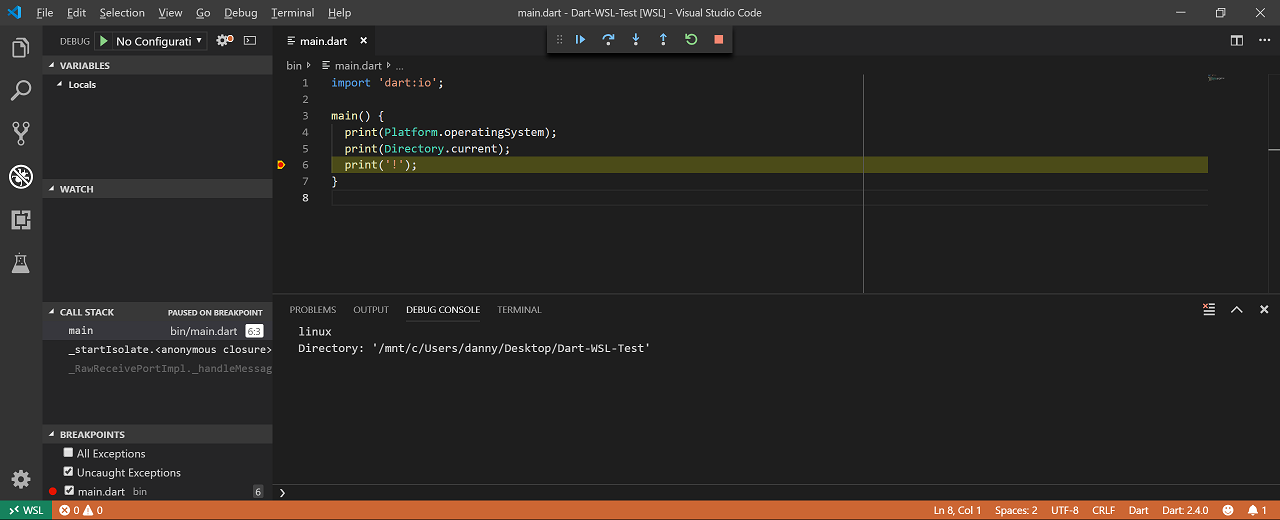
You ofc need to ensure there's a Dart SDK inside WSL, and you seem to need to install the extension in it manually (go to the extensions side bar panel and click "Install in WSL").
I'm considering this working, but please to open new issues if you find any problems (or have any feature quests).
DanTup
on 16 Jul 2019
@DanTup
you say that:
You ofc need to ensure there's a Dart SDK inside WSL, and you seem to need to install the extension in it manually (go to the extensions side bar panel and click "Install in WSL").
Is it necessary to install Dart SDK in WSL? can't I reuse the SDK in windows?
when I start vscode I get the following error message:
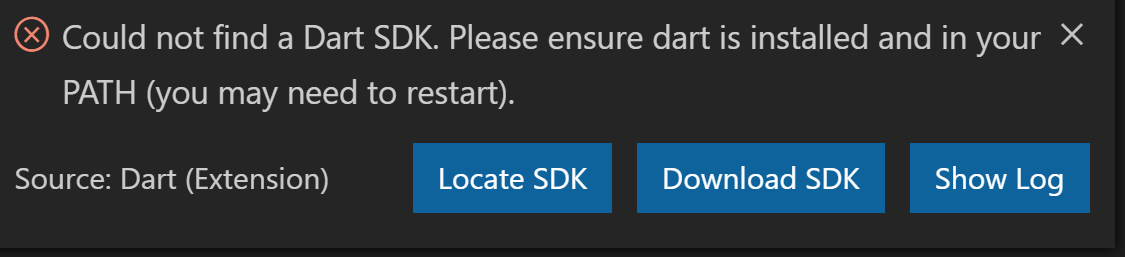
If I select "Locate SDK" and enter the Windows path (using /mnt/c/...)

I still get the same error
 hros
on 16 Oct 2019
hros
on 16 Oct 2019
Is it necessary to install Dart SDK in WSL? can't I reuse the SDK in windows?
I don't think so. WSL is running Linux and your Windows Dart SDK only has the Windows binary (dart.exe) which won't run inside Linux.
If I select "Locate SDK" and enter the Windows path (using /mnt/c/...)
I still get the same error
That makes sense, as we didn't locate the Linux binary (named dart) in the SDK path you provided.
DanTup
on 16 Oct 2019
Related issues
DanTup
·
3Comments
 partounian
·
4Comments
partounian
·
4Comments
 rajeshjeshar
·
4Comments
rajeshjeshar
·
4Comments
 FeimiSzy
·
4Comments
FeimiSzy
·
4Comments
 agmcleod
·
3Comments
agmcleod
·
3Comments
Most helpful comment
I did some testing using WSL with 3.2.1 and it seems to work fine:
You ofc need to ensure there's a Dart SDK inside WSL, and you seem to need to install the extension in it manually (go to the extensions side bar panel and click "Install in WSL").
I'm considering this working, but please to open new issues if you find any problems (or have any feature quests).