Darktable: Crop & Rotate: Bottom border moves when resizing
When resizing a crop by dragging on any of the top handles (top, top-left, top-right) the bottom border of the image also moves up fractionally. This doesn't happen when dragging on the left, right, bottom, bottom-left or bottom-right handles. Edit: this only happens when I have an aspect ratio set (not when using freehand).
Also, perhaps related (?), very occasionally the crop and rotate module seems to get into a state where merely moving the mouse over the box (without holding any buttons down) causes the crop box to slowly move upwards. The set of circumstances required to reproduce this are seemingly random though.
3.1.0+2325~gd10cb25c3 on ArchLinux with and without openCL
 elstoc
All 22 comments
Magic crop-box movement when moving the mouse is illustrated in the attached video. It seems that once I've found the right crop size it happens consistently (even after restarting darktable). Could it be some sort of rounding error?
The only time I'm pressing a mouse button here is to drag the crop box back to the bottom of the screen. Otherwise, if I keep my mouse still nothing happens; if I move my mouse the crop box rises.
elstoc
on 19 Jun 2020
I reproduce, see Screencast, attached
dt_spooky-Magic_20200619-2020-06-19_17.00.37.mp4.zip
 AxelG-DE
on 19 Jun 2020
AxelG-DE
on 19 Jun 2020
I bisected the bottom-line move up thingie...
aac258ae28db0b8b9bc14a29d206186b7133be96 is the first bad commit
commit aac258ae28db0b8b9bc14a29d206186b7133be96
Author: GrahamByrnes <[email protected]>
Date:   Tue Jun 9 22:33:39 2020 +0200

    Allows more precise aspect ratios in crop & rotate

 src/iop/clipping.c | 33 +++++++++++++++++++++++++--------
 1 file changed, 25 insertions(+), 8 deletions(-)
@GrahamByrnes could you do us a favour to also look into this? :)
AxelG-DE
on 19 Jun 2020
Ooh, look at that... lol. Ok, will go have a look.
Can I just say in advance "What a fcckn nightmare" to save me saying it later?
Ta.
 GrahamByrnes
on 19 Jun 2020
GrahamByrnes
on 19 Jun 2020
Confirmed. Both issues are present in https://github.com/darktable-org/darktable/commit/aac258ae28db0b8b9bc14a29d206186b7133be96 but not in https://github.com/darktable-org/darktable/commit/a79a1feb157870a5f5b85bb21d67d211338b1210 (the prior commit)
elstoc
on 19 Jun 2020
Can I just say in advance "What a fcckn nightmare"
I feel your pain. Crop & rotate is a nightmare.
elstoc
on 19 Jun 2020
I'm running something else at the moment, so could you tell me: does this happen when "original image" is set? Or does it have to be one of the other ratios?
GrahamByrnes
on 19 Jun 2020
Yes. Also happens with original image as the aspect ratio.
elstoc
on 19 Jun 2020
I can definitely reproduce the 'bottom moving when cropping the top' issue on original image but the 'magic movement' issue only seems to happen with other ratios
elstoc
on 19 Jun 2020
Could be... but I don't understand why it should be different. Which doesn't mean a lot :-)
For the moment I haven't found the magic choice of numbers and hand waving, so this could be complicated.
According to GLib,
an integer less than, equal to, or greater than zero, if str1 is <, == or > than str2 .
So the only real issue would be if it was comparing two NULL pointers... which is impossible since one is an explicit string.
GrahamByrnes
on 19 Jun 2020
Sorry I deleted my previous comment as on reflection I think your code for that comparison is fine.
elstoc
on 19 Jun 2020
It's kind of weird, since the only part of the code I thought to have modified was for the exact image case. That's where the exact aspect ratio is imported. For the others it should behave like the old code... except it doesn't :-(
GrahamByrnes
on 19 Jun 2020
I also get some odd crop ratios in the combobox occasionally
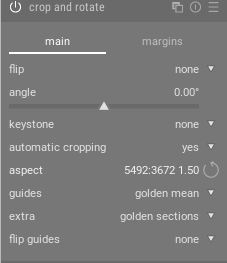
Don't forget this code has been tweaked a couple of times since that PR so the effects might be subtly different now (when I was testing I had to tweak the image size to reproduce the 'magic' bug after your subsequent correction PR)
elstoc
on 19 Jun 2020
There certainly could be an issue with rounding: the whole point was to fix an issue where the rounded ratio of the downsampled preview image was at least a pixel or two off from the image to be pasted in. So the idea was that for "original image" you should be able to select the original image.
Oh, just saw your latest... hmmm.
PS what preview_downsampling are you using?
GrahamByrnes
on 19 Jun 2020
PS what preview_downsampling are you using?
"original"
elstoc
on 19 Jun 2020
I can get the "bottom edge moving" thing... although you can just pull it back down.
GrahamByrnes
on 19 Jun 2020
Got shut out :-(
I'm wondering about those MAX(ceiling(....) ,0) changes, which were really aimed at fixing a preceding problem... since the guts of my changes don't apply when a ratio other than "original" is selected...
GrahamByrnes
on 19 Jun 2020
Yes that's about all that's left really isn't it.
elstoc
on 19 Jun 2020
That's it.
GrahamByrnes
on 19 Jun 2020
Thanks I'll test it soon
elstoc
on 19 Jun 2020
can be closed, I guess?
AxelG-DE
on 20 Jun 2020
Yes. Thanks all.
elstoc
on 20 Jun 2020
Related issues
 schwerdf
·
4Comments
schwerdf
·
4Comments
 pphotography
·
3Comments
GrahamByrnes
·
3Comments
pphotography
·
3Comments
GrahamByrnes
·
3Comments
 denever
·
4Comments
denever
·
4Comments
 lapineige
·
4Comments
lapineige
·
4Comments
Most helpful comment
Ooh, look at that... lol. Ok, will go have a look.
Can I just say in advance "What a fcckn nightmare" to save me saying it later?
Ta.