Darktable: Feature Request: Preference for lighttable border size
It's currently possible to control the size of the border around the images in the darktable via a preference setting. Please could we have something similar for the lighttable.
 elstoc
All 17 comments
well, can you explain a bit more ? There's lot of different views in lighttable with different border sizes (filemanager, culling, preview, ...) and there's margin between backgrounds, inside backgrounds, ...
 AlicVB
on 7 Apr 2020
AlicVB
on 7 Apr 2020
Sorry. I mean the grey border that surrounds the image in file manager view:
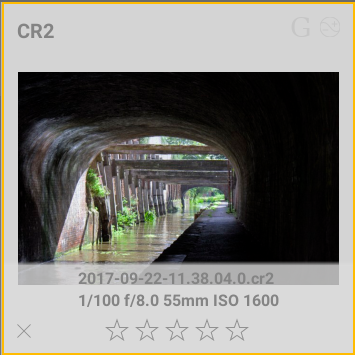
Would be nice to have the image a bit bigger while still fitting the same number of images on the screen.
elstoc
on 7 Apr 2020
This seems doable. 2 tricky things :
- the border is dependent of the thumbnail size. Currently it's 0.45*thumb_size for filemanager
- the border is different for filemanager and culling/preview (0.15*thumb_size)
Adding 2 new options is not really good imho. maybe something like small-normal-big ?
Anyway, if you want to have a try, for filemanager it's located in _event_image_draw in thumbnail.c for culling/preview, it's under rewrite currently by me, but will certainly be located at the same place...
AlicVB
on 7 Apr 2020
I agree - the main reason I was vague ("something similar") was because I knew an absolute size probably wouldn't work. I'm happy to give it a go. What would you consider reasonable boundaries to be (what would we take as 'big' and 'small')? Or should I just put something together in a PR and then we can discuss later?
elstoc
on 7 Apr 2020
It's better to do that with CSS and If I remember your last work @AlicVB, it's already possible. I have not test that but tweaking CSS for what you have would be better. i'm not sure adding another preference for that is the better way as we have made darktable more CSS tweakable.
Grey on thumbnail is tweakable on #thumb_back tag on what I've just checked (but not test).
 Nilvus
on 7 Apr 2020
Nilvus
on 7 Apr 2020
As far as I can tell the color is obtained from the CSS but the size is not (it's a hard-coded float).
elstoc
on 7 Apr 2020
Anyway, I have a version ready to submit if you want it. The only thing I can't achieve is getting the lighttable to update when leaving the preferences window - you have to either restart darktable or change the number of images per row.
Also, I think it's probably best to leave the setting just impacting the filemanager and zoomable lighttable, since the culling and preview are so different generally - it makes more sense to leave them virtually borderless or have a separate setting (if at all).
elstoc
on 7 Apr 2020
Oh shit, seems my eyes don't see the word size here... Time to go sleeping...
Nilvus
on 7 Apr 2020
That's fine - so you're happy that the size sits better in a preference?
elstoc
on 7 Apr 2020
That's fine - so you're happy that the size sits better in a preference?
I would see it in CSS like all colors, sizes and margins in darktable. Would be more consistent: that was the goal of the new UI: make all this tweakable by CSS. But I don't know if this could be added easily or not in the code. @AlicVB and @aurelienpierre: what do you think of that and the #4644 related PR?
Nilvus
on 8 Apr 2020
I can see the idea of moving things into CSS. The only thing I'd say is that not everyone is comfortable updating CSS to change the look and feel of the system. IMHO it makes sense to have themes in CSS (so you have a single place to define consistent color schemes) but if you want everyone to be able to change something it's better as a preference. There's a similar FR open for a global font size preference which falls into the same category.
elstoc
on 8 Apr 2020
I would see it in CSS like all colors, sizes and margins in darktable
completely agree. Last time I've tried, I didn't manage to achieve that, but according to spec, it should be possible ! I'll try to have a look.
IMHO it makes sense to have themes in CSS (so you have a single place to define consistent color schemes) but if you want everyone to be able to change something it's better as a preference. There's a similar FR open for a global font size preference which falls into the same category.
Well, I sort of disagree here. imho, tweaking fontsize or margins is definitely something for power users. "classic" users are used to accept soft appearance out of the box. Not to speak about where to draw the limit if we start to expose css element in prefs, every users will have different needs !
On the other hand, we can maybe make theme tweaking a little bit easier. Thinking loud here : why not propose another tab in prefs with a text editor filled with all the content of the css file and copy the new file into user config dir if something is changed and saved ?
Or maybe just insert a tutorial in the manual with example of how to change fontsize, margin, etc...
AlicVB
on 8 Apr 2020
I personally don't have an issue amending CSS - if I can change the border I'm happy, however I do it.
For theme tweaking I'd say the best thing is probably to have a file in the config directory that just contains the tweaked values - in this case it would only contain the revised border setting. If you have to have the entire theme in the config directory they won't get the advantage of any subsequent theme fixes.
A tutorial is definitely required if we're moving more stuff into CSS.
elstoc
on 8 Apr 2020
I can see the idea of moving things into CSS. The only thing I'd say is that not everyone is comfortable updating CSS to change the look and feel of the system. IMHO it makes sense to have themes in CSS (so you have a single place to define consistent color schemes) but if you want everyone to be able to change something it's better as a preference. There's a similar FR open for a global font size preference which falls into the same category.
Regarding feedback on tweaking UI, I really think that few people care about changing such things like what you described here on this issue. So, overloading preferences if few users use it is not the best way. We already regularly find people asking for tweaking something already there on preferences (like the issue we both answer yesterday about expanding modules...).
Nilvus
on 8 Apr 2020
For theme tweaking I'd say the best thing is probably to have a file in the config directory that just contains the tweaked values - in this case it would only contain the revised border setting. If you have to have the entire theme in the config directory they won't get the advantage of any subsequent theme fixes.
A tutorial is definitely required if we're moving more stuff into CSS.
This is already possible by creating a themes folder on config one, then create a css file and just import the theme wanted to be tweaked, then just copy parts we want to tweak and tweak them after.
About a tutorial, that's already described on darktable 2.4 and darktable 2.6 in darktable.org blog but that probably need to be improved and maybe integrate that on darktable manual. Actually, I have other priorities than spending time needed for that. And that probably be better to do when the manual will be totally moved to markdown (#4177 issue).
Nilvus
on 8 Apr 2020
On the other hand, we can maybe make theme tweaking a little bit easier. Thinking loud here : why not propose another tab in prefs with a text editor filled with all the content of the css file and copy the new file into user config dir if something is changed and saved ?
That could be a better idea. This tab needs to be updated to the selected and displayed theme to adjust this theme.
Nilvus
on 8 Apr 2020
This tab needs to be updated to the selected and displayed theme to adjust this theme.
There would need to be some way to keep the local theme in line with changes to the core theme. That's easier if the local version only contains the changes. Not sure how that could be reconciled with a preference that contains the entire css?
elstoc
on 8 Apr 2020
Related issues
 lovesegfault
·
3Comments
lovesegfault
·
3Comments
 lapineige
·
4Comments
lapineige
·
4Comments
 schwerdf
·
4Comments
schwerdf
·
4Comments
 denever
·
4Comments
denever
·
4Comments
 Praveen-Rai
·
5Comments
Praveen-Rai
·
5Comments
Most helpful comment
There would need to be some way to keep the local theme in line with changes to the core theme. That's easier if the local version only contains the changes. Not sure how that could be reconciled with a preference that contains the entire css?