Darktable: [White Balance] Preset Spot outside image causes "working " label to get shown
Describe the bug
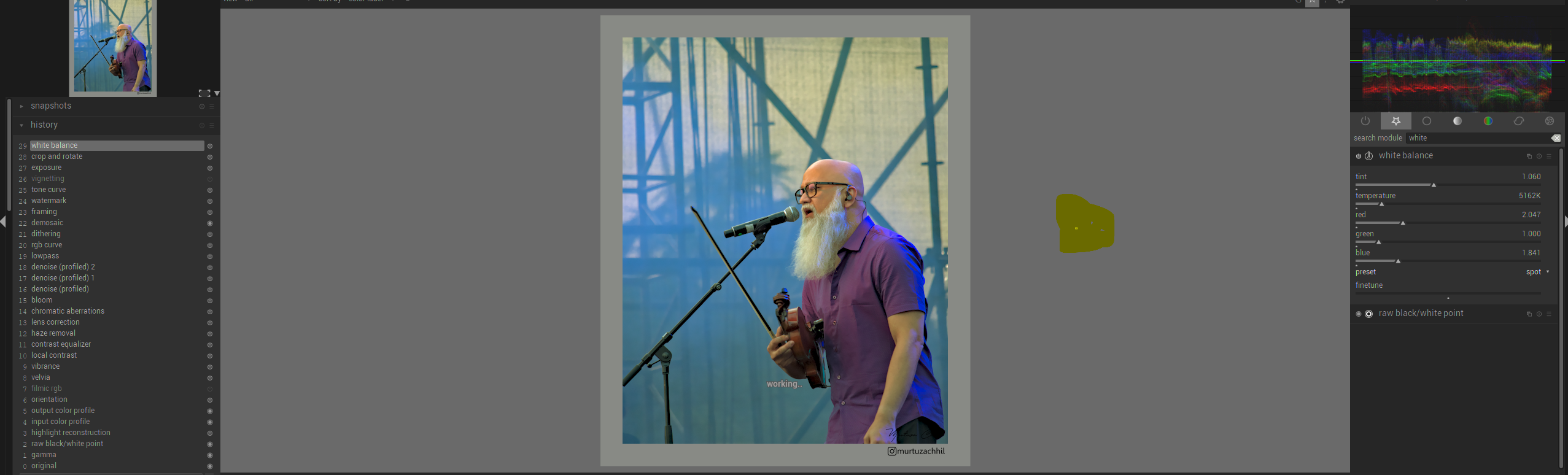
Mistakenly I clicked outside the image for a preset spot balance, dt started processing the click but did not affect the colors.
The next problem was compressing history with top at white balance, the preset changed from spot to camera.
Platform (please complete the following information):
- OS: Win 10
- Version darktable-3.0.0rc2+16~g680668c58-win64
 chhil
chhil
All 27 comments
The _clicking out side the image area_ problem might be related to issue #3353. I get a different results when I do this in the WB module: Sometimes the image turns black, sometimes the colours get changed in the extreme.
Version darktable 3.0.0rc2+17~g2378fe336
Debian 10
 jade-nl
on 30 Nov 2019
jade-nl
on 30 Nov 2019
The next problem was compressing history with top at white balance, the preset changed from spot to camera.
This part is probably the same issue as #3228 and #3521
 junkyardsparkle
on 30 Nov 2019
junkyardsparkle
on 30 Nov 2019
This issue did not get any activity in the past 30 days and will be automatically closed in 7 days if no update occurs. Please check if the master branch has fixed it since then.
![github-actions[bot] picture](https://avatars2.githubusercontent.com/in/15368?v=4&s=40) github-actions[bot]
on 18 Jan 2020
github-actions[bot]
on 18 Jan 2020
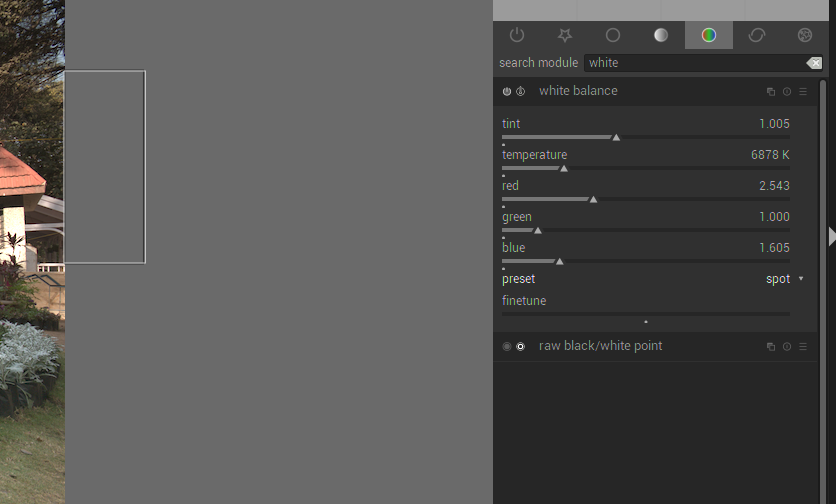
Still, an issue in 3.1.0.426 Windows 10. Except now the spot draws the rectangle along the edge of the pic. Followed by compress history changes the spot selection back to camera. And if we change it back to spot again the previous spot selected rectangle reappears.
chhil
on 26 Jan 2020
This issue did not get any activity in the past 30 days and will be closed in 7 days if no update occurs. Please check if the master branch has fixed it since then.
github-actions[bot]
on 26 Feb 2020
This should be fixed by #4431 - please check if it helped and if so - close the issue?
 johnny-bit
on 13 Mar 2020
johnny-bit
on 13 Mar 2020
Both are still an issue.
I'm not sure if the compressing history with top at white balance, the preset changed from spot to camera is an issue to start with or works-as-designed, but it does resets to camera as mentioned in the original post.
Checked on 3.0.1 and 3.1.0+814
Selecting outside the image is still an issue in the white balance module.
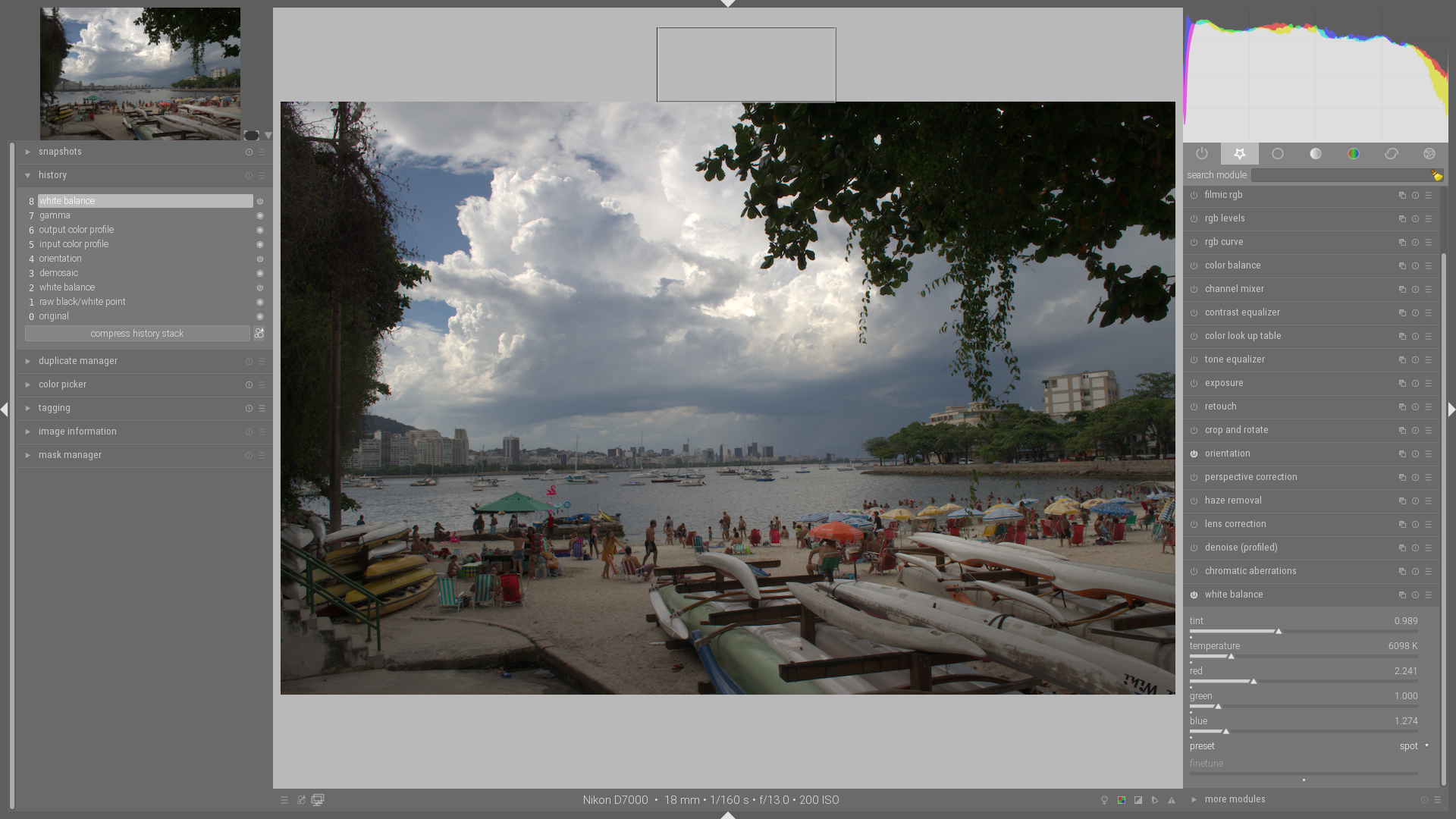
Version 3.0.1 has the better solution: You are able to do this and the selected area is also visible. The image is however not influenced in any way. It seems that the chosen area is discarded):
Version 3.1.0 just tries to hide the selected area outside the image (you can see it if you look closely). But it does influence the image. I'm assuming it takes the row of pixels at the outer edge of the image that corresponds with the selected area outside (which is always linked to the border):
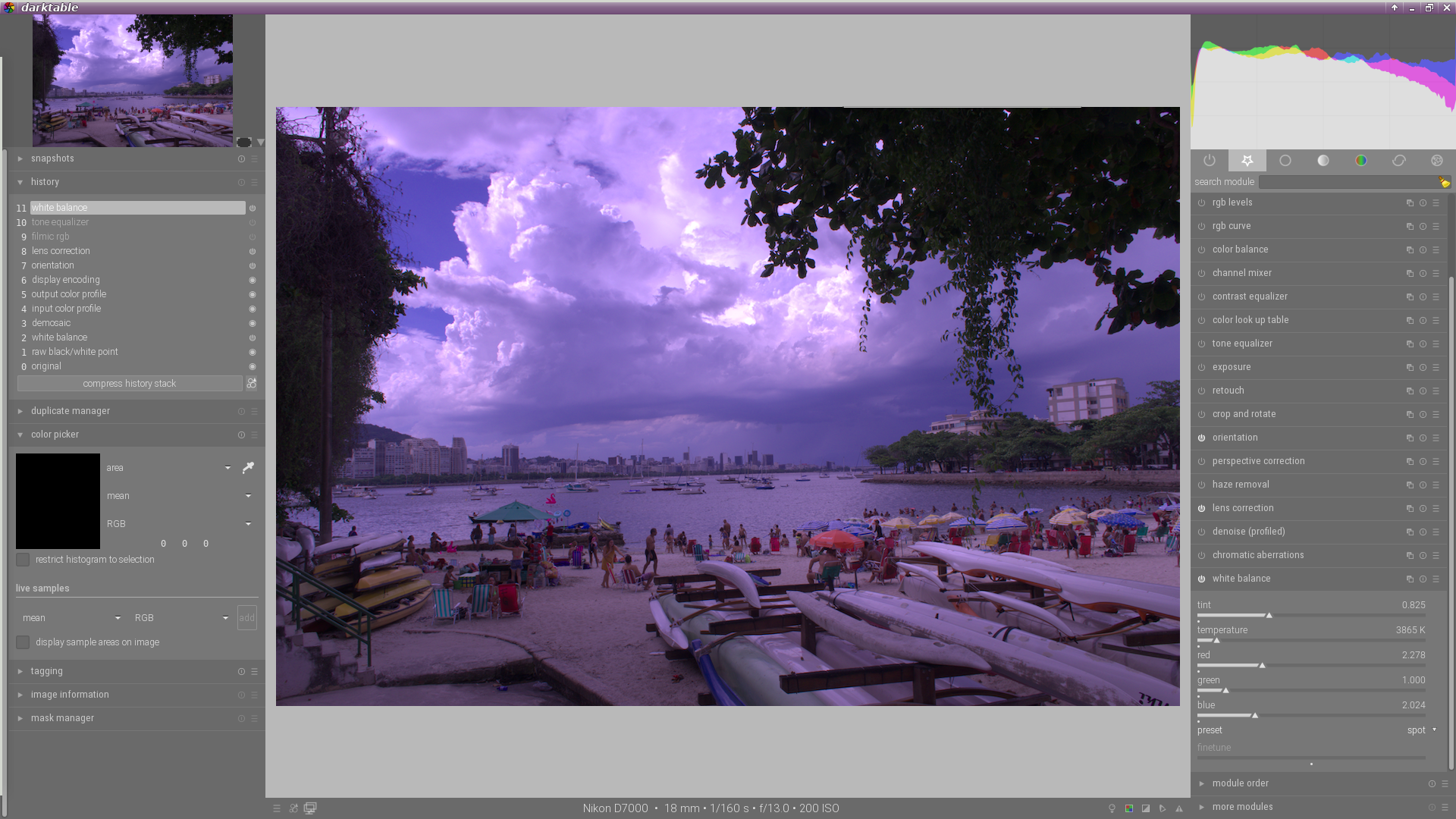
Look at the overhanging tree top right, you can see a line on the inside of the image.
So, long story short: Not solved, cannot be closed.
jade-nl
on 13 Mar 2020
Version 3.1.0 just tries to hide the selected area outside the image (you can see it if you look closely). But it does influence the image. I'm assuming it takes the row of pixels at the outer edge of the image that corresponds with the selected area outside (which is always linked to the border):
I disagree. The selected area is inside the image, just it's sampled from a absolute top row of the image. Better bit would be a "minimal area to work on" for area picker to better see it, since 100x1px area is still "wrong" ;)
johnny-bit
on 13 Mar 2020
I disagree. The selected area is inside the image, just it's sampled from a absolute top row of the image.
Nope, wrong way to tackle this problem; If I select outside the image area the tool shouldn't select an arbitrary part inside the image area.
It shouldn't do anything at all. It should not show an area (as is done in 3.0.1 atm) and it certainly shouldn't pick some pixels inside the image! Both solutions are basically wrong, the one implemented in 3.0.1 does the least harm.
Better bit would be a "minimal area to work on [...]
Correctly implementing that would immediately solve the being able to pick outside the image area problem :-)
It is also wrong though! I should be able to pick 1 pixel. Sometimes the area you want to use to get the correct white (grey) balance is (very) small, don't limit the user to a AxB area.
Why is all this so hard to do? It wasn't a problem in 2.6.X.
jade-nl
on 13 Mar 2020
Wait - I don't understand. So you'd want to have selection outside of image to be _no-op_ instead of _closest image area_? So to not start any area picking until cursor is within image bounds?
Damn, I need to test how it was in 2.6 if you say it was ok... Or can you explain it throughly and have screenshots? ;)
johnny-bit
on 13 Mar 2020
So you'd want to have selection outside of image to be no-op instead of closest image area?
Exactly! A wrong input should never be accepted by darktable. Or at least be handled cleverly or sneaky. I'm not a developer, but I might have just come up with a solution based on the current non-acceptable one:
Assuming the following: It is possible to select a strip of pixels inside the image, parallel to the area selected area outside it (closest image area to use your words). The way it is done in my 3.1.0 screenshot.
How hard would it be to enlarge that area to the default (98% of image?) The same area that is chosen when you initially select spot and haven't actually selected an area yet.
jade-nl
on 13 Mar 2020
Uh... Ok... But if you Did want to use area at/near the border should it
allow you to do so or not? So for example - if you select outside image it
doesn't allow you to go border-only but if you start in the image it allows
you to go up the border?
pt., 13 mar 2020 o 13:20 Jade_NL notifications@github.com napisał(a):
So you'd want to have selection outside of image to be no-op instead of
closest image area?Exactly! A wrong input should never be accepted by darktable. Or at least
be handled cleverly or sneaky. I'm not a developer, but I might have just
come up with a solution based on the current non-acceptable one:Assuming the following: It is possible to select a strip of pixels inside
the image, parallel to the area selected area outside it (closest image
area to use your words). The way it is done in my 3.1.0 screenshot.How hard would it be to enlarge that area to the default (98% of image?)
The same area that is chosen when you initially select spot and haven't
actually selected an area yet.—
You are receiving this because you commented.
Reply to this email directly, view it on GitHub
https://github.com/darktable-org/darktable/issues/3631#issuecomment-598693921,
or unsubscribe
https://github.com/notifications/unsubscribe-auth/ACRRKFMPSUD5S7DFBIAWFSTRHIQHZANCNFSM4JTFWORA
.
--
Pozdrawiam,
Hubert Kowalski
johnny-bit
on 13 Mar 2020
The user should only ever be able to select an area within the confines of the image. Everything outside it is out of bounds. It doesn't matter if the user starts inside the image or outside it.
Why on earth would darktable allow a user to select an area (partially) outside of the image when using spot to get the white/grey balance.... We are talking about the WB module, but I think this, not being able to select outside the image, would or should hold for all modules.
jade-nl
on 13 Mar 2020
I really don't understand this.
The user should only ever be able to select an area within the confines of the image
Right. If you test the color picker and try to select an area it should - and for me it does - only include an area inside the image.
If you change the scale the representation should only show the visible part of the image.
About @johnny-bit commenting and pr, yes it might be better to ensure a minimal bounding box size but that's something i don't care about.
I can't reproduce your problem with current master on linux
 jenshannoschwalm
on 13 Mar 2020
jenshannoschwalm
on 13 Mar 2020
I really don't understand this.
The user should only ever be able to select an area within the confines of the image
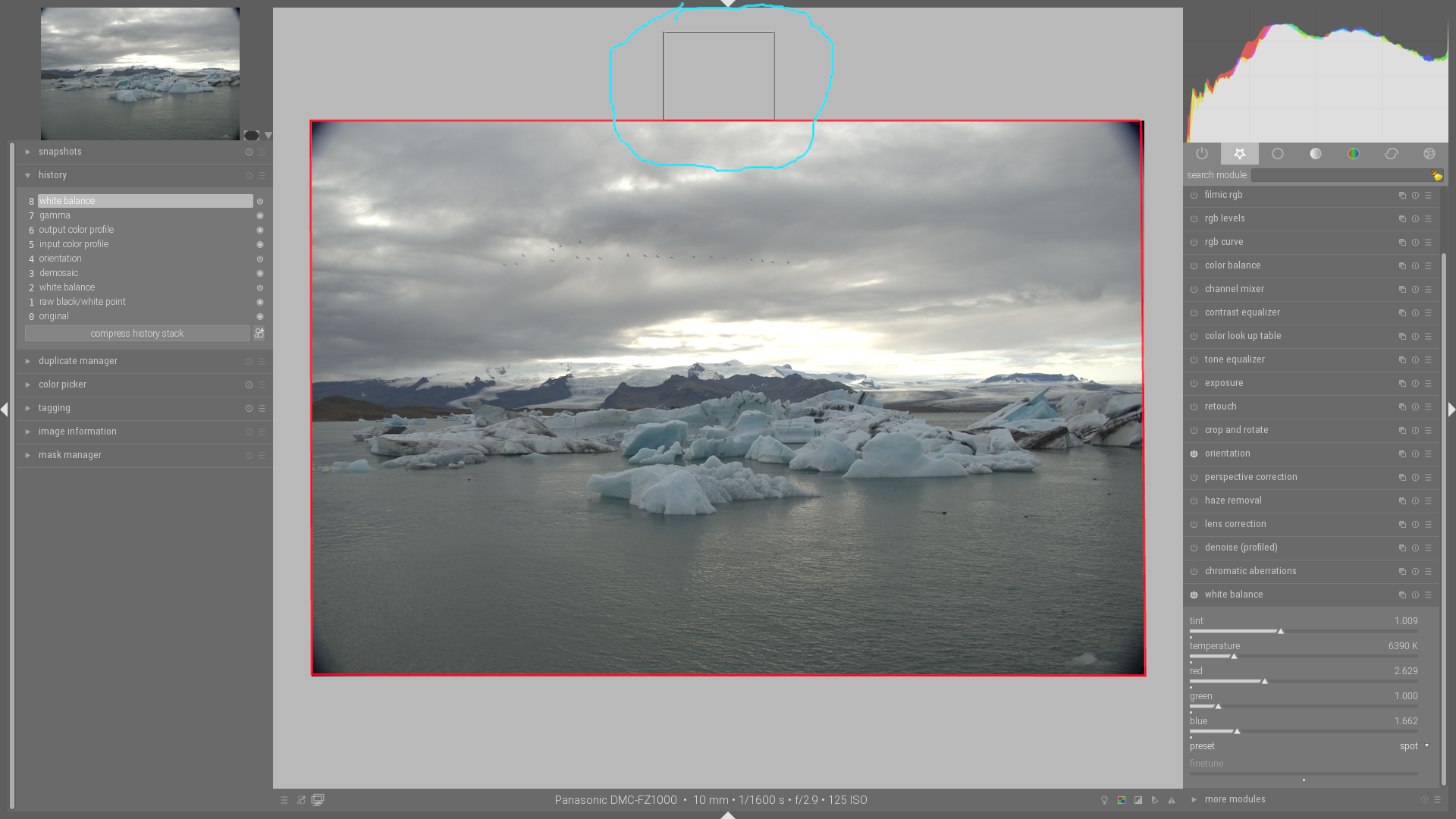
You should not be able to select, partially or fully, outside of the red rectangle.
So using the WB spot picker to select outside of it, as I did in this example using dt stable 3.0.1 should not be possible. And it should definitely not select some arbitrary selection inside of the red square.
To be blunt: dt should tell me I'm a dumbass for not selecting within the red rectangle!
jade-nl
on 13 Mar 2020
You should not be able to select, partially or fully, outside of the red rectangle.
In current master you can't...
select outside of it, as I did in this example using dt stable 3.0.1 should not be possible
Unfortunatelly @jenshannoschwalm change in #4431 is taged for 3.0.2 release in nearest.
So... to be clear - does current master "work" for you by allowing you to select ONLY in image area regardless where you started? Or is additional work needed, eg message "You selected dumb area and your dumbass"? (I know it's supposed to be _you're_) or other solutios like limiting area to inside image withouthout exteme borders?
johnny-bit
on 13 Mar 2020
In current master you can't...
select outside of it, as I did in this example using dt stable 3.0.1 should not be possible
I _can_ select outside the image area in master!!
It isn't shown and it is "translated" to the arbitrary selected line of pixels inside the image area and thus the WB is set on "a hunch" as shown in the second, purple, pic.
I find this much worse then how it is implemented in current stable 3.0.1 At least that one doesn't make any baseless assumptions.
So... to be clear - does current master "work" for you by allowing you to select ONLY in image area regardless where you started?
No. It does not. And it _does_ allow me to select outside the image area!!! See my answer a few paragraphs up.
I already stated what the solution should be a few times. Here's a summery:
- Selecting outside the image area is user error,
- Do not make assumptions when a user does something that is stupid/wrong,
- Either select nothing or fall back to the initial selection (98% or so of the whole image).
- AGAIN: Do not make any arbitrary assumptions about what the user might have wanted to do.
jade-nl
on 13 Mar 2020
I can select outside the image area in master!!
It isn't shown and it is "translated" to the arbitrary selected line of pixels inside the image area and thus the WB is set on "a hunch" as shown in the second, purple, pic.
Don't know what you are doing and shouting doesn't make that statement less false. I you press a mouse button and move it, the position is always clipped to "inside the image".
You may not like this but it does not "make any arbitrary assumptions", it just make sure you always have valid data from the rectangle-marked area. So please stay cool. Or propose a better solution via pr...
jenshannoschwalm
on 13 Mar 2020
I'm not going to repeat things I already stated.
I just send @johnny-bit a video what it is I did (sorry, GitHub doesn't allow mp4 uploads) and we had a short e-mail conversation about it and this issue.
I do think he understands what the issue is and, as a fellow developer, he might be able to better explain this to others.
jade-nl
on 13 Mar 2020
OK I do have a clear picture, however I do not know if a solution is easy to make.
Currently after @jenshannoschwalm fix, the color picker area is constrained within image area, which is good as it disalows borked input.
what @jade-nl is after is basically disregarding totally a color picker outside image area.
Here's the scenario:
- User selects any (even miniscule) area inside image - Currently OK
- User selects area starting outside image, but ending inside image - consider starting point at image area border and end as indicated by user - currently for this OK
- user selects area starting inside image, but extends outside image area - consider starting point inside and end at image area border - currently OK
- user starts area outside image area and ends outside image area at no point crossing image area - consider this as _invalid area_ and reset color picker area to default - this is what @jade-nl is looking for and currently this produces tiny area along image border. @jade-nl suggests that this is clearly to be considered as user error and discarded.
johnny-bit
on 13 Mar 2020
So you suggest "invalid input" to be understood as "switch back to default" -- is that correct? (Indeed the color picker does not offer something like that.)
jenshannoschwalm
on 14 Mar 2020
So you suggest "invalid input" to be understood as "switch back to default" -- is that correct?
Yes.
jade-nl
on 14 Mar 2020
Ok, for me that's a user interface issue/desire.
personally i think that your suggestion to have "drag illegal box" as a hint to fall back to defaults is not the right way to do this. a) Not all of us use a border at all and b) dragging a box outside the valid image is not intuitive imo.
Maybe a simple click - inside or outside the image box - would be a better way.
Please concider to open an issue about this question to rise attention of more people and after there is a consensus i would do a pr implementing that.
jenshannoschwalm
on 14 Mar 2020
Opened #4471 for "invalid input area". Otherwise IMO this issue could be considered fixed/connected with that one...
johnny-bit
on 14 Mar 2020
@jenshannoschwalm
a) Not all of us use a border at all
You really need to explain this one, because the way I see it everybody "uses" a border. I put uses between double quotes because the user really doesn't have a say in this.
I can set the border around image in darkroom area to 0 in the preferences -> GUI options, but that either leaves you with vertical or horizontal borders depending on the orientation of the image. And even if you resize your side-bars to make the initial 3:2 shot fit perfectly you end up with borders after a crop&rotate and/or a perspective correction.
Maybe this way of putting it is better understood by you: Border, as in: That part of the working canvas that is not covered by the actual image.
I think you might be thinking of what the framing module does. I'm not at all talking about that.
b) dragging a box outside the valid image is not intuitive imo.
This is not about being intuitive or not, which is rather subjective to begin with. This is about protecting users from user error or accidentally clicking in an out-of-bounds area without it effecting the image as a result.
I'm getting the idea that this is being made way harder then it needs to be. I already mentioned some solutions that could be implemented, although I am not sure how hard those would be. To be honest, my intuition ;-) tells me it shouldn't be that hard.
jade-nl
on 14 Mar 2020
@chhil - can you check if current master (after #4495) fixes this issue? If yes then please close the issue :)
@jade-nl - can you check if the #4495 works for you?
johnny-bit
on 19 Mar 2020
4495 fixes the _Selecting outside the image_ nicely.
jade-nl
on 19 Mar 2020
Related issues
 GrahamByrnes
·
3Comments
GrahamByrnes
·
3Comments
 trougnouf
·
5Comments
trougnouf
·
5Comments
 sboukortt
·
3Comments
sboukortt
·
3Comments
 pphotography
·
3Comments
pphotography
·
3Comments
 Egocentrix
·
5Comments
Egocentrix
·
5Comments