Darkreader: can't change hot-keys on Firefox
I'm currently changing from chrome which has the option to rebind the shortcut keys for "toggle current site" and "toggle extension". I'd like to be able to change these hot-keys to what I had them in chrome. Also I have another extension that uses the same key binding as the "toggle extension" shortcut, so if there's no way to do this, I'll have to delete one of these extentions
 paperclone22
All 4 comments
Happens the same to me.
I would propose Changing the title to "Can't change hot-keys on Firefox", so that it states clearly the browser
 txomon
on 17 Apr 2018
txomon
on 17 Apr 2018
Firefox 60 should have some API for changing hotkeys.
 alexanderby
on 17 Apr 2018
alexanderby
on 17 Apr 2018
I finally figured out how to do it! Thanks @alexanderby !
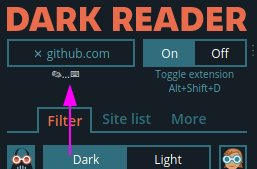
For anyone finding this who couldn't immediately figure it out, click the "Toggle current site" text and then hit your desired shortcut.
I'm not sure if this looks different (more obvious) for others, but while it's waiting for my input, it's:
 AndydeCleyre
on 22 Jul 2020
AndydeCleyre
on 22 Jul 2020
I finally figured out how to do it! Thanks @alexanderby !
For anyone finding this who couldn't immediately figure it out, click the "Toggle current site" text and then hit your desired shortcut.
I'm not sure if this looks different (more obvious) for others, but while it's waiting for my input, it's:
Hey thanks a lot! I've been messing with Firefox css for a while now to darkmode my most visited sites. this will save me some time
paperclone22
on 22 Jul 2020
Related issues
 jenabaivab
·
3Comments
jenabaivab
·
3Comments
 Momoske
·
3Comments
Momoske
·
3Comments
 jubyshu
·
4Comments
jubyshu
·
4Comments
 JakeQuinn77
·
3Comments
JakeQuinn77
·
3Comments
 TheAlienDrew
·
4Comments
TheAlienDrew
·
4Comments