Darknet: windows 10 build to yolo_cpp_dll error from RTX3090
build to yolo_cpp_dll and got error message from RTX3090 the error as below:
Error MSB3721   command  ""C:\Program Files\NVIDIA GPU Computing Toolkit\CUDA\v11.1\bin\nvcc.exe"
-gencode=arch=compute_30,code=\"sm_30,compute_30\"
-gencode=arch=compute_86,code=\"sm_86,compute_86\" --use-local-env
-ccbin "C:\Program Files (x86)\Microsoft Visual Studio\2017\Community\VC\Tools\MSVC\14.16.27023\bin\HostX86\x64"
-x cu
-I\include -IC:\opencv_3.0\opencv\build\include -I..\..\include -I..\..\3rdparty\stb\include -I..\..\3rdparty\pthreads\include
-I"C:\Program Files\NVIDIA GPU Computing Toolkit\CUDA\v11.1\include"
-I"C:\Program Files\NVIDIA GPU Computing Toolkit\CUDA\v11.1\include"
-I"C:\Program Files\NVIDIA GPU Computing Toolkit\CUDA\v11.0\bin\include"
-I"C:\Program Files\NVIDIA GPU Computing Toolkit\CUDA\v11.0\bin\include"
-I"C:\Program Files\NVIDIA GPU Computing Toolkit\CUDA\v11.1\include"
--keep-dir x64\Release -maxrregcount=0  --machine 64 --compile
-cudart static -DCUDNN_HALF -DCUDNN -DGPU -DLIB_EXPORTS -D_TIMESPEC_DEFINED -D_SCL_SECURE_NO_WARNINGS
-D_CRT_SECURE_NO_WARNINGS -DWIN32 -DNDEBUG -D_CONSOLE -D_LIB -D_WINDLL -D_MBCS
-Xcompiler "/EHsc /W3 /nologo /O2 /Fdx64\DLL_Release\vc141.pdb /FS   /MD "
-o x64\DLL_Release\network_kernels.cu.obj "D:\Storage\AIMS\mybook\YOLO\Yolov4\src\network_kernels.cu""  End, code is 1. yolo_cpp_dll
C:\Program Files (x86)\Microsoft Visual Studio\2017\Community\Common7\IDE\VC\VCTargets\BuildCustomizations\CUDA 11.1.targets
**785**
...
Build tools: VC2017
Driver: CUDA 11.1 for windows-x64,
CUDNN v8.0.4.30
 stevenlee600
All 2 comments
Hi,
Maybe remove compute_30,sm_30 from the cuda->device tab?
 Pepsi2006
on 18 Oct 2020
Pepsi2006
on 18 Oct 2020
👍3
Excuse me
I deleted "compute_30" and "sm_30".
The build was successful but network_width is not found.
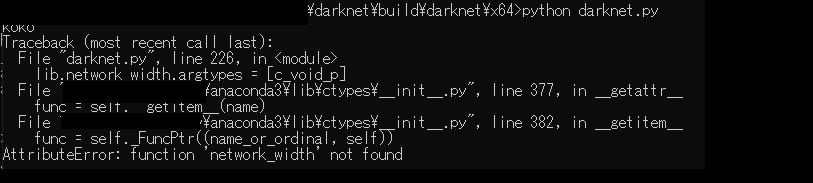
When I checked the inside of the dll, I thought that there was something missing
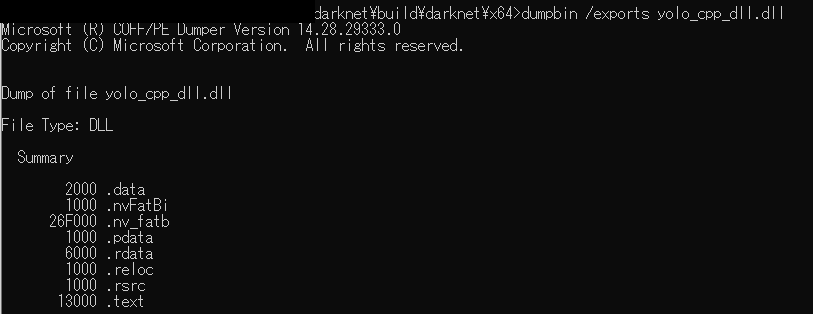
I think the cause is that yolo_cpp_dll.lib and yolo_cpp_dll.exp are not output when they are built.
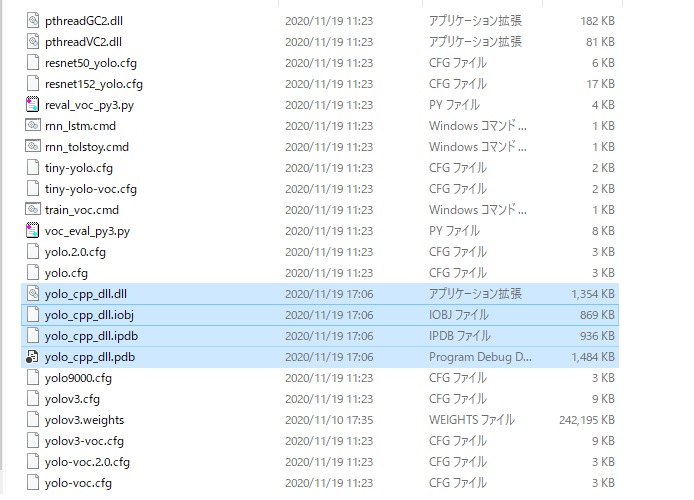
What should I do ?
Build tools: VC2019
Driver: CUDA 11.0 for windows-x64,
CUDNN v8.0.4.30
 krcc5978
on 19 Nov 2020
krcc5978
on 19 Nov 2020
Was this page helpful?
0 / 5 - 0 ratings
Related issues
 Jacky3213
·
3Comments
Jacky3213
·
3Comments
 hemp110
·
3Comments
hemp110
·
3Comments
 PROGRAMMINGENGINEER-NIKI
·
3Comments
PROGRAMMINGENGINEER-NIKI
·
3Comments
 off99555
·
3Comments
off99555
·
3Comments
 jasleen137
·
3Comments
jasleen137
·
3Comments
Most helpful comment
Hi,
Maybe remove compute_30,sm_30 from the cuda->device tab?