Darknet: Quiet different results between Darknet and OpenCV-dnn frameworks
Hello,
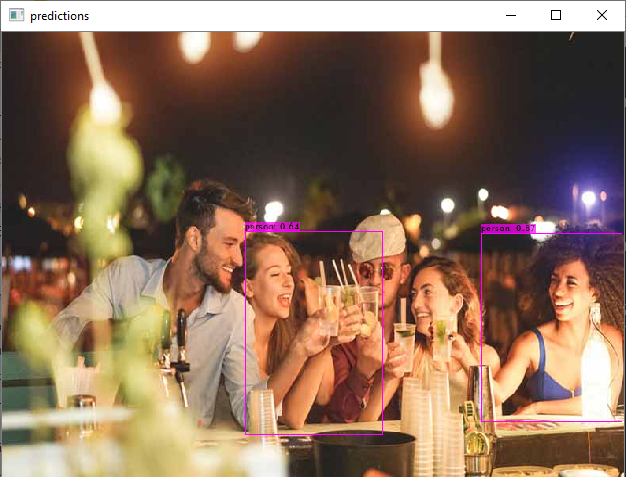
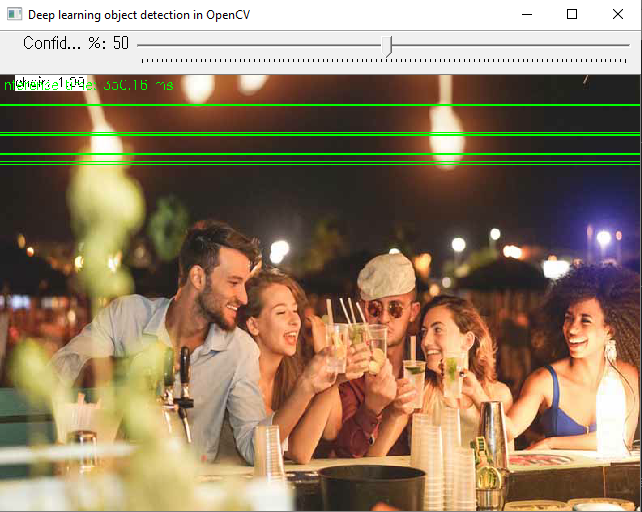
Using just a CPU on Windows 10, I was comparing Darknet and OpenCV-dnn frameworks in C++ with yolov4-tiny.weights but found quiet different results: Darknet is slower but more accurate whereas OpenCV-dnn is fast but inaccurate (see the photos below).
Darknet example
OpenCV-dnn example
I built darknet.exe just with the following commands (without CUDA):
git clone https://github.com/AlexeyAB/darknet
cd darknet
.\build.ps1
Then I typed the following command:
darknet.exe detector test cfg/coco.data cfg/yolov4-tiny.cfg yolov4-tiny.weights -thresh 0.5
For OpenCV-dnn, I first built OpenVINO Toolkit (2020.4.287) and OpenCV 4.4.0 from respective source codes. When building OpenCV, I added the -DWITH_INF_ENGINE=ON option following the instruction here (https://github.com/opencv/opencv/wiki/Intel's-Deep-Learning-Inference-Engine-backend#opencvdldt-windows-package-community-version). Unlike the instruction, I did not have the -DENABLE_CXX11=ON option. But I guess it's OK because I used the Visual Studio 2019 compiler. Lastly I used the sample C++ program posted on AlexeyAB's repo (https://github.com/opencv/opencv/blob/8c25a8eb7b10fb50cda323ee6bec68aa1a9ce43c/samples/dnn/object_detection.cpp#L192-L221) -- I mean just object_detection.cpp & common.hpp.
Then I typed the following command:
demoprogram.exe --backend=0 --config=cfg/yolov4-tiny.cfg --classes=cfg/coco.names --input=sample.jpg --model=yolov4-tiny.weights --target=0 --thr 0.5 (Note: "thr" stands for threshold)
Slight differences in results are acceptable but this difference is out of that acceptable range. Can anybody tell me why the difference is happening and how to fix in OpenCV-dnn?
Thanks in advance!
 ToshiEAB
All 5 comments
you need to use it like this:
example_dnn_object_detection --config=[PATH-TO-DARKNET]/cfg/yolo.cfg --model=[PATH-TO-DARKNET]/yolo.weights --classes=object_detection_classes_pascal_voc.txt --width=416 --height=416 --scale=0.00392 --input=[PATH-TO-IMAGE-OR-VIDEO-FILE] --rgb
you miss the width, height and scale parameter
 VisionEp1
on 25 Aug 2020
VisionEp1
on 25 Aug 2020
Wow! It worked following your instruction. Thank you very much!!!
ToshiEAB
on 25 Aug 2020
@VisionEp1
I re-opened this thread because I have an additional question for you. Why is it necessary to use the scaling value of 0.00392? I can tell that number is an inverse of 255 (i.e., 1/255). Is it simply because YOLO is designed to receive the input frame that is scaled with that value? Any theoretical or practical reason to scale the input frame?
Thanks in advance.
ToshiEAB
on 26 Aug 2020
All computer vision networks and all frameworks do Image normalization.
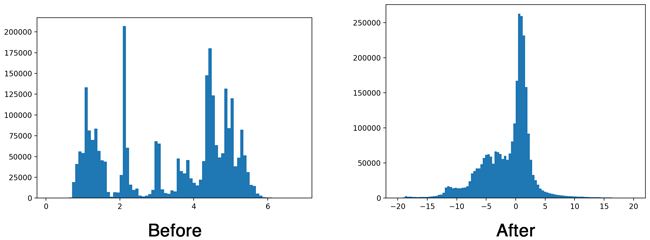
Training is much better if the most values (but not all) in the input of each layer is in the range [-1 ; +1].
This is exactly what batch normalization does. We do this just so as not to waste computational resources on batch normalization in the input layer (before the 1st conv-layer).
Batch-norm:
 AlexeyAB
on 26 Aug 2020
AlexeyAB
on 26 Aug 2020
@AlexeyAB
Thanks for your quick comments along with the graphs. I have seen dividing the input frame by 255 in other frameworks and so I was wondering why that is the case. I now understand!
ToshiEAB
on 26 Aug 2020
Related issues
 jasleen137
·
3Comments
jasleen137
·
3Comments
 yongcong1415
·
3Comments
yongcong1415
·
3Comments
 HilmiK
·
3Comments
HilmiK
·
3Comments
 siddharth2395
·
3Comments
siddharth2395
·
3Comments
 Mididou
·
3Comments
Mididou
·
3Comments