Hi @AlexeyAB,
I tried Deepstream several times and I don't get good detection results.
If I compare deepstream and darknet on the Jetson Nano, with the same .cfg and .weights, darknet run slower (because there is no utilisation of tensorRT) but the detection is good, we can see boundings boxes where there are objects.
Deepstream run way faster but detect almost nothing.
Is it normal? Is there a way to understand why it doesn't work?
Sincerely,
 elementdl
All 16 comments
Did you test default yolov3.cfg/weights model?
If you use your own model, try to train your custom model with
[net] letter_box=1in cfg. And the run detection in Darknet with-letter_boxflag the the end of detection command. And use this model with TRT.Did you check that you use TRT correctly?
 AlexeyAB
on 20 Apr 2020
AlexeyAB
on 20 Apr 2020
@AlexeyAB
DeepStream uses NMS_THRESH = 0.3f and PROB_THRESH = 0.7f. What's the NMS_THRESH and PROB_THRESH used in Darknet demo?
 marcoslucianops
on 20 Apr 2020
marcoslucianops
on 20 Apr 2020
@marcoslucianops
nms = 0.45 https://github.com/AlexeyAB/darknet/blob/1fb4606d5d04a0438887ca9a5681af25291fd240/src/demo.c#L248
conf_thresh = 0.25 https://github.com/AlexeyAB/darknet/blob/1fb4606d5d04a0438887ca9a5681af25291fd240/src/detector.c#L1878
AlexeyAB
on 20 Apr 2020
nms = 0.45
conf_thresh = 0.25
With this values the detection is more similar to darknet
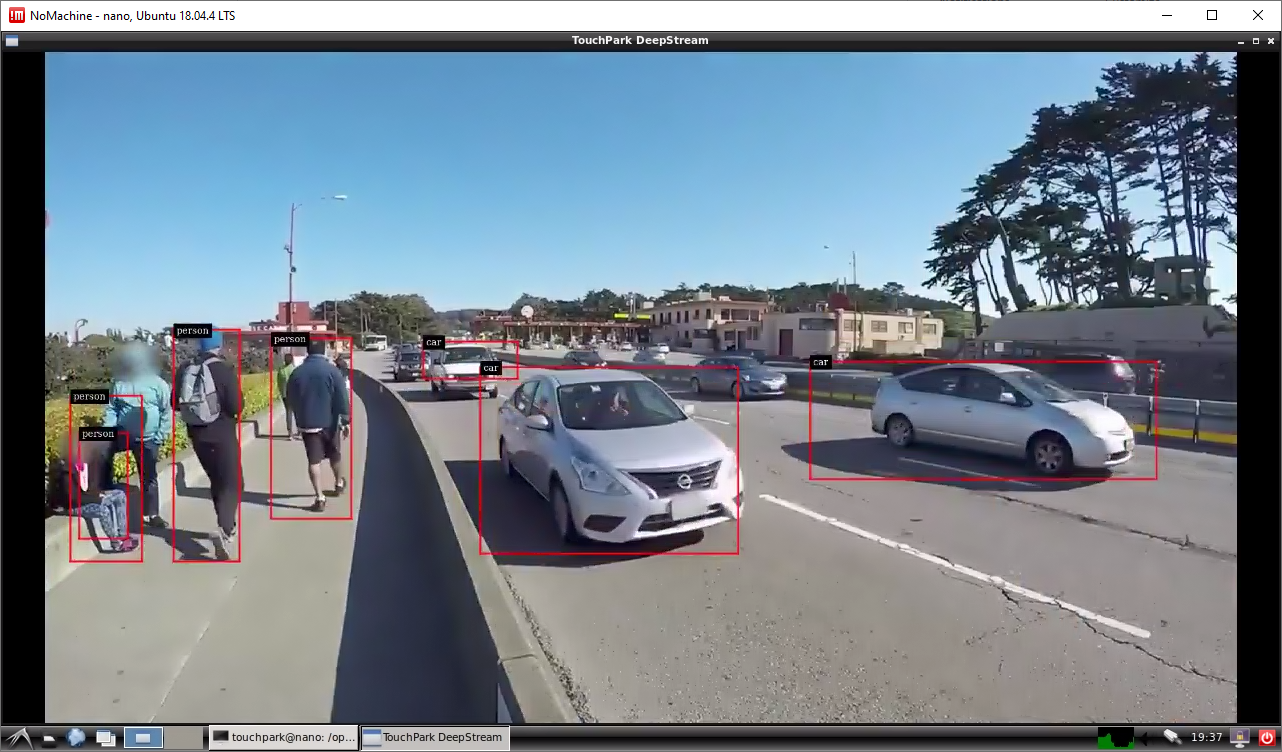
@elementdl, you can change lines 307-108 in nvdsparsebbox_Yolo.cpp
    static const float kNMS_THRESH = 0.3f;
    static const float kPROB_THRESH = 0.7f;
to
    static const float kNMS_THRESH = 0.45;
    static const float kPROB_THRESH = 0.25;
And see if you get better results.
marcoslucianops
on 21 Apr 2020
My results
NVIDIA DeepStream SDK: https://youtu.be/a0yRw19Jb78
Darknet: https://youtu.be/rAJumTq17Eo
Edit: Used mask = 0,1,2 in both videos.
marcoslucianops
on 21 Apr 2020
For default weights use
mask = 1,2,3
instead of https://github.com/AlexeyAB/darknet/blob/1fb4606d5d04a0438887ca9a5681af25291fd240/cfg/yolov3-tiny.cfg#L175
AlexeyAB
on 21 Apr 2020
I’m not sure, but it’s possible that the preprocessing of a image in a deepstream affects the accuracy.
The pre-processing function is:
y = net-scale-factor * (x - mean)
Where:
•x is the input pixel value. It is an int8 with range [0,255].
•mean is the corresponding mean value, read either from the mean file or as offsets[c], where c is the channel to which the input pixel belongs, and offsets is the array specified in the configuration file. It is a float.
•net-scale-factor is the pixel scaling factor specified in the configuration file. It is a float.
•y is the corresponding output pixel value. It is a float.
 daliel
on 21 Apr 2020
daliel
on 21 Apr 2020
For Yolo and the most modern models scale=1 mean=0. So Darknet doesn't use this.
•net-scale-factor is the pixel scaling factor specified in the configuration file. It is a float.
Can you show this value?
May be this is related to quantization?
Did you set mask = 1,2,3 in the last [yolo] layer?
AlexeyAB
on 21 Apr 2020
Can you show this value?
net-scale-factor=1
May be this is related to quantization?
network-mode=0
some small boxes are different from darknet
What mask use for yolov3(full)?
daliel
on 21 Apr 2020
- For yolov3-tiny.cfg - use mask = 1,2,3 in the last [yolo] layer
- For all other models - use default masks
y = net-scale-factor * (x - mean)
Try to use y=x instead of this line and look at the result
AlexeyAB
on 21 Apr 2020
Sorry, I couldn’t find the code you want. I created a men-file filled with zeros. In accordance with the formula, it turned out:
y = net-scale-factor * (x - mean)
where:
    net-sacale-factor = 1
    mean = 0
then:
y = 1* (x-0) = x
The situation has not changed
daliel
on 21 Apr 2020
Do you use yolov3-tiny.cfg?
Did you set mask = 1,2,3 in the last [yolo] layer?
AlexeyAB
on 21 Apr 2020
NVIDIA DeepStream SDK: https://youtu.be/zDwisWLCM08
YoloV3-Tiny
NMS_THRESH = 0.45;
PROB_THRESH = 0.25;

mask = 1,2,3

net-scale-factor=1
network-mode=0 (FP32)
hi,
Thank you all for your response.
@marcoslucianops I tried to apply theses modifications, but I sadly didn't get any better results, In your videos the bounding boxes stays consistent or detectect way more object, in my video it's the opposite.
You used a jetson nano too, right? At maximum power?
I think I will try to reinstall deepstream and try again, if it's working for you, I don't see why it would be not working for me.
elementdl
on 22 Apr 2020
You used a jetson nano too, right? At maximum power?
Yes for both.
Test with these files: yolov3-tiny.zip
Only add yolov3-tiny.weights.
You need make before test (CUDA_VER=10.0 make -C nvdsinfer_custom_impl_Yolo)
marcoslucianops
on 22 Apr 2020
Ok, I don't know what is missing in my code but yours works. I can't thank you enough for your help! I've been stuck with this issues for 3 weeks.
elementdl
on 22 Apr 2020
Related issues
 HilmiK
·
3Comments
HilmiK
·
3Comments
 Greta-A
·
3Comments
Greta-A
·
3Comments
 qianyunw
·
3Comments
qianyunw
·
3Comments
 shootingliu
·
3Comments
shootingliu
·
3Comments
 kebundsc
·
3Comments
kebundsc
·
3Comments
Most helpful comment
Ok, I don't know what is missing in my code but yours works. I can't thank you enough for your help! I've been stuck with this issues for 3 weeks.