Darknet: Implement Yolo-LSTM (~+4-9 AP) for detection on Video with high mAP and without blinking issues
Implement Yolo-LSTM detection network that will be trained on Video-frames for mAP increasing and solve blinking issues.
- https://arxiv.org/abs/1705.06368v3
- https://arxiv.org/abs/1506.04214v2
- Multi-object Tracking with Neural Gating Using Bilinear LSTM: https://web.engr.oregonstate.edu/~lif/1925.pdf
Think about - can we use Transformer (Vaswani et al., 2017) / GPT2 / BERT for frame-sequences instead of word-sequences https://d4mucfpksywv.cloudfront.net/better-language-models/language_models_are_unsupervised_multitask_learners.pdf and https://vk.com/away.php?to=https%3A%2F%2Farxiv.org%2Fpdf%2F1706.03762.pdf&cc_key=
Or can we use Transformer-XL https://arxiv.org/abs/1901.02860v2 or UNIVERSAL TRANSFORMERS https://arxiv.org/abs/1807.03819v3 for Long-time sequences?
 AlexeyAB
All 387 comments
Yes, I was looking this similar thing a few weeks ago. You might find this paper interesting.
Looking Fast and Slow: Memory-Guided Mobile Video Object Detection
https://arxiv.org/abs/1903.10172
Mobile Video Object Detection with Temporally-Aware Feature Maps
https://arxiv.org/pdf/1711.06368.pdf
source code:
https://github.com/tensorflow/models/tree/master/research/lstm_object_detection
 i-chaochen
on 8 May 2019
i-chaochen
on 8 May 2019
@i-chaochen Thanks! It's new interest state-of-art solution by using conv-LSTM not only for increasing accuracy, but also for speedup.
Did you understand what do they mean here?
Does it mean that there are two models:
- f0 (large model
320x320with depth1.4x) - f1 (small model
160x160with depth0.35x)
And states c will be updated only by using f0 model during both Training and Detection (while f1 will not update sates c)?
We also observe that one inherent weakness of the LSTM is its inability to completely preserve its state across updates in practice. The sigmoid activations of the input and forget gates rarely saturate completely, resulting in a slow state decay where long-term dependencies are gradually lost. When compounded over many steps, predictions using the f1 degrade unless f0 is rerun.
We propose a simple solution to this problem by simply skipping state updates when f1 is run, i.e. the output state from the last time f0 was run is always reused. This greatly improves the LSTM’s ability to propagate temporal information across long sequences, resulting in minimal loss of accuracy even when f1 is exclusively run for tens of steps.
AlexeyAB
on 9 May 2019
@i-chaochen Thanks! It's new interest state-of-art solution by using conv-LSTM not only for increasing accuracy, but also for speedup.
Did you understand what do they mean here?
Does it mean that there are two models:
- f0 (large model
320x320with depth1.4x)- f1 (small model
160x160with depth0.35x)And states c will be updated only by using f0 model during both Training and Detection (while f1 will not update sates c)?
We also observe that one inherent weakness of the LSTM is its inability to completely preserve its state across updates in practice. The sigmoid activations of the input and forget gates rarely saturate completely, resulting in a slow state decay where long-term dependencies are gradually lost. When compounded over many steps, predictions using the f1 degrade unless f0 is rerun.
We propose a simple solution to this problem by simply skipping state updates when f1 is run, i.e. the output state from the last time f0 was run is always reused. This greatly improves the LSTM’s ability to propagate temporal information across long sequences, resulting in minimal loss of accuracy even when f1 is exclusively run for tens of steps.
Yes. You have a very sharp eye!
Based on their paper, f0 is for accuracy and f1 is for speed.
They use f0 occasionally for the updates of state, whilst f1 most of time for speed up the testing.
Thus, following this "simple" intuition, part of this paper contribution is to use "Reinforcement Learning" to learn an optimized interleaving policy for f0 and f1.
We can try to have this interleaving first.
i-chaochen
on 11 May 2019
Comparison of different models on a very small custom dataset - 250 training and 250 validation images from video: https://drive.google.com/open?id=1QzXSCkl9wqr73GHFLIdJ2IIRMgP1OnXG
Validation video: https://drive.google.com/open?id=1rdxV1hYSQs6MNxBSIO9dNkAiBvb07aun
Ideas are based on:
LSTM object detection - model achieves state-of-the-art performance among mobile methods on the Imagenet VID 2015 dataset, while running at speeds of up to 70+ FPS on a Pixel 3 phone: https://arxiv.org/abs/1903.10172v1
PANet reaches the 1st place in the COCO 2017 Challenge Instance Segmentation task and the 2nd place in Object Detection task without large-batch training. It is also state-of-the-art on MVD and Cityscapes: https://arxiv.org/abs/1803.01534v4
There are implemented:
convolutional-LSTM models for Training and Detection on Video, without interleaving lightweight network - may be will be implemented later
PANet models -
_pan-networks - there is used[reorg3d]+[convolutional] size=1instead of Adaptive Feature Pooling (depth-maxpool) for the Path Aggregation - may be will be implemented later_pan2-networks - there is used maxpooling[maxpool] maxpool_depth=1 out_channels=64acrosss channels as in original PAN-paper, just previous layers are [convolutional] instead of [connected] for resizability
| Model (cfg & weights) network size = 544x544 | Training chart | Validation video | BFlops | Inference time RTX2070, ms | mAP, % |
|---|---|---|---|---|---|
| yolo_v3_spp_pan_lstm.cfg.txt (must be trained using frames from the video) | - | - | - | - | - |
| yolo_v3_tiny_pan3.cfg.txt and weights-file Features: PAN3, AntiAliasing, Assisted Excitation, scale_x_y, Mixup, GIoU |  | video | 14 | 8.5 ms | 67.3% |
| yolo_v3_tiny_pan5 matrix_gaussian_GIoU aa_ae_mixup_new.cfg.txt and weights-file Features: MatrixNet, Gaussian-yolo + GIoU, PAN5, IoU_thresh, Deformation-block, Assisted Excitation, scale_x_y, Mixup, 512x512, use -thresh 0.6 |  | video | 30 | 31 ms | 64.6% |
| yolo_v3_tiny_pan3 aa_ae_mixup_scale_giou blur dropblock_mosaic.cfg.txt and weights-file |  | video | 14 | 8.5 ms | 63.51% |
| yolo_v3_spp_pan_scale.cfg.txt and weights-file |  | video | 137 | 33.8 ms | 60.4% |
| yolo_v3_spp_pan.cfg.txt and weights-file |  | video | 137 | 33.8 ms | 58.5% |
| yolo_v3_tiny_pan_lstm.cfg.txt and weights-file (must be trained using frames from the video) |  | video | 23 | 14.9 ms | 58.5% |
| tiny_v3_pan3_CenterNet_Gaus ae_mosaic_scale_iouthresh mosaic.txt and weights-file |  | video | 25 | 14.5 ms | 57.9% |
| yolo_v3_spp_lstm.cfg.txt and weights-file (must be trained using frames from the video) |  | video | 102 | 26.0 ms | 57.5% |
| yolo_v3_tiny_pan3 matrix_gaussian aa_ae_mixup.cfg.txt and weights-file |  | video | 13 | 19.0 ms | 57.2% |
| resnet152_trident.cfg.txt and weights-file train by using resnet152.201 pre-trained weights |  | video | 193 | 110ms | 56.6% |
| yolo_v3_tiny_pan_mixup.cfg.txt and weights-file |  | video | 17 | 8.7 ms | 52.4% |
| yolo_v3_spp.cfg.txt and weights-file (common old model) |  | video | 112 | 23.5 ms | 51.8% |
| yolo_v3_tiny_lstm.cfg.txt and weights-file (must be trained using frames from the video) |  | video | 19 | 12.0 ms | 50.9% |
| yolo_v3_tiny_pan2.cfg.txt and weights-file |  | video | 14 | 7.0 ms | 50.6% |
| yolo_v3_tiny_pan.cfg.txt and weights-file |  | video | 17 | 8.7 ms | 49.7% |
| yolov3-tiny_3l.cfg.txt (common old model) and weights-file |  | video | 12 | 5.6 ms | 46.8% |
| yolo_v3_tiny_comparison.cfg.txt and weights-file (approximately the same conv-layers as conv+conv_lstm layers in yolo_v3_tiny_lstm.cfg) |  | video | 20 | 10.0 ms | 36.1% |
| yolo_v3_tiny.cfg.txt (common old model) and weights-file |  | video | 9 | 5.0 ms | 32.3% |
| | | | | - | - |
| | | | | - | - |
AlexeyAB
on 20 May 2019
Great work! Thank you very much for sharing this result.
LSTM indeed improves results. I wonder have you evaluated the inference time with LSTM as well?
Thanks
i-chaochen
on 20 May 2019
How to train LSTM networks:
Use one of cfg-file with
LSTMin filenameUse pre-trained file
for Tiny: use
yolov3-tiny.conv.14that you can get from https://pjreddie.com/media/files/yolov3-tiny.weights by using command./darknet partial cfg/yolov3-tiny.cfg yolov3-tiny.weights yolov3-tiny.conv.14 14for Full: use http://pjreddie.com/media/files/darknet53.conv.74
You should train it on sequential frames from one or several videos:
./yolo_mark data/self_driving cap_video self_driving.mp4 1- it will grab each 1 frame from video (you can vary from 1 to 5)./yolo_mark data/self_driving data/self_driving.txt data/self_driving.names- to mark bboxes, even if at some point the object is invisible (occlused/obscured by another type of object)./darknet detector train data/self_driving.data yolo_v3_tiny_pan_lstm.cfg yolov3-tiny.conv.14 -map- to train the detector./darknet detector demo data/self_driving.data yolo_v3_tiny_pan_lstm.cfg backup/yolo_v3_tiny_pan_lstm_last.weights forward.avi- run detection
If you encounter CUDA Out of memeory error, then reduce the value time_steps= twice in your cfg-file.
The only conditions - the frames from the video must go sequentially in the train.txt file.
You should validate results on a separate Validation dataset, for example, divide your dataset into 2:
train.txt- first 80% of frames (80% from video1 + 80% from video 2, if you use frames from 2 videos)valid.txt- last 20% of frames (20% from video1 + 20% from video 2, if you use frames from 2 videos)
Or you can use, for example:
train.txt- frames from some 8 videosvalid.txt- frames from some 2 videos
LSTM:


AlexeyAB
on 20 May 2019
@i-chaochen I added the inference time to the table. When I improve the inference time for LSTM-networks, I will change them.
AlexeyAB
on 21 May 2019
@i-chaochen I added the inference time to the table. When I improve the inference time for LSTM-networks, I will change them.
Thanks for updates!
What do you mean the inference time for seconds? is for the whole video? How about the inference time for each frame or FPS?
i-chaochen
on 21 May 2019
@i-chaochen This is a millisecond, I fixed )
AlexeyAB
on 21 May 2019
Interesting, it seems yolo_v3_spp_lstm has less BFLOPs(102) than yolo_v3_spp.cfg.txt (112), but it still slower...
i-chaochen
on 21 May 2019
@i-chaochen
I removed some overheads (for calling a lot of functions and reading / writing to GPU-RAM) - I replaced these several functions for: f, i, g, o, c https://github.com/AlexeyAB/darknet/blob/b9ea49af250a3eab3b8775efa53db0f0ff063357/src/conv_lstm_layer.c#L866-L869
to the one fast function add_3_arrays_activate(float *a1, float *a2, float *a3, size_t size, ACTIVATION a, float *dst);
AlexeyAB
on 21 May 2019
Hi @AlexeyAB
I am trying to use yolo_v3_tiny_lstm.cfg to improve small object detection for videos .However I am getting the following error
14 Type not recognized: [conv_lstm]
Unused field: 'batch_normalize = 1'
Unused field: 'size = 3'
Unused field: 'pad = 1'
Unused field: 'output = 128'
Unused field: 'peephole = 0'
Unused field: 'activation = leaky'
15 Type not recognized: [conv_lstm]
Unused field: 'batch_normalize = 1'
Unused field: 'size = 3'
Unused field: 'pad = 1'
Unused field: 'output = 128'
Unused field: 'peephole = 0'
Unused field: 'activation = leaky'
Could you please advice me on this
Many thanks
 NickiBD
on 23 May 2019
NickiBD
on 23 May 2019
@NickiBD For these models you must use the latest version of this repository: https://github.com/AlexeyAB/darknet
AlexeyAB
on 23 May 2019
@AlexeyAB
Thanks alot for the help .I will update my repository .
NickiBD
on 23 May 2019
@AlexeyAB hi, how did you run yolov3-tiny on the Pixel smart phone, could you give some tips? thanks very much.
 passion3394
on 25 May 2019
passion3394
on 25 May 2019
Hi @AlexeyAB,
I have trained yolo_v3_tiny_lstm.cfg and I want to convert it to .h5 and then to .tflite for the smart phone . However ,I am getting Unsupported section header type: conv_lstm_0 and unsupported operation while converting . I really need to solve this issue .Could you please advice me on this.
Many thanks .
NickiBD
on 27 May 2019
@NickiBD Hi,
Which repository and which script do you use for this conversion?
AlexeyAB
on 27 May 2019
Hi @AlexeyAB,
I am using the converter in Adamdad/keras-YOLOv3-mobilenet to convert to .h5 and it was converting for other models e.g. yolo-v3-tiny 3layers ,modified yolov3 ,... .Could you please tell me which converter to use .
Many thanks .
NickiBD
on 27 May 2019
@NickiBD
It is a new layer [conv_lstm], so there is no any converter yet that supports it.
You should request from the converter author for adding convLSTM-layer (with disabled peephole-connection)
Or for adding convLSTM-layer (with peephole-connection) - but you should train with peephole=1 in each [lstm]-layer in yolo_v3_tiny_lstm.cfg
It will use in Keras, or
So ask it from:
- Keras: https://github.com/Adamdad/keras-YOLOv3-mobilenet
- Pytorch: https://github.com/ultralytics/yolov3#darknet-conversion
- TensorFlow: https://github.com/mystic123/tensorflow-yolo-v3 or https://github.com/jinyu121/DW2TF
As I see conv-LSTM is implemented in:
- Keras -
keras.layers.ConvLSTM2D(without peephole - it's good): https://keras.io/layers/recurrent/ - TensorFlow -
tf.contrib.rnn.ConvLSTMCell: https://www.tensorflow.org/api_docs/python/tf/contrib/rnn/ConvLSTMCell - Pytorch - isn't implemented yet: https://github.com/pytorch/pytorch/issues/1706
Conv-LSTM layer is based on this paper - Page 4: http://arxiv.org/abs/1506.04214v1
And can be used with peephole=1 or without peephole=0 Peehole-connection (red-boxes):

In peephole I use * - Convolution instead of o - Element-wise-product (Hadamard product),
so convLSTM is still resizable - can be used with any network input resolution:

AlexeyAB
on 27 May 2019
@AlexeyAB
Thank you so much for all the info and the guidance .I truly appreciate it .
NickiBD
on 27 May 2019
So could Yolov3_spp_pan.cfg be used with standard pretrained weights eg. coco ?
 LukeAI
on 28 May 2019
LukeAI
on 28 May 2019
@LukeAI You must train yolov3_spp_pan.cfg from the begining by using one of pre-trained weights:
or
darknet53.conv.74that you can get from: http://pjreddie.com/media/files/darknet53.conv.74 (trained on ImageNet)or
yolov3-spp.conv.85that you can get from https://pjreddie.com/media/files/yolov3-spp.weights by using command./darknet partial cfg/yolov3-spp.cfg yolov3-spp.weights yolov3-spp.conv.85 85(trained on MS COCO)
AlexeyAB
on 28 May 2019
@AlexeyAB
Sorry to disturb you again . I am now training yolo_v3_tiny_lstm.cfg with my custom dataset for 10000 iterations .I used the weights for 4000 iterations (mAP ~65%) for detection and the detection results were good .However, after 5000 iterations , the mAP dropped to zero and now I am on 6500 iteration it is almost mAP~2% .The frames from the video are sequentially ordered in the train.txt file and random=0. Could you please advice me on this that what might be the problem?
Thanks .
NickiBD
on 28 May 2019
@NickiBD
Can you show me
chart.pngwith Loss & mAP charts?And can you show output of
./darknet detector mapcommand?
AlexeyAB
on 28 May 2019
Hi @AlexeyAB
These is the output of ./darknet detector map:
layer filters size input output
0 conv 16 3 x 3 / 1 416 x 416 x 3 -> 416 x 416 x 16 0.150 BF
1 max 2 x 2 / 2 416 x 416 x 16 -> 208 x 208 x 16 0.003 BF
2 conv 32 3 x 3 / 1 208 x 208 x 16 -> 208 x 208 x 32 0.399 BF
3 max 2 x 2 / 2 208 x 208 x 32 -> 104 x 104 x 32 0.001 BF
4 conv 64 3 x 3 / 1 104 x 104 x 32 -> 104 x 104 x 64 0.399 BF
5 max 2 x 2 / 2 104 x 104 x 64 -> 52 x 52 x 64 0.001 BF
6 conv 128 3 x 3 / 1 52 x 52 x 64 -> 52 x 52 x 128 0.399 BF
7 max 2 x 2 / 2 52 x 52 x 128 -> 26 x 26 x 128 0.000 BF
8 conv 256 3 x 3 / 1 26 x 26 x 128 -> 26 x 26 x 256 0.399 BF
9 max 2 x 2 / 2 26 x 26 x 256 -> 13 x 13 x 256 0.000 BF
10 conv 512 3 x 3 / 1 13 x 13 x 256 -> 13 x 13 x 512 0.399 BF
11 max 2 x 2 / 1 13 x 13 x 512 -> 13 x 13 x 512 0.000 BF
12 conv 1024 3 x 3 / 1 13 x 13 x 512 -> 13 x 13 x1024 1.595 BF
13 conv 256 1 x 1 / 1 13 x 13 x1024 -> 13 x 13 x 256 0.089 BF
14 CONV_LSTM Layer: 13 x 13 x 256 image, 128 filters
conv 128 3 x 3 / 1 13 x 13 x 256 -> 13 x 13 x 128 0.100 BF
conv 128 3 x 3 / 1 13 x 13 x 256 -> 13 x 13 x 128 0.100 BF
conv 128 3 x 3 / 1 13 x 13 x 256 -> 13 x 13 x 128 0.100 BF
conv 128 3 x 3 / 1 13 x 13 x 256 -> 13 x 13 x 128 0.100 BF
conv 128 3 x 3 / 1 13 x 13 x 128 -> 13 x 13 x 128 0.050 BF
conv 128 3 x 3 / 1 13 x 13 x 128 -> 13 x 13 x 128 0.050 BF
conv 128 3 x 3 / 1 13 x 13 x 128 -> 13 x 13 x 128 0.050 BF
conv 128 3 x 3 / 1 13 x 13 x 128 -> 13 x 13 x 128 0.050 BF
15 CONV_LSTM Layer: 13 x 13 x 128 image, 128 filters
conv 128 3 x 3 / 1 13 x 13 x 128 -> 13 x 13 x 128 0.050 BF
conv 128 3 x 3 / 1 13 x 13 x 128 -> 13 x 13 x 128 0.050 BF
conv 128 3 x 3 / 1 13 x 13 x 128 -> 13 x 13 x 128 0.050 BF
conv 128 3 x 3 / 1 13 x 13 x 128 -> 13 x 13 x 128 0.050 BF
conv 128 3 x 3 / 1 13 x 13 x 128 -> 13 x 13 x 128 0.050 BF
conv 128 3 x 3 / 1 13 x 13 x 128 -> 13 x 13 x 128 0.050 BF
conv 128 3 x 3 / 1 13 x 13 x 128 -> 13 x 13 x 128 0.050 BF
conv 128 3 x 3 / 1 13 x 13 x 128 -> 13 x 13 x 128 0.050 BF
16 conv 256 1 x 1 / 1 13 x 13 x 128 -> 13 x 13 x 256 0.011 BF
17 conv 512 3 x 3 / 1 13 x 13 x 256 -> 13 x 13 x 512 0.399 BF
18 conv 128 1 x 1 / 1 13 x 13 x 512 -> 13 x 13 x 128 0.022 BF
19 upsample 2x 13 x 13 x 128 -> 26 x 26 x 128
20 route 19 8
21 conv 128 1 x 1 / 1 26 x 26 x 384 -> 26 x 26 x 128 0.066 BF
22 CONV_LSTM Layer: 26 x 26 x 128 image, 128 filters
conv 128 3 x 3 / 1 26 x 26 x 128 -> 26 x 26 x 128 0.199 BF
conv 128 3 x 3 / 1 26 x 26 x 128 -> 26 x 26 x 128 0.199 BF
conv 128 3 x 3 / 1 26 x 26 x 128 -> 26 x 26 x 128 0.199 BF
conv 128 3 x 3 / 1 26 x 26 x 128 -> 26 x 26 x 128 0.199 BF
conv 128 3 x 3 / 1 26 x 26 x 128 -> 26 x 26 x 128 0.199 BF
conv 128 3 x 3 / 1 26 x 26 x 128 -> 26 x 26 x 128 0.199 BF
conv 128 3 x 3 / 1 26 x 26 x 128 -> 26 x 26 x 128 0.199 BF
conv 128 3 x 3 / 1 26 x 26 x 128 -> 26 x 26 x 128 0.199 BF
23 conv 128 1 x 1 / 1 26 x 26 x 128 -> 26 x 26 x 128 0.022 BF
24 conv 256 3 x 3 / 1 26 x 26 x 128 -> 26 x 26 x 256 0.399 BF
25 conv 128 1 x 1 / 1 26 x 26 x 256 -> 26 x 26 x 128 0.044 BF
26 upsample 2x 26 x 26 x 128 -> 52 x 52 x 128
27 route 26 6
28 conv 64 1 x 1 / 1 52 x 52 x 256 -> 52 x 52 x 64 0.089 BF
29 CONV_LSTM Layer: 52 x 52 x 64 image, 64 filters
conv 64 3 x 3 / 1 52 x 52 x 64 -> 52 x 52 x 64 0.199 BF
conv 64 3 x 3 / 1 52 x 52 x 64 -> 52 x 52 x 64 0.199 BF
conv 64 3 x 3 / 1 52 x 52 x 64 -> 52 x 52 x 64 0.199 BF
conv 64 3 x 3 / 1 52 x 52 x 64 -> 52 x 52 x 64 0.199 BF
conv 64 3 x 3 / 1 52 x 52 x 64 -> 52 x 52 x 64 0.199 BF
conv 64 3 x 3 / 1 52 x 52 x 64 -> 52 x 52 x 64 0.199 BF
conv 64 3 x 3 / 1 52 x 52 x 64 -> 52 x 52 x 64 0.199 BF
conv 64 3 x 3 / 1 52 x 52 x 64 -> 52 x 52 x 64 0.199 BF
30 conv 64 1 x 1 / 1 52 x 52 x 64 -> 52 x 52 x 64 0.022 BF
31 conv 64 3 x 3 / 1 52 x 52 x 64 -> 52 x 52 x 64 0.199 BF
32 conv 128 3 x 3 / 1 52 x 52 x 64 -> 52 x 52 x 128 0.399 BF
33 conv 18 1 x 1 / 1 52 x 52 x 128 -> 52 x 52 x 18 0.012 BF
34 yolo
35 route 24
36 conv 256 3 x 3 / 1 26 x 26 x 256 -> 26 x 26 x 256 0.797 BF
37 conv 18 1 x 1 / 1 26 x 26 x 256 -> 26 x 26 x 18 0.006 BF
38 yolo
39 route 17
40 conv 512 3 x 3 / 1 13 x 13 x 512 -> 13 x 13 x 512 0.797 BF
41 conv 18 1 x 1 / 1 13 x 13 x 512 -> 13 x 13 x 18 0.003 BF
42 yolo
Total BFLOPS 11.311
Allocate additional workspace_size = 33.55 MB
Loading weights from LSTM/yolo_v3_tiny_lstm_7000.weights...
seen 64
Done!
calculation mAP (mean average precision)...
2376
detections_count = 886, unique_truth_count = 1409
class_id = 0, name = Person, ap = 0.81% (TP = 0, FP = 0)
for thresh = 0.25, precision = -nan, recall = 0.00, F1-score = -nan
for thresh = 0.25, TP = 0, FP = 0, FN = 1409, average IoU = 0.00 %
IoU threshold = 50 %, used Area-Under-Curve for each unique Recall
mean average precision ([email protected]) = 0.008104, or 0.81 %
Total Detection Time: 155.000000 Seconds
Set -points flag:
-points 101 for MS COCO
-points 11 for PascalVOC 2007 (uncomment difficult in voc.data)
-points 0 (AUC) for ImageNet, PascalVOC 2010-2012, your custom dataset
Chart :

Many thanks
NickiBD
on 28 May 2019
@NickiBD
The frames from the video are sequentially ordered in the train.txt file and random=0.
How many images do you have in train.txt?
How many different videos (parts of videos) did you use for Training dataset?
It seems something is still unstable in training LSTM, may be due to SGDR, so try to change these lines:
policy=sgdr
sgdr_cycle=1000
sgdr_mult=2
steps=4000,6000,8000,9000
#scales=1, 1, 0.1, 0.1
seq_scales=0.5, 1, 0.5, 1
to these lines
policy=steps
steps=4000,6000,8000,9000
scales=1, 1, 0.1, 0.1
seq_scales=0.5, 1, 0.5, 1
And train again.
AlexeyAB
on 28 May 2019
@AlexeyAB
Thank you so much for the advice .I will make the changes and will train again .
Regarding your questions :I have ~7500 images(including some augmentation of the images ) extracted from ~100 videos for training .
NickiBD
on 28 May 2019
@NickiBD
I have ~7500 images(including some augmentation of the images ) extracted from ~100 videos for training .
So there are something like ~100 sequences of ~75 frames for each.
Yes, you can use it. But better to use ~200 sequential frames.
All frames in one sequence must use the same augmentation (the same cropping, scaling, color, ...). So you can make good video from these ~75 frames.
AlexeyAB
on 28 May 2019
@AlexeyAB
Many thanks for all the advice.
NickiBD
on 28 May 2019
@AlexeyAB really looking forward to trying this out - very impressive results indeed and surely worth writing a paper on? Are you planning to do so?
@NickiBD let us know how those .cfg changes work out :)
LukeAI
on 29 May 2019
@NickiBD If it doesn't help, then also try to add parameter state_constrain=75 for each [conv_lstm] layer in cfg-file. This correlates with the maximum number of frames to remember.
Also do you get better result with lstm-model yolo_v3_tiny_lstm.cfg than with https://github.com/AlexeyAB/darknet/blob/master/cfg/yolov3-tiny_3l.cfg and can you show chart.png for yolov3-tiny_3l.cfg(not lstm)?
@LukeAI May be yes, after several improvements.
AlexeyAB
on 29 May 2019
Have you implemented yolo_v3_spp_pan_lstm.cfg ?
LukeAI
on 29 May 2019
@AlexeyAB
Thank you for the guidance .This is the chart of yolo_v3_tiny3l.cfg .Based on the results I got in iterations before becoming unstable ,The detection results of yolo_v3_tiny_lstm was better than yolo_v3_tiny3l.cfg

NickiBD
on 29 May 2019
@NickiBD So do you get higher mAp with yolo_v3_tiny3l.cfg than with yolo_v3_tiny_lstm.cfg?
AlexeyAB
on 29 May 2019
@AlexeyAB
yes ,mAP is so far higher than yolo_v3_tiny_lstm.cfg
NickiBD
on 29 May 2019
Hi @AlexeyAB
I'm using yolo_v3_spp_pan.cfg and trying to modify it for my use case, I see that the filters parameter is set to 24 for classes=1 instead of 18. How did you calculate this?
 sawsenrezig
on 29 May 2019
sawsenrezig
on 29 May 2019
@sawsenrezig filters = (classes + 5) * 4
AlexeyAB
on 29 May 2019
@AlexeyAB what is the formula for number of filters in the conv layers before yolo layers for yolov3_tiny_3l ?
LukeAI
on 30 May 2019
@LukeAI In any cfg-file filters = (classes + 5) * num / number_of_yolo_layers
- classes: https://github.com/AlexeyAB/darknet/blob/55dcd1bcb8d83f27c9118a9a4684ad73190e2ca3/cfg/yolov3-tiny_3l.cfg#L222
- num: https://github.com/AlexeyAB/darknet/blob/55dcd1bcb8d83f27c9118a9a4684ad73190e2ca3/cfg/yolov3-tiny_3l.cfg#L223
and count number_of_yolo layers:
- https://github.com/AlexeyAB/darknet/blob/55dcd1bcb8d83f27c9118a9a4684ad73190e2ca3/cfg/yolov3-tiny_3l.cfg#L133
- https://github.com/AlexeyAB/darknet/blob/55dcd1bcb8d83f27c9118a9a4684ad73190e2ca3/cfg/yolov3-tiny_3l.cfg#L175
- https://github.com/AlexeyAB/darknet/blob/55dcd1bcb8d83f27c9118a9a4684ad73190e2ca3/cfg/yolov3-tiny_3l.cfg#L219
AlexeyAB
on 30 May 2019
ok! Wait... what is 'num' ?
LukeAI
on 30 May 2019
ok! Wait... what is 'num' ?
'num' means the number of anchors.
 gmayday1997
on 2 Jun 2019
gmayday1997
on 2 Jun 2019
Hi @AlexeyAB
Once again thank you for all your help .I tried to apply all your valuable suggestions except that I dont have 200 frames in each video sequence at the moment .However,still the training is unstable in my case and the accuracy drops significantly after 6000 iterations (almost 0) and goes up a bit after wards Could you please advice me on this .
Many thanks in advance .
NickiBD
on 5 Jun 2019
@NickiBD Try to set state_constrain=10 for each [conv_lstm] layer in your cfg-file. And use the remaining default settings, except filters= and classes=.
AlexeyAB
on 6 Jun 2019
Hi @AlexeyAB
Many thanks for the advice. I will apply that and let you know the result.
NickiBD
on 6 Jun 2019
Hi @AlexeyAB
I tried to applied the the change but it is still unstable in my case and drops to 0 after 7000 iterations .However, the yolov3 -tiny PAN-lSTM worked fine with almost the same settings as the original cfg file and it was stable .Could you please give me advice of what might be the reason ?
As I need a very fast and accurate model for very small object detection to be worked on a smart phone ,I dont know whether yolov3 -tiny PAN-lSTM is better than yolov3-tiny 3l or yolov3-tiny -lstm for very small object detection . I would be really grateful if you could assist me on this on as well .
Many thanks for all the help.
NickiBD
on 9 Jun 2019
@NickiBD Hi,
I tried to applied the the change but it is still unstable in my case and drops to 0 after 7000 iterations .However, the yolov3 -tiny PAN-lSTM worked fine with almost the same settings as the original cfg file and it was stable .Could you please give me advice of what might be the reason ?
Do you mean that
yolo_v3_tiny_pan_lstm.cfg.txtworks fine, butyolo_v3_tiny_lstm.cfg.txtdrops after 7000 iterations?What is the max, min and average size of your objects? Calculate anchors and show me.
What is the average sequence length (how many frames in one sequence) in your dataset?
As I need a very fast and accurate model for very small object detection to be worked on a smart phone ,I dont know whether yolov3 -tiny PAN-lSTM is better than yolov3-tiny 3l or yolov3-tiny -lstm for very small object detection . I would be really grateful if you could assist me on this on as well .
Many thanks for all the help.
Theoretically the best model for small objects should be - use it with the latest version of this repository:
- on images:
yolo_v3_tiny_pan_mixup.cfg.txt - on videos:
yolo_v3_tiny_pan_lstm.cfg.txt
AlexeyAB
on 9 Jun 2019
@AlexeyAB Hi,
Thanks alot for the reply and all your advice.
yes .yolo_v3_tiny_PAN_lstm works fine and is stable but the accuracy of yolo_v3_tiny_lstm.cfg drops to 0 after 7000 iterations.
These are the calculated anchors :
5, 11, 7, 29, 13, 20, 12, 52, 23, 59, 49, 71
The number of frames varies as some videos are short and some are long. The number of frames are 75-100 frames for each video in the dataset.
Many thanks again for all the help.
NickiBD
on 10 Jun 2019
@NickiBD
So use yolo_v3_tiny_pan_lstm.cfg.txt instead of yolo_v3_tiny_lstm.cfg.txt,
since yolo_v3_tiny_pan_lstm.cfg.txt is better in any case, especially for small objects.
Use default anchors.
Could you please give me advice of what might be the reason ?
yolo_v3_tiny_lstm.cfg.txtuses longer sequences (time_steps=16 X augment_speed=3 = 48) thanyolo_v3_tiny_pan_lstm.cfg.txt(time_steps=3 X augment_speed=3 = 9),
so if you trainyolo_v3_tiny_lstm.cfg.txton short video-sequences it can lead to unstable training.yolo_v3_tiny_lstm.cfg.txtisn't good for small objects. Since you use dataset with small objects, so it can lead to unstable training
AlexeyAB
on 10 Jun 2019
@AlexeyAB
Thank you so much for all the advice .
NickiBD
on 10 Jun 2019
@AlexeyAB
I see that you added TridentNet already! Do you have any results / training graphs? Maybe on the same dataset and network size as your table above so that we can compare?
LukeAI
on 13 Jun 2019
@AlexeyAB
I am trying to train a yolo_v3_tiny_pan_mixup. I have downloaded the weights yolov3-tiny_occlusion_track_last.weights but been unable to train directly from the weights or able to extract from them:
$ ./darknet partial my_stuff/yolo_v3_tiny_pan_mixup.cfg my_stuff/yolov3-tiny_occlusion_track_last.weights yolov3-tiny.conv.14 14
 GPU isn't used
layer     filters    size              input                output
   0 conv     16  3 x 3 / 1   768 x 432 x   3   ->   768 x 432 x  16 0.287 BF
   1 max          2 x 2 / 2   768 x 432 x  16   ->   384 x 216 x  16 0.005 BF
   2 conv     32  3 x 3 / 1   384 x 216 x  16   ->   384 x 216 x  32 0.764 BF
   3 max          2 x 2 / 2   384 x 216 x  32   ->   192 x 108 x  32 0.003 BF
   4 conv     64  3 x 3 / 1   192 x 108 x  32   ->   192 x 108 x  64 0.764 BF
   5 max          2 x 2 / 2   192 x 108 x  64   ->    96 x  54 x  64 0.001 BF
   6 conv    128  3 x 3 / 1    96 x  54 x  64   ->    96 x  54 x 128 0.764 BF
   7 max          2 x 2 / 2    96 x  54 x 128   ->    48 x  27 x 128 0.001 BF
   8 conv    256  3 x 3 / 1    48 x  27 x 128   ->    48 x  27 x 256 0.764 BF
   9 max          2 x 2 / 2    48 x  27 x 256   ->    24 x  14 x 256 0.000 BF
  10 conv    512  3 x 3 / 1    24 x  14 x 256   ->    24 x  14 x 512 0.793 BF
  11 max          2 x 2 / 1    24 x  14 x 512   ->    24 x  14 x 512 0.001 BF
  12 conv   1024  3 x 3 / 1    24 x  14 x 512   ->    24 x  14 x1024 3.171 BF
  13 conv    256  1 x 1 / 1    24 x  14 x1024   ->    24 x  14 x 256 0.176 BF
  14 conv    512  3 x 3 / 1    24 x  14 x 256   ->    24 x  14 x 512 0.793 BF
  15 conv    128  1 x 1 / 1    24 x  14 x 512   ->    24 x  14 x 128 0.044 BF
  16 upsample            2x    24 x  14 x 128   ->    48 x  28 x 128
  17 route  16 8
  18 Layer before convolutional layer must output image.: File exists
darknet: ./src/utils.c:293: error: Assertion `0' failed.
Aborted (core dumped)
Could you advise me as to how to extract seed weights to begin training?
LukeAI
on 14 Jun 2019
I also notice that the tiny_occlusion weights are provided for yolo_v3_pan_scale is this correct?
LukeAI
on 14 Jun 2019
@LukeAI
I also notice that the tiny_occlusion weights are provided for yolo_v3_pan_scale is this correct?
There is correct weights-file, just incorrect filename (may be I will change it later).
I am trying to train a yolo_v3_tiny_pan_mixup. I have downloaded the weights yolov3-tiny_occlusion_track_last.weights but been unable to train directly from the weights or able to extract from them:
You set incorrect network resolution, width and height must be multiple of 32, while 432 isn't. Set 416.
I see that you added TridentNet already! Do you have any results / training graphs? Maybe on the same dataset and network size as your table above so that we can compare?
I am training it right now, it is very slow. That's why they used original ResNet152 (without any changes and improvements) for the fastest transfer learning from pre-trained ResNet152 on Imagenet.
AlexeyAB
on 14 Jun 2019
Hi alexey, do you have an example of how use the Yolo-Lstm after training ?
 dhgomezg6
on 14 Jun 2019
dhgomezg6
on 14 Jun 2019
@Dinl Hi, what do you mean? Just use it as usual.
Run it on Video-file or with Video-camera (web-cam, IP-cam http/rtsp):
./darknet detector demo data/self_driving.data yolo_v3_tiny_pan_lstm.cfg.txt yolo_v3_tiny_pan_lstm_last.weights rtsp://login:[email protected]:554
Look at the result video https://drive.google.com/open?id=1ilTuesCfaFphPPx-djhp7bPTC31CAufx
Or press on other video URLs there: https://github.com/AlexeyAB/darknet/issues/3114#issuecomment-494148968
AlexeyAB
on 14 Jun 2019
@LukeAI I added TridentNet to the table: resnet152_trident.cfg.txt
AlexeyAB
on 15 Jun 2019
@AlexeyAB Hi
I trained network with config yolo_v3_spp.cfg, mAP = ~74% at 60k iterations.
Total train images 86k.
Network size is 416x416
batch=64
subdivisions=16
random=1 at all [yolo] layers
Dataset is mostly COCO, classes = 2
Right now i am training with yolo_v3_spp_pan.cfg expecting to get higher mAP
Network size is 416x416
batch=64
subdivisions=32
random=1 at all [yolo] layers
All lines i have changed in the original config file are:
width=416
height=416
...
max_batches = 100000
steps=80000,90000
...
--3x--
[convolutional]
size=1
stride=1
pad=1
filters=28 (for 2 classes)
activation=linear
[yolo]
mask = 0,1,2,3
anchors = 8,8, 10,13, 16,30, 33,23, 32,32, 30,61, 62,45, 64,64, 59,119, 116,90, 156,198, 373,326
classes=2
num=12
jitter=.3
ignore_thresh = .7
truth_thresh = 1
random=1
--3x--
But mAP is about ~66%, expecting to get +~4% i got -8% ))
Is it expected behavior or i missed something in config?
Can it be because of anchors? i did not recalculate them.
Darknet is up to date.
Thanks for help.
 dreambit
on 15 Jun 2019
dreambit
on 15 Jun 2019
@dreambit Hi,
Do you use the latest version of this repository?
Can you rename both yolo_v3_spp.cfg and yolo_v3_spp_pan.cfg files to txt-files and attach them to your message?
Do you have chart.png for both training processes?
AlexeyAB
on 15 Jun 2019
@AlexeyAB Thanks for quick reply
Do you use the latest version of this repository?
commit 94c806ffadc4b052bfaabe1904b79cabc6c10140 (HEAD -> master, origin/master, origin/HEAD)
Date:   Sun Jun 9 03:07:04 2019 +0300

    final fix
Unfortunately chart for spp.cfg is lost, pan is in progress right now, i will show u both charts later.
Config files:
yolov3-spp.cfg.txt
yolo_v3_spp_pan.cfg.txt
I manually calculated mAP for spp.cfg
10k
for conf_thresh = 0.25, precision = 0.64, recall = 0.61, F1-score = 0.63
 for conf_thresh = 0.25, TP = 18730, FP = 10367, FN = 11832, average IoU = 49.59 %

 IoU threshold = 50 %, used Area-Under-Curve for each unique Recall
 mean average precision ([email protected]) = 0.657086, or 65.71 %
20k
```
for conf_thresh = 0.25, precision = 0.80, recall = 0.60, F1-score = 0.69
for conf_thresh = 0.25, TP = 18349, FP = 4635, FN = 12213, average IoU = 63.53 %
IoU threshold = 50 %, used Area-Under-Curve for each unique Recall
mean average precision ([email protected]) = 0.716259, or 71.63 %
**30k**
for conf_thresh = 0.25, precision = 0.75, recall = 0.65, F1-score = 0.70
for conf_thresh = 0.25, TP = 19778, FP = 6562, FN = 10784, average IoU = 59.62 %
IoU threshold = 50 %, used Area-Under-Curve for each unique Recall
mean average precision ([email protected]) = 0.725672, or 72.57 %
**40k**
for conf_thresh = 0.25, precision = 0.75, recall = 0.66, F1-score = 0.71
for conf_thresh = 0.25, TP = 20293, FP = 6681, FN = 10269, average IoU = 60.05 %
IoU threshold = 50 %, used Area-Under-Curve for each unique Recall
mean average precision ([email protected]) = 0.738118, or 73.81 %
**60k**
for conf_thresh = 0.25, precision = 0.73, recall = 0.70, F1-score = 0.72
for conf_thresh = 0.25, TP = 21518, FP = 7818, FN = 9044, average IoU = 59.27 %
IoU threshold = 50 %, used Area-Under-Curve for each unique Recall
mean average precision ([email protected]) = 0.761458, or 76.15 %
**78k**
for conf_thresh = 0.25, precision = 0.74, recall = 0.70, F1-score = 0.72
for conf_thresh = 0.25, TP = 21439, FP = 7444, FN = 9123, average IoU = 59.99 %
IoU threshold = 50 %, used Area-Under-Curve for each unique Recall
mean average precision ([email protected]) = 0.761211, or 76.12 %
 **According to best.weights**
 ```
for conf_thresh = 0.25, precision = 0.74, recall = 0.71, F1-score = 0.72
 for conf_thresh = 0.25, TP = 21599, FP = 7775, FN = 8963, average IoU = 59.45 %

 IoU threshold = 50 %, used Area-Under-Curve for each unique Recall
 mean average precision ([email protected]) = 0.764087, or 76.41 %
As chart:
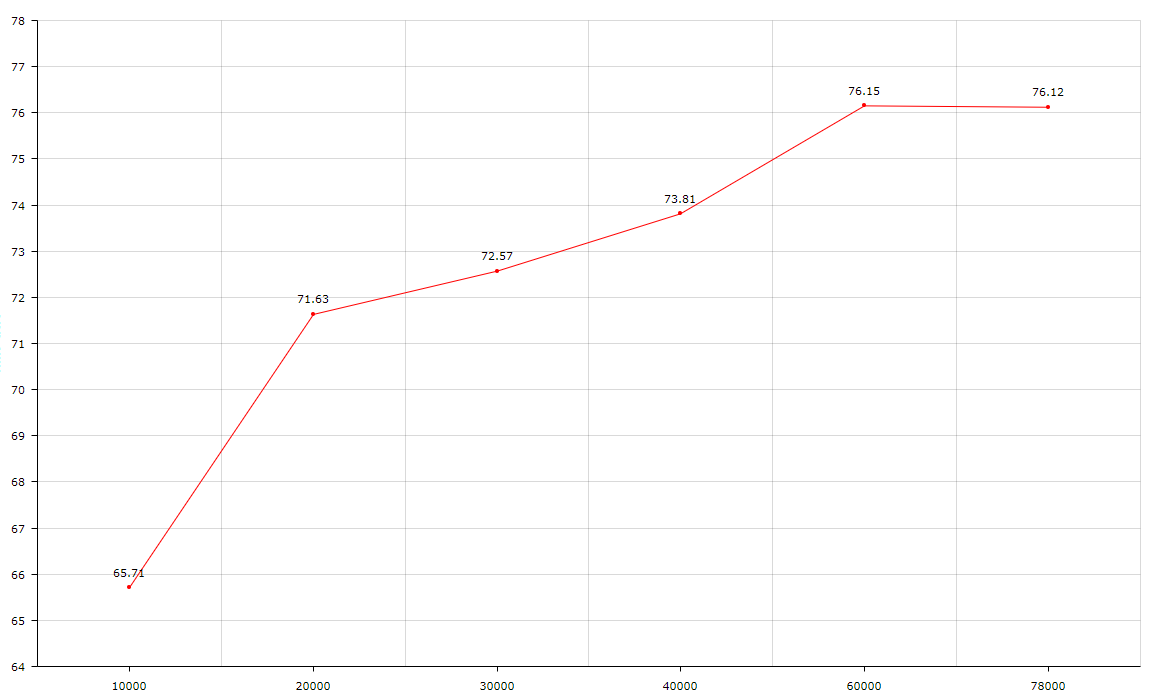
Last spp-pan chart:
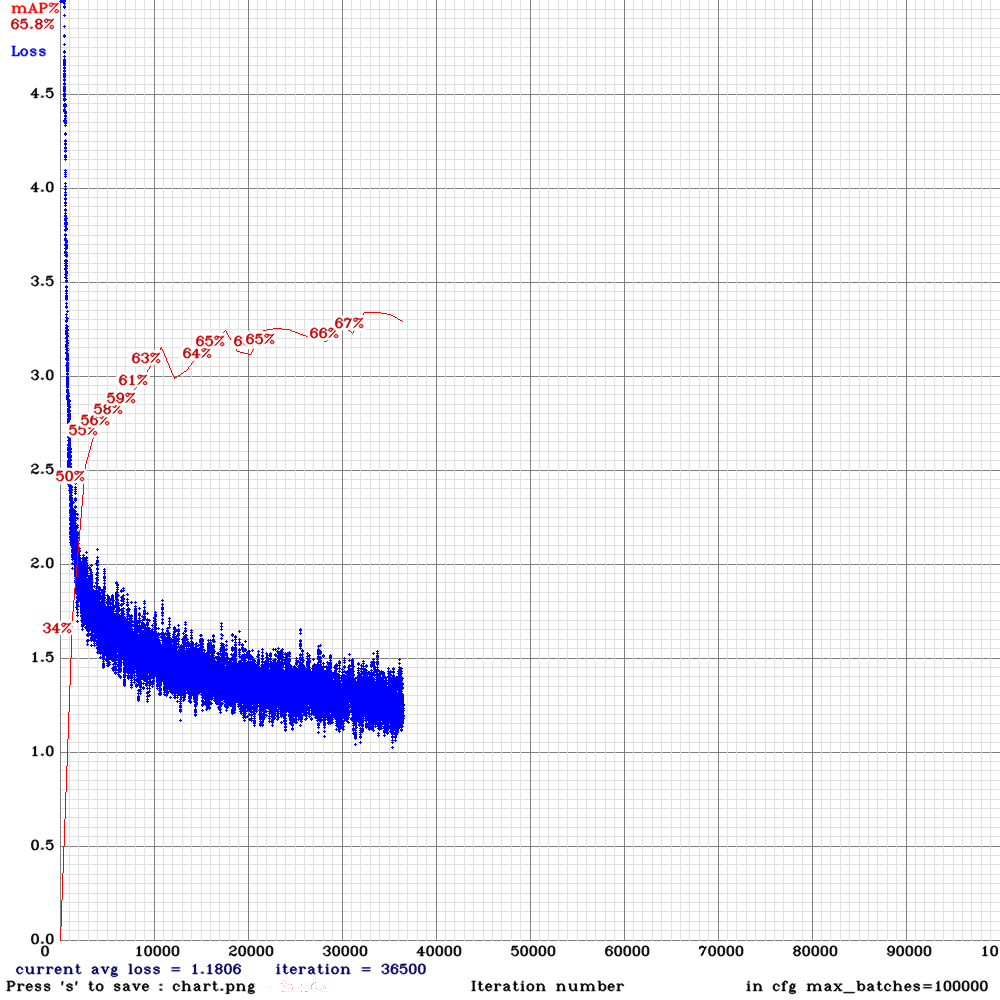
dreambit
on 16 Jun 2019
@dreambit Thanks!
Try to train
yolov3_spp.cfgbut withsubdivisions=32will it have the same high mAP ~76%?If yes, then try to train pan-model with the same learning-policy parameters and the same anchors:
yolo_v3_spp_pan_new.cfg.txt will it have high accuracy mAP ~76% or more?
If it doesn't help, and PAN still has lower mAP, then I will try to make a new layer [maxpool_depth] and new pan-model.
AlexeyAB
on 17 Jun 2019
@AlexeyAB are you planning to make a yolo_v3_spp_pan_lstm.cfg ? (or maybe it should be yolo_v3_spp_pan_scale_mixup_lstm.cfg ?) It looks like it would probably top the league in AP.
LukeAI
on 17 Jun 2019
@LukeAI I'm not planning yet, since we should check whether LSTM, PAN, Mixup and Scale works properly and give improvements in the most cases, what is not yet obvious (also may be fix these approaches):
PAN drops accuracy:
But mAP is about ~66%, expecting to get +~4% i got -8% ))https://github.com/AlexeyAB/darknet/issues/3114#issuecomment-502398291get higher mAp with yolo_v3_tiny3l.cfg than with yolo_v3_tiny_lstm.cfghttps://github.com/AlexeyAB/darknet/issues/3114#issuecomment-496903878scale_x_y = 1.05, 1.1, 1.2 with yolo_v3_tiny_pan_lstm.cfg.txt and it decreases the mAP.https://github.com/AlexeyAB/darknet/issues/3293#issuecomment-499043719Mixup drops -3% mAP accuracy: https://github.com/AlexeyAB/darknet/issues/3272#issuecomment-500781961
EfficientNet_b0 has low accuracy:
Top1 = 57.6%, Top5 = 81.2% - 150 000 iterations (something goes wrong): https://github.com/AlexeyAB/darknet/issues/3380#issuecomment-502364112
Theoretically, there should be a network:
efficientnet_b4_lstm_spp_pan_mixup_scale_trident_yolo.cfg
or
efficientnet_b4_lstm_spp_pan_mixup_scale_trident_corner.cfg )
AlexeyAB
on 17 Jun 2019
@AlexeyAB Thanks.
Try to train yolov3_spp.cfg but with subdivisions=32 will it have the same high mAP ~76%?
If yes, then try to train pan-model with the same learning-policy parameters and the same anchors:
yolo_v3_spp_pan_new.cfg.txt will it have high accuracy mAP ~76% or more?
I've started both on two machines, i'll report results to you at 20, 40, ~60k
dreambit
on 17 Jun 2019
@LukeAI I'm not planning yet, since we should check whether LSTM, PAN, Mixup and Scale works properly and give improvements in the most cases, what is not yet obvious (also may be fix these approaches):
Makes sense! I'm running some trials now, will report here.
Does higher subdivisions mean potentially higher accuracy? Because it means smaller minibatches?
LukeAI
on 17 Jun 2019
@LukeAI No, higher subdivisions -> lower accuracy and lower memory consumption.
Higher minibatch = batch/subdivisions -> higher accuracy.
So to get higher accuracy - use lower subdivisions.
AlexeyAB
on 17 Jun 2019
How to train LSTM networks:
./yolo_mark data/self_driving cap_video self_driving.mp4 1- it will grab each 1 frame from video (you can vary from 1 to 5)./yolo_mark data/self_driving data/self_driving.txt data/self_driving.names- to mark bboxes, even if at some point the object is invisible (occlused/obscured by another type of object)./darknet detector train data/self_driving.data yolo_v3_tiny_pan_lstm.cfg yolov3-tiny.conv.14 -map- to train the detector
@AlexeyAB , Thanks for this enhancement. I will definitely try this out.
Could you tell me -
- what is the LSTM config file training full yolov3 model and not a tiny one?
- command for training full model...You mentioned the training command only for the tiny model above. Can I use the below ?
./darknet detector train data/self_driving.data cfg/weights/darknet53.conv.74 -map
Thanks much!
 kmsravindra
on 17 Jun 2019
kmsravindra
on 17 Jun 2019
@kmsravindra Hi,
there is only this yet (LSTM+spp, but without PAN, Mixup, Scale, GIoU): https://github.com/AlexeyAB/darknet/files/3199654/yolo_v3_spp_lstm.cfg.txt
Yes,
darknet53.conv.74is suitable for all full-models except TridentNet
AlexeyAB
on 17 Jun 2019
Hi @AlexeyAB,
I have a question regarding object detection on videos: what's the difference between using LSTM and running YoloV3 for example on a video?
 YouthamJoseph
on 18 Jun 2019
YouthamJoseph
on 18 Jun 2019
Hi @AlexeyAB,
I am trying to train resnet152_trident.cfg.txt with resnet152.201 pretrained weights . I am using the default config .However, it is very slow ,does not show me the training graph and has not created any weights after 6 hours . Could you Please advice me on this and what I am doing wrong .
Many thanks for all the help .
NickiBD
on 18 Jun 2019
@YouthamJoseph
I have a question regarding object detection on videos: what's the difference between using LSTM and running YoloV3 for example on a video?
That LSTM-Yolo is faster and more accurate than Yolov3.
LSTM-Yolo uses recurrent LSTM-layers with memory, so it takes into account previous several frames and previous detections, it allows to achive much higher accuracy.
AlexeyAB
on 18 Jun 2019
@NickiBD How many iterations did you train?
I will try to add resnet101_trident.cfg.txt that is faster than resnet152_trident.cfg.txt
AlexeyAB
on 18 Jun 2019
@AlexeyAB
Thanks for the reply and providing resnet101_trident.cfg.txt. I cannot see the training graph to see at what stage the training is and I don't know the reason behind it .
NickiBD
on 18 Jun 2019
@AlexeyAB Hi
Try to train yolov3_spp.cfg but with subdivisions=32 will it have the same high mAP ~76%?
If yes, then try to train pan-model with the same learning-policy parameters and the same anchors:
yolo_v3_spp_pan_new.cfg.txt will it have high accuracy mAP ~76% or more?
intermediate results:
spp-pan:
training on gtx 1080ti

spp:
training om rtx 2070 with cuda_half enabled.
Previous results was trained on 1080ti, i don't know if that matters
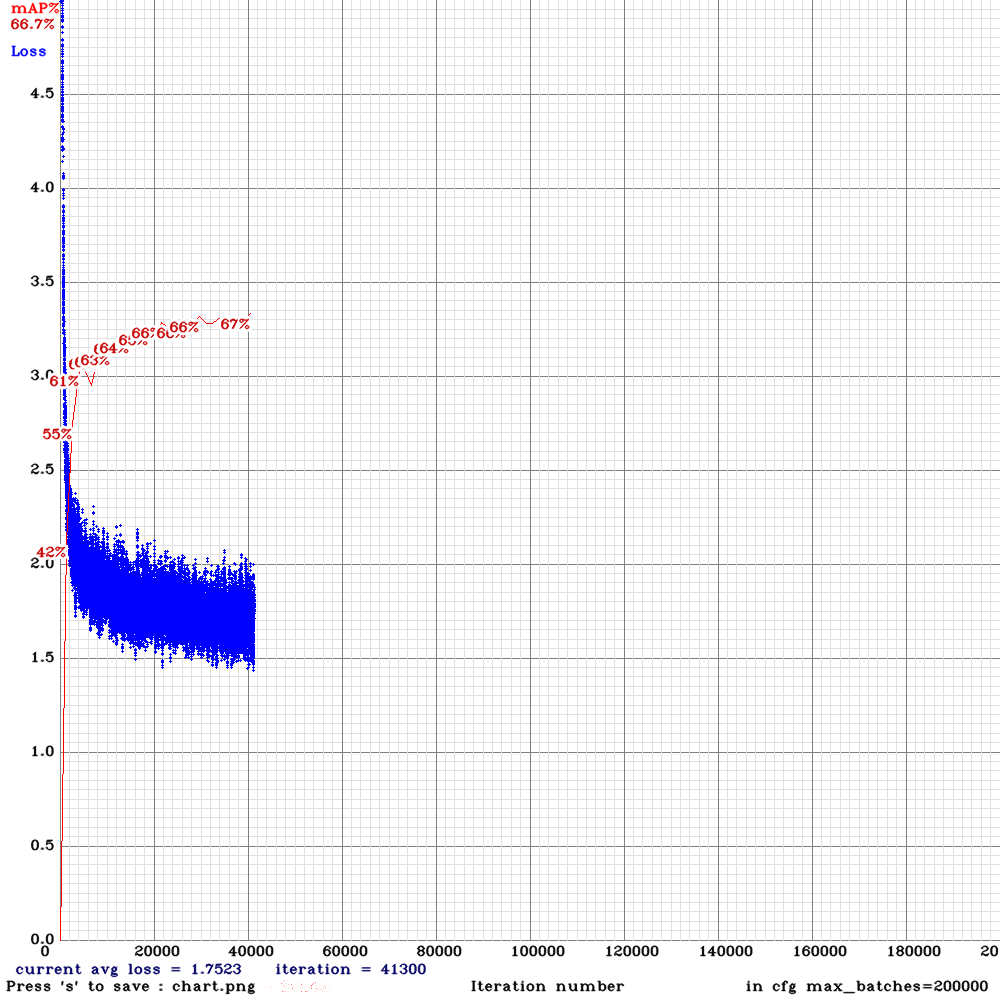
You ideas? :)
dreambit
on 18 Jun 2019
For training, how many sequentially frames per video are needed? after the n frames sequence should be any indicator that new sequence start?
dhgomezg6
on 18 Jun 2019
@dreambit So currently spp-pan (71%) is better than spp (67%) in contrast to previous results: https://github.com/AlexeyAB/darknet/issues/3114#issuecomment-502437431
It seems something is wrong with using Tensor Cores, I will disable TC temporary for training. May be I should use loss-scale even if I don't use Tensor Cores FP16 for activation: https://docs.nvidia.com/deeplearning/sdk/mixed-precision-training/index.html#mptrain
Can you attach new SPP and SPP-PAN cfg-files? Did you use the same batch/subdivisions, steps, policy and anchors in the both cfg-files?
AlexeyAB
on 18 Jun 2019
@Dinl Use at least 200 frames per video (sequence).
AlexeyAB
on 18 Jun 2019
@AlexeyAB
Can you attach new SPP and SPP-PAN cfg-files? Did you use the same batch/subdivisions, steps, policy and anchors in the both cfg-files?
- Try to train yolov3_spp.cfg but with subdivisions=32 will it have the same high mAP ~76%?
- If yes, then try to train pan-model with the same learning-policy parameters and the same anchors: yolo_v3_spp_pan_new.cfg.txt will it have high accuracy mAP ~76% or more?
yolo_v3_spp_pan_new.cfg.txt
yolov3-spp-front.cfg.txt
It seems something is wrong with using Tensor Cores, I will disable TC temporary for training. May be I should use loss-scale even if I don't use Tensor Cores FP16 for activation: https://docs.nvidia.com/deeplearning/sdk/mixed-precision-training/index.html#mptrain
So it is not yet clear is it because of subdivisions right?
dreambit
on 19 Jun 2019
Hi @AlexeyAB, thank you for sharing your valuable knowlodge with us.
I facing problems when I tried the yolo_v3_tiny_pan_lstm.cfg file. I am using the default anchors. I only changed the classes and filters. Also, I set hue =0 as my task is traffic light detection and classification(decide what colour it is).
The problem is I got 0% mAP and the loss is getting nan values after ~15000 iterations
This is the mAP chart I got after several thousands of iterations:
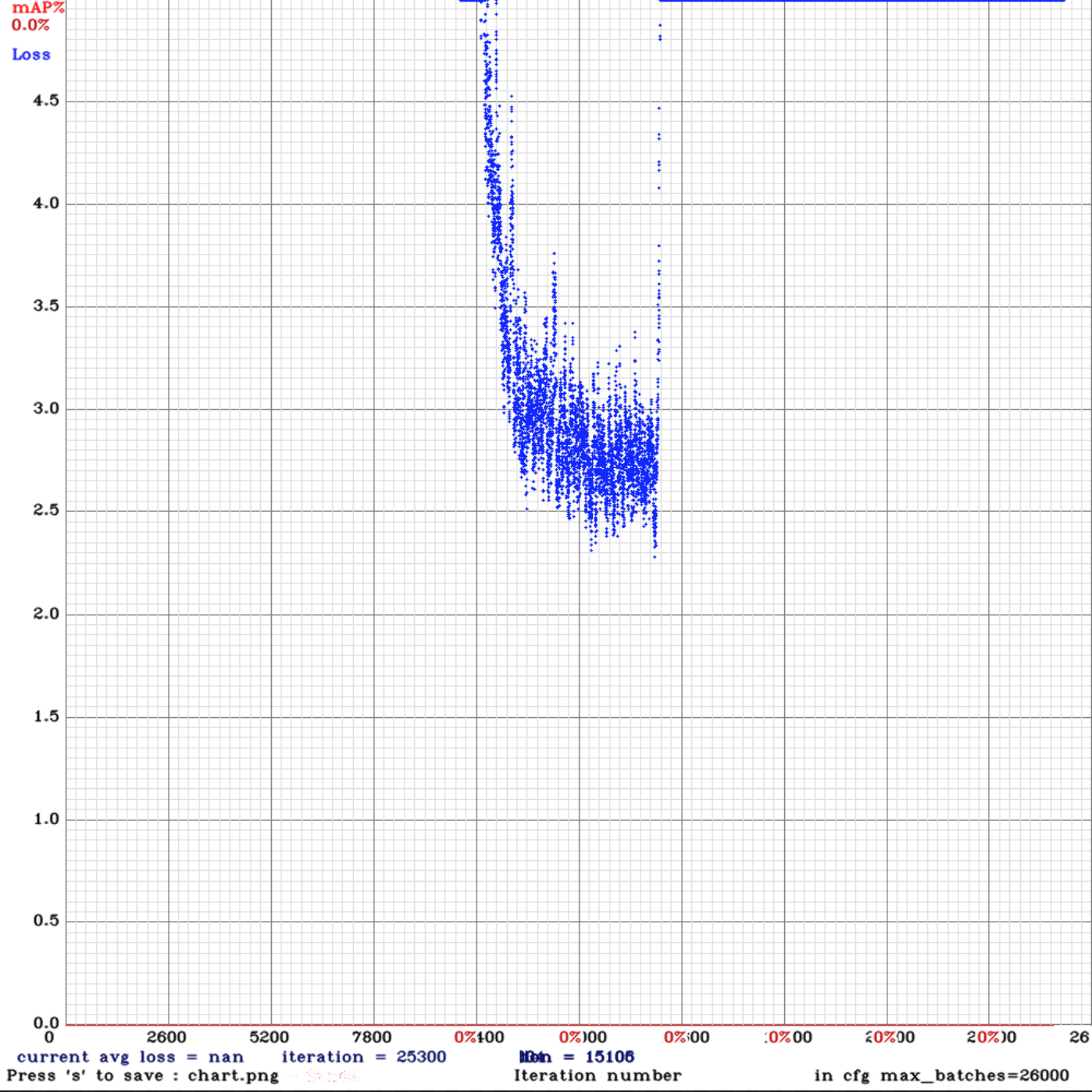
This is the command I used for training:
./darknet detector train tldcl.data yolo_v3_tiny_pan_lstm.cfg yolo_v3_tiny_pan_lstm_last.weights -dont_show -mjpeg_port 8090 -map
Keeping in mind that the testing and training sets are correct as they are working using the normal yolov3.cfg file and are achieving 60+% mAP.
The training set consists of 12 video sequences averaging 442 frames for each. (Bosch Small Traffic Light Dataset)
Do you know what could possibly cause this?
YouthamJoseph
on 19 Jun 2019
@YouthamJoseph Hi,
What pre-trained weights did you use initially, is it yolov3-tiny.conv.14? As described here: https://github.com/AlexeyAB/darknet/issues/3114#issuecomment-494154586
Try to set state_constrain=16 for each [conv_lstm] layer, set sequential_subdivisions=8, set sgdr_cycle=10000 and start training from the begining.
AlexeyAB
on 19 Jun 2019
No, I realized that I should've used this.
Thank you for pointing out what I have been missing.
Do you have a full version of this yolo_v3_tiny_pan_lstm.cfg yet?
YouthamJoseph
on 19 Jun 2019
Accordingly this issues https://github.com/AlexeyAB/darknet/issues/3426 I trained new model using yolo_v3_spp_pan.cfg with darknet53.conv.74.
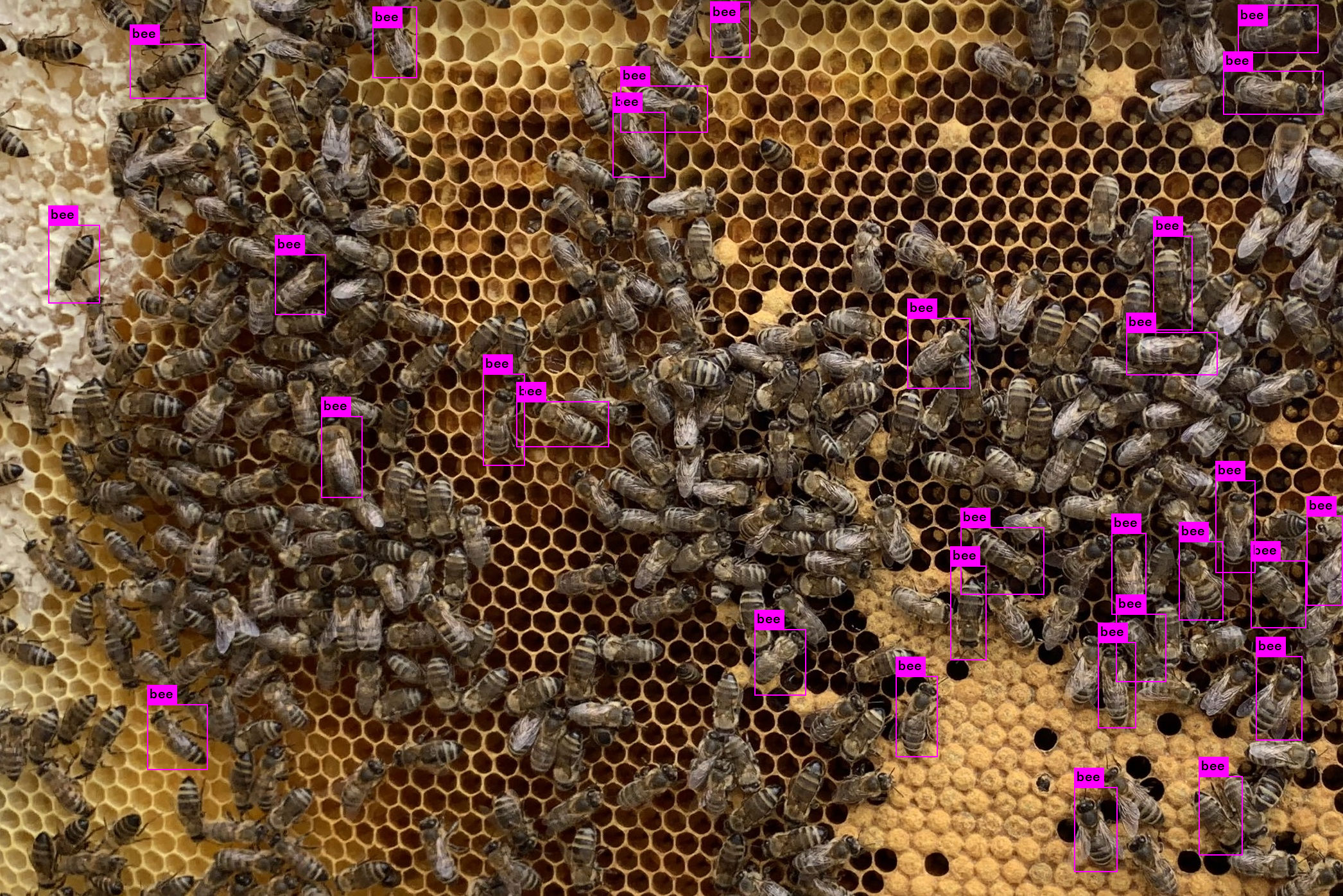
After training I got 71%mAP and compare results with my standart yolov3.cfg with 59%mAP. And result with spp_pan is worse then standart yolo3 config. The dataset is the same.
For exemple
count = 68 objects at
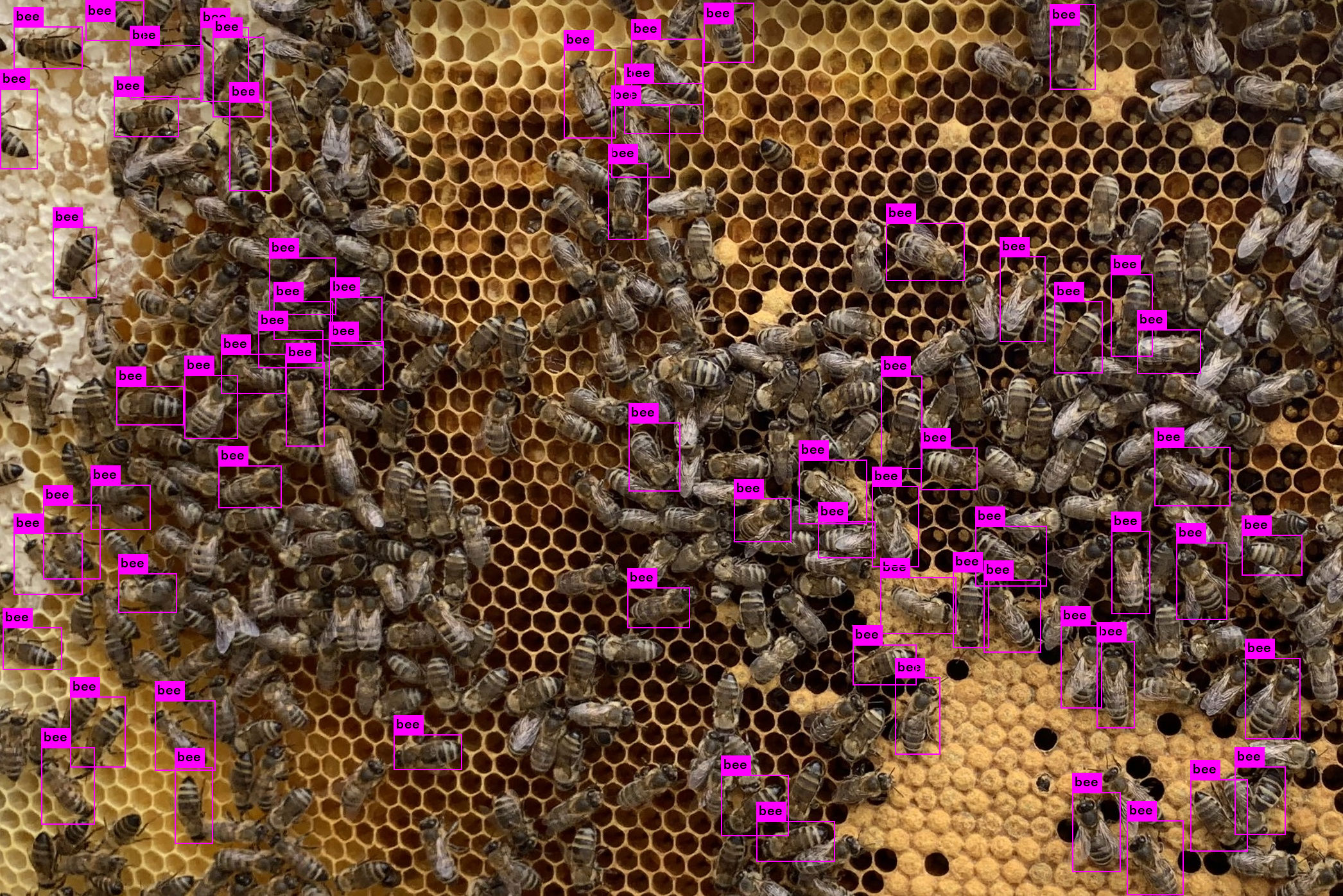
and 31 objects at
 Lepiloff
on 21 Jun 2019
Lepiloff
on 21 Jun 2019
@Lepiloff
After training I got 71%mAP and compare results with my standart yolov3.cfg with 59%mAP. And result with spp_pan is worse then standart yolo3 config.
"result with spp_pan is worse then standart yolo3" - what do you mean? As I see spp_pan gives better mAP than standard yolo3.
It seems that your training dataset is very different from test-set. Try to run detection with flag -thresh 0.1
AlexeyAB
on 21 Jun 2019
I mean what count of objects lower despite highest mAp. If dataset the same, shouldn't there be better results with 71%? I tried to do with trash = 0.1 and of course the results got better.
It seems that your training dataset is very different from test-set
Now I think it is so. To improve accuracy, I will add new images
Lepiloff
on 21 Jun 2019
@Lepiloff Did u use the test dataset during mAP calculation? Or same for training and test? (valid = train.txt)?
dreambit
on 21 Jun 2019
@Lepiloff
If dataset the same, shouldn't there be better results with 71%?
You got better result with mAP=71%. (better ratio of TP, FP and FN).
Now you just should select optimal TP and FP by changing -thresh 0.2 ... 0.05
AlexeyAB
on 21 Jun 2019
Accordingly this issues #3426 I trained new model using
yolo_v3_spp_pan.cfgwithdarknet53.conv.74.
After training I got 71%mAP and compare results with my standart yolov3.cfg with 59%mAP. And result with spp_pan is worse then standart yolo3 config. The dataset is the same.
For exemple
count = 68 objects at
and 31 objects at
Rotation will drastically improve accuracy in this particular context.
I suggest we train and test on voc, kitti or mscoco datasets.
 mdv3101
on 21 Jun 2019
mdv3101
on 21 Jun 2019
Hi, I have some results to share. I trained four different networks on the same very large, challenging, self-driving car dataset. The dataset was made up of 9:16 images with 8 classes: person, car, truck, traffic light, cyclist/motorcyclist, van, bus, dontcare. I trained using mixed precision on a 2080Ti.
I used the .cfg files as provided above - the only edits I made were to recalculate anchors and filters and to set width=800 height=448.
Yolo-v3-spp
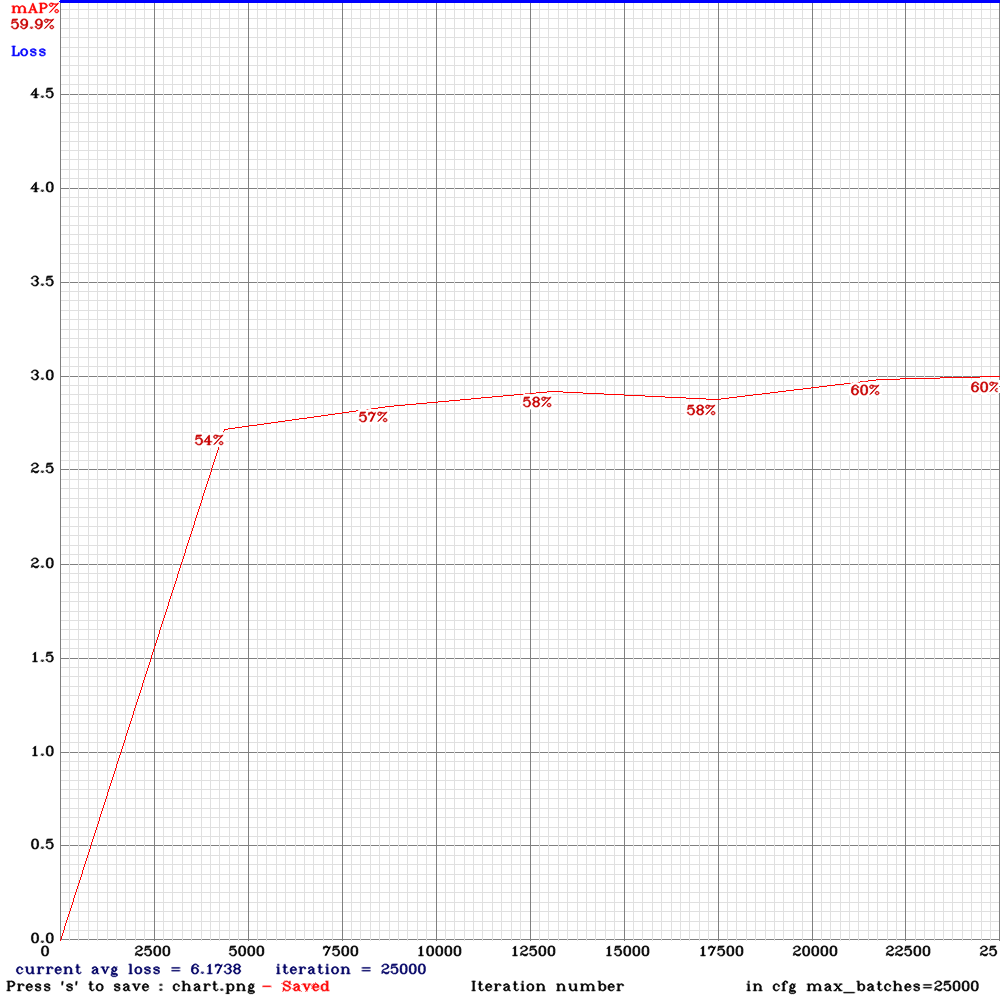
Yolo-v3-spp (with mixup=1)
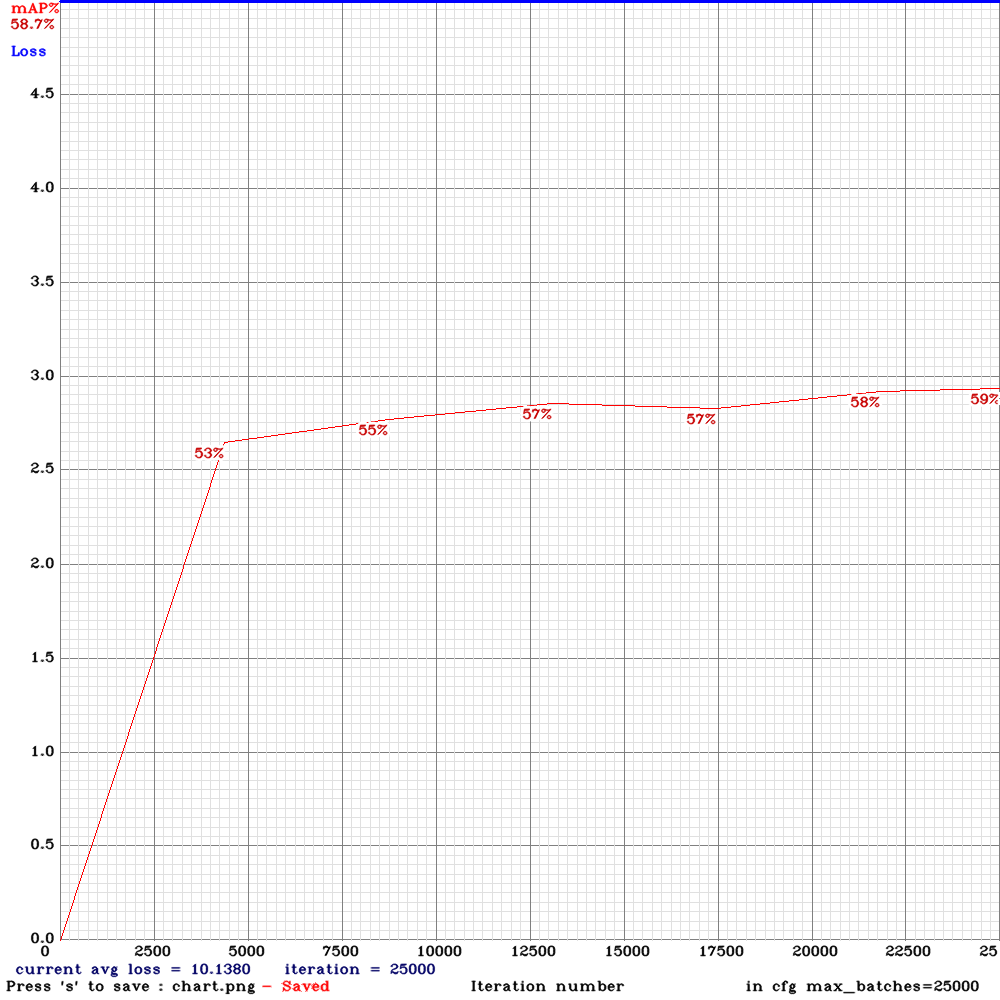
Yolo-v3-tiny-pan-mixup
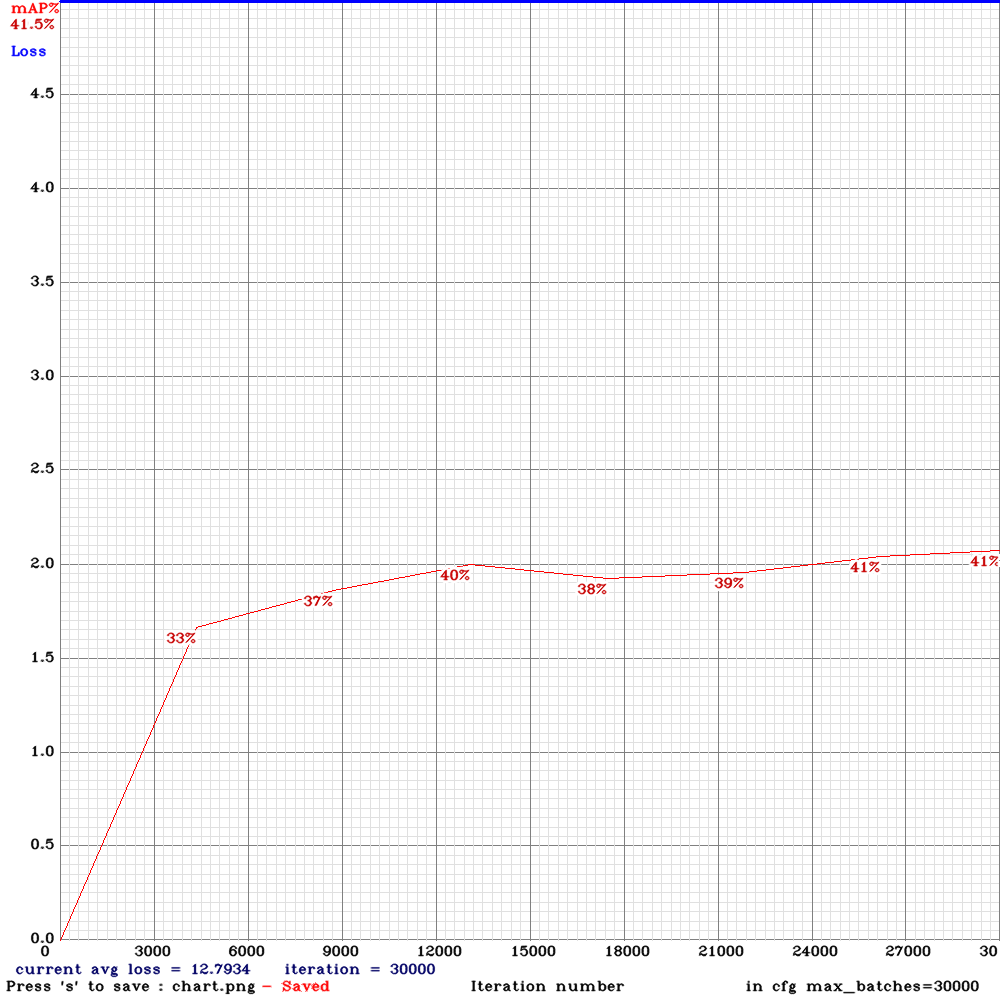
yolov3-pan-scale
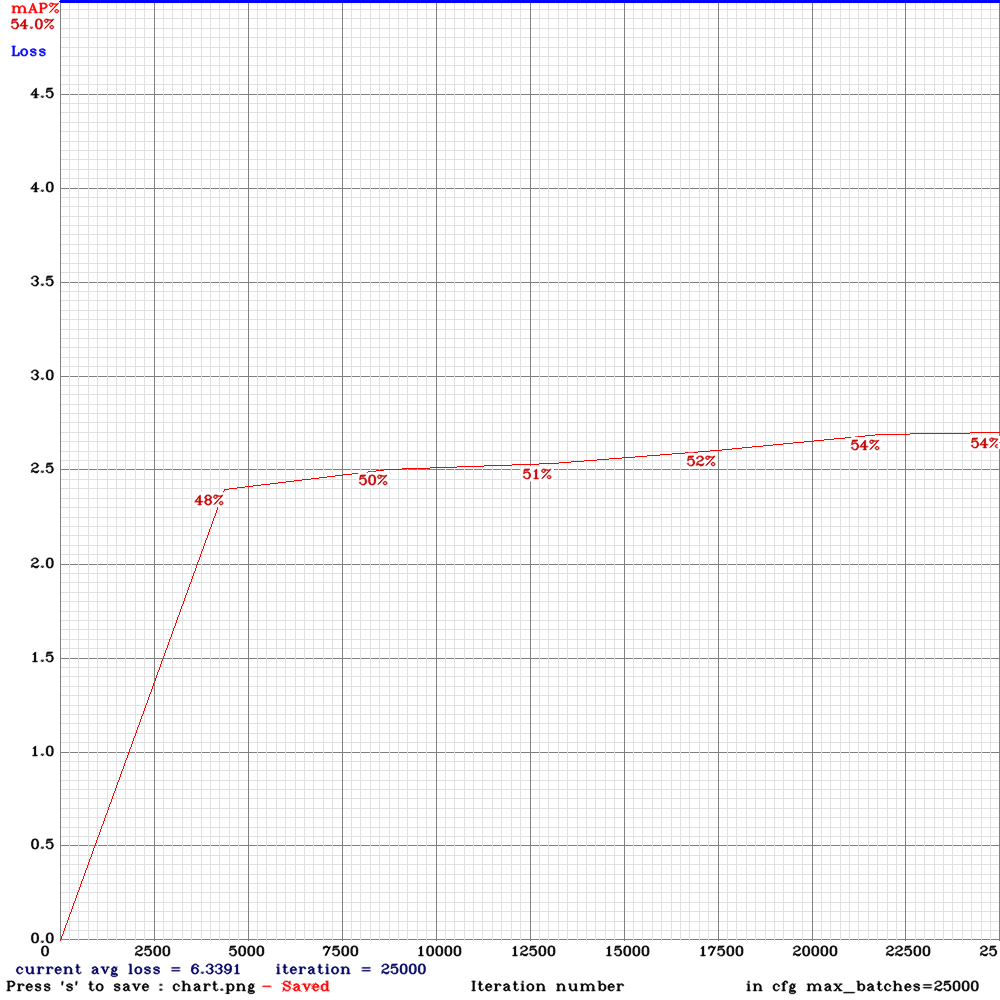
I salute @AlexeyAB experimentation and look forward to trying new versions of the experimental architectures - unfortunately in my use-case, none of them were an improvement over the baseline yolov3-spp
LukeAI
on 21 Jun 2019
For some reason - Loss never gets down below 6 in any of my trainings - I think it might be because the dataset is quite challenging - many obfuscated instances and very poorly illuminated images. Would be interested if anybody has any thoughts on this?
LukeAI
on 21 Jun 2019
@LukeAI Thanks!
- Can you share all your cfg-files?
- Did you use KITTI-dataset?
AlexeyAB
on 21 Jun 2019
For this particular experiment, I used the Berkley Deep Drive Dataset but merged three or four of their classes into 'dontcare'
yolo_v3_spp.cfg.txt
yolo_v3_spp_pan_scale.cfg.txt
yolo_v3_tiny_pan_mixup.cfg.txt
LukeAI
on 21 Jun 2019
Do you have any suggestions of config options that may improve AP? The objects will always be the same way up - no upside down trucks etc. and they exist in a great diversity of lighting conditions - bright sun and night time with artificial lighting. Also a fairly high diversity of scales - people will be in the distance and also very close.
LukeAI
on 21 Jun 2019
@LukeAI
I think you should use default anchors in all models.
On the one hand, anchors should be placed on correspond layers.
On the other hand, there should be enough number of anchors for each layer, not less than initially.
Also should be calculated statistic, how many objects are of each size, and how close objects (with this size) are to each other to decide how many anchors are required in each layer. Since this algorithms aren't implemented, its better to use default anchors.
Also for correct comparison of model, I think should be used the same batch and subdivisions. Only if you want just to get higher mAP rather than comparison of models, and don't have enough GPU-VRAM for low subdivisions for some models, then you can use different subdivisions.
AlexeyAB
on 21 Jun 2019
@AlexeyAB Hi
My final results:
spp on 2070 with CUDNN_HALF
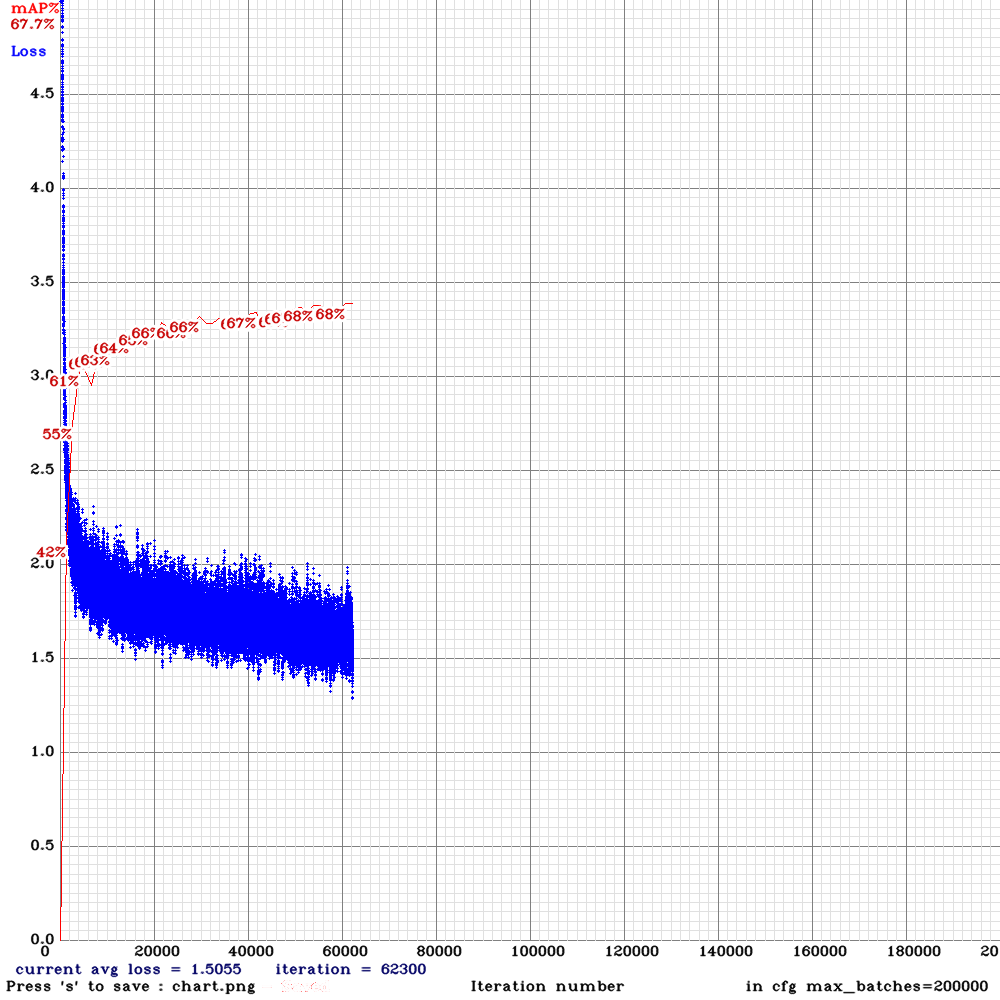
spp-pan on 1080ti
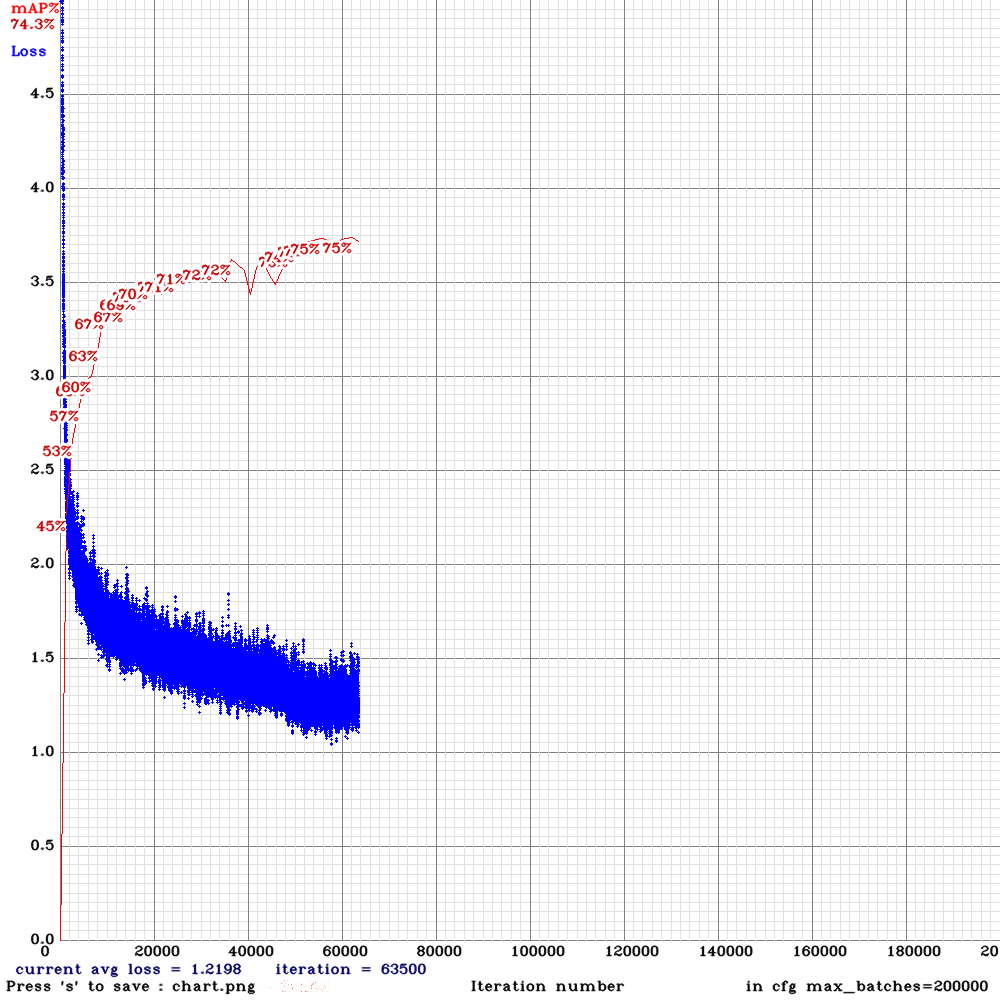
spp on 1080ti
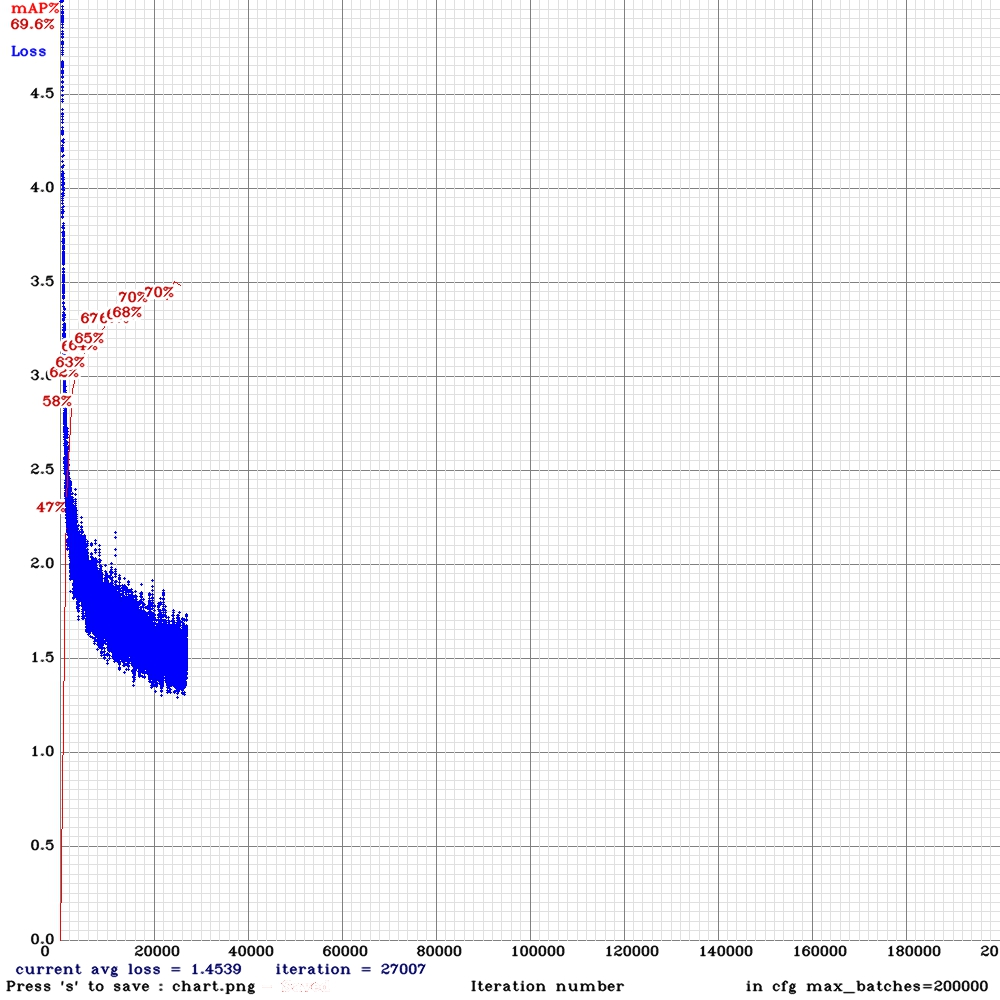
It seems like low mAP on spp was because of CUDNN_HALF right? not subdivision?
Since spp-pan does not give higher mAP in my case, i going to run spp with subdivision=4 on azure p100 with 16gb memory
dreambit
on 22 Jun 2019
@LukeAI
It seems like low mAP on spp was because of CUDNN_HALF right? not subdivision?
It seems - yes.
Since spp-pan does not give higher mAP in my case, i going to run spp with subdivision=4 on azure p100 with 16gb memory
Do you want to increase mAP of SPP model more? To get mAP higher than 75% with SPP.
So may be I will create maxpool-depth layer for PAN.
AlexeyAB
on 22 Jun 2019
Do you want to increase mAP of SPP model more? To get mAP higher than 75% with SPP.
yes, i hope(with subdivision=4 and random=0, 416x416)
So may be I will create maxpool-depth layer for PAN.
That would be great. i would run it on the same machine and share results.
dreambit
on 22 Jun 2019
@AlexeyAB
It seems like low mAP on spp was because of CUDNN_HALF right? not subdivision?
It seems - yes.
Does it also affect inference accuracy? Or just training?
dreambit
on 23 Jun 2019
@dreambit Only training.
AlexeyAB
on 23 Jun 2019
Would I get better results if I trained without CUDNN_HALF but still ran inference with CUDNN_HALF for the speed?
LukeAI
on 24 Jun 2019
I'll try yolov3-spp again with the default anchors - will they likely still perform better even though I am using 9:16 images?
LukeAI
on 24 Jun 2019
@LukeAI
Would I get better results if I trained without CUDNN_HALF but still ran inference with CUDNN_HALF for the speed?
Yes.
In the last commit I temporary disabled CUDNN_HALF for training, so you can just download the latest version of darknet.
I'll try yolov3-spp again with the default anchors - will they likely still perform better even though I am using 9:16 images?
May be yes.
AlexeyAB
on 24 Jun 2019
Does anyone know if there is a way to get the track_id of each detected object from the lstm layers ?
Just looked into the json stream and it seems not to be there...
 alexanderfrey
on 26 Jun 2019
alexanderfrey
on 26 Jun 2019
just to report back - I did indeed get better results with the original anchors, even though i was using 9:16 - but there must be some better way to calculate optimal anchors for 9:16 images?
LukeAI
on 29 Jun 2019
@NickiBD @LukeAI @dreambit @i-chaochen @passion3394
I implemented PAN2 and added yolo_v3_tiny_pan2.cfg.txt with PAN-block that is much more similar to original PAN network. It may be faster and more accurate.
AlexeyAB
on 30 Jun 2019
@AlexeyAB
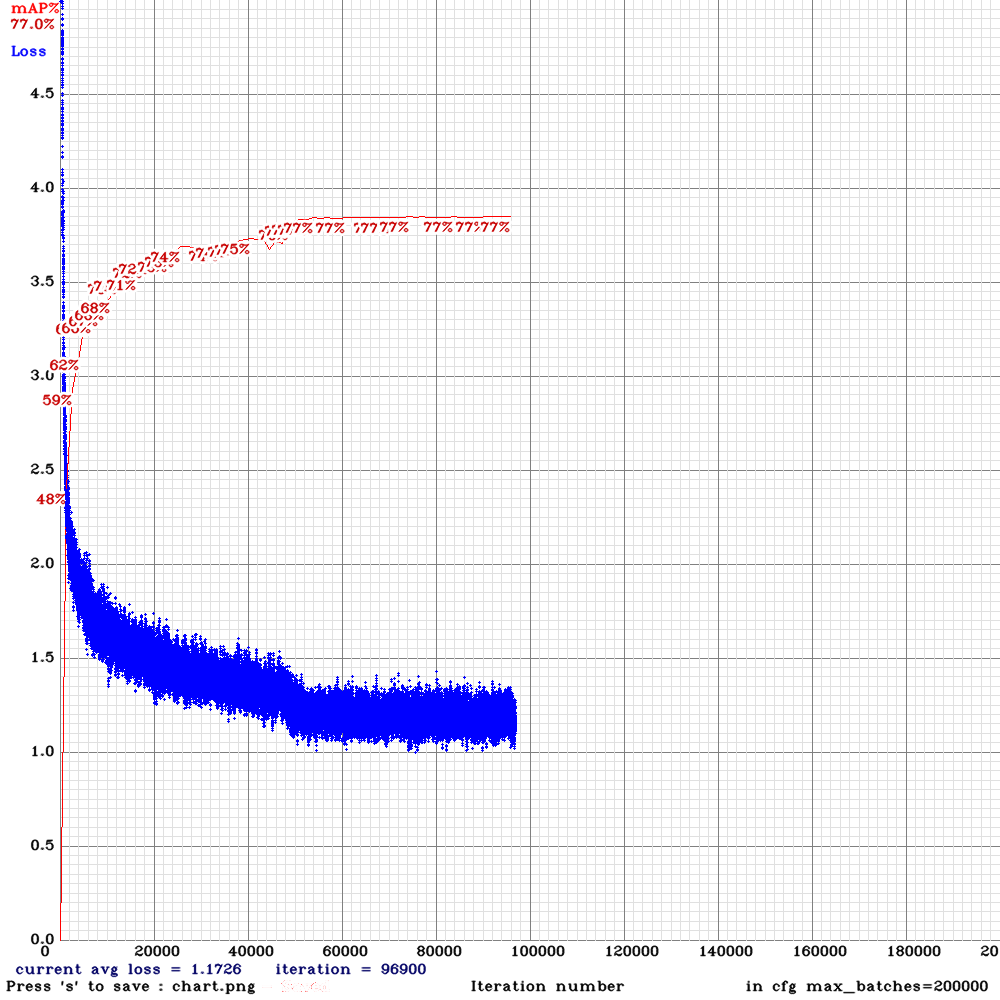
Do you want to increase mAP of SPP model more? To get mAP higher than 75% with SPP.
Results:
spp with subdivision = 32, random=1
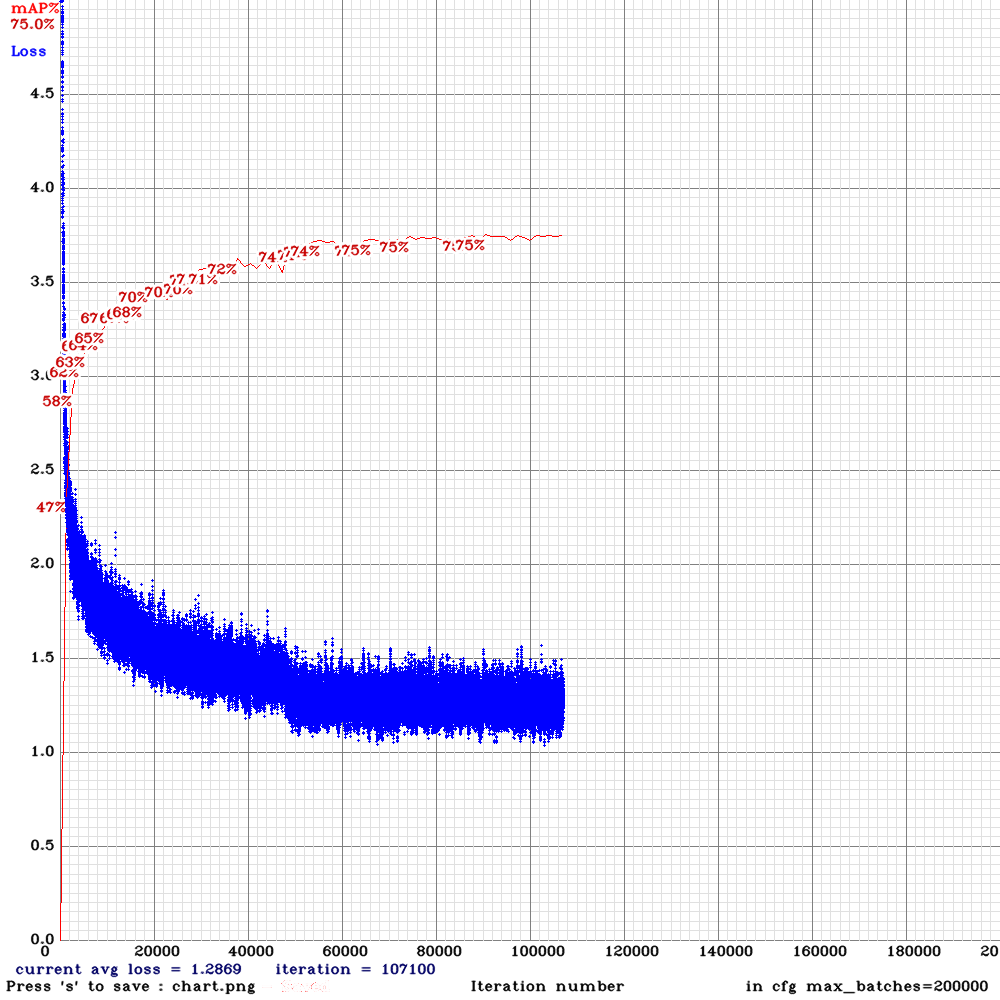
spp with subdivision = 4, random=0
dreambit
on 1 Jul 2019
For reference, yolov3_spp.png
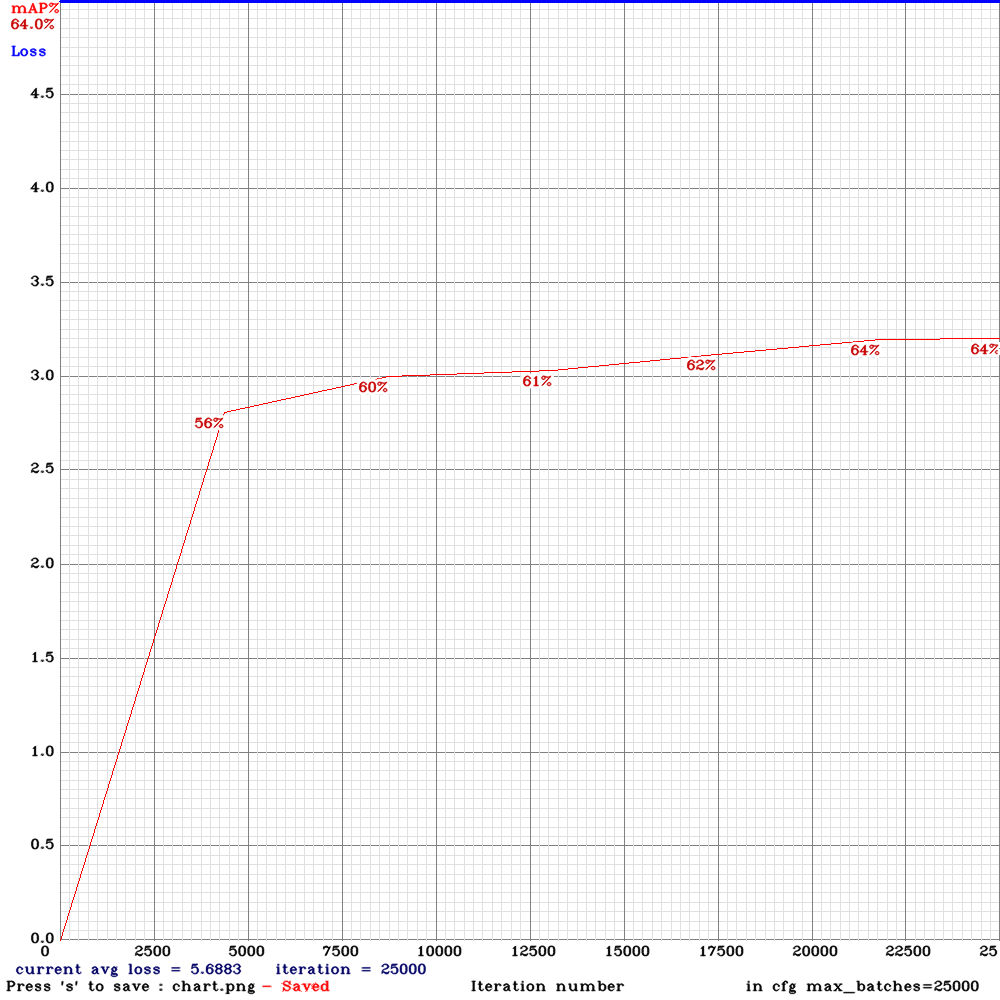
yolo_v3_tiny_pan2
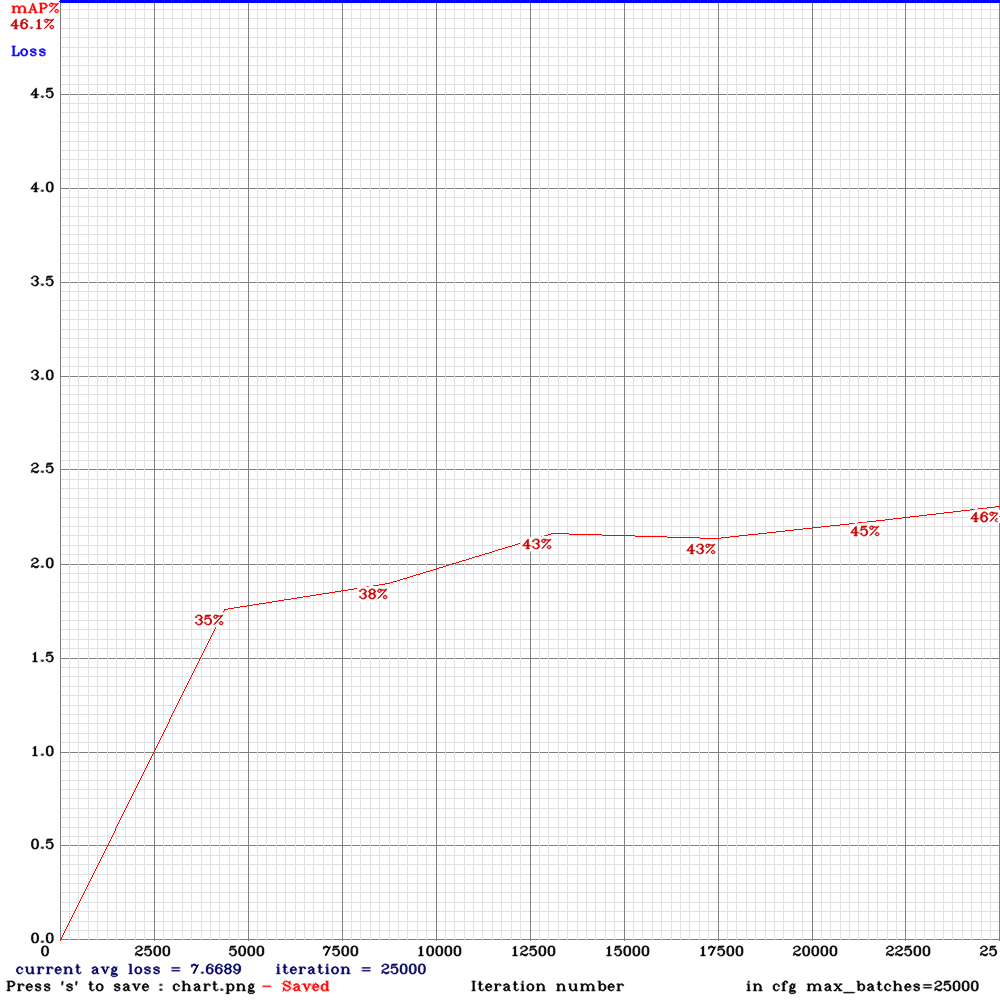
yolo_v3_tiny_pan2.cfg.txt
LukeAI
on 2 Jul 2019
@LukeAI Yes, yolov3_spp should be more accurate than yolo_v3_tiny_pan2.cfg.txt, since yolo_v3_tiny_pan2.cfg.txt is a tiny model.
You should compare yolo_v3_tiny_pan2.cfg.txt with yolo_v3_tiny_pan.cfg.txt or yolov3-tiny_3l.
AlexeyAB
on 2 Jul 2019
Yes I realise that! The other models trained with comparable config are earlier in this thread although those were trained with mixed precision
LukeAI
on 2 Jul 2019
@LukeAI
So as I see new PAN2 yolo_v3_tiny_pan2.cfg.txt (46% mAP) more accurate than old PAN Yolo-v3-tiny-pan-mixup (41% mAP): https://github.com/AlexeyAB/darknet/issues/3114#issuecomment-504367455
AlexeyAB
on 2 Jul 2019
@AlexeyAB Hi ,
As you mentioned, yolo_v3_tiny_pan2.cfg.txt is (~88% mAP ) with my data set which is more accurate than yolo_v3_tiny_pan1.cfg.txt (~78%) and the training is faster.
NickiBD
on 2 Jul 2019
I implemented PAN2 and added yolo_v3_tiny_pan2.cfg.txt with PAN-block that is much more similar to original PAN network. It may be faster and more accurate.
@AlexeyAB Thanks.
Do you have a config file for not tiny model? (like spp + pan2)
dreambit
on 2 Jul 2019
@dreambit Not yet, but I will add when I will have a time.
AlexeyAB
on 3 Jul 2019
@AlexeyAB
How to train with yolo_v3_spp_pan_scale.cfg, Use which .conv file ?
Thanks!
 toplinuxsir
on 4 Jul 2019
toplinuxsir
on 4 Jul 2019
@AlexeyAB If you have time, would you consider releasing a yolo_v3_tiny_pan2_lstm model? Both your results and mine show superiority in both accuracy and inference time of the pan2 model over pan1.
LukeAI
on 7 Jul 2019
Hi, in my case i modified original yolo_v3_spp_pan_scale.cfg decreasing saturation to 0.5 (from 1.0), changed learning rate to 0.0001 (from 0.001) and switching to SGDR policy and i managed to go from ~70% to ~93% in small objects detection without overfitting.
Just letting this here in case someone want to test it.
 keko950
on 8 Jul 2019
keko950
on 8 Jul 2019
@AlexeyAB
Can you please help and explain the following terms in layman language:
SPP
PAN
PAN2
LSTM
Mixup
Thanks!
 deimsdeutsch
on 8 Jul 2019
deimsdeutsch
on 8 Jul 2019
@AlexeyAB
Can you please help and explain the following terms in layman language:SPP
PAN
PAN2
LSTM
MixupThanks!
Dude, have you read this?
https://github.com/AlexeyAB/darknet/issues/3114#issuecomment-494148968
i-chaochen
on 8 Jul 2019
Hi, in my case i modified original yolo_v3_spp_pan_scale.cfg decreasing saturation to 0.5 (from 1.0), changed learning rate to 0.0001 (from 0.001) and switching to SGDR policy and i managed to go from ~70% to ~93% in small objects detection without overfitting.
Just letting this here in case someone want to test it.
Please could you upload your .cfg ? I'd like to try :)
What dataset was it?
LukeAI
on 9 Jul 2019
Hi, in my case i modified original yolo_v3_spp_pan_scale.cfg decreasing saturation to 0.5 (from 1.0), changed learning rate to 0.0001 (from 0.001) and switching to SGDR policy and i managed to go from ~70% to ~93% in small objects detection without overfitting.
Just letting this here in case someone want to test it.Please could you upload your .cfg ? I'd like to try :)
What dataset was it?
Sure, there it is. https://pastebin.com/5g2gGjwx
It was tested in my own custom dataset, focused on detecting small objects (smaller than 32x32 in many cases).
keko950
on 9 Jul 2019
@keko950 What initial weights file did you use for the training ? Thanks !
alexanderfrey
on 9 Jul 2019
@keko950 What initial weights file did you use for the training ? Thanks !
Hi, i used darknet53.conv.74
Also, if you are going to try this, you can try to start your train with a higher learning rate and every 10k iter lower it a bit, like 5x or 10x times, in some cases, it helps.
keko950
on 9 Jul 2019
@keko950 What initial weights file did you use for the training ? Thanks !
Hi, i used darknet53.conv.74
Also, if you are going to try this, you can try to start your train with a higher learning rate and every 10k iter lower it a bit, like 5x or 10x times, in some cases, it helps.
Thanks @keko950 . Could it be that you got the indices of the newly created anchors wrong in your cfg ?The third yolo layer should be the last one in your cfg file and not vice versa. This is how the vanilla cfg files are doing it imho...
What do you think ?
Best Alexander
alexanderfrey
on 9 Jul 2019
@keko950 Sorry forget what I wrote. Apparently the order was changed in the new cfg files...
alexanderfrey
on 9 Jul 2019
May be of interest:
tiny-yolo-3l
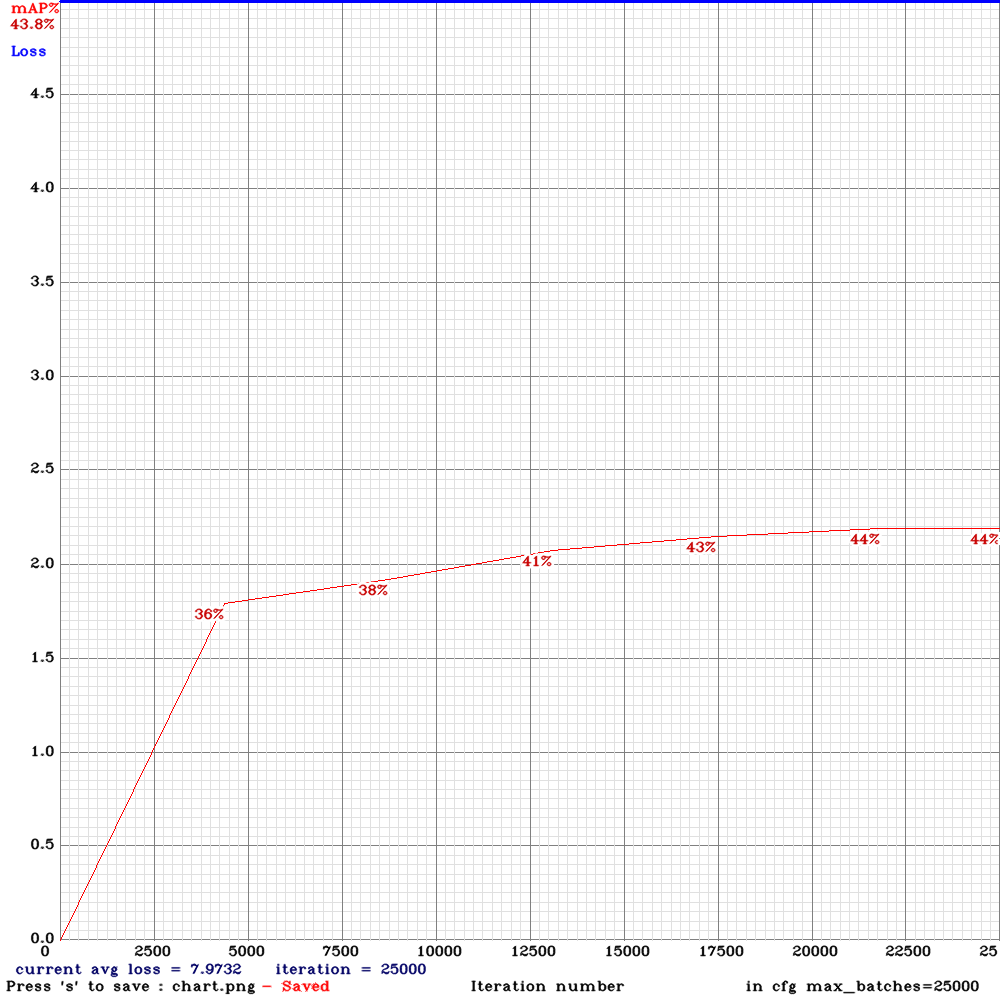
tiny-pan2
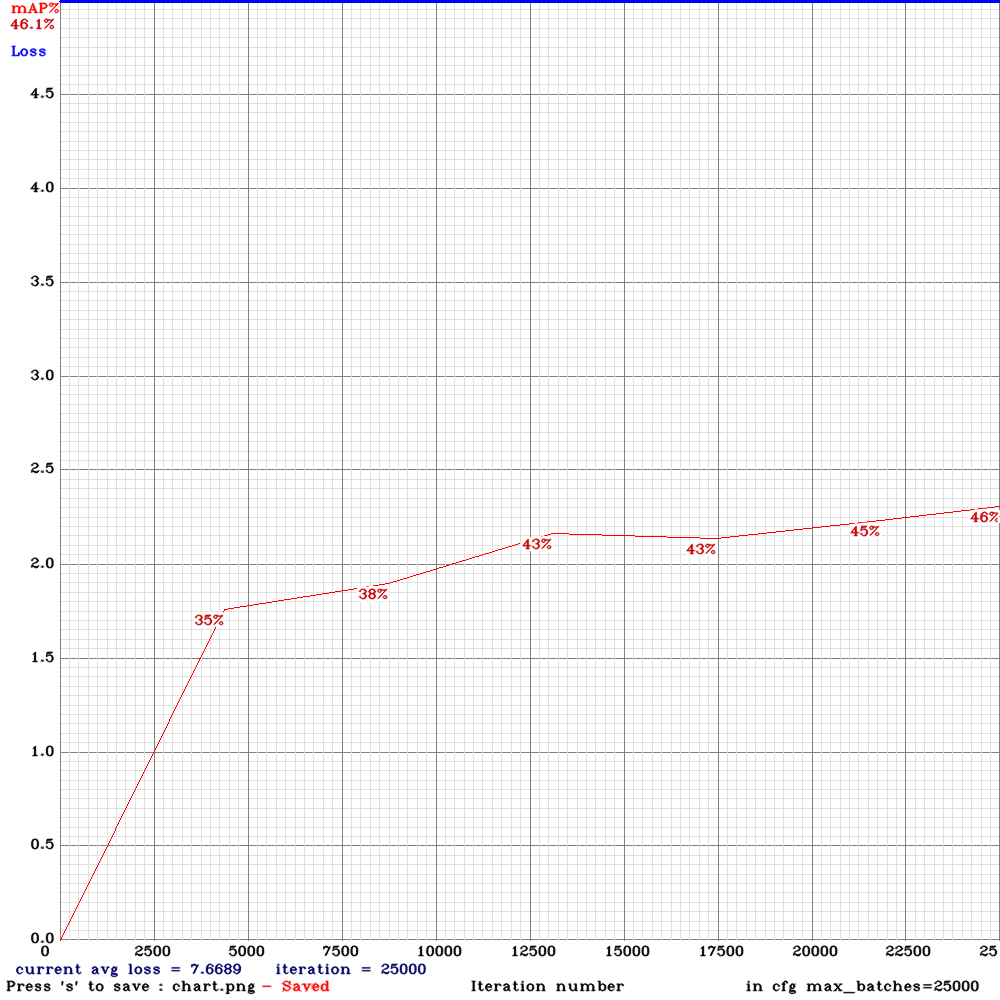
tiny-pan2-swish (same as tiny-pan2 but replaced all leaky relu with swish - had to train for a lot longer)
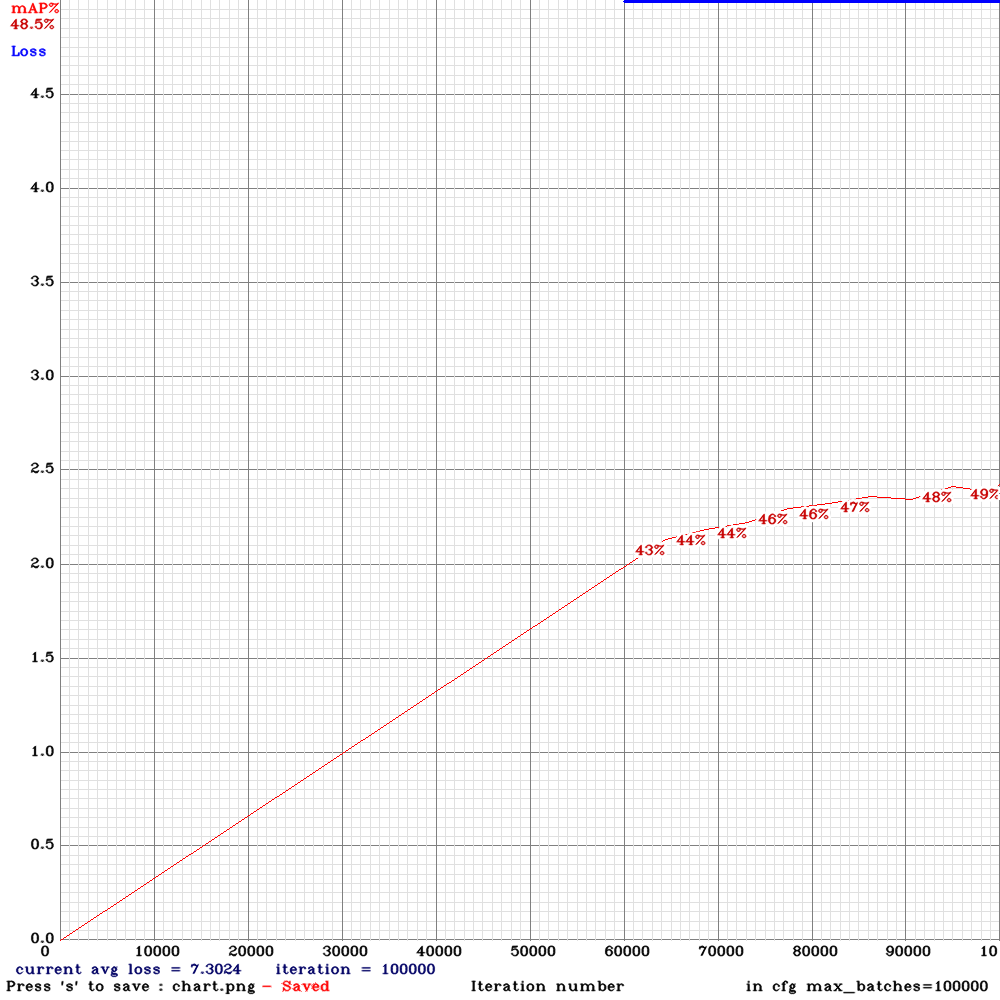
LukeAI
on 9 Jul 2019
@AlexeyAB
I don't want to discourage anyone here but the accuracy is still directly proportional to the number BFlops. We should focus on Pruning, it is a better return on the time spend.
@LukeAI
Can you add a yolov3_tiny_mixup chart as well ..? I think it will increase accuracy without increasing the number of BFlops.
 jamessmith90
on 10 Jul 2019
jamessmith90
on 10 Jul 2019
@jamessmith90 I have tried a few runs with mixup=1 and found that it hurt accuracy in all cases. see some results here: https://github.com/AlexeyAB/darknet/issues/3272
Do you have any results or citations on pruning? It's interesting but I thought that it was more relevant to architectures with lots of fully connected layers and less so with fully convolutional networks.
LukeAI
on 10 Jul 2019
pan2-swish looks like an interesting point in the quality/FPS trade-off. I want to try pretraining on imagenet with swish activations and then retraining tiny-pan2-swish from that. Think it'd probably break through 50% with an inference time of just 7ms.
LukeAI
on 10 Jul 2019
@LukeAI
Does adding swish activation to yolov3_tiny model makes it slow ?
@AlexeyAB
If the end goal here is to do introduce more efficient models then yolov3_tiny_mobilenetV2 and yolov3_tiny_shufflenetV2 should also be added.
But pruning should get higher priority.
jamessmith90
on 10 Jul 2019
@jamessmith90
Pruning does not always give performance gains on the GPU - since sparse-GEMM sparse-dense is slower than GEMM dense-dense: https://github.com/tensorflow/tensorflow/issues/5193#issuecomment-350989310
So there is required block-pruning: https://openai.com/blog/block-sparse-gpu-kernels/ implementation on TensorFlow: https://github.com/openai/blocksparse (Theory https://openreview.net/pdf?id=rJl-b3RcF7 ) but may be its much better to use XNOR-nets than Pruning or Depthwise?
There is suggestion https://github.com/AlexeyAB/darknet/issues/3568 but there is very few detailts and it is tested only on HAND-dataset http://www.robots.ox.ac.uk/~vgg/data/hands/downloads/hand_dataset.tar.gz
As you can see, there are several models with higher mAP and lower BFLOPS and inference time, than in yolov3 / tiny models, so mAP isn't proportional to BFLOPS: https://github.com/AlexeyAB/darknet/issues/3114#issuecomment-494148968
Even BFLOPS and inference time are not always proportional.
There are implemented EfficientNet B0-B7 models with the best ratio Accuracy/BFLOPS, which better than any existing models (MobilenetV2/v3, ShufflenetV2...) at the moment: https://github.com/AlexeyAB/darknet/issues/3380
- These models are optimal for Smartphones and TPUs ($1M)
- But all these models EfficientNet/Mobilenet/Shufflenet are not with the best ratio Accuracy/Inference_time on GPU, because depth-wise convolutional is slow on cuDNN/GPU.
AlexeyAB
on 10 Jul 2019
@AlexeyAB
Can we add gpu memory and cuda cores usage for a fixed resolution of a particular GPU for comparison ?
Checkout the faster implementation from tensorflow:
https://github.com/tensorflow/tensorflow/blob/master/tensorflow/core/kernels/depthwise_conv_op_gpu.h
jamessmith90
on 10 Jul 2019
@AlexeyAB
Why anchor indeces are inputted other way around in yolo_v3_spp_pan_scale.cfg? What I mean is in yolo_v3_spp_pan_scale.cfg first yolo layer takes anchors less than 30x30, second less than 60x60 and the third one takes the rest.
Also, I calculated anchors on my dataset, but there is a big imbalance (there is only 1 anchor greater than 60x60). Is it a good idea to:
-slightly modify generated anchors manually to fix the imbalance?
-calculate anchors for larger width and hight than the actual width and height used in cfg file to avoid imbalance?
Or would you suggest to stick with original anchor values?
Thanks.
 khasmamad99
on 11 Jul 2019
khasmamad99
on 11 Jul 2019
@AlexeyAB
Please add FPS in the table.
 suman-19
on 11 Jul 2019
suman-19
on 11 Jul 2019
@suman-19 FPS = 1000 / inference_time, there is already inference_time
AlexeyAB
on 11 Jul 2019
@AlexeyAB
I am looking for the maximum FPS metric that a model can achieve in terms of handling CCTV camera streams. As per my tests i was able to manage 7 streams of yolov3-tiny on a 1080 ti running at 25 fps.
A metric like that would be very good to measure scalability.
Keep up the good work. Your doing an amazing job.
suman-19
on 11 Jul 2019
@AlexeyAB , Hi
Have few questions on yolo-lstm if you could help answer -
- Is there any latency metric tracked as well for yolov3 (with and without lstm) i.e., the time taken for the network to infer on the given image
- How does the lstm network inside yolo know which is the start frame of sequence and the end frame of sequence if train.txt contains all sequences which are approximately 200? Do we need to specify the number of frames in each sequence for the lstm to be read from the train.txt? It cannot be approximate 200 frames...right?
Thanks!
kmsravindra
on 25 Jul 2019
@kmsravindra Hi,
https://github.com/AlexeyAB/darknet/issues/3114#issuecomment-494148968
yolo_v3_spp.cfg.txt - 23.5 ms
yolo_v3_spp_lstm.cfg.txt - 26.0 ms
Initially Yolo doesn't know where is start and end of sequence. But Yolo learns to know it during training - if the image changes almost completely and all objects disappear, then this is the beginning of a new sequence.
Yolo studies it automatically.
AlexeyAB
on 25 Jul 2019
Thanks @AlexeyAB.
Initially Yolo doesn't know where is start and end of sequence. But Yolo learns to know it during training - if the image changes almost completely and all objects disappear, then this is the beginning of a new sequence.
Regarding the above comment, then I am wondering, perhaps is it preferred to have sequences that look as much different as possible from each other so that the network could possibly deliver good results...
Assuming we can also include "no object" frames in the same sequence with blank annotation txt files as before. For example when I have a moving camera, the camera might move out and come back in the same sequence (when this happens the objects in the scene temporarily go out of view for a brief while) ...Will that be ok to include such frames in the sequence?
Also I have some frames in the sequences where the camera motion might cause big motion blur on the image ( with no object being visible for couple of frames in the sequence). Will it be ok to include such frames as well in the sequence as no-object frames with blank annotation txt files?
So by including no object frames, I am assuming the yolo_lstm network would be able to learn to ignore images where the frames contain no objects ? OR is yolo_lstm purely used for object tracking where the object has to be continuously be visible (or occluded) in all the frames of the sequence?
Thanks!
kmsravindra
on 25 Jul 2019
@kmsravindra
It is not necessary. In any cases Yolo will understand where is end and start of sequence, I think.
Do you want to have 2 sequences one with objects and another without? Yes, I think it is a good idea.
Mark objects as you want to detect them. Usually I mark even very blurred objects.
You can use yolo_lstm in any cases as you want. Yolo_lstm will understand what do you want. I usually mark blurred and occluded objects.
AlexeyAB
on 25 Jul 2019
@AlexeyAB
I have trained tiny-yolov3 network on lots of uav images. How can i do transfer learning or fine tuning with that weights on yolo_v3_tiny_pan_lstm.cfg.txt?
Another question is i have tried what you say above for training this network and got so many nans on regions 53 and 56.But region 46 usually fine ,what should i do? Can you help me?
 brkyc3
on 26 Jul 2019
brkyc3
on 26 Jul 2019
@brkyc3 Do
./darknet partial cfg/yolov3-tiny.cfg yolov3-tiny.weights yolov3-tiny.conv.14 14
and use yolov3-tiny.conv.14
Another question is i have tried what you say above for training this network and got so many
nans on regions 53 and 56.But region 46 usually fine ,what should i do? Can you help me?
Usually this is normal. You shouldn't do anything.
It means that many objects do not correspond to these yolo layers.
AlexeyAB
on 26 Jul 2019
Hi @AlexeyAB,
Thank you for this great work. I trained yolo_v3_spp_lstm on video frames containing only humans and terrain areas. I stuck with the 80/20 ratio for training and obtained mAP 94%, which is good enough. But when I try to use ./darknet detector demo command on another 2 mins video, it processes the video in 2 seconds. How can I force the model to run on each frame of the video? Shortly, I'd like the demo command to output a two-minute video with predictions.
TIA,
 enesozi
on 27 Jul 2019
enesozi
on 27 Jul 2019
@enesozi Hi,
Run ./darknet detector demo ... -out_filename res.avi
then open res.avi file in any mdeiaplayer.
Or use for detection from video Camera.
AlexeyAB
on 27 Jul 2019
I can already save the output video. The problem is that output video duration is 2 seconds while the input video duration is 2 minutes.
enesozi
on 27 Jul 2019
 Leo16112
on 28 Jul 2019
Leo16112
on 28 Jul 2019
Can the LSTM be trained on static images as well as sequences? For example, can you train on COCO alongside your own sequences for more data? Or should we only train on sequences?
 1yian
on 28 Jul 2019
1yian
on 28 Jul 2019
@rybkaa I didn't try it. You can try.
AlexeyAB
on 28 Jul 2019
@AlexeyAB Is it possible to train static images on a non-LSTM model then initialize the non-LSTM weights on the LSTM model to then train the LSTM on video sequences?
1yian
on 28 Jul 2019
@AlexeyAB , Hi
What is the difference between the reorg3d layer in pan and the reorg layer in yolov2. Is there a mixup operation that can be directly enabled in the old yolov3-spp, by adding mixup=1?
 ou525
on 29 Jul 2019
ou525
on 29 Jul 2019
@ou525
reorg layer in yolov2 has a logical bug, reorg3d is a correct layer.
You can use mixup=1 in the [net] section in any detector.
AlexeyAB
on 29 Jul 2019
@AlexeyAB, can you provide a detailed description of the reorg3d layer?
ou525
on 30 Jul 2019
@AlexeyAB Hi ,
There are maxpool_depth= 1 and out_channels= 64 in YOLOtiny-PAN v2 configuration in [maxpool] header . I was wondering whether there are any equivalents in keras (Tensorflow) as I want to convert yolotiny-PAN to .h5 . I wanted to add them; however, I couldnot find anything useful. Do I need to implement them from scratch ? Could you please assist me with this as I really need to do this. I truly appreciate all your help .
NickiBD
on 30 Jul 2019
Lyft recently released a massive sequential annotated frames dataset. Might be useful to anybody experimenting with LSTM or video detectors.
LukeAI
on 31 Jul 2019
@NickiBD share it with us if you do so? :)
LukeAI
on 31 Jul 2019
Lyft recently released a massive sequential annotated frames dataset. Might be useful to anybody experimenting with LSTM or video detectors.
Hi @LukeAI,
Did you use the Lyft dataset with Yolo-LSTM? It seems they used a specific data format. I couldn't find a way to associate annotations with jpeg files. scene.json file points to lidar data. Moreover, annotations contain 3D bounding boxes.
enesozi
on 1 Aug 2019
@enesozi no, I didn't try it myself - I guess you would have to do the projections yourself - plz share if you do so!
LukeAI
on 1 Aug 2019
@AlexeyAB sorry for bothering you. The background: serval months ago, I use the yolov3-spp to train my custom dataset(about 39000 pics), and the mAP is about 96%, everything goes well. serval days ago, I try to use yolov3_pan_scale to train the same dataset, and the init model parameters are from the best yolov3-spp .weight file. But the training failed, I can post everything to help localize the problem. Please help, thanks.
passion3394
on 8 Aug 2019
I'm interested in using LSTM on high-end mobile devices, specifically the Jetson Xavier. From the article mentioned above, it says it achieves 70+ fps on a pixel 3. The Jetson Xavier is far better and I'm only able to achieve 26 fps. I am using yolo_v3_tiny_lstm.cfg on a very large sequence of 3 videos totaling 16.5K images.
Am I missing something here or is it that the new LSTM is still in its infancy and requires more work? Should it be expected to perform at 70+ fps?
 javier-box
on 16 Aug 2019
javier-box
on 16 Aug 2019
@javier-box It is implemented only for increasing mAP. The light-branch part for increasing FPS isn't implemented yet.
AlexeyAB
on 16 Aug 2019
@AlexeyAB
Got it. Looking forward to it!
Can't thank you enough for your contribution and hope to contribute to your effort as mine gets recognized.
javier-box
on 16 Aug 2019
I'm really looking forward to using the LSTM feature. I was just about to start trying to develop it myself, so it's great to see it being done by you.
I wanted to try it out by downloading a few of the cfg files and weights from the comment above. I am getting no objects detected at all, even when I set the threshold to 0.000001. An example of the command I am using is:
./darknet detector demo data/self_driving/self_driving.data data/LSTM/pan/yolo_v3_tiny_pan_lstm.cfg ~/Downloads/yolo_v3_tiny_pan_lstm_last.weights data/self_driving/self_driving_valid.avi -out_filename yolov3_pan.avi -thresh 0.000001
(I have modified the structure of the data folder a bit, and modified self_driving.data to match.)
Since you wrote "must be trained using frames from the video", I tried training the weights files, but darknet immediately saved a *_final.weights file and exited. That new weights file gave no detections as before. This is the command I used to try to train the network:
./darknet detector train data/self_driving/self_driving.data data/LSTM/pan2/yolo_v3_tiny_pan2.cfg.txt data/LSTM/pan2/yolov3-tiny_occlusion_track_last.weights
In case it makes a difference, I am testing things on a computer without a GPU. Once I am confident that everything is set up correctly, I will migrate it to a computer with a GPU.
I am still getting the expected results when I run ./darknet detector demo ... using cfg and weight files with no LSTM component.
I am using the latest version of the repo (4c315ea from Aug 9).
Besides that, I have a couple of quick questions
- why is the layer called ConvLSTM, rather than just LSTM? Is it because you use the convolution rather than the Hadamard product for the peephole connection?
- why do you limit yourself to
time_steps=3? If an object is occluded, it can easily be hidden for longer than three frames, so I would have thought that the LSTM should be trained to have a longer memory than that? If you really only want to cover 3 time_steps, you might get away with using a simpler RNN, since the gradient is unlikely to vanish.
 chrisrapson
on 20 Aug 2019
chrisrapson
on 20 Aug 2019
@chrisrapson
Besides that, I have a couple of quick questions
- why is the layer called ConvLSTM, rather than just LSTM? Is it because you use the convolution rather than the Hadamard product for the peephole connection?
Because there are can be:
- LSTM that is based on Convolutional layers
- LSTM that is based on Fully-connected layers
- why do you limit yourself to
time_steps=3? If an object is occluded, it can easily be hidden for longer than three frames, so I would have thought that the LSTM should be trained to have a longer memory than that? If you really only want to cover 3 time_steps, you might get away with using a simpler RNN, since the gradient is unlikely to vanish.
Because usually you don't have enough GPU RAM to process more than 3 frames in one mini-batch.
You can try to increase this value.
AlexeyAB
on 20 Aug 2019
@javier-box It is implemented only for increasing mAP. The light-branch part for increasing FPS isn't implemented yet.
Hello @AlexeyAB,
If I may ask, when do you foresee developing the light-branch part? Weeks aways? Months away? Year(s) aways?
Thanks.
javier-box
on 21 Aug 2019
I've now been able to test the yolo_v3_tiny_pan_lstm example on a GPU machine, and everything worked. I guess that means that the functionality is not yet available for CPU execution. I can see quite a few #ifdef GPU statements in the conv_lstm_layer.c file, so maybe it's something to do with one of them.
Sorry about my first question, I was getting confused between the terms ConvLSTM and Convolutional-LSTM, which are explained here: https://medium.com/neuronio/an-introduction-to-convlstm-55c9025563a7. I have also seen the "Convolutional-LSTM" referred to as a CNN-LSTM.
ConvLSTM is explained in the paper by Shi that you linked in the first post in this thread, so I should have read that first. Here's the link again: https://arxiv.org/abs/1506.04214v2
Now that I understand that, I think I also understand why the time_steps limitation depends on RAM.
It seems like the ConvLSTM layer takes a 4-D tensor as an input (time_steps, width, height, RGB_channels)? A ConvLSTM network doesn't remember its hidden state from earlier frames, it is passed earlier frames along with the current frame as additional input. Each new frame is evaluated from scratch. Did I get that right? Besides the RAM limitation, it seems like quite a lot of redundant input and computation? When you start evaluating the next frame (t+1), won't it have to repeat the convolution operations on frames (t, t-1, t-2...) which have already been evaluated? They don't appear to be stored anywhere. I assume that the benefit of evaluating each frame from scratch is that it simplifies the end-to-end training?
chrisrapson
on 28 Aug 2019
@chrisrapson
It seems like the ConvLSTM layer takes a 4-D tensor as an input (time_steps, width, height, RGB_channels)? A ConvLSTM network doesn't remember its hidden state from earlier frames, it is passed earlier frames along with the current frame as additional input.
It uses 5D tensor [mini_batch, time_steps, channels, height, width] for Training.
where mini_batch=batch/subdivisions
ConvLSTM remember its hidden state from earlier frames, but backpropagates only for time_steps frames for each mini_batch.
Training looks like
- froward:
t + 0*time_steps, t + 0*time_steps + 1, ... , t + 1*time_steps - backward:
t + 1*time_steps, t + 1*time_steps-1, ..., t + 0*time_steps - froward:
t + 1*time_steps, t + 1*time_steps + 1, ... , t + 2*time_steps - backward:
t + 2*time_steps, t + 2*time_steps-1, ..., t + 1*time_steps
...
AlexeyAB
on 28 Aug 2019
I fixed some bugs for resnet152_trident.cfg.txt (TridentNet), and re-uploaded trained model, valid-video and chart.png.
AlexeyAB
on 1 Sep 2019
I added yolo_v3_tiny_pan3.cfg.txt model just with all possible features which I made recently: PAN3 (stride_x, stride_y), AntiAliasing, Assisted Excitation, scale_x_y, Mixup, GIoU, swish-activation, SGDR-lr-policy, ...
14 BFlops - 8.5 ms - 67.3% [email protected]
I didn't search the best solution and didn't search what features inceases the mAP and what decreases the mAP - just added everything to one pan. It seems it works with this small dataset.
I didn't add: CEM, SAM, Squeeze-and-excitation, Depth-wise-conv, TridentNet, EfficientNet .... etc blocks, which doesn't work fast on GPU.
If somebody want - you can try to train it on MS COCO to check the mAP.
Just train it as usual yolov3-tiny model:
./darknet detector train data/self_driving.data yolov3-tiny_occlusion_track.cfg yolov3-tiny.conv.15 -map
or
./darknet detector train data/self_driving.data yolov3-tiny_occlusion_track.cfg -map
- cfg: https://github.com/AlexeyAB/darknet/files/3580764/yolo_v3_tiny_pan3_aa_ae_mixup_scale_giou.cfg.txt
- weights: https://drive.google.com/open?id=1CVC-XfxbXVALIwy5QbjLZnO2M3I8tsm7
- video: https://drive.google.com/open?id=1QxG6Imnb1kYP9QbCjr-kDNv2bxFi0Zrz
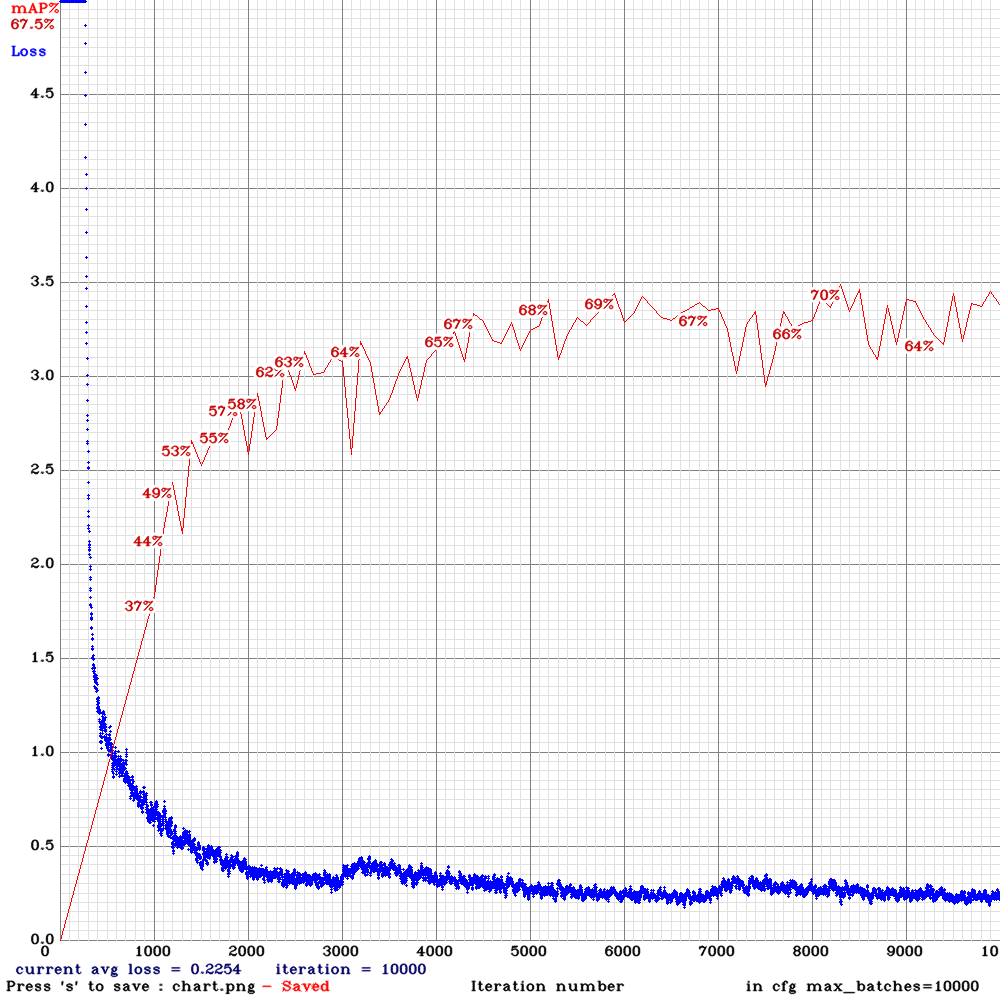
AlexeyAB
on 5 Sep 2019
training pan3 now... it's looking good so far - but when will we get fullsized pan3??
LukeAI
on 6 Sep 2019
@LukeAI Do you mean not Tiny yolo_v3_spp3_pan3.cfg.txt with (PAN3, AntiAliasing, Assisted Excitation, scale_x_y, Mixup, GIoU)?
I think in a week.
AlexeyAB
on 6 Sep 2019
Amazing work! Thanks for sharing.
 lsd1994
on 6 Sep 2019
lsd1994
on 6 Sep 2019
@AlexeyAB yes, exactly. I'll try it in whatever form you release it, although I may also try without mixup, GIoU and SGDR as these have generally lead to slightly worse performance in experiments I have run.
LukeAI
on 6 Sep 2019
I added
yolo_v3_tiny_pan3.cfg.txtmodel just with all possible features which I made recently: PAN3 (stride_x, stride_y), AntiAliasing, Assisted Excitation, scale_x_y, Mixup, GIoU, swish-activation, SGDR-lr-policy, ...14 BFlops - 8.5 ms - 67.3% [email protected]
- I didn't search the best solution and didn't search what features inceases the mAP and what decreases the mAP - just added everything to one pan. It seems it works with this small dataset.
- I didn't add: CEM, SAM, Squeeze-and-excitation, Depth-wise-conv, TridentNet, EfficientNet .... etc blocks, which doesn't work fast on GPU.
- If somebody want - you can try to train it on MS COCO to check the mAP.
Just train it as usual yolov3-tiny model:
./darknet detector train data/self_driving.data yolov3-tiny_occlusion_track.cfg yolov3-tiny.conv.15 -mapor
./darknet detector train data/self_driving.data yolov3-tiny_occlusion_track.cfg -map
- cfg: https://github.com/AlexeyAB/darknet/files/3580764/yolo_v3_tiny_pan3_aa_ae_mixup_scale_giou.cfg.txt
- weights: https://drive.google.com/open?id=1CVC-XfxbXVALIwy5QbjLZnO2M3I8tsm7
- video: https://drive.google.com/open?id=1QxG6Imnb1kYP9QbCjr-kDNv2bxFi0Zrz
What filters should i change in order to train with 2 classes?
keko950
on 6 Sep 2019
@keko950 I have changed like in instructions:
filters = (classes + 5) x masks) = 35 for 2 classes
in last layer filter = 28
@keko950
In yolo_v3_tiny_pan3_aa_ae_mixup_scale_giou.cfg.txt:
- For the 1st and 2nd [yolo] the
filters=(classes + 5) * 5 - For the 3d [yolo] the
filters=(classes + 5) * 4
AlexeyAB
on 6 Sep 2019
actually on mixup - I did find a small improvement when training with quite a small dataset. when training with large datasets it made it worse. It may be that the mixup is an effective data augmentation tactic with small datasets that need more examples with different background but with large datasets, the value of that drops and is exceeded by the cost of giving your detector synthetic data which means that it can't properly learn true contextual cues.
LukeAI
on 6 Sep 2019
@LukeAI What large dataset did you use? Did you use MS COCO?
AlexeyAB
on 6 Sep 2019
not with this new one. I mean in the past when I ran yolov3-spp.cfg with and without mixup on different datasets. the result was better without mixup on bdd100k and better with mixup on a small (~1% size of bdd100k) private dataset.
LukeAI
on 6 Sep 2019
Hmmm.. i am actually receiving loss: -nan , what could be wrong?
CFG:
CLICK ME - CFG
[net]
Testing
batch=1
subdivisions=1
Training
batch=64
subdivisions=8
width=512
height=512
channels=3
momentum=0.9
decay=0.0005
angle=0
saturation = 1.5
exposure = 1.5
hue=.1
mixup=1
blur=5
learning_rate=0.001
burn_in=2000
max_batches = 20000
policy=sgdr
sgdr_cycle=1000
sgdr_mult=2
steps=4000,8000,12000,9000
scales=1, 1, 0.1, 0.1
[convolutional]
batch_normalize=1
filters=16
size=3
stride=1
pad=1
activation=swish
[convolutional]
batch_normalize=1
filters=16
size=3
stride=2
pad=1
activation=swish
remove
[maxpool]
size=2
stride=2
[convolutional]
batch_normalize=1
filters=32
size=3
stride=1
pad=1
activation=swish
[maxpool]
size=2
stride=2
antialiasing=1
[convolutional]
batch_normalize=1
filters=64
size=3
stride=1
pad=1
activation=swish
[maxpool]
size=2
stride=2
antialiasing=1
[convolutional]
batch_normalize=1
filters=128
size=3
stride=1
pad=1
activation=swish
[maxpool]
size=2
stride=2
antialiasing=1
[convolutional]
batch_normalize=1
filters=256
size=3
stride=1
pad=1
activation=swish
[maxpool]
size=2
stride=2
antialiasing=1
[convolutional]
batch_normalize=1
filters=512
size=3
stride=1
pad=1
activation=swish
[maxpool]
size=2
stride=1
[convolutional]
batch_normalize=1
filters=1024
size=3
stride=1
pad=1
activation=swish
#
[convolutional]
batch_normalize=1
filters=256
size=1
stride=1
pad=1
activation=swish
[convolutional]
batch_normalize=1
filters=512
size=3
stride=1
pad=1
activation=swish
assisted_excitation=4000
##### to [yolo-3]
[convolutional]
batch_normalize=1
filters=128
size=1
stride=1
pad=1
activation=swish
[upsample]
stride=2
[route]
layers = -1, 8
#
[convolutional]
batch_normalize=1
filters=128
size=1
stride=1
pad=1
activation=swish
[convolutional]
batch_normalize=1
filters=256
size=3
stride=1
pad=1
activation=swish
##### to [yolo-2]
[convolutional]
batch_normalize=1
filters=128
size=1
stride=1
pad=1
activation=swish
[upsample]
stride=2
[route]
layers = -1, 6
[convolutional]
batch_normalize=1
filters=64
size=1
stride=1
pad=1
activation=swish
[convolutional]
batch_normalize=1
filters=128
size=3
stride=1
pad=1
activation=swish
##### features of different layers
[route]
layers=2
[maxpool]
size=16
stride=16
[convolutional]
batch_normalize=1
filters=64
size=1
stride=1
pad=1
activation=swish
[route]
layers=4
[maxpool]
size=8
stride=8
[convolutional]
batch_normalize=1
filters=64
size=1
stride=1
pad=1
activation=swish
[route]
layers=4
[maxpool]
size=8
stride=4
stride_x=4
stride_y=8
[convolutional]
batch_normalize=1
filters=64
size=1
stride=2
stride_x=2
stride_y=1
pad=1
activation=swish
[route]
layers=4
[maxpool]
size=8
stride=8
stride_x=8
stride_y=4
[convolutional]
batch_normalize=1
filters=64
size=1
stride=1
stride_x=1
stride_y=2
pad=1
activation=swish
[route]
layers=4
[maxpool]
size=8
stride=8
[convolutional]
batch_normalize=1
filters=64
size=1
stride=1
pad=1
activation=swish
[route]
layers=6
[maxpool]
size=4
stride=4
[convolutional]
batch_normalize=1
filters=64
size=1
stride=1
pad=1
activation=swish
[route]
layers=6
[maxpool]
size=4
stride=2
stride_x=2
stride_y=4
[convolutional]
batch_normalize=1
filters=64
size=1
stride=2
stride_x=2
stride_y=1
pad=1
activation=swish
[route]
layers=6
[maxpool]
size=4
stride=4
stride_x=4
stride_y=2
[convolutional]
batch_normalize=1
filters=64
size=1
stride=1
stride_x=1
stride_y=2
pad=1
activation=swish
[route]
layers=8
[maxpool]
size=2
stride=2
[convolutional]
batch_normalize=1
filters=64
size=1
stride=1
pad=1
activation=swish
[route]
layers=10
[convolutional]
batch_normalize=1
filters=64
size=1
stride=1
pad=1
activation=swish
[route]
layers=-1, -3, -6, -9, -12, -15, -18, -21, -24, -27
[maxpool]
maxpool_depth=1
out_channels=64
stride=1
size=1
##### [yolo-1]
[upsample]
stride=4
[route]
layers = -1,24
[convolutional]
batch_normalize=1
filters=128
size=3
stride=1
pad=1
activation=swish
[convolutional]
size=1
stride=1
pad=1
filters=35
activation=linear
[yolo]
mask = 0,1,2,3,4
anchors = 8,8, 10,13, 16,30, 33,23, 32,32, 30,61, 62,45, 64,64, 59,119, 116,90, 156,198, 373,326
classes=2
num=12
jitter=.3
ignore_thresh = .7
truth_thresh = 1
iou_normalizer=0.25
cls_normalizer=1.0
iou_loss=giou
scale_x_y = 1.05
random=0
##### [yolo-2]
[route]
layers = -6
[upsample]
stride=2
[route]
layers = -1,19
[convolutional]
batch_normalize=1
filters=256
size=3
stride=1
pad=1
activation=swish
[convolutional]
size=1
stride=1
pad=1
filters=35
activation=linear
[yolo]
mask = 4,5,6,7,8
anchors = 8,8, 10,13, 16,30, 33,23, 32,32, 30,61, 62,45, 64,64, 59,119, 116,90, 156,198, 373,326
classes=2
num=12
jitter=.3
ignore_thresh = .7
truth_thresh = 1
iou_normalizer=0.25
cls_normalizer=1.0
iou_loss=giou
scale_x_y = 1.1
random=0
##### [yolo-3]
[route]
layers = -12
[route]
layers = -1,14
[convolutional]
batch_normalize=1
filters=512
size=3
stride=1
pad=1
activation=swish
[convolutional]
size=1
stride=1
pad=1
filters=28
activation=linear
[yolo]
mask = 8,9,10,11
anchors = 8,8, 10,13, 16,30, 33,23, 32,32, 30,61, 62,45, 59,119, 80,80, 116,90, 156,198, 373,326
classes=2
num=12
jitter=.3
ignore_thresh = .7
truth_thresh = 1
iou_normalizer=0.25
cls_normalizer=1.0
iou_loss=giou
scale_x_y = 1.2
random=0
keko950
on 6 Sep 2019
Which weights i have to use to train? Darknet74 or the one you uploaded?
keko950
on 6 Sep 2019
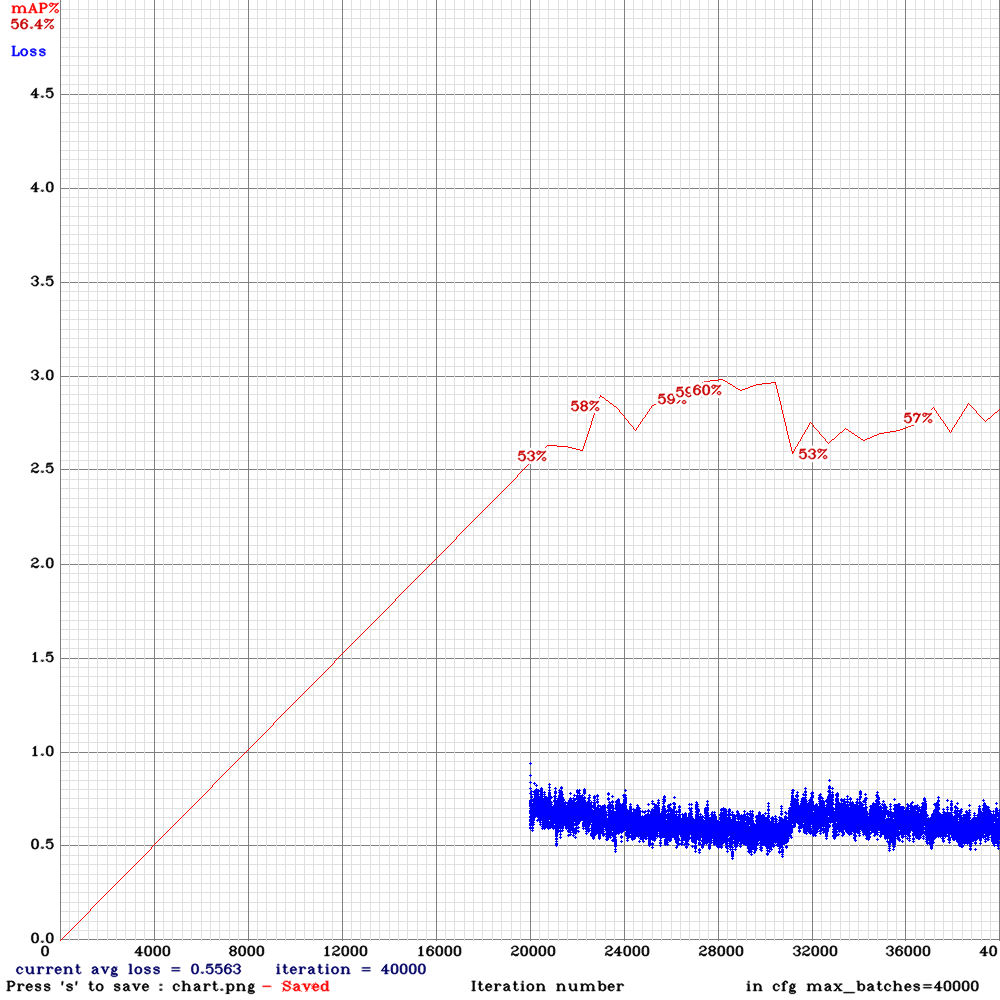
This was one result I got with pan3_etc.cfg Unfortunately I lost the first half, it was chaotics as hell - I guess that's the SGDR jumping up and down like that?
for comparison, using the same data with yolo_v3_spp:
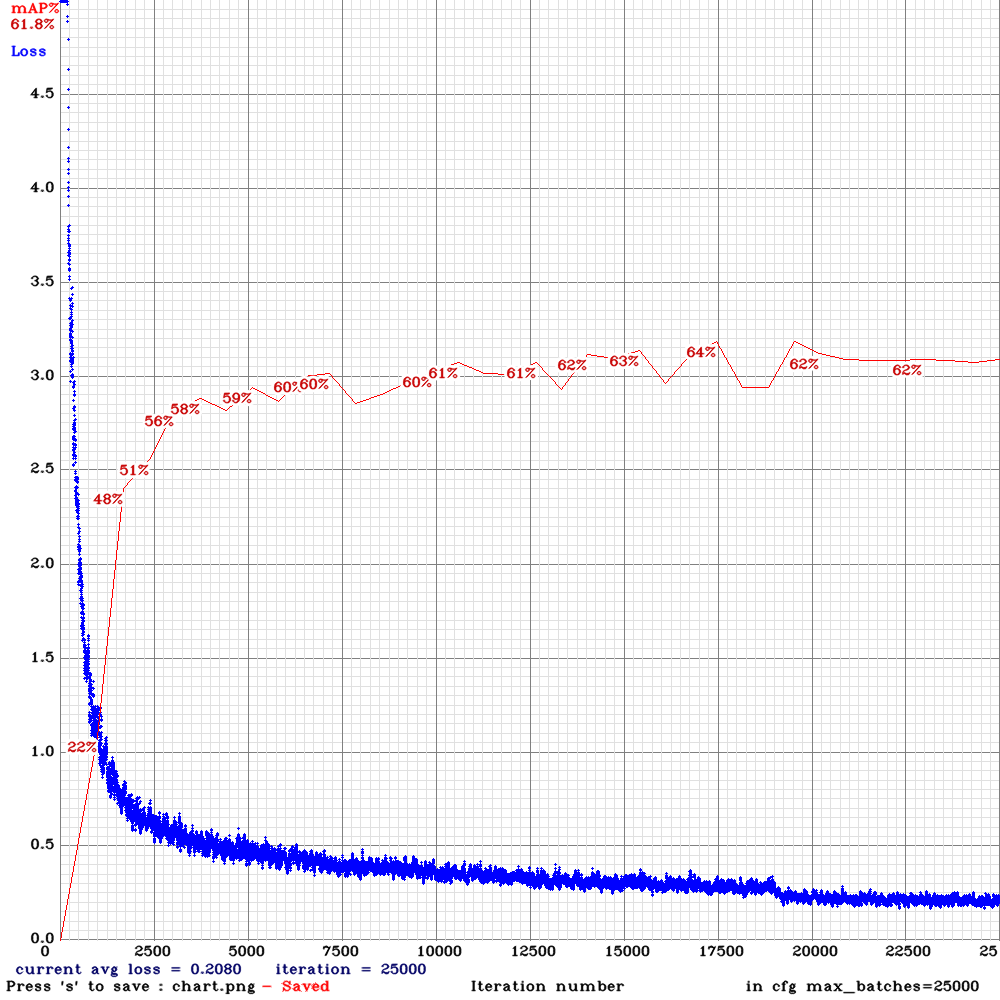
Part of pan3 good performance here may be because it was trained and evaluated at a slightly larger resolution than yolov3spp and a lot of the objects in the dataset are very small. but it's looking really strong for such a small network, I think you're really onto something with this one. Bring on full-sized pan3!
LukeAI
on 6 Sep 2019
@keko950
Which weights i have to use to train? Darknet74 or the one you uploaded?
Read: https://github.com/AlexeyAB/darknet/issues/3114#issuecomment-528532293
Just train it as usual yolov3-tiny model:
./darknet detector train data/self_driving.data yolov3-tiny_occlusion_track.cfg yolov3-tiny.conv.15 -map
And read how to get yolov3-tiny.conv.15 : https://github.com/AlexeyAB/darknet#how-to-train-tiny-yolo-to-detect-your-custom-objects
AlexeyAB
on 6 Sep 2019
@LukeAI
Part of pan3 good performance here may be because it was trained and evaluated at a slightly larger resolution than yolov3spp
You used 800x448 in tiny-pan3.cfg.txt
And what resolution did you use in yolov3spp?
AlexeyAB
on 6 Sep 2019
736X416
LukeAI
on 6 Sep 2019
do you have any idea what might be going on at batch 31000 with tiny-pan3 ^
LukeAI
on 7 Sep 2019
@LukeAI It's SGDR. You can use learning_rate-policy from default yolov3.cfg to avoid this.
AlexeyAB
on 7 Sep 2019
@AlexeyAB
Yeah, you're right, thanks and sorry for the spam :)
keko950
on 7 Sep 2019
I tried training tiny-pan3 on bdd100k but this happened!
I changed number of classes and commented out mixup. surely mixup isn't crucial?
yolo_pan3_bdd.cfg.txt
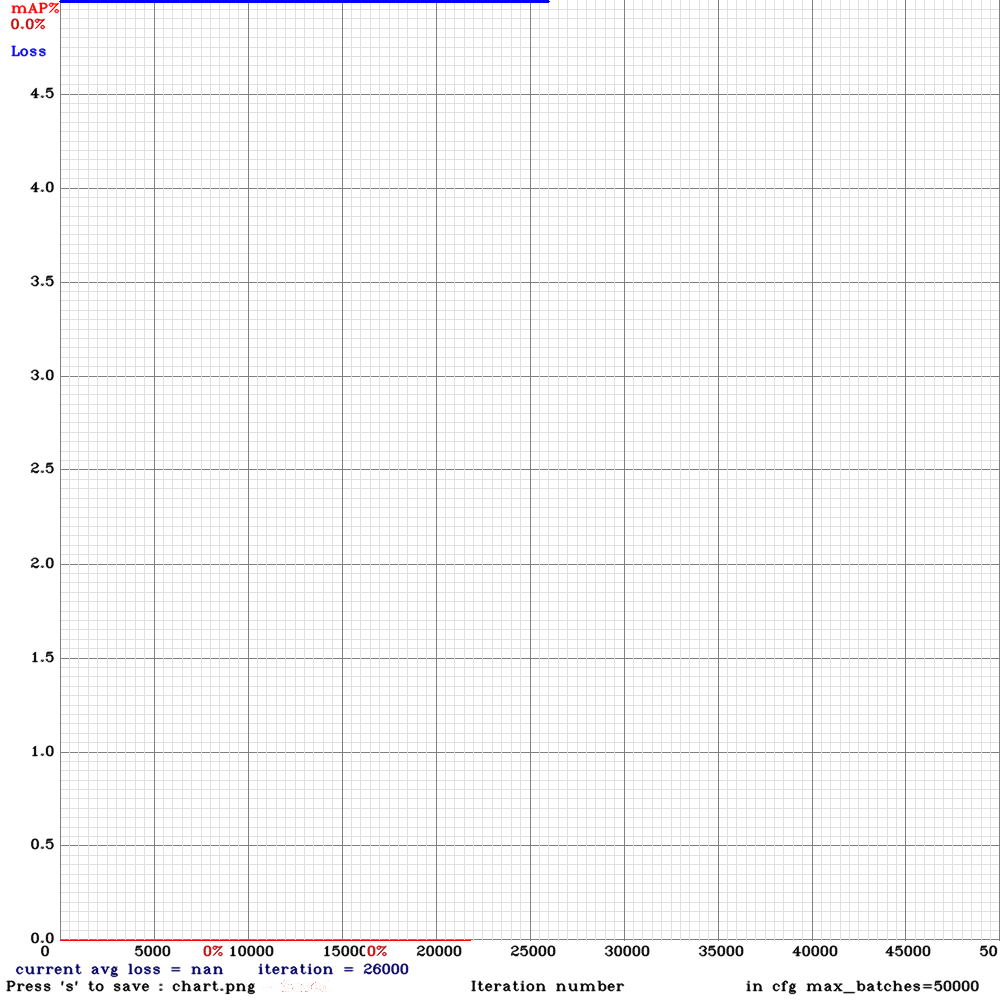
LukeAI
on 7 Sep 2019
@LukeAI
- Try to use mixup and disable SGDR.
- Try to increase assisted_excitation=4000 to assisted_excitation=15000
AlexeyAB
on 7 Sep 2019
I'm trying again with stepped learning_rate and assisted_excitation=15000 - I'm really hesitant to use mixup because I've only seen it make results worse on large datasets - is it necessary for this cfg? If I exclude it, should I do something else to compensate?
LukeAI
on 7 Sep 2019
@LukeAI If you want you can disable mixup. Just set mixup=0.
PS
I think this feature will replace mixup later: https://github.com/AlexeyAB/darknet/issues/3320
Random removal of textures during data-augmentation or use Stylized Dataset.
AlexeyAB
on 7 Sep 2019
ok, i'm training with "#mixup=1" rather than "mixup=0" is that the same?
Yeah that feature will be really interesting to try out!
LukeAI
on 7 Sep 2019
Hello @AlexeyAB,
I want to use yolov3-pan2.cfg instead of yolov3-tiny-pan2.cfg,and I compared yolov3-tiny-pan.cfg and yolov3-tiny-pan2.cfg and modified yolov3.cfg,but I met this problem

I want to know how to solve this problem.Thanks a lot.
 sunshinemingo
on 8 Sep 2019
sunshinemingo
on 8 Sep 2019
@sunshinemingo @LukeAI @keko950 @dreambit @NickiBD
Try to use this Full Yolo v3 PAN3 model:
yolo_v3_spp_pan3_aa_ae_mixup_scale_giou.cfg.txt
Train
./darknet detector train data/self_driving.data yolov3-tiny_occlusion_track.cfg darknet53.conv.74 -map
AlexeyAB
on 8 Sep 2019
yolo_pan3_full.cfg.txt
unfortunately I get a mysterious crash with it:
7f3a83c79000-7f3a83e78000 ---p 00007000 09:00 11542108                   /usr/lib/x86_64-linux-gnu/libSM.so.6.0.1
7f3a83e78000-7f3a83e79000 r--p 00006000 09:00 11542108                   /usr/lib/x86_64-linux-gnu/libSM.so.6.0.1
7f3a83e79000-7f3a83e7a000 rw-p 00007000 09:00 11542108                   /usr/lib/x86_64-linux-gnu/libSM.so.6.0.1
7f3a83e7a000-7f3a83e80000 r-xp 00000000 09:00 11541888                   /usr/lib/x86_64-linux-gnu/libdatrie.so.1.3.3
7f3a83e80000-7f3a84080000 ---p 00006000 09:00 11541888                   /usr/lib/x86_64-linux-gnu/libdatrie.so.1.3.3
7f3a84080000-7f3a84081000 r--p 00006000 09:00 11541888                   /usr/lib/x86_64-linux-gnu/libdatrie.so.1.3.3
7f3a84081000-7f3a84082000 rw-p 00007000 09:00 11541888                   /usr/lib/x86_64-linux-gnu/libdatrie.so.1.3.3
7f3a84082000-7f3a840a6000 r-xp 00000000 09:00 11541916                   /usr/lib/x86_64-linux-gnu/libgraphite2.so.3.0.1
7f3a840a6000-7f3a842a5000 ---p 00024000 09:00 11541916                   /usr/lib/x86_64-linux-gnu/libgraphite2.so.3.0.1
7f3a842a5000-7f3a842a7000 r--p 00023000 09:00 11541916                   /usr/lib/x86_64-linux-gnu/libgraphite2.so.3.0.1
7f3a842a7000-7f3a842a8000 rw-p 00025000 09:00 11541916                   /usr/lib/x86_64-linux-gnu/libgraphite2.so.3.0.1
7f3a842a8000-7f3a842ad000 r-xp 00000000 09:00 11539968                   /usr/lib/x86_64-linux-gnu/libXdmcp.so.6.0.0
7f3a842ad000-7f3a844ac000 ---p 00005000 09:00 11539968                   /usr/lib/x86_64-linux-gnu/libXdmcp.so.6.0.0
7f3a844ac000-7f3a844ad000 r--p 00004000 09:00 11539968                   /usr/lib/x86_64-linux-gnu/libXdmcp.so.6.0.0
7f3a844ad000-7f3a844ae000 rw-p 00005000 09:00 11539968                   /usr/lib/x86_64-linux-gnu/libXdmcp.so.6.0.0
7f3a844ae000-7f3a844b0000 r-xp 00000000 09:00 11539966                   /usr/lib/x86_64-linux-gnu/libXau.so.6.0.0
7f3a844b0000-7f3a846b0000 ---p 00002000 09:00 11539966                   /usr/lib/x86_64-linux-gnu/libXau.so.6.0.0
7f3a846b0000-7f3a846b1000 r--p 00002000 09:00 11539966                   /usr/lib/x86_64-linux-gnu/libXau.so.6.0.0
7f3a846b1000-7f3a846b2000 rw-p 00003000 09:00 11539966                   /usr/lib/x86_64-linux-gnu/libXau.so.6.0.0
7f3a846b2000-7f3a846c3000 r-xp 00000000 09:00 11536729                   /usr/lib/x86_64-linux-gnu/libtasn1.so.6.5.1
7f3a846c3000-7f3a848c3000 ---p 00011000 09:00 11536729                   /usr/lib/x86_64-linux-gnu/libtasn1.so.6.5.1
7f3a848c3000-7f3a848c4000 r--p 00011000 09:00 11536729                   /usr/lib/x86_64-linux-gnu/libtasn1.so.6.5.1
7f3a848c4000-7f3a848c5000 rw-p 00012000 09:00 11536729                   /usr/lib/x86_64-linux-gnu/libtasn1.so.6.5.1
7f3a848c5000-7f3a848f6000 r-xp 00000000 09:00 11536701                   /usr/lib/x86_64-linux-gnu/libidn.so.11.6.15
7f3a848f6000-7f3a84af6000 ---p 00031000 09:00 11536701                   /usr/lib/x86_64-linux-gnu/libidn.so.11.6.15
7f3a84af6000-7f3a84af7000 r--p 00031000 09:00 11536701                   /usr/lib/x86_64-linux-gnu/libidn.so.11.6.15
7f3a84af7000-7f3a84af8000 rw-p 00032000 09:00 11536701                   /usr/lib/x86_64-linux-gnu/libidn.so.11.6.15
7f3a84af8000-7f3a84b51000 r-xp 00000000 09:00 11536715                   /usr/lib/x86_64-linux-gnu/libp11-kit.so.0.1.0
7f3a84b51000-7f3a84d50000 ---p 00059000 09:00 11536715                   /usr/lib/x86_64-linux-gnu/libp11-kit.so.0.1.0
7f3a84d50000-7f3a84d5a000 r--p 00058000 09:00 11536715                   /usr/lib/x86_64-linux-gnu/libp11-kit.so.0.1.0
7f3a84d5a000-7f3a84d5c000 rw-p 00062000 09:00 11536715                   /usr/lib/x86_64-linux-gnu/libp11-kit.so.0.1.0
7f3a84d5c000-7f3a84f0d000 r-xp 00000000 09:00 11535389                   /usr/lib/x86_64-linux-gnu/libxml2.so.2.9.3
7f3a84f0d000-7f3a8510c000 ---p 001b1000 09:00 11535389                   /usr/lib/x86_64-linux-gnu/libxml2.so.2.9.3
7f3a8510c000-7f3a85114000 r--p 001b0000 09:00 11535389                   /usr/lib/x86_64-linux-gnu/libxml2.so.2.9.3
7f3a85114000-7f3a85116000 rw-p 001b8000 09:00 11535389                   /usr/lib/x86_64-linux-gnu/libxml2.so.2.9.3
7f3a85116000-7f3a85117000 rw-p 00000000 00:00 0
7f3a85117000-7f3a85196000 r-xp 00000000 09:00 11536693                   /usr/lib/x86_64-linux-gnu/libgmp.so.10.3.0
7f3a85196000-7f3a85395000 ---p 0007f000 09:00 11536693                   /usr/lib/x86_64-linux-gnu/libgmp.so.10.3.0
7f3a85395000-7f3a85396000 r--p 0007e000 09:00 11536693                   /usr/lib/x86_64-linux-gnu/libgmp.so.10.3.0
7f3a85396000-7f3a85397000 rw-p 0007f000 09:00 11536693                   /usr/lib/x86_64-linux-gnu/libgmp.so.10.3.0
7f3a85397000-7f3a853cb000 r-xp 00000000 09:00 11536713                   /usr/lib/x86_64-linux-gnu/libnettle.so.6.2
7f3a853cb000-7f3a855ca000 ---p 00034000 09:00 11536713                   /usr/lib/x86_64-linux-gnu/libnettle.so.6.2
7f3a855ca000-7f3a855cc000 r--p 00033000 09:00 11536713                   /usr/lib/x86_64-linux-gnu/libnettle.so.6.2
7f3a855cc000-7f3a855cd000 rw-p 00035000 09:00 11536713                   /usr/lib/x86_64-linux-gnu/libnettle.so.6.2
7f3a855cd000-7f3a855ff000 r-xp 00000000 09:00 11536699                   /usr/lib/x86_64-linux-gnu/libhogweed.so.4.2
7f3a855ff000-7f3a857fe000 ---p 00032000 09:00 11536699                   /usr/lib/x86_64-linux-gnu/libhogweed.so.4.2
7f3a857fe000-7f3a857ff000 r--p 00031000 09:00 11536699                   /usr/lib/x86_64-linux-gnu/libhogweed.so.4.2
7f3a857ff000-7f3a85800000 rw-p 00032000 09:00 11536699                   /usr/lib/x86_64-linux-gnu/libhogweed.so.4.2
7f3a85800000-7f3a85847000 r-xp 00000000 09:00 11535370                   /usr/lib/x86_64-linux-gnu/libgssapi_krb5.so.2.2
7f3a85847000-7f3a85a46000 ---p 00047000 09:00 11535370                   /usr/lib/x86_64-linux-gnu/libgssapi_krb5.so.2.2
7f3a85a46000-7f3a85a48000 r--p 00046000 09:00 11535370                   /usr/lib/x86_64-linux-gnu/libgssapi_krb5.so.2.2
7f3a85a48000-7f3a85a4a000 rw-p 00048000 09:00 11535370                   /usr/lib/x86_64-linux-gnu/libgssapi_krb5.so.2.2
7f3a85a4a000-7f3a85b21000 r-xp 00000000 09:00 5112337                    /lib/x86_64-linux-gnu/libgcrypt.so.20.0.5
7f3a85b21000-7f3a85d21000 ---p 000d7000 09:00 5112337                    /lib/x86_64-linux-gnu/libgcrypt.so.20.0.5
7f3a85d21000-7f3a85d22000 r--p 000d7000 09:00 5112337                    /lib/x86_64-linux-gnu/libgcrypt.so.20.0.5
7f3a85d22000-7f3a85d2a000 rw-p 000d8000 09:00 5112337                    /lib/x86_64-linux-gnu/libgcrypt.so.20.0.5
7f3a85d2a000-7f3a85d2b000 rw-p 00000000 00:00 0
7f3a85d2b000-7f3a85da6000 r-xp 00000000 09:00 11542646                   /usr/lib/x86_64-linux-gnu/liborc-0.4.so.0.25.0
7f3a85da6000-7f3a85fa5000 ---p 0007b000 09:00 11542646                   /usr/lib/x86_64-linux-gnu/liborc-0.4.so.0.25.0
7f3a85fa5000-7f3a85fa7000 r--p 0007a000 09:00 11542646                   /usr/lib/x86_64-linux-gnu/liborc-0.4.so.0.25.0./train.sh: line 1:  4771 Aborted                 (core dumped) /srv/perception/PSA_YOLO/darknet/darknet detector train /srv/perception/PSA_YOLO/bdd.data /srv/perception/PSA_YOLO/yolo_pan3_full.cfg -dont_show -mjpeg_port 8090 -map
I did make sure I was using the latest github - training from scratch, not pretrained weights.
LukeAI
on 8 Sep 2019
@LukeAI Try to download Darknet again, compile and run without -mjpeg_port 8090
AlexeyAB
on 8 Sep 2019
@AlexeyAB
Having done so, the problem persists :/
LukeAI
on 8 Sep 2019
Results on bdd100k
These are probably a lot more meaningful than the results I shared earlier, the dataset is about x100 larger.
tiny-pan3
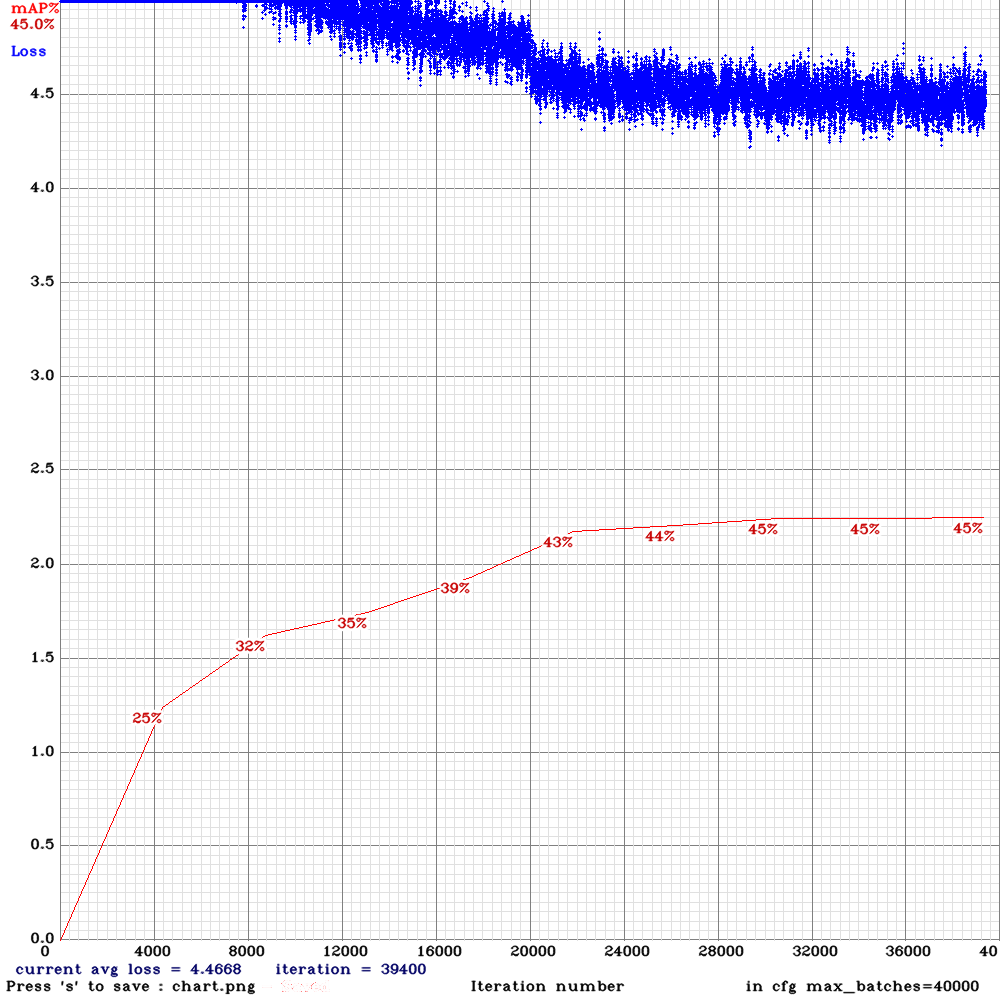
yolo_tiny_pan3.cfg.txt
For comparison:
tiny-pan2 with swish activations (two graphs):
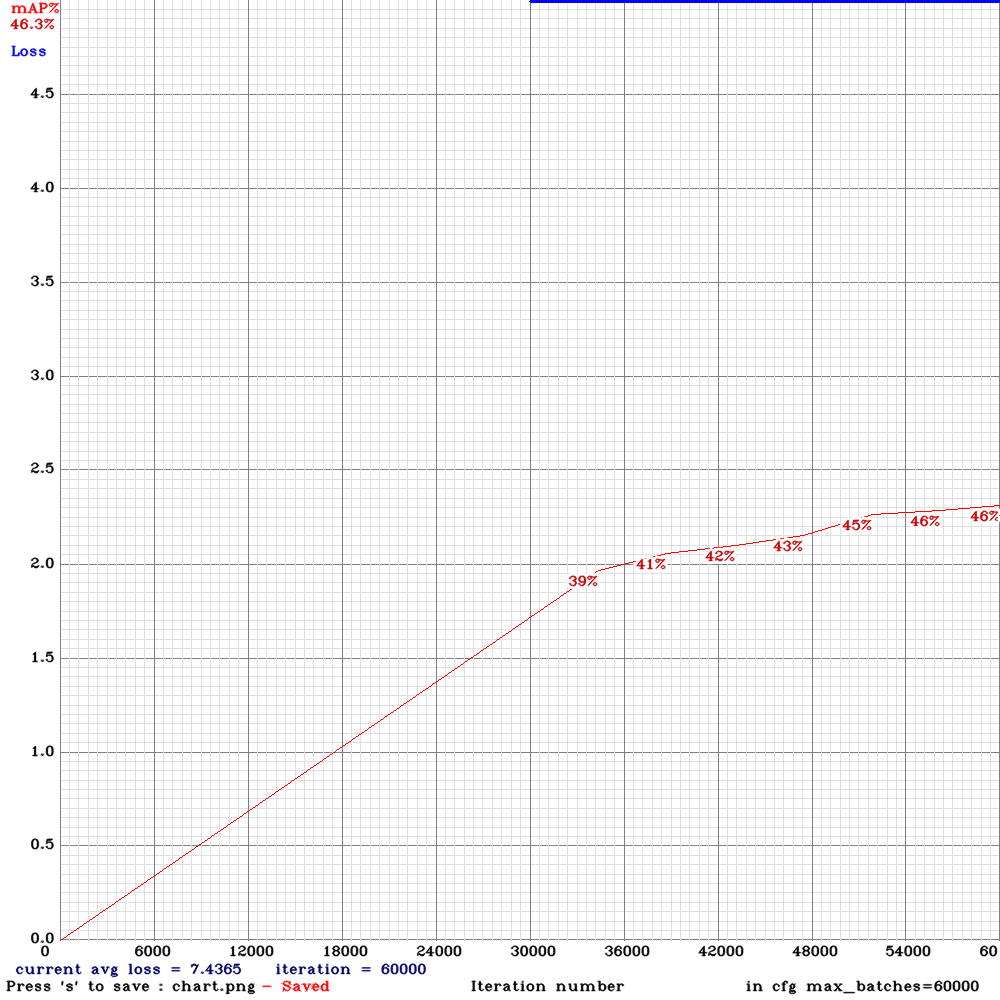
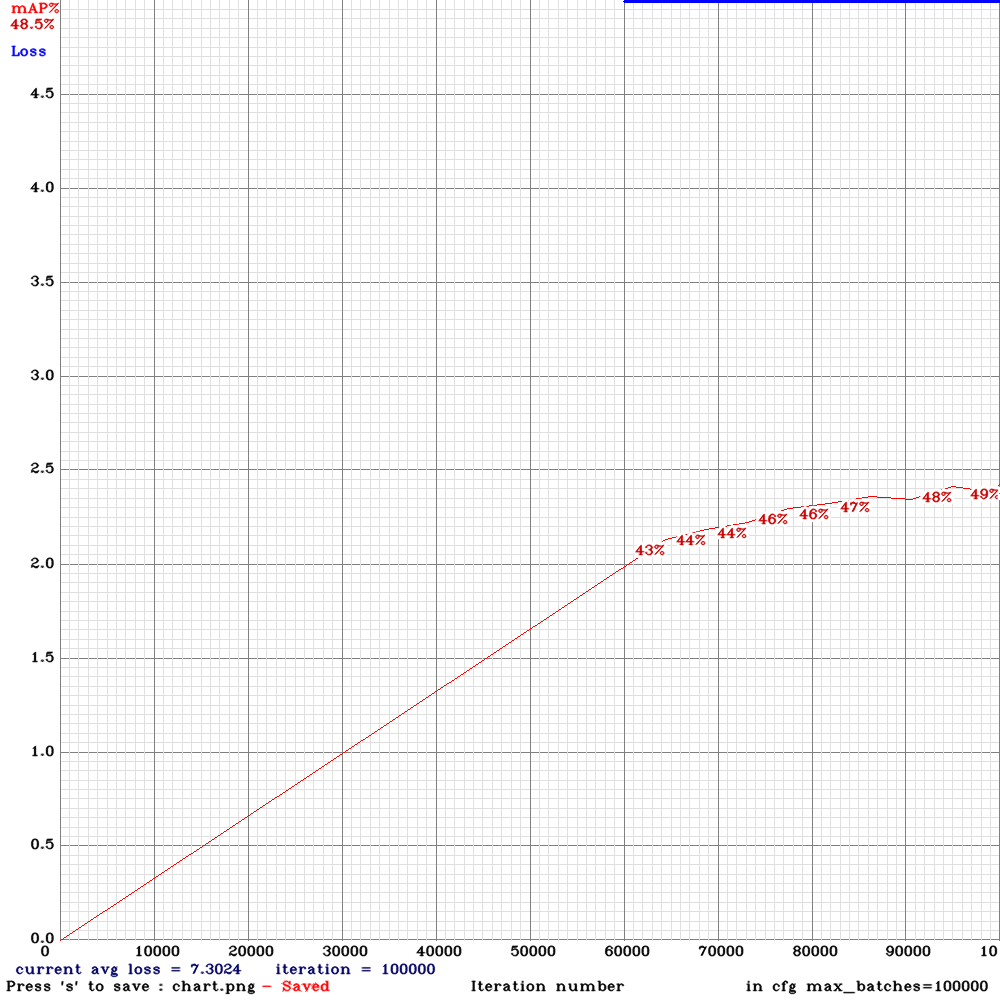
yolov3-spp
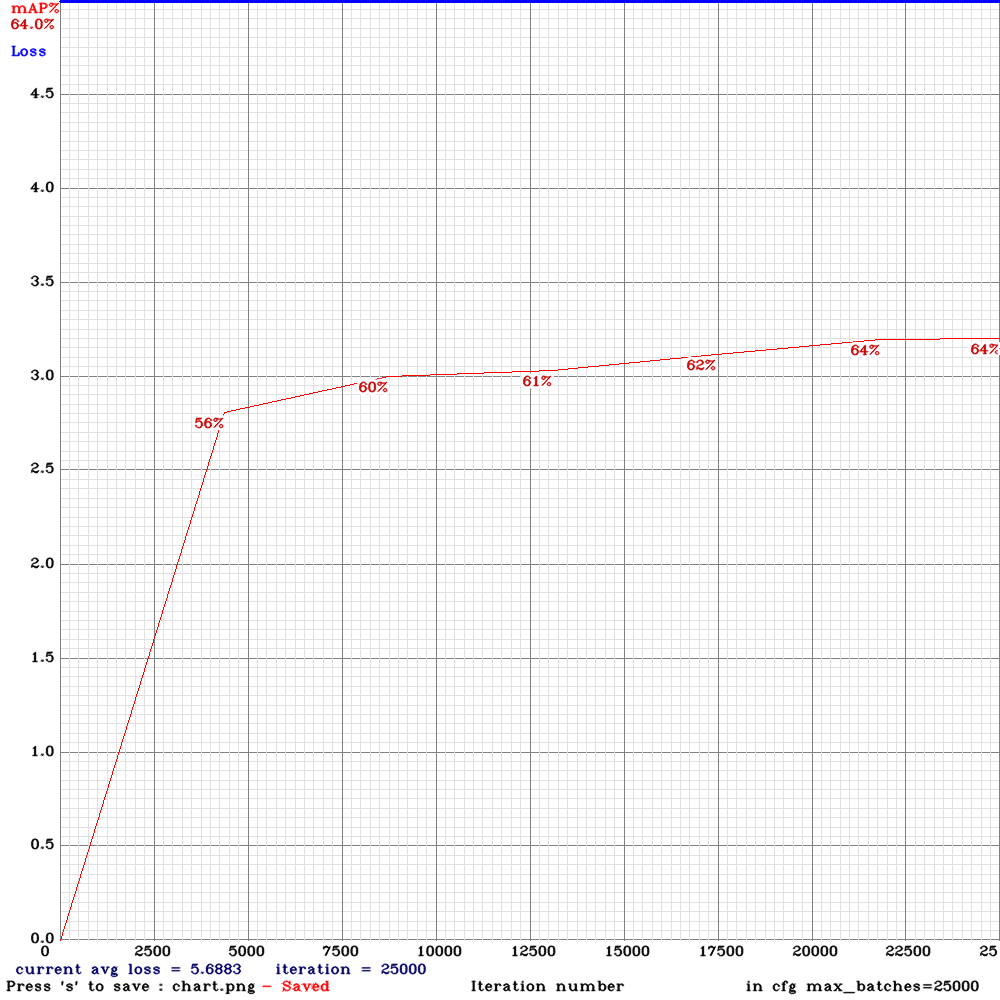
tiny-3l
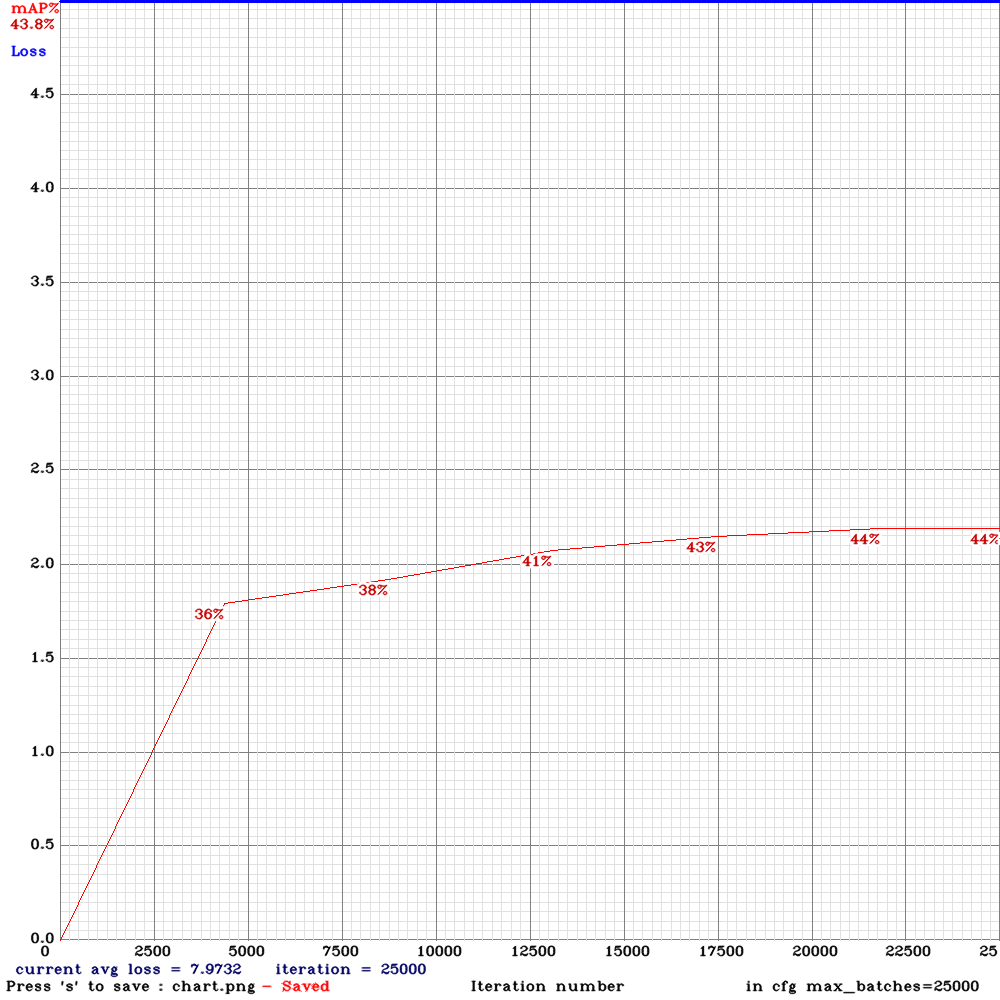
LukeAI
on 8 Sep 2019
@LukeAI Thanks. I didn't understand. Is the first chart for PAN3(tiny-pan3) or PAN2(yolo_v3_tiny_pan2.cfg.txt)?
AlexeyAB
on 8 Sep 2019
I attached wrong cfg. Have updated ^
LukeAI
on 8 Sep 2019
@LukeAI So tiny-pan2+swish better than tiny-pan3?
AlexeyAB
on 8 Sep 2019
I think so, yes.
LukeAI
on 8 Sep 2019
Hmm, i trained by error yolo_v3_tiny_pan3_aa_ae_mixup_scale_giou.cfg.txt with Darknet74 conv weights and actually it gave to me good results. Will train tomorrow the same data with the tiny weights.
keko950
on 9 Sep 2019
what dataset? Show us the chart.png ?
LukeAI
on 9 Sep 2019
Custom dataset, 13000 images, 2 classes. With many small objects.
Yolov3-spp.cfg gave me a 68-69% map before.
Now it is almost 80% map.
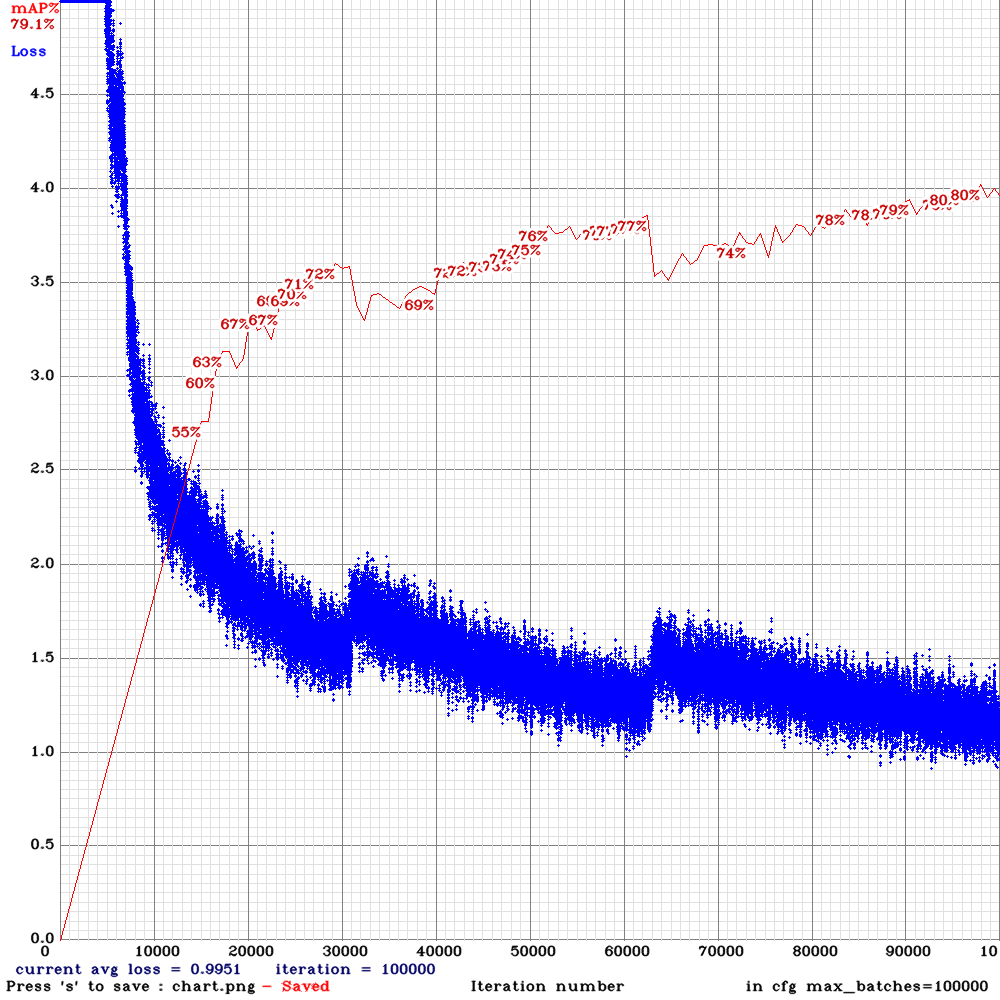
keko950
on 10 Sep 2019
@keko950
Now it is almost 80% map.
What model do you use?
AlexeyAB
on 10 Sep 2019
@keko950
Now it is almost 80% map.
What model do you use?
yolo_v3_tiny_pan3_aa_ae_mixup_scale_giou.cfg, only changed resolution to 512x512
keko950
on 10 Sep 2019
@keko950
What is your valid= in obj.data?
dreambit
on 10 Sep 2019
what resolution was yolov3-spp on same dataset?
LukeAI
on 10 Sep 2019
what resolution was yolov3-spp on same dataset?
Same resolution.
@keko950
What is your valid= in obj.data?
10% of total dataset. (Obviously not included in training data)
keko950
on 10 Sep 2019
@keko950
How about inference time or fps of both models? Thank you.
lsd1994
on 10 Sep 2019
@keko950
How about inference time or fps of both models? Thank you.
yolo_v3_tiny_pan3_aa_ae_mixup_scale_giou.cfg
7-8ms
yolov3-spp.cfg
21-22ms
keko950
on 10 Sep 2019
@keko950 Try to use this model yolo_v3_spp_pan3_aa_ae_mixup_scale_giou.cfg.txt
https://github.com/AlexeyAB/darknet/issues/3114#issuecomment-529186069
AlexeyAB
on 10 Sep 2019
@keko950 Try to use this model
yolo_v3_spp_pan3_aa_ae_mixup_scale_giou.cfg.txt
#3114 (comment)
Sure, it will take a little, i will share the results when it finish
keko950
on 11 Sep 2019
yolo_v3_spp_pan3_aa_ae_mixup_scale_giou.cfg
Wrong annotation: class_id = 1. But class_id should be [from 0 to 0].
I used two class, for example car=0, person =1
In YoloV3 you have to change each filters= in 3 convolutional layers before [yolo] layer and classes in [yolo] layer
Formula is filters = (classes+5)*3 in yoloV3
AA: AA: AA: AA: AA: Error: l.outputs == params.inputs
filters= in the [convolutional]-layer doesn't correspond to classes= or mask= in [yolo]-layer
 ThomasBomjan
on 11 Sep 2019
ThomasBomjan
on 11 Sep 2019
Intermediate results on _yolo_v3_tiny_pan3_aa_ae_mixup_scale_giou.cfg_
Datasets are COCO + BerkleyDeepDrive + custom dataset with 2 classes car/person: 167K images in total
batch=64
subdivisions=4
width=640
height=384
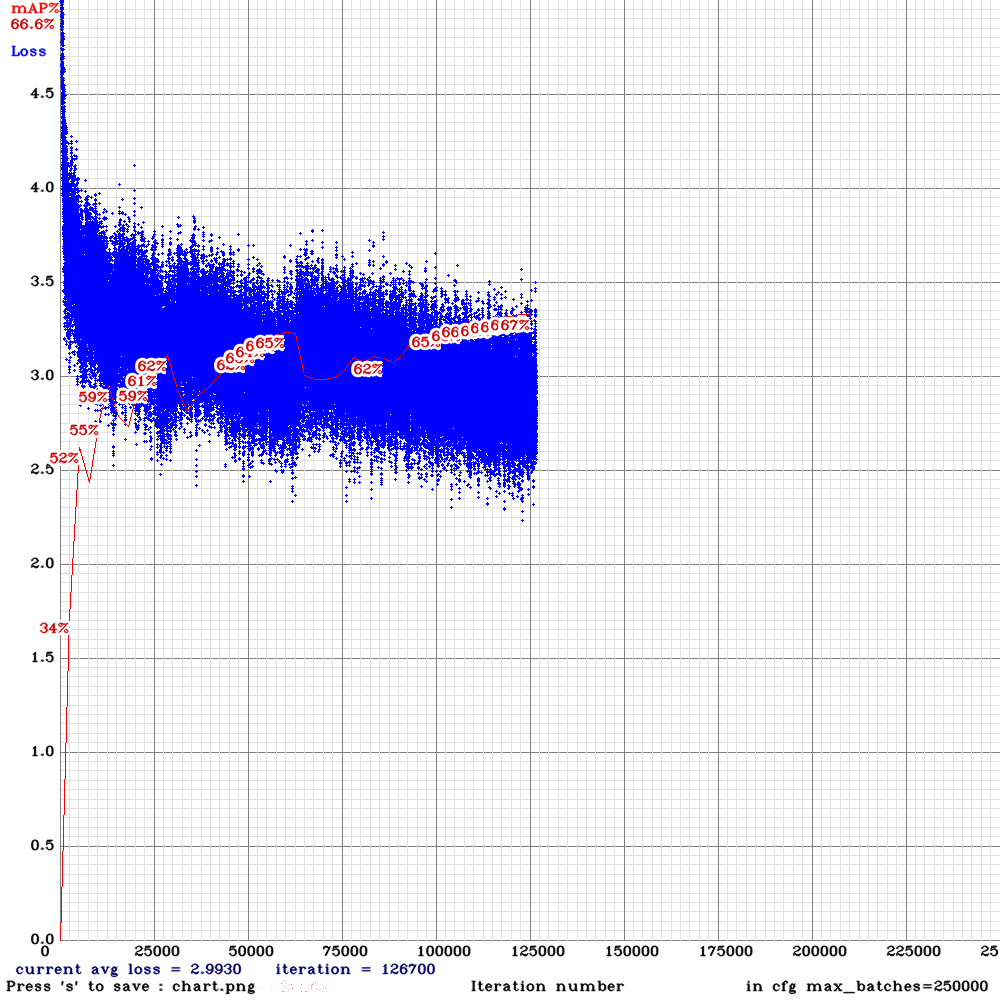
Last results:
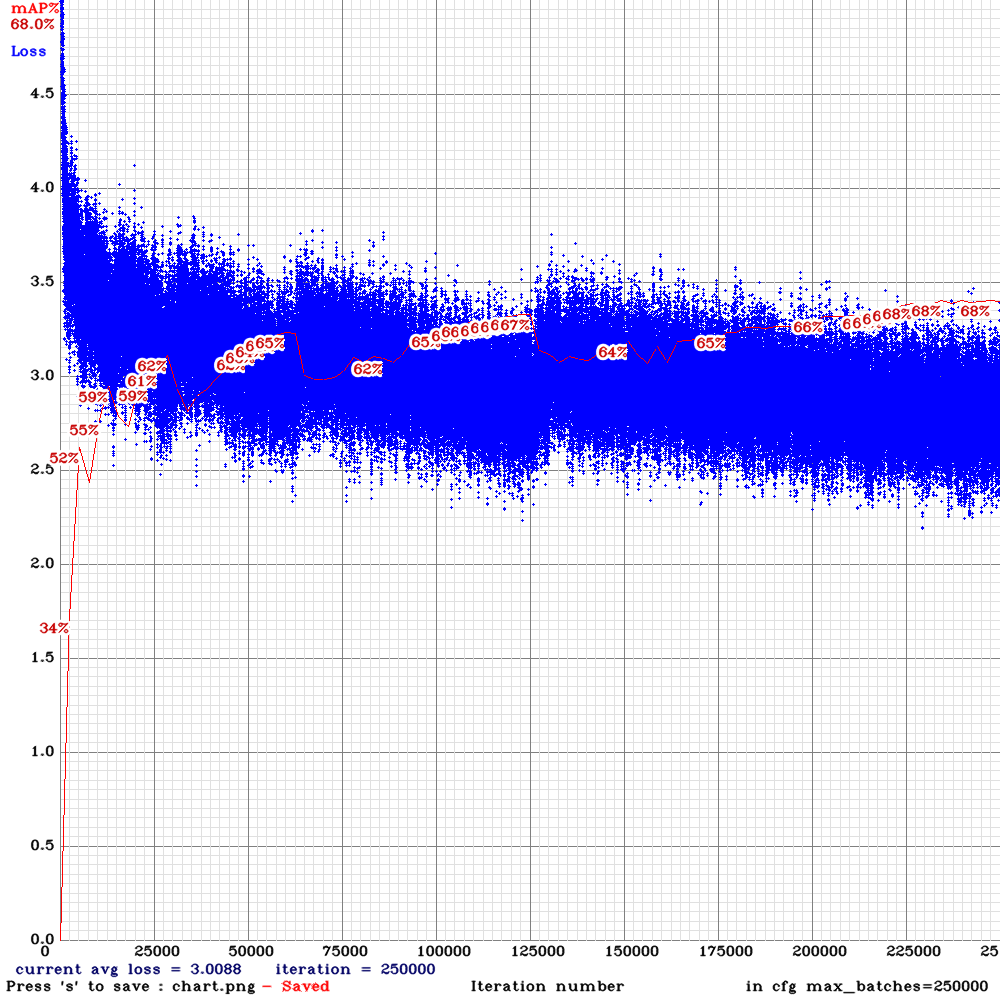
mAP _on yolo_v3_spp.cfg_ with the same width/height was ~80%
dreambit
on 13 Sep 2019
Intermediate results on yolo_v3_tiny_pan3_aa_ae_mixup_scale_giou.cfg
Datasets are COCO + BerkleyDeepDrive + custom dataset with 2 classes car/person: 167K images in total
batch=64
subdivisions=4
width=640
height=384mAP on yolo_v3_spp.cfg with the same width/height was ~80%
have you tried yolo_v3_spp_pan3_aa_ae_mixup_scale_giou.cfg?
 15605190982
on 16 Sep 2019
15605190982
on 16 Sep 2019
Because lstm requires a sequence of inputs, when lstm yolo in the inference, does it need to do something for each input frame?
i-chaochen
on 18 Sep 2019
@i-chaochen
Because lstm requires a sequence of inputs, when lstm yolo in the inference, does it need to do something for each input frame?
when lstm yolo in the inference, images should be sequence of frames from video
AlexeyAB
on 18 Sep 2019
@i-chaochen
Because lstm requires a sequence of inputs, when lstm yolo in the inference, does it need to do something for each input frame?
when lstm yolo in the inference, images should be sequence of frames from video
I used your c++ api to import yolo into my project, it's running as an independent threat to detect each frame received from the camera.
I am not sure how am I going to change the input, do I just change it to receive a sequence of images as a batch? I think it might cause the delay.
So I wonder how do you handle the first frame of input at LSTM-yolo for the real-time camera?
std::mutex data_lock;   // detector thread checks whether new mat has arrivied
std::atomic<bool> exit_flag, new_data; //, //new_det_res;
std::vector<bbox_t> result_vect;
cv::Mat dest_m;
double infer_time;

void detectorThread(const std::string cfg_file, const std::string weights_file, const float thresh){
    Detector detector(cfg_file, weights_file);
    std::shared_ptr<image_t> det_img;
    const double freq = cv::getTickFrequency() / 1000;
    while (!exit_flag){
        if (new_data){

            data_lock.lock();
            cv::Size frame_size = dest_m.size();
            det_img = detector.mat_to_image_resize(dest_m);
            double start_t = (double)cv::getTickCount();

            result_vect = detector.detect_resized(*det_img, frame_size.width, frame_size.height,
                                                    thresh, false);

            infer_time = ((double)cv::getTickCount() - start_t) / freq;


            data_lock.unlock();
            new_data = false;
        }
        else
            std::this_thread::sleep_for(std::chrono::milliseconds(1));
    }
}
do I just change it to receive a sequence of images as a batch?
No.
Just send frames one by one as usual.
AlexeyAB
on 18 Sep 2019
do I just change it to receive a sequence of images as a batch?
No.
Just send frames one by one as usual.
If received frames one by one, how does yolo-lstm know the sequence of images and do the lstm operation?
It will store frames as a sequence? for example if I set time_steps=4, so it can store first 4 frames as a sequence, and then to do the detection for these 4 frames?
i-chaochen
on 18 Sep 2019
@i-chaochen time_steps=4 is used only for training.
During detection, LSTM layer stores hidden states after detection and uses it for next detection.
AlexeyAB
on 18 Sep 2019
@i-chaochen
time_steps=4is used only for training.
During detection, LSTM layer stores hidden states after detection and uses it for next detection.
Thanks for the explanation!
So in the detection/inference, yolo-lstm (the whole neural network) still takes one image as the input.
But at lstm_layer, as it stores hidden states, it will take the hidden states and the current input(one image) as a sequence of input to do the detection, and it will also store it for the next detection.
i-chaochen
on 18 Sep 2019
@i-chaochen
But at lstm_layer, as it stores hidden states, it will take the hidden states and the current input(one image) as a sequence of input to do the detection, and it will also store it for the next detection.
Yes. LSTM, RNN, GRU, ... are layers with memory, they store hidden states, which will be changed after each forward-inference.
AlexeyAB
on 18 Sep 2019
@AlexeyAB Hello,I want to know the meaning of assisted_excitation=4000 in the YOLOv3-pan3-aa-ae-mixup-scale-giou.cfg. I have read 《Assisted Excitation of Activations:A Learning Technique to Improve Object Detectors》, is it similiar to YOLOv3+?
sunshinemingo
on 18 Sep 2019
@sunshinemingo Yes: https://github.com/AlexeyAB/darknet/issues/3417
AlexeyAB
on 18 Sep 2019
@i-chaochen
But at lstm_layer, as it stores hidden states, it will take the hidden states and the current input(one image) as a sequence of input to do the detection, and it will also store it for the next detection.
Yes. LSTM, RNN, GRU, ... are layers with memory, they store hidden states, which will be changed after each forward-inference.
So for the object detection in the video, it's more like one-to-one rnn model? page 11-15
http://cs231n.stanford.edu/slides/2019/cs231n_2019_lecture10.pdf
i-chaochen
on 18 Sep 2019
@i-chaochen
So for the object detection in the video, it's more like one-to-one rnn model? page 11-15
http://cs231n.stanford.edu/slides/2019/cs231n_2019_lecture10.pdf
Yes, Yolo-LSTM is one-to-one in a loop.
Just for example:
To use One-to-Many or Many-to-Many, you can use text-generator, where you send random input (seed), and then the model with RNN/LSTM layers generate text (many chars): https://pjreddie.com/darknet/rnns-in-darknet/
You can train the models:
- https://github.com/AlexeyAB/darknet/blob/master/cfg/lstm.train.cfg
- https://github.com/AlexeyAB/darknet/blob/master/cfg/rnn.train.cfg
- https://github.com/AlexeyAB/darknet/blob/master/cfg/gru.cfg
by using such command, where you should have text.txt file with some text for training:
./darknet rnn train cfg/lstm.train.cfg -file text.txt
and then generate text:
./darknet rnn generate cfg/lstm.train.cfg backup/lstm.backup -len 500 -seed apple
But text.txt for training should very large, otherwise LSTM model will just quote the text without any changing due to overfitting.
AlexeyAB
on 18 Sep 2019
@AlexeyAB Hello,I want to know the meaning of pan3 in the YOLOv3-pan3-aa-ae-mixup-scale-giou.cfg. Does it mean PANet which the article 《Path aggregation network for instance segmentation》metioned ? And does scale mean Multi-scale training? Thanks a lot!
sunshinemingo
on 19 Sep 2019
@sunshinemingo PAN2 is the PAN from "Path aggregation network for instance segmentation" - if I understood it correctly.
AlexeyAB
on 19 Sep 2019
@AlexeyAB Thanks a lot for your answer! I still want to know what PAN3 means and their differences between PAN2 and PAN3. Thanks!
sunshinemingo
on 19 Sep 2019
@AlexeyAB Hi
I am testing yolo_v3_spp_pan3_aa_ae_mixup_scale_giou.cfg.txt and chart looks weird
Dataset is about 7K images.
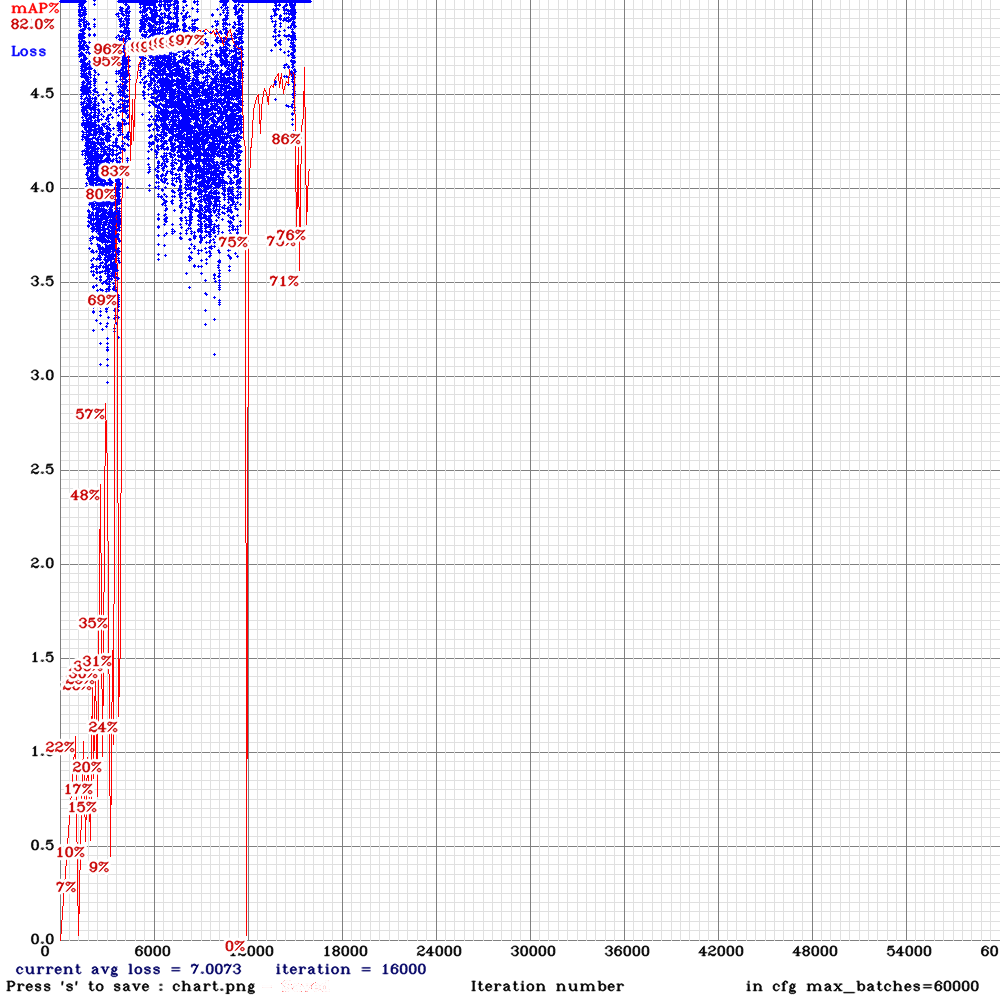
Is it okey?
dreambit
on 20 Sep 2019
@dreambit Try to train with this lr policy, will you get this strange mAP & Loss spike? https://github.com/AlexeyAB/darknet/blob/b918bf0329c06ae67d9e00c8bcaf845f292b9d62/cfg/yolov3.cfg#L18-L23
AlexeyAB
on 20 Sep 2019
@AlexeyAB
 learning_rate=0.001
 burn_in=1000
 max_batches = 500200
 policy=steps
 steps=400000,450000
 scales=.1,.1
yolo_v3_spp_pan3_aa_ae_mixup_scale_giou.cfg has the same learning_rate
learning_rate=0.001
burn_in=1000
Or i am missing something?
dreambit
on 20 Sep 2019
@dreambit
policy
Try to train with this lr policy
AlexeyAB
on 20 Sep 2019
@AlexeyAB
lines in config file are the following:
learning_rate=0.001
burn_in=1000
max_batches=60000

policy=steps
steps=48000,54000
scales=.1,.1
sorry i don't get what should be changed :/
dreambit
on 20 Sep 2019
@dreambit
If you use this cfg-file https://github.com/AlexeyAB/darknet/files/3580764/yolo_v3_tiny_pan3_aa_ae_mixup_scale_giou.cfg.txt
wiht these lines
learning_rate=0.001
burn_in=1000
max_batches = 10000

policy=sgdr
sgdr_cycle=1000
sgdr_mult=2
steps=4000,6000,8000,9000
#scales=1, 1, 0.1, 0.1
then you should use these lines:
learning_rate=0.001
burn_in=1000
max_batches=60000

policy=steps
steps=48000,54000
scales=.1,.1
Otherwise you should check your Training dataset.
Do you get some errors in files bad.list and/or bad_label.list ?
If all is ok, then this is strange behavior of Loss & mAP.
AlexeyAB
on 20 Sep 2019
@AlexeyAB
I am using full size model, darknet is up to date.
in bad_label.list there are 200 lines with the same file:
1_208_31-17-4-6.txt "Wrong annotation: x = 0 or y = 0"
1_208_31-17-4-6.txt 200 times
One file can break training process?
dreambit
on 20 Sep 2019
@dreambit
One file can break training process?
I think no.
But something goes wrong.
AlexeyAB
on 20 Sep 2019
@AlexeyAB I want to know what PAN3 means in the YOLOv3-pan3-aa-ae-mixup-scale-giou.cfg. Thanks a lot.
sunshinemingo
on 21 Sep 2019
Hi @AlexeyAB,
I made an experiment with the Yolov3_spp_lstm network. It seems the network has learned to not make use of hidden states. I run the network on five identical images. Below are the scores for three people in the images. As you can see, there's a slight difference between the scores, even if the images are the same. Do you have any idea what would be the reason?
I'm getting better results on my validation dataset using the LSTM network compared to the non-LSTM network. However, if it has learned to not use hidden states, then the same results basically would be obtainable with the non-LSTM network with more parameters. Do you agree?
PS. I trained yolov3_spp_lstm on a custom dataset with the default configuration file and more classes after necessary adjustments made.
test_lstm/1.png: [0.9983740448951721, 0.9954074621200562, 0.9929710626602173]
test_lstm/2.png: [0.9982781410217285, 0.9945717453956604, 0.9926117062568665]
test_lstm/3.png: [0.9982686638832092, 0.9946098327636719, 0.992585301399231]
test_lstm/4.png: [0.9982640147209167, 0.9946212768554688, 0.9925756454467773]
test_lstm/5.png: [0.9982654452323914, 0.994621753692627, 0.9925785064697266]
enesozi
on 23 Sep 2019
@enesozi
As you can see, there's a slight difference between the scores, even if the images are the same.
Because hidden layers are used.
I'm getting better results on my validation dataset using the LSTM network compared to the non-LSTM network. However, if it has learned to not use hidden states, then the same results basically would be obtainable with the non-LSTM network with more parameters. Do you agree?
It depends on your training and validation datasets.
If images are sequences from video, then mAP will be higher on LSTM.
For the LSTM model, 10 times as many images may be required for it to learn to use hidden layers.
These models have ~ the same number of params, but LSTM has higher mAP: https://github.com/AlexeyAB/darknet/issues/3114#issuecomment-494148968
- https://github.com/AlexeyAB/darknet/files/3199770/yolo_v3_tiny_lstm.cfg.txt 19 BFlops 50.9 mAP
- https://github.com/AlexeyAB/darknet/files/3199617/yolo_v3_tiny_comparison.cfg.txt 20 BFLops - 36.1 mAP
AlexeyAB
on 23 Sep 2019
Sharing my thoughts on practical testing between:
Trained Model: yolov3-tiny @ 832x832
Running at: 12 FPS
Model [email protected] : 59%
GPU Memory Usage: 1427 MB
Cuda Cores Usage: 950
CPU usage: 4 cores of Intel(R) Xeon(R) CPU E5-2620 v4 @ 2.10GHz

Trained Model: yolo_v3_tiny_pan3_aa_ae_mixup_scale_giou @544x544
Running at: 12 FPS
[email protected] : 69%
GPU Memory Usage: 901 MB
Cuda Cores Usage: 1050
CPU usage: 4 cores of Intel(R) Xeon(R) CPU E5-2620 v4 @ 2.10GHz
 dexception
on 23 Sep 2019
dexception
on 23 Sep 2019
@dexception
What dataset did you use?
What is the Cuda Cores Usage: 1050 ? 1050 MHz, 1050% or 1050 number of cores?
What mAP can you get by using yolov3-tiny_3l 832x832 ?
AlexeyAB
on 23 Sep 2019
Hi @AlexeyAB ,
In my project I need to detect very tiny images always of the same size (9x9 px). I'm having really good values for mAP% (like 97%) after using yolov3 tiny and deleting a mask, since after calculating the anchors it was giving me sizes of 25,24; 25,23.
Although detection is quite good, I need to track so I cannot have blinking states. And I do have. So I wanted to use your tiny lstm cfg. I'm trying it but it is quite slow compared with tiny3, and I'm not sure how to do the same modifications as I did for tiny3 to simplify it. Can you help me? Here you can find both cfg files I'm using https://gofile.io/?c=IBWyML
PS. My system has 2 GTX 1060 6 GB.
 Scolymus
on 23 Sep 2019
Scolymus
on 23 Sep 2019
@Scolymus Hi, Why do you use width=960 height=960 in cfg file, while your images are 9x9 pixels?
Try to use width=32 height=32 and remove all [maxpool] layers
Try to use this LSTM cfg-file without modifications
yolo_v3_tiny_lstm_modified.cfg.txt
AlexeyAB
on 23 Sep 2019
@AlexeyAB
Dataset is custom.
1050 is the average number of cuda cores consumed for 1 min of usage.
I am yet to train yolov3-tiny_3l 832x832.
Will share the results once i am free with training other models.
dexception
on 24 Sep 2019
@dexception
1050 is the average number of cuda cores consumed for 1 min of usage.
What command did you use to measure this?
AlexeyAB
on 24 Sep 2019
@AlexeyAB
My images aren't 9x9. I have images of size 1200x800 with many tiny objects to detect that are of size 9x9, which never oclude but they can pack together very close so I can have clusters of these objects. When I train the network, I divide each image into 8 images, so I increase the quantity of images I give to my network. Then, I train the network scaling those images to give them better detection since the gpu has memory enough to afford that. Is it a bad idea?
For training with lstm, I marked manually all the objects of a video for 75 frames and divide that video in 8 pieces as explained before, but after 1000 steps, the error is quite constant at 4000.
Scolymus
on 24 Sep 2019
@AlexeyAB
nvvp -vm /usr/lib/jvm/java-8-openjdk-amd64/jre/bin/java
Nvidia Visual Profiler
https://developer.nvidia.com/nvidia-visual-profiler
Documentation
https://docs.nvidia.com/cuda/profiler-users-guide/index.html
New Session
Path to executable: /opt/github/darknet/darknet
Parameters:
[params we pass to darknet executable]
dexception
on 24 Sep 2019
@AlexeyAB
nvvp -vm /usr/lib/jvm/java-8-openjdk-amd64/jre/bin/javaNvidia Visual Profiler
https://developer.nvidia.com/nvidia-visual-profilerDocumentation
https://docs.nvidia.com/cuda/profiler-users-guide/index.htmlNew Session
Path to executable: /opt/github/darknet/darknetParameters:
[params we pass to darknet executable]
this can be a good way to profile and optimize for everyone who ask about why 2 instances gets X fps and not Y etc..
 HagegeR
on 24 Sep 2019
HagegeR
on 24 Sep 2019
Can someone tell me how many instances of yolo_v3_tiny_pan3_aa_ae_mixup_scale_giou @544x544 i would be able to run on Tesla T40 @12FPS ?
The reason i am asking because i haven't worked with a Tesla before and don't know how much difference Tensor Cores are going to make !
dexception
on 25 Sep 2019
Hi @AlexeyAB when i custom train with yolo_v3_tiny_pan3.cfg.txt on GTX 1070 was error
_cuDNN status Error in: file: ./src/convolutional_layer.c : () : line: 249 : build time: Sep 26 2019 - 10:38:59
cuDNN Error: CUDNN_STATUS_BAD_PARAM
cuDNN Error: CUDNN_STATUS_BAD_PARAM: File exists
darknet: ./src/utils.c:293: error: Assertion `0' failed._
Please help me!
 agutuyen
on 26 Sep 2019
agutuyen
on 26 Sep 2019
How are filters being calculated for yolo_v3_tiny_pan3.cfg.txt ?
For 1 classes it is 30,30,24 in each conv layer.
This is different because in the home page the formula given is giving different result.
For 6 classes what would be the filters in yolo_v3_tiny_pan3.cfg.txt and what is the logic behind it ?
deimsdeutsch
on 27 Sep 2019
Hi @deimsdeutsch,
For 6 class it is (classes+5)*mask => 55,55,44 in each conv layer.
agutuyen
on 27 Sep 2019
@AlexeyAB
Swish activation is not supported by TensorRT. So will have to manage with something else in yolo_v3_tiny_pan3.cfg.txt . What do you suggest to replace it with ?
dexception
on 5 Oct 2019
@dexception Use leaky activation as in common yolov3.
AlexeyAB
on 6 Oct 2019
@AlexeyAB With all things constants. Leaky is giving better results than swish. I thought swish was better.
dexception
on 10 Oct 2019
@dexception which results has that been the case with? I get a small improvement with swish.
LukeAI
on 10 Oct 2019
@LukeAI On the other hand i got better results with leaky. Looks like it is not guaranteed to be better.
I tested it with my own dataset. As mentioned before if the improvement is small better to go with leaky. It has its advantages.
dexception
on 10 Oct 2019
What are the advantages of leaky? it's a bit faster?
LukeAI
on 10 Oct 2019
Does the yolo_v3_tiny_pan3_aa_ae_mixup_scale_giou_LSTM.cfg model exists?? @AlexeyAB
keko950
on 10 Oct 2019
@AlexeyAB hi, i'm wondering if you think yolo_v3_tiny_pan3 model is better than yolo_v3 for mAP in COCO dataset
 syjeon121
on 11 Oct 2019
syjeon121
on 11 Oct 2019
@syjeon121
MSCOCO dataset has plenty of tagging issues. So it only makes sense for us to correct them.
https://github.com/AlexeyAB/darknet/issues/4085
dexception
on 15 Oct 2019
@AlexeyAB
Is it possible to add more yolo layers to improve accuracy ?
3 yolo layers seem to work wonders. Why not try with 4 or 5 ?
dexception
on 15 Oct 2019
@dexception Yes, just try. 4 and 5 [yolo] layers are suitable only for small objects.
AlexeyAB
on 15 Oct 2019
Hi @AlexeyAB
How's the results for yolo_v3_spp_pan_lstm?
Thanks!
i-chaochen
on 21 Oct 2019
I added yolo_v3_tiny_pan3 matrix_gaussian aa_ae_mixup.cfg.txt model.
| Model (cfg & weights) network size = 544x544 | Training chart | Validation video | BFlops | Inference time RTX2070, ms | mAP, % |
|---|---|---|---|---|---|
| yolo_v3_tiny_pan3 matrix_gaussian aa_ae_mixup.cfg.txt and weights-file | | video | 13 | 19.0 ms | 57.2% |
AlexeyAB
on 31 Oct 2019
loss is high in this one
HagegeR
on 31 Oct 2019
@HagegeR Yes. But loss is nothing, only accuracy is important..
AlexeyAB
on 31 Oct 2019
yeah but maybe a better result can be obtained in this one by adding a layer or changing some params, having a high loss means it still has potential isn't it?
HagegeR
on 31 Oct 2019
yeah but maybe a better result can be obtained in this one by adding a layer or changing some params, having a high loss means it still has potential isn't it?
I think high loss means model will learn more from the data whist low loss means model learn little from data, probably due to unbalanced dataset or model pick too many easy examples. Like online hard example sample and focal loss trying to solve.
As a side note. @AlexeyAB as I mentioned, do you know the result for the spp_lstm?
i-chaochen
on 31 Oct 2019
@i-chaochen
There have long been these results for yolo_v3_spp_lstm.cfg.txt - 102 BFlops, 26.0 ms, 57.5% mAP on this small dataset - or what do you mean?
@HagegeR
Loss depends on:
how loss is calculated in the Detection layers
how many Detection layers - there are 10
[Gaussian_yolo]instead of 3[yolo]layers as in yolov3.cfghow many parameters it tries to optimize - there are 4 new confidence_score for x,y,w,h in the
[Gaussian_yolo]layer (so not only for classes, but also for coordinates)which of the parameters does it try to optimize more, and which less (for example, GIoU tries to optimize x,y,w,h more than MSE tries to do this)
....
AlexeyAB
on 31 Oct 2019
@i-chaochen
There have long been these results for
yolo_v3_spp_lstm.cfg.txt- 102 BFlops, 26.0 ms, 57.5% mAP on this small dataset - or what do you mean?@HagegeR
Loss depends on:
- how loss is calculated in the Detection layers
- how many Detection layers - there are 10
[Gaussian_yolo]instead of 3[yolo]layers as in yolov3.cfg- how many parameters it tries to optimize - there are 4 new confidence_score for x,y,w,h in the
[Gaussian_yolo]layer (so not only for classes, but also for coordinates)- which of the parameters does it try to optimize more, and which less (for example, GIoU tries to optimize x,y,w,h more than MSE tries to do this)
- ....
I'm sorry, I was trying to ask yolo_v3_spp_pan_lstm
Because I saw you in > https://github.com/AlexeyAB/darknet/issues/3114#issuecomment-494148968
the first one is still empty.
i-chaochen
on 1 Nov 2019
@AlexeyAB Hi,
Can I change policy from sgdr to steps in yolo_v3_tiny_pan3.cfg? And Is yolo_v3_tiny_pan3.cfg better than Yolo3-SPP.cfg Or Yolov3-Gaussian for large dataset?
Thanks
 zpmmehrdad
on 3 Nov 2019
zpmmehrdad
on 3 Nov 2019
@zpmmehrdad
Can I change policy from sgdr to steps in yolo_v3_tiny_pan3.cfg?
Yes, you can.
Also you can do any other changes.
And Is yolo_v3_tiny_pan3.cfg better than Yolo3-SPP.cfg Or Yolov3-Gaussian for large dataset?
I didn't test it.
AlexeyAB
on 3 Nov 2019
I added yolo_v3_tiny_pan3 matrix_gaussian aa_ae_mixup.cfg.txt model.
Model (cfg & weights) network size = 544x544 Training chart Validation video BFlops Inference time RTX2070, ms mAP, %
yolo_v3_tiny_pan3 matrix_gaussian aa_ae_mixup.cfg.txt and weights-file
Mmm.. im having some issues trying that last model
keko950
on 4 Nov 2019
@keko950
- Do you use the latest Darknet version?
- What training dataset do you use?
- How many classes?
AlexeyAB
on 4 Nov 2019
@keko950
- Do you use the latest Darknet version?
- What training dataset do you use?
- How many classes?
- Yes, just pulled and compiled again the repo before trying it
- Custom dataset
- two clases (and using classes + 8 + 1) * number masks
I used the darknet53.conv.74 weights
keko950
on 4 Nov 2019
@keko950
use yolov3-tiny.conv.14
https://github.com/AlexeyAB/darknet/issues/3114#issuecomment-494154586
AlexeyAB
on 4 Nov 2019
@AlexeyAB Hi,
I have prepared a small dataset with 4 classes and ~5.1k images. I trained with YoloV3-Gaussian and yolo_v3_tiny_pan3_aa_ae_mixup_scale_giou and my results are :
yolo_v3_tiny_pan3_aa_ae_mixup_scale_giou :
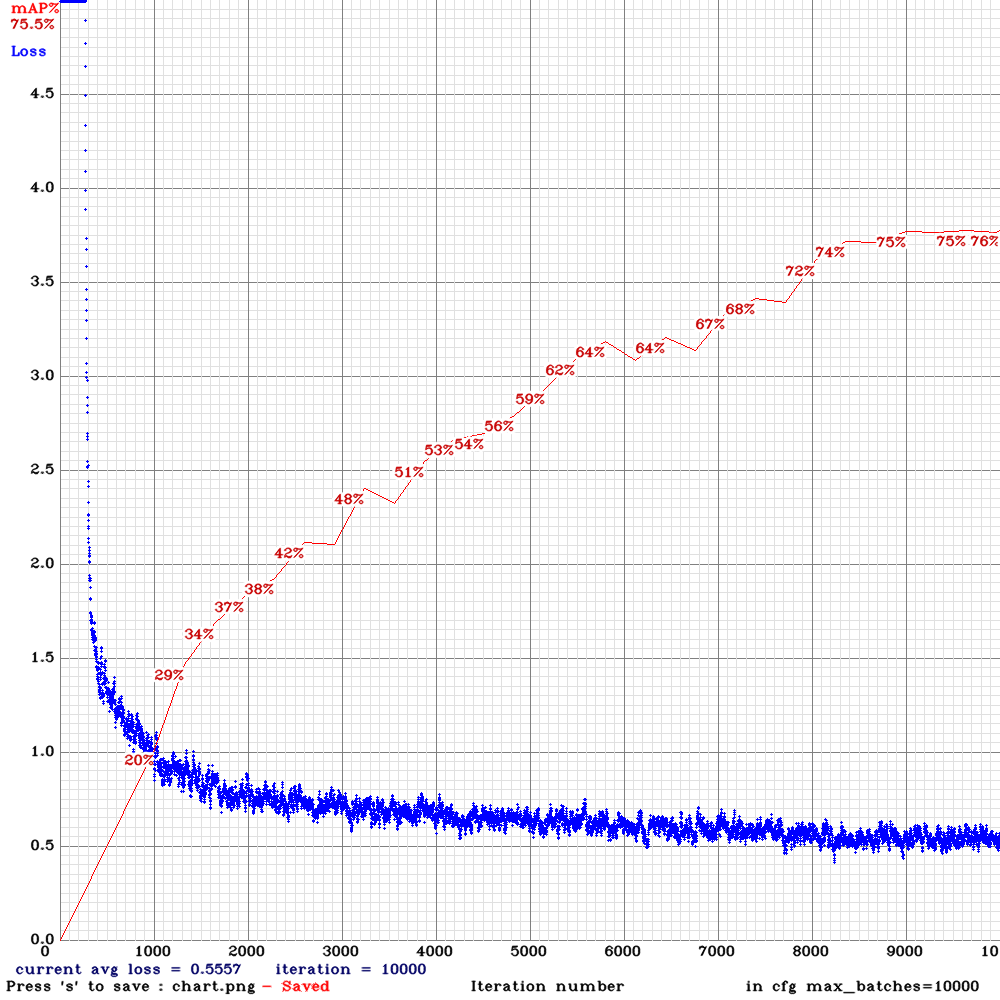
YoloV3-Gaussian:
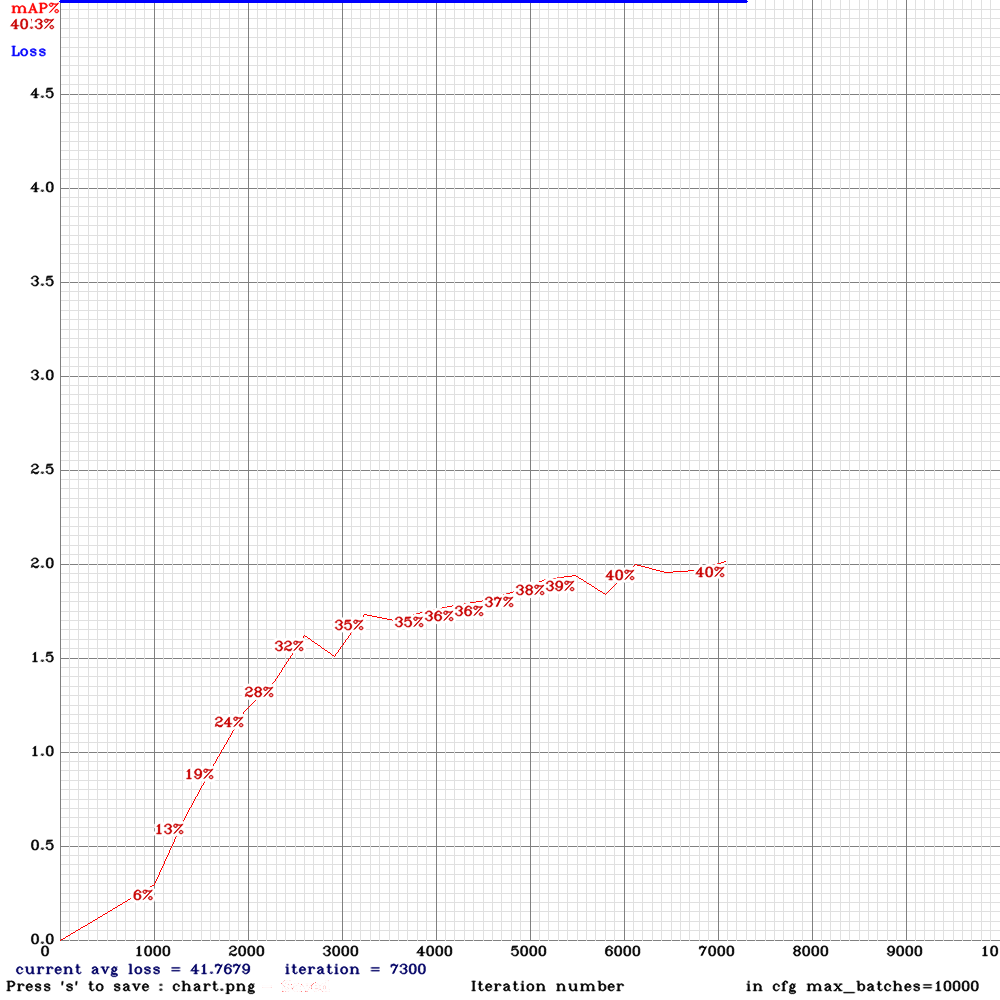
but YoloV3-Gaussian isn't completed yet. And I also trained with SPP but unfortuantly I don't have the chart and the mAP was ~55%.
My problem is about IoU. I check the mAP:
iou_thresh 0.9 : 2.36 %
iou_thresh 0.8 : 29.79 %
Net size: 544x544
Can I increase iou_normalizer in the cfg, the default is 0.25? And do you have another advice to improve it?
Thanks!
zpmmehrdad
on 5 Nov 2019
@keko950
use yolov3-tiny.conv.14
#3114 (comment)
Yup, it worked, thanks!
keko950
on 5 Nov 2019
@AlexeyAB
Hi, I cloned the latest (2019/11/05) repo and compiled successfully on Linux.
I compiled with
GPU=1
CUDNN=1
CUDNN_HALF=1
OPENCV=0
AVX=1
OPENMP=1
LIBSO=1
ZED_CAMERA=0
I tried to train
yolo_v3_tiny_pan3.cfg.txt and weights-file Features: PAN3, AntiAliasing, Assisted Excitation, scale_x_y, Mixup, GIoU
on my own dataset with no pretrained weights file. It can train successfully.
However, when I try to partial the weights file you provided with
./darknet partial cfg/yolo_v3_tiny_pan3_aa_ae_mixup_scale_giou.cfg yolov3-tiny_occlusion_track_last.weights yolo_v3_tiny_pan3_aa_ae_mixup_scale_giou.14 14
CUDA related error occurred.
GPU isn't used
layer filters size/strd(dil) input output
0 conv 16 3 x 3/ 1 544 x 544 x 3 -> 544 x 544 x 16 0.256 BF
1 max 2x 2/ 2 544 x 544 x 16 -> 272 x 272 x 16 0.005 BF
2 conv 32 3 x 3/ 1 272 x 272 x 16 -> 272 x 272 x 32 0.682 BF
3 max 2x 2/ 1 272 x 272 x 32 -> 272 x 272 x 32 0.009 BF
conv 32/ 32 3 x 3/ 2 272 x 272 x 32 -> 136 x 136 x 32 0.011 BF
AA: CUDA status Error: file: ./src/dark_cuda.c : () : line: 309 : build time: Nov 5 2019 - 04:24:11
CUDA Error: invalid argument
CUDA Error: invalid argument: File exists
darknet: ./src/utils.c:293: error: Assertion `0' failed.
Aborted (core dumped)
However, it can partial a standard yolov3.cfg and yolov3.weights file successfully.
I don't know why this is the case.
Do you have any ideas?
Thanks!
 taosean
on 5 Nov 2019
taosean
on 5 Nov 2019
@taosean I fixed it.
AlexeyAB
on 5 Nov 2019
@zpmmehrdad
My problem is about IoU. I check the mAP:
iou_thresh 0.9 : 2.36 %
iou_thresh 0.8 : 29.79 %
In which model do you have such problem (yolo_v3_tiny_pan3_aa_ae_mixup_scale_giou, Yolov3-gaussian, SPP, ...)?
- Try to use GIoU
iou_loss=giouin [yolo] layers - Try to increase
iou_normalizer=0.5 - Try to increase
ignore_thresh = .7or0.9 - Try to train this model: https://github.com/AlexeyAB/darknet/files/3795047/yolo_v3_tiny_pan3_matrix_gaussian_aa_ae_mixup.cfg.txt
AlexeyAB
on 5 Nov 2019
@AlexeyAB @LukeAI I thought this might be a good place to post our recent results. I've been busy trying to bring our repo (ultralytics/yolov3) up to spec with darknet training results. I think it's finally there. The architectures and anchors we use are identical, we use yolov3-spp.cfg and only change data augmentation and hyperparameters, meaning all of this improvement runs at exactly the same BFLOPS and FPS as existing yolov3-spp. Our [email protected] improvements are minor (0-3%) at lower confidence thresholds, but our [email protected] improvements are significant (3-4%) across most resolutions and confidence thresholds.
The full test results are in this Google Colab Notebook, but I've summarized them in the tables below. I used 512 img-size for testing as this seems to be the most commonly used test resolution in recent papers. last49.pt here was trained at 416 img-size with multiscale (320-608) to 273 epochs on COCO2014, with all default settings in our repo. No backbone was used.
| [email protected] | [email protected]
--- | --- | ---
yolov3-spp.weights at 0.001 conf | 0.355 | 0.593
gs://yolov4/last49.pt at 0.001 conf | 0.386 | 0.593
And these are the results at 0.3 confidence threshold (more representative of real-world usage)
| [email protected] | [email protected]
--- | --- | ---
yolov3-spp.weights at 0.300 conf | 0.298 | 0.466
gs://yolov4/last49.pt at 0.300 conf | 0.341 | 0.501
I uploaded two comparison videos for a sanity check, and the last49.pt box regressions and detections seem qualitatively improved over yolov3-spp.weights. The smaller cars are detected earlier with less blinking and cars of all sizes show better behaved bounding boxes:
yolov3-spp.weightsinference: https://youtu.be/7qn52DPdyqolast49.ptinference: https://youtu.be/whwlv_YhhDY
I think the greatest single change came from implementing what we call a mosaic dataloader, which loads up 4 images at a time in a mosaic (rather than a single image). I think this random combination of 4 images (touching on their edges) helps increase variation in the training set (similar to or better than mixup), and makes overtraining more difficult. An example of the mosaic loader is here. This might be something you could try to implement here if you have time @AlexeyAB.
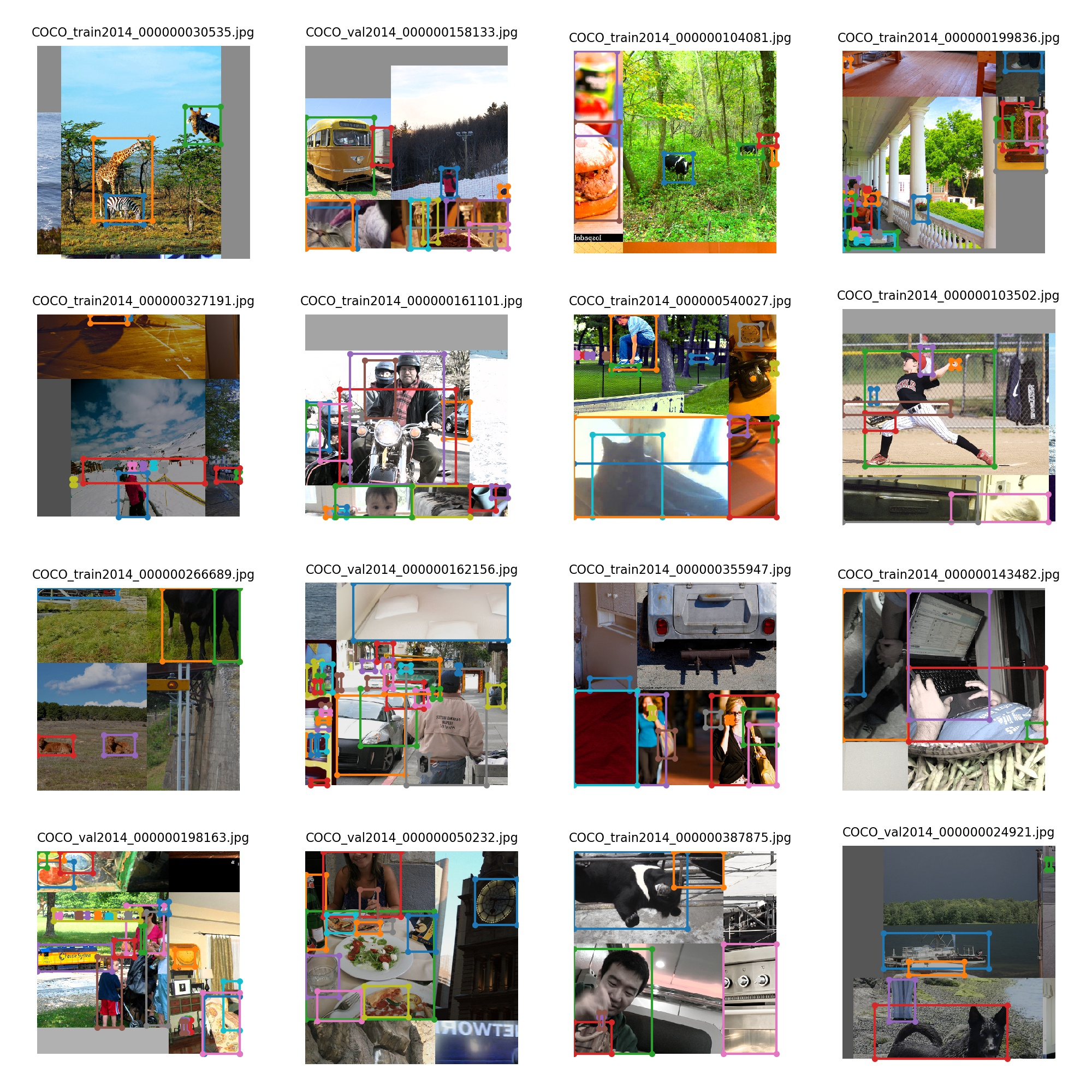
 glenn-jocher
on 10 Nov 2019
glenn-jocher
on 10 Nov 2019
@glenn-jocher Thanks for your detailed infromation and tests!
So mosaic-augmentation is like CutMix, just uses 4 images instead of 2, and images do not overlap each other?
AlexeyAB
on 10 Nov 2019
@AlexeyAB ah I had not heard of cutmix. I looked at the paper, the dog-cat image is funny. The primary mechanism for increasing mAP here seems to be suppressing overtraining, which starts to become a serious problem for me on COCO after about 200 epochs. Interestingly, my GIoU validation loss was always decreasing, but cls and in particular obj losses were more prone to overtraining.
The mosaic simply places the selected image in the top left, along with 3 random ones from the train set in the remaining 3 slots (top right, bottom left, bottom right). The four images meet at a common point (the bottom right corner of the first image). The mosaic is then shifted randomly so that the common point lies within the 416x416 box.
About your question, no the images do not overlap right now, but I think this would be a useful addition. A next-level mosaic might allow the images to overlap and shift slightly, further increasing the variation seen during training.
glenn-jocher
on 10 Nov 2019
@AlexeyAB by the way, a user on the ultralytics repo was asking for mixup, which led me to look at the paper, and I think we are exceeding it's performance substantially with mosaic. It's not apples to apples comparison because they appear to use yolov3.cfg and we use yolov3-spp.cfg, but our [email protected] at 608 is a little over 40.0, whereas they show 37.0 at 608.
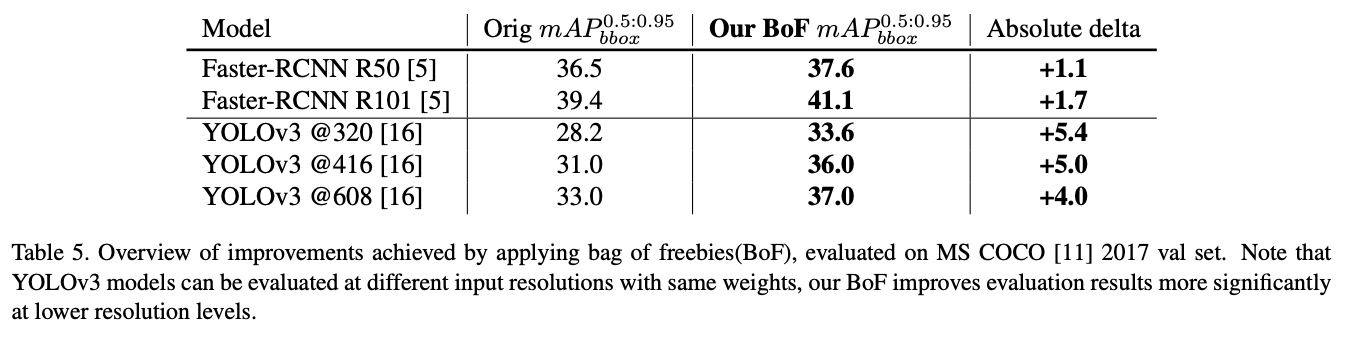 glenn-jocher
on 10 Nov 2019
glenn-jocher
on 10 Nov 2019
@glenn-jocher
- Is your result 40% [email protected] for yolov3-spp.cfg 608x608 with GIoU?
- And did you use ADAM-optimizer or just simple decay&momentum?
- Also did you implement and use
ignore_thresh=0.7in your Pytorch implementation?
- Did you try to use Swish or Mish activations instead of leaky-RELU?
- Did you try to use Gaussian-yolo?
- Did you try to use your earlier suggestion "Sensitivity Effects Near Grid Boundaries (Experimental Results)"? https://github.com/AlexeyAB/darknet/issues/3293
- Also what do you think about Assisted Excitation? https://github.com/AlexeyAB/darknet/issues/3417
About all these improvements: https://github.com/AlexeyAB/darknet/projects/1
AlexeyAB
on 10 Nov 2019
@glenn-jocher
- Is your result 40% [email protected] for yolov3-spp.cfg 608x608 with GIoU?
Yes with GIoU and all default settings in the ultralytics repo, trained at --img-size 608 with --multi-scale. I think GIoU helps in more ways than one, for example before I was trying to balance 4 loss terms, GIoU simplifies them into a single loss term. It also makes the model more robust to instabilities during early training. We don't use a burn in period for example, since I think we don't need it after implementing GIoU.
- And did you use ADAM-optimizer or just simple decay&momentum?
SGD with momentum. The LR and momentum were 0.00261 and 0.949, based on hyperparameter searches.
- Also did you implement and use
ignore_thresh=0.7in your Pytorch implementation?
No, we don't have an ignore threshold, we use an iou_threshold, set at 0.213 (from the same hyp search). Any target-anchor combination > 0.213 contributes to all 3 losses (box, obj, cls), lower pairings are ignored for box and cls, and counted as 'no object' for obj loss.
- Did you try to use Swish or Mish activations instead of leaky-RELU?
Yes, swish helped a tiny amount (+0.003 mAP) but required much more GPU memory (since its not an in-place operation) and thus smaller batch-sizes, so we abandoned it for practicality. I don't know what Mish is.
- Did you try to use Gaussian-yolo?
No. Is there a cfg file for this?
- Did you try to use your earlier suggestion "Sensitivity Effects Near Grid Boundaries (Experimental Results)"? #3293
I tried this in the past for several magnitudes, but was not able to improve performance.
- Also what do you think about Assisted Excitation? #3417
I looked at it briefly, but it seemed a bit difficult to implement so I never pursued it.
About all these improvements: https://github.com/AlexeyAB/darknet/projects/1
Wow, this is a large list of TODOs! I think in essence we've only done 3 things to get our improvements. It would be great to use these as the basis for more tests.
- GIoU
- Slight changes to loss function
- Hyperparameter search
- Mosaic loader
glenn-jocher
on 11 Nov 2019
Our model for 0.40 mAP at 608 is last48.pt, which was trained under all default settings with --img-size 608 and --multi-scale. Under default test conditions it returns this:
$ python3 test.py --save-json --weights last48.pt --img-size 608
Namespace(batch_size=16, cfg='cfg/yolov3-spp.cfg', conf_thres=0.001, data='data/coco.data', device='', img_size=608, iou_thres=0.5, nms_thres=0.5, save_json=True, weights='last48.pt')

 Average Precision  (AP) @[ IoU=0.50:0.95 | area=   all | maxDets=100 ] = 0.395
 Average Precision  (AP) @[ IoU=0.50      | area=   all | maxDets=100 ] = 0.604
 Average Precision  (AP) @[ IoU=0.75      | area=   all | maxDets=100 ] = 0.419
 Average Precision  (AP) @[ IoU=0.50:0.95 | area= small | maxDets=100 ] = 0.216
 Average Precision  (AP) @[ IoU=0.50:0.95 | area=medium | maxDets=100 ] = 0.428
 Average Precision  (AP) @[ IoU=0.50:0.95 | area= large | maxDets=100 ] = 0.518
 Average Recall     (AR) @[ IoU=0.50:0.95 | area=   all | maxDets=  1 ] = 0.322
 Average Recall     (AR) @[ IoU=0.50:0.95 | area=   all | maxDets= 10 ] = 0.510
 Average Recall     (AR) @[ IoU=0.50:0.95 | area=   all | maxDets=100 ] = 0.533
 Average Recall     (AR) @[ IoU=0.50:0.95 | area= small | maxDets=100 ] = 0.339
 Average Recall     (AR) @[ IoU=0.50:0.95 | area=medium | maxDets=100 ] = 0.566
 Average Recall     (AR) @[ IoU=0.50:0.95 | area= large | maxDets=100 ] = 0.680
But if I increase nms-threshold a bit from 0.5 to 0.6, I get reduced [email protected] but increased [email protected]:
$ python3 test.py --save-json --weights last48.pt --img-size 608 --nms-thres 0.6
Namespace(batch_size=16, cfg='cfg/yolov3-spp.cfg', conf_thres=0.001, data='data/coco.data', device='', img_size=608, iou_thres=0.5, nms_thres=0.6, save_json=True, weights='last48.pt')

 Average Precision  (AP) @[ IoU=0.50:0.95 | area=   all | maxDets=100 ] = 0.401
 Average Precision  (AP) @[ IoU=0.50      | area=   all | maxDets=100 ] = 0.603
 Average Precision  (AP) @[ IoU=0.75      | area=   all | maxDets=100 ] = 0.431
 Average Precision  (AP) @[ IoU=0.50:0.95 | area= small | maxDets=100 ] = 0.219
 Average Precision  (AP) @[ IoU=0.50:0.95 | area=medium | maxDets=100 ] = 0.434
 Average Precision  (AP) @[ IoU=0.50:0.95 | area= large | maxDets=100 ] = 0.523
 Average Recall     (AR) @[ IoU=0.50:0.95 | area=   all | maxDets=  1 ] = 0.323
 Average Recall     (AR) @[ IoU=0.50:0.95 | area=   all | maxDets= 10 ] = 0.523
 Average Recall     (AR) @[ IoU=0.50:0.95 | area=   all | maxDets=100 ] = 0.553
 Average Recall     (AR) @[ IoU=0.50:0.95 | area= small | maxDets=100 ] = 0.358
 Average Recall     (AR) @[ IoU=0.50:0.95 | area=medium | maxDets=100 ] = 0.589
 Average Recall     (AR) @[ IoU=0.50:0.95 | area= large | maxDets=100 ] = 0.698
@glenn-jocher thanks for sharing your results, it's great how you and @AlexeyAB share your ideas and results. Why is that without the mosaic data augmentation, the ultralytics implementation trains to a slightly lower mAP than in this repo. ? What is this repo. doing that Ultralytics is not?
LukeAI
on 11 Nov 2019
@glenn-jocher
No, we don't have an ignore threshold, we use an iou_threshold, set at 0.213 (from the same hyp search). Any target-anchor combination > 0.213 contributes to all 3 losses (box, obj, cls), lower pairings are ignored for box and cls, and counted as 'no object' for obj loss.
Does it mean that you use truth_thresh = 0.213?
- https://github.com/AlexeyAB/darknet/blob/d91d59a22fea9c266f06c2ae5edb23d38fd83c20/cfg/yolov3-spp.cfg#L820
- https://github.com/AlexeyAB/darknet/blob/d91d59a22fea9c266f06c2ae5edb23d38fd83c20/src/yolo_layer.c#L317-L326
Yes, swish helped a tiny amount (+0.003 mAP) but required much more GPU memory (since its not an in-place operation) and thus smaller batch-sizes, so we abandoned it for practicality. I don't know what Mish is.
Did you train yolov3-spp with swish-activation by using default pre-trained weights-file darknet53.conv.74 which is trained for darknet53.cfg with leaky-relu-activation?
Or did you train darknet53.cfg with swish-activation on imagenet? May be swish can give advantage if we train classify model with swish too.
About MISH: https://github.com/AlexeyAB/darknet/issues/3994 Mish looks very promising, but in practice gives Nan for loss.
Did you try to use Gaussian-yolo?
No. Is there a cfg file for this?
cfg-file is the same as yolov3.cfg, just use [Gaussian-yolo] instead of [yolo] https://github.com/jwchoi384/Gaussian_YOLOv3/blob/master/cfg/Gaussian_yolov3_BDD.cfg
[Gaussian-yolo] is implemented in this repo. More: https://github.com/AlexeyAB/darknet/issues/4147
It gives ~ the same +3% [email protected] as GIoU, but requires new layer [Gaussian-yolo], while GIoU doesn't require any changes for Detection (Inference-only).
I don't know, can we combine [Gaussian-yolo] + GIoU and get a greater increase in accuracy.
Wow, this is a large list of TODOs!
Currently I think about
- MixNet: https://github.com/AlexeyAB/darknet/issues/4203
- MatrixNet: https://github.com/AlexeyAB/darknet/issues/3772
- Mosaic data augmentation: https://github.com/AlexeyAB/darknet/issues/4264
- Combine with TridentNet: https://github.com/AlexeyAB/darknet/issues/3363
AlexeyAB
on 11 Nov 2019
@AlexeyAB
I'm trying to train darknet using yolo_v3_spp_lstm.cfg file and darknet/yolov3-spp.weights on colab but it stops immediately. I tried -clear 1 option or incresing max_batchesbut still stops without train.
Output:
   layer   filters  size/strd(dil)      input                output
   0 conv     32       3 x 3/ 1    416 x 416 x   3 ->  416 x 416 x  32 0.299 BF
   1 conv     64       3 x 3/ 2    416 x 416 x  32 ->  208 x 208 x  64 1.595 BF
   2 conv     32       1 x 1/ 1    208 x 208 x  64 ->  208 x 208 x  32 0.177 BF
   3 conv     64       3 x 3/ 1    208 x 208 x  32 ->  208 x 208 x  64 1.595 BF
   4 Shortcut Layer: 1
   5 conv    128       3 x 3/ 2    208 x 208 x  64 ->  104 x 104 x 128 1.595 BF
   6 conv     64       1 x 1/ 1    104 x 104 x 128 ->  104 x 104 x  64 0.177 BF
   7 conv    128       3 x 3/ 1    104 x 104 x  64 ->  104 x 104 x 128 1.595 BF
.........
.........
.........
 101 CONV_LSTM Layer: 104 x 104 x 64 image, 64 filters
conv     64       3 x 3/ 1    104 x 104 x  64 ->  104 x 104 x  64 0.797 BF
conv     64       3 x 3/ 1    104 x 104 x  64 ->  104 x 104 x  64 0.797 BF
conv     64       3 x 3/ 1    104 x 104 x  64 ->  104 x 104 x  64 0.797 BF
conv     64       3 x 3/ 1    104 x 104 x  64 ->  104 x 104 x  64 0.797 BF
conv     64       3 x 3/ 1    104 x 104 x  64 ->  104 x 104 x  64 0.797 BF
conv     64       3 x 3/ 1    104 x 104 x  64 ->  104 x 104 x  64 0.797 BF
conv     64       3 x 3/ 1    104 x 104 x  64 ->  104 x 104 x  64 0.797 BF
conv     64       3 x 3/ 1    104 x 104 x  64 ->  104 x 104 x  64 0.797 BF
 102 route  101 100
 103 conv    128       1 x 1/ 1    104 x 104 x 128 ->  104 x 104 x 128 0.354 BF
 104 conv    128       3 x 3/ 1    104 x 104 x 128 ->  104 x 104 x 128 3.190 BF
 105 conv     18       1 x 1/ 1    104 x 104 x 128 ->  104 x 104 x  18 0.050 BF
 106 yolo
[yolo] params: iou loss: mse, iou_norm: 0.75, cls_norm: 1.00, scale_x_y: 1.00
 107 route  95
 108 conv    256       3 x 3/ 1     26 x  26 x 256 ->   26 x  26 x 256 0.797 BF
 109 conv     18       1 x 1/ 1     26 x  26 x 256 ->   26 x  26 x  18 0.006 BF
 110 yolo
[yolo] params: iou loss: mse, iou_norm: 0.75, cls_norm: 1.00, scale_x_y: 1.00
 111 route  87
 112 conv    512       3 x 3/ 1     13 x  13 x 512 ->   13 x  13 x 512 0.797 BF
 113 conv     18       1 x 1/ 1     13 x  13 x 512 ->   13 x  13 x  18 0.003 BF
 114 yolo
[yolo] params: iou loss: mse, iou_norm: 0.75, cls_norm: 1.00, scale_x_y: 1.00
Total BFLOPS 67.951
Loading weights from /content/gdrive/My Drive/AlexDarknet/darknet/yolov3-spp.weights...
 seen 64
Done! Loaded 115 layers from weights-file
Learning Rate: 0.001, Momentum: 0.9, Decay: 0.0005

 Tracking! batch = 4, subdiv = 8, time_steps = 4, mini_batch = 1
Resizing
608 x 608
 sequential_subdivisions = 2, sequence = 4
Loaded: 0.000102 seconds
This is first 32 lines of my train.txt file:
/home/darknet/img/mustafa_1_2_BR-1.jpg
/home/darknet/img/mustafa_1_2_BR-2.jpg
/home/darknet/img/mustafa_1_2_BR-3.jpg
/home/darknet/img/mustafa_1_2_BR-4.jpg
/home/darknet/img/mustafa_1_2_BR-5.jpg
/home/darknet/img/mustafa_1_2_BR-6.jpg
/home/darknet/img/mustafa_1_2_BR-7.jpg
/home/darknet/img/mustafa_1_2_BR-8.jpg
/home/darknet/img/mustafa_1_2_BR-9.jpg
/home/darknet/img/mustafa_1_2_BR-10.jpg
/home/darknet/img/mustafa_1_2_BR-11.jpg
/home/darknet/img/mustafa_1_2_BR-12.jpg
/home/darknet/img/mustafa_1_2_BR-13.jpg
/home/darknet/img/mustafa_1_2_BR-14.jpg
/home/darknet/img/mustafa_1_2_BR-15.jpg
/home/darknet/img/mustafa_1_2_BR-16.jpg
/home/darknet/img/mustafa_1_2_BR-17.jpg
/home/darknet/img/mustafa_1_2_BR-18.jpg
/home/darknet/img/mustafa_1_2_BR-19.jpg
/home/darknet/img/mustafa_1_2_BR-20.jpg
/home/darknet/img/mustafa_1_2_BR-21.jpg
/home/darknet/img/mustafa_1_2_BR-22.jpg
/home/darknet/img/mustafa_1_2_BR-23.jpg
/home/darknet/img/mustafa_1_2_BR-24.jpg
/home/darknet/img/mustafa_1_2_BR-25.jpg
/home/darknet/img/mustafa_1_2_BR-26.jpg
/home/darknet/img/mustafa_1_2_BR-27.jpg
/home/darknet/img/mustafa_1_2_BR-28.jpg
/home/darknet/img/mustafa_1_2_BR-29.jpg
/home/darknet/img/mustafa_1_2_BR-30.jpg
/home/darknet/img/mustafa_1_2_BR-31.jpg
/home/darknet/img/mustafa_1_2_BR-32.jpg
cfg file: yolo_v3_spp_lstm.cfg.txt
I just changed anchor boxes according to calc_anchors and line 723 to layers = -1, 11
 J-Thunderbolt
on 12 Nov 2019
J-Thunderbolt
on 12 Nov 2019
@J-Thunderbolt
- Try to set width=320 height=320 or random=0
- Use default anchors.
AlexeyAB
on 12 Nov 2019
@J-Thunderbolt
- Try to set width=320 height=320 or random=0
- Use default anchors.
Still the same :(
J-Thunderbolt
on 12 Nov 2019
@J-Thunderbolt I just tried your cfg-file and it works.
So check your dataset. Look at the generated files bad.list and bad_label.list
AlexeyAB
on 12 Nov 2019
@J-Thunderbolt
You must use http://pjreddie.com/media/files/darknet53.conv.74 weights-file as described there: https://github.com/AlexeyAB/darknet/issues/3114#issuecomment-494154586
also try
batch=4 subdivisions=4 sequential_subdivisions=4what GPU do you use?
what params in the Makefile do you use?
how many CPU RAM do you have?
AlexeyAB
on 12 Nov 2019
@glenn-jocher thanks for sharing your results, it's great how you and @AlexeyAB share your ideas and results. Why is that without the mosaic data augmentation, the ultralytics implementation trains to a slightly lower mAP than in this repo. ? What is this repo. doing that Ultralytics is not?
@LukeAI this is a good questions. Yes originally at the beginning of the year we were running inference and testing to the exact same results when using the original darknet weights, but we were training very poorly on COCO2014, to about 0.40 [email protected] at 416, compared to 0.56 with the default weights. The major increases in performance came from 3 changes/misunderstandings:
- Our loss initially only paired the best anchor (out of all 9) to each target. We changed this to pair a target to any anchor above iou_thres = 0.213 (all paired anchors generate losses). So for example all 9 anchors might be paired or none at all. This change boosted mAP by about 0.07 to 0.47.
- Our loss components differed wildly in magnitude. We balanced them by hand first, and then automated this process by evolving these balancing hyperparameters (along with the augmentation hyperparameters and all the rest like SGD LR and momentum simultaneously) using a genetic algorithm. As an example our GIoU, obj and cls gains are now 3.31, 42.4 and 40.0. This boosted mAP another 0.07 to about 0.54.
- We noticed our cls and obj (in particular) losses were overfitting severely at the later epochs (see https://github.com/ultralytics/yolov3/issues/453#issuecomment-525731974), so we invented the mosaic dataloader to try to increase variation in the training data, like mixup/cutmix etc but hopefully better. This boosted mAP another 2-3%, to a little over the darknet results in most cases (the outlier where darknet weights still test better is 608 [email protected]). The greatest gains are seen in [email protected] at all resolutions and all confidence levels, and [email protected] is now a bit higher also at 320 and 416 (but not 608). The 608 outlier problem may have to due with how we interpolate smaller images to larger ones, I need to look into it still.
Some of the difference is also surely due to PyTorch and C implementations of the same functions, i.e. the loss functions. Unfortunately I'm only a PyTorch expert, so it's hard for me to read the darknet C code and understand it. You'd need a YOLOv3 + C + PyTorch expert to really pick apart the true differences, which might be next to impossible to find.
glenn-jocher
on 13 Nov 2019
@LukeAI @AlexeyAB BTW here are the training plots to give you an idea of how the 3 losses compare after the hyperparameter tuning. These two are 416-multiscale and 608-multiscale trained on COCO2014 for 273 epochs. The mAP shown is at 0.10 conf-thres, except for the last epoch, which is tested at 0.001 conf-thres (hence the epoch 273 jump in mAP and R, and drop in P).
The hyperparameters were evolved at 320 img-size, so one of the things we want to try is to evolve them at 512, to get the very best test mAP at 512 to compare to the recent publications (i.e. cornernet etc). This will take a long time though, maybe another month or two. If you have free GPUs laying around I could send you a script to help us out with this.
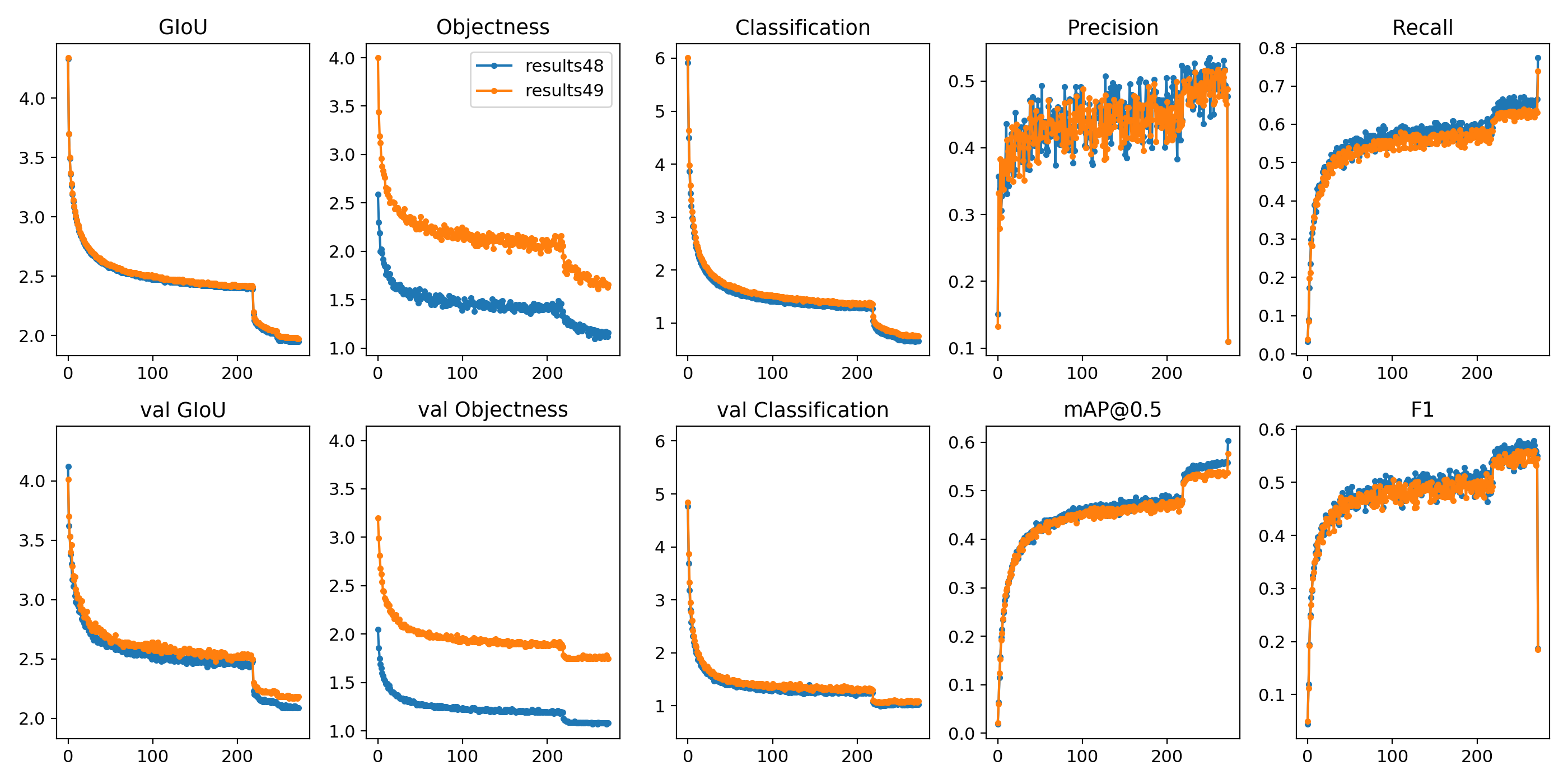
glenn-jocher
on 13 Nov 2019
@glenn-jocher
What confidence_threshold do you use to get Precision and Recall on your charts?
Our loss initially only paired the best anchor (out of all 9) to each target. We changed this to pair a target to any anchor above iou_thres = 0.213 (all paired anchors generate losses). So for example all 9 anchors might be paired or none at all. This change boosted mAP by about 0.07 to 0.47.
I will try to implement this.
Did you try to change yolov3-spp.cfg architecture as MatrixNet? https://github.com/AlexeyAB/darknet/issues/3772
It seems MatrixNet is better than CornerNet/CenterNet.
AlexeyAB
on 13 Nov 2019
@AlexeyAB mAP is tested at --conf-thres 0.100 (to compute it quickly) for all epochs except the last epoch, which is tested at --conf-thres 0.001 (to get the highest final mAP). At 0.100 mAP computes in about 2 minutes on 5k.txt, but takes about 7 minutes at 0.001 mAP, so to prevent the mAP computation from slowing down training significantly we do this.
I guess my #1 question to you is what the most important update to yolov3-spp you think we could make to improve COCO results while keeping inference times fast. Do you think MatrixNets is the best approach? 47.8 mAP is super high. I can start reading the paper and thinking about how to implement this. Until now I've been avoiding architecture changes, but it might be time to start looking at that.
The most interesting part of our loss function is that there is no unique anchor-target pairings. All pairings above iou_thres=0.213 are used, which means that multiple targets can pair to one anchor, and multiple anchors to one target. If multiple targets pair to one anchor we simply average these as usual. Before I spent a lot of time trying to enforce the best unique pairings and it turns out all of this effort was hurting the mAP.
glenn-jocher
on 13 Nov 2019
@glenn-jocher
I think the most promising is the MatrixNet, since it is better than CornerNet/CenterNet. But I didn't find detalied architecture of MatrixNet, there is only general desctiption.
But the most easy way to improve the mAP I think:
- use 3 SPP blocks instead of 1 (one for each 3 yolo-branches)
- add PAN2 block to the yolov3-spp.cfg https://github.com/AlexeyAB/darknet/files/3342792/yolo_v3_tiny_pan2.cfg.txt
Just as an assumption:
- change darknet53.cfg classifier to use 9x9 conv-lyaer instead of 3x3 for stride=2 conv-layers or even MixConv layers (3x3, 5x5, 7x7, 9x9) without using grouped/depthwise conv: https://github.com/AlexeyAB/darknet/issues/4203 or even (conv3x3, conv5x5, conv7x7, conv9x9, maxpool2x2, maxpool4x4, maxpool6x6, maxpool8x8)
- train this classifier by using Stylized ImageNet https://github.com/AlexeyAB/darknet/issues/3320
Based on the theoretical basis from Stylized ImageNet, it seems can help Bilateral Bluring during data augmentation, that removes detailed textures and leaves only general shapes of the objects (so for example we should select blur_kernel_size smaller than 1/10 of the smalles object size) this should help the neural network pay attention to the most important details of objects and should increase Top1 / mAP. I randomly blur whole image or only background: https://github.com/AlexeyAB/darknet/blob/c516b6cb0a08f82023067a649d10238ff18cf1e1/src/image_opencv.cpp#L1197-L1235
P.S.
Also may be:
- may be use TridentNet instead of Feature Pyramid, but I think it can be slow
For example, from Top10 networks: https://paperswithcode.com/sota/object-detection-on-coco
Top2 TridentNet: https://github.com/AlexeyAB/darknet/files/3292303/resnet152_trident.cfg.txt but there is not implemented ResNet101-Deformable (may be it is very slow) https://github.com/AlexeyAB/darknet/issues/3363
Top4 PANet: https://github.com/AlexeyAB/darknet/files/3342792/yolo_v3_tiny_pan2.cfg.txt there is just a simple block that routes features from each subsampling layer, and do maxpooling-depth, which takes the max value from channels for each (x,y) https://github.com/AlexeyAB/darknet/issues/3175
Also I though about using EfficientNet https://github.com/AlexeyAB/darknet/issues/3380 and MixNet https://github.com/AlexeyAB/darknet/issues/4203 as backbone, since they have 10x less flops with the same accuracy, but they are slower on GPU than darknet53.cfg.
AlexeyAB
on 13 Nov 2019
@J-Thunderbolt
- You must use http://pjreddie.com/media/files/darknet53.conv.74 weights-file as described there: #3114 (comment)
- also try
batch=4 subdivisions=4 sequential_subdivisions=4- what GPU do you use?
- what params in the Makefile do you use?
- how many CPU RAM do you have?
I'm sorry for taking your time. It worked after updating some linux packages. Forgive my ignorance.
J-Thunderbolt
on 13 Nov 2019
If I understood correctly, one of the main advantages of the CNN-LSTM approach is that the visual features are available for tracking. That is compared to SORT (Hungarian+Kalman) where the tracking uses only position and velocity information. ID switches should be much less likely for CNN-LSTMs when two objects pass close to each other. ID-switches are a factor in the scoring for many MOT tests.
YOLO output seems to label the class of each object, but doesn't have a unique ID for each instance of a class. In this case, is it possible to detect ID switches with the current architecture? If not now, is that part of any future plans? I guess that even the existing training data doesn't include instance labels, if the ground truth labels only give the class rather than an instance ID?
Despite the lack of instance labels in the ground truth dataset, I suspect that the LSTM would learn to store something like an "instance label", because that would be very helpful for tracking. Perhaps it would be possible to make this available as an output, if an appropriate loss function could be devised?
I noticed this when comparing the Ultralytics examples where there are many cars with identical labels, to videos of YOLO+SORT, where each object has a bbox with a unique colour e.g. https://www.youtube.com/watch?v=tq0BgncuMhs
chrisrapson
on 15 Nov 2019
@chrisrapson this is an interesting idea. As of now what you talk about is handled separately as far as I know, and is called 'Object Detection and Tracking'. Track ID's are initiated with an object detector and then tracked with more traditional techniques such as KLT trackers possibly combined with a Kalman Filter for maintaining state estimates.
I don't know much about LSTM (and we don't have this ability enabled currently in ultralytics/yolov3) but I know @AlexeyAB has been integrating this functionality into this repo.
glenn-jocher
on 15 Nov 2019
@chrisrapson @glenn-jocher
There are two papers from the first message in this issue about this. F.e. Ali Farhadi Co-Founder & Chief Xnor Officer XNOR.ai (co-author of Yolo): https://arxiv.org/abs/1705.06368v3
Generally, top Multi-object trackers use Siamese networks, SiamRPN and DaSiamRPN https://github.com/AlexeyAB/darknet/issues/3042
But I think LSTM networks are more flexible, and can be used in multi-task networks that integrate tasks:
- Robust Object detection
yolo_v3_tiny_pan_lstm.cfg.txt: https://github.com/AlexeyAB/darknet/issues/3114#issuecomment-494148968 - Instance segmentation:
YOLACT- https://github.com/AlexeyAB/darknet/issues/3048 - Multi-object tracking: https://arxiv.org/abs/1705.06368v3 and https://github.com/AlexeyAB/darknet/issues/3042
Suggestion:
If Detector (Yolo) works fast and accurate enough, then it is enough to use simple object-tracking like SORT (cv::KalmanFilter + Hungarian algorithm).
But there are still 2 problems:
- More accuracy (Blinking issue) - we can solve it by using LSTM layers
- Occlusions (track_id migration of 2 objects with the same class_id). Since SORT tracks objects well, we should solve tracking only for occlusions, for this case we need only very robust
internal_temporal_track_idwhich should distinguish two overlaped objects with the same class_id:
Multi-object tracking can be implemented in the same way as it is done in the Instance segmentation implementation YOLACT - by using (4+1+classes+K)*anchors outputs of Detector as in YOLACT instead of (4+1+classes)*anchors as in Yolov3. F.e. K=32, so if the highest value for the current object is in k-output (where k = [0, K)), then internal_temporal_track_id = k for this object.
In this way: Yolo-detector, LSTM, (4+1+classes+K)*anchors from YOLACT - all in one model synergistically help each other.
For example, multi-task network: Object-detector and Instance-segmentation tasks help each other and increase accuracy each other: https://github.com/AlexeyAB/darknet/issues/4287
AlexeyAB
on 16 Nov 2019
@glenn-jocher I added ability to use iou_thresh=0.213 in [yolo] layers: https://github.com/AlexeyAB/darknet/commit/e7e85b358cb0531f7154fdd68306c4c4dc96b5d2
Is it the same as you wrote in your message? https://github.com/AlexeyAB/darknet/issues/3114#issuecomment-553180311
The most interesting part of our loss function is that there is no unique anchor-target pairings. All pairings above iou_thres=0.213 are used, which means that multiple targets can pair to one anchor, and multiple anchors to one target. If multiple targets pair to one anchor we simply average these as usual. Before I spent a lot of time trying to enforce the best unique pairings and it turns out all of this effort was hurting the mAP.
AlexeyAB
on 16 Nov 2019
@AlexeyAB ah ok! This threshold is the only criteria I am using to match targets to anchors, so in that sense our loss function is quite simple.
I had considered trying to make this threshold more of a smooth transition (as shown below) rather than a step change, but I just have not had time. My intuition tells me smoothing the threshold would lead to more stable/differentiable losses and maybe better training results. Now for example a 0.220 iou creates obj=1.0 target (and full box and cls loss), but a slightly different 0.210 iou creates obj=0.0 (and no box, no cls loss). It seems a difficult lesson for the network to learn.
import matplotlib.pyplot as plt
import numpy as np


def sigmoid(x):
    return 1 / (1 + np.exp(-x))


x = np.linspace(0, 1, 300)

fig = plt.figure(figsize=(8, 4))
plt.plot(x, sigmoid((x - 0.213) * 50000), '.-')
plt.plot(x, sigmoid((x - 0.213) * 50), '.-')
plt.xlabel('IoU')
plt.ylabel('Objectness target')
fig.tight_layout()
plt.savefig('iou.png', dpi=200)
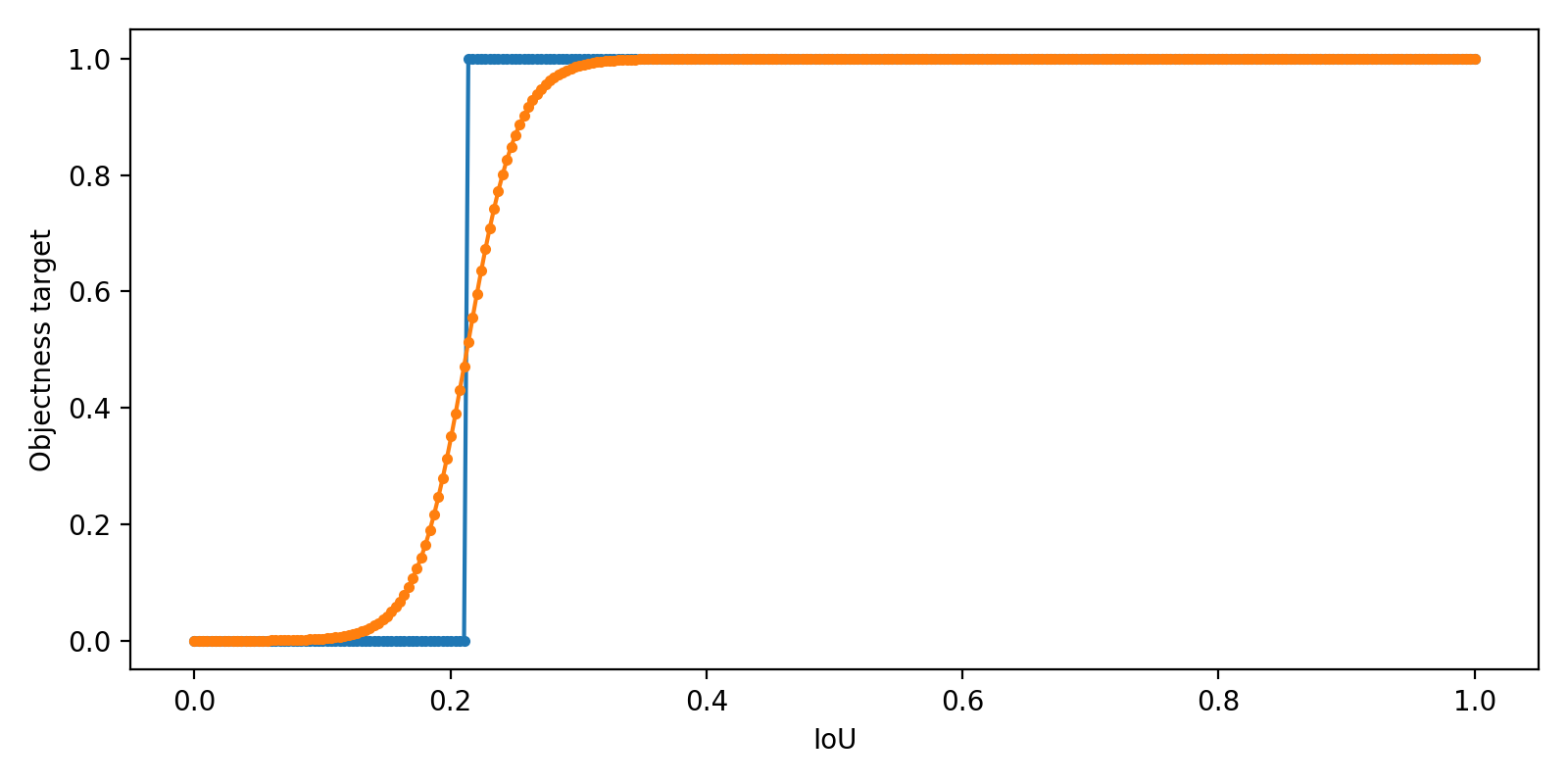
glenn-jocher
on 17 Nov 2019
@AlexeyAB @glenn-jocher Hello,
For tracking, I think we can considerate about this:
https://github.com/Zhongdao/Towards-Realtime-MOT
 WongKinYiu
on 17 Nov 2019
WongKinYiu
on 17 Nov 2019
@glenn-jocher
I had considered trying to make this threshold more of a smooth transition (as shown below) rather than a step change, but I just have not had time.
- Do you mean that we should introduce
iou_thresh_normalization = sigmoid((iou - 0.213) * 50)coefficient?
And we should multiply deltas for x,y,w,h,objectenss,probs by this coefficient iou_thresh_normalization?
If multiple targets pair to one anchor we simply average these as usual.
- Do you mean that if 3 objects have IoU > 0.213 with 1 anchor, then you set
delta_x = (delta_obj1_x + delta_obj2_x + delta_obj3_x) / 3?
All pairings above iou_thres=0.213 are used, which means that multiple targets can pair to one anchor, and multiple anchors to one target.
- Doesn't that create too many fals positives, and does this not spoil the IoU (since anchors with IoU ~= 0.2-0.5 are not very suitable)?
- What NMS-implementation do you use? Do you remove overlapped detections with IoU > nms_threshold (0.45) and lower
probability*objectnessas it is done in the Darknet? (or lowerobjectness)
AlexeyAB
on 17 Nov 2019
@glenn-jocher
I had considered trying to make this threshold more of a smooth transition (as shown below) rather than a step change, but I just have not had time.
- Do you mean that we should introduce
iou_thresh_normalization = sigmoid((iou - 0.213) * 50)coefficient?
Well let me experiment with it for a bit. I've tried it in the past without improvement so far.
And we should multiply
deltasforx,y,w,h,objectenss,probsby this coefficientiou_thresh_normalization?
Yes that is the idea.
If multiple targets pair to one anchor we simply average these as usual.
- Do you mean that if 3 objects have IoU > 0.213 with 1 anchor, then you set
delta_x = (delta_obj1_x + delta_obj2_x + delta_obj3_x) / 3?
Yes exactly. But this is not handled as a special case, we simply apply the default pytorch loss behavior, which is to average across elements, then we sum the 3 layers togethor to get the total loss. So for example if we have 100, 300 and 900 anchor-target pairings across the 3 yolo layers our GIoU_loss = mean([GIoU_1...GIoU_100])_layer0 + mean([GIoU_1...GIoU_300])_layer1 + mean([GIoU_1...GIoU_900])_layer2.
All pairings above iou_thres=0.213 are used, which means that multiple targets can pair to one anchor, and multiple anchors to one target.
- Doesn't that create too many fals positives, and does this not spoil the IoU (since anchors with IoU ~= 0.2-0.5 are not very suitable)?
Mmm, I'm not sure if it creates a lot of false positives at conf-thres 0.10, but yes at the lower conf-thres 0.001 it could be. I think what it does is create more overlapping boxes which NMS merges into 1.
- What NMS-implementation do you use? Do you remove overlapped detections with IoU > nms_threshold (0.45) and lower
probabilityas it is done in the Darknet? (or lowerobjectness, or lowerprobability*objectness)
We use a special type of NMS which merges overlapping bounding boxes togethor rather than eliminating them. We use a weighted average of the overlapping boxes. The weights are the obj values. This helped improve mAP a tiny bit over default NMS, maybe +0.002 mAP. We multiply the objectness and class probabilities togethor for this, probability*objectness.
glenn-jocher
on 17 Nov 2019
I tested Mish against LeakyReLU(0.1) on COCO with yolov3-spp.cfg. Mish returned better results, but our implementation increased GPU memory requirements _tremendously_, so much that I could only fit --batch-size 8 on a V100. To compare apples to apples I re-ran LeakyReLU(0.1) and Swish under the exact same conditions. The results are to 27 epochs at 512 resolution, batch-size 8, img-size 512.
| [email protected] | mAP0.5:0.95 | GPU memory | Epoch time
--- | --- | --- | --- | ---
LeakyReLU(0.1) | 48.9 | 29.6 | 4.0G | 31min
Swish() | - | - | 5.2G | -
Mish() | 50.9 | 31.2 | 11.1G | 46min
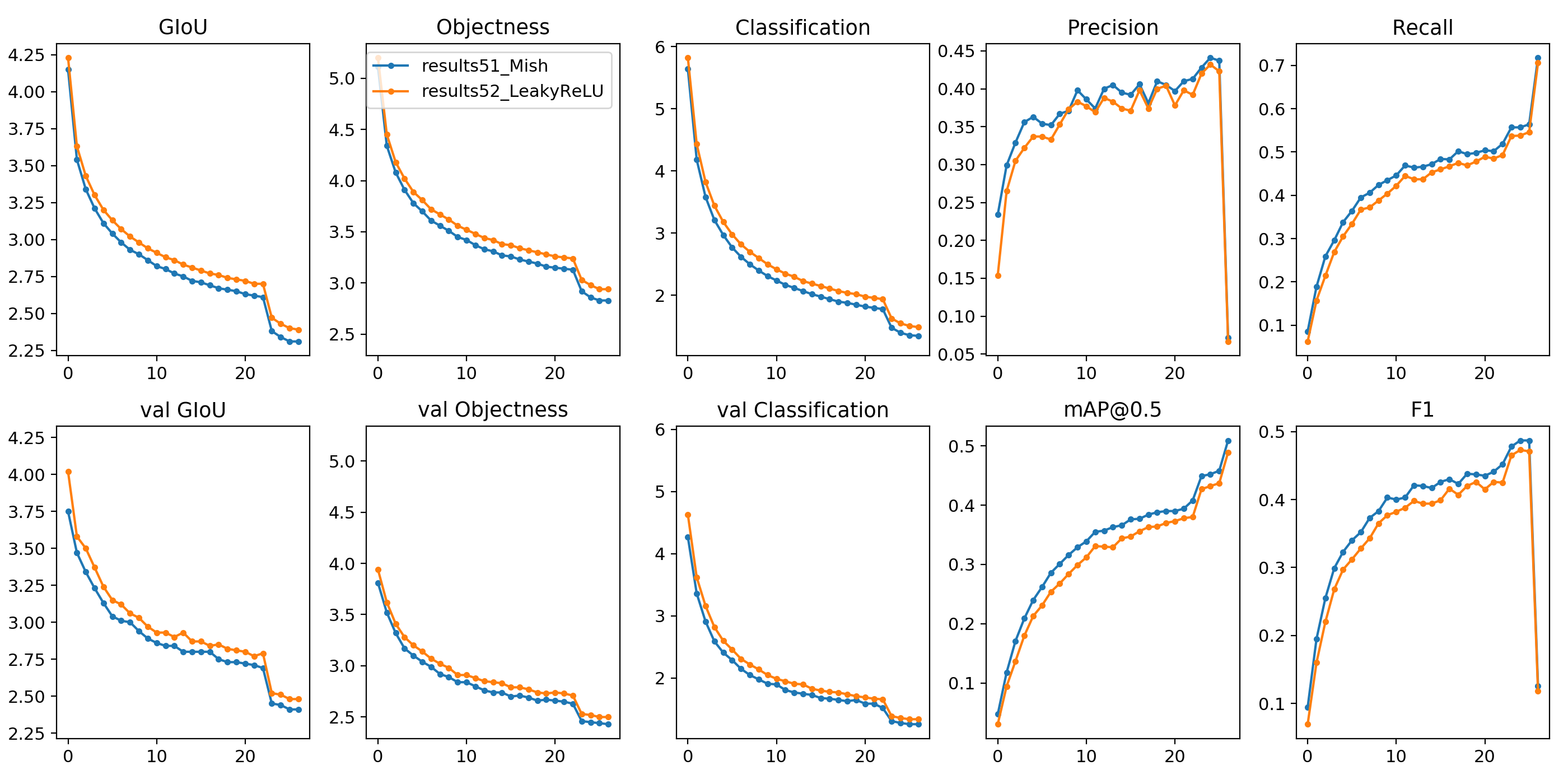
class Swish(nn.Module):
    def __init__(self):
        super(Swish, self).__init__()

    def forward(self, x):
        return x.mul_(torch.sigmoid(x))


class Mish(nn.Module):  # https://github.com/digantamisra98/Mish
    def __init__(self):
        super().__init__()

    def forward(self, x):
        return x.mul_(F.softplus(x).tanh())
@glenn-jocher
In general, can you achieve [email protected] higher than 60%
or mAP0.5...0.95 higher than 40%
on yolov3spp608+mish with current memory usge?
This is weird that MISH requires more memory than SWISH, since both required only 1 overhead buffer for inputs (or swish can use buffer for sigmoid(inputs) instead of inputs with the same size).
Is there built-in MISH-activation in Pytorch? Since I see two requrest was discarded: https://github.com/pytorch/pytorch/issues?q=is%3Aissue+mish+is%3Aclosed
I implemented in the Darknet this MISH-implementation that was created for Pytorch: https://github.com/thomasbrandon/mish-cuda/blob/master/csrc/mish.h#L26-L31 But it shouldn't use more than 2x memory.
AlexeyAB
on 17 Nov 2019
@AlexeyAB I'm going to rerun the analysis as 416 with --batch-size 16 --accumulate 4. This is a full COCO analysis other than the fact that it only trains to 10% of the epochs (27). In general I've noticed results at 27 epochs do a very good job of representing full training results (so if it's better at 27, it's likely better at 273 also). Once I get this sorted out I can start a few full trainings in parallel, which should take a week or so.
glenn-jocher
on 18 Nov 2019
@AlexeyAB to answer your other questions no, there are no built-in Swish or Mish functions in PyTorch. I think they don't like the branding/names and the fact that they are of only very slight improvement for much more resource utilisation. In general I could see us presenting mAPs from YOLOv3-Swish/Mish suitable for academic comparison, but I'm not sure I would recommend anyone actually use these activation functions in real-world applications, unless the task is lightweight, like NLP or MNIST.
It's possible PyTorch may optimize further as new releases come out. I think Swish is using less memory than I remember before. In the past I had seen it using 50% more than LeakyReLU(0.1), now it's 30% more.
Actually, if Swish can get close to Mish performance, but stay close to LeakyReLU speed/memory, it may be a worthwhile compromise. I should know by tomorrow when the 416 results come in.
glenn-jocher
on 18 Nov 2019
In reply to https://github.com/AlexeyAB/darknet/issues/3114#issuecomment-554564064, @AlexeyAB @glenn-jocher
I agree with Alexey that "LSTM networks are more flexible". My intuition is that CNN-LSTMs should be the ideal architecture for MOT. Perhaps because this project and the MOT project were started about the same time, I just made the assumption that Alexey intended to use the LSTM for MOT.
Siamese networks usually only use the previous frame (unless they include something like an LSTM) so they are not robust if the object is occluded, even for a short time. They are also vulnerable to model drift if the object is viewed from a different angle etc.
I also just assumed that since Glenn was comparing the Ultralytics to the videos above, and since the Ultralytics output seemed very smooth, that it must be using an LSTM. Thanks to Glenn for correcting me there.
My understanding of the JDE algorithm in "Towards-Realtime-MOT" is that the detection network outputs both the object's location and the visual features. Effectively, it uses the output of the second-last CNN layer, in addition to the bboxes from the last layer, and passes that data to a Hungarian algorithm. The performance of the Hungarian algorithm is improved because it is working with additional data. I would say that sounds very similar to ROLO. Instead of a Hungarian algorithm, ROLO passes the same data to a separately trained LSTM. It would be interesting to see a side-by-side comparison of JDE and ROLO, but ROLO was only developed for single object tracking. My intuition is that an LSTM might be more robust to the ID-switches that are discussed in the "Analysis and Discussions" paragraph of the JDE paper.
ROLO paper: https://arxiv.org/pdf/1607.05781.pdf
ROLO repo: https://github.com/Guanghan/ROLO
I'm very impressed with YOLACT. I couldn't find anything in their paper or their repo about the (4+1+classes+K)*anchors, but I agree that that could be a way to train an instance-labelling object detection network. I still wonder what the loss function for K should be. There isn't an a priori "correct" label for each object. The correct answer at t+1 depends on the answer at t, since the goal is to keep the same label for the same object at all time steps.
chrisrapson
on 18 Nov 2019
@AlexeyAB @LukeAI I've got good news. In my last activation study (yolov3-spp on COCO2014 for 27 epochs) Swish returned best results across all metrics, +2.[email protected] compared to default (LeakyReLU(0.1)), +0.[email protected] compared to Mish. Speed hit is +10% and memory hit is +30% vs default, which may be a suitable compromise. I will gather the latest hyperparameter results and run a new full COCO training soon to test out Swish, which should be ready in about a week.
python3 train.py --weights '' --img-size 416 --batch-size 16 --accumulate 4 --epochs 27 --device 0 --prebias
| [email protected] | mAP0.5:0.95 | GPU memory | Epoch time
--- | --- | --- | --- | ---
LeakyReLU(0.1) | 47.7 | - | 5.5G | 20min
Swish() | 49.8 | 30.4 | 7.3G | 22min
Mish() | 49.0 | 29.8 | 15.6G | 27min
glenn-jocher
on 18 Nov 2019
@glenn-jocher
I am glad to see that the swish gives a good increase in accuracy. Moreover, the use of memory grows only during training, but not during detection.
There is bad speed and memory-usage of Mish I think just because you use simple CPU-implementation. Try to use https://github.com/thomasbrandon/mish-cuda
Swish better than Mish in accuracy - I think it's better to ask @digantamisra98 may be Mish can be improved
AlexeyAB
on 18 Nov 2019
I would suggest to use the Mish CUDA implementation for more optimized performance and also to do a 3 run test to see the statistical significance of the results. Mish and Swish are very similar to each other so I won't be surprised if Mish beats Swish in another run but I'd like you to give Mish CUDA a try.
 digantamisra98
on 18 Nov 2019
digantamisra98
on 18 Nov 2019
@AlexeyAB @digantamisra98 thanks for the comments! I'm a little confused about how to install cuda-mish, so I've raised an issue https://github.com/thomasbrandon/mish-cuda/issues/1.
In terms of statistics the 3 runs take about 48 hours to complete in all, they are YOLOv3-SPP COCO trainings to 10% of the full epochs, and all begin with the same 0 seed to make the comparison apples to apples. So even though they do represent a single Monte Carlo point, all 3 begin from the same initial conditions and initial from-scratch network, seeing the same training data in the same random order, same random augmentation etc. I could re-run the 3 with a different seed but its a very computationally intensive test.
In any case I am making constant updates to the repo, so there should be valid grounds for rerunning this comparison in a month or two once the repo has changed sufficiently to warrant it (new hyperparameters etc). In the past for example Swish was much closer to LeakyReLU(0.1), and now it's much further ahead, so results really depend not just on the network but on the task, and the training settings and hyperparameters.
glenn-jocher
on 18 Nov 2019
@chrisrapson yes that seems to be a good summary. To clarify the ultralytics/yolov3 repo does not do any tracking or lstm yet, though these would make a very useful additions. The smoothness in the updated video is just a result of a year's worth of incremental improvements to the originally released yolov3-spp. The bounding boxes are much better behaved, though in actuality each frame in the video is handled independently as it's own image with no apriori knowledge of the previous frame.
I agree that the current methods are not robust, even in the video you linked to I see broken tracks in just a few seconds of occlusion. An LSTM powered object detection and tracking system might be very useful in that space, though depending on the situation the memory would have to reside for quite a long time (i.e. over 100 images into the past) to reacquire occluded people after say 3 seconds at 30 FPS.
glenn-jocher
on 18 Nov 2019
@glenn-jocher you can also give this a shot - https://github.com/rwightman/gen-efficientnet-pytorch/blob/master/geffnet/activations/activations_autofn.py
This would be much straightforward and easy to plug-in. Though I haven't tested it out myself.
digantamisra98
on 19 Nov 2019
I gave Mish a shot with this repo.
I trained on a private dataset, using weights pretrained on bdd100k. The pretrained network used the swish cfg. so the experiment is a little biased against Mish. I found no meaningful difference in AP between swish and mish. The mish network took longer to converge which is probably simply due to the pretrained bias. I guess if I pretrained using mish activations, the final AP might be slightly higher but I doubt it would make much difference or be worth a hit in performance.
Swish
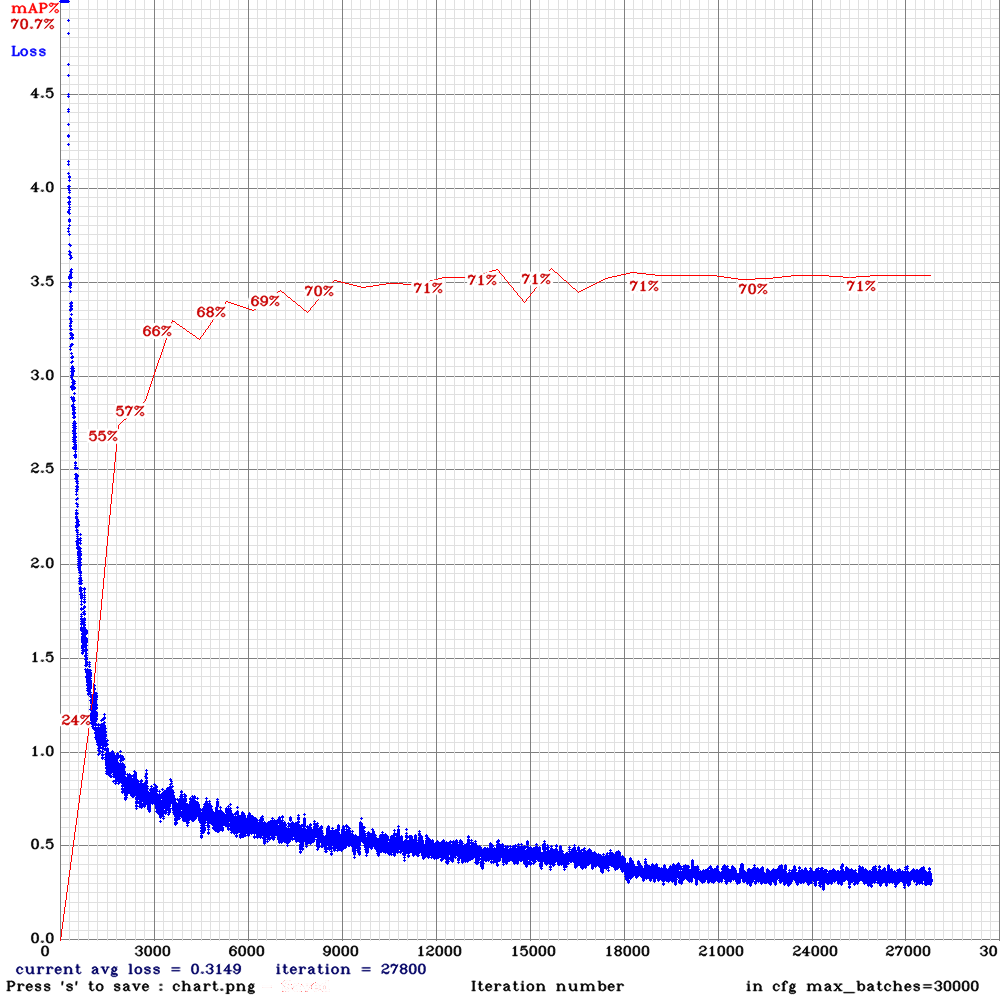
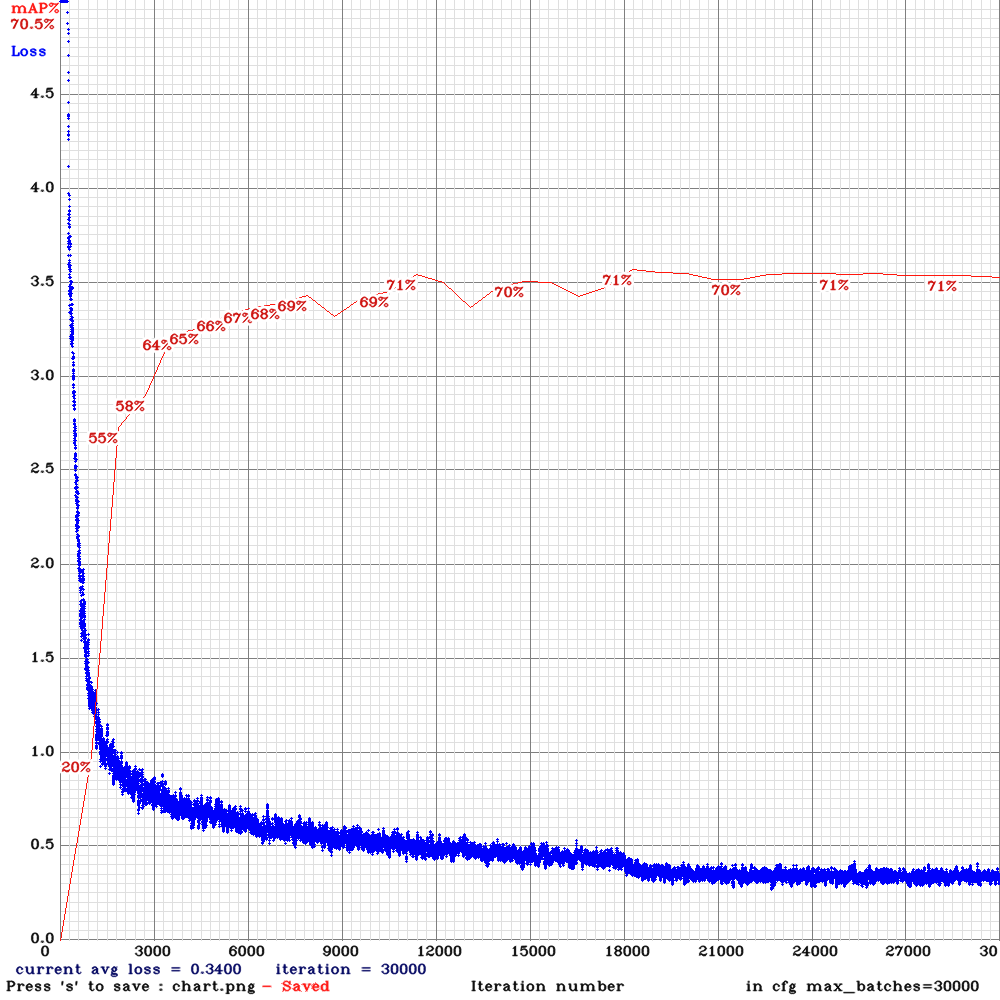 LukeAI
on 20 Nov 2019
LukeAI
on 20 Nov 2019
Interesting. Thanks for the observations. Agreed Mish and Swish are very close approximations of each other so there is no clear cut winner from both of them. However in some of my tests involving changing of hyper-parameters, I found Mish to be more robust than Swish is. For Instance:
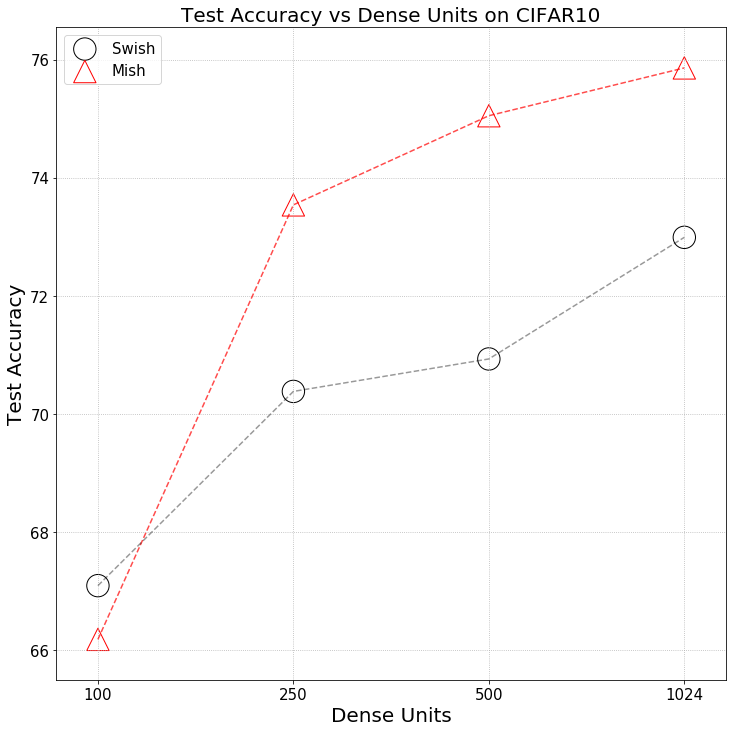
digantamisra98
on 20 Nov 2019
@glenn-jocher
Our loss initially only paired the best anchor (out of all 9) to each target. We changed this to pair a target to any anchor above iou_thres = 0.213 (all paired anchors generate losses). So for example all 9 anchors might be paired or none at all. This change boosted mAP by about 0.07 to 0.47.
Do you mean that iou_thresh=0.213 (pairs for iou(thresh, anchors)) gives you +0.47% of mAP?
Our loss components differed wildly in magnitude. We balanced them by hand first, and then automated this process by evolving these balancing hyperparameters (along with the augmentation hyperparameters and all the rest like SGD LR and momentum simultaneously) using a genetic algorithm. As an example our GIoU, obj and cls gains are now 3.31, 42.4 and 40.0. This boosted mAP another 0.07 to about 0.54.
Do you mean that you use such coefficients and it gives +0.54% mAP?
iou_normalizer=3.31 https://github.com/AlexeyAB/darknet/blob/master/src/yolo_layer.c#L173-L176
cls_normalizer=42.4 https://github.com/AlexeyAB/darknet/blob/master/src/yolo_layer.c#L340
probability_normalizer = 40.0
iou_loss=giou
SGD with momentum. The LR and momentum were 0.00261 and 0.949, based on hyperparameter searches.
And you use
learning_rate=0.00261
momentum=0.949
@glenn-jocher
Our loss initially only paired the best anchor (out of all 9) to each target. We changed this to pair a target to any anchor above iou_thres = 0.213 (all paired anchors generate losses). So for example all 9 anchors might be paired or none at all. This change boosted mAP by about 0.07 to 0.47.
Do you mean that
iou_thresh=0.213(pairs for iou(thresh, anchors)) gives you +0.47% of mAP?Our loss components differed wildly in magnitude. We balanced them by hand first, and then automated this process by evolving these balancing hyperparameters (along with the augmentation hyperparameters and all the rest like SGD LR and momentum simultaneously) using a genetic algorithm. As an example our GIoU, obj and cls gains are now 3.31, 42.4 and 40.0. This boosted mAP another 0.07 to about 0.54.
Do you mean that you use such coefficients and it gives +0.54% mAP?
iou_normalizer=3.31 https://github.com/AlexeyAB/darknet/blob/master/src/yolo_layer.c#L173-L176
cls_normalizer=42.4 https://github.com/AlexeyAB/darknet/blob/master/src/yolo_layer.c#L340
probability_normalizer = 40.0
iou_loss=giouSGD with momentum. The LR and momentum were 0.00261 and 0.949, based on hyperparameter searches.
And you use
learning_rate=0.00261
momentum=0.949
Under our implementation, iou_thresh is a necessity really, otherwise every target is paired with all 9 anchors, and mAP is significantly lower (imagine a very large anchor fitting a tiny objects for example and vice versa). The mAP gain after implementing it I'm not sure, but it would be easy to figure out, you'd simply train with iou_thresh=0.0. This is why we let the value evolve along with the others, because we weren't sure the correct value to assign it. Typically around iou_thresh 0.10-0.30 seems to work best.
Yes that's correct about the normalizers, I think they are the same in our repo. The total loss is the sum of each component (box, objectness, classification) multiplied by its 'normalizer' hyperparameter:
    lbox *= hyp['giou']
    lobj *= hyp['obj']
    lcls *= hyp['cls']
    loss = lbox + lobj + lcls
@glenn-jocher
The total loss is the sum of each component (box, objectness, classification) multiplied by its 'normalizer' hyperparameter:
Do you use these coefs only for loss that is only for showing?
Or do you use these coefs for deltas too, that are for backpropagation?
As an example our GIoU, obj and cls gains are now 3.31, 42.4 and 40.0. This boosted mAP another 0.07 to about 0.54.
iou_normalizer=3.31 https://github.com/AlexeyAB/darknet/blob/master/src/yolo_layer.c#L173-L176
cls_normalizer=42.4 https://github.com/AlexeyAB/darknet/blob/master/src/yolo_layer.c#L340
probability_normalizer = 40.0
iou_loss=giou
In this repo is used
iou_normalizer=0.5
cls_normalizer=1.0
probability_normalizer = 1.0
So proportion in my implementation 0.5 / 1 / 1, while in your 0.08 / 1 / 1. Do I understand it correctly?
Under our implementation, iou_thresh is a necessity really, otherwise every target is paired with all 9 anchors, and mAP is significantly lower (imagine a very large anchor fitting a tiny objects for example and vice versa).
In this repo is used the best anchor by default. But I also implemented iou_thresh=0.213 so we can use the same approach as in your implementation.
I also implemented [Gaussian_yolo] layer that can work together with GIoU, DIoU and GIoU: https://github.com/AlexeyAB/darknet/issues/4147
And implemented DIoU and GIoU which are better than GIoU: https://github.com/AlexeyAB/darknet/issues/4360
Also I added test implementation of Corners, so there are used 3 [Gaussian_yolo] layers instead of 1, where are predicted w,h of object (usually the same) and x,y of different points of object:
- top-left-corner (x,y of top-left-corner converts to x,y of center)
- right-bottom-corner (x,y of right-bottom-corner converts to x,y of center)
- center
So actually will be predicti the same bbox (x,y,w,h) from 3 different [Gaussian_yolo]-layers (from 3 different final activations which are closer to: top-left-corner, right-bottom-corner and center of object. Then all 3 bboxes will be fused by NMS.
I just don't have a time to test it on big datasets.
On this dataset I get 64.26% mAP:
yolo_v3_tiny_pan3_Corner_Gaus_aa_ae_mixup_scale.cfg.txt
./darknet detector train data/self_driving.data yolov3-tiny_occlusion_track.cfg yolov3-tiny.conv.15 -map
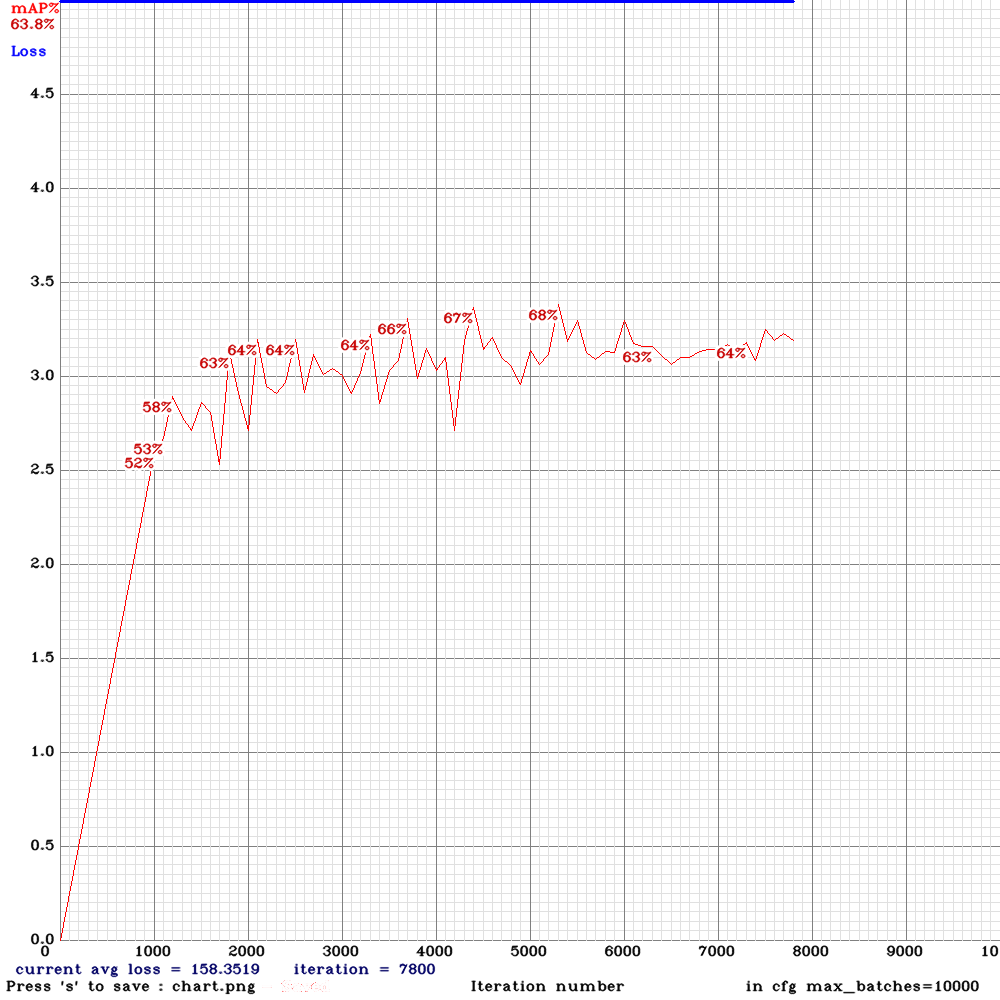
AlexeyAB
on 23 Nov 2019
yolo_v3_tiny_pan5 matrix_gaussian_GIoU aa_ae_mixup_new.cfg.txt and weights-file Features: MatrixNet, Gaussian-yolo + GIoU, PAN5, IoU_thresh, Deformation-block, Assisted Excitation, scale_x_y, Mixup, 512x512, use
-thresh 0.6
I tried this one with CIOU/DIOU instead and I got nan pretty quickly (not right away but after less than 1000 iteration), other changes are needed for CIOU/DIOU properly? did someone tried successfully to use the new losses?
HagegeR
on 26 Nov 2019
Hi @AlexeyAB I am using yolo_v3_tiny_pan_lstm model for Object detection in videos. Previously I was using simple yolov3_tiny model and OpenCV dnn module for inference in c++ based software. But I am unable to use yolo_v3_tiny_pan_lstm model with OpenCV because it has got 2 unknown layers reorg3d and conv-lstm. Can you suggest me a way to use this model with OpenCV dnn module?
How can I convert yolo_v3_tiny_pan_lstm model to keras (.h5) model?
Thanks,
 scianand
on 4 Dec 2019
scianand
on 4 Dec 2019
@scianand These new models have many new layers which are not supported in OpenCV-dnn / Pytorch.
AlexeyAB
on 4 Dec 2019
@AlexeyAB So can you suggest me a way to infer from these models in c++?
scianand
on 4 Dec 2019
@scianand You can compile Darknet as SO/DLL libary, just compile by using Cmake - so libdark.so/dll will be compiled automatically.
Then use this C++ API: https://github.com/AlexeyAB/darknet/blob/master/include/yolo_v2_class.hpp
As in this example: https://github.com/AlexeyAB/darknet/blob/master/src/yolo_console_dll.cpp
AlexeyAB
on 4 Dec 2019
Hi @AlexeyAB Thank you so much for suggestion.
When I am compiling yolo_console_dll.cpp it is show error like this:
/tmp/ccTyrrYp.o: In function main':
yolo_console_dll.cpp:(.text+0x669): undefined reference toDetector::Detector(std::__cxx11::basic_string
yolo_console_dll.cpp:(.text+0x7b0): undefined reference to Detector::load_image(std::__cxx11::basic_string<char, std::char_traits<char>, std::allocator<char> >)'
yolo_console_dll.cpp:(.text+0x7fb): undefined reference toDetector::detect(image_t, float, bool)'
yolo_console_dll.cpp:(.text+0x81a): undefined reference to Detector::free_image(image_t)'
yolo_console_dll.cpp:(.text+0x8e2): undefined reference toDetector::~Detector()'
yolo_console_dll.cpp:(.text+0xb74): undefined reference to `Detector::~Detector()'
collect2: error: ld returned 1 exit status
scianand
on 6 Dec 2019
Can we add yolov3-tiny-prn and cspresnext networks in the table for a complete list ?
 ashuezy
on 6 Dec 2019
ashuezy
on 6 Dec 2019
Hello, what is format of label file for train yolov3-tiny_occlusion_track?
Can i pass a pre-labeled video for this task?
What is the command to train this (Didn't found enough information in readme).
 VladBlat
on 6 Dec 2019
VladBlat
on 6 Dec 2019
@VladBlat
what is format of label file for train yolov3-tiny_occlusion_track?
format of labels is the same as for yolov3.cfg
just in train.txt images should be placed in order as they go in the video
how to train LSTM: https://github.com/AlexeyAB/darknet/issues/3114#issuecomment-494154586
AlexeyAB
on 6 Dec 2019
Is it faster and more accurate than Yolov3-Tiny ?
jamessmith90
on 9 Dec 2019
@jamessmith90 No.
AlexeyAB
on 9 Dec 2019
@AlexeyAB Hi, I have tried to compile the darknet but it is showing error:
- I have compiled darknet using make GPU 0 and Cudnn 0
- After that it produced libdarknet.so
- After that I tried to use yolo_console_dll.cpp but while compiling it I got this error
When I am compiling yolo_console_dll.cpp it is show error like this:
/tmp/ccTyrrYp.o: In function main':
yolo_console_dll.cpp:(.text+0x669):undefined reference to Detector::Detector(std::__cxx11::basic_string
yolo_console_dll.cpp:(.text+0x81a): undefined reference to Detector::free_image(image_t)' yolo_console_dll.cpp:(.text+0x8e2): undefined reference to Detector::~Detector()'
yolo_console_dll.cpp:(.text+0xb74): undefined reference to `Detector::~Detector()'
collect2: error: ld returned 1 exit status
Please, can you help me out?
scianand
on 10 Dec 2019
I have a request @AlexeyAB
-Can we have an excel sheet or a pinned link with the list improvements done in this repo along with research papers and link to the code in this repo.
It is quite hard to keep up these days with so much work.
-List of classification and object detection cfg files along with their MAP scores..
dexception
on 11 Dec 2019
This looks like dope:
https://github.com/songwsx/RFSong-779
https://zhuanlan.zhihu.com/p/76491446
 uday60
on 11 Dec 2019
uday60
on 11 Dec 2019
@uday60 RFBnet as well as CenterNet even worse than simple old yolov3.cfg, and much worse than yolov3-spp.cfg or csresnext50-panet-spp.cfg
More: https://github.com/AlexeyAB/darknet/issues/4406
AlexeyAB
on 11 Dec 2019
@dexception
-Can we have an excel sheet or a pinned link with the list improvements done in this repo along with research papers and link to the code in this repo.
In general, all this is here: feature + paper + accuracy + sometimes link to commit: https://github.com/AlexeyAB/darknet/projects/1
-List of classification and object detection cfg files along with their MAP scores..
- Several my models are private.
- Several models are public, but they just shows that some features work, aren't sota, and aren't tested on large datasets like MSCOCO / Openimages: https://github.com/AlexeyAB/darknet/issues/3114#issuecomment-494148968
- There are only these public models: https://github.com/WongKinYiu/CrossStagePartialNetworks
AlexeyAB
on 11 Dec 2019
@AlexeyAB I would like to know in greater details as the repo i shared is capable to running detection with decent accuracy live on the CPU only and don't compare it with yolov3 it an elephant.
uday60
on 11 Dec 2019
@uday60 I create a separate issue for RFBNet: https://github.com/AlexeyAB/darknet/issues/4507
You can write there. Is it is faster than Yolov3-tiny-PRN?
AlexeyAB
on 11 Dec 2019
Can you share a LSTM classifier tutorial??
Which cfg can we use??
For standard classifier I'm using darknet19.cfg by using this
./darknet partial cfg/darknet19.cfg darknet19.weights darknet-19.conv.15 15
To get the pre-trained weights
Then I changed the last convolution layer filters parameter to my number of classes.
Then have my training data, each image has its class name in its file name and I think this is working.
(Currently training )
So for activity recognition it could be a really good advance to get LSTM classifiers.. in darknet
 isra60
on 8 Jan 2020
isra60
on 8 Jan 2020
@isra60 There is not implemented yet sequential-data-augmentation for training LSTM-Classifier.
You can open a separate issue for this. What dataset do you want to use?
AlexeyAB
on 8 Jan 2020
Maybe this https://arxiv.org/abs/1705.06950 Kinetics Dataset could be a good starter point.
isra60
on 8 Jan 2020
Sharing accuracy of the models on my flower class dataset:
Minimum size of flowers is 10x10
All of them have been trained on 100,000 iterations.
yolo_v3_tiny_pan3.cfg.txt and weights-file Features: PAN3, AntiAliasing, Assisted Excitation, scale_x_y, Mixup, GIoU(544x544)
Total BFLOPS 14.402
mAP : 62.77%
yolov3-tiny-prn(832x832)
Total BFLOPS 13.622
47.28%
@AlexeyAB
Any other networks that i can use for better accuracy ? My limit is 15 BLOPS.
uday60
on 23 Jan 2020
@uday60
Do you check the mAP on separate valid-dataset?
Try to train 2 models:
- Try to train the same model
yolo_v3_tiny_pan3.cfg.txt and weights-file Features: PAN3, AntiAliasing, Assisted Excitation, scale_x_y,
but remove all lines antialiasing=1- and
assisted_excitation=4000
Also add
[net]
mosaic=1
- Do the same as in (1) but also add
label_smooth_eps=0.1to each[yolo]layer
AlexeyAB
on 23 Jan 2020
@AlexeyAB
Yes. mAP is on separate valid dataset.
Will get back to you once training is done.
uday60
on 23 Jan 2020
@AlexeyAB
Just wondering can't we add one more yolo layer to yolov3-tiny-prn network ?
You mentioned it is good for small objects.
uday60
on 23 Jan 2020
@uday60
Just wondering can't we add one more yolo layer to yolov3-tiny-prn network ?
Yes you can.
But I would recommend you to train these 2 models first:
AlexeyAB
on 23 Jan 2020
Accuracy improved by small amount.
yolo_v3_tiny_pan3_aa_ae_mixup_scale_giou.cfg[without antialiasing,assisted_excitation,scale_x_y] [with mosaic=1,label_smooth_eps=0.1]
Total BFLOPS 14.389
544x544
100,000 iterations
mAP = 63.37 %
yolov3-tiny_3l_stretch_sway_whole_maxout.cfg
Total BFLOPS 5.874
544x544
100,000 iterations
mAP = 46.06%
uday60
on 25 Jan 2020
@uday60
It seems that:
- improve accuracy:
[net]
mosaic=1
label_smooth_eps=0.1

...

activation=mish

...

[yolo]
random=1
scale_x_y = 1.1
iou_thresh=0.213
cls_normalizer=1.0
iou_normalizer=0.07
uc_normalizer=0.07
iou_loss=ciou
nms_kind=greedynms
beta_nms=0.6
- dont improve accuracy:
antialiasing=1

assisted_excitation=4000
...
Something strange...
mAP: 40.32%
yolov3-tiny_3l_stretch_sway_whole_maxout.cfg
640x640
100,000 iterations
with (cudann_half=1)
uday60
on 27 Jan 2020
In-progress for pan3 with mish activation and the changes you recommended.
I have disabled CUDNN_HALF.
http://txt.do/16oq8
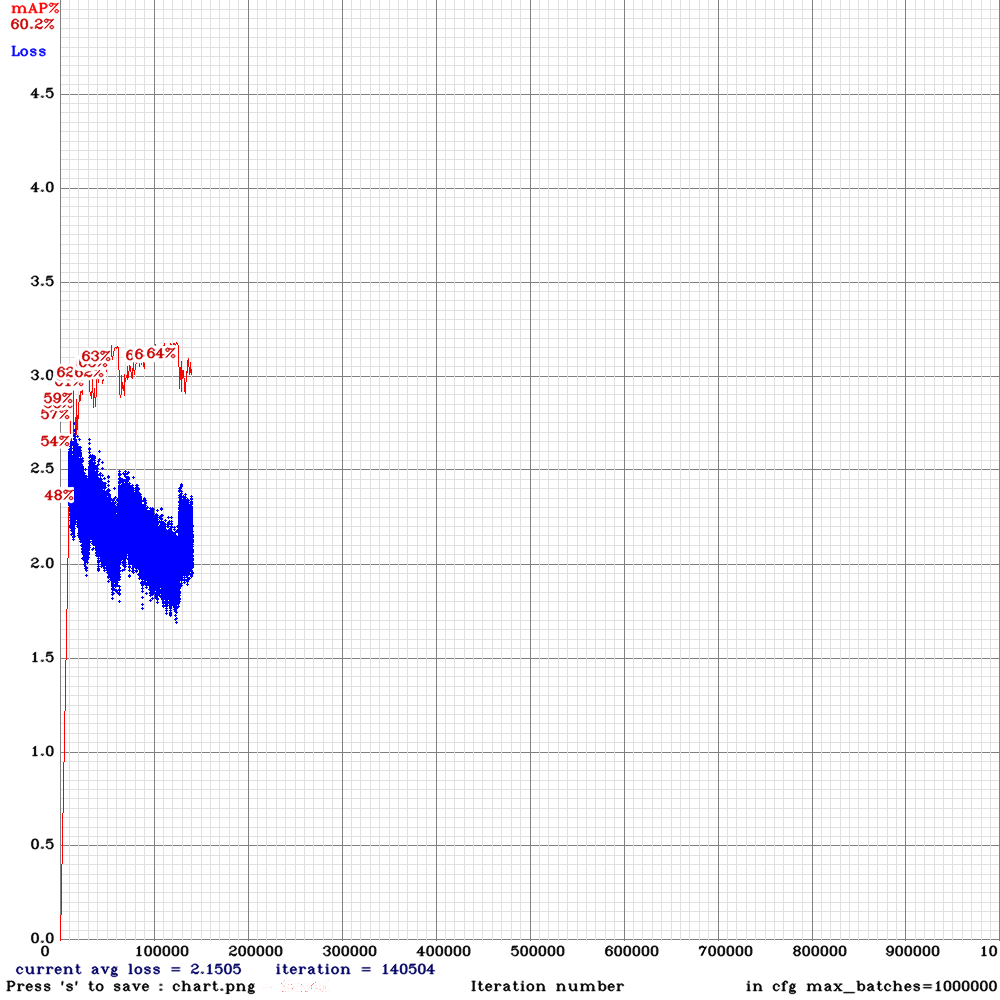
Will training till 1,000,000 iterations.
And will compare mish with leaky, swish.
uday60
on 30 Jan 2020
Hi @AlexeyAB ,
how should i train yolo_v3_tiny_pan3.cfg.txt and weights-file Features: PAN3, AntiAliasing, Assisted Excitation, scale_x_y, Mixup, GIoU?
Should i download and use the provided weights? Or should i use yolov3.conv.15 weights? What params to change in order to train with 2 classes?
keko950
on 3 Feb 2020
Hi @AlexeyAB ,
how should i train yolo_v3_tiny_pan3.cfg.txt and weights-file Features: PAN3, AntiAliasing, Assisted Excitation, scale_x_y, Mixup, GIoU?Should i download and use the provided weights? Or should i use yolov3.conv.15 weights? What params to change in order to train with 2 classes?
Seems like using the yolov3-tiny_occlusion_track_last.weights produce a -nan output. Switching to yolov3-tiny.conv.15..
keko950
on 3 Feb 2020
@AlexeyAB
Getting slightly better accuracy with leaky activation.
(next mAP calculation at 196533 iterations)
Last accuracy [email protected] = 61.62 %, best = 63.79 %
196049: 2.379208, 2.065837 avg loss, 0.000882 rate, 2.358257 seconds, 25094272 images
Loaded: 0.000060 seconds
vs Mish
mAP = 63.37 %
uday60
on 9 Feb 2020
@uday60 Mish is better for big models: https://github.com/WongKinYiu/CrossStagePartialNetworks#some-tricks-for-improving-acc
AlexeyAB
on 9 Feb 2020
@AlexeyAB
Does TensorRT with Deepstream support pan3 network ?
ashuezy
on 15 Feb 2020
How to train LSTM networks:
- Use one of cfg-file with
LSTMin filenameUse pre-trained file
- for Tiny: use
yolov3-tiny.conv.14that you can get from https://pjreddie.com/media/files/yolov3-tiny.weights by using command./darknet partial cfg/yolov3-tiny.cfg yolov3-tiny.weights yolov3-tiny.conv.14 14- for Full: use http://pjreddie.com/media/files/darknet53.conv.74
You should train it on sequential frames from one or several videos:
./yolo_mark data/self_driving cap_video self_driving.mp4 1- it will grab each 1 frame from video (you can vary from 1 to 5)./yolo_mark data/self_driving data/self_driving.txt data/self_driving.names- to mark bboxes, even if at some point the object is invisible (occlused/obscured by another type of object)./darknet detector train data/self_driving.data yolo_v3_tiny_pan_lstm.cfg yolov3-tiny.conv.14 -map- to train the detector./darknet detector demo data/self_driving.data yolo_v3_tiny_pan_lstm.cfg backup/yolo_v3_tiny_pan_lstm_last.weights forward.avi- run detectionIf you encounter CUDA Out of memeory error, then reduce the value
time_steps=twice in your cfg-file.The only conditions - the frames from the video must go sequentially in the
train.txtfile.
You should validate results on a separate Validation dataset, for example, divide your dataset into 2:
train.txt- first 80% of frames (80% from video1 + 80% from video 2, if you use frames from 2 videos)valid.txt- last 20% of frames (20% from video1 + 20% from video 2, if you use frames from 2 videos)Or you can use, for example:
train.txt- frames from some 8 videosvalid.txt- frames from some 2 videosLSTM:
Dear @AlexeyAB I have tried your YOLO implementation, it works great for object detection.
Now I go to object tracking case.
I found ID switches problem especially for reappearing objects.
You mention several times that this is how we train and run the YOLO LSTM networks.
My question is, when we run the demo, is it going to run like an object tracking program, which gives us the bounding box and IDs?
And regarding the training, is it training the networks for the detection (so that it gives better detection including when occlusion happens) or training an object tracking model?
Thank you in advance
 Ujang24
on 4 Mar 2020
Ujang24
on 4 Mar 2020
@Ujang24
Object detection
- yolov3 - good accuracy https://github.com/AlexeyAB/darknet
- yolov3-lstm - better accuracy on video, especially for small occlusions https://github.com/AlexeyAB/darknet/issues/3114
Object tracking
- optical flow - very fast: https://docs.opencv.org/master/d4/dee/tutorial_optical_flow.html
- siamRPN - accurate: https://github.com/opencv/opencv/issues/15119
Face/Person reidentification - the most accurate tracking even for long occlusions, but only for faces/persons - you should calculate cosine distance between old and new hashes of objects
- face-recognition (only for faces) https://github.com/opencv/open_model_zoo/blob/master/models/intel/face-reidentification-retail-0095/description/face-reidentification-retail-0095.md
- person-reidentification (only for persons) https://github.com/opencv/open_model_zoo/blob/master/models/intel/person-reidentification-retail-0200/description/person-reidentification-retail-0200.md
Id identification - your own logic based on:
object-detection- (distance / IoU (intersect over union) / GIoU) of old and new detected objectsobject-detection + object-tracking- Tracking algorithm moves bbox and keeps IDobject-detection + face/person-reidentification- keep ID based on cosine distance between old and new hashes of objects
AlexeyAB
on 4 Mar 2020
@Ujang24
1. Object detection

   * yolov3 - good accuracy https://github.com/AlexeyAB/darknet
   * yolov3-lstm - better accuracy on video, especially for small occlusions #3114

2. Object tracking

   * optical flow - very fast: https://docs.opencv.org/master/d4/dee/tutorial_optical_flow.html
   * siamRPN - accurate: [opencv/opencv#15119](https://github.com/opencv/opencv/issues/15119)

3. Face/Person reidentification - the most accurate tracking even for long occlusions, but only for faces/persons - you should calculate cosine distance between old and new hashes of objects

   * **face-recognition** (only for faces) https://github.com/opencv/open_model_zoo/blob/master/models/intel/face-reidentification-retail-0095/description/face-reidentification-retail-0095.md
   * **person-reidentification** (only for persons)  https://github.com/opencv/open_model_zoo/blob/master/models/intel/person-reidentification-retail-0200/description/person-reidentification-retail-0200.md

4. Id identification - your own logic based on:

   * `object-detection` - (distance / IoU (intersect over union) / GIoU) of old and new detected objects
   * `object-detection + object-tracking` - Tracking algorithm moves bbox and keeps ID
   * `object-detection + face/person-reidentification`  - keep ID based on cosine distance between old and new hashes of objects
Thank you for the comprehensive answer!
FYI, At the moment, I use YOLOv3 + DeepSORT for multi object tracking.
It works great.
I might ask you again later.
Ujang24
on 5 Mar 2020
@AlexeyAB Hi,
What command do I use for making a pre-trained with yolo_v3_tiny_pan3_aa_ae_mixup_scale_giou?
zpmmehrdad
on 7 Mar 2020
Hi @AlexeyAB
I am training yolo_v3_spp_lstm on a custom dataset of 10 classes, I see the training loss decreasing but first calculation of mAP was 0%, I followed the same steps on how to train on custom dataset.
I checked train.txt and valid.txt files and the frames of videos are in sequence form
what could be the issue, maybe I missed some important step? did I use something wrong?
Thanks
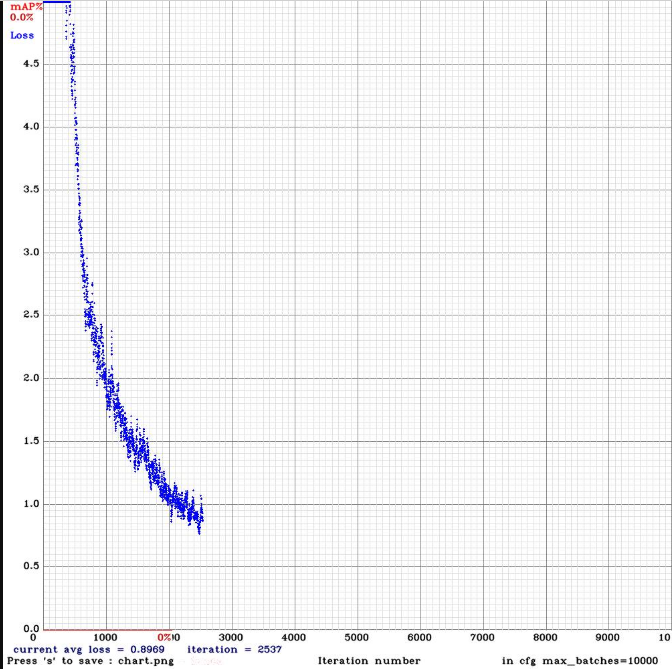
 RadouaneK
on 11 Mar 2020
RadouaneK
on 11 Mar 2020
@RadouaneK
Show your training command.
Did you compile Darknet with CUDA and cuDNN?
Check you dataset by training with -show_imgs flag, do you see correct bounded boxes?
Try to train https://github.com/AlexeyAB/darknet/files/3199770/yolo_v3_tiny_lstm.cfg.txt first. It works well.
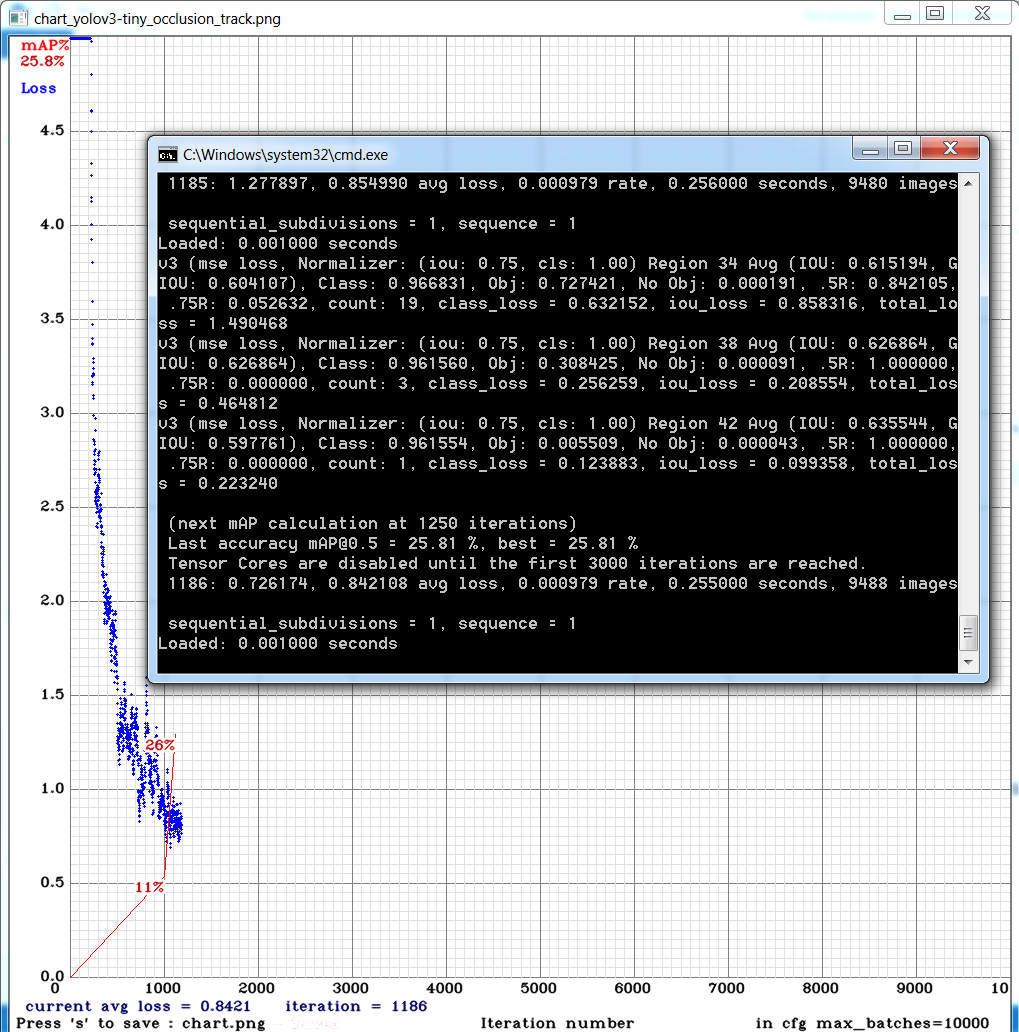
AlexeyAB
on 11 Mar 2020
@AlexeyAB
Thanks for your suggestions, it was a mistake of mine since I didn't notice the path to validation frames is incorrect in valid.txt
now it's working fine :)
RadouaneK
on 13 Mar 2020
Hey @AlexeyAB could you help me use the lstm cfg's properly? Currently, regular yolov3 does much better on a custom dataset. Files are in sequential order in the training file and for some of the videos there are 200 frames and some others 900 frames. The file the mAP is calculated on has videos with 900 frames.
Yolov3:
yolov3-obj.cfg.txt

Yolov3-tiny-pan-lstm: yolo_v3_tiny_pan_lstm.cfg.txt

I don't have the graph for the following
Yolov3-spp-lstm: highest mAP is around 60%
yolo_v3_spp_lstm.cfg.txt
 AdamCuellar
on 3 Apr 2020
AdamCuellar
on 3 Apr 2020
@AlexeyAB any idea on how to improve the performance of the issue mentioned above?
AdamCuellar
on 7 Apr 2020
Any plan to add lstm to yolov4?
Thanks,
 kaishijeng
on 4 May 2020
kaishijeng
on 4 May 2020
Any plan to add lstm to yolov4?
Thanks,
I don't think it's necessary, because lstm or conv-lstm is designed for the video scenario, especially there is a sequence-to-sequence "connection" between frames, and the yolo-v4 should be a general model for the image object detection, like ms-coco or imagenet benchmark.
You can add this into your model if your yolo-v4 is used in the video.
i-chaochen
on 4 May 2020
I am processing traffic scenes from a stationary camera, so I think lstm could be helpful. How do I actually add it to yolo-v4?
 Witek-
on 15 May 2020
Witek-
on 15 May 2020
Is there a way to train an lstm layer on top of an already trained network?
 LucasSloan
on 27 May 2020
LucasSloan
on 27 May 2020
Is there a way to train an lstm layer on top of an already trained network?
the purpose of LSTM is to "memorize" some features between frames, if you add it at the very top/beginning of the trained cnn network, where hasn't learned anything yet, LSTM wouldn't learn or memorize any thing.
This paper mentioned some insights about where to put the LSTM to get the optimal result. Basically, it's should be after the 13-Conv.
i-chaochen
on 28 May 2020
@i-chaochen
May be I will add this cheap conv Bottleneck-LSTM https://github.com/AlexeyAB/darknet/issues/5774
I think the more complex the recurret layer, the later we should add it.
So for Conv1-13 can be used conv-RNN, and for Conv13-FM can be used conv-LSTM.
In this case maybe we should create a workaround for CRNN
[crnn]

[route]
layers=-1,-2
Is memory consumption increasing every time and eventually leads to a lack of memory?
AlexeyAB
on 28 May 2020
Is memory consumption increasing every time and eventually leads to a lack of memory?
Speaking of memory consumption, maybe you can have a look on gradient check pointing.
https://github.com/cybertronai/gradient-checkpointing
It can save significantly memory for the training.
i-chaochen
on 28 May 2020
@AlexeyAB
Hi, I am grateful about yolo versions and yolo-lstm. But is lstm only applicable to yolov3?
If lstm can also be applied to yolov4, I would really appreciate if you let me know how to do that.
 smallerhand
on 26 Jun 2020
smallerhand
on 26 Jun 2020
@smallerhand It is in progress.
Did you train https://github.com/AlexeyAB/darknet/files/3199654/yolo_v3_spp_lstm.cfg.txt on video?
Did you get any improvements?
AlexeyAB
on 26 Jun 2020
@AlexeyAB
Thank you for your reply!
Is yolo_v3_spp_lstm.cfg your recommendation? I will try it, although I can only compare it with yolov4.
smallerhand
on 27 Jun 2020
Implement Yolo-LSTM detection network that will be trained on Video-frames for mAP increasing and solve blinking issues.
@AlexeyAB, hello. What are the blinking issues? Does it mean that objects can be detected in this frame, but not in next one?
 HaolyShiit
on 29 Jul 2020
HaolyShiit
on 29 Jul 2020
Hi Alexey, I really appreciate your work and improvements from previous Pjreddie repo. I had a Yolov3 people detector trained on custom dataset videos using single frames, now i want to test your new model Yolov4 and conv-lstm layers. I trained the model with yolov4-custom.cfg and results improved just by doing this, I am now wondering how to add temporal information (i.e. conv-lstm layers).
Is it possible? If yes how do i have to modify the cfg file, perform transfer learning and then perform the training?
 fabiozappo
on 31 Aug 2020
fabiozappo
on 31 Aug 2020
@smallerhand have you done a comparison between yolo_v3_spp_lstm.cfg and yolov4? What are the results?
have you tried to compare with yolo_v3_tiny_constrastive.cfg from #6004 ?
@HaolyShiit Blinking issues can either mean:
objects can be detected in one frame but not in the following one
jump from one class to another one on two consecutive frames
within the same class, bounding boxes are changing in size more than what is needed, causing flickering.
@fabiozappo not yet possible to add lstm to YoloV4, Alexey is actively working on it.
 arnaud-nt2i
on 10 Sep 2020
arnaud-nt2i
on 10 Sep 2020
TO ALL PEOPLE REDING THIS PAGE, in order to try those LSTM models, you have to use "Yolo v3 optimal" repo
here: https://github.com/AlexeyAB/darknet/releases/tag/darknet_yolo_v3_optimal
arnaud-nt2i
on 7 Oct 2020
@arnaud-nt2i
Thank u very much! I will try "Yolo v3 optimal" repo.
HaolyShiit
on 2 Nov 2020
Related issues
 HilmiK
·
3Comments
HilmiK
·
3Comments
 zihaozhang9
·
3Comments
zihaozhang9
·
3Comments
 Jacky3213
·
3Comments
Jacky3213
·
3Comments
 qianyunw
·
3Comments
qianyunw
·
3Comments
 jasleen137
·
3Comments
jasleen137
·
3Comments
Most helpful comment
Comparison of different models on a very small custom dataset - 250 training and 250 validation images from video: https://drive.google.com/open?id=1QzXSCkl9wqr73GHFLIdJ2IIRMgP1OnXG
Validation video: https://drive.google.com/open?id=1rdxV1hYSQs6MNxBSIO9dNkAiBvb07aun
Ideas are based on:
LSTM object detection - model achieves state-of-the-art performance among mobile methods on the Imagenet VID 2015 dataset, while running at speeds of up to 70+ FPS on a Pixel 3 phone: https://arxiv.org/abs/1903.10172v1
PANet reaches the 1st place in the COCO 2017 Challenge Instance Segmentation task and the 2nd place in Object Detection task without large-batch training. It is also state-of-the-art on MVD and Cityscapes: https://arxiv.org/abs/1803.01534v4
There are implemented:
convolutional-LSTM models for Training and Detection on Video, without interleaving lightweight network - may be will be implemented later
PANet models -
_pan-networks - there is used[reorg3d]+[convolutional] size=1instead of Adaptive Feature Pooling (depth-maxpool) for the Path Aggregation - may be will be implemented later_pan2-networks - there is used maxpooling[maxpool] maxpool_depth=1 out_channels=64acrosss channels as in original PAN-paper, just previous layers are [convolutional] instead of [connected] for resizability| Model (cfg & weights) network size = 544x544 | Training chart | Validation video | BFlops | Inference time RTX2070, ms | mAP, % | | video | 14 | 8.5 ms | 67.3% |
 | video | 30 | 31 ms | 64.6% |
 | video | 14 | 8.5 ms | 63.51% |
 | video | 137 | 33.8 ms | 60.4% |
 | video | 137 | 33.8 ms | 58.5% |
 | video | 23 | 14.9 ms | 58.5% |
 | video | 25 | 14.5 ms | 57.9% |
 | video | 102 | 26.0 ms | 57.5% |
 | video | 13 | 19.0 ms | 57.2% |
 | video | 193 | 110ms | 56.6% |
 | video | 17 | 8.7 ms | 52.4% |
 | video | 112 | 23.5 ms | 51.8% |
 | video | 19 | 12.0 ms | 50.9% |
 | video | 14 | 7.0 ms | 50.6% |
 | video | 17 | 8.7 ms | 49.7% |
 | video | 12 | 5.6 ms | 46.8% |
 | video | 20 | 10.0 ms | 36.1% |
 | video | 9 | 5.0 ms | 32.3% |
|---|---|---|---|---|---|
| yolo_v3_spp_pan_lstm.cfg.txt (must be trained using frames from the video) | - | - | - | - | - |
| yolo_v3_tiny_pan3.cfg.txt and weights-file Features: PAN3, AntiAliasing, Assisted Excitation, scale_x_y, Mixup, GIoU |
| yolo_v3_tiny_pan5 matrix_gaussian_GIoU aa_ae_mixup_new.cfg.txt and weights-file Features: MatrixNet, Gaussian-yolo + GIoU, PAN5, IoU_thresh, Deformation-block, Assisted Excitation, scale_x_y, Mixup, 512x512, use
-thresh 0.6|| yolo_v3_tiny_pan3 aa_ae_mixup_scale_giou blur dropblock_mosaic.cfg.txt and weights-file |
| yolo_v3_spp_pan_scale.cfg.txt and weights-file |
| yolo_v3_spp_pan.cfg.txt and weights-file |
| yolo_v3_tiny_pan_lstm.cfg.txt and weights-file (must be trained using frames from the video) |
| tiny_v3_pan3_CenterNet_Gaus ae_mosaic_scale_iouthresh mosaic.txt and weights-file |
| yolo_v3_spp_lstm.cfg.txt and weights-file (must be trained using frames from the video) |
| yolo_v3_tiny_pan3 matrix_gaussian aa_ae_mixup.cfg.txt and weights-file |
| resnet152_trident.cfg.txt and weights-file train by using resnet152.201 pre-trained weights |
| yolo_v3_tiny_pan_mixup.cfg.txt and weights-file |
| yolo_v3_spp.cfg.txt and weights-file (common old model) |
| yolo_v3_tiny_lstm.cfg.txt and weights-file (must be trained using frames from the video) |
| yolo_v3_tiny_pan2.cfg.txt and weights-file |
| yolo_v3_tiny_pan.cfg.txt and weights-file |
| yolov3-tiny_3l.cfg.txt (common old model) and weights-file |
| yolo_v3_tiny_comparison.cfg.txt and weights-file (approximately the same conv-layers as conv+conv_lstm layers in yolo_v3_tiny_lstm.cfg) |
| yolo_v3_tiny.cfg.txt (common old model) and weights-file |
| | | | | - | - |
| | | | | - | - |