Darknet: Compiling Darknet on Windows with MSMV2019 and CUDA 10.0
Dear all,
Versions: Windows 10, MSVS2019, OpenCV 3.4.0, CUDA 10.0, cuDNN 7.5.1
I cloned AlexeyABs repo and followed compiling steps as described for GPU installation on Windows and got compilation errors. However previous warnings already popped up when installing CUDA about integration with MSVS2019.
Do you know if CUDA 10.0 and MSVS 2019 are compatible?
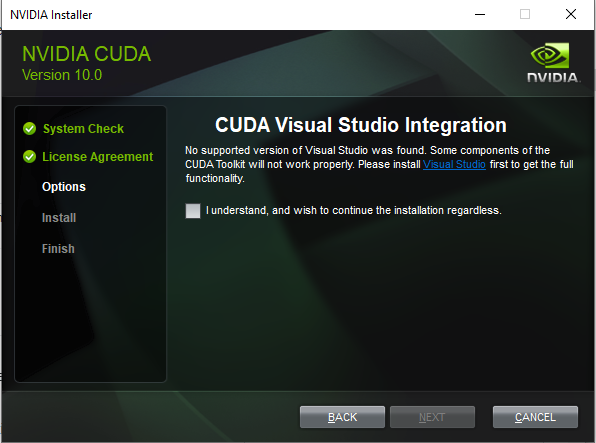
Then I follwed the instructions:
- Installed OpenCV 3.4.0; created folder C:\opencv_3.0 with C:\opencv_3.0\build\include and C:\opencv_3.0\build\x64\vc14\lib
- confirmed, that both entries for CUDA version in \build\darknet\darknet.vcxproj are set to 10.0
The next error occurs, when opening build\darknet\darknet.sln in MSVS2019 and setting “x64” and “Release”. Note that the "Designtime" error pops up already when opening the project before clicking the build button.

Your help is much appreciated!
 felixwolff
All 5 comments
@felixwolff Hi,
Try to install CUDA 10.1 instead of CUDA 10.0.
CUDA 10.1 available now, with support for latest Microsoft Visual Studio 2019 versions
 AlexeyAB
on 29 Apr 2019
AlexeyAB
on 29 Apr 2019
@AlexeyAB
Thanks your the quick reply!
Unfortunately, after installing CUDA 10.1 ( and the appropriate cuDNN version) and updating darknet.vcxproj to "10.1" the same "Designtime" error occurs in MSVS2019 when opening darknet.sln. However, the no-integration warning with MSVS during CUDA installation doesn't show up any more.
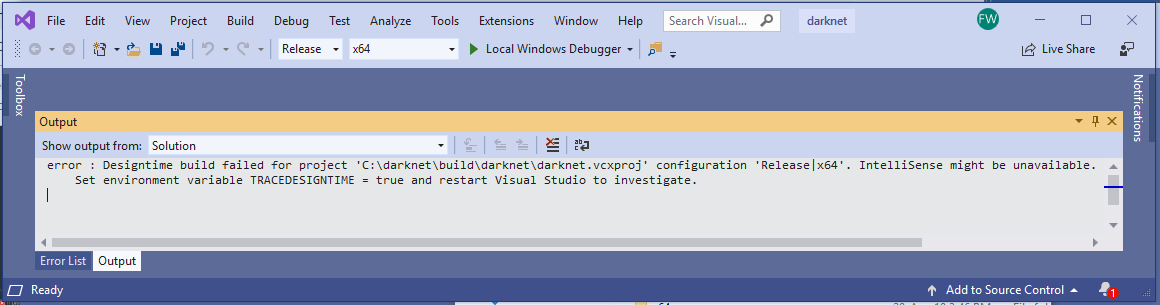
(Don't know if it helps, but compiling darknet_no_gpu.sdl worked)
felixwolff
on 29 Apr 2019
I found that CUDA 10.1 for windows 10 did work for the MSVS 2019 16.0 preview versions, but not for version 16.0.2.
EDIT:
Finally, able to compile Darknet with MSVS 2019 & Cuda10.1.
Needed to copy the content of C:\Program Files\NVIDIA GPU Computing Toolkit\CUDA\v10.1\extras\visual_studio_integration\MSBuildExtensions to C:\Program Files (x86)\Microsoft Visual Studio\2019\Community\MSBuild\Microsoft\VC\v160\BuildCustomizations.
Thanks.
 prdas31
on 1 May 2019
prdas31
on 1 May 2019
@prdas31 So, it looks like a bug in CUDA 10.1/10.0 (or MSVS2019(16.0.2)).
AlexeyAB
on 1 May 2019
MSVS2019 developer is Microsoft, so it different with CUDA developer (NVIDIA).
use previous MSVS, recommended is 2015 for sure working...you can use MSVS 2017, but I forget which version is working.
 wahyubram82
on 6 May 2019
wahyubram82
on 6 May 2019
Related issues
 Mididou
·
3Comments
Mididou
·
3Comments
 kebundsc
·
3Comments
kebundsc
·
3Comments
 Greta-A
·
3Comments
Greta-A
·
3Comments
 qianyunw
·
3Comments
qianyunw
·
3Comments
 jasleen137
·
3Comments
jasleen137
·
3Comments
Most helpful comment
I found that CUDA 10.1 for windows 10 did work for the MSVS 2019 16.0 preview versions, but not for version 16.0.2.
EDIT:
Finally, able to compile Darknet with MSVS 2019 & Cuda10.1.
Needed to copy the content of C:\Program Files\NVIDIA GPU Computing Toolkit\CUDA\v10.1\extras\visual_studio_integration\MSBuildExtensions to C:\Program Files (x86)\Microsoft Visual Studio\2019\Community\MSBuild\Microsoft\VC\v160\BuildCustomizations.
Thanks.