Darknet: Got Memory/Swap issues after days of training - fix for a upcoming release on the roadmap?
@AlexeyAB - You got a proposal or can respect and fix the Memory Issue in a upcoming release?
( I think this is could be a major issue for stable training on a long term view )
@bhargavravat - I also thought about your idea and it would be useful for me too!
My problem (and thats why i had the same idea) came up from a memory/swap issue with darknet:
For example: i got a machine with 4x GPU's and 32GB Ram Training on 608 Network Image Size
1.) The Memory/Swap Problem:
32GB RAM Memory is nearly full, 31,8GB RAM the whole time used - the size after ~5 days of my swap partition _(which is 20 GB)_ was also nearly full _(...and swap partition filled up for each iteration a littlebit)_, so... Linux started to kill processes because of this not enough free memory anymore (memory and swap)... _(it seems darknet train process doesnt clear swap/ram when running the next iteration or something like that...)_ so darknet train process was one of the killed processes unfortunaley.
2.) The charts.png storing option
_(passing as parameter like './darknet train... -save_charts=1000...' would be nice, where 1000 is the iteration on which the graph should be sored in '...-graph_store=
So i restarted the process from my last *.weights file but the Chart output on _http://localhost:8090_ doesnt show the stats for the whole training process, the chart only shows mAP and loss from the weights file from where i've restarted the training.
So long text, short sense:
It would be good if the charts can be stored for each X iteration separately or, also good, if the map output on _http://localhost:8090_ would show the whole graph from all weight files, not just from the one the process was restarted on.
But the best thing would be if you can fix the memory clear issue from 1.) :-)
_Originally posted by @flowzen1337 in https://github.com/AlexeyAB/darknet/issues/3024#issuecomment-486377305_
 flowzen1337
All 9 comments
@flowzen1337 Hi,
- What command do you use for training?
- What parameters do you use in the Makefile?
- What versions of CUDA, cuDNN, OpenCV?
- Can you show output of commands?
nvcc --version
nvidia-smi
- Do you get Swap-issue if you compile Darknet with
OPENCV=0in the Makefile and train for a few days?
Also would it be a good temporay solution, if there will be ability to load previous chart.png by using -char chart.png in training command?
In this way, if you run training in a loop in sh-file, it will load previous chart.png and will draw the chart on the old chart.
 AlexeyAB
on 24 Apr 2019
AlexeyAB
on 24 Apr 2019
@AlexeyAB Hi :-)
- What command do you use for training?
Runs in a while True loop:
./darknet detector train data/data.data cfg/own.cfg weights/own_last.weights darknet53.conv.74 -dont_show -mjpeg_port 8090 -map -gpus 0,1,2,3
- What parameters do you use in the Makefile?
GPU=1
CUDNN=1
CUDNN_HALF=1
OPENCV=1
AVX=0
OPENMP=0
LIBSO=1
ZED_CAMERA=0
...
...
#GTX 1080, GTX 1070, GTX 1060, GTX 1050, GTX 1030, Titan Xp, Tesla P40, Tesla P4
ARCH= -gencode arch=compute_61,code=sm_61 -gencode arch=compute_61,code=compute_61
...
...
What versions of CUDA, cuDNN, OpenCV?
CUDA Version: 10.1
cuDNN 7.4.2.24
OpenCV 3.2.0Can you show output of commands?
- nvcc --version
nvcc: NVIDIA (R) Cuda compiler driver
Copyright (c) 2005-2019 NVIDIA Corporation
Built on Fri_Feb__8_19:08:17_PST_2019
Cuda compilation tools, release 10.1, V10.1.105
- nvidia-smi
+-----------------------------------------------------------------------------+
| NVIDIA-SMI 418.43 Driver Version: 418.43 CUDA Version: 10.1 |
|-------------------------------+----------------------+----------------------+
| GPU Name Persistence-M| Bus-Id Disp.A | Volatile Uncorr. ECC |
| Fan Temp Perf Pwr:Usage/Cap| Memory-Usage | GPU-Util Compute M. |
|===============================+======================+======================|
| 0 GeForce GTX 108... Off | 00000000:01:00.0 Off | N/A |
| 58% 63C P2 79W / 280W | 7685MiB / 11178MiB | 97% Default |
+-------------------------------+----------------------+----------------------+
| 1 GeForce GTX 108... Off | 00000000:02:00.0 Off | N/A |
| 54% 59C P2 75W / 280W | 6901MiB / 11178MiB | 100% Default |
+-------------------------------+----------------------+----------------------+
| 2 GeForce GTX 108... Off | 00000000:03:00.0 Off | N/A |
| 65% 67C P2 109W / 280W | 6901MiB / 11178MiB | 99% Default |
+-------------------------------+----------------------+----------------------+
| 3 GeForce GTX 108... Off | 00000000:04:00.0 Off | N/A |
| 58% 61C P2 82W / 280W | 6901MiB / 11178MiB | 89% Default |
+-------------------------------+----------------------+----------------------+
+-----------------------------------------------------------------------------+
| Processes: GPU Memory |
| GPU PID Type Process name Usage |
|=============================================================================|
| 0 11974 C ./darknet 7086MiB |
| 1 11974 C ./darknet 6891MiB |
| 2 11974 C ./darknet 6891MiB |
| 3 11974 C ./darknet 6891MiB |
+-----------------------------------------------------------------------------+
- Do you get Swap-issue if you compile Darknet with OPENCV=0 in the Makefile and train for a few days?
Not tested so far, will do as soon as I've reached the "max_batches=" size for the current training and give you feedback after training again with recompiled OPENCV=0 :-)
- I train on 112 Classes with this *.cfg file for 608 width and height:
[net]
batch=64
subdivisions=32
width=608
height=608
channels=3
momentum=0.9
decay=0.0005
angle=0
saturation = 1.5
exposure = 1.5
hue=.1
learning_rate=0.001
burn_in=4000
max_batches = 224000
policy=steps
steps=179200,201600
scales=.1,.1
Regarding the '...char chart.png...' option, yes this would be also help me and would be great 👍
flowzen1337
on 25 Apr 2019
@flowzen1337 Thanks!
If you can, just to find the reason:
- Try to train with
OPENCV=0, does it help?
If it doesn't help, try to train with only one GPU
./darknet detector train data/data.data cfg/own.cfg weights/own_last.weights darknet53.conv.74 -dont_show -mjpeg_port 8090 -mapIf it doesn't help, try to train with OPENCV=1 and multi-GPU, but without
-mjpeg_port 8090 -map
./darknet detector train data/data.data cfg/own.cfg weights/own_last.weights darknet53.conv.74 -dont_show -gpus 0,1,2,3
AlexeyAB
on 25 Apr 2019
Hello, @AlexeyAB .
Sorry for my poor English.
I have the same killed process problem, and i want to use #2728 and char chart.png to rewrite my chart , because chart can let me know more about the training process,can you tell me how to do that?

I have already write a simple bash file but i don't know where should i put char chart.png.
#!/bin/bash
cd /home/philip/Desktop/AlexeyAB_darknet_new
while :
    do
            ./darknet detector train ./data/tiny-LP.data ./cfg/LP/tiny-LP.cfg ./backup/tiny-LP_last.weights ./pretrain_weights/yolov2-tiny-voc.conv.13 -map
done
i also tried this command but not worked.
./darknet detector train ./data/tiny-LP.data ./cfg/LP/tiny-LP.cfg ./backup/tiny-LP_last.weights ./pretrain_weights/yolov2-tiny-voc.conv.13 -char chart.png -map
if anyone has a better solution, please tell me.
Thanks!
 PhilipWu526
on 12 Jun 2019
PhilipWu526
on 12 Jun 2019
Hello, @AlexeyAB
I try to use below command but it still be killed
./darknet detector train ./data/tiny-LP.data ./cfg/LP/tiny-LP.cfg ./backup/tiny-LP_last.weights ./pretrain_weights/yolov2-tiny-voc.conv.13 -mjpeg_port 8090 -ext_output -dont_show -map

Can you give me some advice?
PhilipWu526
on 13 Jun 2019
Hello, @AlexeyAB .
When I using another GPU, the problem is solved, but i don't know why.
My computer, it have memory issue.
GPU: GTX 1070
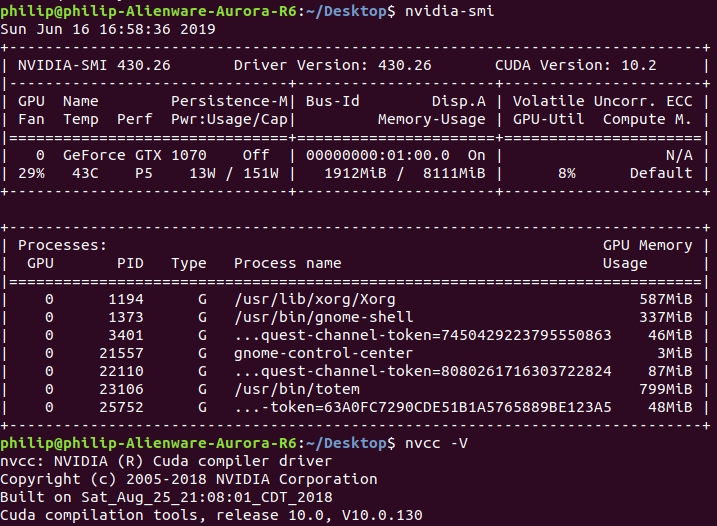
Another computer, it don't have memory issue.
GPU: Titan X
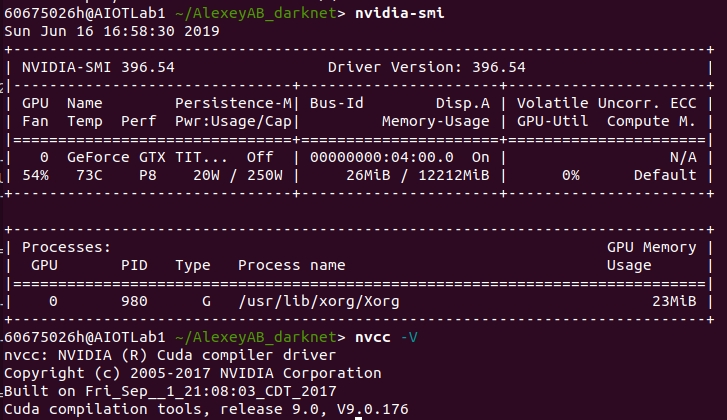
Both are trained using this command
./darknet detector train ./data/tiny-LP.data ./cfg/LP/tiny-LP.cfg ./backup/tiny-LP_last.weights ./pretrain_weights/yolov2-tiny-voc.conv.13 -mjpeg_port 8090 -dont_show -map
I would be grateful if anyone has any suggestions. Thanks.
PhilipWu526
on 16 Jun 2019
@PhilipWu526 Try to use the latest version of Darknet, there were fixed several bugs.
AlexeyAB
on 16 Jun 2019
@AlexeyAB OK,Thank you very much!
PhilipWu526
on 16 Jun 2019
In my task, this problem has been solved.
Thanks again.
PhilipWu526
on 18 Jul 2019
Related issues
 HilmiK
·
3Comments
HilmiK
·
3Comments
 rezaabdullah
·
3Comments
rezaabdullah
·
3Comments
 HanSeYeong
·
3Comments
HanSeYeong
·
3Comments
 Cipusha
·
3Comments
Cipusha
·
3Comments
 Jacky3213
·
3Comments
Jacky3213
·
3Comments