Darknet: Detector Demo MJPEG Server does not work
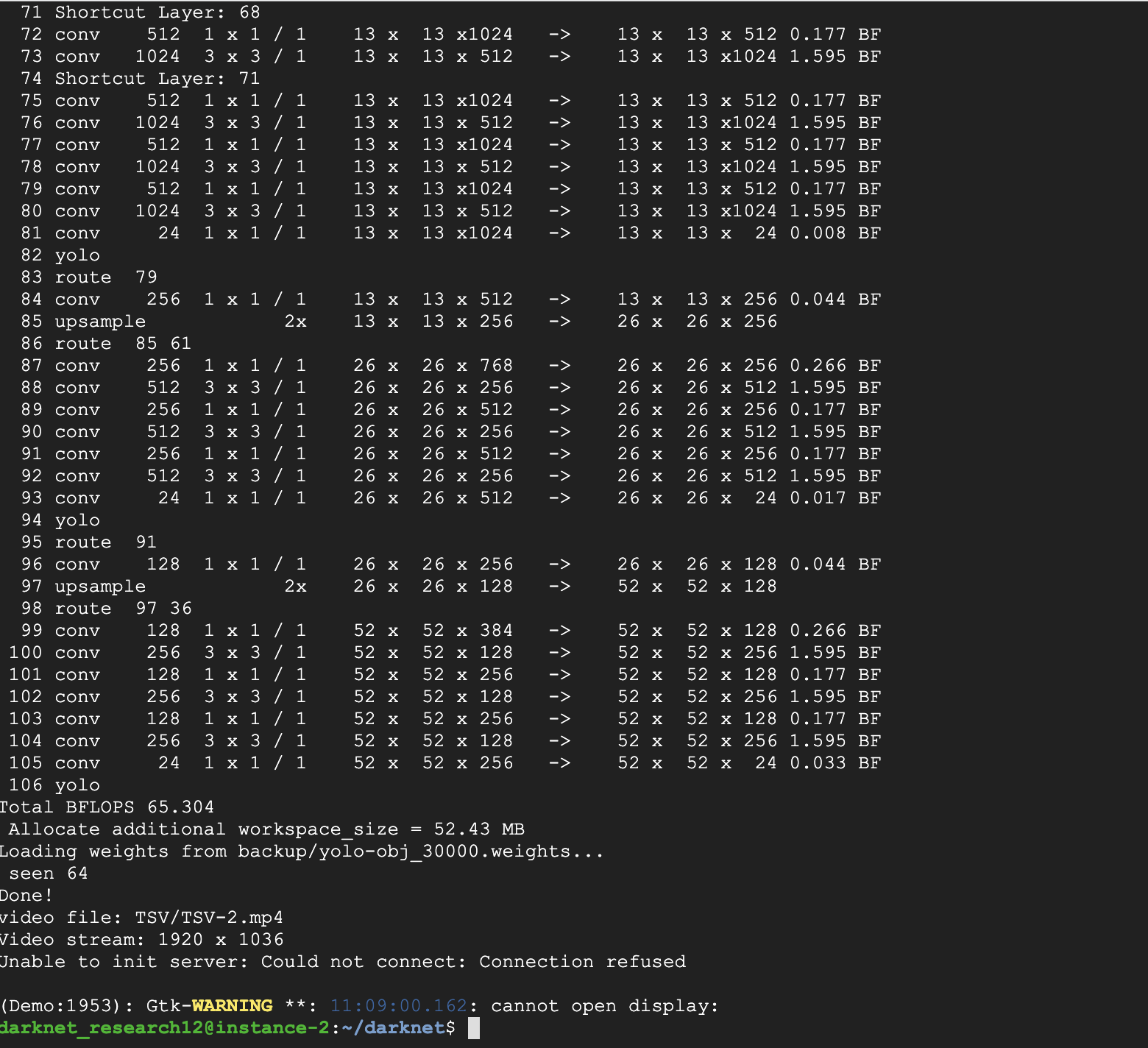
When trying to start detector demo with MJPEG server, error is received.
Command used: ./darknet detector demo obj.data yolo-obj.cfg backup/yolo-obj_30000.weights TSV/TSV-1.webm -json_port 8070 -mjpeg_port 8090 -ext_output
Error screenshot:
 darknet-researcher
All 27 comments
@darknet-researcher Hi,
Try to use flag -dont_show
./darknet detector demo obj.data yolo-obj.cfg backup/yolo-obj_30000.weights TSV/TSV-1.webm -json_port 8070 -mjpeg_port 8090 -ext_output -dont_show
 AlexeyAB
on 22 Mar 2019
AlexeyAB
on 22 Mar 2019
Hello @AlexeyAB !
sometimes when I open a stream, I get the this error "error MJPG_sender: couldn't bind sock" << sock << "to port" << port << "!" << endl ", because of what this error may appear?
Thanks!
 JonnySme
on 1 Apr 2019
JonnySme
on 1 Apr 2019
@JonnySme Hi,
Can you compile Darknet if you comment these lines?
- https://github.com/AlexeyAB/darknet/blob/6231b748c44e2007b5c3cbf765a50b122782c5a2/src/http_stream.cpp#L378
- https://github.com/AlexeyAB/darknet/blob/6231b748c44e2007b5c3cbf765a50b122782c5a2/src/http_stream.cpp#L381
If you can't compile, then this is the well known general socket/OS issue, it isn't related to Darknet - you must wait 4 minutes before you can use the same port: https://stackoverflow.com/a/35293452/1558037
AlexeyAB
on 1 Apr 2019
@AlexeyAB Hi!
The overwhelming error was gone, I do not know how. But now, when I start to connect to the stream "ip: 8090", the error "error MJPG_sendler: couldn't accept connection on sock 47" appears, the stream does not open
What's wrong? :-(
JonnySme
on 2 Apr 2019
@JonnySme
Can you show screenshot?
Does it happen everytime or sometime?
Do you use your server or remote Cloud server (Amazon EC2, ...)?
What OS do you use?
AlexeyAB
on 2 Apr 2019
@AlexeyAB
Update my comment. I attach a screenshot
It turns out only sometimes. I work on TX2, Ubuntu 16
besides, it happens that the stream in the browser (or vlc) stops sometimes, perhaps somehow connected with the ping between devices, since there are no such problems locally. What can be changed to fix this problem?
will wait your answer..

JonnySme
on 3 Apr 2019
@JonnySme
Does it happen while streaming already is going, or at the start of connection?
You can try to increase 10x times timeout and decrease 2x time quality https://github.com/AlexeyAB/darknet/blob/6231b748c44e2007b5c3cbf765a50b122782c5a2/src/demo.c#L272-L273
But there is can be some other side effects.
AlexeyAB
on 3 Apr 2019
@AlexeyAB
At the beginning of the connection, error "MJPG_sender: couldn't accept connection on sock 47" is released.
Thanks
JonnySme
on 3 Apr 2019
@JonnySme
Did you change anything in the source code?
Also several tries can solve this problem?
AlexeyAB
on 3 Apr 2019
@AlexeyAB
UPD.
I increase timeout and set low quality, but nothing is changed.
noticed! when I try to connect from another computer, the darknet drops fps, to 2.1 fps and the stream also stops
I added the ability to get frames from the basler camera. in attempts to find a solution at the moment I just compared the current code with your source code, I didn’t find any differences, I’ll look for debug chern
JonnySme
on 4 Apr 2019
@JonnySme
Does this issue happen if you use detection from video-files instead of camera?
noticed! when I try to connect from another computer, the darknet drops fps, to 2.1 fps and the stream also stops
Does it happen if you use default params?
 int timeout = 400000;
 int jpeg_quality = 40;    // 1 - 100
@AlexeyAB
Sorry for the late reply
1) No
2) No, the FPS decrease does not occur with the default settings. I could not find the problem, why the stream stops. When the "timeout" parameter is increased, the problem remains, the stream also stops, but the video starts to lag
JonnySme
on 8 Apr 2019
@JonnySme Hi,
Use default params: https://github.com/AlexeyAB/darknet/blob/486562b2f23b0d6bd540c4a73e0f985f8a6a0109/src/demo.c#L255-L256
And try to change these lines: https://github.com/AlexeyAB/darknet/blob/486562b2f23b0d6bd540c4a73e0f985f8a6a0109/src/http_stream.cpp#L492-L508
to these lines:
#include <atomic>
#include <thread>
static std::mutex mtx_mjpeg;
static std::thread mjpeg_thread;
static std::atomic<bool> mjpeg_data_ready(false);
static std::atomic<bool> exit_flag(false);
static cv::Mat mjpeg_mat;

struct mat_cv : cv::Mat { int a[0]; };

void send_mjpeg(mat_cv* mat, int port, int timeout, int quality)
{
    try {
        if (mat->empty()) {
            cerr << " MJPEG-stream: got empty cv::Mat. \n";
            return;
        }

        if (!mjpeg_thread.joinable())
        {
            mjpeg_thread = std::thread([&]()
            {
                static MJPG_sender wri(port, timeout, quality);

                do {
                    while (!mjpeg_data_ready) std::this_thread::sleep_for(std::chrono::milliseconds(3));
                    std::lock_guard<std::mutex> lock(mtx_mjpeg);
                    wri.write(mjpeg_mat);
                    mjpeg_data_ready = false;
                } while (!exit_flag);
            });
        }

        if (mjpeg_data_ready == false) {
            std::lock_guard<std::mutex> lock(mtx_mjpeg);
            mjpeg_mat = *mat;
            mjpeg_data_ready = true;
            cerr << " MJPEG-stream: sent. \n";
        }
        else {
            cerr << " MJPEG-stream: sending frame skipped. \n";
        }
    }
    catch (...) {
        cerr << " Error in send_mjpeg() function \n";
    }
}
@AlexeyAB , sorry for my late answer..
I saw an updated repository, before that I worked with the previous version. I noticed that you translated some code for working with images in C ++. I checked the video stream and noticed that when transferring video over the network, in most cases the bounding boxes do not have time to draw. The video is displayed, but without bounding boxes, it seems they just do not have time to draw..
work.. in the previous version of the repository, before transferring to IplImage on cv :: Mat, this was not observed
JonnySme
on 16 Apr 2019
@JonnySme
I checked the video stream and noticed that when transferring video over the network, in most cases the bounding boxes do not have time to draw.
Do you use ./darknet or ./uselib executable file?
AlexeyAB
on 16 Apr 2019
@AlexeyAB , i'm use ./darknet
JonnySme
on 16 Apr 2019
@AlexeyAB
Can you help with another problem? I want the image transmitted in MjpegStream to change in size. instead of the original resolution, resize to 640, 480. I added a function to image_opencv.cpp, I call the function in demo.c. But, the function returns 0. I attach screenshots
in image_opencv.cpp
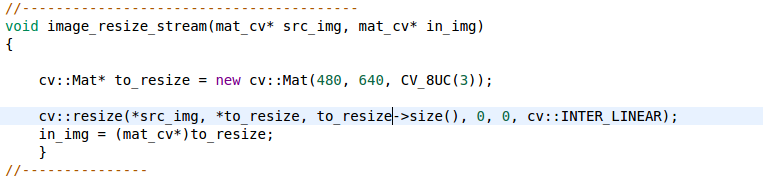
in demo.c

so, resize_stream_image return null, i don't know why
JonnySme
on 16 Apr 2019
@JonnySme
use
mat_cv *images_resize_stream(mat_cv *src_img)
{
    cv::Mat *to_resize = new ....
    ....
    return (mat_cv*)to_resize;
}
and
mat_cv *resized_img = images_resize_stream(show_img);
...
send_mjpeg();

release_mat(&resized_img);
@AlexeyAB , thanks! It's works!
Can you find out why instead of void you need to use - mat_cv?
I’ll look for a problem with drawing the bounding boxes, why this happens, maybe this is due to the fact that I submit frames to the input, and not the video stream
JonnySme
on 16 Apr 2019
@JonnySme
Can you find out why instead of void you need to use - mat_cv?
Just to distinguish when you use mat_cv* and another_typ*. C++ compiler will let your know that you implicitly converts wrong type.
maybe this is due to the fact that I submit frames to the input, and not the video stream
What do you mean?
What did you change in the source code?
AlexeyAB
on 16 Apr 2019
@AlexeyAB
I replaced the code where the webcam was connected (* cap). Instead webcam, I create cv::Mat *src and copy frames from the camera into it
as I understand it works with a web camera in a similar way
JonnySme
on 16 Apr 2019
@JonnySme
Do you get this issue if you use original code? https://github.com/AlexeyAB/darknet
Why did you do these changes, what is the reason?
AlexeyAB
on 16 Apr 2019
@AlexeyAB
- not yet checked
- I made these changes because I have a Basler camera and I wanted to get images from there
JonnySme
on 16 Apr 2019
@JonnySme
Try to check
and show your changes
AlexeyAB
on 16 Apr 2019
@AlexeyAB HI! Sorry for my late answer..
- check it, there is no such problem
- I will, only unfortunately tomorrow or the day after tomorrow I can write to you here again
Notice!! Among the questions I found the question of how to hide all the other classes so that only one class was detected. You recommended there to add "dont_show" before each line in "coco.names". I tried to do it, but the class still shows up, as in my case, how i can detect a only particular class that interests me
JonnySme
on 19 Apr 2019
@JonnySme
Notice!! Among the questions I found the question of how to hide all the other classes so that only one class was detected. You recommended there to add "dont_show" before each line in "coco.names". I tried to do it, but the class still shows up, as in my case, how i can detect a only particular class that interests me
Can you show screenshot?
What command do you use for detection?
Do you use the latest version of Darknet?
AlexeyAB
on 19 Apr 2019
@AlexeyAB I am very sorry, it was my fault. All this time I have not edited the true the ".names" file.
JonnySme
on 20 Apr 2019
Related issues
 HanSeYeong
·
3Comments
HanSeYeong
·
3Comments
 Jacky3213
·
3Comments
Jacky3213
·
3Comments
 louisondumont
·
3Comments
louisondumont
·
3Comments
 Cipusha
·
3Comments
Cipusha
·
3Comments
 yongcong1415
·
3Comments
yongcong1415
·
3Comments
Most helpful comment
@darknet-researcher Hi,
Try to use flag
-dont_show./darknet detector demo obj.data yolo-obj.cfg backup/yolo-obj_30000.weights TSV/TSV-1.webm -json_port 8070 -mjpeg_port 8090 -ext_output -dont_show