Darknet: CUDA Error: out of memory WHEN batch=64 subdivisions=8
Hello there
I did all of this https://github.com/AlexeyAB/darknet#how-to-train-pascal-voc-data
But get error when I start train_voc.cmd
C:\Users\Administrator\Downloads\darknet-master\build\darknet\x64>darknet.exe detector train cfg/voc.data cfg/yolov3-voc.cfg darknet53.conv.74 -dont_show
yolov3-voc
 compute_capability = 610, cudnn_half = 0
layer     filters    size              input                output
   0 conv     32  3 x 3 / 1   416 x 416 x   3   ->   416 x 416 x  32 0.299 BF
.............
 105 conv     75  1 x 1 / 1    52 x  52 x 256   ->    52 x  52 x  75 0.104 BF
 106 yolo
Total BFLOPS 65.428
 Allocate additional workspace_size = 52.43 MB
Loading weights from darknet53.conv.74...
 seen 64
Done!
Learning Rate: 0.001, Momentum: 0.9, Decay: 0.0005
Resizing
608 x 608
 used slow CUDNN algo without Workspace! Need memory: 556680, available: 0
 CUDNN-slow  Try to set subdivisions=64 in your cfg-file.
CUDA status Error: file: c:\users\administrator\downloads\darknet-master\src\cuda.c : cuda_make_array() : line: 209 : build time: Feb 23 2019 - 13:59:13
CUDA Error: out of memory
When I change cfg file to "batch=64 subdivisions=64" get the following error and it closes automatically
C:\Users\Administrator\Downloads\darknet-master\build\darknet\x64>darknet.exe detector train cfg/voc.data cfg/yolov3-voc.cfg darknet53.conv.74 -dont_show
yolov3-voc
 compute_capability = 610, cudnn_half = 0
layer     filters    size              input                output
   0 conv     32  3 x 3 / 1   416 x 416 x   3   ->   416 x 416 x  32 0.299 BF
 .........................
Total BFLOPS 65.428
 Allocate additional workspace_size = 52.43 MB
Loading weights from darknet53.conv.74...
 seen 64
Done!
Learning Rate: 0.001, Momentum: 0.9, Decay: 0.0005
Resizing
608 x 608
.................
Region 106 Avg IOU: -nan(ind), Class: -nan(ind), Obj: -nan(ind), No Obj: 0.519006, .5R: -nan(ind), .75R: -nan(ind),  count: 0
 hypersoar2016
All 16 comments
Can you verify that
C:\Users\Administrator\Downloads\darknet-master\build\darknet\x64\data\voc\VOCdevkit\VOC2007\JPEGImages\005471.jpg
is the correct path to an image?
 Jacob-Stevens-Haas
on 23 Feb 2019
Jacob-Stevens-Haas
on 23 Feb 2019
Can you verify that
C:\Users\Administrator\Downloads\darknet-master\build\darknet\x64\data\voc\VOCdevkit\VOC2007\JPEGImages\005471.jpg
is the correct path to an image?
Fixed it, but still same error
hypersoar2016
on 23 Feb 2019
@hypersoar2016
Fix all paths from bad.list output file
 AlexeyAB
on 23 Feb 2019
AlexeyAB
on 23 Feb 2019
@hypersoar2016
Fix all paths frombad.listoutput file
Thanks for your replying. You're awesome. But I already fixed it. But still same error.
Actually I want to detect just person not all 20 classes. Want to use yolov3-tiny Which CFG and WEIGHTS file should I use. Can you help me? Or is any already weights file that I can download
hypersoar2016
on 23 Feb 2019
@hypersoar2016
Can you show screenshot of your error?
Can you rename your cfg-file to txt-file and drag-n-drop to your message?
- If you want to detect persons only by using darknet.exe (not python or DLL/SO-library), then just add
dont_showbefore each line exceptpersonincoco.namesfile in the/data/directory
then download https://pjreddie.com/media/files/yolov3.weights
and run these commands:
./darknet detector test cfg/coco.data cfg/yolov3.cfg yolov3.weights image.jpg
./darknet detector demo cfg/coco.data cfg/yolov3.cfg yolov3.weights test.mpg
AlexeyAB
on 23 Feb 2019
Here you are dear @AlexeyAB
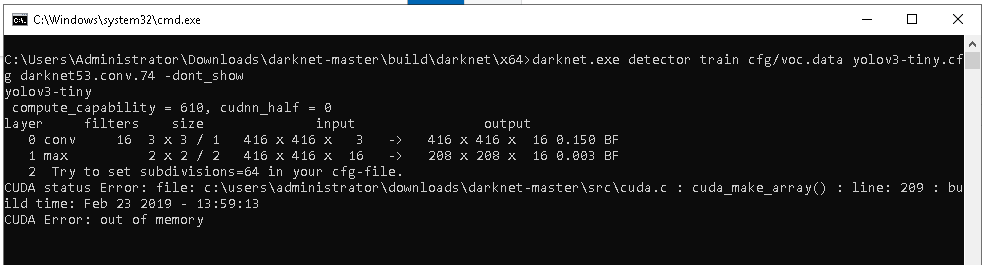
yolov3-tiny.cfg
train_voc.cmd
voc.data
voc.names
I tried to add dont_show at each line but it's slow. In the future I want to add some objects too. like person + phone + notebook etc. Want to speed up and work it on 30 fps. That's why I must learn how to execute this code.
Thank you man really. You're very helpful
hypersoar2016
on 23 Feb 2019
@hypersoar2016
From your cfg-file
[net]
# Testing
#batch=1
#subdivisions=1
# Training
batch=64
subdivisions=2
Set subdivisions=64 as said in the error message.
What GPU do you use?
AlexeyAB
on 23 Feb 2019
Did it. Also tried with darknet_no_gpu.exe. Same error
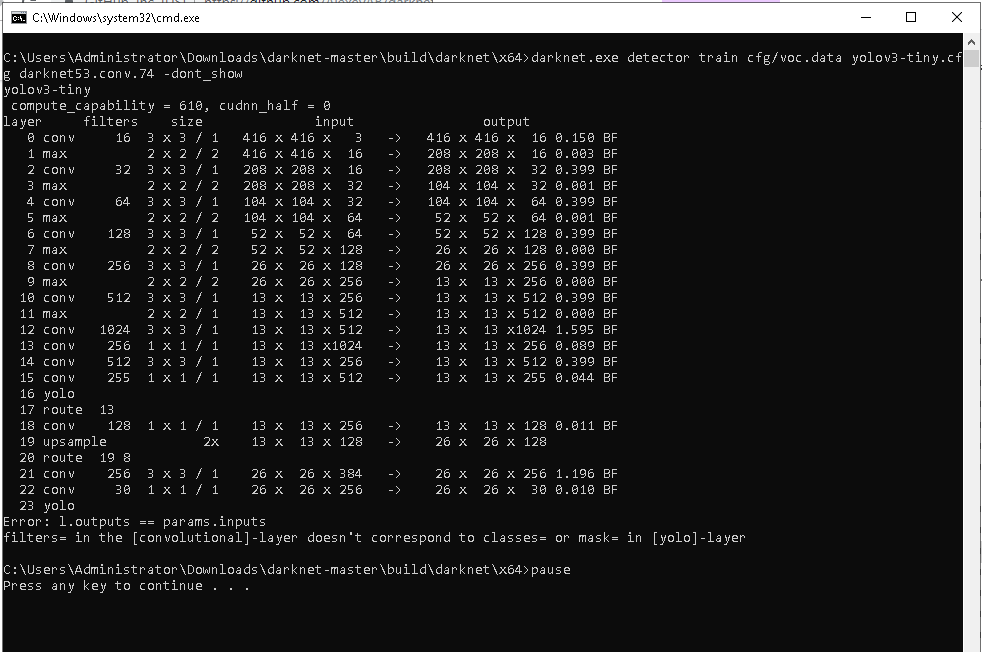
Geforce GTX 1050 Ti on Intel Xeon E5 2620v3
hypersoar2016
on 23 Feb 2019
@hypersoar2016
From your cfg-file
[convolutional]
size=1
stride=1
pad=1
filters=255
activation=linear


[yolo]
mask = 3,4,5
anchors = 10,14,  23,27,  37,58,  81,82,  135,169,  344,319
classes=80
and
[convolutional]
size=1
stride=1
pad=1
filters=30
activation=linear

[yolo]
mask = 0,1,2
anchors = 10,14,  23,27,  37,58,  81,82,  135,169,  344,319
classes=1
Read: https://github.com/AlexeyAB/darknet#how-to-train-to-detect-your-custom-objects
change [filters=255] to filters=(classes + 5)x3 in the 3 [convolutional] before each [yolo] layer
So if classes=1 then should be filters=18. If classes=2 then write filters=21.
AlexeyAB
on 23 Feb 2019
@AlexeyAB
Completely my mistake. sorry. but now a another error
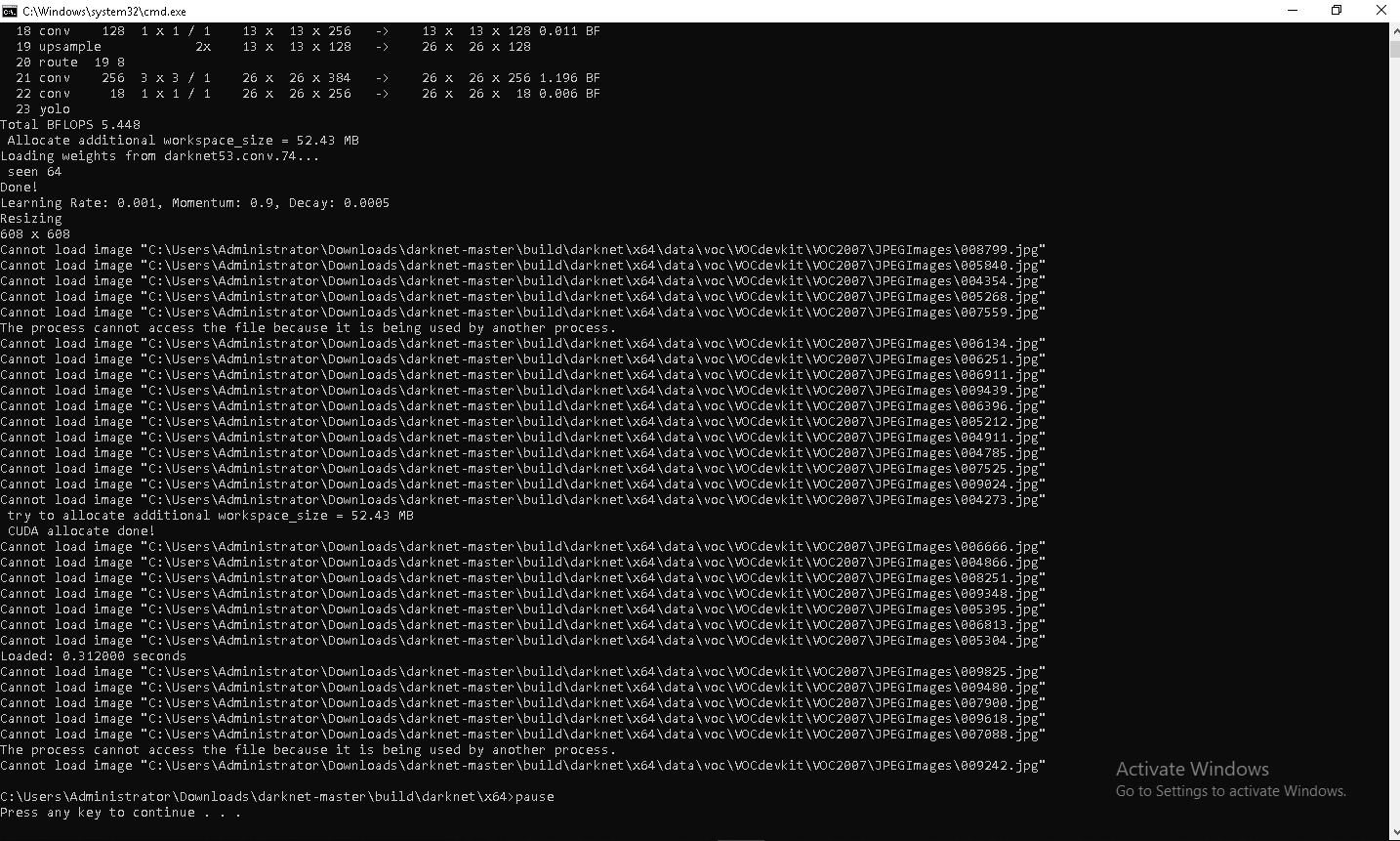
hypersoar2016
on 23 Feb 2019
@hypersoar2016
Restart you computer. If it doesn't help then run training as Administrator.
Or just copy your dataset to another directory and run voc_label.py again.
AlexeyAB
on 23 Feb 2019
Thank you, let me try it
@hypersoar2016
Restart you computer. If it doesn't help then run training as Administrator.Or just copy your dataset to another directory and run
voc_label.pyagain.
hypersoar2016
on 23 Feb 2019
I have same error,and have tried to change filters=75 "classes= 20" and subdivisions=64
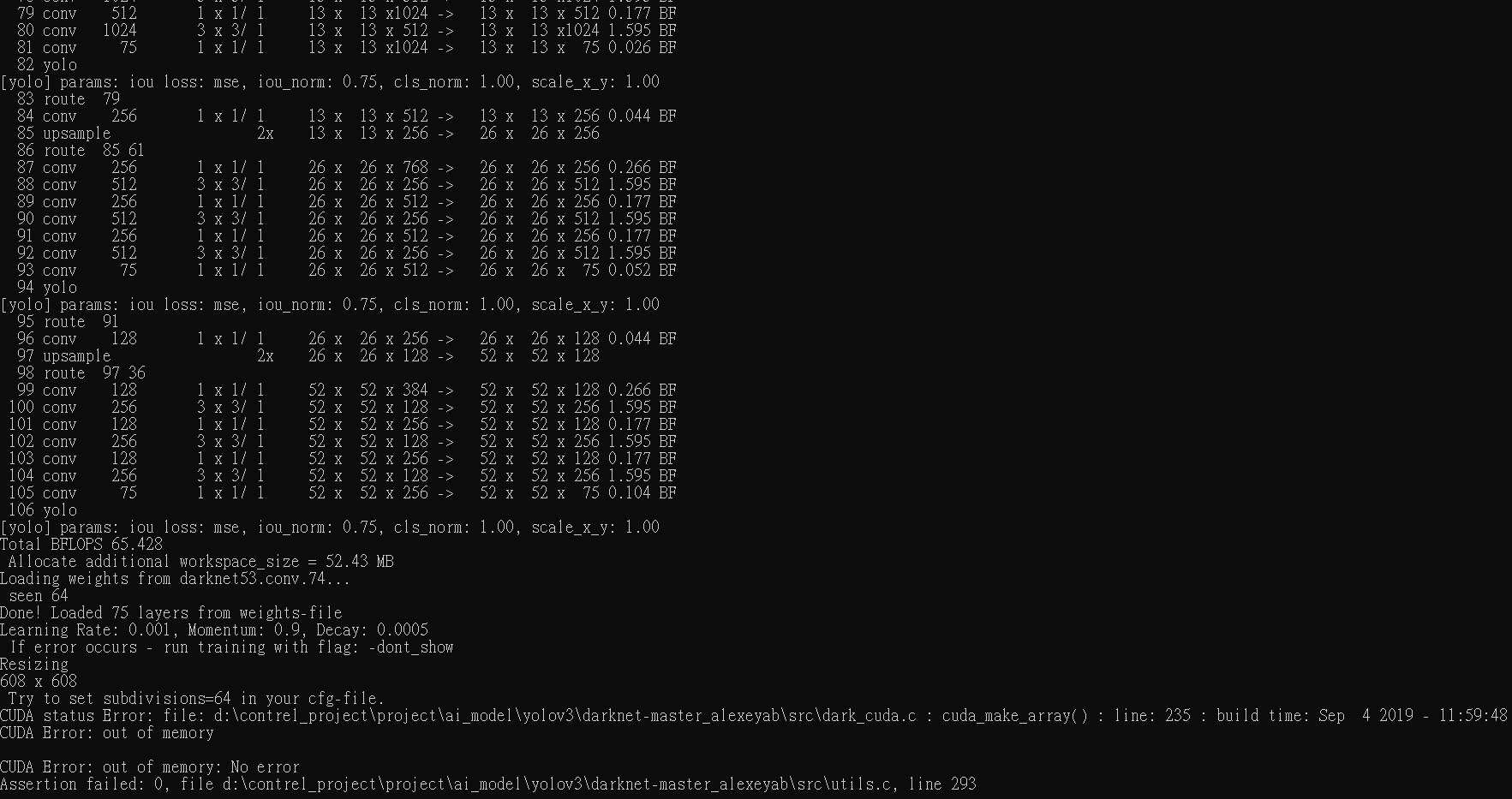
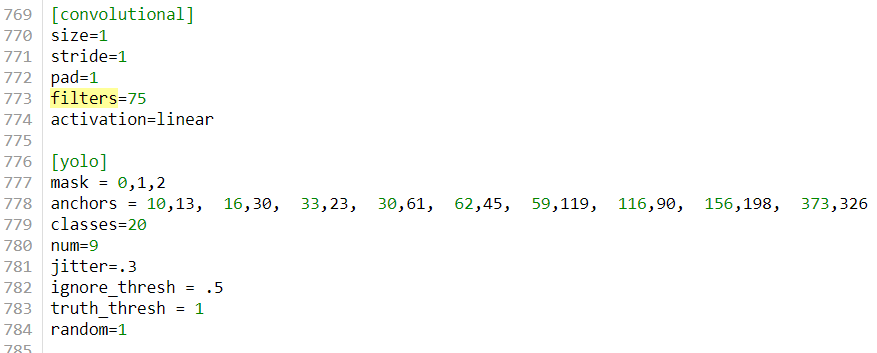
Can you explain the source of the error and how to solve it?
Thanks
 ryanlu7374
on 5 Sep 2019
ryanlu7374
on 5 Sep 2019
@ryanlu7374
- Show screenshot of
subdivisions=64 - What GPU do you use?
AlexeyAB
on 5 Sep 2019
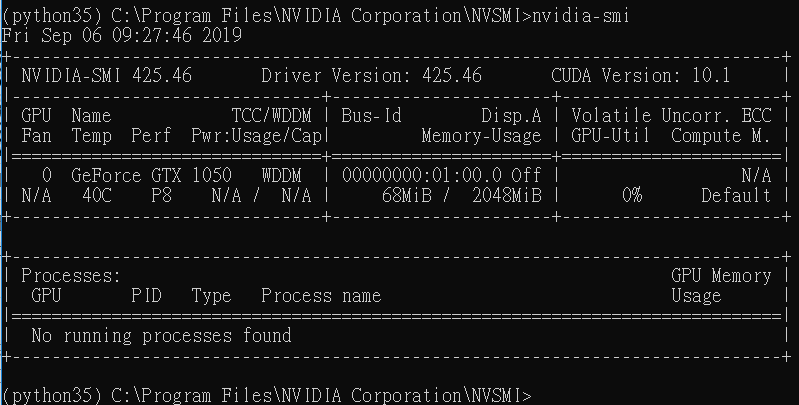

ryanlu7374
on 6 Sep 2019
@ryanlu7374
Set random=0 in the last [yolo]-layer
AlexeyAB
on 6 Sep 2019
Related issues
 siddharth2395
·
3Comments
siddharth2395
·
3Comments
 jasleen137
·
3Comments
jasleen137
·
3Comments
 PROGRAMMINGENGINEER-NIKI
·
3Comments
PROGRAMMINGENGINEER-NIKI
·
3Comments
 Cipusha
·
3Comments
Cipusha
·
3Comments
 Jacky3213
·
3Comments
Jacky3213
·
3Comments
Most helpful comment
@hypersoar2016
Can you show screenshot of your error?
Can you rename your cfg-file to txt-file and drag-n-drop to your message?
dont_showbefore each line exceptpersonincoco.namesfile in the/data/directorythen download https://pjreddie.com/media/files/yolov3.weights
and run these commands:
./darknet detector test cfg/coco.data cfg/yolov3.cfg yolov3.weights image.jpg./darknet detector demo cfg/coco.data cfg/yolov3.cfg yolov3.weights test.mpg