I would like to test if my detection is successful with many images in my trained model.
Is there a way to test all the images in the folder with a single command with image detection?
I want to check only the image of the detection result by using the image without box attached.
 rrrtype
All 16 comments
What do you want to get as result?
- one txt file for all detections
- txt file with detections for each image
- jpg files with detected bboxes
- jpg files with cropped detected objects
- ....
You can run Pseudo-lableing:
darknet.exe detector test cfg/coco.data yolov3.cfg yolov3.weights -thresh 0.25 -dont_show -save_labels < data/new_train.txtand then check result labels by using Yolo_mark: https://github.com/AlexeyAB/Yolo_mark
Also you can try to do these changes: https://github.com/AlexeyAB/darknet/issues/2263#issuecomment-456062613
Create folder /result_img/
And run this command:
darknet.exe detector test cfg/coco.data yolov3.cfg yolov3.weights -dont_show -ext_output < data/train.txt > result.txt
You will get:
- Images for each cropped objects
result.txtwith results of detections
https://github.com/AlexeyAB/darknet#how-to-use
To process a list of images
data/train.txtand save results of detection toresult.txtuse:
darknet.exe detector test cfg/coco.data yolov3.cfg yolov3.weights -dont_show -ext_output < data/train.txt > result.txtPseudo-lableing - to process a list of images
data/new_train.txtand save results of detection in Yolo training format for each image as label<image_name>.txt(in this way you can increase the amount of training data) use:
darknet.exe detector test cfg/coco.data yolov3.cfg yolov3.weights -thresh 0.25 -dont_show -save_labels < data/new_train.txt
 AlexeyAB
on 2 Feb 2019
AlexeyAB
on 2 Feb 2019
jpg files with detected bboxes
rrrtype
on 3 Feb 2019
@AlexeyAB
I also have a question about testing multiple images. I'd like to get one text/csv file per test image. For example, if I test 10 images, I want to get 10 different text/csv files with classes and coordinates.
Right now I edited the image.c file to output the classes and coordinates into a csv file. Here is what I edited:
/darknet/src/image.c:
Line 242: FILE *fp = fopen("results.csv","a"); // Opens csv file
Line 287: fprintf(fp, "%s;%f;%f;%f;%f;\n", names[class], b.x*im.w, b.y*im.h, b.w*im.w, b.h*im.h); // prints coordinates to open csv file
Line 315: fclose(fp); // closes csv file
Currently, this is working, but I need to run ./darknet detector test ... for each image. How can I test a folder of images and output one text/csv file for each?
Thanks.
 daylanc
on 5 Feb 2019
daylanc
on 5 Feb 2019
@daylanc
Just use this command:
./darknet detector test cfg/coco.data yolov3.cfg yolov3.weights -thresh 0.25 -dont_show -save_labels < data/new_train.txt
and you will get txt-files for each jpg-file with detected objects in Yolo-training format.
data/new_train.txt - should contain paths to images which you want to test.
AlexeyAB
on 5 Feb 2019
@AlexeyAB
What tags can I add to print the class and bounding box coordinates for a single image? Also, what do the tags mean?
-thresh 0.25?
-dont_show?
-save_labels?
-ext_output?
I want to test a single image first, but in the future I'm gonna have to test multiple images. Just want to clarify what tags to use and in what order. Not sure if there's documentation that exists about this elsewhere.
Thanks.
daylanc
on 5 Feb 2019
@daylanc
-thresh 0.25 - confidence threshold
-dont_show - don't show window with detection, so it will not wait for press-key if you use many images
-save_labels - save detection in Yolo label format (the same format as for training)
-ext_output - show class name, confidence and coordinates of detected objects (without it - only class name and confidence will be showed)
AlexeyAB
on 5 Feb 2019
@AlexeyAB
I used the -ext_output tag to get the class name, confidence, and coordinates. I need to get that information into a python pandas dataframe to do some analysis on, but am having a hard time due to the format of the output .txt or .csv file. Is there a way I could edit the output of the -ext_output tag to just output the class, x_center, and y_center values (or the important values)?
Current Output:

Format I need:
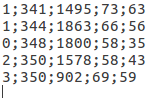
If there's a file I could take a look at to edit this output or a way I could get each value in a separate cell or column that would be great.
Thanks!
daylanc
on 5 Feb 2019
@daylanc
If you want to create separate txt file for each image, then you should use flag -save_labels and change this line: https://github.com/AlexeyAB/darknet/blob/285088adc4a2da0d9c9715bb33ad5b086eb2dbee/src/detector.c#L1336
It isn't related to the -ext_output
AlexeyAB
on 6 Feb 2019
@AlexeyAB
Ahhhh okay I see how it works now! Thank you!
daylanc
on 6 Feb 2019
@AlexeyAB
Can we also save the predictions.jpg file for each image as well as saving the bounding box coordinates using save_labels?
daylanc
on 11 Feb 2019
@AlexeyAB i dont get it..
i have new images , i want to get the coordinates in yolo format but when i run pseudo labeling i get
Enter Image Path: ../google68_0.jpg: Predicted in 173.189000 milli-seconds.
E: 46%
V: 83%
N: 50%
C: 59%
C: 41%
4: 95%
5: 71%
6: 38%
6: 92%
Enter Image Path: ...
thats not yolo format!
 Favi0
on 6 Mar 2019
Favi0
on 6 Mar 2019
@Favi0
- look at the file
../google68_0.txtthat was created - what command do you use?
AlexeyAB
on 7 Mar 2019
@AlexeyAB
Can we also save the predictions.jpg file for each image as well as saving the bounding box coordinates usingsave_labels?
I wonder also whether we can save all images with bounding boxes and annotations for predictions during detecting of the set of images? thank you in advance
 yustiks
on 15 May 2019
yustiks
on 15 May 2019
@rrrtype hi, Have you solve the problem? I just want to save the jpg files detected in a folder. Can you tell me how deal?
 yuyifan1991
on 24 Jun 2019
yuyifan1991
on 24 Jun 2019
@AlexeyAB hi,I just want to get jpg files with detected bboxes. How can I get? Thank you so much.
yuyifan1991
on 24 Jun 2019
What do you want to get as result?
- one txt file for all detections
- txt file with detections for each image
- jpg files with detected bboxes
- jpg files with cropped detected objects
- ....
You can run Pseudo-lableing:
darknet.exe detector test cfg/coco.data yolov3.cfg yolov3.weights -thresh 0.25 -dont_show -save_labels < data/new_train.txt- and then check result labels by using Yolo_mark: https://github.com/AlexeyAB/Yolo_mark
Also you can try to do these changes: #2263 (comment)
Create folder/result_img/
And run this command:
darknet.exe detector test cfg/coco.data yolov3.cfg yolov3.weights -dont_show -ext_output < data/train.txt > result.txtYou will get:
- Images for each cropped objects
result.txtwith results of detectionshttps://github.com/AlexeyAB/darknet#how-to-use
- To process a list of images
data/train.txtand save results of detection toresult.txtuse:
darknet.exe detector test cfg/coco.data yolov3.cfg yolov3.weights -dont_show -ext_output < data/train.txt > result.txt- Pseudo-lableing - to process a list of images
data/new_train.txtand save results of detection in Yolo training format for each image as label<image_name>.txt(in this way you can increase the amount of training data) use:
darknet.exe detector test cfg/coco.data yolov3.cfg yolov3.weights -thresh 0.25 -dont_show -save_labels < data/new_train.txt
Hi,
It replace the predictions.jpg everytime. so there is only one prediction.jpg at end. I am running on 10 jpg images and want to save 10 jpg predictions. How to do it?
 MuhammadAsadJaved
on 28 Nov 2019
MuhammadAsadJaved
on 28 Nov 2019
Related issues
 qianyunw
·
3Comments
qianyunw
·
3Comments
 jasleen137
·
3Comments
jasleen137
·
3Comments
 bit-scientist
·
3Comments
bit-scientist
·
3Comments
 siddharth2395
·
3Comments
siddharth2395
·
3Comments
 Jacky3213
·
3Comments
Jacky3213
·
3Comments
Most helpful comment
@AlexeyAB
Can we also save the predictions.jpg file for each image as well as saving the bounding box coordinates using
save_labels?