Darknet: Questions about my custom training
Hi @AlexeyAB,
Im going to do a training and i have a few questions before doing it.
1. The object I want to detect is the lateral of a industrial tractor (just the lateral). Should I use a pretrained weights for this or is better to train from zero? In the case I should use pretrained weights, what should I use? I'm using yolov3-tiny.
2. I want to perform the detection in a Jetson TX2 in real time. I tested yolov3-tiny 416x416 and it rans at 30FPS. Your repo says that for improve the detection I should set a bigger resolution like 640x640. If I do this the detection task will be slower than my actual 30FPS right? In that case I prefer using the 416x416 size. For your interest, the input images have 2 different sizes: 4000x3000 and 1920x1080.
3. I recalculated my anchors for a 416x416 size with 9 clusters. I obtained an avg IoU = 86.08%. Should I use more or less clusters? The anchors I got are this:
102,148, 154,172, 133,227, 191,218, 163,266, 199,277, 265,264, 227,325, 281,370
Which ones I have to set (or masks) in the first and the second yolo levels in the network?
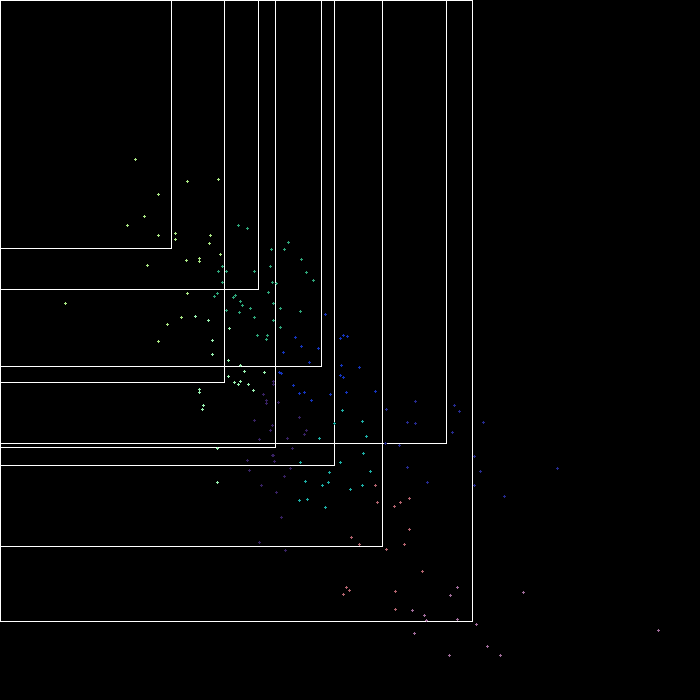
EDIT: This is the result image of calc_anchors:
Thanks for your time and patience.
 PabloDIGITS
All 29 comments
Update:
I resized all the images to 416x416. The reason is because I'm working on the Jetson TX2 and it have a limited memory space. Now I have enough space for performing data augmentation. My number of original images are 212 with object and 207 without object.
I didn't label again the resized images because it is supposed that the data labels are relative to the size of the image. I'm I right?
After I performed the data augmentation I have 3352 images with their labels. One half with objects and the other half without objects
PabloDIGITS
on 22 Jan 2019
I have a few more questions about my training:
4. Since I'm training on a Jetson TX2, the memory of the GPU is limited, so probably I will have to set the subdivisions parameter 16, 32 or even 64. Does this parameter affects the accuracy or performance of the network or is the batch size which affects? What is your opinion on doing the training in the Jetson TX2?
5. You recommend to train for 2000*class iteration. I have only one class so I will train for 2000. Is this value the same that I have to set in the max_batches parameter in the cfg file? If not, how is it calculated?
6. Should I change the steps parameter in the cfg file? I'm asking this because I don't know if exist the possibility that the training is so short that the condition to change the learning rate is never reached.
Again thanks for your time and patience
PabloDIGITS
on 22 Jan 2019
@PabloDIGITS Hi,
- Use
yolov3-tiny.conv.15that you can get by using./darknet partial cfg/yolov3-tiny.cfg yolov3-tiny.weights yolov3-tiny.conv.15 15: https://github.com/AlexeyAB/darknet#how-to-train-tiny-yolo-to-detect-your-custom-objects
I should set a bigger resolution like 640x640. If I do this the detection task will be slower than my actual 30FPS right?
- Yes. About ~14 FPS with width=640 height=640 on TX2. You don't have small objects as I can see from your anchors and cloud of points, so just use width=416 height=416.
I recalculated my anchors for a 416x416 size with 9 clusters. I obtained an avg IoU = 86.08%. Should I use more or less clusters? The anchors I got are this:
102,148, 154,172, 133,227, 191,218, 163,266, 199,277, 265,264, 227,325, 281,370
- I recommend you to use for classes=1 in your case:
filters=54
activation=linear

[yolo]
mask = 1,2,3,4,5,6,7,8,9
anchors = 60,60, 102,148, 154,172, 133,227, 191,218, 163,266, 199,277, 265,264, 227,325, 281,370
classes=1
num=10


...
filters=6
activation=linear

[yolo]
mask = 0
anchors = 60,60, 102,148, 154,172, 133,227, 191,218, 163,266, 199,277, 265,264, 227,325, 281,370
classes=1
num=10
(just calculated filters= based on your number of classes)
filters=(5+classes)*9
activation=linear

[yolo]
mask = 1,2,3,4,5,6,7,8,9
anchors = 60,60, 102,148, 154,172, 133,227, 191,218, 163,266, 199,277, 265,264, 227,325, 281,370
classes=
num=10


...
filters=(5+classes)*1
activation=linear

[yolo]
mask = 0
anchors = 60,60, 102,148, 154,172, 133,227, 191,218, 163,266, 199,277, 265,264, 227,325, 281,370
classes=
num=10
I didn't label again the resized images because it is supposed that the data labels are relative to the size of the image. I'm I right?
Yes.
After I performed the data augmentation I have 3352 images with their labels. One half with objects and the other half without objects
What soft did you use for data augmentation?
Check you augmented dataset by using https://github.com/AlexeyAB/Yolo_mark
- Since I'm training on a Jetson TX2, the memory of the GPU is limited, so probably I will have to set the subdivisions parameter 16, 32 or even 64. Does this parameter affects the accuracy or performance of the network or is the batch size which affects? What is your opinion on doing the training in the Jetson TX2?
- subdivisions almost doesn't affect on accuracy. It affects only on speed. You can use TX2 for training, but much faster to use any desktop GPU, like GeForce RTX 2070.
- You recommend to train for 2000*class iteration. I have only one class so I will train for 2000. Is this value the same that I have to set in the max_batches parameter in the cfg file? If not, how is it calculated?
- Train at least 4000 - 6000 iterations. Also you can use the latest version of this repository and train with flag
-mapand stop the training when the mAP will stop increase: https://github.com/AlexeyAB/darknet#when-should-i-stop-training
Usually sufficient 2000 iterations for each class(object), but not less than 4000 iterations in total. But for a more precise definition when you should stop training, use the following manual:
- Should I change the steps parameter in the cfg file? I'm asking this because I don't know if exist the possibility that the training is so short that the condition to change the learning rate is never reached.
set and train 6000 iterations:
learning_rate=0.001
burn_in=1000
max_batches = 6000
policy=steps
steps=4000,5000
scales=.1,.1
 AlexeyAB
on 23 Jan 2019
AlexeyAB
on 23 Jan 2019
Hi @AlexeyAB,
I will do the training again with the anchor you sugest, the iterations and new steps parameter.
What soft did you use for data augmentation?
Check you augmented dataset by using https://github.com/AlexeyAB/Yolo_mark
I use a python library named CLOdSA. I choose this library because it changes the label files depending on the transformation you do. In this way I only have to label with Yolo_mark (in my case) 400 images and not 3000. You can find the library here: https://github.com/joheras/CLoDSA
I use it yesterday for a training with yolo and I got after 4000 iterarions a 0.25 avg loss and a map of 90% so it works and do the label transformations well.
Thanks for your kindly answer and help. I will let you know how my new training goes.
PabloDIGITS
on 24 Jan 2019
@AlexeyAB Hi,
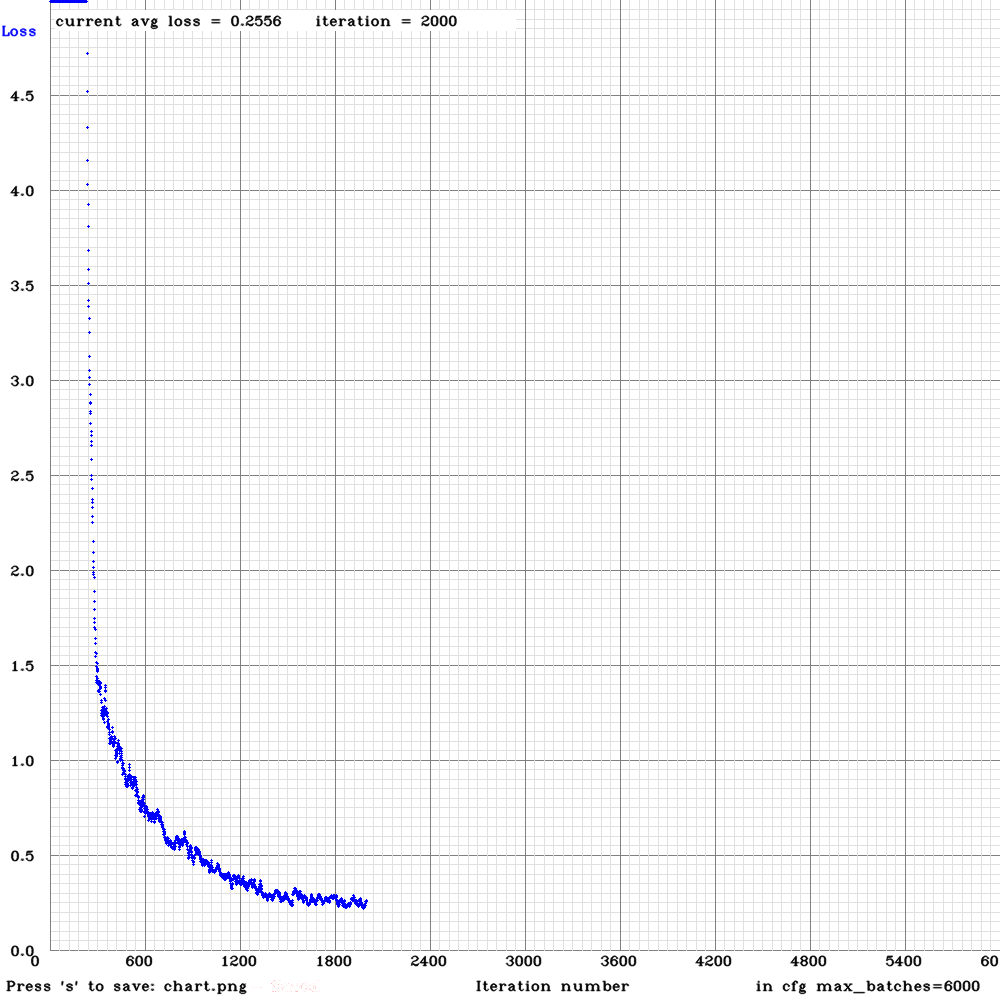
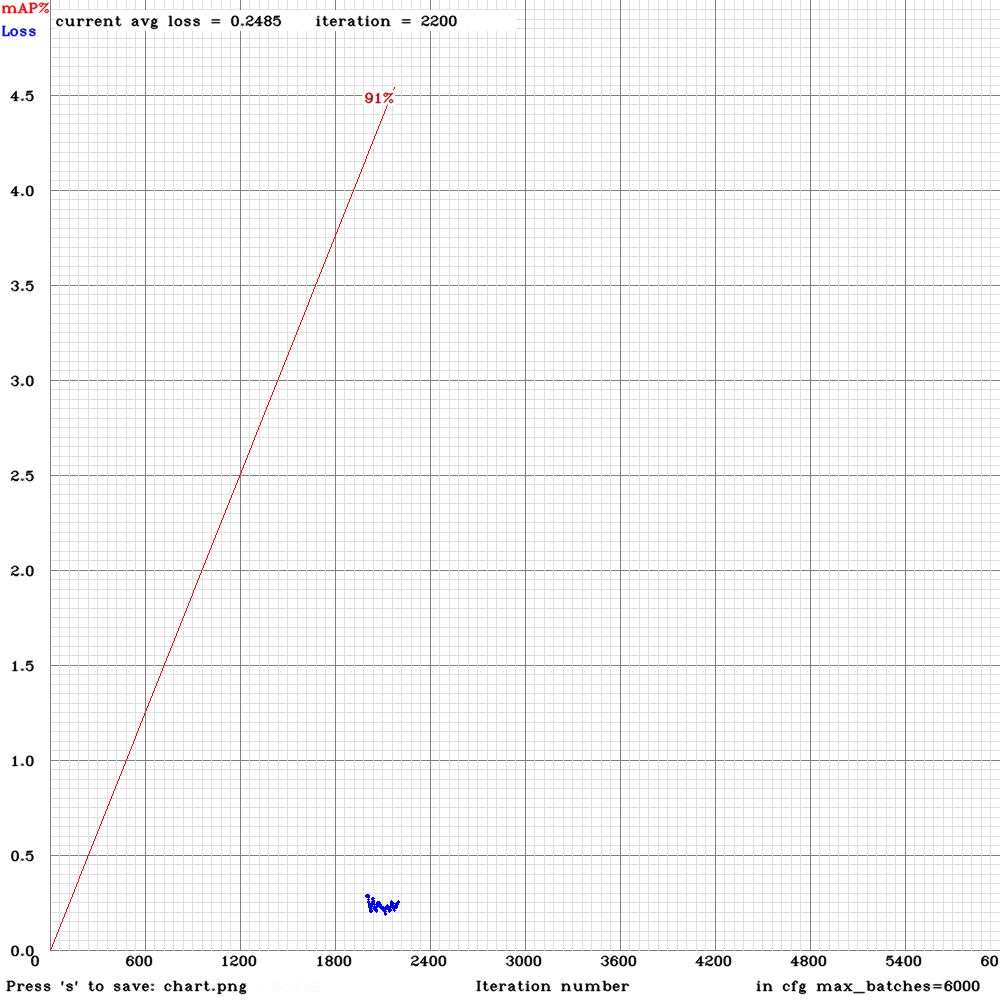
This is the graph of the avg loss and the map of my current training. Everything seems fine.
(I have the graph in 2 different files because I forgot to enable the -map flag so I restarted the training with the 2000 iteration weights)
I'm training until 6000 iterations, but just one question:
Is it possible that training for too much iterations and achieving a very avg loss and a high map could cause over-fitting?
PabloDIGITS
on 24 Jan 2019
@PabloDIGITS
I use a python library named CLOdSA. I choose this library because it changes the label files depending on the transformation you do. In this way I only have to label with Yolo_mark (in my case) 400 images and not 3000. You can find the library here: https://github.com/joheras/CLoDSA
Can it rotate image randomly by +- 0-180 degrees, for example, rotate by 23 degrees?
Or it can rotate only by 0,90,180,270 degrees?
Is it possible that training for too much iterations and achieving a very avg loss and a high map could cause over-fitting?
It is possible in theory. Just try to use separate validation dataset to check this.
AlexeyAB
on 24 Jan 2019
@AlexeyAB,
Can it rotate image randomly by +- 0-180 degrees, for example, rotate by 23 degrees?
Or it can rotate only by 0,90,180,270 degrees?
Yes, you can rotate randomly by any degrees 0-360.
PabloDIGITS
on 25 Jan 2019
@AlexeyAB Hi,
I trained with your recomendations above and this is the final part of mi map chart:
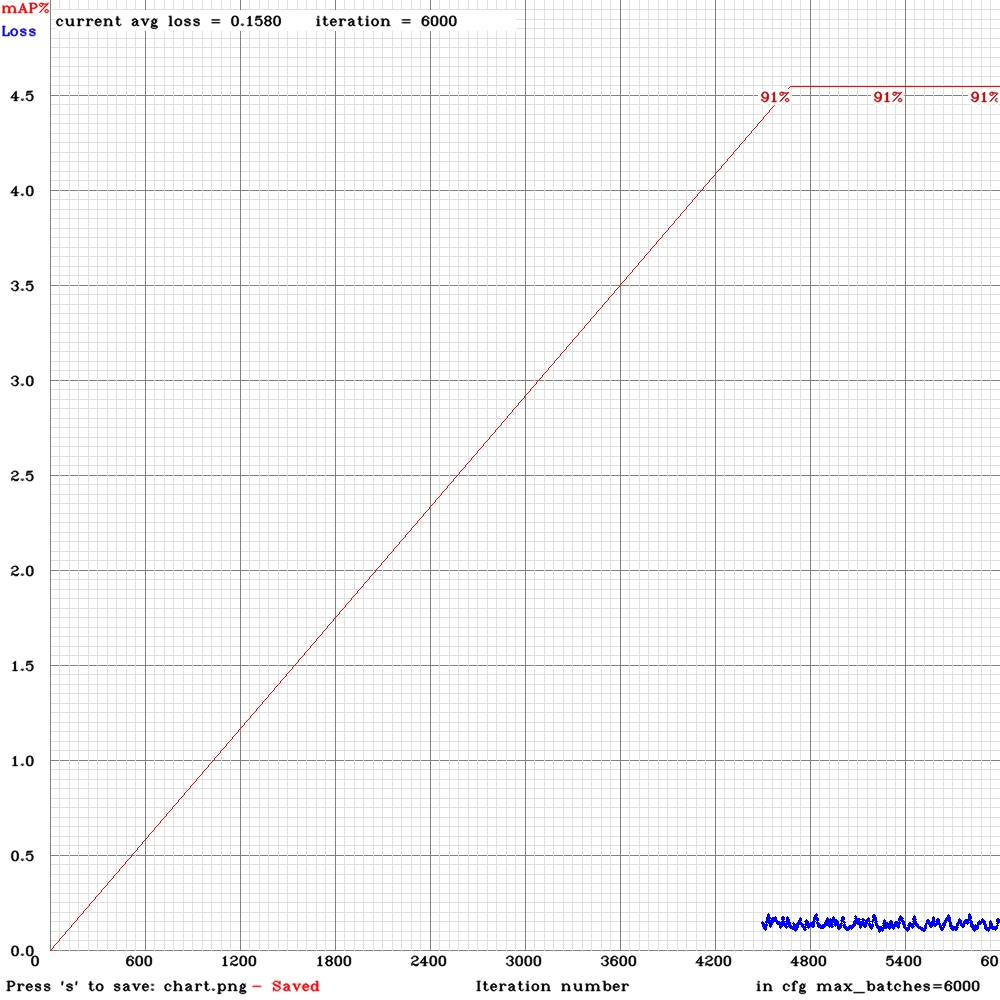
The final map is 91%. And yes, I have a valid dataset with images and labels, that I didn't use for training. Therefor, I take some new pictures and did a predict with my trained model, the result is very good:

With a 90% and a 40% of confidence from left to right.
The only thing that I need to test is feeding the network with live video and see how it performs. I will let you know when it is done.
Thanks for your help and time.
PabloDIGITS
on 25 Jan 2019
@AlexeyAB Hi,
I have done some test with my trained model and I have some comments to do on my set-up and results:
1. The camera I used to take the training images is different from the camera I used for detection with the Jetson TX2.
2. I have notice that, although I take a picture in the same position and conditions of the same object but with the two cameras, the model always gives me more confidence with the image taken with the "training camera". Here is an example:
Image with the training camera: 96% tractor
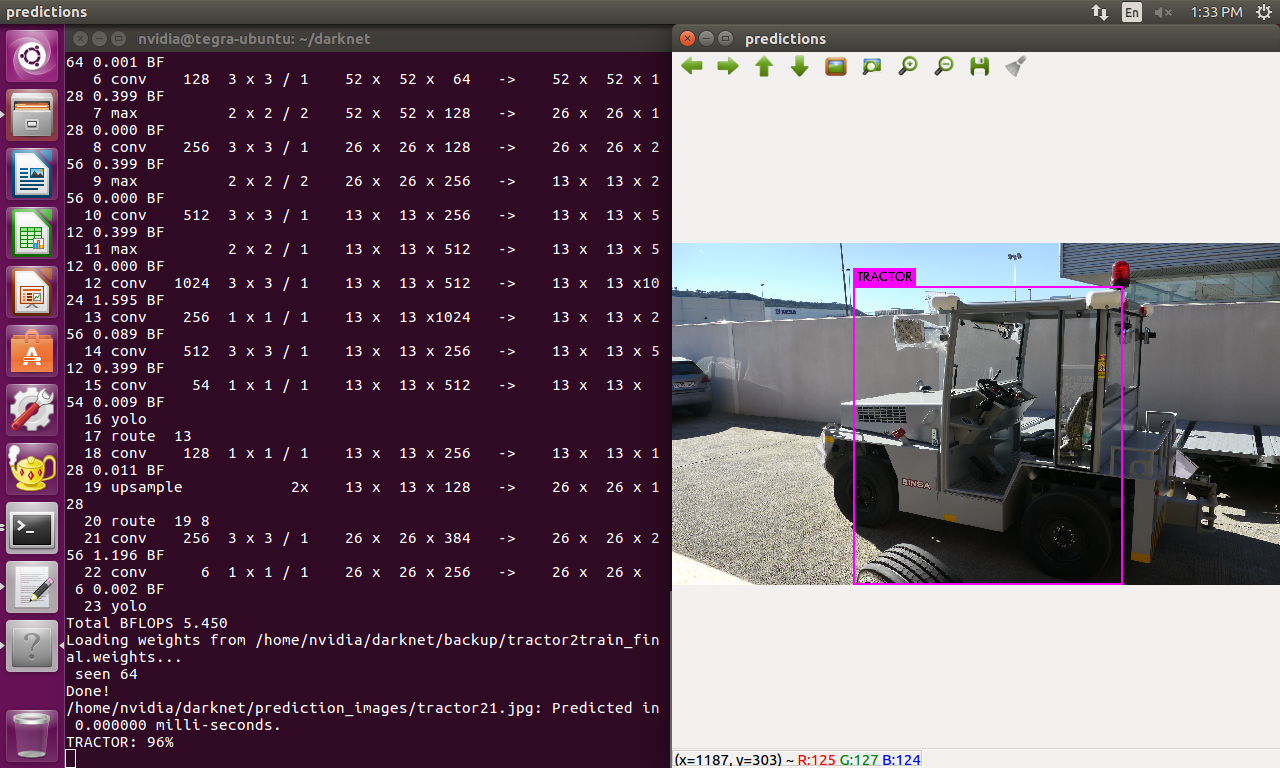
Image with the detecting camera: 58% tractor
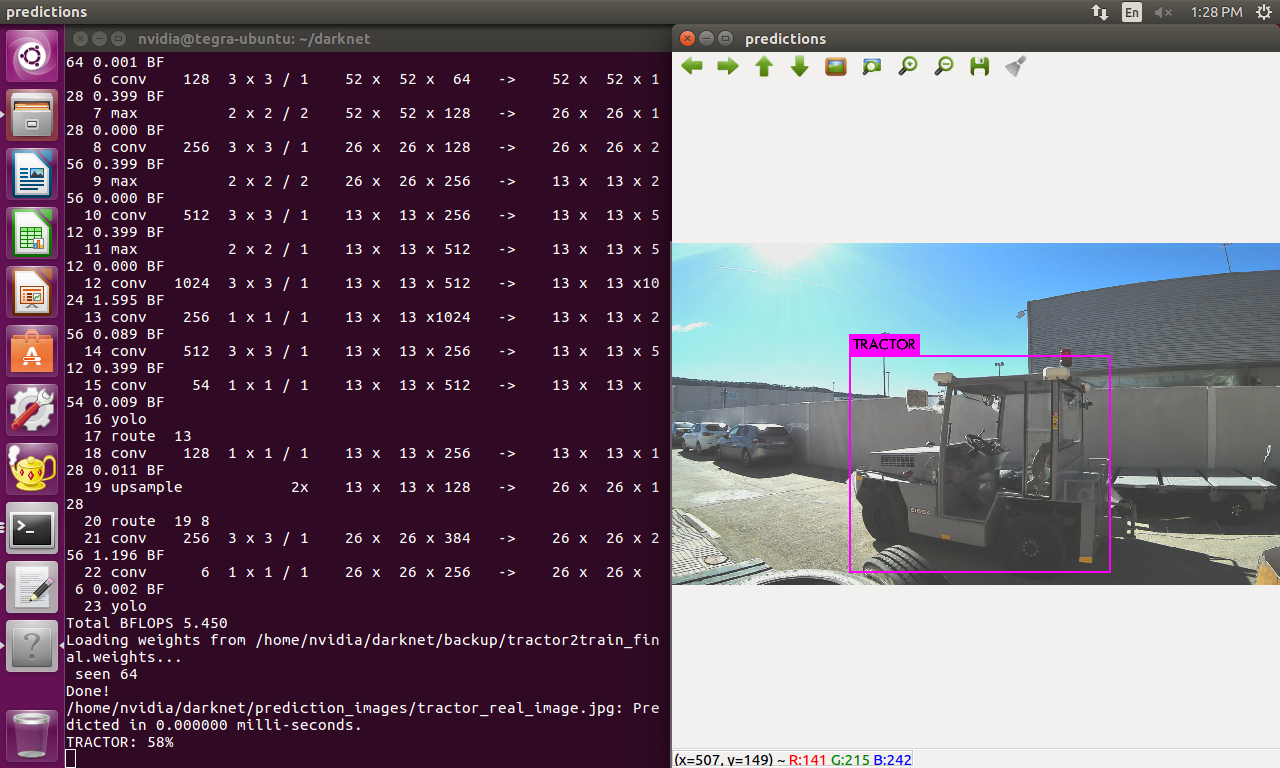
I know the position and size is not the same but there is a 40% of difference between the confidence detections which seems a lot to my for this case.
3. If I modify the brightness of the detection camera the confidence varies a lot, but I think this is normal. However I think the network it is very sensitive to this changes. Here is an example:
Image with bright: 36%

4. After doing these tests with images I did some tests with live video from the detection camera. With the camera in the same position that before, the confidence or precision is lower than the case with single images. Why this difference exists? Shouldn't be the same process but repeatedly more times taking the frames of the video as single images? Here is an example:
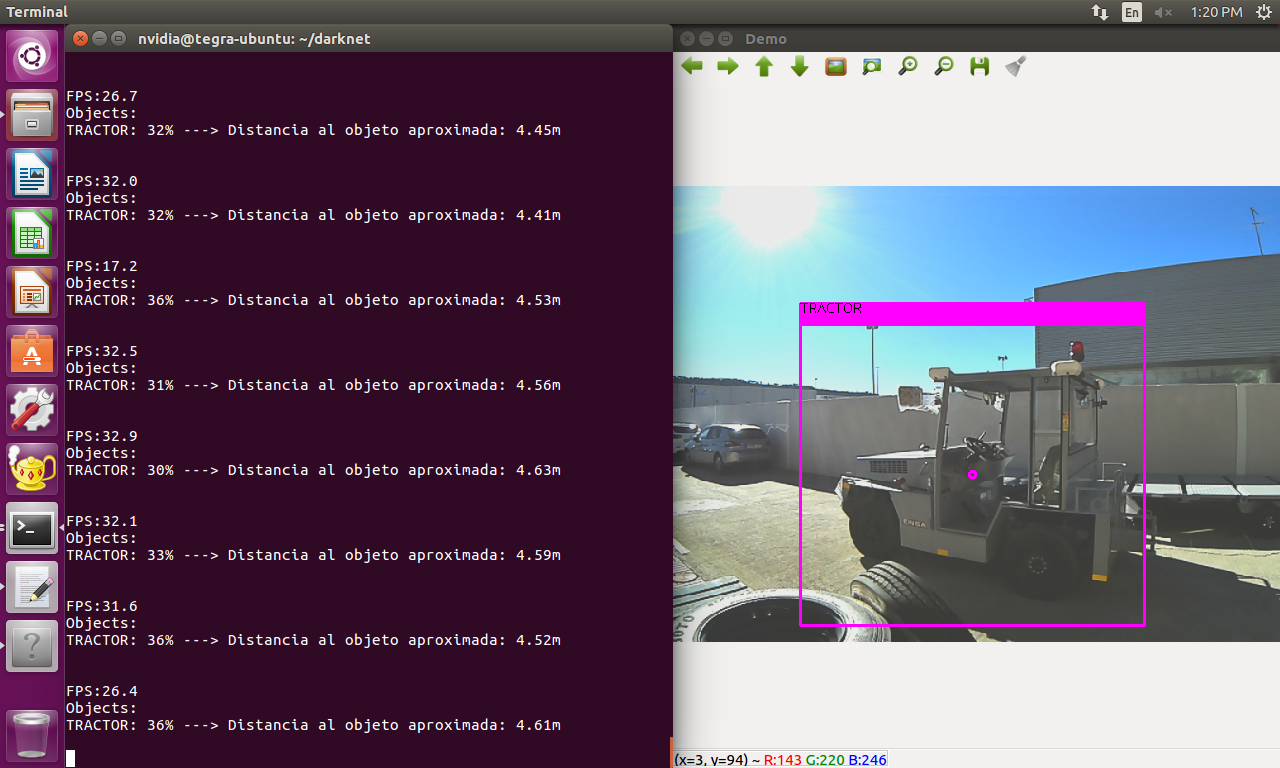
As you can see the frames of the live video are very similar to the second photo of this comment, but the confidence result are about 30% lower.
Could you give some more advice to make my dataset more robust? I know taking the training images with same camera for detection could be a great idea. Have you got any more ideas?
Maybe the performance will be improved if one of my augmented data techniques add or subtract brightness to the images.
Or maybe this normal for the actual state-of-art YOLO?
Thank you for help me and for your kindly answers.
PabloDIGITS
on 25 Jan 2019
@PabloDIGITS Hi,
Maybe the performance will be improved if one of my augmented data techniques add or subtract brightness to the images.
This can be easily solved by using color data augmentation. Especially - exposure.
Use params:
 saturation = 1.7
 exposure = 3.0
 hue=.1
instead of https://github.com/AlexeyAB/darknet/blob/1b15e2f8df5794a8c81fdfafddb3863c9a1a9e16/cfg/yolov3.cfg#L14-L16
And train 2x more iterations.
As you can see the frames of the live video are very similar to the second photo of this comment, but the confidence result are about 30% lower.
Did you get the 2nd photo by using photo-mode of your camera or by grabbing one of frames from video?
There can be different quality, resolution, WDR, ...
Also how do you measure distance to the objects?
AlexeyAB
on 25 Jan 2019
@AlexeyAB Hi,
1. Ok, I will modify the exposure value and try to train for 12.000 iteration, but it will take time... I have to suggest again in my company for buying a desktop PC with at least a GTX 1080 to do this if I dont want to wait much time.
Did you get the 2nd photo by using photo-mode of your camera or by grabbing one of frames from video?
2. Yes it was some kind of photo-mode. But the resolution and all the parameters should be the same for video.
Also how do you measure distance to the objects?
3. I measured the distance to the object when I took the first photo, and measured the height of the object. Then I calculated the focal distance. I use the focal distance and the height of the bbox of prediction to estimate the distance. I know It is not an accurate distance but I did that to see how it performs. It is a good aproximation for me by now. Althought I see you recently stared a repo with ZED stereo cam that it is very interesting.
4. Also, do you think taking the photos with the detection camera will improve the results? Is this important?
Last thing I notice:
When I predict over a single image with this command:
./darknet detector test...
The distance and and a point at the center of the bbox (I modify the code to output this) are not showed, and when I used this command for the live video feed:
./darknet detector demo...
The point and the distance are showed. My questions is:
5. Is the forward algorithm different when you perform a single prediction on an image and when you use live video? The only difference I see is the way of obtaining the image, but once you get the frame of a video it could be treated as a single image, am I right?
PabloDIGITS
on 28 Jan 2019
@PabloDIGITS Hi,
- Yes it was some kind of photo-mode. But the resolution and all the parameters should be the same for video.
Try to grab frames from video by using Yolo_mark: https://github.com/AlexeyAB/Yolo_mark
./yolo_mark x64/Release/data/img cap_video test.mp4 10 - it will grab each 10th frame from video test.mp4
Althought I see you recently stared a repo with ZED stereo cam that it is very interesting.
Yes, I will try to find a good solution for 3D-coords.
- Also, do you think taking the photos with the detection camera will improve the results? Is this important?
Yes, you should do it if possible.
- Is the forward algorithm is different when you perform a single prediction on an image and when you use live video? The only difference I see is the way of obtaining the image, but once you get the frame of a video it could be treated as a single image, am I right?
Forward algorithm is the same.
Differences:
- Averaging of detections over 3 frames on video, you can set
1to disable it: https://github.com/AlexeyAB/darknet/blob/00b87281f35412dfd0493b879120583951ca279c/src/demo.c#L18 - different drawing function
- for detection on image: https://github.com/AlexeyAB/darknet/blob/00b87281f35412dfd0493b879120583951ca279c/src/image.c#L316
- for detection on video: https://github.com/AlexeyAB/darknet/blob/00b87281f35412dfd0493b879120583951ca279c/src/image.c#L519
- Frame from video usullay differs from photo from the same camera.
AlexeyAB
on 28 Jan 2019
@AlexeyAB Hi,
1. I have made a small program that grab a frame (grabbed_frame) in the same way that YOLO does (http_stream.cpp).
Then I have took a photo with the camera trough the guvcview app (app_frame).
I make the prediction with both images and then with live video from the camera. The scene conditions are maintained in all the cases.
The results are:
grabbed frame = 35%
app_frame = 33%
live video = 30%-40%
So I think I change something in the parameters of the camera between the tests. Everything is fine with this issue.
2. I will do the next training with 12000 iterations, the saturation and exposure changes you suggest and using the same camera for training photos and detection. But for this I will have to design some type of portable platform for the Jetson with a battery and a little screen because I will have to carry it with me while doing the photos.
Thanks for your help. I will update the thread with my progress and tests if you don't mind.
PabloDIGITS
on 28 Jan 2019
@PabloDIGITS
hello. Tell me please, how do you calculate the distance in Yolo? I saw on the screenshot the calculation of the distance
Thanks!
 JonnySme
on 22 Feb 2019
JonnySme
on 22 Feb 2019
@JonnySme
I calculate the distance with a correlation between the height of the bounding box and the height of the real object. First you have to calculate the focal length of your camera with a initial picture:
F = (P x D) / H
P is the height in pixels of the object in the photo.
D is the distance to the object (the distance between where you taje the picture and the object).
H is the real height of the object in meters.
Then in the detection phase, you use the height of the bounding box and calculate D'
D' = (W x F) / P
This is the original article:
https://www.pyimagesearch.com/2015/01/19/find-distance-camera-objectmarker-using-python-opencv/
I use the height because my cam is in a fixed position (fixed distance to the gorund). It means that when the object gets closer to the cam the height of the bounding box changes. The width in this case changes with the angle of the object, but that doesnt give any information of the distance.
PabloDIGITS
on 22 Feb 2019
Thanks for your answer!
D - distance to the object in meters record?
Do you convert pixels to meters or vice versa?
You have one class and you already know the height of this object?
JonnySme
on 22 Feb 2019
D - distance to the object in meters record?
Yes, D is the distance in meters.
Do you convert pixels to meters or vice versa?
You dont have to convert pixels in meters. Just put the number like 230 pixels. But you have to make sure that you measure the pixels on the image with the same resolution for the network. In my case the resolution is 416x416. So I took a picture, resize to 416x416 and measure the height in pixels.
You have one class and you already know the height of this object?
Yes, you have to know the height of the object before the training. In my case is possible because is an object I have around the place I can measure it physically.
FYI, This is only an aproximation, because as you can see, the height of the bounding box changes from one frame to another, so the distance will change a little. But its better than nothing :)
PabloDIGITS
on 22 Feb 2019
@PabloDIGITS Okay, thank you very much!
Btw, What progress have you made on tx2? Fps, what weights you use
JonnySme
on 22 Feb 2019
Im using the yolov3-tiny version, and I get 30FPS approx.
I use the initial weights for training that you can get by using the partial command. (You can find it in this thread):
./darknet partial cfg/yolov3-tiny.cfg yolov3-tiny.weights yolov3-tiny.conv.15 15
PabloDIGITS
on 22 Feb 2019
@PabloDIGITS Thanks!
JonnySme
on 22 Feb 2019
Hi again, @AlexeyAB, its been some time.
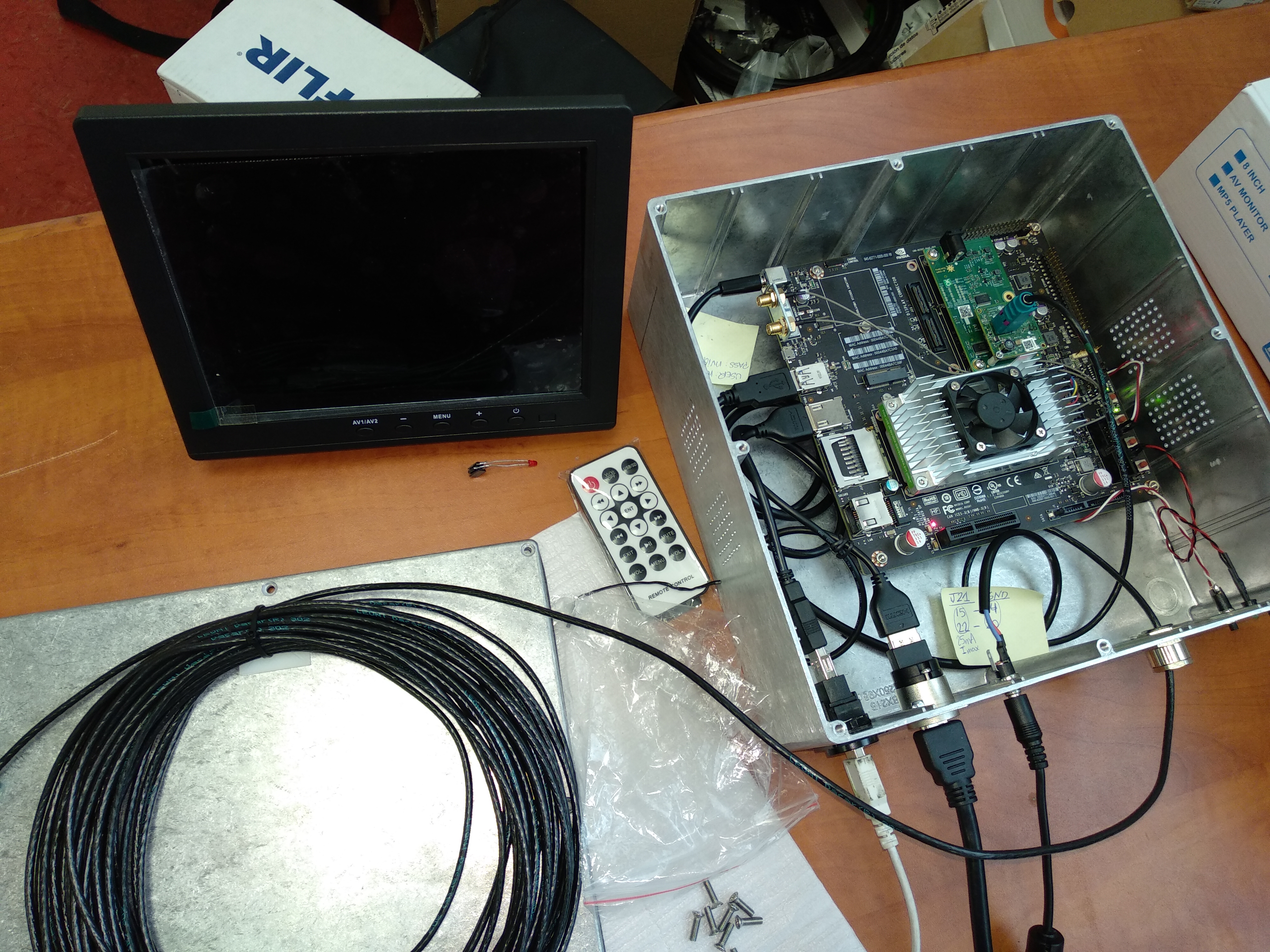
As you know in later comments I have to make a portable container for the jetson to carry with me in the vehicle. Now it has been finished!.
Well, I want to output some signals to GPIO ports when a detection of i.e. a tractor triggers. I have tried to trail the execution sequence until I find a good spot to put my code there. But I'm a little lost in the code.
The spot where I want to put my code is the following:
The network its processing frame by frame. When the "confidence" of a frame reach the minimun threshold to be consider i.e. a tractor, the function draw_detection_cv_v3 is called (I think). I want to put my code right after the condition of the minimun threshold is met in order to give a high level in a gpio port of the jetson.
Can you please tell me where can I find this spot? Thanks in advance. Sorry for the dealy in this thread but this project goes slow because I'm the only one working on it and it doesnt have a big priority.
FYI this is the portable container:
PabloDIGITS
on 7 Mar 2019
@PabloDIGITS Hi,
You can put your code here: https://github.com/AlexeyAB/darknet/blob/b751bac17505a742f149ada81d75689b5e692cde/src/image.c#L553
for example
if (class_id == tracktor_id) {
    // send signal
}
It will work if you use ./darknet detector demo... command
Or you can try to run Darknet as JSON-server:
./darknet detector demo ./cfg/coco.data ./cfg/yolov3.cfg ./yolov3.weights test50.mp4 -json_port 8070 -mjpeg_port 8090 -ext_output
And write your own code on C/C++/Python.... that connects to the Darknet by tcp-ip port 8070 and receives JSON from Darknet with detected objects in such format (Note: Darknet initially sends http-header to be able to view JSON in the Web-browser, your application just should ignore this http-header just start parsing JSON from [ symbol https://github.com/AlexeyAB/darknet/blob/b751bac17505a742f149ada81d75689b5e692cde/src/http_stream.cpp#L412-L423 ):
[
{
 "frame_id":1,
 "filename":"air1.jpg",
 "objects": [
  {"class_id":4, "name":"aeroplane", "relative coordinates":{"center_x":0.490987, "center_y":0.466325, "width":0.097139, "height":0.070714}, "confidence":0.748290}
 ]
},
{
 "frame_id":2,
 "filename":"air2.jpg",
 "objects": [
  {"class_id":4, "name":"aeroplane", "relative coordinates":{"center_x":0.602200, "center_y":0.604230, "width":0.094619, "height":0.132290}, "confidence":0.987765}
 ]
},
{
 "frame_id":3,
 "filename":"air3.jpg",
 "objects": [
  {"class_id":4, "name":"aeroplane", "relative coordinates":{"center_x":0.502918, "center_y":0.450664, "width":0.140498, "height":0.152194}, "confidence":0.998996}
 ]
},
{
 "frame_id":4,
 "filename":"air4.jpg",
 "objects": [
  {"class_id":4, "name":"aeroplane", "relative coordinates":{"center_x":0.523753, "center_y":0.813396, "width":0.144994, "height":0.131100}, "confidence":0.999736},
  {"class_id":4, "name":"aeroplane", "relative coordinates":{"center_x":0.528856, "center_y":0.173572, "width":0.155057, "height":0.155651}, "confidence":0.999707},
  {"class_id":4, "name":"aeroplane", "relative coordinates":{"center_x":0.389052, "center_y":0.336465, "width":0.114922, "height":0.114010}, "confidence":0.999635},
  {"class_id":4, "name":"aeroplane", "relative coordinates":{"center_x":0.525393, "center_y":0.513047, "width":0.145724, "height":0.140836}, "confidence":0.999523},
  {"class_id":4, "name":"aeroplane", "relative coordinates":{"center_x":0.275818, "center_y":0.530806, "width":0.146725, "height":0.150267}, "confidence":0.999521},
  {"class_id":4, "name":"aeroplane", "relative coordinates":{"center_x":0.637638, "center_y":0.327067, "width":0.116134, "height":0.118171}, "confidence":0.999363},
  {"class_id":4, "name":"aeroplane", "relative coordinates":{"center_x":0.633681, "center_y":0.663368, "width":0.116667, "height":0.106232}, "confidence":0.999348},
  {"class_id":4, "name":"aeroplane", "relative coordinates":{"center_x":0.374444, "center_y":0.712834, "width":0.111681, "height":0.107841}, "confidence":0.999305},
  {"class_id":4, "name":"aeroplane", "relative coordinates":{"center_x":0.746882, "center_y":0.496853, "width":0.151026, "height":0.154754}, "confidence":0.999171}
 ]
}
]
Hi @AlexeyAB ,
I choose the first option. But I have a build problem of my new code. I added two file to the src folder of darknet, a jetsonGPIO.h and jetsonGPIO.c. I compile just with this new files and all goes right.
After this I made this modifications in the image.c file (I did the #include "jetsonGPIO.h"):
Here:
https://github.com/AlexeyAB/darknet/blob/b751bac17505a742f149ada81d75689b5e692cde/src/image.c#L36
I added: jetsonTX2GPIONumber LEDControlPin = gpio254;
And here:
https://github.com/AlexeyAB/darknet/blob/b751bac17505a742f149ada81d75689b5e692cde/src/image.c#L553
I added:
if (class_id == 0){
   gpioSetValue(LEDControlPin, on);
}
Why the compiler doesnt find the definition of the jetsonTX2GPIONumber type name if I added to the project the .h and .c files?
This is the exact error:
./src/image.c:30:1: error: unknown type name ‘jetsonTX2GPIONumber’
 jetsonTX2GPIONumber LEDControlPin = gpio254;
PabloDIGITS
on 7 Mar 2019
This is the .zip with the 2 files, jetsonGPIO.c and jetsonGPIO.h
jetsonGPIO.zip
PabloDIGITS
on 7 Mar 2019
@PabloDIGITS
I added: jetsonTX2GPIONumber LEDControlPin = gpio254;
Add include before this line, i.e.
#include "jetsonGPIO.h"
jetsonTX2GPIONumber LEDControlPin = gpio254;
I added to the project the .h and .c files
How did you add it?
Did you add jetsonGPIO.o to the Makefile here? https://github.com/AlexeyAB/darknet/blob/b751bac17505a742f149ada81d75689b5e692cde/Makefile#L114
AlexeyAB
on 8 Mar 2019
@AlexeyAB
Add include before this line, i.e.
I did that and the error is still there.
How did you add it?
Did you add jetsonGPIO.o to the Makefile here?
I add it copying the 2 files inside de src folder. And yes I add jetsonGPIO.o to the Makefile and I can see that .o in the obj folder.
The exact error is this:
./src/image.c:30:1: error: unknown type name ‘jetsonTX2GPIONumber’
 jetsonTX2GPIONumber LEDControlPin = gpio254;
EDIT:
I did some tests. I added another 2 files to the src folder, which name is pablo_space_calculations.c and pablo_space_calculations.h. In that files I define a new type called custom_center. I added the pablo_space_calculations.o to the Makefile too.
Then in image.c I make the #include pablo_space_calculations.h and right after I declare a variable of the custom_center type. The code is as follows:
#include "pablo_space_calculations.h"
custom_center centro;
#include "jetsonGPIO.h"
jetsonTX2GPIONumber LEDControlPin = gpio255; //MODIFICADO POR PABLO
In this case I have no error in custom_center variable, but in jetsonTX2GPIONumber yes. Im confused, because is the same principle for both includes (added a .c and .h file, added the .o in makefile...etc). But I cant find the .o of both in the obj folder.
You have any clue of what is happening?
PabloDIGITS
on 8 Mar 2019
Ok, I think I solve the problem. I just add 'enum' before the declarations of jetsonTX2GPIONumber:
#include "jetsonGPIO.h"
enum jetsonTX2GPIONumber LEDControlPin = gpio255; //MODIFICADO POR PABLO
After this I compile with make and no errors show.
I will update with more things when I test the program in the vehicle. Thanks @AlexeyAB for the support you give in darknet.
PabloDIGITS
on 8 Mar 2019
Hi @AlexeyAB , today I have another question:
Im planning to make a special dataset of a tractor, where all the training images will be done with a distance to the object fixed, i.e. 10 meters. My goal is to see if when I test my trained model the detection will be triggered when the camera is placed around 10 meters of the object.
So if the .cfg file has some parameter that does some type of distance or size of the object augmentation (zoom or other things like this) could you tell me how to disable it?
Do you think that the detections will be performed when the camera is X meter to the object, if I train with images taken X meters of the object?
PabloDIGITS
on 11 Mar 2019
@PabloDIGITS Hi,
Set jitter=0 random=0 in each [yolo] layer
AlexeyAB
on 11 Mar 2019
Related issues
 louisondumont
·
3Comments
louisondumont
·
3Comments
 yongcong1415
·
3Comments
yongcong1415
·
3Comments
 off99555
·
3Comments
off99555
·
3Comments
 Mididou
·
3Comments
Mididou
·
3Comments
 qianyunw
·
3Comments
qianyunw
·
3Comments
Most helpful comment
@PabloDIGITS Hi,
Set
jitter=0 random=0in each[yolo]layer