How can I display the loss graph by training with my data on darknet yolov 3 in google colab?
 rrrtype
All 18 comments
Do you train by using the latest version of this repository with flag
-dont_show?Loss-chart will be saved to the
chart.pngfor each 100 iterations. Just download it to your PC.You can run training with flag
-mjpeg_port 8090, and if you can connect to the remote server by usinghttp://ip:8090in Chrome/Firefox, then you will see Loss-chart in your Web-browser remotely.
./darknet detector train cfg/coco.data yolov3.cfg darknet53.conv.74 -dont_show -mjpeg_port 8090 -map
 AlexeyAB
on 17 Jan 2019
AlexeyAB
on 17 Jan 2019
Thank you !!
I tried
!./darknet detector train data/obj.data yolov3-obj.cfg darknet53.conv.74 -dont_show -mjpeg_port 8090 -map
And , I got
,,,,,,,,,,,,
90: 1050.771118, 1071.344727 avg loss, 0.000000 rate, 23.553140 seconds, 5760 images
Resizing
576 x 576
CUDA Error: out of memory
darknet: ./src/cuda.c:36: check_error: Assertion `0' failed.
I should use tiny-yolo??
rrrtype
on 18 Jan 2019
Thank you !!
I tried
!./darknet detector train data/obj.data yolov3-obj.cfg darknet53.conv.74 -dont_show -mjpeg_port 8090 -mapAnd , I got
,,,,,,,,,,,,
90: 1050.771118, 1071.344727 avg loss, 0.000000 rate, 23.553140 seconds, 5760 images
Resizing
576 x 576
CUDA Error: out of memory
darknet: ./src/cuda.c:36: check_error: Assertion `0' failed.I should use tiny-yolo??
refer to https://github.com/AlexeyAB/darknet
Note: if error Out of memory occurs then in .cfg-file you should increase subdivisions=16, 32 or 64: link
 duohappy
on 18 Jan 2019
duohappy
on 18 Jan 2019
@rrrtype Set subdivisions=64 in your yolov3-obj.cfg file.
AlexeyAB
on 18 Jan 2019
Thank you so much for such a quick response .
I could start to train. but , I couldn't find chart.png. So , I couldn't watch my loss graph .
rrrtype
on 20 Jan 2019
@rrrtype
- Use the latest version of Darknet from this repository
- chart.png will be saved after each 100 iterations
90: 1050.771118, 1071.344727 avg loss, 0.000000 rate, 23.553140 seconds, 5760 images
Resizing
576 x 576
CUDA Error: out of memory
darknet: ./src/cuda.c:36: check_error: Assertion `0' failed.
You trained only 90 iterations.
AlexeyAB
on 20 Jan 2019
Thank you!
I was misunderstanding that I used the latest one.
As for the question, where can I change the value to display the graph in chart.png with a small value?
In other words, if I change max_batches in line 20 of my .cfg file, what can I see on the vertical axis loss from the vertical axis?
@rrrtype
- Use the latest version of Darknet from this repository
- chart.png will be saved after each 100 iterations
90: 1050.771118, 1071.344727 avg loss, 0.000000 rate, 23.553140 seconds, 5760 images
Resizing
576 x 576
CUDA Error: out of memory
darknet: ./src/cuda.c:36: check_error: Assertion `0' failed.You trained only 90 iterations.
rrrtype
on 21 Jan 2019
Note that this feature is not available without opencv. This problem has been bothering me for a long time until I read the code.
 pprp
on 21 Jan 2019
pprp
on 21 Jan 2019
@rrrtype
vertical axis - always [0-5]
horizontal axis - [0 - max_batches]
AlexeyAB
on 21 Jan 2019
Do I need opencv to get chart.png?
rrrtype
on 23 Jan 2019
@rrrtype Yes.
AlexeyAB
on 23 Jan 2019
- Loss-chart will be saved to the
chart.pngfor each 100 iterations. Just download it to your PC.
@AlexeyAB @rrrtype Firstly, is there a way I can change the scale of the graph axes as the graph currently has a scale of 1 unit = 50200 iterations?
- You can run training with flag
-mjpeg_port 8090, and if you can connect to the remote server by usinghttp://ip:8090in Chrome/Firefox, then you will see Loss-chart in your Web-browser remotely.
./darknet detector train cfg/coco.data yolov3.cfg darknet53.conv.74 -dont_show -mjpeg_port 8090 -map
Also, once I enter the mentioned command, where do I find the IP to view the graph on my chrome browser? Please help me here.
 AravindhanV
on 8 Feb 2019
AravindhanV
on 8 Feb 2019
@PhantomKnight1947
Firstly, is there a way I can change the scale of the graph axes as the graph currently has a scale of 1 unit = 50200 iterations?
Change max_batches= in your cfg-file
./darknet detector train cfg/coco.data yolov3.cfg darknet53.conv.74 -dont_show -mjpeg_port 8090 -map
Also, once I enter the mentioned command, where do I find the IP to view the graph on my chrome browser? Please help me here.
If you run it on local computer than use URL http://http://127.0.0.1:8090
Otherwise, run on remote server one of these commands:
- on Windows run
ipconfigand find IP - on Linux run
ifconfigand find IP
AlexeyAB
on 8 Feb 2019
Otherwise, run on remote server one of these commands:
- on Windows run
ipconfigand find IP- on Linux run
ifconfigand find IP
I am training the model on Google Colab. When I use ifconfig in there, I get two addresses - lo and eth0. Which address should I use because the local host is refusing to connect and the eth0 address doesn't respond. Is there something I am missing?
AravindhanV
on 9 Feb 2019
@PhantomKnight1947
Can you connect to the Google Colab using SSH?
Or just download chart.png that will be created for each 100 iterations during training, if you compild Darknet with OPENCV=1 in the Makefile.
AlexeyAB
on 9 Feb 2019
Can you connect to the Google Colab using SSH?
Yes, i managed to connect to the Colab machine via SSH.
Or just download
chart.pngthat will be created for each 100 iterations during training, if you compild Darknet withOPENCV=1in the Makefile.
chart.png that is generated does not show the mAP values right? Or is there an option i am missing? Additionally, is there a way i can see the graph for loss from the start of training even if i stop it at a checkpoint and resume training from that point later?
I use the following command format to start training:
./darknet detector train data/obj.data yolo-obj.cfg darknet53.conv.74 -dont_show
That is the reason why i was looking for the browser option which I am not able to get Working
AravindhanV
on 16 Feb 2019
@PhantomKnight1947
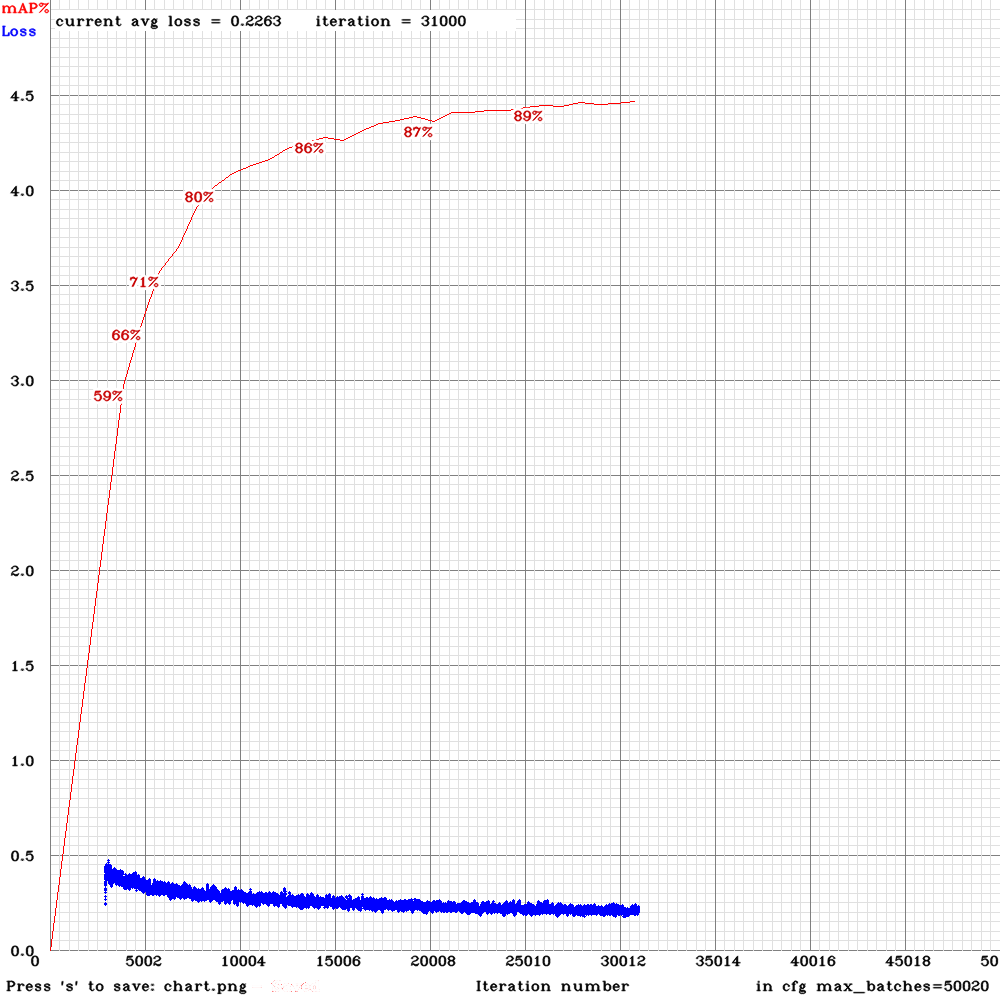
chart.png that is generated does not show the mAP values right? Or is there an option i am missing?
It shows both Loss and mAP (will be drawed when 4 Epochs reached) on chart.png if you train with flag -map
f.e.:
./darknet detector train data/obj.data yolo-obj.cfg darknet53.conv.74 -dont_show -map
Additionally, is there a way i can see the graph for loss from the start of training even if i stop it at a checkpoint and resume training from that point later?
Currently no.
AlexeyAB
on 16 Feb 2019
@PhantomKnight1947
What OpenCV version do you use?
AlexeyAB
on 17 Feb 2019
Related issues
 qianyunw
·
3Comments
qianyunw
·
3Comments
 HilmiK
·
3Comments
HilmiK
·
3Comments
 kebundsc
·
3Comments
kebundsc
·
3Comments
 Cipusha
·
3Comments
Cipusha
·
3Comments
 bit-scientist
·
3Comments
bit-scientist
·
3Comments